Twitter "This Request Looks Like It Might Be Automated" — Error 226, and How to Fix It
When X says "This request looks like it might be automated", that is error 226 — X's anti-automation system has flagged you and blocked the request. The exact wording, the error code, and the lockout vary by surface, but the cause is the same: behavioural signals on your request looked enough like a bot or scraper that X stopped it.
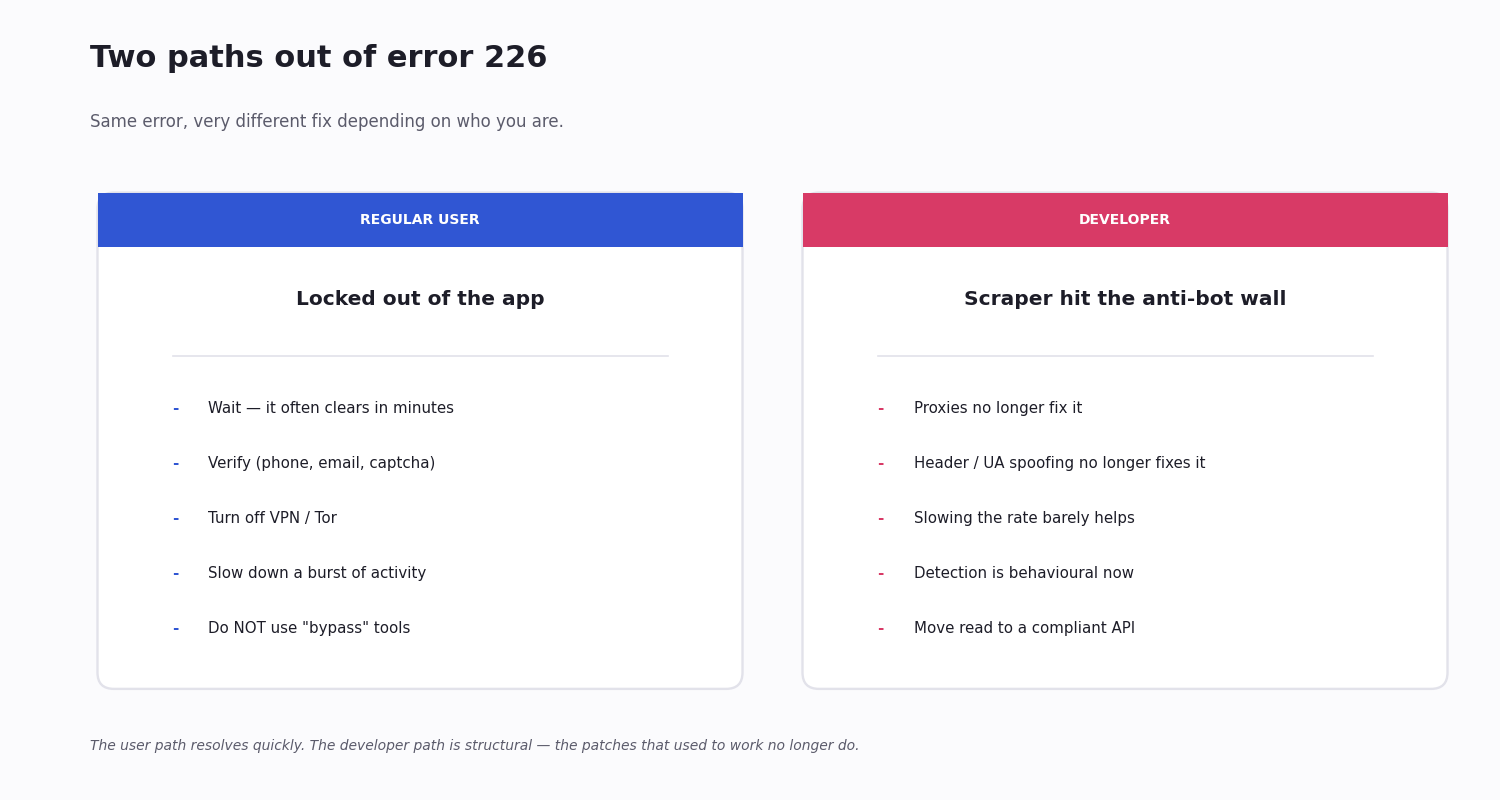
Two very different people land on this page. If you are a regular user who got locked out trying to browse or post normally, the block is usually temporary and there is a clear path to unblock it. If you are a developer whose scraper, bot or tweepy/twikit script suddenly started returning 226, the situation is structural — X's anti-bot detection has tightened to the point that the patches that used to work no longer do.
The counterintuitive thing — the part most pages miss — is that what used to be the developer fix for blocks like this no longer works. Proxies, header spoofing and slowing down all target an IP-based detector that does not exist anymore.
What Error 226 Actually Is — HTTP Status vs Body Code
Error 226 is X's automation-detection block. The platform runs behavioural analysis on every request — request patterns, cookies, headers, IP signals, the cadence and shape of your activity — and when the combined signature looks enough like an automated client, it returns the block instead of the content you asked for.
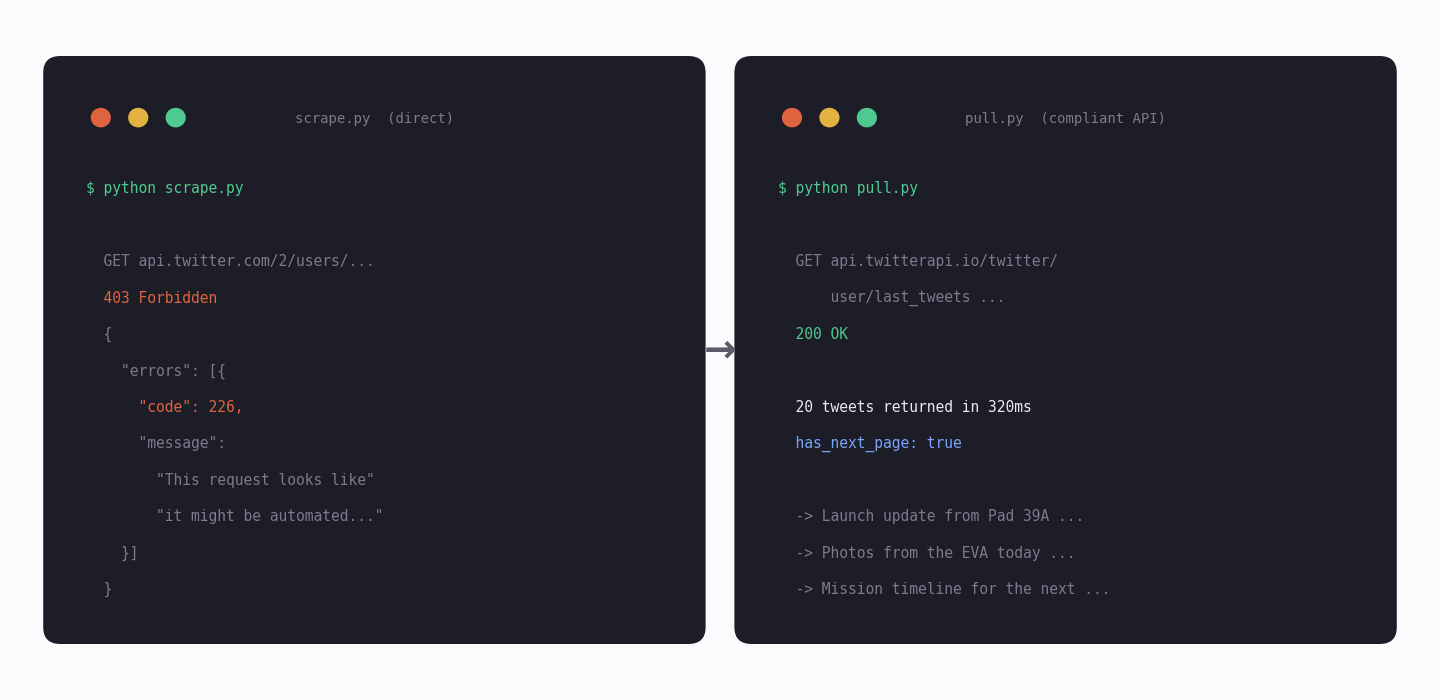
Critical distinction — the 226 is in the response body, not the HTTP status. The transport-layer status code your client receives is HTTP 403 Forbidden. The string 226 is the X-specific error code carried in the JSON body — typically {"errors":[{"code":226,"message":"This request looks like it might be automated..."}]}. RFC 7231's HTTP 403 means "server understood the request, but refuses to authorise it"; X uses 226 as its app-level identifier for why it refused. A correct error handler reads both layers: branch on HTTP status first (403 vs 401 vs 429), then on body code (226 vs other 4xx X error codes) for the precise reason.
It is not just about credentials. A correctly authenticated request can still trigger 226 if the behaviour around the request looks scripted. Equally, a misconfigured browser or VPN can trigger it on a real human — false positives are the trade-off X chose to keep automation suppressed.
What 226 is not: it is not the rate-limit error — that is HTTP 429 with body code 88, and it has its own page. It is not an authentication error — that is HTTP 401. And note that HTTP 226 itself is a real but unrelated HTTP status (RFC 3229's "IM Used" for delta encoding); X is not returning that, and confusing the two costs you debug time. 226-in-body always rides on HTTP 403.
The Exact Message You're Seeing
If you are searching for the wording to find this page, here are the variants — they all mean error 226:
In the web or mobile app: a banner or modal that reads "This request looks like it might be automated. To protect our users from spam and other malicious activity, we can't complete this action right now." Usually with no obvious way to dismiss it.
In an API response: the JSON body carries {"errors":[{"code":226,"message":"This request looks like it might be automated. To protect our users from spam and other malicious activity, we can't complete this action right now. Please try again later."}]}
In a Python script using tweepy: a tweepy.errors.Forbidden or generic API error containing the 226 code and message in its body.
In a browser-automation tool (twikit, browserless scrapers): typically a navigation error or a redirected page that loads only the block screen. The underlying response is the same 226.
Why X Tightened Automation Detection
X's anti-automation push is deliberate and not reversing.
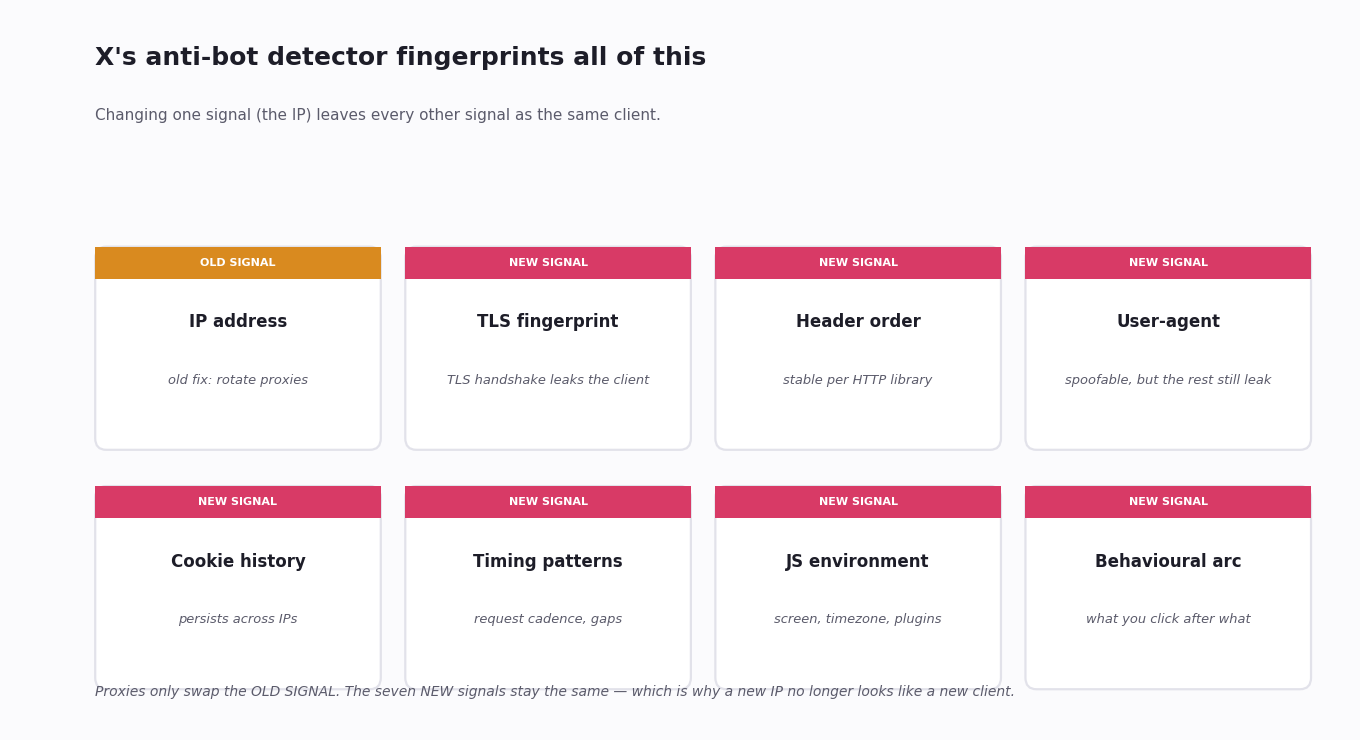
Behavioural profiling, not IP profiling. Detection used to be IP-based — block a known scraper IP, done. It now runs on the full request signature: timing, header order, TLS fingerprint, cookie consistency, mouse-and-scroll patterns on the web. A clean IP with the wrong signature still gets blocked; a normal residential IP from a real browser session usually does not.
Anti-bot is a platform priority. Since the ownership change, suppressing automation has been one of the platform's stated priorities — both to fight spam and abuse, and as part of the broader move to paid API access. The walls that frustrate legitimate scrapers also push developer use onto the paid API, which is the strategic direction.
False positives are accepted. Real users do get hit by 226 — a clean install of the app on a new device, a VPN connection, a burst of normal-looking activity. The platform tolerates that cost; the trade-off has been chosen.
If You're a Regular User — How to Unblock
If you are not running a bot or a scraper, this is almost always temporary and resolvable. In rough order of effectiveness:
Wait. The block often clears on its own within minutes to a few hours. If the action that triggered it was a one-off, the system usually backs down once your subsequent activity looks normal again.
Verify your account. Add a phone number and confirm an email if you have not. Verified accounts are flagged far less aggressively because the platform has more confidence that you are a real person. A captcha or SMS challenge may appear automatically — completing it usually lifts the block immediately.
Turn off the VPN or Tor. VPN and Tor connections are heavy 226 triggers. If you are using one, switch to your normal connection and try again — most VPN-driven 226s clear instantly.
Reduce activity rate. If you were on a burst — many likes, follows or replies in a short window — slow down. The behaviour was the trigger, not the credentials.
Do not try to "bypass" it. Searches for bypasses turn up tools that ask for your credentials, install browser extensions, or proxy your traffic — most are either scams or will get the account permanently suspended for going around the block instead of resolving it. The verification path is the only safe one.
If You're a Developer — Your Scraper Hit the Wall
If your tweepy / twikit / Selenium / Puppeteer script suddenly started returning 226 in production, the story is different. The patches that used to work — rotating proxies, randomising headers, slowing the request rate — were calibrated against an IP-based detector that no longer exists. The behavioural detector sees through them.
Three things that look like fixes but no longer are:
Proxies. Rotating residential or datacentre proxies used to reset the IP-block. Detection moved up the stack — request signatures, cookie histories and timing patterns persist across IPs, so a new IP alone does not look like a new user.
Header and user-agent spoofing. Browsers leak many signals beyond user-agent — TLS fingerprint, header order, JS environment quirks, screen and timezone. Matching one or two is easy; matching all of them consistently across a real session is harder than building the data pipeline you actually wanted.
Slowing down the script. Going from one request per second to one per minute helps a little against pure rate-based detection. Against behavioural detection that fingerprints your client, it just makes the block take slightly longer to land.
Building and maintaining a scraper that stays ahead of 226 has become a full-time job, and the platform has more engineers on the other side of the wall than you do. The economics stop making sense well before the technical fight does.
The Structural Fix — A Compliant API
The path most developer projects end up on, once they have exhausted the patches, is moving the public-data read off scraping entirely and onto a compliant API.
TwitterAPI.io is one of those APIs. It reads public X data through authenticated, compliant channels — there is no anti-bot wall to fight, and a busy script does not collect 226 blocks instead of tweets. Pricing is pay-per-use at about $0.15 per 1,000 tweets with no monthly minimum, so cost scales with what you actually pull.
The economics usually break decisively in the API's favour. A project pulling 100,000 posts a month runs about $15 on a pay-per-call API, against a typical residential-proxy infrastructure bill of several hundred dollars a month — and that proxy spend buys you a fight you are still slowly losing. The engineering time spent on "just one more proxy" is the larger cost, but the dollar comparison alone usually settles it.
It is not the right path for every project. If you genuinely need write access, ads metadata or other official-only data, the official API remains the only route. For the much more common case — pulling public posts, profiles, searches — a compliant data API removes the 226 problem entirely. See [the pricing page](/pricing) for the per-call rates; an API key is one Google sign-in and a trial credit covers end-to-end testing.
Code: Pull Public Data Without the Wall
The snippet below replaces a scraper that was returning 226 with a single API call that returns the same kind of data. The endpoint is /twitter/user/last_tweets — one HTTP GET, no browser automation, no anti-bot tripwires.
Swap the userName for any public account and the same pattern collects its timeline. For broader collection (keywords, hashtags, multi-account watchlists), the search endpoint takes a full advanced-search query — same shape, same predictability.
import requests

API_KEY = "your_api_key"

# Replaces a scraper that was returning 226 — one GET, no browser, no proxy.
r = requests.get(
    "https://api.twitterapi.io/twitter/user/last_tweets",
    params={"userName": "nasa"},
    headers={"X-API-Key": API_KEY},
    timeout=30,
)
r.raise_for_status()
body = r.json()

for t in body["data"]["tweets"]:
    print(t["createdAt"], "::", t["text"][:80])

# Page through with the response cursor when you need more.
if body.get("has_next_page"):
    print("more available — pass next_cursor on the next call")
Questions readers ask
What is Twitter error 226?
Error 226 is X's automation-detection block — the platform has flagged the behaviour around your request as resembling a bot or scraper and refused to serve it. It is not a credential error or a rate-limit error; it is specifically X's "this looks automated" verdict, and the response is to block rather than throttle.
How long does a 226 block last?
For a regular user, often minutes to a few hours — the system backs down once your subsequent activity looks normal again. Adding a phone number, completing any verification challenge that appears, or turning off a VPN usually clears it immediately. For a scraper that keeps triggering the same behavioural signature, the block effectively persists — the detector keeps seeing the same fingerprint.
Can I appeal a 226 block?
There is no formal appeal because 226 is not a suspension — it is a temporary block on the request, not the account. The way through it is verification (phone, email, captcha) or simply waiting; X's standard appeal flow is for account-level actions like suspension, not for individual request blocks.
Do proxies bypass error 226?
Not reliably. X's detection moved beyond IP-only filtering to behavioural profiling — request timing, header order, TLS fingerprint, cookie history. Swapping the IP through a residential or datacentre proxy fixes one signal while leaving the rest. The block is back within minutes of the new IP looking like the old client.
Why are libraries like tweepy and twikit getting blocked now?
Because their request signatures are recognisable. tweepy makes direct API calls with a consistent header set; twikit and similar tools drive a browser session that leaves identifiable traces. X's detector has been trained on exactly these shapes, so a stock install of either gets flagged quickly — especially when deployed to a cloud server with a known datacentre IP.
Is using a third-party API safer than scraping?
For reading public data, yes — and not just safer technically. A compliant API reads through authenticated channels that do not trigger 226, and the legal and platform-policy posture is much cleaner than running a scraper that is being actively blocked. Scraping public data is a grey area at best; a paid data API is straightforwardly transactional.
Does using a third-party API instead of scraping violate Twitter's terms?
Reading public data through a compliant authenticated API is a different posture than scraping that bypasses platform controls. The third-party service handles the official-channel reads on the backend and exposes a clean HTTP API on top, so you are calling a paid data service rather than evading a block. The exact terms depend on your jurisdiction and use case, but the posture is far cleaner than running a scraper that the platform is actively trying to stop.
Will reducing my request rate help?
A little, against rate-based detection. Against behavioural detection it usually does not — the detector is fingerprinting your client, not just counting requests. Slowing from one per second to one per minute changes how soon you hit the wall, not whether you hit it.
Why am I getting 226 on a legitimate, low-volume request?
Either your client signature is unusual (a misconfigured browser, an outdated SDK, a TLS library that produces a non-standard fingerprint), or your network looks suspicious (VPN, Tor, a known cloud datacentre IP). The fix is the same as for any user: verify the account, switch off VPNs, or — if you are a developer — move the read onto a compliant API.
Can my X account get suspended for triggering 226?
Not for the block itself. What can lead to suspension is the response to the block: scripts that keep retrying through different proxies, tools that try to forge credentials, or any visible attempt to evade detection. Hitting 226 is a block — by itself, it is not a strike. What crosses into suspension territory is the visible attempt to bypass it.
Does TwitterAPI.io trigger error 226?
No — the service reads public X data through compliant authenticated channels, not through a scraper that would be visible to the anti-bot detector. There is no 226 to manage on your side; you call the endpoint and you get the data back.
Is HTTP 226 the same as Twitter error 226?
No, and conflating them sends debugging in the wrong direction. HTTP 226 "IM Used" is an RFC 3229 status for delta encoding — completely unrelated to automation detection. The 226 that triggers "this request looks like it might be automated" is an X application-level error code in the JSON body of an HTTP 403 Forbidden response. Read the status code and the body code separately: status 403 + body code 226 is the bot-detection block; status 226 alone (which X does not return) would be a delta-encoding signal you'd handle very differently.
Continue
Stop reading. Start building.
Starter credits cover real testing on real data. Google sign-in, no card, no application queue.
Get an API key