Best Twitter Data APIs for Small Business Analytics in 2026
Best Twitter Data APIs for Small Business Analytics in 2026
X (formerly Twitter) offers valuable insights for small businesses, but accessing its data can be costly. Third-party APIs provide affordable alternatives with features like sentiment analysis, engagement tracking, and real-time data. Here's a quick breakdown of the top options:
- TwitterAPI.io: Pay-as-you-go pricing starting at $0.15 per 1,000 tweets. Quick setup, real-time and historical data, and high-speed performance (1,000+ requests/second). Subscription plans start at $29/month.
- Official Twitter API: Offers comprehensive data access, including historical archives. Pricing starts at $200/month (10,000 reads) but can go up to $5,000/month for higher tiers. Approval takes weeks.
- SocialBee API: Combines Twitter analytics with social media management. Subscription plans start at $29/month, focusing on ease of use for non-technical teams.
Quick Comparison:
| Feature | TwitterAPI.io | Official Twitter API | SocialBee API |
|---|---|---|---|
| Setup Time | <5 minutes | Weeks (approval required) | Moderate |
| Monthly Cost | Pay-as-you-go ($0.15/tweet) | $200 (Basic) / $5,000 (Pro) | $29-$99 |
| Rate Limits | 1,000+ req/sec | 10,000 reads/month (Basic) | Platform-managed |
| Historical Data | Real-time focus | Full archive since 2006 | Limited |
| Best For | Custom analytics | Enterprise-level needs | Social media management |
Each option serves different needs. TwitterAPI.io is a flexible, budget-friendly choice for small businesses, while the Official API suits enterprises needing extensive data. SocialBee simplifies management for non-technical teams.
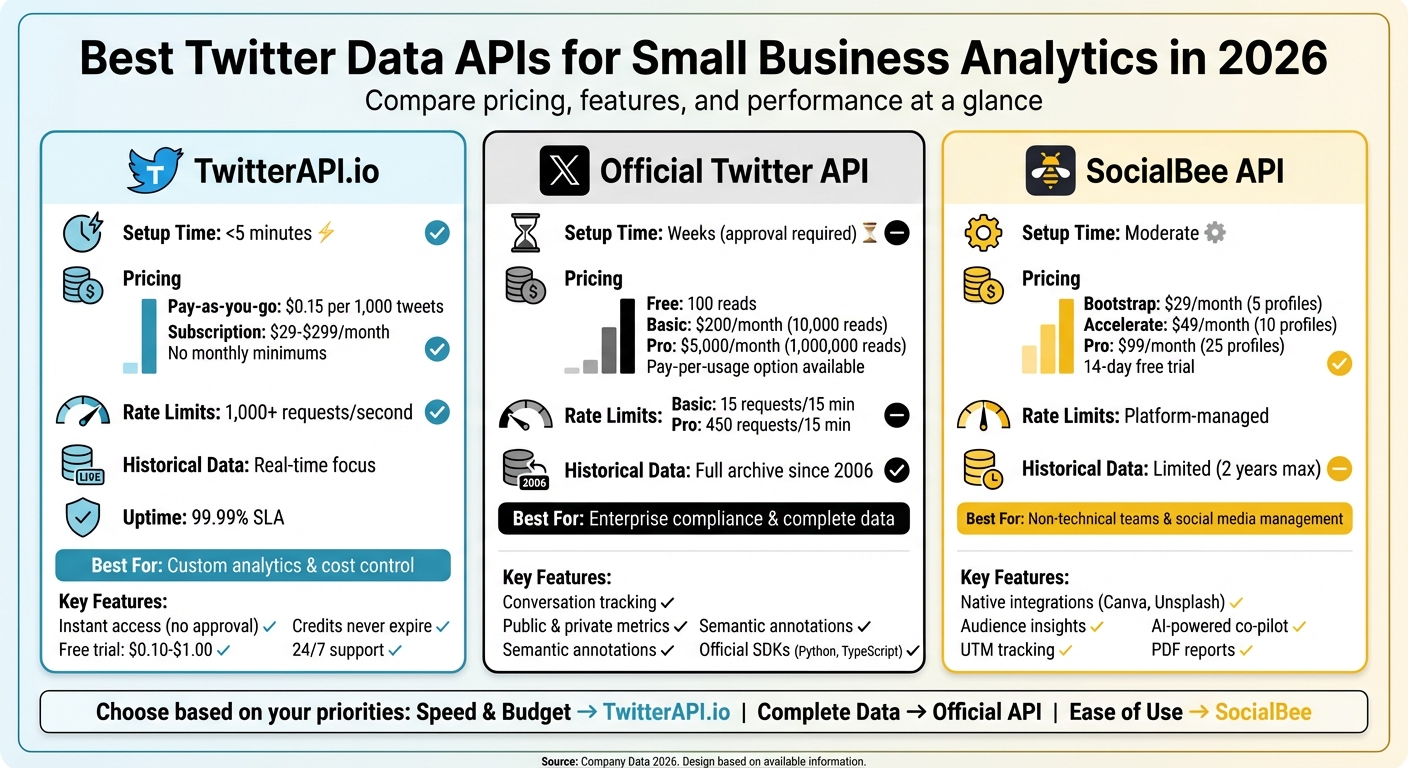
Twitter Data API Comparison for Small Businesses: Pricing, Features, and Performance
Analyzing Data with the Twitter API v2: Postman Student Summit Session
1. TwitterAPI.io
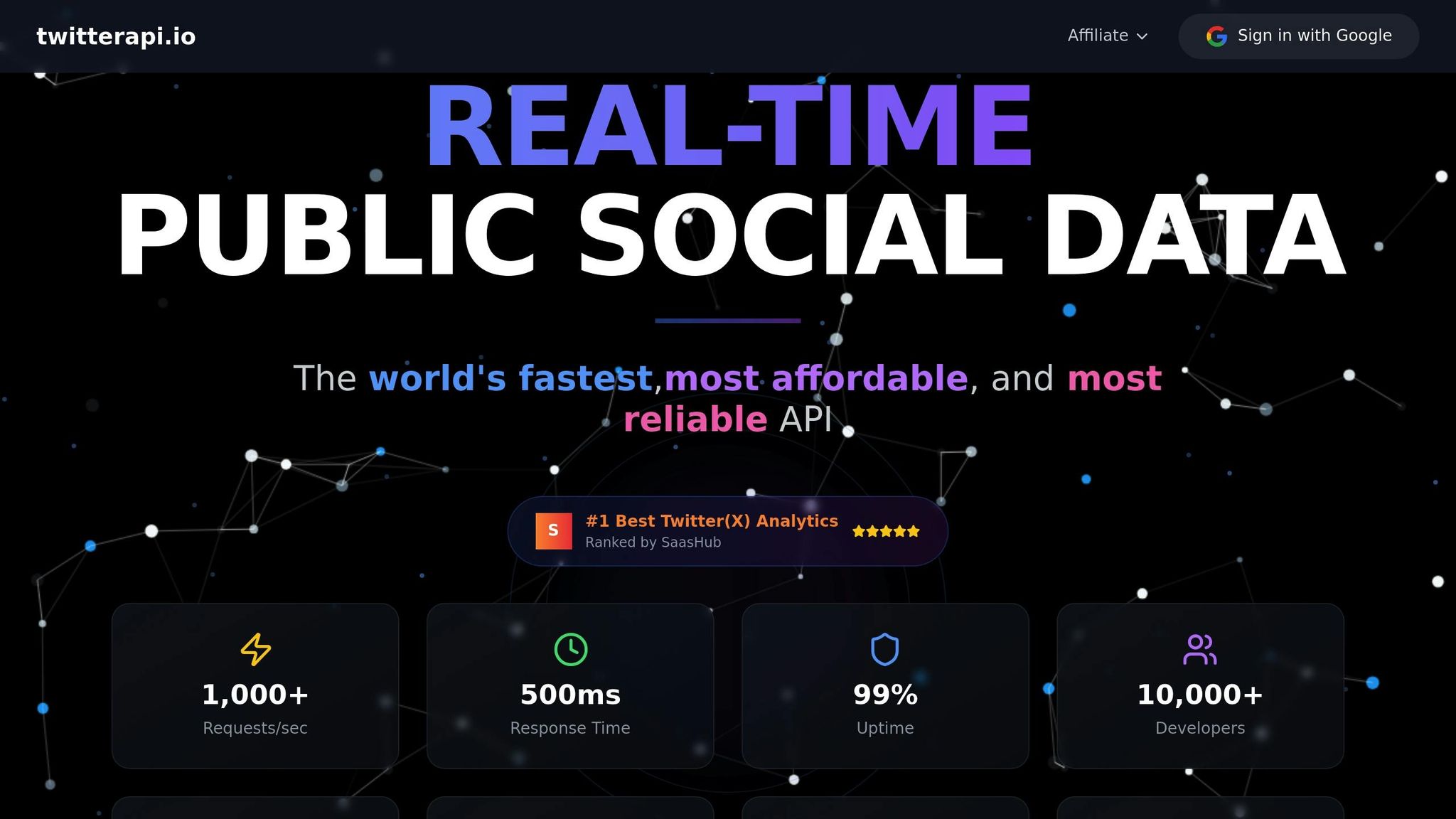
TwitterAPI.io makes accessing Twitter data quick and straightforward. With just an API key, you can get started in under five minutes - no need to deal with lengthy approval processes or complex OAuth setups.
Pricing
TwitterAPI.io uses a pay-as-you-go model, so there are no monthly commitments or minimum spending requirements. Credits cost $1 for 100,000 units, and specific data pulls are priced as follows: tweets at $0.15 per 1,000 units (15 credits), user profiles at $0.18 per 1,000 units (18 credits), and follower data at $0.15 per 1,000 units (15 credits). Plus, your credits never expire.
New users can test the service for free with credits worth $0.10 to $1.00, no payment details required.
For businesses needing ongoing access, subscription-based streaming plans are available:
- Starter: $29/month for up to 6 accounts
- Growth: $79/month for up to 20 accounts
- Professional: $149/month for up to 50 accounts
- Enterprise: $299/month for up to 150 accounts
Students and researchers with .edu email addresses can also take advantage of academic discounts.
Rate Limits
The platform is built to handle 1,000+ requests per second and offers a 99.99% uptime SLA. With global infrastructure spanning 12+ regions, average response times are around 800ms, and some queries return in under 500ms thanks to its distributed CDN.
Integration Ease
TwitterAPI.io is designed to be a drop-in replacement for existing Twitter API setups. It provides Swagger documentation, a Postman collection, and pre-written code snippets in Python and other programming languages, making integration simple and fast.
"Finally, an API that just works. No approval hassles, no rate limit nightmares."
- Sarah Johnson, CTO at DataInsights
Features
TwitterAPI.io stands out with its robust data features and real-time capabilities. It delivers both real-time and historical data with sub-second latency. Supported data types include user profiles, tweet timelines, follower and following lists, mentions, and advanced search options.
The API offers both REST and WebSocket endpoints, catering to different needs - REST for on-demand data pulls and WebSocket for live streaming. It integrates seamlessly with BI tools, CRMs, and data warehouses like BigQuery and Snowflake, eliminating the need for custom middleware. Additionally, it supports write actions such as posting tweets and liking content, though many small businesses primarily use its analytics features.
To ensure smooth operations, TwitterAPI.io provides 24/7 live chat support and dedicated account managers for enterprise customers.
With its flexibility, speed, and ease of use, TwitterAPI.io is a powerful tool for small businesses looking to gain actionable insights from Twitter data.
2. Official Twitter API
The Official X API operates on a tiered subscription model, which can be a challenge for small businesses trying to manage their budgets. While there are more affordable third-party tools available, the pricing structure and approval process for the Official API can make it tough for smaller organizations to effectively access analytics.
Pricing
The Basic tier costs $200 per month (or $175 per month if billed annually) and includes 10,000 reads. For those just testing the waters, the Free tier allows only 100 reads, which is quite limited. On the other end of the spectrum, the Pro tier offers 1,000,000 reads but comes with a hefty price tag of $5,000 per month ($4,500 annually). This creates a difficult choice for businesses that are scaling up but can’t yet justify such a high expense. To address some of these concerns, X introduced a pay-per-usage model in late 2025, where users can purchase credits upfront without being tied to monthly caps.
Rate Limits
Each pricing tier comes with strict rate limits, applied within 15-minute intervals. For example:
- Basic tier: 15 requests every 15 minutes
- Pro tier: 450 requests every 15 minutes
- Free tier: Just one request every 24 hours
These restrictions can make large-scale analytics nearly impossible unless businesses upgrade to higher tiers.
Integration Ease
X provides official SDKs for Python and TypeScript, along with a Postman collection, to simplify integration. However, the approval process for access can take several weeks, which may slow down implementation. The API uses a standard JSON response format, making it compatible with most analytics tools. For those migrating from older API versions, X offers migration guides and endpoint maps to ease the transition. Beyond just integration, the API includes features that can significantly improve data analysis.
Features
The v2 API includes advanced capabilities like conversation tracking via the conversation_id parameter, which allows businesses to reconstruct entire threads - ideal for customer service analysis. It also provides both public metrics (such as likes and reposts) and private metrics (like impressions and profile clicks) for your own posts. Additionally, the API offers semantic annotations to identify key entities within tweets.
To help manage usage costs, you can use the fields and expansions parameters to request only the data you need. However, support for lower-tier users is limited to documentation and community forums, while Enterprise customers benefit from dedicated account teams.
sbb-itb-9cf686c
3. SocialBee API
SocialBee offers a practical solution for small businesses looking to simplify social media management and access data insights. With its all-in-one platform and built-in Twitter analytics, it’s an excellent option for teams without dedicated developers.
Pricing
SocialBee keeps things simple with its subscription plans:
- Bootstrap: $29/month ($24/month when billed annually) for 5 profiles and 3 months of data.
- Accelerate: $49/month ($40/month annually) for 10 profiles and 2 years of data.
- Pro: $99/month ($82/month annually) for 25 profiles, 5 workspaces, and 2 years of analytics.
You can also try it out with a 14-day free trial - no credit card required.
"SocialBee saves us from hiring a dedicated person to post on our social media profiles."
- Bill Rice, Family Cookbook Project
Integration Ease
Getting started with SocialBee is quick and hassle-free. It offers native integrations with Canva for creating designs, Unsplash for high-quality images, and GIPHY for fun GIFs. For automation, SocialBee connects with Zapier, Make, and Pabbly, making it easy to set up workflows without needing any coding skills. Plus, the platform’s "Engage Module" centralizes Twitter mentions and comments, helping teams respond faster.
Features
SocialBee packs in a range of tools to help businesses grow their presence on Twitter:
- Audience insights: Get data on age, gender, country, and language.
- Follower growth tracking: Monitor your audience size over time.
- Performance metrics: Analyze real-time reach and engagement.
- Optimal posting times: Use analytics to find out when your audience is most active.
- Content categorization: Tag posts to see which topics resonate most with your followers.
- PDF reports: Automatically generate analytics summaries.
- UTM tracking: Measure link performance directly from the dashboard.
- AI-powered co-pilot: Receive strategy suggestions and post ideas based on your analytics.
With these features, SocialBee provides a comprehensive toolkit to manage and grow your social media presence effectively.
Advantages and Disadvantages
When choosing an API for analytics, small businesses need to weigh factors like speed, cost, and data depth. Each option comes with its own strengths and trade-offs, making the decision largely dependent on specific business needs.
TwitterAPI.io stands out for its quick setup - ready to go in under five minutes - and its pay-as-you-go pricing at $0.15 per 1,000 tweets. This flexibility is great for businesses looking to avoid long-term commitments. It also boasts impressive performance, handling over 1,000 requests per second with a 99.99% uptime guarantee. However, since it's a third-party provider, some businesses might have reservations about relying on it for their data needs.
The Official Twitter API is the go-to choice for businesses seeking the most comprehensive data access. It offers tools like PowerTrack and a full historical archive dating back to 2006, making it ideal for enterprise-level needs and strict compliance. But this level of access comes at a price: the Pro tier costs $5,000 per month, while the more affordable $200/month Basic tier restricts users to just 10,000 reads per month. Additionally, the approval process can take several weeks, which might not suit businesses needing a quick start.
SocialBee, on the other hand, is tailored for teams without dedicated developers. It combines analytics with social media management tools, focusing on ease of use and scheduling rather than deep data extraction or custom analytics workflows. This makes it a practical choice for non-technical teams looking to streamline their social media efforts.
Here’s a quick comparison of the key features:
| Feature | TwitterAPI.io | Official Twitter API | SocialBee API |
|---|---|---|---|
| Setup Time | <5 minutes | Weeks (approval required) | Moderate |
| Monthly Cost | Pay-as-you-go | $200 (Basic) / $5,000 (Pro) | Subscription-based |
| Rate Limits | 1,000+ req/sec | 10,000 reads/month (Basic) | Managed by the platform |
| Historical Data | Real-time focus | Full archive since 2006 | Limited |
| Best For | Custom development & cost control | Enterprise compliance & complete data | Non-technical teams & management |
This breakdown highlights how each API serves different priorities, whether it's affordability, comprehensive data access, or user-friendly management tools.
Conclusion
Choosing the right Twitter data API comes down to finding the right balance between cost, speed, and data depth - especially for small businesses. For those wanting to keep expenses low while scaling easily, TwitterAPI.io stands out. With its pay-as-you-go pricing at just $0.15 per 1,000 tweets, it eliminates monthly minimums and offers instant access without the hassle of lengthy approval processes.
On the other hand, the Official API provides robust historical data, but its pricing can be a hurdle for small businesses operating on tighter budgets.
Ultimately, the decision should revolve around tracking the metrics that matter most for your business - whether it's engagement rates, sentiment analysis, or competitor insights. Take advantage of free credits to test the service before making a financial commitment. This ensures you pick the API that aligns with your needs and budget.
For many small businesses, TwitterAPI.io strikes the perfect balance. It’s affordable, quick to set up, and scalable for growing analytics demands. As indie developer Marcus Liu shared:
"Built my entire startup on TwitterAPI.io. The cost savings compared to alternatives are incredible".
FAQs
Why is TwitterAPI.io a great choice for small business analytics?
TwitterAPI.io stands out as a smart choice for small businesses, offering real-time access to Twitter data at a price that won’t break the bank. Unlike many official APIs, it removes common restrictions and keeps costs low - perfect for small-scale projects. The pay-as-you-go model means businesses only pay for what they actually use, giving them more control over their budget.
Key features include high request rates (over 1,000 requests per second), WebSocket and webhook support for live data streaming, and a setup process that takes less than five minutes. Even teams with limited technical skills can integrate it quickly. Plus, by skipping the need for Twitter authentication, it simplifies access and reduces setup hassles. These tools are ideal for businesses wanting to analyze trends, track engagement, or gauge customer sentiment efficiently.
With its mix of affordability, user-friendly setup, and robust real-time capabilities, TwitterAPI.io helps small businesses leverage Twitter data to make smarter decisions and strengthen their social media strategies.
How does TwitterAPI.io manage real-time and historical Twitter data for small business analytics?
TwitterAPI.io provides robust tools for working with both real-time and historical Twitter data, making it a great resource for small businesses aiming to improve their analytics game.
For real-time data, the platform offers live streaming options via WebSocket and webhook integrations. This lets businesses track tweets, mentions, and trending topics as they occur. With this capability, you can monitor conversations in real time, address customer feedback promptly, and stay ahead of new developments.
When it comes to historical data, TwitterAPI.io grants access to an extensive archive of past tweets. This feature allows businesses to analyze long-term trends, perform sentiment analysis on older mentions, and gain a deeper understanding of audience behavior over time.
By combining affordability with reliable performance, TwitterAPI.io provides actionable insights without stretching your budget, making it a practical option for small businesses eager to harness Twitter analytics for growth.
What are the pricing plans for TwitterAPI.io, and how can they help small businesses?
TwitterAPI.io offers flexible pricing options tailored for small businesses, making it easier to access social media analytics without overspending. Their pay-as-you-go model ensures you’re only charged for what you actually use. Here’s the breakdown: $0.15 per 1,000 tweets, $0.18 per 1,000 profiles, and $0.15 per 1,000 followers. This setup allows businesses to control costs based on their unique needs.
Another standout feature is their credit system. With this system, unused credits never expire, and you can even receive discounts - up to 5% - when you recharge with larger amounts. This approach combines affordability with scalability, giving small businesses access to both real-time and historical Twitter data. Whether you’re analyzing trends, tracking customer sentiment, or monitoring engagement, these tools provide the insights you need to make smarter decisions and fuel business growth - all without straining your budget.
Tags
Related articles
Ready to get started?
Try TwitterAPI.io for free and access powerful Twitter data APIs.
Get Started Free