Bypassing Twitter API Restrictions: Solutions That Work
Bypassing Twitter API Restrictions: Solutions That Work
Accessing Twitter data has become increasingly challenging due to strict API limits and high costs. Here's what you need to know:
- Official Twitter API limits: Free tier allows ~1 request every 15 minutes; Basic tier costs $100/month for 10,000 tweets with only 7 days of historical data; Pro tier costs $5,000/month for full archive access.
- Alternative solutions: Tools like TwitterAPI.io offer cheaper and faster access to Twitter data, bypassing many limitations.
- Proxy strategies: Rotating IPs and using residential or mobile proxies can help avoid detection and manage large-scale data collection.
TwitterAPI.io stands out by offering:
- $0.15 per 1,000 tweets (96–97% cheaper than Twitter's API).
- Faster setup (<5 minutes) with no approval process.
- High limits (1,000+ requests per second) and 99.99% uptime.
Proxies can enhance reliability by distributing requests across multiple IPs, with residential and mobile proxies being harder to block. For large-scale projects, combining proxies with tools like TwitterAPI.io ensures smooth and cost-effective data collection.
Using TwitterAPI.io for Twitter Data Access
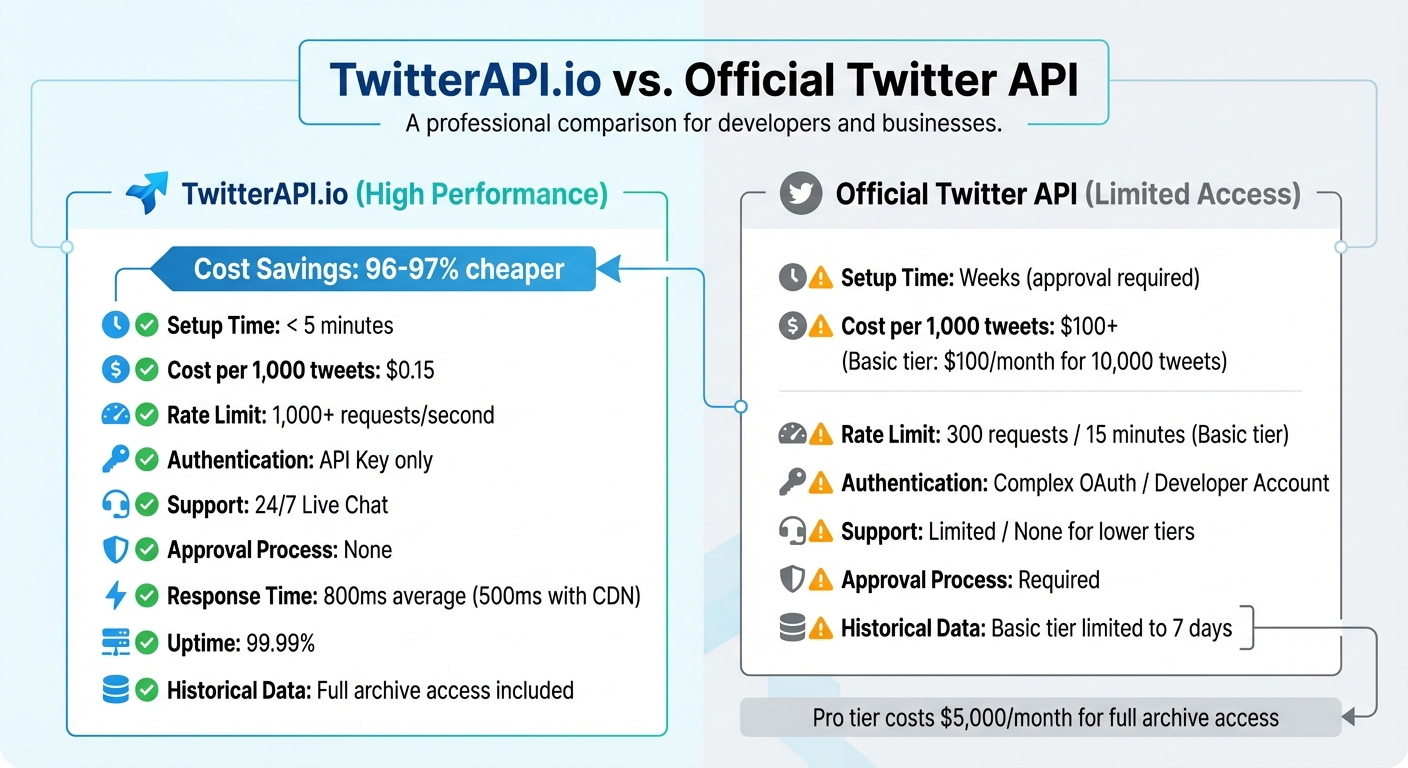
TwitterAPI.io vs Official Twitter API: Cost and Features Comparison
TwitterAPI.io offers a practical and budget-friendly alternative to Twitter's official API, addressing common limitations users face. With this platform, you don't need a developer account, and you can start accessing data in less than five minutes using just a single API key.
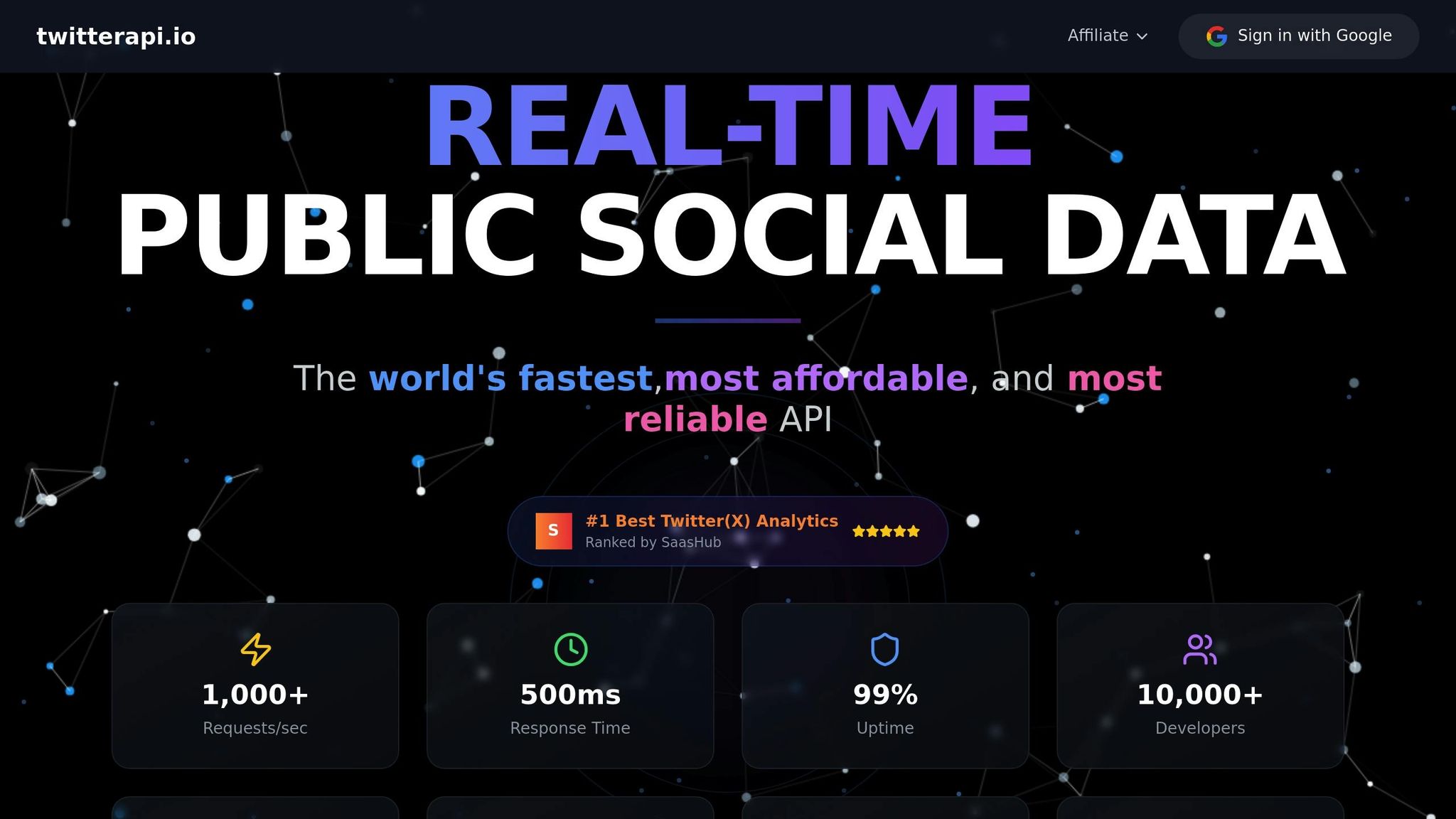
The service supports over 1,000 requests per second, far exceeding the Basic tier's limit of 300 requests every 15 minutes. This makes it ideal for applications requiring quick response times or large-scale data collection. On top of that, TwitterAPI.io boasts an average response time of 800 milliseconds, with some CDN-supported responses delivered in under 500 milliseconds.
Cost Efficiency: TwitterAPI.io charges $0.15 per 1,000 tweets and $0.18 per 1,000 user profiles, making it about 96–97% cheaper than the official API. The credit system is simple: $1 equals 100,000 credits, and credits never expire. New users can even test the platform with $0.10 to $1.00 in free credits - no credit card required.
"Finally, an API that just works. No approval hassles, no rate limit nightmares. Pure gold."
- Sarah Johnson, CTO, DataInsights
The platform guarantees 99.99% uptime, thanks to automatic failover and servers operating across 12+ global regions. It also supports write actions like posting and liking tweets, making it suitable for building interactive applications. Students and researchers can take advantage of special academic pricing by reaching out with a .edu email address.
Core Features of TwitterAPI.io
TwitterAPI.io simplifies data collection while addressing restrictive access issues. It provides access to both real-time and historical data, including user profiles, tweets, followers, following lists, replies, and quotes. These are available through REST and WebSocket endpoints, with historical data delivered in under a second. The real-time data stream maintains an average latency of 1.2 seconds, with P99 latency staying below 2 seconds.
Integration is straightforward, with tools like Swagger documentation, Postman collections, and ready-to-use code snippets in multiple programming languages. The platform also uses a snowflake algorithm to decode tweet IDs and monitor latency. For large-scale account tracking, the Twitter Stream Monitoring service reduces costs to around $1 per month per account when monitoring 500 or more accounts.
"TwitterAPI.io saved us months of development time. The data quality and speed are unmatched."
- Alex Chen, AI Researcher, Stanford
Importantly, the platform processes only publicly available data and does not access private messages or non-public information. Developers also benefit from 24/7 live chat support to resolve issues quickly.
Integration Process
Getting started with TwitterAPI.io is simple. Sign up at their website, generate your API key, and choose from REST APIs, WebSocket streaming, or pre-built code snippets for seamless integration. Swagger and Postman support make endpoint testing quick and easy. This streamlined approach helps developers get their first API call running in no time.
Pricing Options
TwitterAPI.io offers flexible, transparent pricing with a pay-as-you-go model. The credit system charges 15 credits per tweet ($0.00015), 18 credits per user profile, and 15 credits per follower. List function calls cost 150 credits per API call. Larger credit purchases come with bonus credits valid for 30 days and discounts of up to 5%.
For continuous monitoring, subscription plans cater to various needs:
- Starter plan: $29/month for up to 6 accounts
- Growth plan: $79/month for up to 20 accounts
- Professional plan: $149/month for up to 50 accounts
- Enterprise plan: $299/month for up to 150 accounts
- Enterprise Plus plan: $499/month for up to 500 accounts
| Feature | TwitterAPI.io | Official Twitter API |
|---|---|---|
| Setup Time | < 5 minutes | Weeks (approval required) |
| Cost per 1,000 units | $0.15 | $100+ |
| Rate Limit | 1,000+ req/sec | 300 req / 15 min (Basic) |
| Authentication | API Key only | Complex OAuth / Developer Account |
| Support | 24/7 Live Chat | Limited / None for lower tiers |
Academic users can email hello@twitterapi.io from a .edu address to access discounted rates for their projects. For high-volume needs, custom enterprise solutions with dedicated account managers and enhanced SLAs are also available.
Using Proxy Strategies for Large-Scale Data Access
When extracting large volumes of Twitter data through TwitterAPI.io, proxy strategies are a game-changer for ensuring your infrastructure remains reliable. Proxies help distribute requests across multiple IP addresses, keeping data flowing smoothly even during the most demanding operations.
Rotating Proxies
Rotating proxies automatically switch between different IP addresses for each request or session. This minimizes the risk of Twitter flagging a single IP for making excessive requests in a short period. By spreading traffic across thousands of IPs, you can keep your operations under the radar.
Residential proxies take this a step further. These proxies use IP addresses assigned by real Internet Service Providers to actual households. Because they mimic legitimate user traffic, they’re nearly impossible for Twitter to detect as automated activity. Typically priced around $15 per GB, residential proxies are more reliable than datacenter proxies, which are easier to identify as bot-related.
For added stealth, combine IP rotation with User-Agent rotation. This changes browser fingerprints, creating what developers call "digital chameleons" - requests that blend in seamlessly with genuine user behavior on Twitter.
Up next, let’s look at how mobile proxies can further strengthen your setup.
Residential and Mobile Proxies
Building on the benefits of rotating proxies, residential and mobile proxies make automated requests even harder to detect. Mobile proxies, which use 4G or 5G connections, are particularly effective. They rely on IP addresses assigned to real mobile devices connected to cellular networks. These IPs are shared by thousands of legitimate users through carrier-grade NAT (CGNAT), making them especially tricky for Twitter’s systems to block. Blocking one mobile IP could unintentionally affect thousands of real users, so platforms like Twitter tread carefully.
"Mobile proxies are the hardest to block... Perfect for strict anti-bot systems, social media, ticketing, and protected e-commerce."
- Wisdom Udo, Frontend Developer and Technical Writer
Mobile proxies are especially useful for account-based actions and for navigating Twitter’s toughest security measures.
Setting Up Proxy Infrastructure
Now that we’ve covered proxy types, it’s time to integrate them into a functional infrastructure. To make your system reliable, configure your proxies with retry logic and exponential backoff. If a request fails, your system should pause and retry after a cooldown period instead of hammering the same endpoint. Real-time monitoring of API response headers can help you adjust scraping speeds dynamically. During initial discovery phases, a two-second delay between requests can also help avoid triggering security alarms.
For long-term monitoring, static residential proxies are often the better choice, as they help maintain account stability.
"Treat Twitter data like radioactive material - minimize exposure, and always have a containment plan."
- Sivaram, Full Stack Engineer
Lastly, abstracting your data layer in code through generic interfaces allows you to switch between proxy providers without rewriting your core logic. TwitterAPI.io simplifies this process by automating proxy rotation and request management, saving you the 15+ hours per week typically spent maintaining DIY scraper setups.
sbb-itb-9cf686c
Working Around Rate Limits
Rate limits can make accessing large-scale Twitter data a challenge. The official X API, for instance, limits "Recent Search" to 450 requests per 15-minute window for apps and 300 for individual users. Exceeding these limits results in a 429 "Too Many Requests" error (code 88). While platforms like TwitterAPI.io handle these limits automatically with their auto-scaling infrastructure, understanding the mechanics behind rate limits and using essential developer tools can help you fine-tune your integration. Below are strategies to use API requests more efficiently and manage rate limits effectively.
Request Throttling and Caching
To reduce unnecessary API calls, cache responses that don’t change often - like user profiles - locally. For distributed applications, a tool like Redis can be a game-changer. It helps you track global API usage across multiple servers, ensuring you stay within the limits.
Another way to manage requests is by implementing debouncing for search queries and monitoring the x-rate-limit-remaining and x-rate-limit-reset headers. Instead of firing off a burst of requests all at once, spread them out evenly over the 15-minute window. For real-time data needs, filtered streams are a better option than repeatedly querying search endpoints, as they can significantly cut down your request volume.
Distributing Requests Across Multiple API Keys
If throttling isn’t enough, you can expand your capacity by using multiple API keys. Think of it as adding extra lanes to a highway - each key increases your overall throughput. If one key hits its limit and triggers a 429 error, the others can continue processing requests without disruption. To make this work, implement logic in your middleware to rotate through keys and balance the load evenly. By tracking each key's x-rate-limit-remaining header, you can switch keys proactively before one is exhausted. For an even more resilient setup, pair key rotation with proxy strategies (covered in the proxy section), as some platforms also enforce IP-based limits.
Exponential Backoff Methods
When you encounter rate limit errors, use exponential backoff to manage retries. Start with a 1-minute delay for HTTP 420 errors, doubling the delay with each retry. Use the x-rate-limit-reset header to time your retry attempts effectively.
"Ensure that your client is reading the stream fast enough. Typically you should not do any real processing work as you read the stream. Read the stream and hand the activity to another thread/process/data store to do your processing asynchronously."
- X Developer Platform
To handle peak traffic - sometimes 5–10 times higher than average - separate data ingestion from processing by using asynchronous buffers. For streaming connections, setting a 90-second TCP socket timeout can help detect stalls when no data or keep-alive signals are received. This ensures your system remains responsive even during heavy usage.
Conclusion
Dealing with Twitter API restrictions doesn’t have to mean compromising on data quality or sinking hours into maintenance. While DIY scraping might seem like a solution, it often requires 10–15 hours of upkeep every month and comes with daily proxy costs ranging from $10 to $50.
That’s where TwitterAPI.io steps in as a game-changer. This platform takes care of the technical heavy lifting, so you can focus on building your application instead of worrying about managing scraping tools. With a straightforward pay-as-you-go pricing model - just $0.15 per 1,000 tweets - it’s a budget-friendly option for startups and established businesses alike.
For developers and researchers who need dependable data access without the headache of constant maintenance, TwitterAPI.io delivers both efficiency and reliability.
FAQs
How does TwitterAPI.io compare to Twitter’s official API in terms of cost and ease of setup?
TwitterAPI.io offers a cheaper and quicker alternative to Twitter’s official API. On the cost front, TwitterAPI.io charges approximately $0.15 for every 1,000 units, a stark contrast to the official API, which can run upwards of $100 per 1,000 units.
In terms of setup, TwitterAPI.io is built for speed, allowing users to get started in under 5 minutes. By comparison, Twitter’s official API often requires a lengthy approval process that can stretch on for weeks. This makes TwitterAPI.io a go-to solution for developers and researchers who need fast, cost-effective access to Twitter data.
Why should I use proxies to access Twitter data?
Using proxies to access Twitter data offers several key benefits, particularly when navigating API restrictions or managing large-scale data collection. By distributing requests across multiple IP addresses, proxies help you bypass rate limits and avoid blocks from Twitter's servers. This allows for smoother collection of publicly available data without setting off anti-bot defenses.
Another advantage is the added layer of anonymity and security proxies provide. By masking your identity, they minimize the risk of bans or other complications during data extraction. For developers and researchers facing limited or unavailable API access, proxies serve as a reliable and scalable solution to access Twitter data efficiently.
How does TwitterAPI.io help manage Twitter API rate limits?
TwitterAPI.io provides practical tools and strategies to help you manage Twitter API rate limits with ease. By offering smart data collection methods and creative approaches, it helps you reduce the challenges posed by request quotas while still accessing the data you need.
Using TwitterAPI.io, you can simplify your processes and maintain steady performance, making it a reliable option for developers and researchers aiming to work around API limitations efficiently.
Tags
Related articles
Ready to get started?
Try TwitterAPI.io for free and access powerful Twitter data APIs.
Get Started Free