Twitter Data Collection Checklist for Research Projects
Twitter Data Collection Checklist for Research Projects
Twitter offers a vast amount of data, making it a go-to for researchers. This checklist simplifies the process of collecting and using Twitter data for studies. Here’s what you need to know:
- Set clear research objectives: Define your goals and the type of data you need (e.g., tweets, user profiles, or engagement metrics).
- Understand Twitter’s API options: Choose between Recent Search (last 7 days) or Full-archive Search (since 2006), and know your access limits (e.g., 10,000 tweets/month for Basic tier).
- Follow ethical guidelines: Respect privacy by sharing only Tweet IDs, avoid sensitive data, and comply with Twitter’s policies.
- Use the right tools: Libraries like Tweepy and Twarc make data collection easier, while platforms like TwitterAPI.io offer flexible options for accessing data.
- Optimize queries: Test and refine your search terms to avoid wasting your API quota.
- Document everything: Keep a record of your queries, API settings, and cleaning steps for transparency and reproducibility.
Academic Research with the Twitter API v2
Define Research Objectives and Data Requirements
Start by clearly identifying the data you need. As the Twarc Project Documentation highlights:
Much of the challenge in using Twitter for research is both about asking the right research question and also choosing the right approach to the data.
Your research question is the backbone of your entire process - it dictates everything from the API endpoints you’ll use to the volume of data required. Without clear objectives, you risk wasting your data quota on irrelevant tweets or, worse, missing out on the information you actually need.
Once you’ve outlined your research goals, define the specific questions driving your study and the data you’ll need to answer them.
Set Clear Research Questions
Your research question determines what you’ll search for and how you’ll structure your queries. Are you analyzing sentiment trends following a product launch? Comparing engagement metrics to understand which topics are sparking the most interest? Or tracking how conversations evolve over time using conversation_id to reconstruct discussion threads?
Each type of research requires a tailored approach. For example:
- Trend analysis involves tracking the volume of posts over time.
- Network mapping focuses on relationships between accounts, such as follower structures, mentions, or reply chains.
- Geographic studies examine where conversations occur.
- Demographic research explores user attributes like profile data.
Here’s a practical tip: Start with the counts endpoint to get an overview of your query’s scope. This helps you understand how many tweets match your criteria over time and whether your search is too broad or too narrow.
Determine Data Types and Scope
With your research questions in place, identify the exact data and timeframe you need. Are you analyzing tweet content like text, hashtags, or language? Or are you more interested in user profiles, such as their verification status, account age, and follower counts? Maybe you’re focused on engagement metrics like likes, retweets, and replies. The Twitter data API allows you to specify these fields using parameters like tweet.fields, user.fields, and place.fields.
The timeframe is equally important. The Recent Search endpoint only covers the last 7 days, while Full-archive Search offers access to data going back to March 2006. For long-term studies or historical analyses, full-archive access is essential. On the other hand, Recent Search is ideal for real-time monitoring.
Keep in mind the limitations of your access tier. For example, the Academic Research track allows up to 10,000,000 tweets per month, while the Basic tier caps at 10,000 tweets monthly. If you’re conducting a year-long study, requesting all tweets from January 1, 2020, to December 31, 2020, without setting periodic caps could quickly exhaust your quota, leaving you with an incomplete dataset.
| Data Category | Common Fields | Common Uses |
|---|---|---|
| Tweet Content | text, created_at, lang, source |
Sentiment analysis, content analysis, language studies |
| User Profiles | description, verified, public_metrics |
Credibility studies, influencer identification |
| Engagement | like_count, retweet_count, reply_count |
Measuring virality or public interest |
| Geographic | geo.place_id, country_code |
Regional trend mapping, spatial analysis |
To avoid errors, format all timestamps in ISO 8601 (YYYY-MM-DDTHH:mm:ssZ). Remember, individual search requests typically return between 10 and 500 results, so you’ll need to use pagination with next_token for larger datasets.
Follow Ethical Standards and Data Usage Policies
Once you've set your goals and picked the right tools, it’s crucial to understand and adhere to Twitter’s strict data usage rules. These policies are in place to protect user privacy and maintain Twitter as a platform for safe public discourse. As Twitter emphasizes:
At Twitter, protecting and defending the privacy of our users is built into the core DNA of our company - and our developer and data products reflect that commitment.
Failing to comply with these rules can result in losing your API access, which is essential for any research or data-driven project.
Review Twitter's Policies
When setting up a developer account at console.x.com, you'll be required to review and agree to the Developer Agreement and Policy. This document clearly outlines the dos and don’ts when working with Twitter data.
Some prohibited activities include collecting or storing sensitive personal details about users, such as their health status, political opinions, ethnicity, religion, sexual orientation, or any alleged criminal activity. Additionally, using Twitter data for surveillance purposes - like monitoring activist groups, conducting background checks, or implementing facial recognition - is strictly banned. Twitter makes this stance clear:
We prohibit the use of Twitter data and the Twitter APIs by any entity for surveillance purposes, or in any other way that would be inconsistent with our users' reasonable expectations of privacy. Period.
If your research scope changes, make sure to update your use case in the Developer Console.
To comply with these policies, consider sharing datasets using Post IDs and User IDs only, rather than full tweet content. This approach, often referred to as "dehydration", ensures that privacy adjustments - such as a user deleting a tweet or switching their account to private - are respected when others "rehydrate" the dataset. Keep in mind, you’re limited to sharing a maximum of 50,000 hydrated objects per recipient per day. Following this practice isn’t just a policy requirement - it’s a practical step toward safeguarding user privacy.
Handle Privacy and Consent
Respecting user privacy is a cornerstone of ethical research, and your practices should align with Twitter’s data usage expectations.
For instance, never link Twitter identities (like usernames or user IDs) to external identifiers such as customer records or browser cookies without explicit, opt-in consent from the user. If you plan to match Twitter handles with email addresses in your organization’s database, you’ll need clear permission from each individual.
To protect sensitive information, always store API credentials securely. Use environment variables or vaults instead of hardcoding them, and add credential files to your .gitignore to prevent accidental exposure in public repositories.
If your research involves contacting users - such as sending automated replies - be sure to obtain their explicit consent before proceeding. Similarly, if a user requests to opt out of your study, honor their request immediately. Twitter also prohibits publishing private details, such as home addresses or phone numbers, without proper authorization.
Here’s a quick breakdown of key restrictions and requirements:
| Restricted Activity | Policy Requirement |
|---|---|
| Off-Twitter Matching | Requires explicit, opt-in consent from users |
| Sensitive Traits | Prohibited from collecting or storing sensitive user information |
| Redistribution | Limited to 50,000 hydrated objects per recipient per day; prefer sharing IDs |
| Surveillance | Strictly forbidden for tracking activists, protests, or similar activities |
Lastly, implement rate limiting in your data collection scripts with functions like time.sleep() to avoid overloading Twitter’s servers. Staying within rate limits not only ensures compliance but also signals responsible use of the platform.
Select API Access Methods and Tools
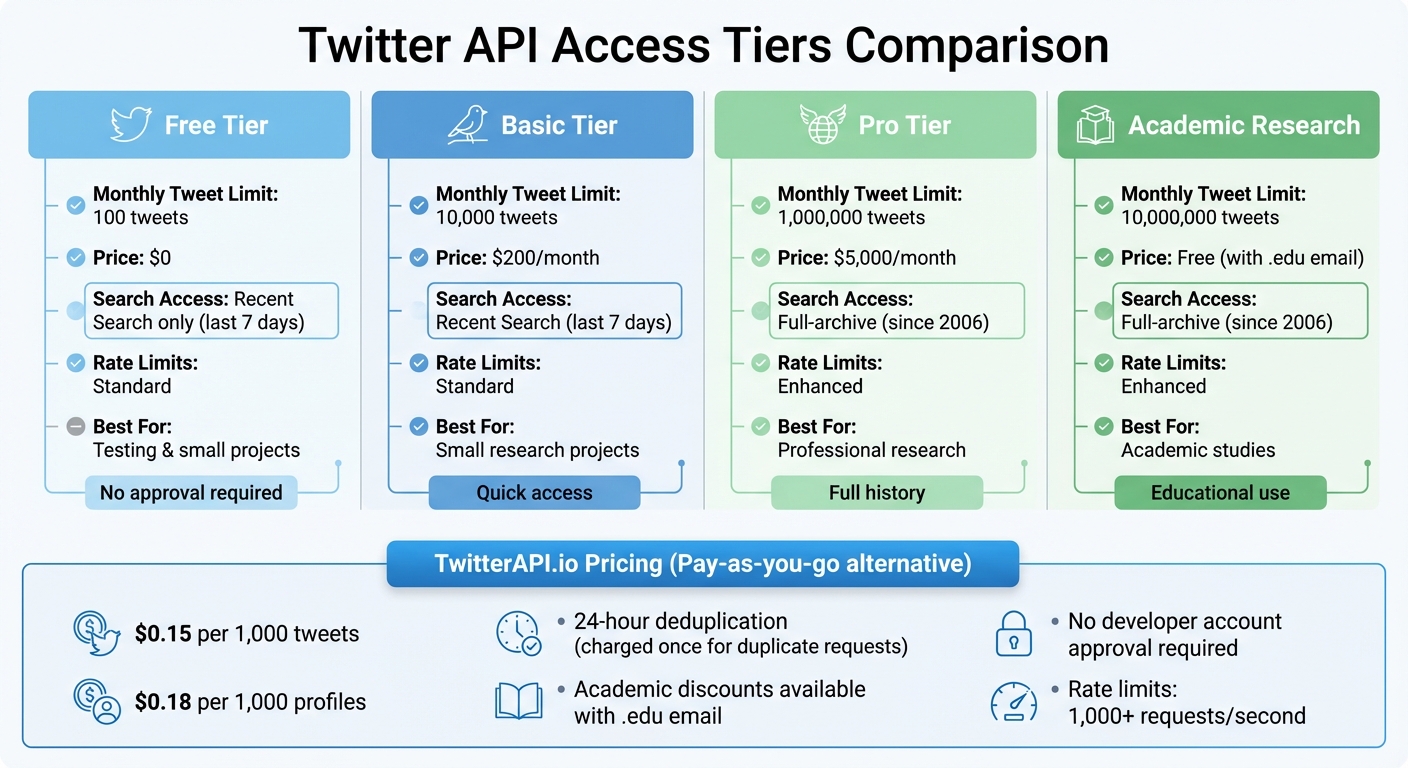
Twitter API Access Tiers: Features, Limits, and Pricing Comparison
Once you've grasped the ethical guidelines and policy requirements, it’s time to choose the tools and access methods that align with your data collection goals. Picking the right combination can streamline your research process and make it much more efficient.
Use TwitterAPI.io Features
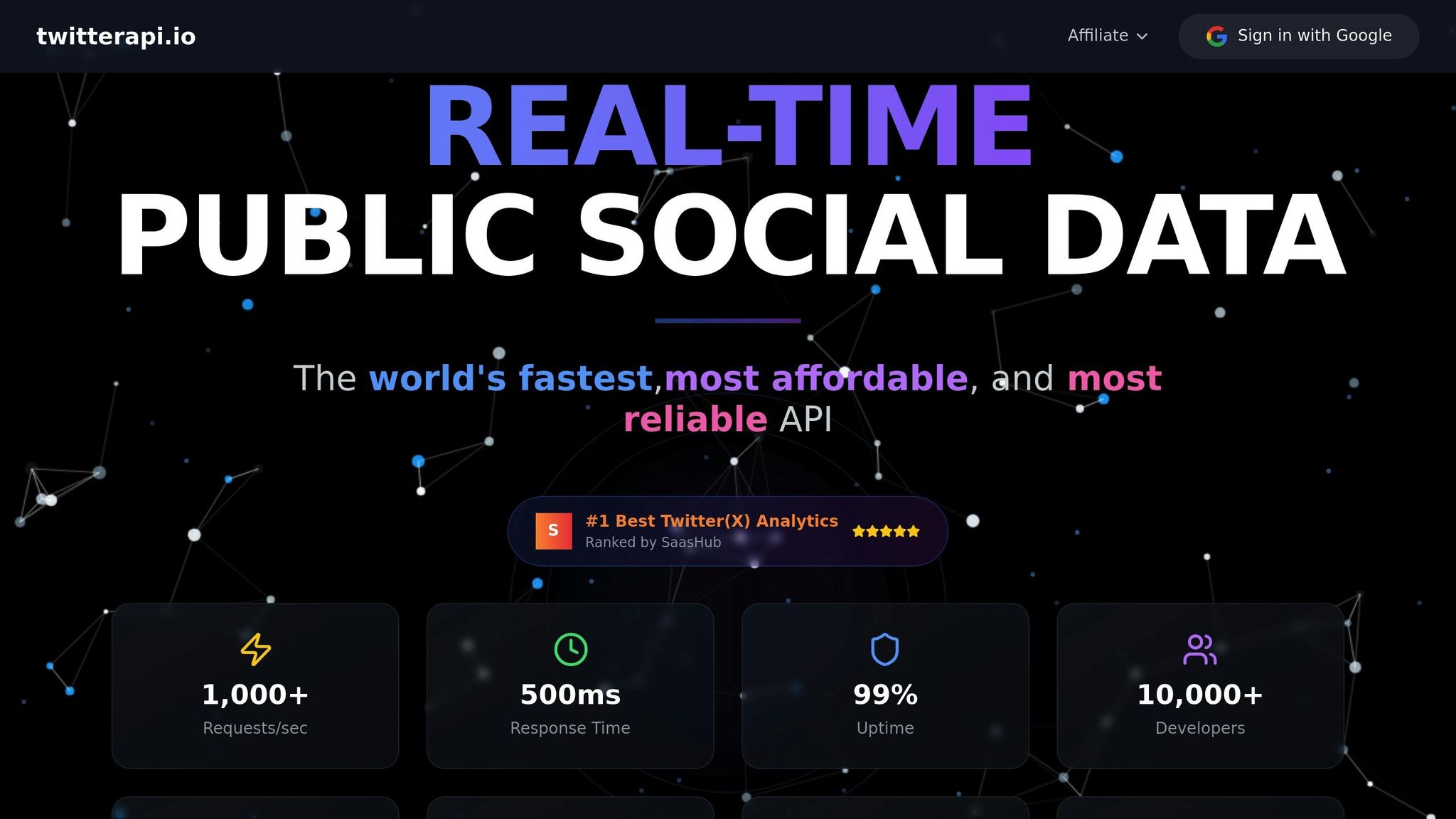
TwitterAPI.io offers a straightforward pay-as-you-go pricing model, starting at $0.15 per 1,000 tweets and $0.18 per 1,000 profiles. You’re charged only for the resources you use, making it a flexible option for researchers.
One standout feature is its built-in deduplication. If you request the same resource twice within a 24-hour window, you’ll only be charged once, which helps keep costs down. For academic researchers, TwitterAPI.io goes a step further by offering discounts. By registering with a .edu email address and providing details about your project, students and faculty can access data at reduced rates - perfect for those working with tight grant budgets.
The platform also boasts impressive technical capabilities, including high rate limits (over 1,000 requests per second), sub-second latency through a global network spanning 12+ regions, and 24/7 live chat support. Plus, it doesn’t require approval for a Twitter developer account, removing a common barrier for many researchers.
Choose the Right Tools and Libraries
Selecting the right tools for data extraction and management is just as important. If your project is Python-based, Tweepy is a highly recommended library for working with Twitter data. It simplifies tasks like authentication (supporting both OAuth 1.0a and OAuth 2.0), pagination through large datasets, and managing rate limits. Tweepy’s Cursor feature is especially handy for collecting complete datasets.
To ensure your queries are structured correctly, take advantage of TwitterAPI.io’s Swagger documentation and Postman collections. The official X API v2 Postman collection allows you to test requests and examine response formats without having to write any code. This is particularly helpful for understanding how to use parameters like fields and expansions, which let you request specific data - such as post annotations, metrics, or conversation IDs. This approach not only reduces response size but also helps manage costs.
For command-line enthusiasts, tools like twarc are excellent for collecting and archiving Twitter data. Twarc automates API requests, handles authentication, and retries failed requests automatically. If you need structured data, twarc-csv can convert raw JSON responses into CSV files, making them easy to analyze in spreadsheet software. Other useful tools include twurl and jq, which are great for testing API calls and processing JSON data directly in the terminal.
With your API access set up and tools in place, you’re ready to start building and refining your data queries for effective research.
sbb-itb-9cf686c
Create and Test Queries for Data Collection
When crafting queries for data collection, the goal is to make them align closely with your research questions. Start with simple queries, test them on smaller datasets, and tweak them until your results are on point.
Build Query Rules
Twitter's query language processes AND before OR, which can affect how your query is interpreted. For example, apple OR iphone ipad will be read as apple OR (iphone AND ipad). To avoid confusion, use parentheses to group terms explicitly.
Operators fall into two main categories:
- Standalone operators: These work independently, like keywords, hashtags, or
from:NASA. - Conjunction-required operators: These need to be paired with other terms, such as
has:media,lang:en, oris:retweet. A query with only conjunction-required operators will fail unless anchored by a standalone term.
For research on specific topics, consider using Tweet Annotations with the context: and entity: operators instead of relying on long keyword lists. For instance:
context:11.689566306014617600
This query retrieves tweets about American Football based on Twitter's contextual tagging, which can help you capture relevant posts without needing exact keywords. This method is especially useful for tracking conversations as they evolve.
You can also use the negation operator (-) to filter out irrelevant content. For example, ironman -movie excludes Marvel-related posts, while -is:retweet ensures you only get original tweets. Keep in mind to negate terms individually - grouped negations won't work.
Query length depends on your access level. Here's a quick breakdown:
- Self-serve accounts: 512 characters for Recent Search, 1,024 for Full-Archive Search.
- Enterprise accounts: Up to 4,096 characters.
Don't forget to URL-encode your queries before sending them to the API. For instance, spaces should be replaced with %20, and # becomes %23.
Once you've built your query, test it right away on a small dataset to make sure it delivers relevant results.
Test and Refine Queries
Testing is essential to fine-tune your queries. Use the counts endpoint to check if your results match your research goals. Tools like twarc2 counts let you track trends without using up too much of your monthly API quota. This saves time and prevents downloading irrelevant data.
Start with a basic query. If your results are too broad, narrow them down with filters like lang:en or exclusions such as -birthday. If you’re not getting enough results, expand your query by adding synonyms or related hashtags. For example, a query like "happy" might pull in too many posts. Refining it to "happy lang:en -birthday -anniversary" can help you zero in on more relevant content.
Once you have initial results, perform a quick exploratory analysis on a sample of 500 to 1,000 posts. Look for patterns, emerging slang, new hashtags, or signs of "topic drift" as discussions shift over time. For example, in a COVID-19 study, you might need to add terms like "social distancing" as they become more common.
If you're using the standard v1.1 API, you can test your query syntax directly in a browser at twitter.com/search. The resulting URL will show the properly formatted query, which you can then reuse in your API requests. This is a quick way to validate your query logic before diving into coding.
Lastly, keep an eye out for potential biases or gaps in your queries. For instance, only a small fraction of tweets include geo-tagged data, so relying solely on geo-operators could lead to skewed results. Similarly, the standard v1.1 search API only covers the last 7 days, which may not be suitable for long-term studies. Being aware of these limitations can help you design better, more reliable data collection plans.
Set Up and Manage Data Collection Workflows
Once you've crafted your queries, the next step is to establish a reliable workflow for ongoing data collection. This includes securing authentication, selecting the right storage format, and keeping an eye on rate limits to ensure smooth operations.
Set Up Authentication and Data Storage
To authenticate your API requests, start by creating a developer account at console.x.com. From there, set up a Project and an App in the Developer Console. This will generate the credentials you need, such as API Keys, Secrets, and Tokens.
For research involving public data, a Bearer Token is the easiest option. It's ideal for tasks like searching posts, analyzing trends, and retrieving user details without requiring user-specific permissions. If your project involves more advanced actions like posting content or accessing direct messages, use OAuth 2.0 for more granular permission control.
Keep your credentials secure by avoiding hardcoding them into your scripts. Instead, store them in environment variables (e.g., export BEARER_TOKEN='your_token') and make sure to add credential files to .gitignore if you're using version control. Save these credentials in a secure vault or password manager immediately, as they are often displayed only once during creation.
The API returns data in JSON format, which retains metadata and nested structures. For spreadsheet-based analysis, convert JSON to CSV, but be cautious if using Excel for large datasets due to its row limits and formatting quirks. To optimize your data collection, use parameters like tweet.fields and user.fields to request only the specific data points you need, which can save both memory and storage space.
With authentication and storage sorted, the next step is to keep your workflow running efficiently.
Monitor Rate Limits and Workflow Efficiency
Managing rate limits is critical for maintaining an efficient workflow. Start with the counts endpoint to gauge the volume of tweets before diving into a full search. As the Twarc documentation explains:
It's always a good idea to start with the counts endpoint first, because... if you accidentally search for the wrong thing you can consume your monthly quota of tweets without collecting anything useful.
API requests typically return between 10 and 500 tweets per call. For larger datasets, use pagination with next_token to retrieve additional results. If more data is available, this token allows you to continue fetching seamlessly.
To avoid exceeding rate limits, incorporate sleep timers between API calls. Popular libraries like Twarc and Tweepy can simplify this process by handling retries and managing rate limit notifications automatically.
For large-scale projects, consider spreading data collection over time. Using nested loops in your scripts can help you avoid hitting your monthly caps too quickly. For instance, the Academic Research track permits up to 10,000,000 tweets per month, so setting daily or weekly data quotas can help you stay within limits.
Additionally, developer tools like the "Get app rate limit status" endpoint (available in v1.1) let you track your remaining calls in real time. This allows you to adjust your workflow dynamically and avoid interruptions.
Clean, Preprocess, and Document Data
Once you've gathered your data, the next step is to clean and document it thoroughly. This process is essential to turn raw Twitter data into meaningful insights. Since Twitter data typically comes in nested JSON format, you'll need to clean and organize it before diving into analysis.
Filter and Organize Data
Start by flattening the JSON structure into a more manageable format. For instance, the Twitter API v2 provides intricate dictionaries that include embedded objects like public_metrics, which detail likes, retweets, and replies. Breaking these down into separate columns makes the data much easier to work with.
For text preprocessing, follow these steps:
- Convert text to lowercase.
- Remove punctuation, numbers, URLs, user mentions, and hashtags.
- If you're working on text analysis or sentiment analysis, consider stemming to simplify words to their base form (e.g., "running" becomes "run").
If you're handling a large dataset, avoid using Excel due to its row limitations and potential encoding issues. Instead, rely on tools like Python with Pandas or R with dplyr for better scalability and functionality. Ensure dataset consistency by removing duplicate Tweet IDs and filtering out retweets if your focus is on original content. Use User IDs as primary identifiers since usernames can change over time, disrupting long-term tracking.
You can also streamline retweet filtering during data collection by using the -is:retweet operator or handle it later by identifying duplicates in your dataset.
Lastly, document each cleaning and preprocessing step carefully. This ensures that your research can be reproduced and verified by others.
Document Query Rules and Dataset Details
Proper documentation is just as important as the cleaning process. Keep a detailed record of the query parameters you used, such as:
- The specific endpoint (e.g., Full-archive search or Recent search).
- The complete Boolean query with all operators.
- The start and end timestamps in ISO 8601 format (
YYYY-MM-DDTHH:mm:ssZ).
Also, note which fields you extracted (e.g., author_id, created_at, public_metrics) and explain why those fields were chosen. Track metadata like next_token values and result_count to ensure you've retrieved all pages of your query. If you used scripts to manage rate limits, save those scripts or notebooks, including any time.sleep() logic, to document your process.
When sharing your dataset for peer review or collaboration, adhere to Twitter's developer policy by dehydrating your dataset - sharing only the Tweet IDs instead of the full content. This allows others to hydrate the tweets themselves via the Twitter API, respecting Twitter's terms of service. As noted in the Twarc tutorial:
Instead of sharing the content of the tweets, we can share the unique ID for that tweet, which allows others to hydrate the tweets by retrieving them again from the Twitter API.
This method ensures compliance with Twitter's rules while enabling other researchers to recreate your dataset. Academic researchers are allowed to share unlimited Tweet IDs for non-commercial research purposes, so take advantage of this when applicable.
Finally, document any limitations or sampling strategies tied to your Twitter API access level. For example, note the monthly tweet cap for your subscription tier: 500 for Free, 50,000 for Basic ($200/month), or 1,000,000 for Pro ($5,000/month). This transparency helps explain any constraints on your dataset size.
Conclusion and Next Steps
When collecting Twitter data for research, breaking the process into manageable steps is crucial. Start by defining your research questions, securing API authentication, building effective queries, and documenting your workflow. As highlighted in the twarc tutorial:
It's always a good idea to start with the counts endpoint first, because... if you accidentally search for the wrong thing you can consume your monthly quota of tweets without collecting anything useful.
This initial validation step helps you avoid wasting both your API quota and valuable time.
Key Takeaways from the Checklist
Before diving into data collection, use the counts endpoint to estimate tweet volumes and refine your Boolean queries. This precaution ensures that you don’t exhaust your monthly quota unnecessarily - whether you’re limited to 100 tweets on the Free tier, 10,000 on Basic ($200/month), or 1,000,000 on Pro ($5,000/month). Protect your Bearer Tokens by storing them in environment variables instead of embedding them in your code. Additionally, many APIs include deduplication features, meaning duplicate requests for the same resource within 24 hours typically count only once against your usage.
Compliance and ethics play a central role in any research project. Review Twitter's Developer Agreement thoroughly, and when sharing datasets for peer review, dehydrate them by including only Tweet IDs rather than full content. To streamline your process, implement pagination logic using next_token values and adhere to rate limits (e.g., 200 requests per 15 minutes for certain endpoints) to avoid interruptions. These steps align with earlier recommendations for setting clear objectives and maintaining ethical standards.
Start Your Data Collection Project
With your workflow documented and queries refined, you’re ready to begin your Twitter research project. Platforms like TwitterAPI.io offer quick setup, high rate limits (over 1,000 requests per second), and flexible pay-as-you-go pricing starting at $0.15 per 1,000 tweets. Students and researchers may also qualify for academic discounts with a .edu email.
Begin on a small scale - test your queries, validate the data volume, and gradually build out your collection workflow. With careful planning, ethical practices, and the right tools, you’ll turn raw Twitter data into meaningful research insights efficiently and effectively.
FAQs
What steps should I take to ensure ethical compliance when collecting Twitter data for research?
To maintain ethical standards when collecting data from Twitter, it's crucial to adhere to Twitter's Terms of Service and API usage policies. These guidelines set clear boundaries for what is acceptable, including restrictions on storing sensitive health information or compromising user privacy. Transparency, informed consent, and limiting the collection of sensitive or identifiable data should always be top priorities.
Ensure that your data collection methods align with both legal and institutional regulations. Use authorized access to Twitter's API, and verify that your accounts and tools comply with Twitter's rules. Additionally, take steps to safeguard the security and confidentiality of the data you gather. Clearly communicate your data collection practices to uphold trust and integrity in your work.
How can I optimize my Twitter API queries for better results?
To get the most out of your Twitter API queries, focus on crafting targeted and efficient filters. Narrow your search by using specific keywords, hashtags, or user mentions. Avoid broad terms that could pull in irrelevant data or overwhelm you with unnecessary results. You can also use Boolean operators and grouping to fine-tune your search, helping you gather only the most relevant information.
Keep an eye on rate limits and query restrictions. Twitter's API sets limits on how many requests you can make within a given time frame. To work around this, try batching your queries or spacing them out over time. Using precise criteria, like exact keywords or user IDs, not only ensures better data quality but also cuts down on processing time - especially when handling large datasets or retrieving historical information.
By applying these strategies, you can streamline your Twitter data collection process, improve accuracy, and stay well within the API's usage rules.
What’s the best way to store and document Twitter data for reproducibility?
To make your Twitter data both reproducible and well-documented, start by storing it securely in structured formats like JSON or CSV. Be meticulous about recording the data collection process - this means noting down the API endpoints you accessed, the query parameters you used, the timestamps of retrieval, and any filters you applied. This level of detail ensures you can trace the data’s origin and maintain transparency.
For better organization, use tools that archive datasets and create metadata to describe how the data was collected. Include crucial details such as the retrieval date and time, the API version, and any search queries. These practices not only make your work easier to replicate but also help you stay aligned with Twitter’s data usage policies.
Tags
Related articles
Ready to get started?
Try TwitterAPI.io for free and access powerful Twitter data APIs.
Get Started Free