Affordable Storage for Real-Time Twitter Data
Affordable Storage for Real-Time Twitter Data
Storing Twitter data in real-time can be expensive, but there are ways to cut costs effectively. By using affordable APIs and cloud storage strategies, you can manage high data volumes without overspending. Key tactics include:
- API Savings: Use services like TwitterAPI.io for real-time data at $0.15 per 1,000 tweets, far cheaper than Twitter's official $5.00 per 1,000 tweets.
- Compression: Reduce storage needs by 70–80% with Gzip or similar methods.
- Tiered Storage: Shift older data to low-cost archival storage, saving up to 95% on cloud costs.
- Automation: Set lifecycle rules to move data between storage tiers based on usage.
These methods ensure you can handle large-scale tweet streams while keeping costs under control. Let's explore how to set up an efficient, budget-friendly Twitter data pipeline.
Technical Requirements for Real-Time Twitter Data Storage
Storing real-time Twitter data requires an infrastructure that operates differently from traditional systems. Unlike batch processing, which handles predictable workloads at set intervals, real-time streams demand constant ingestion. Even brief interruptions can compromise the integrity of your data. To handle the unpredictable surges caused by trending events, your storage pipeline must scale instantly.
High Data Volumes and Ingestion Rates
Twitter streams generate massive amounts of data, with thousands of tweets pouring in every minute. Considering Twitter attracts around 3.6 billion visits monthly, a storage solution must support sustained write operations exceeding 1,000 requests per second. Traditional REST APIs, which rely on polling intervals, struggle with this demand due to high overhead and latency. Instead, WebSocket connections provide a better alternative, offering persistent, low-latency streams with millisecond-level response times. This speed is crucial for monitoring breaking news or live events.
Additionally, tweets come with rich metadata and media attachments, requiring systems designed for efficient sequential writes. Given these challenges, compression and tiered archival techniques are vital for managing storage effectively.
Compression and Archival Needs
Handling such intense data flows necessitates cost-saving measures like compression and archival. Raw data can quickly inflate storage demands, but using Gzip compression can reduce the footprint by 70–80% while maintaining accessibility. Formats like compressed JSON or NDJSON integrate well with modern analytics tools and AI workflows, balancing storage costs with retrieval efficiency.
Tiered storage strategies further optimize expenses. By separating "hot" data - recent tweets requiring quick access - from "cold" archives of older data, you can significantly cut costs. For instance, moving data older than 30 days into archival storage can lower expenses by 60–75% compared to keeping everything in high-performance storage. These methods not only save space but also help manage operational costs in high-volume environments.
Cost vs. Performance Trade-offs
Storage decisions often involve a trade-off between cost, retrieval speed, and long-term accessibility. High-performance systems with sub-500ms response times come at a premium, while more affordable archival solutions may introduce multi-second delays. For most applications, instant access is critical only for recent data, while older tweets can tolerate slightly higher retrieval times without disrupting functionality.
Flexible pricing models, such as pay-as-you-go options at $0.15 per 1,000 tweets, offer a way to manage costs for unpredictable real-time streams. These models avoid the hefty $5,000–$42,000 monthly commitments typical of enterprise tiers. With this approach, expenses scale directly with usage, while compression, tiered storage, and careful monitoring of ingestion rates help prevent budget overruns.
"Enterprise access remains prohibitively expensive for many organizations, creating a market gap for alternative solutions." – TwitterAPI.io
sbb-itb-9cf686c
Cost-Effective Storage Solutions for Real-Time Twitter Data
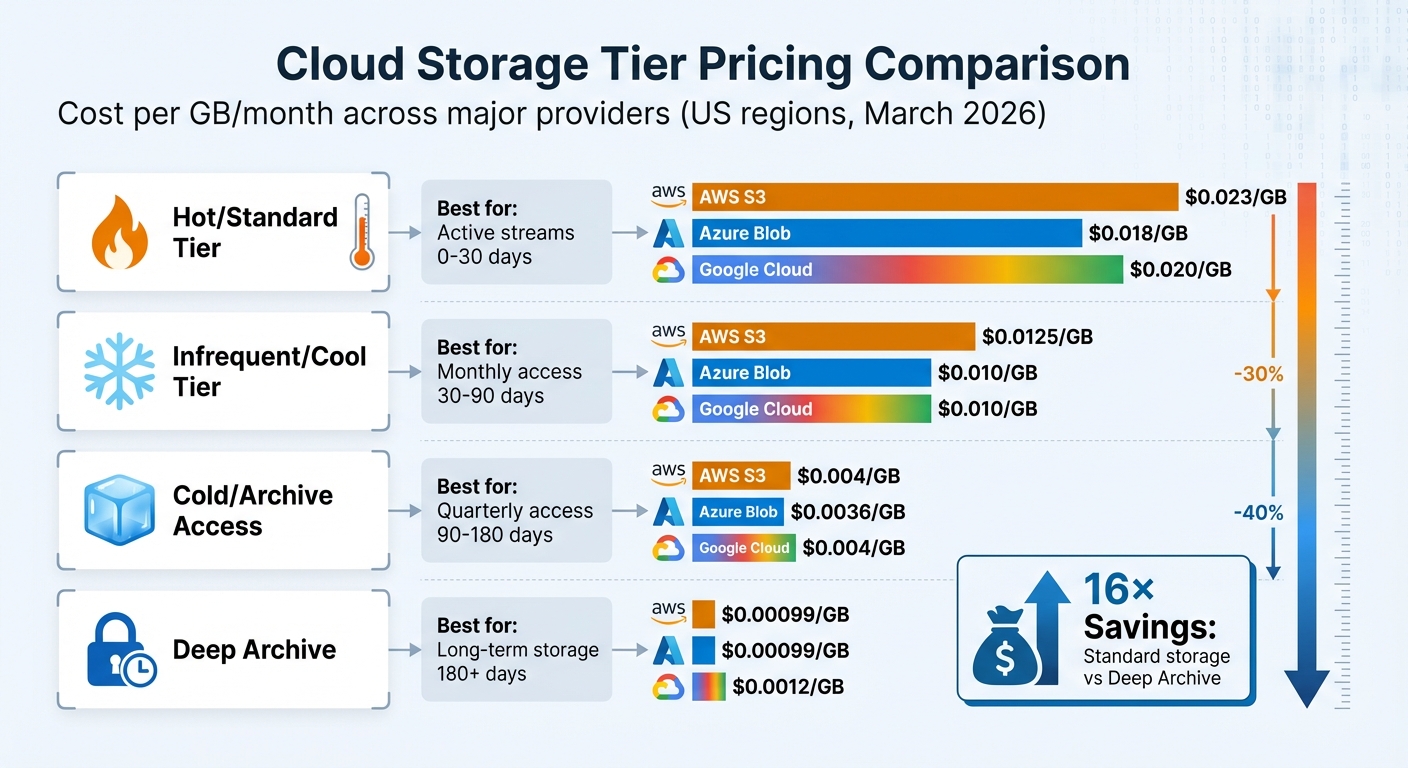
Cloud Storage Tier Pricing Comparison for Twitter Data Storage
Cloud Storage Options for Cost Optimization
When it comes to storing real-time Twitter data, cloud providers like AWS, Google Cloud, and Azure offer flexible tiered storage options. These tiers are designed to balance costs with the speed of data retrieval. For active Twitter streams, the Standard tier is ideal, while older tweets can be stored in Infrequent Access or Archive tiers at significantly reduced rates.
Here’s how the pricing stacks up: Standard storage typically costs $0.018–$0.023 per GB per month, while Archive tiers drop the price to just $0.00099–$0.0012 per GB - a massive 16× savings. To make things even easier, AWS S3 Intelligent-Tiering and Google Cloud Storage Autoclass use machine learning to automatically shift data between tiers based on usage patterns, saving users from manually managing transitions. AWS reports that S3 Intelligent-Tiering has saved its customers over $6 billion since its introduction.
Azure also offers attractive options with its Cool and Cold tiers. The Cold tier can save up to 64% compared to the Cool tier, while still providing immediate access without the need for data "rehydration". These tiered storage solutions are a game-changer for managing costs while maintaining access to critical data.
Using Tiered Storage for Scalability
Automated tiering is a must-have for anyone handling large volumes of Twitter data. Studies show that 60–80% of stored data is rarely accessed after the first 30 days. Instead of keeping this data in expensive hot storage, lifecycle policies can automatically move it to cheaper tiers based on access frequency.
The cost benefits are clear. For example, transferring 50 TB of infrequently accessed data from hot to cold storage can save around $950 per month, which adds up to over $11,000 annually. Similarly, moving data from Azure's Hot tier to Cool tier cuts costs by 44%, while Google Cloud's Archive tiers can slash expenses by as much as 95%.
"60–80% of stored data is rarely or never accessed after the first 30 days, yet it sits in premium hot storage tiers racking up charges at the highest rate."
– Cloud Cost Cutter
To maximize savings, batch real-time data into files of at least 128 KB - this qualifies for automated tiering and reduces transaction fees. Also, setting lifecycle rules to delete incomplete uploads after 7 days can help avoid unnecessary storage costs from orphaned fragments.
Cost Comparison and Savings Breakdown
Here’s a quick comparison of storage costs across major providers:
| Storage Tier | AWS S3 | Azure Blob | Google Cloud | Best For |
|---|---|---|---|---|
| Hot/Standard | $0.023/GB | $0.018/GB | $0.020/GB | Active streams (0–30 days) |
| Infrequent/Cool | $0.0125/GB | $0.010/GB | $0.010/GB | Monthly access (30–90 days) |
| Cold/Archive Access | $0.004/GB | $0.0036/GB | $0.004/GB | Quarterly access (90–180 days) |
| Deep Archive | $0.00099/GB | $0.00099/GB | $0.0012/GB | Long-term storage (180+ days) |
Pricing based on US regions as of March 2026
It’s important to note that some tiers have minimum storage duration requirements. For example, deleting data from Archive or Cool tiers before the retention period ends (30–365 days) can result in penalty fees. For unpredictable access patterns, AWS S3 Intelligent-Tiering is a smart choice, as it avoids retrieval fees and automates tier transitions. Additionally, Azure offers discounts of 34–38% for 1-year or 3-year reserved capacity, making it a great option for predictable data volumes.
Building a Cost-Effective Storage Pipeline with TwitterAPI.io
Setting Up Real-Time Data Streams
TwitterAPI.io makes collecting real-time Twitter data incredibly straightforward through its WebSocket streams, which deliver tweets as they happen. The setup process is quick - less than five minutes - and provides instant access. The system boasts an average latency of 1.2 seconds, with 99% of requests completing in under 2 seconds. The WebSocket connection supports three types of events:
connected: Confirms a successful connection.ping: Keeps the connection alive.tweet: Delivers tweet data, including fields likerule_id,tweets,author,text, andtimestamp.
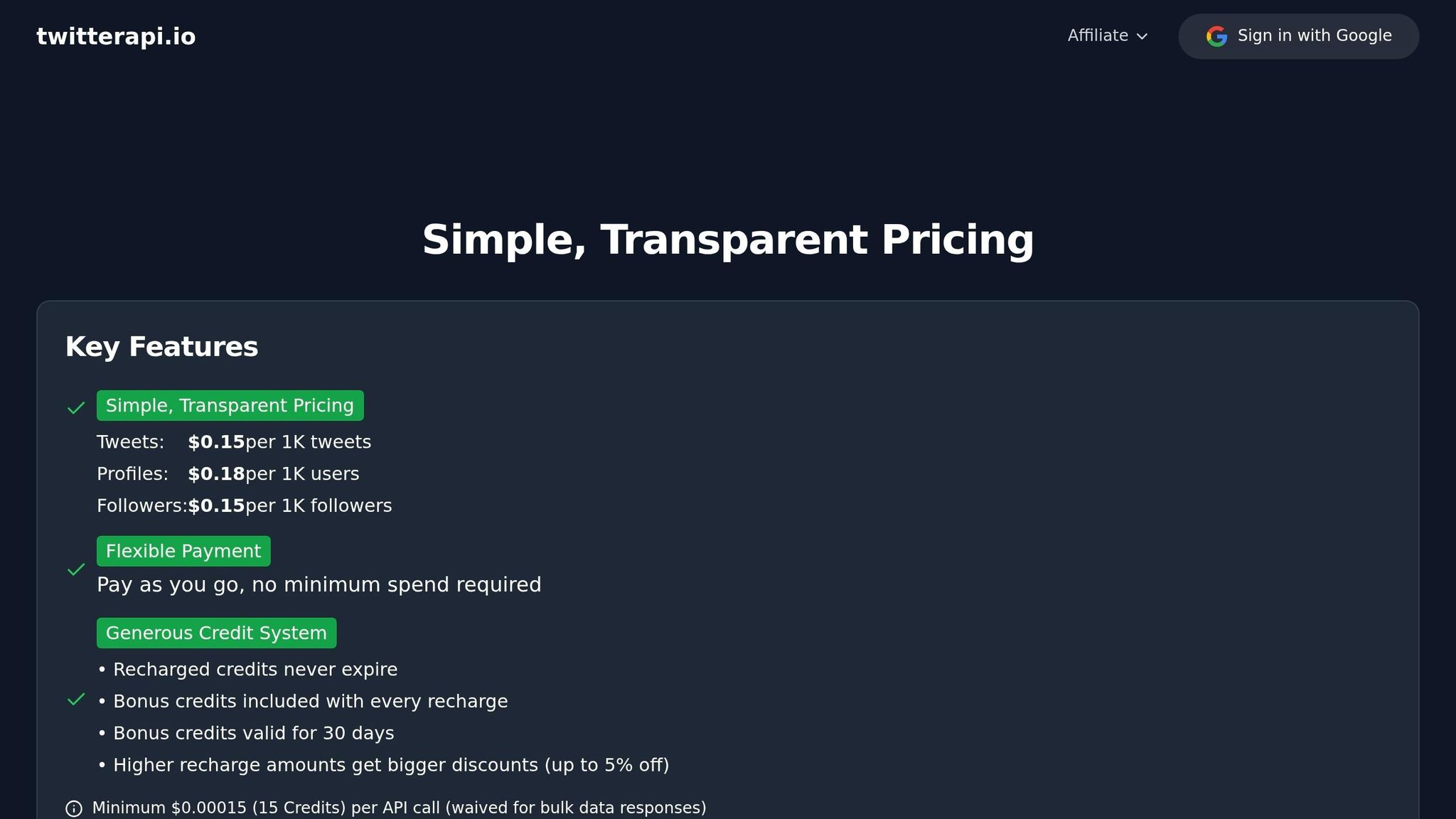
With a default rate limit exceeding 1,000 requests per second, high-volume data streams are no issue. Plus, the pricing is straightforward - $0.15 per 1,000 tweets.
"TwitterAPI.io saved us months of development time. The data quality and speed are unmatched." - Alex Chen, AI Researcher, Stanford
Once your real-time stream is running smoothly, the next step is to focus on efficient storage through compression and partitioning.
Data Compression and Partitioning
To handle incoming tweet data effectively, use micro-batching every 15 minutes. This approach helps generate files that are at least 128 KB in size, which qualifies for automated tiering and reduces transaction costs. For better querying performance, partition the data by date or hour during processing. Deduplication is another key step - use unique tweet IDs to remove duplicates, ensuring your pipeline runs efficiently.
For historical data, pull in 30-day chunks to avoid hitting rate limits and maintain system stability. Once stored in S3, you can easily query the data using Amazon Athena, a serverless SQL tool that charges only for the queries you execute.
With optimized batching and partitioning in place, the next move is automating lifecycle transitions to further cut costs.
Automating Tiering Policies
To maximize cost efficiency, set up lifecycle rules that automatically move data between storage tiers as it ages. For instance, keep the most recent 30 days in hot storage for active use, then transition older data into cooler tiers like Cool, Cold, or Deep Archive. AWS S3 Intelligent-Tiering is a great option for automating these transitions, leveraging machine learning to handle everything without manual effort.
Conclusion
Keeping real-time Twitter data storage affordable boils down to three main strategies: smart data ingestion, efficient data handling, and automated tiered storage. Services like TwitterAPI.io make data ingestion cost-effective by offering real-time streams at just $0.15 per 1,000 tweets, which is a massive reduction compared to the official API's $5.00 per 1,000 tweets. With rate limits surpassing 1,000 requests per second and sub-second latency, you get top-tier performance without breaking the bank.
Once the data starts coming in, efficient processing becomes crucial. Methods like batching help create larger files for easier automated tiering. Partitioning data by time - such as by date or hour - can speed up queries, while deduplicating tweets by their ID cuts down on redundant storage. These steps help shrink your cloud storage needs and save money.
Automation ties it all together. By setting lifecycle policies, you can automatically move older data from high-cost, fast-access storage to more affordable archival tiers. For example, keeping only the most recent 30 days in hot storage for active querying while shifting older data to cooler storage tiers ensures you're striking the right balance between performance and cost-efficiency.
FAQs
How much storage will my tweet stream need per day?
The amount of storage you'll need for your daily tweet stream depends on the size of each tweet. On average, a single tweet takes up about 1 kilobyte. So, if you're handling 500 million tweets per day, you'll require roughly 500 GB of storage. However, keep in mind that actual storage requirements can differ depending on the specific data you choose to store.
What file format should I use to store tweets for cheap querying later?
For cost-effective and efficient querying, it's best to store tweets in a structured format like JSON. This format is perfect for managing tweet data, as it simplifies storage, retrieval, and analysis without driving up expenses.
How do lifecycle rules affect costs and retrieval time?
Lifecycle rules are a smart way to cut costs by reducing unnecessary data retrievals. They also streamline retrieval times by automatically organizing and managing data. This ensures quicker access to frequently used information while minimizing delays when fetching less important data.
Tags
Related articles
Ready to get started?
Try TwitterAPI.io for free and access powerful Twitter data APIs.
Get Started Free