Real-Time Hashtag Tracking with TwitterAPI.io
Real-Time Hashtag Tracking with TwitterAPI.io
Tracking hashtags on Twitter used to be slow, expensive, and complicated. But with TwitterAPI.io, you can start in minutes using just an API key. This tool provides fast, cost-effective access to real-time data, perfect for marketers, researchers, or developers. Key features include:
- Pay-as-you-go pricing: $0.15 per 1,000 tweets (96% cheaper than enterprise options).
- Performance: Sub-second latency, 99.99% uptime, and over 1,000 requests per second.
- Ease of use: No waiting for approval; just sign up, grab your API key, and start tracking.
- WebSocket support: Stream tweets live with minimal delay.
Whether you're monitoring product launches or analyzing trends, TwitterAPI.io simplifies the process and delivers reliable results without breaking the bank.
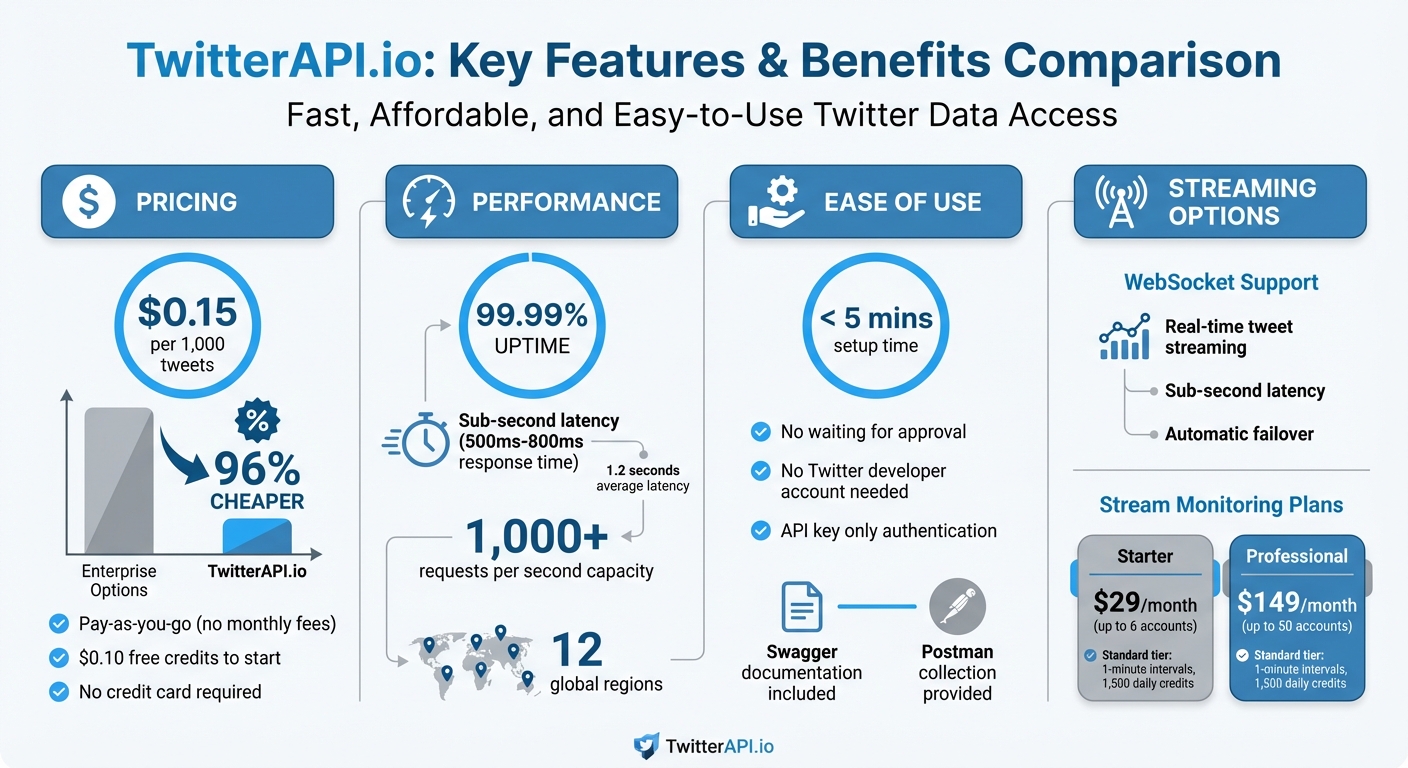
TwitterAPI.io Features and Pricing Overview
Setting Up Your TwitterAPI.io Account and API Key
Creating Your Account
Head over to TwitterAPI.io and sign up - it’s quick and easy, with no credit card required. The process is straightforward and takes less than five minutes. There’s no waiting for approval or dealing with complicated authentication.
When you sign up, you’ll get $0.10 in free credits to test the service. Once you’re ready to dive in, the pricing is simple: $0.15 per 1,000 tweets, and it’s all pay-as-you-go. No monthly fees, no hidden costs. This makes it one of the most affordable Twitter API alternatives for developers. If you’re a student or researcher, you can even access academic research pricing by signing up with a .edu email address.
Generating API Keys
After logging in, your API key will be right there on your dashboard. Make sure to copy and store it securely. Avoid hardcoding it in public repositories or client-side code - use environment variables or a secrets management tool instead.
The dashboard also provides Swagger documentation and a Postman collection to help you get started. These resources allow you to test hashtag search queries without writing any code. The Swagger interface is especially handy - it lays out all the available endpoints, parameters, and response formats. Just paste your API key, enter a hashtag (like #AI or #marketing), and instantly see the results.
Once your API key is ready, you can start pulling real-time hashtag data. From here, you’re all set to explore how to use the hashtag search endpoint for live tweets.
sbb-itb-9cf686c
Using the Hashtag Search Endpoint for Real-Time Data
Configuring Hashtag Search
The Twitter Search API at https://api.twitterapi.io/twitter/tweet/advanced_search is the tool you need for tracking hashtags in real time. To get started, include your API key in the HTTP header using X-API-Key.
You’ll need to specify two required parameters:
query: This is where you define your search terms, such as#AI. You can also combine terms using operators for more nuanced searches.queryType: Choose betweenLatestfor real-time tweets orTopfor high-engagement content.
If you want to filter results by time, use the since: operator directly in your query string. For example, #marketing since:2025-01-01_00:00:00_UTC retrieves tweets posted after midnight UTC on January 1, 2025. This is particularly handy for fetching only new data during regular polling.
The API responds with a JSON object that includes an array of tweets and their metadata, such as retweetCount and likeCount. Pagination is supported via the cursor parameter - start with an empty string for the first page, then use the returned cursor value to fetch subsequent pages.
Once your hashtag search is set up, you can fine-tune your queries for even better results. These steps are the foundation for efficient, real-time data collection.
Query Optimization Tips
To get the most out of your searches, combine operators. For instance, a query like #AI OR #MachineLearning from:NASA since:2025-03-01_00:00:00_UTC allows you to target specific hashtags, accounts, and timeframes. When polling for updates, use the since: value from your last query to ensure you’re only retrieving new tweets. This approach is not only efficient but also cost-effective, with a rate of $0.15 per 1,000 tweets. Given the system supports over 1,000 queries per second, you can adjust polling frequency based on the activity level of your hashtags.
Take advantage of the metadata fields in the API response, such as lang for language or author.location for geographic details. Using these fields within your application logic can often simplify your queries and reduce complexity.
Setting Up Real-Time Data Streams with WebSockets
Connecting to WebSocket Endpoints
WebSockets offer sub-second latency for tracking hashtags, delivering tweets as they’re posted instead of relying on constant polling. With TwitterAPI.io’s WebSocket setup, you get 99.99% uptime and automatic failover, so your stream remains uninterrupted.
To get started, authenticate at the WebSocket endpoint using your API key. Keep in mind that new monitoring rules may take up to 20 minutes to activate. If you're working with Node.js, tools like socket.io can simplify communication, while dotenv helps securely manage API credentials.
The system is built to handle over 1,000 requests per second by default, letting you track multiple hashtags without worrying about hitting rate limits. With an average latency of 1.2 seconds and staying under 2 seconds at the 99th percentile, this setup is ideal for real-time trend analysis and live event tracking.
Managing Live Tweet Data
Once connected, tweets flow in instantly as JSON objects, ready for immediate processing. These objects include fields like text, author (with both username and name), createdAt, and timestamp. For precise timing analysis, you can use the Snowflake algorithm with the tweet_id to determine the exact creation time of each tweet.
Pricing aligns with the REST endpoints. If you’re monitoring specific accounts in addition to hashtags, consider stream monitoring plans: the Starter plan costs $29/month and supports up to 6 accounts, while the Professional plan at $149/month accommodates up to 50 accounts. To keep your system efficient and costs manageable, focus on extracting and storing only the fields you need.
Get TWEETS by User and Hashtag with Python | Twitter API 2022
Processing and Visualizing Hashtag Data
Once live tweet data starts streaming in, the real challenge is making sense of it. Effective processing and visualization are key to turning raw data into actionable insights.
Analyzing Hashtag Metrics
Start by organizing raw JSON tweet data into a structured format, such as a Python list or a Pandas DataFrame. This makes it easier to extract and analyze key metrics, including:
- Volume: Count of tweets over specific time intervals.
- Engagement: Total retweets, likes, and replies.
- Sentiment: Categorization of tweets as positive, negative, or neutral.
- Geographic and Linguistic Distribution: Derived from fields like
langandplace. - Reach: Estimated based on
author.followers_count.
To ensure accuracy and reduce noise, apply filters that focus on relevant data. This not only improves the quality of insights but also helps manage costs, as tighter filters reduce unnecessary data processing. Use message queues to buffer incoming data and prevent bottlenecks during processing.
Once these metrics are extracted, they provide the foundation for building real-time dashboards that offer clear, actionable insights.
Creating Visual Dashboards
The choice of database plays a crucial role in how you handle processed data. For high-speed performance, consider in-memory databases like Redis, while document stores like MongoDB work well for storing and querying JSON data.
To visualize your findings, use libraries such as Seaborn or Matplotlib for creating trend analyses. If you need live updates, connect WebSocket streams to dashboard tools for real-time visualization. Make sure to implement exponential backoff strategies (starting at 1 second and capping at 30 seconds) for handling reconnections gracefully. Additionally, deduplicate tweets using unique identifiers like tweet_id to avoid inflating metrics and skewing results.
For general brand or hashtag monitoring, the Standard tier offers a good balance, operating at one-minute intervals with a daily limit of 1,500 credits. This setup works well when slight delays in data processing don’t impact decision-making.
Conclusion
TwitterAPI.io makes real-time hashtag tracking fast, affordable, and scalable. Here’s how it works: you can set up your account in just a few minutes, configure the hashtag search endpoint with fine-tuned queries, connect to WebSocket streams for live data, and transform that data into actionable insights using visual dashboards. This process gets you from setup to live tracking in no time.
The platform is budget-friendly, offering a pay-as-you-go model at just $0.15 per 1,000 tweets. There are no monthly contracts, hidden fees, or long approval delays to slow you down. As Marcus Liu, an Indie Developer, shares:
"Built my entire startup on TwitterAPI.io. The cost savings compared to alternatives are incredible."
This affordability pairs perfectly with the platform’s ability to scale.
Whether you’re a solo developer or part of a large enterprise handling millions of tweets daily, TwitterAPI.io has you covered. It supports over 1,000 requests per second by default and operates on a global infrastructure spanning 12 regions. With response times ranging from 500ms to 800ms, the system efficiently handles everything from tracking a single hashtag to monitoring dozens - no major architectural overhauls required.
On top of cost and scalability, the platform’s simplicity speeds up deployment. Forget about needing a Twitter developer account or navigating complex OAuth flows. With just an API key, you can start tracking hashtags immediately. Pre-written code snippets, detailed Swagger documentation, and a Postman collection make integration straightforward, ensuring a smooth experience from start to finish.
FAQs
How do I track multiple hashtags at once?
To monitor several hashtags at once using TwitterAPI.io, you need to set up individual filter rules for each hashtag. This can be done through the filter rules API or the platform's interface. Once configured, TwitterAPI.io will stream real-time tweets that match all your specified hashtags in one unified feed. This approach makes it easier to keep track of multiple hashtags efficiently.
How can I avoid paying for duplicate tweets?
To cut costs when using TwitterAPI.io, it's smart to avoid paying for duplicate tweets. One way to do this is by tracking tweet IDs to ensure every tweet is processed only once - this is especially useful when you're working with paginated historical data.
For real-time streams, you can set up filtering rules or logic to skip repeated tweets based on their unique IDs or content. These strategies help reduce redundant data processing and storage, keeping your expenses under control.
What’s the best way to store and visualize live tweet data?
To work with real-time data effectively, consider using TwitterAPI.io's streaming or webhook features. These tools allow you to receive live data as events unfold. Once you have the data, organize it in a structured format - like using a database or a Pandas DataFrame - to make it easier to analyze.
For visualization, tools like Dash or Streamlit are excellent options for creating interactive dashboards. These platforms let you display metrics such as hashtags, mentions, or engagement trends in an intuitive way. To keep your dashboards up-to-date, set up live connections that automate updates, ensuring your visualizations always reflect the latest data.
Tags
Related articles
Ready to get started?
Try TwitterAPI.io for free and access powerful Twitter data APIs.
Get Started Free