XSS Prevention in APIs: JSON vs. HTML Responses
XSS Prevention in APIs: JSON vs. HTML Responses
Cross-Site Scripting (XSS) is a major security risk for APIs, even when returning JSON. Many developers mistakenly believe JSON responses are automatically safe, but improper client-side handling can still lead to vulnerabilities. Here's what you need to know:
- HTML Responses: Higher risk due to browsers executing embedded scripts. Requires strict encoding and sanitization.
- JSON Responses: Generally safer but not immune. Risks arise when unsafe methods like
.innerHTMLoreval()are used on the frontend. - Key Risks:
- Misconfigured headers (
Content-Type,nosniff) can cause issues. - Dormant vulnerabilities in JSON can activate if mishandled by other systems.
- HTML responses are inherently active and need context-specific encoding.
- Misconfigured headers (
Quick Comparison
| Feature | JSON Response | HTML Response |
|---|---|---|
| XSS Risk | Low (inert by default) | High (executable by default) |
| Defense | Correct headers + safe rendering | Context-aware encoding + sanitization |
| Handling | Primarily client-side | Primarily server-side |
| Complexity | Simple | Complex |
Takeaway: JSON is safer for modern APIs but requires careful client-side handling. HTML responses demand rigorous encoding and sanitization to avoid XSS attacks. Always validate, sanitize, and use proper headers to secure your API.
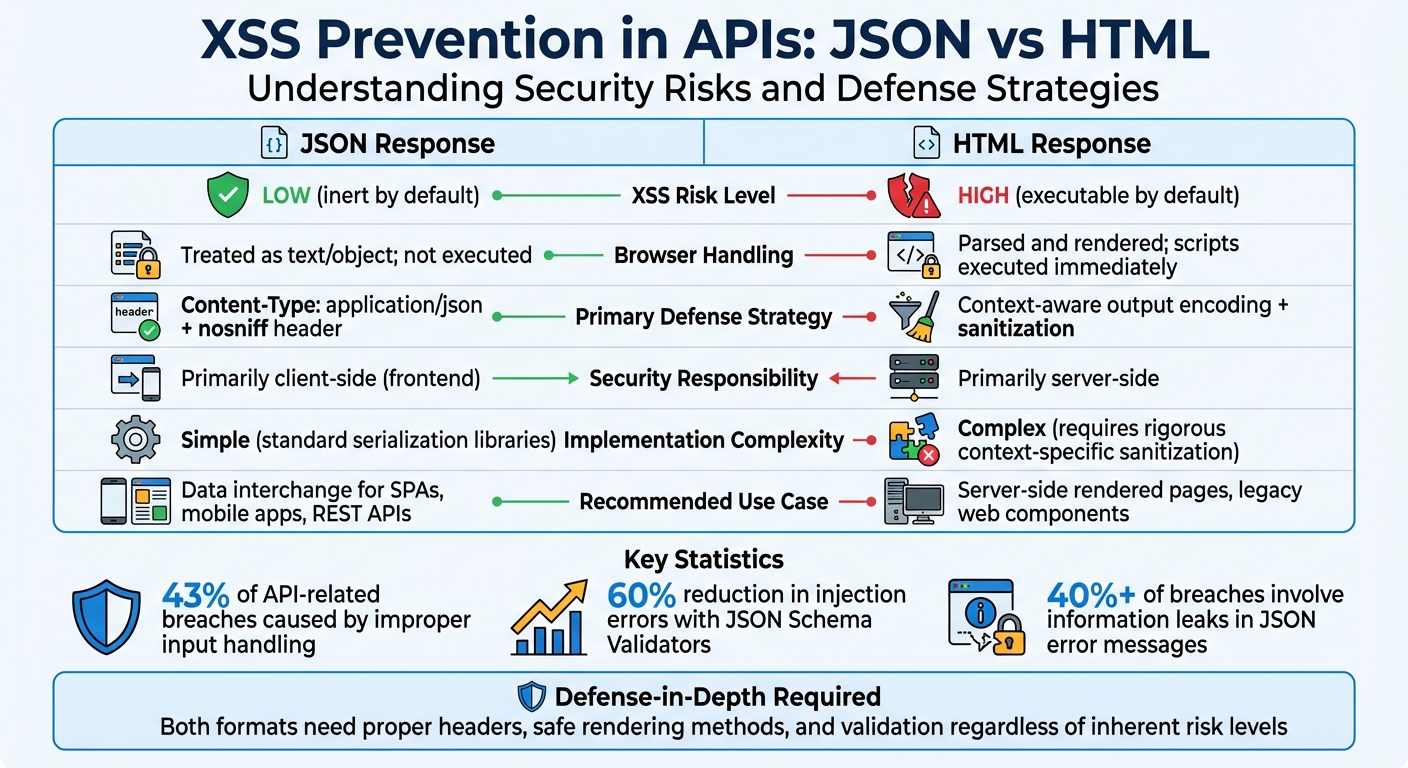
JSON vs HTML API Responses: XSS Risk Comparison and Security Best Practices
How to prevent XSS attacks in ASP .NET Core Web API

sbb-itb-9cf686c
XSS Risks in HTML API Responses
HTML responses carry a higher risk of XSS attacks compared to JSON because browsers actively parse and execute embedded scripts, event handlers, and protocol-based attacks. Unlike JSON, which is inherently passive, HTML is "active" by nature - browsers automatically execute any malicious code embedded within its structure.
The danger often starts with how browsers handle the Content-Type header. If an API mistakenly sets this header to text/html instead of application/json, or fails to include the X-Content-Type-Options: nosniff header, browsers may interpret the response as an HTML webpage. This can lead to the execution of any script tags embedded in the data through a process known as content sniffing. This issue paves the way for the encoding challenges discussed below.
Direct Script Injection in HTML
HTML responses provide numerous opportunities for malicious code injection. Unlike JSON, which requires explicit rendering on the client side, HTML can execute embedded scripts automatically. As Gabor Lengyel explains:
"The browser is primarily an html parser. It finds stuff between
<script>and</script>and executes that as Javascript".
This automatic execution isn't limited to script tags. Event handlers like onclick, onerror, or onload can trigger code execution when the browser renders the HTML or when a user interacts with the page. Additionally, URL-based attacks using javascript: or data:text/html protocols in attributes like href or src can execute malicious code as soon as the browser processes these attributes. These risks highlight the need for context-specific encoding, which we'll explore next.
Context-Specific Encoding Challenges
HTML responses require careful and context-aware encoding to address hidden vulnerabilities. Noor Mohammed Rizwan, Lead Engineer at Open Text, highlights the importance of tailoring encoding strategies:
"Context is King. To prevent XSS, you must change your encoding strategy based on where the data lands in the DOM. There is no universal 'safe' function".
For example, HTML entity encoding works well in the HTML body but is ineffective in JavaScript contexts. This is because JavaScript executes before HTML decoding, rendering encoded entities useless. As the Inventive HQ Team warns:
"JavaScript context is where HTML encoding provides zero protection... JavaScript executes before HTML decoding occurs, making encoded entities meaningless for security".
| Context | Example | Required Encoding |
|---|---|---|
| HTML Body | <div>USER_DATA</div> |
HTML Entity Encoding (< to <) |
| HTML Attribute | <div title="USER_DATA"> |
Attribute Encoding + Quoting |
| JavaScript | <script>var x = 'USER_DATA';</script> |
JavaScript Escape Sequences (\', \xXX) |
| URL Context | <a href="USER_DATA"> |
URL Percent-Encoding + Protocol Whitelisting |
| CSS Context | <style>body { color: USER_DATA; }</style> |
CSS Hex Encoding (\HEX) |
The challenge becomes even greater in nested contexts. For example, when data appears inside a URL within an href attribute, it requires double encoding - first using URL encoding for the parameter, and then applying HTML attribute encoding to the entire string. This intricate process demonstrates why HTML responses demand significantly more attention and care than JSON responses to ensure security.
XSS Risks in JSON API Responses
JSON responses are generally safer than HTML when it comes to XSS attacks, but they aren't completely immune. The key difference lies in how browsers process the data. While HTML is actively parsed and executed, JSON is treated as inert data - browsers won't automatically execute scripts embedded within it. However, this safety can be undermined if JSON is improperly handled on the client side.
Lower Risks Due to JSON Structure
Browsers handle raw JSON served with the Content-Type: application/json header as inert data. This means that even if a JSON response contains <script> tags or malicious code, the browser won't execute it. This behavior stands in contrast to HTML, where browsers actively search for and execute embedded scripts.
The structured nature of JSON is a major advantage. JSON consists of simple data types - strings, numbers, and booleans - without the script execution context that HTML carries. When JavaScript processes JSON using JSON.parse(), it does so safely, avoiding any unintended code execution.
Another layer of protection comes from browser enforcement. When the X-Content-Type-Options: nosniff header is included, modern browsers adhere to the declared MIME type and avoid interpreting the content as executable HTML. As Jython aptly states:
"JSON is safe. Mishandling JSON is not."
While JSON inherently reduces execution risks, how it's rendered on the client side remains critical to maintaining security.
Client-Side Handling Risks
Despite its safer design, JSON's security can be compromised by poor client-side handling. Vulnerabilities arise when frontend code uses unsafe methods - like .innerHTML or document.write() - to render JSON data received from APIs.
Another risk occurs when JSON is served with an incorrect Content-Type header, such as text/html. In such cases, browsers might interpret the JSON as HTML and execute embedded scripts. Additionally, outdated practices like using eval() or embedding JSON directly into <script> tags can allow attackers to exploit the data.
Invicti highlights a shift in responsibility:
"In general, when you send data to the client in modern APIs, there is no need to sanitize it against cross-site scripting on the backend... the burden of sanitizing input to prevent cross-site scripting attacks no longer lies on the backend developers – it is now the frontend team that needs to do it."
A particularly concerning issue is the potential for dormant vulnerabilities. Malicious payloads stored in JSON may remain harmless in one application that handles them securely but could become active if consumed by another application with weaker safeguards. Julius Callahan, a Security Advisor at Rapid7, warns:
"A mere { } should never be the difference between your site getting hacked or not."
The numbers are alarming. Improper input handling accounts for roughly 43% of API-related breaches, while information leaks in JSON error messages or stack traces contribute to over 40% of breaches, according to a 2025 survey.
These risks highlight the importance of strict client-side handling practices to mitigate vulnerabilities in JSON and HTML responses alike.
Prevention Strategies for JSON and HTML Responses
Securing APIs from XSS vulnerabilities requires tailored strategies depending on the response format - JSON or HTML. Each format has unique risks, and addressing them demands specific preventive measures.
Securing JSON API Responses
A strong starting point for securing JSON responses is setting the correct headers. Always use Content-Type: application/json and enforce X-Content-Type-Options: nosniff, even for error responses. This prevents browsers from incorrectly interpreting the content as text/html.
Keep data unencoded until it's ready for final output. This "just-in-time" approach avoids issues like double encoding or mismatched contexts. On the client side, stick to safe DOM manipulation methods like .textContent or .innerText instead of .innerHTML. Always parse JSON strings using JSON.parse() and avoid the dangerous eval() function, which could execute malicious code.
Another layer of defense is a strict Content Security Policy (CSP). Configure the CSP to block inline scripts and restrict script sources to trusted domains. As Carlston Mills from Microsoft Security Response Center highlights:
"XSS mitigation succeeds only when untrusted data is consistently treated as data - not code - at every step of the rendering pipeline and never becomes executable."
With JSON covered, let’s shift focus to HTML responses and their specific challenges.
Securing HTML API Responses
HTML responses require encoding that adapts to the context in which the data is rendered. Avoid using custom regex for this purpose; instead, rely on established libraries like OWASP Java Encoder or DOMPurify. These tools ensure that data is encoded properly based on where it will appear in the HTML structure. For rich-text inputs, sanitization libraries like DOMPurify can strip out harmful elements like <script> while preserving safe tags such as <b>.
Avoid global HTTP interceptors for encoding, as they lack the contextual awareness needed to handle data safely. Instead, focus on context-specific solutions. Noor Mohammed Rizwan, Lead Engineer at OpenText, explains:
"Context is the most important word in web security... Security depends entirely on where the data is being rendered."
To further secure your application, use the Trusted Types API. This ensures only sanitized strings are allowed in sensitive areas of the DOM. While modern frameworks like React and Vue automatically escape data, developers should avoid using escape hatches like dangerouslySetInnerHTML unless absolutely necessary.
JSON vs. HTML: Comparing XSS Risks and Prevention
When it comes to managing XSS risks, the choice between JSON and HTML as response formats plays a huge role. JSON responses are inert by nature, meaning they don’t execute scripts on their own. On the other hand, HTML responses can execute scripts immediately, making them inherently riskier. While HTML encoding happens server-side, JSON requires careful handling on the client side - like using .textContent instead of .innerHTML - to ensure safety.
Both formats come with unique vulnerabilities. HTML-based XSS typically stems directly from the server's response. JSON, however, introduces what’s often called a "sleeper vulnerability." This type of risk only surfaces when client-side code improperly handles JSON data or when headers are misconfigured. While JSON is safer during transport, it can still pose issues later if developers don’t handle it cautiously. These differences highlight how important it is to align your response format with your application’s security needs.
Comparison Table: JSON vs. HTML
Here’s a breakdown of the key differences between JSON and HTML responses:
| Feature | JSON Response | HTML Response |
|---|---|---|
| Inherent XSS Risk | Low (inert by default) | High (executable by default) |
| Primary Defense | Content-Type: application/json + nosniff header |
Context-aware output encoding + sanitization |
| Encoding Requirement | JSON structural escaping (quotes, backslashes) | HTML entity encoding (<, >, &, ", ') |
| Security Responsibility | Primarily client-side (frontend) | Primarily server-side |
| Implementation Complexity | Simple (standard serialization libraries) | Complex (requires rigorous context-specific sanitization) |
| Browser Handling | Treated as text/object; not executed | Parsed and rendered; scripts executed immediately |
| Recommended Use Case | Data interchange for SPAs, mobile apps, REST APIs | Server-side rendered pages, legacy web components |
For modern single-page applications (SPAs) and mobile apps, JSON is often the better choice due to its simplicity and reduced risk of XSS. However, server-side rendered applications or older systems may still rely on HTML responses, which require much stricter security protocols. Choosing the right format isn’t just a technical decision - it’s a key step in protecting your application from vulnerabilities.
Recommendations for API Developers
Choosing the Right Response Format
When deciding on a response format, JSON is the go-to choice for modern, multi-platform applications, while HTML is more suited for older, server-rendered pages. JSON's flexibility allows it to be processed seamlessly by web browsers, iOS apps, and Android clients, adapting to their individual needs. HTML, on the other hand, is tied to web presentation and can face compatibility issues with mobile or IoT devices.
From a security perspective, browsers treat application/json as inert, meaning it doesn't execute scripts, whereas text/html can enable script execution, posing higher risks. However, JSON does require careful handling. Clients should use safe rendering methods like textContent to avoid potential vulnerabilities. As Julius Callahan from Rapid7 aptly warns:
"A mere { } should never be the difference between your site getting hacked or not."
For REST APIs, single-page applications, and mobile backends, JSON is generally the best option. HTML responses, however, might still be necessary for legacy pages or situations requiring pre-formatted content. In such cases, rigorous server-side encoding and sanitization are essential to maintain security.
These guidelines provide a foundation for safely navigating hybrid scenarios.
Hybrid Scenarios and Safe Practices
Some applications operate in hybrid environments, requiring both JSON and HTML responses. For example, the Gitter API delivers both raw text and pre-escaped HTML. This dual approach caters to security-conscious clients who prefer raw data while offering pre-formatted content for web-specific use cases.
Consistency is key in hybrid setups. Always ensure your API explicitly defines the Content-Type header: use application/json for JSON responses and text/html for HTML responses. Additionally, configure error handlers to return JSON responses with proper Content-Type and nosniff headers, reducing the risk of unintended script execution.
Hybrid environments can introduce risks, especially if JSON data, safe in one context, is consumed in another - like legacy server-side rendering - without proper sanitization. As Stack Overflow contributor The Spooniest aptly puts it:
"The server's output is the client's input, and so the client should not trust it."
This highlights the importance of a layered defense strategy. Validate and sanitize inputs at the API level, enforce appropriate headers, and ensure every application consuming the API handles data securely, regardless of the format. This approach minimizes risks and ensures safer interactions across varied platforms and use cases.
Conclusion
Grasping the differences between JSON and HTML response formats is key to building secure APIs. JSON, when served with the application/json header, is treated as inert data by browsers, minimizing risks. In contrast, HTML is parsed as executable code, making it more susceptible to XSS attacks. The response format you choose not only determines security responsibilities but also dictates the prevention measures required. This distinction is central to adopting a layered security strategy.
It's worth reiterating that assuming JSON is inherently safe from XSS attacks can lead to serious mistakes. JSON is secure when handled correctly, but vulnerabilities arise when it's rendered unsafely on the client side or when response headers are misconfigured. For example, using .innerHTML or failing to set proper headers can expose your application to risks.
To mitigate these issues, a defense-in-depth approach is essential, regardless of the response format. For JSON, enforce strict Content-Type headers and use X-Content-Type-Options: nosniff to prevent content sniffing. On the frontend, prioritize safe rendering methods like .textContent over .innerHTML. For HTML responses, apply context-aware output encoding and thorough sanitization to neutralize potential threats.
Another critical point is that data considered safe in one context can become a hidden vulnerability when used by other systems or teams. To address this, modern API security demands multiple layers of protection. This includes proper headers, Content Security Policies (CSP), schema validation, and secure coding practices across both backend and frontend operations.
The numbers back this up: improper input handling is responsible for 43% of API-related breaches, while using JSON Schema Validators can cut injection-related errors by about 60%. By adopting these practices, you can significantly reduce your API's exposure to attacks and better safeguard your users against XSS threats.
FAQs
When can a JSON API response still lead to XSS?
JSON API responses can expose your application to XSS attacks if they include malicious code and the client-side application mishandles it. This risk arises when JSON data is displayed or executed without applying proper sanitization or encoding. To mitigate this, it's essential to validate and sanitize all user inputs and ensure your application securely processes JSON data at every step.
Which headers best prevent browsers from treating JSON as HTML?
To minimize the risk of browsers misinterpreting JSON responses as HTML and to lower the chances of XSS attacks, it's important to set the following headers:
Content-Type: application/json: This tells the browser that the response is JSON, ensuring proper handling.X-Content-Type-Options: nosniff: This prevents the browser from guessing or "sniffing" the content type, reducing the risk of incorrect interpretation and misuse.
These headers work together to ensure JSON responses are processed safely and as intended.
What’s the safest way to render API data in the DOM?
To guard against XSS vulnerabilities, never inject raw HTML or unescaped data directly into the DOM. Always sanitize or encode data either on the server side or right before rendering it. Treat JSON responses with caution, especially if they contain HTML, and make sure they're properly encoded. For any HTML content, use sanitization techniques to eliminate potential risks. Remember, server-side measures should always come first - don’t rely solely on client-side protections.
Tags
Related articles
Ready to get started?
Try TwitterAPI.io for free and access powerful Twitter data APIs.
Get Started Free