TwitterAPI.io vs Apify for Twitter data: cost per query, limits and how to switch
TwitterAPI.io and Apify both get you public X (Twitter) data without an X developer account, but they are different kinds of product. TwitterAPI.io is a Twitter data API: you call an endpoint and get JSON back, billed per item returned ($0.00015 per tweet) with a $0.00015 minimum per request. Apify is a scraping platform: you start an actor that someone published in its Store, the actor writes results to a dataset, and you pay the actor's developer per event. For Tweet Scraper V2, the most-used Twitter actor, that is $0.0004 per tweet, and $0.016 per query on Api Dojo's actor meant for small queries. On every data type we priced against Api Dojo's actors, TwitterAPI.io costs less: about 2.7 times less on large tweet exports, about 89 times less on alerts that mostly find nothing, and several hundred times less on bulk profiles and tweet lookups. We also publish Twitter actors on Apify ourselves, for teams that want to stay on the platform.
The short verdict
- Alerts, monitoring and anything polled: TwitterAPI.io, by a wide margin. An empty check is $0.00015 here and $0.016 on Api Dojo's Twitter Scraper Unlimited (107 times more), and Api Dojo's per-tweet actor, Tweet Scraper V2, rules out repeated short-interval queries.
- Large tweet exports: TwitterAPI.io, about 2.7 times less: $0.15 per 1,000 tweets on full search pages against $0.40 on Tweet Scraper V2, and $0.079 per 1,000 on our Business plan.
- Profiles and follower lists: TwitterAPI.io, $0.01 per 1,000 in both cases (profiles in batches of 100+) against $4.00 and about $0.39.
- Single tweets and replies: TwitterAPI.io. A tweet by ID is $0.00015 here and $0.05 per tweet URL on Apify; the first ~40 replies to a tweet are $0.006 here and $0.016 there.
- Commitment: no minimum here; on Apify these actors need a paid plan from $19 a month for real use, and unused prepaid usage expires each cycle.
How each one bills
Apify has two layers. The platform sells a monthly plan, listed on its pricing page (apify.com/pricing): Free ($5 of usage a month, no card), Starter $19, Scale $199 and Business $999, each including the same dollar amount of prepaid usage, with overage added to the next invoice (on the free plan, access is blocked until the next cycle). Unused usage is not rolled over. On top of that, every Store actor sets its own price. Most Twitter actors use pay per event: the developer defines events such as “query” or “result” and charges for each. Apify says most pay-per-event actors include platform usage in the event price, but some charge compute separately, so the actor's pricing tab is the source of truth.
This page prices the three Twitter actors by Api Dojo, whose Tweet Scraper V2 is the most-used Twitter actor in Apify Store by monthly users:
- Tweet Scraper V2 (apify.com/apidojo/tweet-scraper): $0.40 per 1,000 tweets. Each query must return at least 50 tweets, one run at a time with up to 5 batched queries, no single tweets, no replies, and “No monitoring”.
- Twitter Scraper Unlimited (apify.com/apidojo/twitter-scraper-lite): $0.016 per search, profile or list query, including the first two pages (about 40 tweets), then $0.0004 per tweet in runs of up to 5 queries, $0.0008 for 6–10, $0.0012 for 11–30, $0.0016 for 31–100 and $0.002 above 100. A single tweet URL is $0.05 plus the item. This is the actor Api Dojo recommends for small queries, single tweets and replies.
- Twitter User Scraper (apify.com/apidojo/twitter-user-scraper): $0.004 per profile URL, $0.016 per followers, following or retweeters query (first ~70 users included), $0.008 per keyword search (first ~20 included), $0.0004 per additional user, at least 5 objects per run.
TwitterAPI.io uses credits: 100,000 credits are $1, no plan required. Tweets cost 15 credits each and profiles 18, with a 15-credit minimum per request. There is no per-request cap, so the price per tweet is the same on a page of 1 or of 20:
request = max(15, 15 × tweets returned) credits · user search = 18 per user · 100,000 credits = $1
The structural difference is the floor. The smallest query on Api Dojo's actors costs $0.016 whether it returns 0 tweets or 40; ours costs $0.00015 when it returns nothing. Past the floor, Apify charges $0.0004 per tweet in small runs, while every tweet here costs $0.00015, so a full 20-tweet page is $0.003. The chart shows what one query costs as the number of tweets it returns grows.
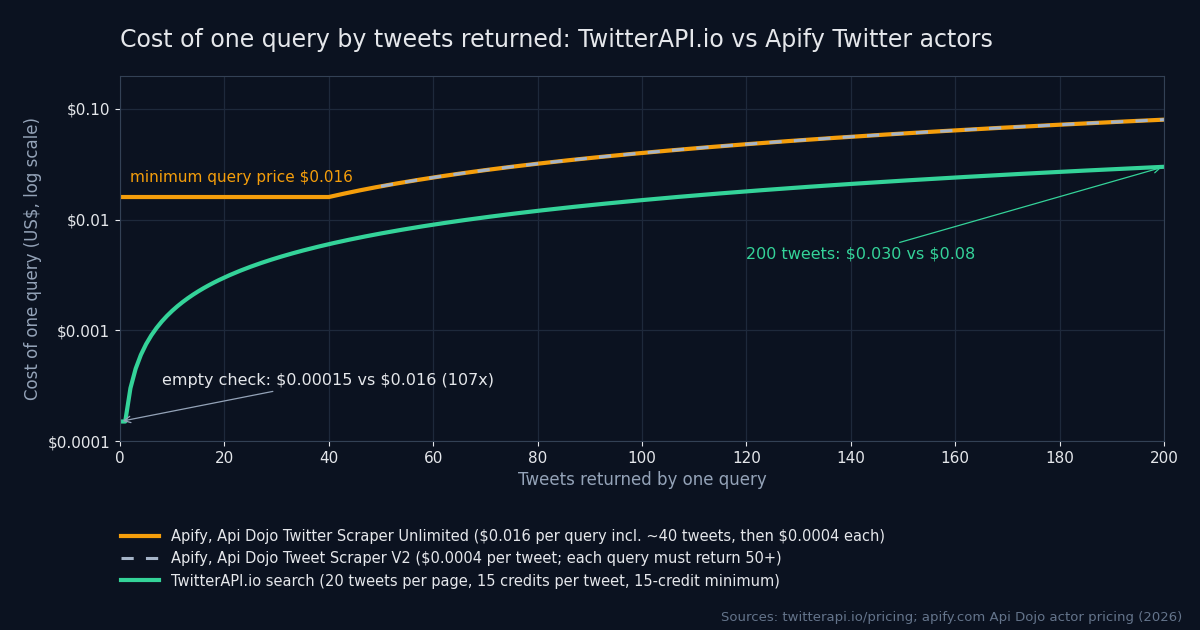
Price per data type
Each row prices one kind of data the way you would fetch it on each service, using the lower-priced Api Dojo actor that supports it. Green marks the lower price.
| Data | TwitterAPI.io | Apify (Api Dojo actors) |
|---|---|---|
| Keyword search that finds nothing (a monitoring check) | $0.00015 | $0.016 (Twitter Scraper Unlimited; one query, ~40 tweets included). Not supported on Tweet Scraper V2: each query must return at least 50 tweets |
| Keyword search returning 20 tweets | $0.003 (one full page, 15 credits per tweet) | $0.016 (Unlimited) |
| Keyword search, per 1,000 tweets on full pages | $0.15 | $0.40 (Tweet Scraper V2, $0.0004 per tweet; Unlimited works out the same past 40 tweets in small runs) |
| User timeline, per 1,000 tweets | $0.15 (15 credits per tweet, ~20 per page) | $0.40 (V2 with a twitterHandles input, or from: queries) |
| Tweets by ID or URL, each | $0.00015 (/twitter/tweets, 15 credits per tweet) | $0.05 per tweet URL plus $0.0004 per item (Unlimited); V2 does not fetch single tweets |
| Replies under one tweet, first ~40 | $0.006 (2 pages of 20) | $0.016 (Unlimited, conversation_id: query) |
| Single profile | $0.00018 | $0.004 per profile URL (User Scraper; at least 5 objects per run) |
| Profiles in bulk, per 1,000 | $0.01 (100+ per request, by user ID) | $4.00 ($0.004 per profile URL) |
| Followers / followings, per 1,000 | $0.01 (200 per page) | $0.016 per query (first ~70 included), then $0.0004 per user: about $0.39 per 1,000 |
| User search by keyword, 20 users | $0.0036 (18 credits per user) | $0.008 (first ~20 included) |
| Watching a fixed list of accounts in real time | Twitter Stream: $29 for 6 accounts (+$5 each extra), $79 for 20, $149 for 50, $299 for 150, $499 for 500 | No push product for new tweets; you schedule actor runs and pay per query |
Apify prices from the actor pages for Tweet Scraper V2 (apify.com/apidojo/tweet-scraper), Twitter Scraper Unlimited (apify.com/apidojo/twitter-scraper-lite) and Twitter User Scraper (apify.com/apidojo/twitter-user-scraper), paid-plan rates; Api Dojo states that free-plan users get different terms. Followers per 1,000 on Apify: ($0.016 + 930 × $0.0004) for 1,000 users = $0.388. TwitterAPI.io prices from our pricing page. Checked in 2026.
Apify Store also lists Twitter actors from other developers, each with its own price, minimums and limits. Some charge per result with no query event, others a minimum per query or per run; check how the actor bills a query that returns nothing and whether it adds platform usage. If you are comparing a specific actor, read its pricing tab and its minimum charge per query before you price a workload; the floor per query matters more than the headline per-1,000 figure for anything you run often.
We also publish Twitter actors in Apify Store ourselves, under the developer name kaitoeasyapi, for teams that would rather stay on Apify. They are billed by Apify at the prices on their listings, which are separate from the API prices on this page. Calling the API directly needs no Apify plan, and a search with no results returns an empty list.
What a month costs: ten workloads
Here are ten common jobs, each costed on both services with the arithmetic shown. Where Api Dojo's cheaper actor does not allow the job, the Apify column uses the actor that does, and where grouping queries lowers the Apify bill, it uses the grouped version.
- Keyword alert, checked every 60 seconds
- 43,200 checks a month; 90% find nothing, 10% find 3 tweets
- TwitterAPI.io38,880 × $0.00015 + 4,320 × $0.00045 = $7.78
- ApifyUnlimited: 43,200 × $0.016 = $691.20 (V2 rules out monitoring)
- Same alert, checked every 15 minutes
- 2,880 checks; same hit rate
- TwitterAPI.io2,592 × $0.00015 + 288 × $0.00045 = $0.52
- ApifyUnlimited: 2,880 × $0.016 = $46.08
- Research backfill, 1 million tweets
- full pages here; one large V2 run there
- TwitterAPI.io50,000 pages × $0.003 = $150.00 (Business plan: $78.95)
- ApifyV2: 1,000,000 × $0.0004 = $400.00
- 200 accounts, new posts every hour
- about 1 new tweet per account per hour; Apify grouped into 10 OR-queries of 20 handles
- TwitterAPI.io144,000 from: searches × $0.00015 = $21.60 (the same if grouped: billing is per tweet returned)
- ApifyUnlimited: 7,200 queries × $0.016 = $115.20 ($2,304 one handle per query)
- Enrich 100,000 profiles
- by user ID in batches of 100+ here; profile URLs there
- TwitterAPI.io100,000 × $0.00001 = $1.00 (or $18.00 one by one)
- ApifyUser Scraper: 100,000 × $0.004 = $400.00
- Export 1 million followers of one account
- 200 per page here; first ~70 included in the query there
- TwitterAPI.io5,000 pages × $0.002 = $10.00
- Apify$0.004 + $0.016 + 999,930 × $0.0004 = $399.99
- Followers of 1,000 accounts, ~500 each
- 500,000 followers in total
- TwitterAPI.io1,000 × 600 credits (two pages of 200 at 1 credit each, a last page of 100 at 2 each) = $6.00
- Apify1,000 × ($0.004 + $0.016 + 430 × $0.0004) = $192.00 (Api Dojo's own example: $0.19)
- Replies under 1,000 tweets, ~100 each
- 5 pages of 20 here; Unlimited runs of 5 queries or fewer there
- TwitterAPI.io1,000 × 5 × $0.003 = $15.00
- Apify1,000 × ($0.016 + 60 × $0.0004) = $40.00
- Look up 10,000 tweets by ID
- tweet IDs you already have; Apify in runs of 5 URLs or fewer
- TwitterAPI.io10,000 × $0.00015 = $1.50
- ApifyUnlimited: 10,000 × ($0.05 + $0.0004) = $504.00
- Real-time feed of 6 fixed accounts
- push delivery here; one OR-query run every minute there
- TwitterAPI.ioTwitter Stream Starter: $29.00
- ApifyUnlimited: 43,200 × $0.016 = $691.20
| Workload | Assumption | TwitterAPI.io | Apify |
|---|---|---|---|
| Keyword alert, checked every 60 seconds | 43,200 checks a month; 90% find nothing, 10% find 3 tweets | 38,880 × $0.00015 + 4,320 × $0.00045 = $7.78 | Unlimited: 43,200 × $0.016 = $691.20 (V2 rules out monitoring) |
| Same alert, checked every 15 minutes | 2,880 checks; same hit rate | 2,592 × $0.00015 + 288 × $0.00045 = $0.52 | Unlimited: 2,880 × $0.016 = $46.08 |
| Research backfill, 1 million tweets | full pages here; one large V2 run there | 50,000 pages × $0.003 = $150.00 (Business plan: $78.95) | V2: 1,000,000 × $0.0004 = $400.00 |
| 200 accounts, new posts every hour | about 1 new tweet per account per hour; Apify grouped into 10 OR-queries of 20 handles | 144,000 from: searches × $0.00015 = $21.60 (the same if grouped: billing is per tweet returned) | Unlimited: 7,200 queries × $0.016 = $115.20 ($2,304 one handle per query) |
| Enrich 100,000 profiles | by user ID in batches of 100+ here; profile URLs there | 100,000 × $0.00001 = $1.00 (or $18.00 one by one) | User Scraper: 100,000 × $0.004 = $400.00 |
| Export 1 million followers of one account | 200 per page here; first ~70 included in the query there | 5,000 pages × $0.002 = $10.00 | $0.004 + $0.016 + 999,930 × $0.0004 = $399.99 |
| Followers of 1,000 accounts, ~500 each | 500,000 followers in total | 1,000 × 600 credits (two pages of 200 at 1 credit each, a last page of 100 at 2 each) = $6.00 | 1,000 × ($0.004 + $0.016 + 430 × $0.0004) = $192.00 (Api Dojo's own example: $0.19) |
| Replies under 1,000 tweets, ~100 each | 5 pages of 20 here; Unlimited runs of 5 queries or fewer there | 1,000 × 5 × $0.003 = $15.00 | 1,000 × ($0.016 + 60 × $0.0004) = $40.00 |
| Look up 10,000 tweets by ID | tweet IDs you already have; Apify in runs of 5 URLs or fewer | 10,000 × $0.00015 = $1.50 | Unlimited: 10,000 × ($0.05 + $0.0004) = $504.00 |
| Real-time feed of 6 fixed accounts | push delivery here; one OR-query run every minute there | Twitter Stream Starter: $29.00 | Unlimited: 43,200 × $0.016 = $691.20 |
Two patterns stand out. First, anything you repeat on a schedule is dominated by Apify's per-query floor: on Api Dojo's Twitter Scraper Unlimited a check that finds nothing still costs $0.016, so a keyword alert costs about 89 times more there. Polling 200 accounts for new posts costs about 5 times less here, even with the handles grouped into OR-queries on Apify. Second, bulk data that TwitterAPI.io serves in large pages (200 followers, 100+ profiles per request) costs about 30 to 400 times less here, because the per-item price is $0.00001 against $0.0004 or $0.004. Large exports and reply threads cost about 2.7 times less here, since we bill $0.00015 for every tweet returned and Apify $0.0004.
None of the Apify figures include a plan fee. If Twitter data is all you run on Apify, the Starter plan's $19 a month covers $19 of usage, so a workload under $19 still costs $19, and anything unused at the end of the cycle expires. TwitterAPI.io has no plan to buy. Optional subscriptions ($29 to $1,499 a month) add extra credits for steady volume: counting the first-month bonus and 12 monthly returns, $1 buys 1.22× the credits on Builder and 1.9× on Business, which takes the 1-million-tweet backfill above from $150.00 to $78.95.
Alerts and monitoring: where the per-query floor costs most
Most Twitter workloads that run every day are some form of “tell me when something new appears”: brand mentions, a competitor's posts, a keyword, a cashtag. They have three properties that Apify's actors handle poorly. The checks are frequent, most of them find nothing, and you want the result in seconds, not after a run starts, finishes and writes a dataset.
On Apify, Tweet Scraper V2, the actor Api Dojo built for large jobs, rules the job out directly. Its page lists “No monitoring - Don't run the same query repeatedly in short intervals” and requires at least 50 tweets per query, which a minute-by-minute check rarely returns. Twitter Scraper Unlimited allows it, but every check is a $0.016 query event. You can run it on an Apify schedule (docs.apify.com/platform/schedules) (cron syntax, runs at least 10 seconds apart) and have a webhook (docs.apify.com/platform/integrations/webhooks/events) call you when a run succeeds, but the webhook reports that the run finished; your code still reads the dataset to find out whether anything new arrived.
On TwitterAPI.io there are two ways to do it. You can poll advanced search with since_id, paying $0.00015 for an empty check and $0.00015 per new tweet it returns. Or you can add a filter rule and let us run the search and push matches to your webhook or WebSocket, billed at the same rate as polling; see the webhooks guide. For a fixed list of accounts, Twitter Stream pushes new posts for a flat monthly price: $29 for 6 accounts (+$5 per extra account), $79 for 20, $149 for 50, $299 for 150 and $499 for 500.
import os, time, requests

KEY = os.environ["TWITTERAPI_IO_KEY"]
URL = "https://api.twitterapi.io/twitter/tweet/advanced_search"
QUERY = '"your brand" -filter:retweets'  # any advanced-search query
since_id = None  # newest tweet ID already seen

def fetch(params):
    while True:
        r = requests.get(URL, headers={"X-API-Key": KEY},
                         params=params, timeout=30)
        if r.status_code != 429:
            return r
        time.sleep(5)

while True:
    q = QUERY + (f" since_id:{since_id}" if since_id else "")
    params = {"query": q, "queryType": "Latest"}
    newest, complete = since_id, True
    while True:
        r = fetch(params)
        if not r.ok:
            print("check failed:", r.status_code)  # retried on the next loop
            complete = False
            break
        body = r.json()
        for t in body.get("tweets", []):
            print(t["author"]["userName"], t["url"])
            if newest is None or int(t["id"]) > int(newest):
                newest = t["id"]
        # The first run reads one page to set a starting point. Later runs
        # follow next_cursor, so a burst of more than 20 new tweets in a
        # minute is not skipped.
        if since_id is None or not body.get("has_next_page") or not body.get("next_cursor"):
            break
        params["cursor"] = body["next_cursor"]
    if complete:  # a failed check repeats alerts next time, never skips them
        since_id = newest
    # billed per tweet returned: an empty check is the 15-credit minimum ($0.00015)
    time.sleep(60)  # 43,200 checks a month
At one check a minute, that loop costs about $7.78 a month if one check in ten finds three tweets. The same schedule on Twitter Scraper Unlimited is 43,200 query events, $691.20, before any tweets beyond the first 40 per query. Checking every 15 minutes brings Apify to $46.08 and TwitterAPI.io to about $0.52. A busier keyword costs more here, since every returned tweet is billed: at 20 new tweets a minute the TwitterAPI.io loop is $129.60 a month, still below the $691.20 for the query events alone on Apify.
Features and limits
| TwitterAPI.io | Apify | |
|---|---|---|
| What you buy | A Twitter/X data API: you call an endpoint, it answers with JSON | A cloud platform: you start an actor (a scraper someone published), it writes results to a dataset you read back |
| Billing unit | Per item returned (15 credits per tweet, 18 per profile), 15-credit minimum per request | Per event, set by each actor's developer (per query, per result, per profile URL); runs that charge for platform usage add compute units at $0.13–$0.20 per CU |
| Monthly commitment | None: pay as you go, no minimum spend | Free plan, or Starter $19, Scale $199, Business $999 a month, each including the same amount of usage |
| Free tier | $1, no card, if the account passes the invisible bot check (one per person and network); valid 31 days; every read endpoint at 0.2 requests/s | $5 of usage a month, no card; the Api Dojo Twitter actors run only in Demo Mode on it (5 runs a month, 10 items each), and V2 cannot be called by API |
| Credit expiry | Purchased credits never expire; bonus, monthly-return and sign-up credits 31 days | Unused prepaid usage expires at the end of each billing cycle |
| Smallest real query | $0.00015 | $0.016 (Unlimited); V2 needs at least 50 tweets per query ($0.02) |
| Throughput | 20 requests/s once you have paid (0.2 before), up to 400 tweets/s on full pages; 50 requests/s on Scale, 500 on Business, up to 1,000 on request | One concurrent run on the tweet actors (1–2 on User Scraper), up to 5 batched queries on V2; 30–80 tweets/s per run (developer's own figures); platform runs API allows 400 requests/s |
| Monitoring and alerts | Filter rules pushed by webhook or WebSocket, billed like polling search; Twitter Stream for fixed accounts | V2's page says "No monitoring"; schedules (cron, runs at least 10 s apart) and webhooks on run events |
| Coverage | 76 endpoints in the public API reference: search, timelines, tweets by ID, replies, quotes, retweeters, profiles, followers, verified followers, lists, communities, trends, Spaces, write actions | Search, profiles, lists, tweet URLs, replies (Unlimited), followers, following and retweeters (User Scraper); no write actions in these actors |
| Who maintains the scraper | TwitterAPI.io, first-party support | Each actor's developer; Apify hosts the run, the developer handles changes on X's side |
| Auth | X-API-Key header | Authorization: Bearer <Apify token> |
Apify figures from its pricing (apify.com/pricing), Store pricing (docs.apify.com/platform/actors/running/actors-in-store), API (docs.apify.com/api/v2), run-sync (docs.apify.com/api/v2/act-run-sync-get-dataset-items-post), schedules (docs.apify.com/platform/schedules) and MCP (docs.apify.com/platform/integrations/mcp) documentation and the three Api Dojo actor pages; TwitterAPI.io from our pricing, rate limits and MCP server pages. Checked in 2026.
Throughput and run limits
An Apify actor run is a container that pages through X for you. Api Dojo reports 30 to 80 tweets a second per run (49 on search in its own benchmark table), and both of its tweet actors allow one run at a time; V2 accepts up to 5 queries per run. Apify's platform also caps concurrent runs by plan (5 on Free, 32 on Starter, 128 on Scale, 256 on Business), and its API allows 400 run requests a second, so the actor is the bottleneck, not the API.
TwitterAPI.io is limited per request instead: 0.2 requests a second before your first payment, 20 after it, 50 on the Scale plan and 500 on Business, with up to 1,000 on request. At 20 requests a second and 20 tweets a page, that is a ceiling of 400 tweets a second, or about 1.7 million search pages a day. Hitting the limit returns HTTP 429 with no Retry-After header; the code on this page backs off and retries.
Synchronous calls and timeouts
Apify's run-sync-get-dataset-items (docs.apify.com/api/v2/act-run-sync-get-dataset-items-post) endpoint starts a run and returns its dataset in one HTTP call, but if the run takes longer than 300 seconds you get a 408 and must fetch the dataset separately. Large jobs are usually started asynchronously and read back when done. TwitterAPI.io calls are ordinary request and response: each page comes back on its own, so a large job is a loop you can stop, resume from a cursor or spread across workers.
AI agents and MCP
Apify's MCP server (docs.apify.com/platform/integrations/mcp) at mcp.apify.com lets an agent search Apify Store and run actors, so one connection reaches scrapers for many websites, each billed at its own actor price. TwitterAPI.io's MCP server exposes 12 read-only Twitter tools (search, users, followers, replies, trends); it is open source under the MIT license on GitHub and runs locally as an npx package. For an agent that works across For an agent that searches X a lot, a $0.00015 empty search keeps exploratory queries cheap, where each query on Api Dojo's Twitter Scraper Unlimited costs $0.016.
Coverage
Between them, Api Dojo's three actors cover search with advanced operators, profiles, lists, tweet URLs, replies through conversation_id: queries, followers, following and retweeters. TwitterAPI.io adds verified followers, quotes, thread context, a dedicated mentions endpoint, communities, trends, Spaces details and write actions (posting, liking, following through an account you log in), plus filter rules and account monitoring. Neither side needs your X login for reads.
The same request on both
On Apify you send actor input as JSON and get back the dataset; on TwitterAPI.io you call the endpoint and page with a cursor. Here is the same search on both:
# Apify: start Tweet Scraper V2 and wait for its dataset (one call, up to 300 s)
curl -X POST "https://api.apify.com/v2/acts/apidojo~tweet-scraper/run-sync-get-dataset-items" \
  -H "Authorization: Bearer $APIFY_TOKEN" \
  -H "Content-Type: application/json" \
  -d '{"searchTerms": ["from:nasa"], "sort": "Latest", "maxItems": 100}'

# TwitterAPI.io: the same search, one page (up to 20 tweets) per request
curl -H "X-API-Key: $TWITTERAPI_IO_KEY" \
"https://api.twitterapi.io/twitter/tweet/advanced_search?query=from%3Anasa&queryType=Latest"| Apify (Api Dojo) input | TwitterAPI.io equivalent |
|---|---|
searchTerms: ["…"] | /twitter/tweet/advanced_search with query |
sort: "Latest" | "Top" | queryType=Latest | Top |
maxItems | Loop on next_cursor until you have enough (see the adapter) |
twitterHandles | from:handle search, or /twitter/user/last_tweets?userName= |
startUrls (tweet URLs) | /twitter/tweets?tweet_ids= with the IDs from the URLs |
conversation_id:… query | /twitter/tweet/replies?tweetId= |
getFollowers / getFollowing | /twitter/user/followers or /twitter/user/followings, pageSize=200 |
twitterUserIds | /twitter/user/batch_info_by_ids?userIds= (100+ at $0.01 per 1,000) |
| Auth: Authorization: Bearer <token> | X-API-Key: <key> |
Output fields
The tweet objects are closer than you might expect, because both mirror the shape of X's own data. In Api Dojo's documented output and in TwitterAPI.io's responses these fields share a name: id, url, text, createdAt, likeCount, retweetCount, replyCount, quoteCount, bookmarkCount, lang, isReply, and an author object with userName, followers, following and isBlueVerified. Apify also returns twitterUrl; use url instead. The envelope is the real difference: an actor run returns a flat array, TwitterAPI.io returns tweets (or followers) with has_next_page and next_cursor. Diff a sample of each endpoint you use before you switch.
An adapter that returns what an actor returns
If the rest of your pipeline expects an Apify dataset, keep it and replace only the call. These functions take Tweet Scraper-style input, page through TwitterAPI.io, back off on 429 and return a flat list:
import os, time, requests

KEY = os.environ["TWITTERAPI_IO_KEY"]
BASE = "https://api.twitterapi.io"

def get(path, params, retries=5):
    """GET with exponential back-off on 429."""
    for attempt in range(retries + 1):
        r = requests.get(BASE + path, headers={"X-API-Key": KEY},
                         params=params, timeout=30)
        if r.status_code != 429 or attempt == retries:
            r.raise_for_status()
            return r.json()
        time.sleep(2 ** attempt)

def search_tweets(search_terms, sort="Latest", max_items=100):
    """Takes Tweet Scraper-style input and returns a flat list of
    tweets, like an actor's dataset. max_items applies per term."""
    items = []
    for term in search_terms:
        cursor, got = "", 0
        while got < max_items:
            params = {"query": term, "queryType": sort}  # Latest or Top
            if cursor:
                params["cursor"] = cursor
            body = get("/twitter/tweet/advanced_search", params)
            page = body.get("tweets", [])[: max_items - got]
            items.extend(page)
            got += len(page)
            if not page or not body.get("has_next_page") or not body.get("next_cursor"):
                break
            cursor = body["next_cursor"]
    return items

def followers(user_name, max_items=10_000):
    """Replaces User Scraper with getFollowers: 200 per page, 1 credit each."""
    items, cursor = [], ""
    while len(items) < max_items:
        params = {"userName": user_name, "pageSize": 200}
        if cursor:
            params["cursor"] = cursor
        body = get("/twitter/user/followers", params)
        page = body.get("followers", [])
        items.extend(page)
        if not page or not body.get("has_next_page") or not body.get("next_cursor"):
            break
        cursor = body["next_cursor"]
    return items[:max_items]

if __name__ == "__main__":
    for t in search_tweets(["from:nasa"], max_items=40):
        print(t["id"], t["createdAt"], t["author"]["userName"], t["text"][:60])
Switching checklist
- List your actor runs for a month: which actor, how many queries, how many items. Apify's billing page shows the events you were charged for.
- Separate scheduled checks from one-off exports. Scheduled checks are where the per-query floor costs most; move them first.
- Map each actor input to an endpoint with the table above. For accounts you poll, use
from:handle since_id:searches, or Twitter Stream if you need push delivery. - Replace
maxItemswith a cursor loop, and store the last cursor or the newest tweet ID so a job can resume. - Diff the tweet and user objects for one sample per endpoint and adjust any fields your parser reads beyond the shared ones.
- Make a first payment before load testing: unpaid accounts are limited to 0.2 requests a second, paid ones to 20.
- Run both side by side for a few days and compare row counts and bills before you cancel the Apify plan. Remember unused prepaid Apify usage expires at the end of the cycle.
Where TwitterAPI.io is the better pick
- You run alerts, monitoring or polling, where an empty check is $0.00015 instead of $0.016 on Api Dojo's Unlimited actor.
- You export profiles or followers in volume (about 30 to 400 times less per item), or tweets (about 2.7 times less than Tweet Scraper V2; see our historical scraping guide).
- You need data in your own app with request-and-response latency, not after a run finishes.
- You need push delivery: filter rules by webhook or WebSocket, or Twitter Stream for fixed accounts.
- You do not want a monthly plan, or credits that expire at the end of each cycle.
Price your own workload
Apify is not in our calculator, because its price depends on the actor you pick. To price TwitterAPI.io against the per-call APIs, use the calculator on our Twitter API price comparison. For an Apify actor, the formula is: queries × the actor's query price + items beyond the included ones × its item price, plus a plan fee if your usage is below the plan's included amount. For our full rate card see Twitter API pricing. If most of your requests return full pages of tweets (bulk exports, full timelines), on the Business plan a 20-tweet page costs $0.0016 after 12 monthly payments ($0.002 in the first month).
Both against the official X API
The official API is the third option and the most expensive for reading. X now bills per resource read with no subscriptions: according to its pricing documentation, $0.005 per post read, $0.010 per user read and $0.010 per follower or following read; creating a post costs $0.015, or $0.20 if it contains a URL. Pay-per-use is capped at 3 million post reads per monthly billing cycle, above which you need an Enterprise agreement. New accounts get $20 of credits when they save a first eligible card, plus a match of the first auto-recharge up to $50.
| 1 million tweets read | Cost | Relative |
|---|---|---|
| Official X API ($0.005 per post) | $5,000.00 | 33× |
| Apify, Tweet Scraper V2 ($0.0004 per tweet) | $400.00 | 2.7× |
| TwitterAPI.io, pay as you go ($0.00015 per tweet) | $150.00 | 1× |
| TwitterAPI.io, Business plan | $78.95 | 0.53× |
The Business plan row assumes every extra credit from the first-month bonus and 12 monthly returns is used before it expires.
For 1 million followers the gap is wider: $10,000 on the official API at $0.010 per follower read, about $400 on Api Dojo's User Scraper and $10 here. The official API still makes sense when you need a contract with X, posting through X's own consent screen, or data only an authenticated first-party app can read. See TwitterAPI.io vs the official X API for the full comparison.
Quick decision guide
| If your main workload is | Better fit | Why |
|---|---|---|
| Keyword alerts, brand monitoring, social listening | TwitterAPI.io | $0.00015 vs $0.016 (Unlimited) per empty check; V2 rules out monitoring |
| New posts from a list of accounts | TwitterAPI.io | from: searches billed per new tweet ($21.60 vs $115.20 for 200 accounts hourly), or Twitter Stream push |
| Large keyword backfills | TwitterAPI.io | $0.15 vs $0.40 per 1,000 tweets ($0.079 on our Business plan) |
| Profile enrichment | TwitterAPI.io | $0.01 vs $4.00 per 1,000 profiles |
| Follower graphs | TwitterAPI.io | $0.01 vs about $0.39 per 1,000 |
| Replies and single tweets | TwitterAPI.io | $0.00015 per tweet by ID vs $0.05 per tweet URL; $0.006 vs $0.016 for ~40 replies |
| AI agent that researches X | TwitterAPI.io | Cheap empty searches, 12 Twitter tools |
Questions
- Is TwitterAPI.io cheaper than Apify for Twitter data?
- Against Api Dojo's actors, for every data type we priced, yes. A keyword search that finds nothing costs $0.00015 against $0.016 for the smallest query on Twitter Scraper Unlimited, and a full page of 20 tweets $0.003. Full search pages work out to $0.15 per 1,000 tweets against $0.40 on Tweet Scraper V2; profiles cost $0.01 per 1,000 in bulk against $4.00, and followers $0.01 per 1,000 against about $0.39. Apify Store has other Twitter actors from other developers at other prices, so check the pricing tab of the actor you would use.
- Can I use Apify's Tweet Scraper for keyword alerts or monitoring?
- Not Tweet Scraper V2: its page lists "No monitoring - Don't run the same query repeatedly in short intervals" and requires each query to return at least 50 tweets. Api Dojo points small queries, single tweets and replies to Twitter Scraper Unlimited, where every query costs $0.016 including about 40 tweets. Checked every minute that is $691.20 a month for one keyword. On TwitterAPI.io an empty check costs $0.00015, and filter rules can push matches to you by webhook or WebSocket.
- Why does a small query cost $0.016 on Apify's Twitter Scraper Unlimited?
- Twitter Scraper Unlimited charges a $0.016 query event that includes the first two pages (about 40 tweets), then $0.0004 per extra tweet in runs of up to 5 queries, rising to $0.002 per tweet in runs of more than 100 queries. A query that finds 0 tweets and one that finds 40 cost the same. TwitterAPI.io bills $0.00015 per tweet returned, with a $0.00015 minimum per request and no per-request cap.
- Does Apify's free plan work for Twitter scraping?
- Only for testing. The free plan includes $5 of usage a month, but Api Dojo's Twitter actors run in Demo Mode on it: 5 runs a month, 10 items each, and Tweet Scraper V2 cannot be called through the API. Real use needs a paid plan from $19 a month. TwitterAPI.io's free $1 (if the account passes the invisible bot check (one per person and network); 31 days, no card) works on every read endpoint, at 0.2 requests a second until your first payment.
- Do Apify credits expire?
- Yes. Each plan's prepaid usage is for that billing cycle; unused usage is not rolled over and expires at the end of the cycle. On TwitterAPI.io, credits you buy never expire. Bonus credits, monthly credit returns and the free sign-up credit last 31 days.
- Does TwitterAPI.io publish actors on Apify too?
- Yes. We also publish Twitter actors in Apify Store, under the developer name kaitoeasyapi, for teams that want to stay on Apify. They are billed through Apify at the prices on their listings. If you call our API directly instead, you pay our API prices and need no Apify plan.
- Is the data the same?
- Both read public X data, and the tweet objects are close: id, url, text, createdAt, likeCount, retweetCount, replyCount, quoteCount, lang and an author object with userName and followers appear under the same names in Api Dojo's output and in TwitterAPI.io's. The envelope differs: an Apify run returns a flat array of items, TwitterAPI.io returns pages of up to 20 tweets with has_next_page and next_cursor. A search with no results returns an empty tweets list.
- How do I move an Apify actor call to TwitterAPI.io?
- Map the actor input to an endpoint: searchTerms to advanced_search with query and queryType, twitterHandles to a from: search or the user timeline, tweet URLs to /twitter/tweets with tweet_ids, getFollowers to /twitter/user/followers. Replace maxItems with a cursor loop that stops at your limit. The adapter on this page returns the same flat list an actor run returns.
- Can I use Apify and TwitterAPI.io together?
- Yes. A common split is TwitterAPI.io for alerts, monitoring and anything your app calls on demand, and Apify for scraping other websites. They solve different problems, so running both is a reasonable end state.
- Which is faster for a large export?
- Api Dojo reports 30 to 80 tweets a second per run, and its tweet actors allow one concurrent run. TwitterAPI.io allows 20 requests a second once you have paid, which is up to 400 tweets a second on full search pages, and 500 requests a second on the Business plan.
- Is either one an official X API?
- No. Both read public X data without an X developer account. The official X API is billed per resource read: $0.005 per post and $0.010 per user, capped at 3 million post reads a month before an Enterprise agreement.
Sources
- TwitterAPI.io: pricing, rate limits, Twitter Stream, MCP server, API docs.
- Apify platform: pricing (apify.com/pricing), Store actor pricing models (docs.apify.com/platform/actors/running/actors-in-store), API reference and rate limits (docs.apify.com/api/v2), run-sync endpoint (docs.apify.com/api/v2/act-run-sync-get-dataset-items-post), schedules (docs.apify.com/platform/schedules), webhook events (docs.apify.com/platform/integrations/webhooks/events), MCP server (docs.apify.com/platform/integrations/mcp).
- Api Dojo actors: Tweet Scraper V2 (apify.com/apidojo/tweet-scraper), Twitter Scraper Unlimited (apify.com/apidojo/twitter-scraper-lite), Twitter User Scraper (apify.com/apidojo/twitter-user-scraper).
- Our own Apify actors: kaitoeasyapi in Apify Store.
- Official X API: pricing documentation.
- All figures checked in 2026. Actor prices are set by their developers and change; check the actor's pricing tab before you commit to a large job.