Real-Time Event Impact with Twitter Data
Real-Time Event Impact with Twitter Data
Twitter is a goldmine for real-time insights. Whether it's a product launch, a PR crisis, or a viral trend, Twitter data lets you track public reactions as they happen. Instead of waiting hours for reports, you can now monitor sentiment, engagement, and key influencers in seconds. Here's what you need to know:
- Real-time monitoring outpaces traditional methods by detecting trends instantly.
- Tools like TwitterAPI.io make data collection easy with REST APIs for historical data and WebSocket streams for live tweets.
- Sentiment analysis helps classify tweets as positive, negative, or neutral, offering a snapshot of public opinion.
- Visual tools like heat maps and line graphs turn raw data into actionable insights.
With fast, cost-effective pricing starting at $0.15 per 1,000 tweets, TwitterAPI.io simplifies event tracking for businesses, researchers, and brands. Learn how to set up filters, manage data streams, and analyze events in real time.
Twitter Sentiment Analysis Machine Learning Project | Live Twitter API | NLP Series | Project#9
sbb-itb-9cf686c
Setting Up Twitter Data Streams with TwitterAPI.io
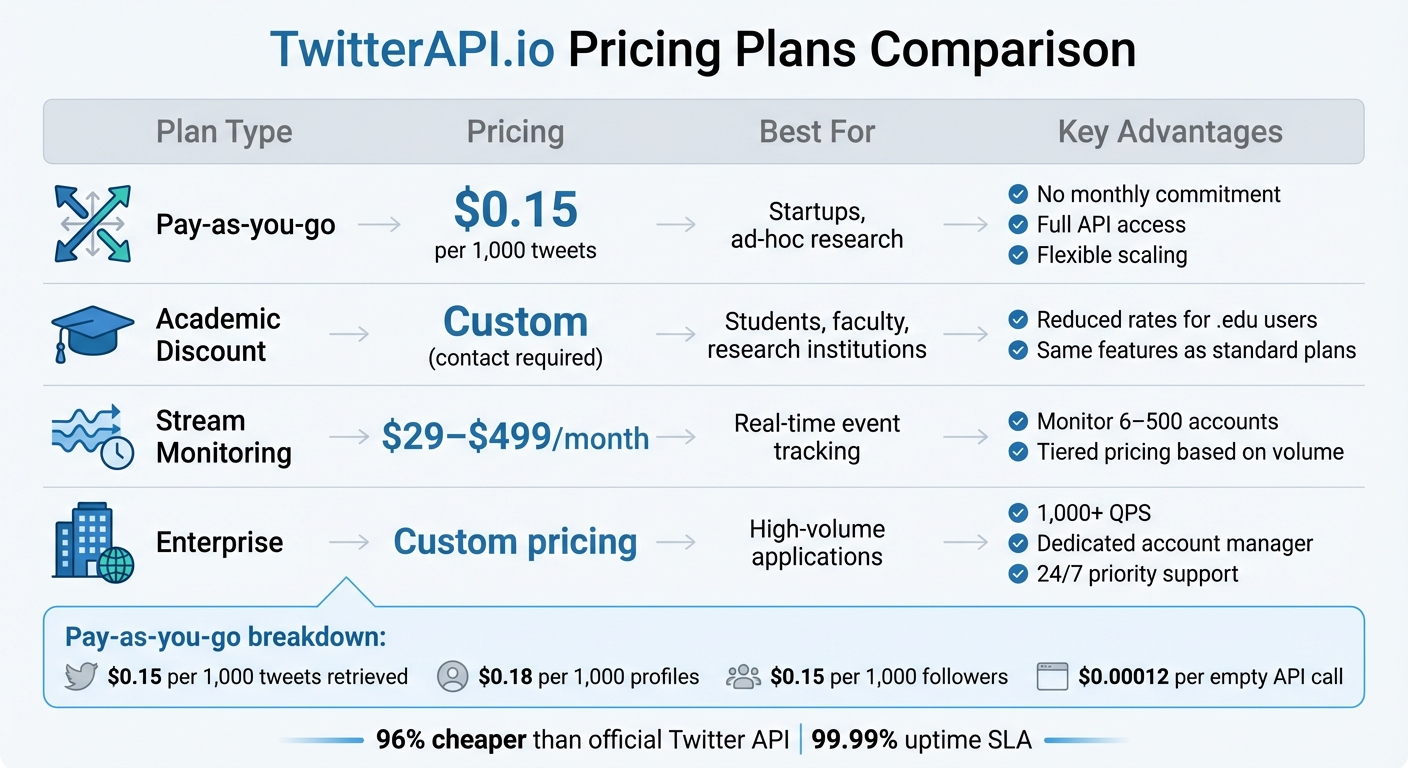
TwitterAPI.io Pricing Plans and Features Comparison
Getting started with TwitterAPI.io is quick and straightforward. In just a few minutes, you can sign up, grab your API key, and begin collecting data. This simple process allows you to dive straight into working with real-time data without unnecessary delays.
The platform provides two main ways to access Twitter data:
- Historical Data Retrieval: REST API endpoints let you pull past tweets, user profiles, and engagement stats. Response times are typically between 500 and 700 milliseconds.
- Real-Time Monitoring: WebSocket connections stream live tweets directly to your application. The average latency is about 1.2 seconds, ensuring near-instantaneous updates. The WebSocket endpoint (wss://ws.twitterapi.io/twitter/tweet/websocket) continuously delivers tweets matching your filters as soon as they're posted.
Setting Up Real-Time Streams
Before starting a stream, you'll need to define filter rules. These could include:
- Keywords (e.g., "machine learning")
- Hashtags (e.g., #AI)
- Specific user handles (e.g., from:elonmusk)
You can set these rules through the web interface or API. Once configured, use your API key in the HTTP headers to connect. The stream provides three types of events:
- "Connected" Events: Sent when the connection is successfully established.
- "Ping" Events: Periodic signals (every 40–90 seconds) to verify the connection is active.
- "Tweet" Events: These include full JSON payloads with tweet text, author details, timestamps, and engagement metrics.
While general filters are ready to go immediately, setting up specific account monitoring may take up to 20 minutes.
"Finally, an API that just works. No approval hassles, no rate limit nightmares. Pure gold." - Sarah Johnson, CTO, DataInsights
Infrastructure and Developer Tools
TwitterAPI.io is built to handle high demand, supporting over 1,000 requests per second with a 99.99% uptime SLA. Its global network spans 12+ regions, ensuring reliable performance. For Python developers, the websocket-client library simplifies integration, while the platform also provides Swagger documentation and Postman collections to speed up the setup process.
New users can test both REST and WebSocket endpoints risk-free, with free credits ranging from $0.10 to $1.00. There's no need to provide a credit card, making it easy to explore the platform before committing.
TwitterAPI.io Pricing Plans Comparison
TwitterAPI.io offers flexible pricing options to suit a variety of needs, from small projects to large-scale operations. Its pay-as-you-go model is especially cost-efficient, charging:
- $0.15 per 1,000 tweets retrieved
- $0.18 per 1,000 profiles
- $0.15 per 1,000 followers
Even if no tweets match your query, the cost for empty API calls is just $0.00012, allowing for affordable exploratory searches. Compared to the official Twitter API, this pricing is roughly 96% cheaper.
| Plan Type | Pricing | Best For | Key Advantages |
|---|---|---|---|
| Pay-as-you-go | $0.15 per 1,000 tweets | Startups, ad-hoc research | No monthly commitment, full API access, flexible scaling |
| Academic Discount | Custom (contact required) | Students, faculty, research institutions | Reduced rates for .edu users, same features as standard plans |
| Stream Monitoring | $29–$499/month | Real-time event tracking | Monitor 6–500 accounts, tiered pricing based on volume |
| Enterprise | Custom pricing | High-volume applications | 1,000+ QPS, dedicated account manager, 24/7 priority support |
For those needing continuous account monitoring, stream subscription plans range from $29/month (up to 6 accounts) to $499/month (up to 500 accounts). The Enterprise Plus tier, designed for large-scale tracking, costs about $1 per monitored account per month, making it a budget-friendly option for high-volume needs. Academic users can take advantage of special pricing by emailing from a .edu address with a project description.
Data Collection Techniques for Real-Time Events
To gather Twitter data during live events, you need precise filters that focus on the most relevant content. Using TwitterAPI.io, you can filter streams by keywords, hashtags, specific user IDs, and locations. For instance, when monitoring a product launch, you might combine the company's Twitter handle (e.g., from:apple) with related hashtags like #iPhone16 and keywords such as "new features." These filters can be applied using the web interface or directly through Twitter API calls.
One standout feature is metadata expansions, which provide additional context without requiring extra API requests. Instead of just receiving a tweet ID, you can access the full author profile via the includes field. By requesting user_fields like public_metrics, you can quickly identify influential users. Similarly, the geo.place_id expansion brings in location data, including coordinates and place names, which is invaluable for mapping how events unfold geographically. For visual tracking, attachments.media_keys allows you to retrieve metadata for images and videos, helping you understand which types of content are driving engagement during trending moments or breaking news. To handle the spikes in activity during these events, efficient data ingestion strategies are a must.
Managing High-Volume Data Ingestion
When monitoring viral events or breaking news, tweet volumes can skyrocket from hundreds to thousands per minute. To manage this influx, robust buffering strategies are essential. After filtering for relevant tweets, message queues can buffer incoming data to prevent system overload.
For sustained monitoring, it's critical to request only the necessary tweet_fields, user_fields, and place_fields. Stripping out unneeded data reduces payload sizes and improves processing speed. For example, during the 2024 Super Bowl, a sports analytics team cut their data pipeline latency by 40% by focusing on fields like retweet_count, like_count, and author_id, while excluding unused media attachments.
"TwitterAPI.io saved us months of development time. The data quality and speed are unmatched."
- Alex Chen, AI Researcher, Stanford
WebSocket connections are especially valuable for live events. They allow the server to push data directly to your application with millisecond-level transmission, eliminating the need for repeated HTTP requests. For enterprise-level operations, TwitterAPI.io also offers custom rate limits, dedicated account management, and priority support to ensure your infrastructure can keep up with the demands of real-time events.
Real-Time Sentiment Analysis on Twitter Data
To gauge public sentiment, classify tweets as positive, negative, or neutral. Start by cleaning the text using regular expressions to strip out unnecessary elements like usernames, URLs, hashtags, and retweet markers. Once cleaned, tokenize the text into individual words and filter out common stop words using tools like NLTK or spaCy.
Next, convert all text to lowercase for consistency. Use a library like TextBlob to calculate polarity scores, which range from –1 (negative sentiment) to 1 (positive sentiment). To track trends, aggregate these sentiment scores over 60-second intervals, allowing you to observe changes in public opinion over time . The streaming method you select will directly impact how quickly you can detect shifts in sentiment.
REST Polling vs. WebSocket Streaming
When streaming tweets, you can choose between REST polling and WebSocket streaming, each with distinct advantages and limitations.
| Feature | REST Polling | WebSocket Streaming |
|---|---|---|
| Communication | Unidirectional (Request-Response) | Bi-Directional (Full-Duplex) |
| Latency | Higher (delays of seconds) | Millisecond-level transmission |
| Throughput | Limited by polling frequency | Continuous real-time flow |
| Error Handling | Requires retry logic for each request | Persistent connection with automatic reconnection |
| Best For | Historical analysis, low-volume monitoring | Live events, breaking news, viral trends |
For scenarios like live events or viral moments where sentiment can shift rapidly, WebSocket streaming is the better choice. Its low latency and continuous data flow make it ideal for capturing real-time public reactions. Using tools like TwitterAPI.io's WebSocket connections ensures your sentiment analysis stays up-to-the-minute, avoiding the delays associated with polling.
Visualizing Event Impact with Key Metrics
Once you’ve analyzed sentiment data, the next step is turning it into visual insights that highlight the dynamics of your event. These visuals, built on real-time sentiment analysis, help uncover audience trends and behaviors in greater depth.
Use line graphs to track tweet volume spikes, layering sentiment ratios with stacked bar charts or pie charts to show peak interest and shifts in public opinion. For a geographic perspective, location heat maps can pinpoint where conversations are happening, offering insight into regional differences in audience reactions. A hashtag cloud is another valuable tool, showcasing trending terms to uncover related sub-topics and emerging narratives.
To identify key players, try network graphs that map retweet chains and mentions. Focus on users with high Betweenness Centrality - these are the connectors who act as bridges between different communities, amplifying your event’s reach far beyond their immediate followers.
| Metric | Formula | What It Reveals |
|---|---|---|
| Amplification Rate | (Shares / Impressions) × 100 | How shareable your event content is |
| Engagement Rate | (Total Engagements / Impressions) × 100 | How much the audience interacts with content |
| Reply Rate | (Replies / Impressions) × 100 | The level of discussion and community interaction |
Before diving into visualizations, make sure to clean your data by removing bots and duplicate accounts. This step ensures your analysis reflects genuine audience engagement. Then, match your visualization method to the type of data you’re working with: line graphs for tracking trends over time, heat maps for geographic insights, and network graphs for mapping influence pathways. These tools help transform scattered data into actionable insights, giving you a clearer picture of your event’s impact.
Best Practices for Using TwitterAPI.io in Real-Time Event Analysis
Setting up your streams correctly from the start can save you a lot of time and effort. One key step is to validate your filter rules using the /v1/twitter/filter-rules/validate endpoint before creating them. This avoids wasting credits on rules that don't work as expected.
When choosing a polling tier, match it to the urgency of your event. For live events or crises, the Turbo tier streams data every 0.5 seconds and uses about 30,000 credits per rule per day. For regular brand monitoring, a 1-minute interval (1,500 credits per rule per day) is usually sufficient. For less time-sensitive tasks like market research, the Relaxed tier with 10-minute intervals is more efficient.
It's also important to use an exponential backoff reconnection loop for WebSocket connections. Start with a 1-second delay and double it with each retry, up to a maximum of 30 seconds. This prevents overwhelming the server during network issues.
"The key difference from a polling pipeline: you're not asking 'what happened?' on a schedule. You're receiving events the moment they occur." - Thomas Shultz, Head of Data at ScrapeBadger
For webhook setups, the delivery ID header (e.g., X-ScrapeBadger-Delivery-Id) is essential for avoiding duplicate tweet processing during automatic retries. If you notice missing data, check the logs endpoint for the specific rules to verify if they were active during the time in question.
By combining these practices with existing streaming and data collection methods, you can streamline your real-time event analysis workflow. Below is an example that puts these strategies into action.
Code Examples for Event Monitoring
Here’s a Python example that follows these best practices for live event monitoring. It tracks tweets about a product launch, filters them by engagement levels, and triggers alerts for high engagement spikes:
import requests
import time
from datetime import datetime

API_KEY = "your_api_key_here"
BASE_URL = "https://api.twitterapi.io/v1"

# Validate your search query before creating a rule
def validate_query(query):
    response = requests.post(
        f"{BASE_URL}/twitter/filter-rules/validate",
        headers={"Authorization": f"Bearer {API_KEY}"},
        json={"query": query}
    )
    return response.json()

# Create a filter rule for your event
def create_filter_rule(query, tier="turbo"):
    response = requests.post(
        f"{BASE_URL}/twitter/filter-rules",
        headers={"Authorization": f"Bearer {API_KEY}"},
        json={
            "query": query,
            "tier": tier,
            "name": "product_launch_monitor"
        }
    )
    return response.json()

# Poll for new tweets with exponential backoff on errors
def poll_tweets(rule_id, min_engagement=100):
    backoff_seconds = 1
    max_backoff = 30
    processed_ids = set()

    while True:
        try:
            response = requests.get(
                f"{BASE_URL}/twitter/filter-rules/{rule_id}/tweets",
                headers={"Authorization": f"Bearer {API_KEY}"}
            )

            if response.status_code == 200:
                tweets = response.json().get("data", [])
                backoff_seconds = 1  # Reset on success

                for tweet in tweets:
                    # Use delivery ID for idempotency to prevent duplicate processing
                    delivery_id = response.headers.get("X-ScrapeBadger-Delivery-Id")

                    if delivery_id in processed_ids:
                        continue
                    processed_ids.add(delivery_id)

                    engagement = (tweet.get("like_count", 0) +
                                  tweet.get("retweet_count", 0) +
                                  tweet.get("reply_count", 0))

                    if engagement >= min_engagement:
                        print(f"[{datetime.now()}] High engagement detected!")
                        print(f"Tweet ID: {tweet['id']}")
                        print(f"Engagement: {engagement}")
                        print(f"Text: {tweet['text'][:100]}...")
                        # Trigger your alert system here

                time.sleep(0.5)  # Turbo tier polling interval

            else:
                print(f"Error {response.status_code}, backing off...")
                time.sleep(backoff_seconds)
                backoff_seconds = min(backoff_seconds * 2, max_backoff)

        except Exception as e:
            print(f"Connection error: {e}")
            time.sleep(backoff_seconds)
            backoff_seconds = min(backoff_seconds * 2, max_backoff)

# Run the monitor
query = "(#ProductLaunch OR @YourBrand) -is:retweet"
validation = validate_query(query)

if validation.get("valid"):
    rule = create_filter_rule(query, tier="turbo")
    poll_tweets(rule["id"], min_engagement=100)
else:
    print(f"Invalid query: {validation.get('error')}")
This example handles query validation, avoids duplicate processing, and manages errors with exponential backoff. You can tweak the min_engagement threshold and polling interval to suit your event's scale and the tier you’re using.
Conclusion and Key Takeaways
Twitter data offers a powerful tool for detecting real-time events by analyzing the massive volume of daily tweets. Research involving 27 million tweets across 5,234 events highlights this potential, showing that predictable events often trigger noticeable changes in tweet rates before they happen, with accuracy reaching 87% on the day prior to sudden events. This demonstrates Twitter’s value as a historical signal source, a principle utilized by companies like Dataminr, which processes tens of thousands of signals per second using neural networks for scoring and clustering.
Efficient real-time systems can handle massive data loads with minimal latency - around 10 seconds - and achieve over 95% accuracy in engagement metrics. By combining WebSocket streaming for near-instant updates, sentiment analysis to classify tweets by emotion and influence, and dynamic visualization of metrics like volume and geolocation, organizations can create a complete pipeline for actionable insights. These strategies, discussed earlier, form the backbone of effective event monitoring.
TwitterAPI.io simplifies advanced analysis with a developer-friendly platform. Its pay-as-you-go pricing starts at $0.15 per 1,000 tweets, offering high rate limits (over 1,000 queries per second) and fast response times of about 800ms. This approach reduces data costs by up to 97% while maintaining the speed and reliability crucial for applications like crisis monitoring and market intelligence.
To succeed in real-time event analysis, tailor your approach based on the urgency of the event. Carefully validate filter rules to avoid unnecessary data costs and ensure stable system connections. Whether tracking product launches, monitoring brand sentiment, or identifying emerging trends, Twitter’s real-time data combined with TwitterAPI.io's scalable infrastructure provides a reliable and cost-effective solution for accurate event analysis.
FAQs
How do I pick the right filters for an event?
To get the most out of your filters, focus on crafting rules that accurately capture the Twitter conversations you're targeting. Start by pinpointing essential keywords, hashtags, user accounts, or any other attributes directly linked to the event or topic you're monitoring.
Leverage Boolean operators (like AND, OR, NOT) and grouping to combine conditions effectively. This approach helps you filter out unrelated content and ensures you're left with relevant data.
Finally, thoroughly test your filters. This step is crucial to confirm they're pulling in the right content while cutting down on unnecessary noise. The result? High-quality, focused data that saves you time and effort.
How can I avoid missing tweets during traffic spikes?
To ensure you don't miss tweets during traffic spikes, consider these strategies to keep your system running smoothly:
- Set up automatic reconnection with exponential backoff: This helps maintain a stable connection by retrying at increasing intervals if a connection drops.
- Utilize WebSocket connections: They offer lower latency and enable real-time data delivery, which is crucial for handling live updates.
- Incorporate buffering and multi-threading: These techniques can efficiently manage high-volume streams, ensuring your system processes data without bottlenecks.
- Conduct stress tests: Simulate traffic bursts that are 5-10 times higher than usual to identify and address potential weak points in your application.
These steps can help your system stay reliable, even during heavy traffic surges.
How do I remove bots and duplicates from my analysis?
Filtering out bots and duplicates in Twitter data analysis is crucial for accurate insights. Start by spotting accounts with unusual patterns, such as overly frequent posts, low engagement, or generic usernames. Similarly, remove tweets with identical content or timestamps, as these often indicate duplication or automation.
Tools like TwitterAPI.io can streamline this process by letting you set filters for specific keywords, hashtags, or accounts, ensuring more targeted data collection. During the processing phase, compare tweet IDs or content hashes to identify and eliminate duplicates efficiently. This step ensures the dataset remains clean and reliable for analysis.
Tags
Related articles
Ready to get started?
Try TwitterAPI.io for free and access powerful Twitter data APIs.
Get Started Free