Deactivating a Twitter (X) Account: What Happens, Step by Step
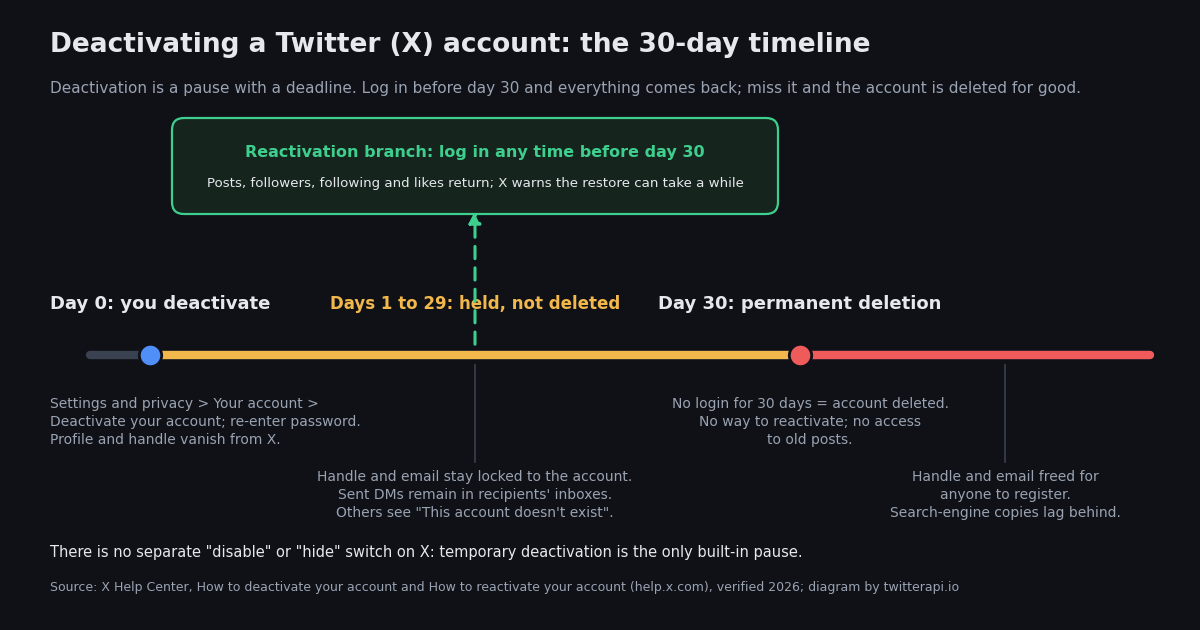
Most people who search for deactivating a Twitter (X) account want one of two things: a break, or an exit. X gives both the same button. Deactivation hides your account immediately and opens a 30-day window; log back in during the window and nothing is lost, let it run out and the account is permanently deleted (X Help Center, How to deactivate your account, verified 2026). Understanding that one mechanism answers almost every follow-up question: whether you can deactivate temporarily (yes, for up to 30 days), whether you can disable an account without deleting it (only in that same way), and what happens to your username (held during the window, released after).
This page is written for the person about to press the button, not for developers. It gives the exact menu path on the web, iOS and Android, the two things to do before you deactivate, a table of what persists and what disappears at each stage, what other people see while you are gone, the reactivation gotchas X's help pages mention, and the alternatives when all you want is quiet. Every claim about X's behaviour is taken from X's help center or privacy policy and checked against a second source; where we could not confirm something, we say so.
A related page on this site covers the other side of the same event: if you are the person who clicked a link and saw "This account doesn't exist" or "this content is not available", the content-is-not-available guide linked below explains how to tell a deactivated account from a deleted post, a suspension or a block. This page is about deactivating your own account. The last section is a short bridge for researchers and brand monitors who need to notice when an account on a watchlist goes away.
Deactivate versus delete: what the 30 days actually mean
X does not have two buttons. Deactivation is the first and only step of deletion, and X's help center is explicit about the sequence: deactivating hides your username and public profile from x.com and the iOS and Android apps, starts a 30-day window in which you can change your mind, and if you do not log in during that window the account is permanently deleted, with no way to reactivate it and no access to old posts (help.x.com, How to deactivate your account, verified 2026). Press coverage of X's deletion process describes the same mechanism, including that logging in at any point during the 30 days restores the account.
One hedge is worth stating. X's help center today describes only a 30-day window. Around 2019 to 2021 the deactivation screen offered a choice of reactivation period, 30 days or 12 months, and how-to guides from that era (Business Insider in 2021, Shacknews) still describe the selector. We could not find it in current X guidance, so if your deactivation screen shows a reactivation-period option, read it carefully and treat the longer window as a bonus rather than something to rely on.
A second hedge concerns X's own copies of your data. X's privacy policy, as summarised by third-party policy trackers, says X may keep your personal data for up to 30 days after deactivation in case you reactivate, and may keep certain data longer where the law or legitimate business needs require it. Deletion removes the account from the product; it is not a promise that every backup is wiped on day 30.
How to deactivate on the web, iOS and Android
The path is the same on every platform; only the entry point differs. X's help center gives the steps as: open Settings and privacy, choose Your account, choose Deactivate your account, read the deactivation notice, tap Deactivate, enter your password when prompted, and confirm (help.x.com, verified 2026). A guide by Incogni, which we used as the second source, lists the same labels and confirms the password prompt on both web and mobile.
On the web (x.com): click More in the left-hand navigation, then Settings and privacy, then Your account, then Deactivate your account. Read the notice, click Deactivate, enter your password, and confirm.
On X for iOS: tap your profile photo at the top left, then Settings and support, then Settings and privacy, then Your account, then Deactivate your account. Tap Deactivate, enter your password, and confirm.
On X for Android: tap your profile photo, then Settings and support, then Settings and privacy, then Your account, then Deactivate your account. Tap Deactivate, enter your password, and confirm.
Two details trip people up. First, if you signed in with Google or Apple and have never set an X password, the password prompt will stop you; set a password from Your account, then Change your password, before deactivating. Second, the deactivation notice includes a reminder about changing your username or email: X's help center says that if you want to reuse your current handle or email on a different account you should change them on this account before deactivating, because for the 30-day window they remain tied to the deactivated account.
After you confirm, X logs you out and the profile disappears immediately. There is no email confirmation step and no grace period before the hiding takes effect; the grace period is the 30 days of being hidden.
Before you deactivate: archive, subscriptions, and the handle question
Three things are easier before day 0 than after, and one of them is impossible after day 30.
Request your data archive first. X will not let a deactivated account request an archive, and after permanent deletion there is nothing to request. The path is Settings and privacy, then Your account, then Download an archive of your data; you re-enter your password, verify by a code sent to your email or phone, and click Request archive. X's help center says it can take up to 24 hours to process the request, and that you will get an email or a push notification when the .zip is ready (help.x.com, How to download your X archive, verified 2026; the same path and 24-hour figure appear in Hongkiat's walkthrough). If you deactivate during those 24 hours, the archive request goes with the account, so wait for the download before you proceed. The archive contains your posts, likes, DMs, media and account data; the archive-search guide linked below explains how to make the posts inside it searchable.
Cancel app-store Premium yourself. X's help center states that deactivating your account does not automatically cancel an X subscription: any paid subscription bought through the X app, such as Premium or a creator subscription, stays active and must be managed through the App Store or Google Play where you bought it. Subscriptions bought on x.com, by contrast, cancel automatically when you deactivate (help.x.com, verified 2026; also reported by igeeksblog). If you let an app-store subscription run, you can be billed for a service attached to an account that no longer exists.
Decide what you want to happen to your handle. During the 30 days nobody can register it. After day 30 it is released. If you intend to come back under the same name on a fresh account, change the handle on the old account to something throwaway before deactivating, then register the real one on the new account immediately; waiting for the release means racing anyone who wants it. If you are leaving for good and do not want someone else wearing your name, the honest answer is that X offers no reservation, and the only protection is to keep the account alive, protected, and silent (see the alternatives section).
Tell the people you DM with. Messages you sent are in their inboxes and stay there; your side of the conversation disappears for you, not for them. Screenshots, if you need the record, are a day-0 job.
What persists, what comes back, and what is gone for good
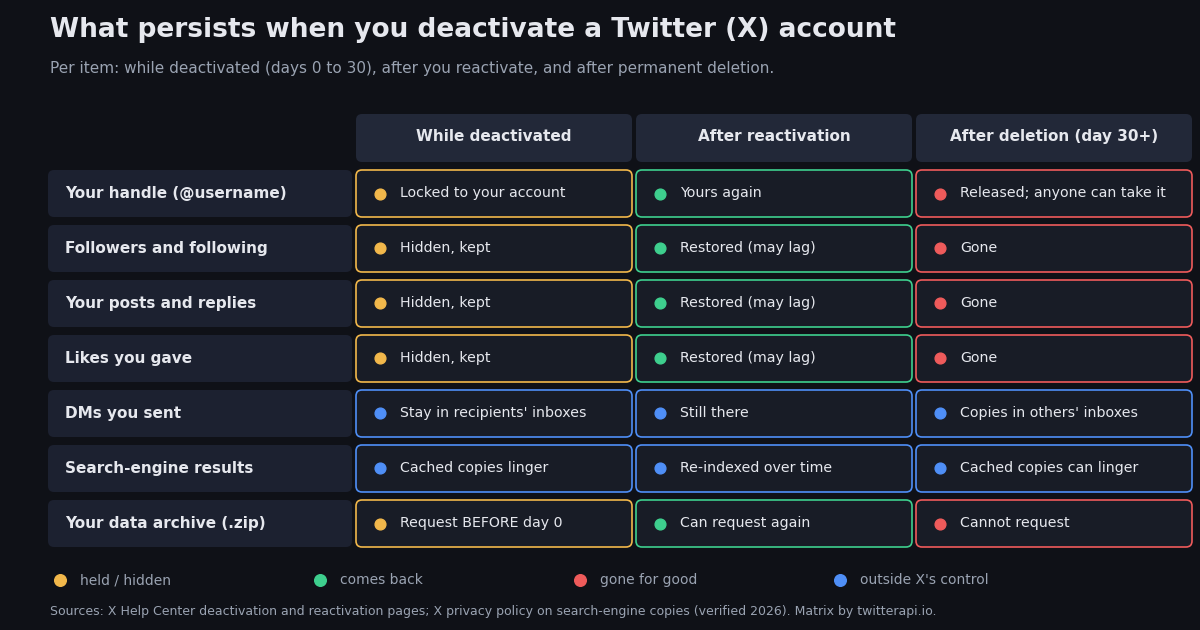
This is the table most guides skip. Each row is one thing you own or affect, across the three states an account can be in. Sources: X's deactivation and reactivation help pages for handle, followers, posts and likes; X's privacy policy for search engines; and the DM behaviour, which X's help pages do not spell out but which is consistently reported by privacy guides (IDStrong, Incogni) and matches the privacy policy's note that copies held by other parties are outside X's control.
The search-engine row deserves its own sentence, because it is the one people are most surprised by. X's privacy policy says that search engines and other third parties may retain copies of your public information, such as your profile and public posts, even after you have deleted the information or deactivated your account, and that X does not control those copies. Google's own removal process (search for Google's outdated-content tool) is the route for a cached result that points at a profile that no longer loads; without a request, the cache clears whenever the engine next recrawls the page, and neither X nor the search engines publish a timeline for that.
One more thing persists that no column captures: quotes, screenshots and replies by other people that reference your posts are their content, not yours, and survive your deletion. Deactivation removes your account; it does not remove the conversation around it.
What other people see while you are deactivated
From the outside, a deactivated account and a deleted account look identical. Open the profile URL and X shows the notice "This account doesn't exist", with a prompt to try searching for another; the same notice appears for everyone, not just for people you have blocked (a point several how-to guides make because it is how people tell a block from a deactivation). Your posts vanish from timelines and search inside X. Replies you made to other people's posts disappear from those threads, which can leave visible gaps where a conversation used to be. Posts that quoted you show a card saying the post is from an account that no longer exists.
The one thing that does not change for other people is their DM inbox. The conversation thread with you stays, with your messages in it, and the thread simply has nobody on the other end. X's help pages do not describe DM behaviour on deactivation in detail; the behaviour above is what privacy guides and users consistently report, and it is consistent with the privacy policy's statement that copies held by other parties are outside X's control. Treat it as reliable but not officially documented.
There is no notification. X does not tell your followers that you deactivated, and if you reactivate within the window you reappear in their following lists without any announcement either. People who want to know whether a specific account was deactivated rather than suspended or renamed use the profile-check method on the content-is-not-available page: a suspended account says so in its own words, a renamed account leaves the old URL pointing at the same "doesn't exist" notice, and only time distinguishes a deactivation from a deletion.
Reactivating, and the gotchas X warns about
Reactivation is deliberately simple: go to x.com/login or open the iOS or Android app and sign in with your usual credentials. X's help center says you will see a notice asking you to confirm that you want to reactivate, and that choosing to reactivate takes you to your Home timeline (help.x.com, How to reactivate your account, verified 2026). That is the whole procedure; there is no form, no review and no waiting period as long as you are inside the 30 days.
Gotcha 1: any login counts. Signing in to check whether you have mail, or opening the app out of habit, reactivates the account and resets nothing; the deactivation is simply cancelled. If you want the deletion to go through, do not sign in, and remove the account from any app that might sign in for you (a second phone, a desktop client, a scheduling tool with a saved session).
Gotcha 2: the restore is not instant. X's reactivation page warns that posts, followers, likes and similar data may take a while to fully restore, and gives no timescale. A follower count that reads low or a timeline that looks thin right after reactivation is the restore still running; give it a day before concluding that something was lost.
Gotcha 3: you cannot change the handle or email while deactivated. X's help center notes that the username and email address stay tied to the deactivated account during the 30 days specifically so that reactivation works. If you need them for another account, reactivate, change them, then deactivate again, which restarts the 30-day clock.
Gotcha 4: past 30 days, support cannot help. X's help page on trouble reactivating says that an account deactivated for more than 30 days cannot be restored; the only path is a new account. If the old handle has not been taken, you can register it on the new account, but followers, posts and verification do not carry over. And as covered above, an app-store Premium subscription keeps billing either way until you cancel it in the store.
There is no disable switch: the alternatives to deactivating
A lot of searches for this topic use the word disable, as in disable my account without deleting it. X does not have that feature. Deactivation is the only pause, and it carries the 30-day deadline. If what you actually want is to stop seeing X, or to stop being seen on X, without starting a deletion clock, these are the built-in options, in rough order of how much they hide.
Protect your posts. Settings and privacy, then Privacy and safety, then Audience and tagging, then turn on Protect your posts (help.x.com, How to make X private and public, verified 2026). Only approved followers can see your posts, new followers need your approval, and your posts drop out of public search and search engines over time. Existing followers keep seeing you, and your profile page still exists. Reversible at any time with no clock.
Log out and remove the app. Nothing changes for anyone else; your account sits untouched for as long as you like. X has no inactivity deletion policy for ordinary accounts that we could find in its current help center, and the handle stays yours. For a break of a few weeks this is the lowest-risk option because there is nothing to undo.
Mute and pause notifications. Settings and privacy, then Notifications, lets you turn off push and email notifications entirely; muting words and accounts removes most of what made you want to leave in the first place. Combined with protecting your posts, this gets most of the way to invisible without any deadline.
Deactivate for a defined break. If you do want the profile gone for a stretch, deactivation works, as long as you put a reminder before day 30 on a calendar that does not live inside X. People who want a longer break than 30 days use a cycle: reactivate on day 28, deactivate again the same day, which restarts the window. It is crude, but it is the only supported way to stay hidden for months without deletion.
The decision usually comes down to one question: do you want the handle and history preserved? If yes, protect and log out. If you are genuinely done, deactivate, do not log in, and the account deletes itself on day 30.
Detecting deactivations at scale: a watchlist check with the API
Researchers, brand teams and anyone who links to X profiles from their own site have the mirror-image problem: not how to deactivate, but how to notice when one of hundreds of accounts has. Doing that by hand means opening every profile and looking for the "doesn't exist" notice. Doing it with a read API means one profile call per handle on a schedule and a diff against the last run.
On twitterapi.io the call is GET /twitter/user/info with a userName parameter. A live account returns the profile under data with followers, statusesCount, createdAt and the rest. The response also carries three availability fields: unavailable (a boolean), unavailableReason (for example "suspended") and message (for example "This account is unavailable" or "This account is suspended"), documented at docs.twitterapi.io/api-reference/endpoint/get_user_by_username. In practice the unavailable flag covers profiles that still exist but are hidden by X, such as suspensions and withheld accounts; a deactivated or deleted handle more often comes back with no data object and an error status, the API equivalent of the "doesn't exist" notice. The script below therefore records three states (active, unavailable, not_found), logs every transition to a JSONL file with the raw reason and message, and leaves it to you to interpret a not_found that persists past 30 days as a deletion.
Cost comparison. A profile read costs 18 credits, or $0.18 per 1,000 checks (twitterapi.io/pricing, verified 2026). The same 1,000 user reads cost $10 on the official X API's pay-per-use tier at $0.010 per user read (docs.x.com/x-api/getting-started/pricing, verified 2026). A daily check of 100 handles for a month is 3,000 reads: $0.54 here, $30 there, before the official API's app approval and OAuth setup. New twitterapi.io accounts that pass the automatic bot check get $1 of free credits, one per person or network, expiring after 31 days, which covers about 5,500 profile checks. The rate limit is 0.2 requests per second before your first payment and 20 after it, so a 100-handle run on an unpaid key takes about eight minutes; set the sleep in the script accordingly.
Both pricing pages are linked in the sources. The official API remains the right choice if you need write access or first-party guarantees; for a read-only watchlist, the per-read gap is the whole story. The end-to-end script is at the bottom of the page: set TWITTERAPI_IO_KEY in your environment, put one handle per line in handles.txt, and run it from cron.
import os

import requests

BASE = "https://api.twitterapi.io"
HEADERS = {"X-API-Key": os.environ["TWITTERAPI_IO_KEY"]}  # key from twitterapi.io/dashboard


def account_state(handle):
    """One profile read: 18 credits. Returns active / unavailable / not_found plus X's own wording."""
    r = requests.get(f"{BASE}/twitter/user/info", params={"userName": handle}, headers=HEADERS, timeout=30)
    r.raise_for_status()
    body = r.json()
    user = body.get("data") or {}
    if body.get("status") == "error" or not user:
        return "not_found", body.get("msg")  # deactivated, deleted, renamed, or never existed
    if user.get("unavailable"):
        return "unavailable", f"{user.get('unavailableReason')}: {user.get('message')}"  # suspended, withheld
    return "active", f"{user.get('followers'):,} followers, {user.get('statusesCount'):,} posts"


if __name__ == "__main__":
    for handle in ("NASA", "this_handle_does_not_exist_12345"):
        state, detail = account_state(handle)
        print(f"@{handle}: {state} ({detail})")
"""Watch a list of Twitter (X) handles and record when any of them is deactivated, suspended or comes back.

Usage: python watchlist.py handles.txt
Reads one handle per line, calls GET /twitter/user/info for each, compares the state with the
last run stored in watchlist-state.json, and appends every change to watchlist-events.jsonl.
Run it from cron (daily is plenty: X's deactivation window is 30 days). Needs TWITTERAPI_IO_KEY.
Cost: 18 credits per profile read, so 1,000 checks cost $0.18 (twitterapi.io/pricing).
"""
import json
import os
import sys
import time
from datetime import datetime, timezone

import requests

BASE = "https://api.twitterapi.io"
HEADERS = {"X-API-Key": os.environ["TWITTERAPI_IO_KEY"]}
STATE_FILE = "watchlist-state.json"
EVENTS_FILE = "watchlist-events.jsonl"
# 0.2 requests/s before your first payment (sleep 5.0), 20 requests/s after it (sleep 0.1)
SLEEP_SECONDS = float(os.environ.get("WATCHLIST_SLEEP", "5.0"))


def check(handle):
    """Return a compact status dict for one handle."""
    r = requests.get(f"{BASE}/twitter/user/info", params={"userName": handle}, headers=HEADERS, timeout=30)
    r.raise_for_status()
    body = r.json()
    user = body.get("data") or {}
    if body.get("status") == "error" or not user:
        # No profile at all: deactivated, deleted, renamed, or never existed.
        # A not_found that persists past 30 days is, for your purposes, a deletion.
        return {"state": "not_found", "reason": None, "message": body.get("msg")}
    if user.get("unavailable"):
        # Profile exists but X hides it: suspended, withheld, etc.
        return {"state": "unavailable", "reason": user.get("unavailableReason"), "message": user.get("message")}
    return {"state": "active", "reason": None, "message": None,
            "followers": user.get("followers"), "statusesCount": user.get("statusesCount")}


def load_state():
    if os.path.exists(STATE_FILE):
        with open(STATE_FILE, encoding="utf-8") as fh:
            return json.load(fh)
    return {}


def main(path):
    with open(path, encoding="utf-8") as fh:
        handles = [h.strip().lstrip("@") for h in fh if h.strip() and not h.startswith("#")]
    previous = load_state()
    current = {}
    now = datetime.now(timezone.utc).isoformat()
    changes = 0

    for handle in handles:
        try:
            result = check(handle)
        except requests.RequestException as exc:
            print(f"@{handle}: request failed ({exc}); keeping last state")
            current[handle] = previous.get(handle, {"state": "unknown"})
            continue
        current[handle] = result
        before = (previous.get(handle) or {}).get("state")
        if before and before != result["state"]:
            changes += 1
            event = {"checked_at": now, "handle": handle, "from": before, "to": result["state"],
                     "reason": result.get("reason"), "message": result.get("message")}
            with open(EVENTS_FILE, "a", encoding="utf-8") as fh:
                fh.write(json.dumps(event) + "\n")
            print(f"CHANGE @{handle}: {before} -> {result['state']} ({result.get('message') or 'no message'})")
        else:
            print(f"@{handle}: {result['state']}")
        time.sleep(SLEEP_SECONDS)

    with open(STATE_FILE, "w", encoding="utf-8") as fh:
        json.dump(current, fh, indent=2)
    credits = len(handles) * 18
    print(f"checked {len(handles)} handles, {changes} change(s); {credits:,} credits = ${credits / 100000:.4f}")


if __name__ == "__main__":
    main(sys.argv[1] if len(sys.argv) > 1 else "handles.txt")
Questions readers ask
Can you deactivate Twitter (X) temporarily?
Yes, but only for up to 30 days at a time. Deactivation hides the account immediately and starts a 30-day window; logging in at any point during the window restores it, and if you do not log in the account is permanently deleted (X Help Center, verified 2026). For a longer break, either reactivate and deactivate again before day 30, or use the alternatives: protect your posts and log out, which have no deadline.
How do I deactivate my X account?
On the web: More, then Settings and privacy, then Your account, then Deactivate your account, then Deactivate, enter your password, and confirm. On iOS and Android: tap your profile photo, then Settings and support, then Settings and privacy, then Your account, then Deactivate your account, and follow the same prompts. Request your data archive first, because a deactivated account cannot request one.
What happens to my username when I deactivate?
For the 30-day window the username and the email address on the account stay tied to the deactivated account, so nobody else can register them and you cannot use them on a new account either. X's help center says both become available for use on another account 30 days after deactivation. If you want to keep the handle for a fresh account, change it on the old account before deactivating and register it on the new one straight away.
Does deactivating delete my direct messages?
Not from the other person's inbox. Messages you sent stay in recipients' conversations throughout the 30 days and after deletion; your own view of the conversations disappears with your account. X's help pages do not describe DM behaviour on deactivation in detail; this is the consistently reported behaviour, and it matches X's privacy-policy note that copies held by other parties are outside its control.
Can I disable my Twitter (X) account without deleting it?
There is no disable switch. Deactivation is the only built-in pause and it always carries the 30-day deletion deadline. If you want to stop being seen without starting that clock, protect your posts (Settings and privacy, Privacy and safety, Audience and tagging, Protect your posts), turn off notifications, and log out. Your handle and history stay intact for as long as you like.
Does deactivating cancel X Premium?
Only if you subscribed on x.com. X's help center says deactivation does not automatically cancel subscriptions bought through the X app on iOS or Android; those stay active and must be cancelled in the App Store or Google Play. Cancel there before you deactivate, or you can keep paying for an account that no longer exists.
How can I tell if someone deactivated their account rather than blocking me?
Open the profile while logged out or from another account. A deactivated or deleted account shows "This account doesn't exist" to everyone; a block shows a "You're blocked" notice only to you; a suspension says "Account suspended". From the outside you cannot distinguish deactivated from deleted; only time does, since a deactivated account can return within 30 days. Anyone checking many accounts can automate this with the watchlist script on this page.
Continue
- X Help Center: How to deactivate your account (30-day window, menu path, password prompt, subscriptions not cancelled)
- X Help Center: How to reactivate your account (log in within 30 days; restore may take a while; username and email released after 30 days)
- X Help Center: How to download your X archive (up to 24 hours to prepare)
- X Privacy Policy: data kept up to 30 days after deactivation; search engines and third parties may retain copies
- twitterapi.io docs: Get User Info (unavailable, unavailableReason and message fields used by the watchlist script)
- X API pay-per-usage pricing (docs.x.com): $0.010 per user read, the official and more expensive route to the same check
- Twitter (X) API overview: the hub for reading X data
- Twitter (X) "content is not available": deactivated, deleted, suspended or blocked?
- How to download tweets via the API before you deactivate
- Building a searchable archive of your own Twitter (X) posts
- Mass-deleting tweets instead of deactivating the whole account
- twitterapi.io pay-per-call pricing: $0.18 per 1,000 profile reads
Stop reading. Start building.
Starter credits cover real testing on real data. Google sign-in, no card, no application queue.
Get an API key