Twitter (X) "Content Is Not Available": Every Cause, and How to Tell Which One
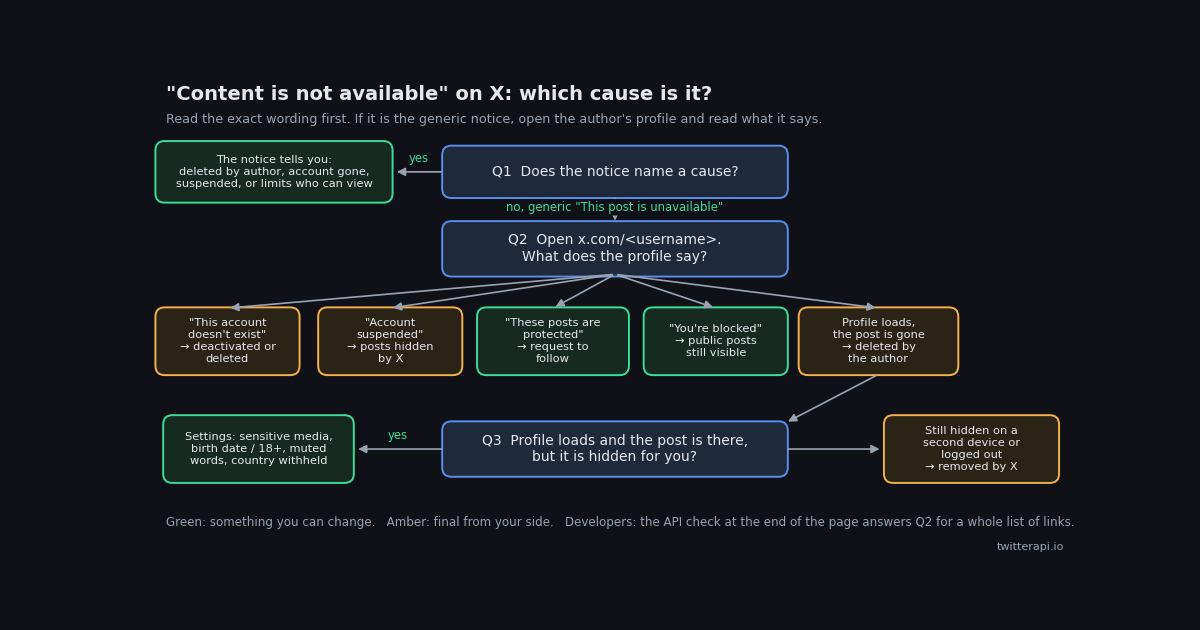
You tap a link, a reply, or a quoted card, and instead of a post you get a grey box: "This post is unavailable", or in a shared link preview, "Content is not available". It is one of the most searched X error strings precisely because it is the least informative one. The same box covers a post the author deleted an hour ago, an account that was suspended last year, a private account you have never followed, a block, a post X took down, a post that is only hidden from your country, and media your own settings are keeping behind a cover.
This page is built around the one move that resolves nearly all of those cases: reading what X actually tells you, first in the notice itself and then on the author's profile page. The diagnosis table pairs each notice with its meaning, the check that confirms it, and whether anything you do can change it. The sections after it explain the cases that confuse people most: deleted versus deactivated accounts, what being blocked does and does not hide after X's 2024 change, and the settings that make a perfectly public post invisible to you alone.
Scope: this page is about a single post or account that will not show while the rest of X works. If nothing loads, that is a different problem with its own page; so are videos that will not play and the question of who has blocked you. The last section is for people who hold a list of links, for example a saved thread, a citations file, or a media-monitoring sheet, and want to know which ones are still alive without clicking each one.
Start here: what each X notice means and how to confirm it
X calls these grey boxes tombstones: a placeholder shown in place of a post. X's own help page on notices says a post may be unavailable when it is from a protected account you do not follow, when you are blocked by the account, when the post has been deleted, or when the posting account has been deleted (help.x.com, verified 2026). In practice the box carries one of several wordings, and the wording is your first clue. Older app builds still say "Tweet" where current builds say "post"; the meaning is the same. The table lists each wording that appears in X's help pages and in current troubleshooting guides, what it means, the check that confirms it, and whether you can do anything about it.
Two wordings deserve a note. The generic "This post is unavailable" also appears when the post contains a word you have muted, which is a filter on your side rather than anything about the post; and a post that shows as unavailable in one place but opens fine from the author's profile was almost always a temporary load failure. Reload before concluding anything.
The 10-second profile check
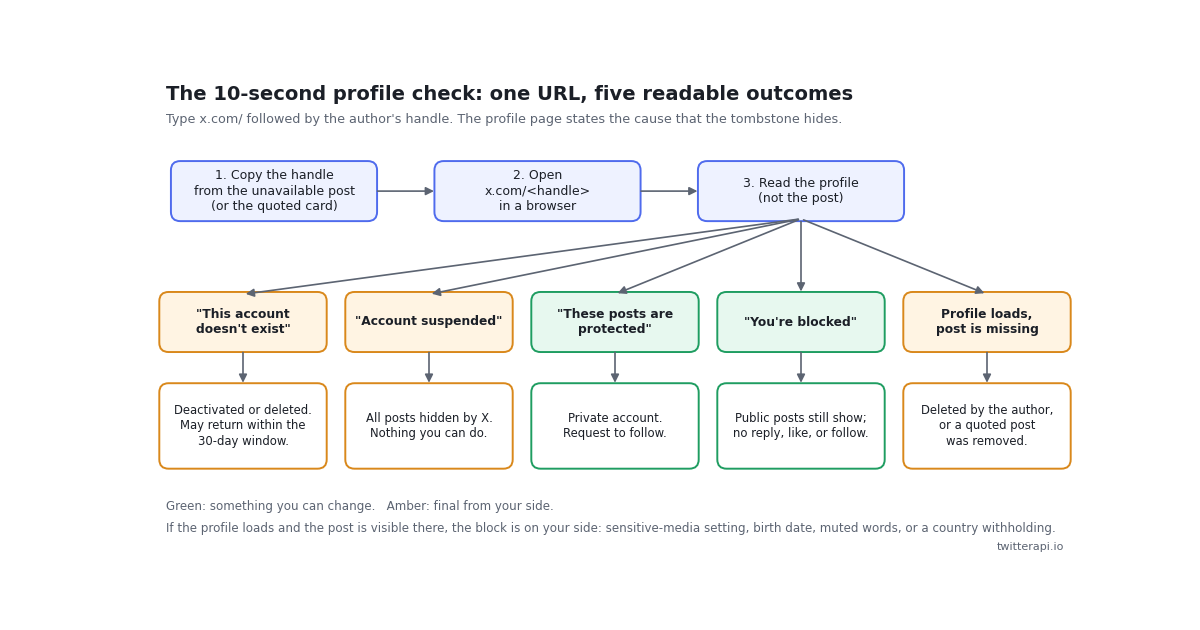
Every troubleshooting guide for this error lists the same causes. Few tell you how to find out which one you have, and the answer is embarrassingly simple: X hides the reason on the post, but states it on the profile. A profile page can only be in a handful of states, and each state corresponds to one cause. Here is the check, step by step.
Step 1: get the author's handle. On a reply or a quoted card the handle is usually still printed above the grey box. On a link someone sent you, the handle is the path segment after x.com/ and before /status/. If the link is a shortened t.co URL, open it in a browser and read the address bar after it redirects.
Step 2: open x.com/handle in a browser. Type it directly rather than tapping through the app, because the browser shows the full notice text and the app sometimes just shows an empty screen. A private window also tells you whether the hiding is tied to your account: if the post appears in a private window but not when signed in, the cause is a setting or a mute on your account.
Step 3: read the profile, not the post. A profile that says the account does not exist means the author deactivated or deleted it. "Account suspended" means X suspended them. A lock icon and "These posts are protected" means the account is private. "You're blocked" means the author blocked you. A profile that loads normally, with the post missing from its timeline, means the author deleted that post.
Step 4: if the post is visible on the profile, the hiding is on your side. Check, in order: Settings and privacy, Privacy and safety, Content you see, "Display media that may contain sensitive content"; your birth date under Account information, because X does not show adult content to profiles under 18 or without a birth date (help.x.com, verified 2026); and Mute and block, Muted words, for a word in the post. If none of those apply and the post is still hidden from a second device or a logged-out window, it was removed or withheld by X.
The figure below condenses the five profile outcomes. Green outcomes are ones where an action on your side can change the result; amber outcomes are final from where you sit.
Deleted post, deleted account, or deactivated account?
These three look identical from the post: a grey box. They behave differently, and one of them can reverse itself.
A deleted post. The author removed it, and everything that depended on it changes shape: replies to it stay on X but lose their parent, quote posts keep their own text but show "This quoted post is unavailable" where the card used to be, and embeds on other sites show a blank frame. The author's profile is unaffected. There is no view-deleted-posts feature on X; what survives is whatever was cached by third parties, which is the subject of the deleted-tweet page linked below.
A deactivated account. When an owner deactivates, X removes the handle and profile from x.com and the apps and starts a 30-day clock; logging back in within that window reactivates the account, and if the owner does not, the account is permanently deleted at the end of it (help.x.com, verified 2026). From your side, every post from that account shows the "account that no longer exists" notice and the profile page says it does not exist. The practical consequence: if the notice appeared recently, check again in a few weeks before you treat the content as gone.
A deleted account. Same appearance as deactivated, but permanent. After the 30-day window there is nothing to come back, and the handle may eventually be taken by someone else, which is why a link that once showed a notice can later open a completely different person's profile.
How to tell deactivated from deleted: you cannot, from the outside, and X does not say. The only signal is time. A profile that still reports "does not exist" more than a month after the posts disappeared is, for your purposes, gone.
Protected, blocked, or suspended: what each one hides
These are the account-state causes, where the post exists and X is choosing not to show it to you in particular, or to anyone.
Protected accounts. A protected (private) account's posts are shown only to approved followers. Their posts in your timeline, in replies, and in quote cards all render as unavailable, the profile shows a lock, and the notice on an individual post says the owner limits who can view their posts. The fix is a follow request; nothing else, including a logged-out window, will show the posts, because X does not serve protected posts to anyone who is not approved.
Blocked by the author. This changed. Until late 2024, being blocked meant the blocker's profile and posts were hidden from you entirely. In November 2024 X began letting blocked users see a public account's posts; they still cannot like, reply, repost, follow, message, tag, or add the account to a list, and the change does not apply to protected accounts, which stay hidden from the people they block (TechSpot, verified 2026). So in 2026 a block alone does not produce an unavailable post on a public account. If you see "You're blocked" on the profile and the posts still load, that is the expected state, and if the posts do not load, the account is protected as well as blocking you. A separate page covers how to work out who has blocked you.
Suspended accounts. When X suspends an account for violating its rules, every post from that account is hidden behind a notice, and the profile page says so (help.x.com, verified 2026). This is the one case where the same grey box appears for everyone on X, not just you, and where even the author cannot make the posts visible unless an appeal succeeds. If a suspension is later lifted, the posts return.
The pattern across all three: protected and blocked are about you, suspended is about the author, and only the first has a route you can take yourself.
Hidden for you only: sensitive media, birth date, muted words, and country withholding
The most frustrating version of this error is the one where a friend sends you a link, sees the post fine, and you get a box. The post is public and the author is in good standing; something tied to your account or your location is filtering it.
Sensitive-media setting. Posts flagged as containing sensitive media are hidden behind a cover unless you have opted in. On the web and in the app the switch is under Settings and privacy, Privacy and safety, Content you see, "Display media that may contain sensitive content". Turning it on shows the media behind a tap-to-view cover rather than removing it.
Birth date and age restriction. X restricts viewers who are under 18, or who have no birth date on their profile, from viewing adult content (help.x.com, verified 2026). If your account has no birth date, the sensitive-media switch may not be enough, and some posts will stay hidden until you add one under Account information. It is widely reported that logged-out visitors cannot see sensitive media at all, so testing in a private window will not help with this case.
Muted words. A post containing a word or phrase on your muted list is hidden from your timeline and notifications and can render as unavailable in reply threads. Settings and privacy, Privacy and safety, Mute and block, Muted words. A term muted long ago for a one-off event is a common cause of a mysteriously blank reply.
Country withholding. When X receives a valid legal demand from an authorized entity, or finds content violates a local law, it withholds that post or account in that jurisdiction only and shows a notice saying so (help.x.com, verified 2026). The notice is explicit, which separates this case from the generic box, and the same post is visible from other countries. There is nothing to change in your settings.
Quoted post unavailable. When a quote post shows "This quoted post is unavailable", the quote post itself is fine; the inner post was deleted, is protected, or belongs to an account that is gone. Apply the profile check to the inner author's handle, which is often still visible in the card header. The page on quoting posts covers how quotes behave in general.
A quick way to separate these from the author-side causes: if the author's profile loads and the post is present on it, you are in this section. If the profile itself reports a state (does not exist, suspended, protected, blocked), go back to the previous one.
Three ways to find out, compared
If you are checking one link, the profile check above is all you need. If you are checking a saved thread, a list of citations, or a content calendar with dozens of links, the methods differ in effort, in what they can tell you, and in what they cost.
A point worth stating plainly: the API path is independent of your session. A post that is hidden from you by a muted word, a missing birth date, or a withholding in your country still comes back from the API, because the API is not you. That makes it the cleanest way to answer "is this post gone, or is it just gone for me", which is the question most of this page is about. The official X API can answer the same question through its paid tiers at a higher per-post price and with a developer-app approval step (docs.x.com, verified 2026); for an occasional link audit, a pay-per-call key is the simpler route.
For developers: sort a list of links into live, deleted, and account gone
If you hold a list of status URLs, two twitterapi.io calls settle it. GET /twitter/tweets takes a comma-separated tweet_ids parameter and returns a tweets array plus status and message (docs.twitterapi.io, verified 2026). Posts that X no longer serves, whether deleted, from a suspended or deleted account, or protected, are simply absent from the array, so the diagnosis is a set difference: the IDs you asked for minus the IDs that came back. For each missing ID, GET /twitter/user/info with the author's userName returns status, msg, and a data object with unavailable, unavailableReason, and message fields, documented with example values such as "suspended" and "This account is suspended", alongside the ordinary followers, statusesCount, and isBlueVerified fields (docs.twitterapi.io, verified 2026). An author that resolves normally while the post is missing means the post itself was deleted or is protected; an author that comes back unavailable or errors tells you the whole account is gone.
The short version below checks one batch of IDs. The end-to-end script at the bottom of the page parses URLs, batches the IDs, and prints a verdict per link. Set TWITTERAPI_IO_KEY in your environment first; keys come from the dashboard. For a hundred links the tweet check costs $0.015 at $0.15 per 1,000 posts, and looking up a hundred authors costs $0.018 at $0.18 per 1,000 profiles (twitterapi.io/pricing, verified 2026), so a full audit of a hundred links runs about three cents.
Two honest limits. The API cannot see protected posts, so from the outside a protected post and a deleted post look the same until you check the author; and it cannot tell you whether a particular account has blocked you, because blocks are a relationship between two accounts and the API is neither of them.
import os
import requests

BASE = "https://api.twitterapi.io"
HEADERS = {"X-API-Key": os.environ["TWITTERAPI_IO_KEY"]}  # key from twitterapi.io/dashboard


def still_live(tweet_ids):
    """Return the subset of tweet_ids that X still serves."""
    r = requests.get(
        f"{BASE}/twitter/tweets",
        params={"tweet_ids": ",".join(tweet_ids)},
        headers=HEADERS,
        timeout=30,
    )
    r.raise_for_status()
    body = r.json()
    if body.get("status") != "success":
        raise RuntimeError(body.get("message"))
    return {t["id"] for t in body.get("tweets", [])}


if __name__ == "__main__":
    ids = ["1846987139428634858", "1866332309399781537"]  # replace with your IDs
    live = still_live(ids)
    for tid in ids:
        print(tid, "live" if tid in live else "gone (deleted, protected, or account unavailable)")
"""Audit a list of X status links: which are still live, which are gone, and why.

Usage: python audit_links.py links.txt
  links.txt holds one x.com (or twitter.com) status URL per line.

Step 1  GET /twitter/tweets with batches of IDs; IDs missing from the response are not served by X.
Step 2  for each missing ID, GET /twitter/user/info on the author handle from the URL:
        author unavailable or suspended -> the whole account is gone
        author resolves normally        -> the post itself was deleted (or is protected)
Needs TWITTERAPI_IO_KEY in the environment.
"""
import os
import re
import sys
import requests

BASE = "https://api.twitterapi.io"
HEADERS = {"X-API-Key": os.environ["TWITTERAPI_IO_KEY"]}
STATUS_RE = re.compile(r"https?://(?:www\.)?(?:x|twitter)\.com/([A-Za-z0-9_]{1,15})/status/(\d+)")
BATCH = 20


def parse_links(path):
    """Return a list of (handle, tweet_id) from a file of status URLs."""
    found = []
    with open(path) as fh:
        for line in fh:
            m = STATUS_RE.search(line.strip())
            if m:
                found.append((m.group(1), m.group(2)))
    return found


def live_ids(tweet_ids):
    """Ask X, through the API, which of these IDs are still served."""
    live = set()
    for i in range(0, len(tweet_ids), BATCH):
        chunk = tweet_ids[i:i + BATCH]
        r = requests.get(
            f"{BASE}/twitter/tweets",
            params={"tweet_ids": ",".join(chunk)},
            headers=HEADERS,
            timeout=30,
        )
        r.raise_for_status()
        body = r.json()
        if body.get("status") != "success":
            raise RuntimeError(body.get("message"))
        live.update(t["id"] for t in body.get("tweets", []))
    return live


def author_state(handle, cache):
    """Return 'ok', 'suspended', 'unavailable', or 'not found' for a handle."""
    if handle in cache:
        return cache[handle]
    r = requests.get(
        f"{BASE}/twitter/user/info",
        params={"userName": handle},
        headers=HEADERS,
        timeout=30,
    )
    body = r.json() if r.status_code == 200 else {}
    data = body.get("data") or {}
    if body.get("status") != "success" or not data:
        state = "not found"
    elif data.get("unavailable"):
        state = (data.get("unavailableReason") or data.get("message") or "unavailable").lower()
    else:
        state = "ok"
    cache[handle] = state
    return state


def main():
    if len(sys.argv) < 2:
        sys.exit("usage: python audit_links.py links.txt")
    links = parse_links(sys.argv[1])
    if not links:
        sys.exit("no x.com/twitter.com status URLs found")
    live = live_ids([tid for _, tid in links])
    cache = {}
    counts = {"live": 0, "post deleted or protected": 0, "account gone": 0}
    for handle, tid in links:
        if tid in live:
            verdict = "live"
        else:
            state = author_state(handle, cache)
            if state == "ok":
                verdict = "post deleted or protected"
            else:
                verdict = f"account gone ({state})"
        key = "account gone" if verdict.startswith("account gone") else verdict
        counts[key] += 1
        print(f"{verdict:<34} @{handle:<16} {tid}")
    print()
    print(", ".join(f"{k}: {v}" for k, v in counts.items()))


if __name__ == "__main__":
    main()
Questions readers ask
What does "This post is unavailable" mean on X?
It is X's generic placeholder for a post it will not show you. X's help page lists the ordinary causes: the post is from a protected account you do not follow, you are blocked by the account, the post has been deleted, or the posting account has been deleted. A suspended author, a post removed by X, a muted word, or your sensitive-media settings produce the same box. Open the author's profile to find out which.
How can I tell if a tweet was deleted or the account was deleted?
Open x.com/username. If the profile loads normally and the post is missing from it, the author deleted the post. If the profile says the account does not exist, the account was deactivated or deleted. The post-level notice sometimes says it outright: "Deleted by the post author" versus "from an account that no longer exists".
Does "content is not available" mean I am blocked?
Usually not. Since X's November 2024 change, a public account that blocks you still shows you its posts; you just cannot interact with them, and the profile says "You're blocked". A block only hides posts when the account is also protected. If the profile shows the block notice and the posts still load, that is the expected state.
Can a post that says "This post is from an account that no longer exists" come back?
Sometimes. A deactivated account is held for 30 days, and if the owner logs in during that window the account and its posts return. After the window the account is permanently deleted and the posts are gone. If the notice is recent, check again in a few weeks.
Why can my friend see a post that shows as unavailable for me?
The post is public and the hiding is on your side. Check the sensitive-media switch under Content you see, whether your account has a birth date showing you are an adult, your muted words list, and whether the notice mentions withholding in your country. A private window test helps for muted words but not for sensitive media, which X does not show to logged-out visitors.
Why does a quote post say "This quoted post is unavailable"?
The quote post is fine; the original it quotes was deleted, is from a protected account you do not follow, or belongs to an account that was deactivated, deleted, or suspended. Run the profile check on the original author's handle, which usually still appears in the card header.
Can an API tell me whether a post was deleted?
It can tell you whether X still serves it. On twitterapi.io, GET /twitter/tweets with the post IDs returns only the posts that are still available; IDs missing from the response are deleted, protected, or from an unavailable account. GET /twitter/user/info on the author then reports whether the account is suspended or unavailable, which separates a deleted post from a gone account. It cannot recover the deleted text.
Continue
- X Help Center: Notices on X and what they mean (limited visibility, suspended accounts, withheld content)
- X Help Center: About country withheld content
- X Help Center: How to deactivate your account (the 30-day reactivation window)
- TechSpot: X's 2024 change letting blocked users see public posts
- twitterapi.io docs: Get Tweets by IDs endpoint (tweet_ids parameter, tweets array)
- twitterapi.io docs: Get User Info endpoint (userName parameter, unavailable and unavailableReason fields)
- Twitter (X) API overview: the hub for reading X data
- Twitter (X) posts not loading at all: outage and app fixes
- How to tell who blocked you on X
- Searching for deleted tweets: what survives and where
- How quote posts work on X
- Free X shadowban checker
- twitterapi.io pay-per-call pricing
Stop reading. Start building.
Starter credits cover real testing on real data. Google sign-in, no card, no application queue.
Get an API key