Tweepy vs TwitterAPI.io
Tweepy is the de-facto Python client for the X (Twitter) API. If you've written any Python code that touches X in the last decade, you've probably imported tweepy. It is well-maintained, well-documented, and well-trusted — the library itself is not the problem. The problem is what sits on the other side of the library in 2026.
Every tweepy call routes through the official X API surface, which means every call inherits the official tier model: Free at ~1,500 reads/month, Basic at $200/month, Pro at $5,000/month, Enterprise from $42,000/month. Layered on top of those tiers as of February 2026 is a hard 2,000,000 Post-reads/month account cap and a hybrid per-resource overage scheme ($0.005 per Post-read above the cap, $0.010 per User/DM read, $0.001 per owned post, $0.200 per URL Post created). A tweepy script that worked fine in 2022 can return HTTP 403 in 2026 because the endpoint moved tiers.
This page is for teams who are already on tweepy and hitting these walls — or evaluating Python options for a new project and trying to avoid them. We compare tweepy's official path with TwitterAPI.io, a third-party HTTP API with the same data surface, no tier system, and a flat $0.00015 per request. The migration is a ~30 minute mechanical swap for most workloads. Code, cost math, and the full migration checklist below.
Tweepy in 2026 — Status and What Changed Under It
Tweepy itself is healthy. The repository is active, the 4.x line ships incremental support for new X API endpoints as they appear, and the library covers both the v2 surface (recommended) and the surviving v1.1 endpoints. As a piece of Python, tweepy is a fine choice.
What changed is the API behind it. The v1.1 endpoints that older tweepy code relied on — statuses/filter, statuses/sample, parts of users/show — were retired in the 2023-2024 v1.1 sunset. Any project using tweepy.Stream or api.get_user(screen_name=...) against v1.1 stopped working when those endpoints went dark. The maintained surface today is the v2 client (tweepy.Client) and the small subset of v1.1 still exposed (tweepy.API for media upload).
The deeper change is pricing. The v2 client routes to endpoints that all sit on the X tier system. search_recent_tweets requires Basic minimum; search_all_tweets requires Pro ($5,000/month). The 2026 hybrid model added per-resource overage above the tier cap, meaning a successful tweepy script can produce an unbounded bill if it streams or paginates heavily. The library does not (and cannot) shield you from this — its job is to call the API, not to renegotiate the tier.
Why Tweepy Users Hit Walls in 2026
The most common failure pattern reported in tweepy issues since the February 2026 hybrid switch:
HTTP 429 mid-job from the 2M cap, not from per-window rate limits. Pre-2026 rate-limiting was per-15-minute window — wait, retry, succeed. The 2026 cap is monthly and account-wide. Once you cross 2,000,000 Post reads, every additional read either errors out (if you have not opted into overage) or bills at $0.005/each (if you have). Tweepy's built-in retry handler cannot wait this out — the next window won't reset until the 1st of next month.
HTTP 403 on endpoints that worked before. When X folded historical search into the Pro tier, tweepy code calling client.search_all_tweets(...) on a Basic account started returning 403. The error message is accurate but unhelpful (Your API key does not have access to this product).
Costs that scale with max_results and pagination. Pre-2026, a tweepy job that paged through 50,000 tweets cost the same as a tweepy job that pulled 50. Post-2026, every page consumed from the 2M monthly cap and every page past the cap bills overage. The library's tweepy.Paginator makes paging easy — which makes runaway bills easy too.
No way to control which tier-routing happens. Tweepy abstracts the v2 endpoint behind a method call. The library cannot tell you, before you run the call, whether your account's tier has access — you find out from the response.
TwitterAPI.io as a Python Alternative
TwitterAPI.io is a third-party HTTP API with the same shape of data — tweets, users, search, followers, trends — but a different operating model: no tier system, no per-endpoint tier wall, no monthly account cap, and a flat $0.00015 per request priced at API call level. There is no Python SDK in the strict sense because the API is plain HTTP and JSON — requests is the SDK. (httpx, aiohttp, anything that speaks HTTP works the same way.)
The trade-offs are real and worth naming up front: you write your HTTP calls directly instead of through a typed client; you don't get tweepy's pagination helper or its rate-limit auto-handler; you do get a single endpoint that doesn't shift tier underneath you. For workloads that are bounded by cost rather than convenience, the swap is a net win — for most analytics, monitoring, and research projects in 2026, that's the entire workload class.
Auth is a single header (X-API-Key). You get the key by signing in with Google at twitterapi.io — no application form, no tier interview, no enterprise contract. Spend is billable per call against a credit balance you top up; there is no monthly minimum, no committed spend, and no contract.
Side-by-Side — Fetch the Last 1,000 Posts from @elonmusk — Tweepy (requires Basic $200/month minimum; Pro $5,000/month for historical)
Same task, two implementations. Both return a list of tweet objects. Tweepy uses tweepy.Client against v2; the alternative uses requests against TwitterAPI.io's /twitter/tweet/advanced_search.
import os
import tweepy

client = tweepy.Client(bearer_token=os.environ["X_BEARER_TOKEN"])

tweets = []
for page in tweepy.Paginator(
    client.search_recent_tweets,
    query="from:elonmusk",
    max_results=100,
    tweet_fields=["created_at", "public_metrics"],
    limit=10,  # 10 pages × 100 = 1,000
):
    if page.data:
        tweets.extend(page.data)
print(len(tweets))
# Bill against 2M cap: ~1,000 Post reads consumedAnd via twitterapi.io — TwitterAPI.io (no tier required)
import os
import requests

API_KEY = os.environ["TWITTERAPI_IO_KEY"]
tweets = []
cursor = ""

while len(tweets) < 1000:
    r = requests.get(
        "https://api.twitterapi.io/twitter/tweet/advanced_search",
        headers={"X-API-Key": API_KEY},
        params={
            "query": "from:elonmusk",
            "queryType": "Latest",
            "cursor": cursor,
        },
        timeout=30,
    )
    r.raise_for_status()
    body = r.json()
    tweets.extend(body["data"]["tweets"])
    cursor = body["data"].get("next_cursor", "")
    if not cursor:
        break

print(len(tweets))
# Bill: ~10 requests × $0.00015 = $0.0015 totalWhat the migration buys you — practical comparison
The shape is similar — both require pagination, both return tweet objects, both can be wrapped in your own helper class. Tweepy's auto-pagination is convenient; the explicit cursor loop is more transparent about cost. Neither is structurally harder than the other.
Cost Comparison Across Workload Sizes
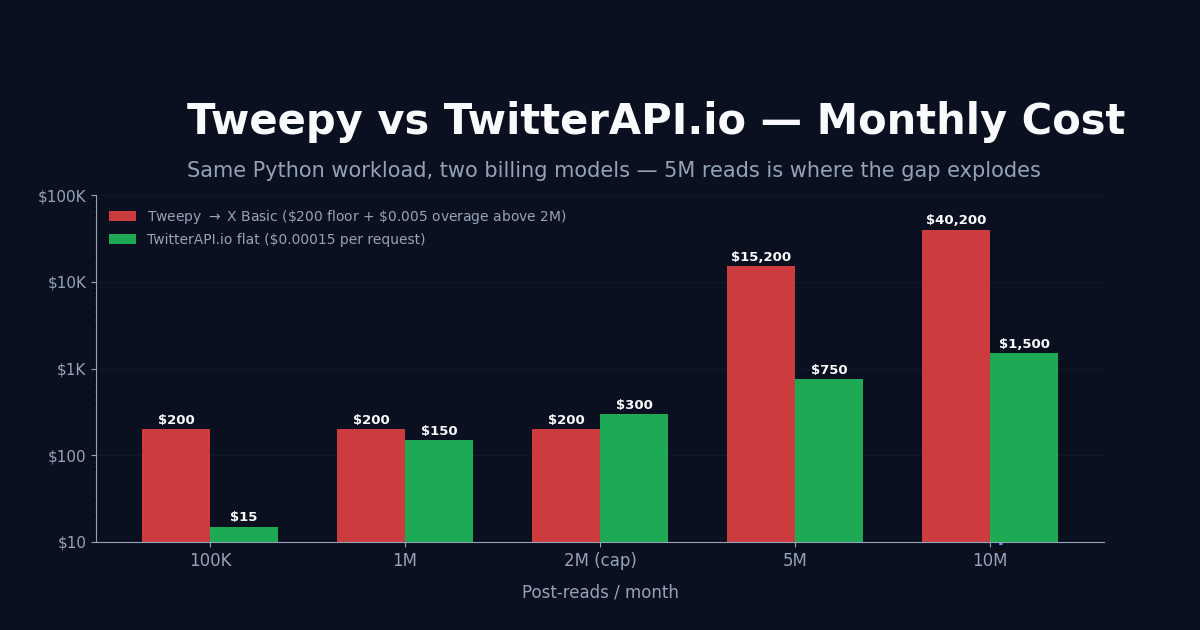
The headline gap shows up the moment you cross 2,000,000 Post-reads in a month. Below that, Basic-tier tweepy ($200/month flat) is competitive at moderate volume; above it, the picture changes fast.
Monthly cost — Tweepy via X official vs TwitterAPI.io flat:
Below 1M Post-reads/month, Basic-tier tweepy is the cheapest path if you can fit your workload inside it. Above 2M, the per-Post-read overage ($0.005) makes the flat $0.00015 rate dramatically cheaper — at 5M Post-reads the gap is over $14,000/month. Most analytics and monitoring workloads land in the 100K-10M range, which is where the swap usually pays for itself in the first week.
5-Step Migration Checklist
Most tweepy → TwitterAPI.io migrations take a half-day for a single-purpose script and 2-3 days for a larger codebase. The pattern is mechanical:
Step 1 — Swap the base URL and auth header. Replace bearer_token=... (Tweepy Client constructor) with an X-API-Key header on a requests.Session. Base URL changes from the official api.twitter.com host (v2 namespace) to the api.twitterapi.io host. Auth-method change is one line.
Step 2 — Map endpoints. Most v2 endpoints map 1:1 to a TwitterAPI.io endpoint with a similar name. search_recent_tweets → /twitter/tweet/advanced_search. get_users → /twitter/user/info. get_users_tweets → /twitter/user/last_tweets. Streaming → /oapi/tweet_filter/add_rule (webhook or websocket). The TwitterAPI.io docs (docs.twitterapi.io) lists every endpoint with the same query semantics tweepy users know.
Step 3 — Adjust params. Param names differ in places — max_results → pageSize is a common one. Date range params use ISO 8601 strings the same way. Tweet/user fields are returned by default rather than opted-in via tweet.fields= parameters.
Step 4 — Handle pagination. Tweepy's Paginator is replaced by a while cursor: loop that reads next_cursor from the response. A small helper function (15 lines) gives you tweepy-like pagination ergonomics. Sample helper at the bottom of this page in the code block.
Step 5 — Benchmark + cut over. Run the new code alongside tweepy for one full pull. Compare result counts; spot-check tweet IDs for parity. Most migrations match exactly because both APIs read from the same underlying X data. Cut over when parity is confirmed.
When to Stay on Tweepy
The honest case for staying on tweepy in 2026 is narrow but real. Stay on tweepy if all of the following are true: (1) your workload fits within 2M Post-reads/month under the cap; (2) your account is on Basic ($200/month) and you don't need historical search; (3) you specifically need official-API writes (post creation, like, follow) — TwitterAPI.io is read-focused for most use cases; (4) you depend on tweepy's auto-rate-limit-handling and don't want to maintain pagination code yourself.
Most teams who hit this page do not satisfy all four. The first condition alone (under 2M Post-reads/month) eliminates monitoring, analytics-at-scale, news-feed ingestion, and any project that needs historical data. For everything else, the migration math is unambiguous — and the code change is small enough that you can keep tweepy as a fallback wrapper if you want.
import os
import requests
from typing import Iterator

API_KEY = os.environ["TWITTERAPI_IO_KEY"]
HEADERS = {"X-API-Key": API_KEY}


def search_paginate(query: str, limit: int | None = None) -> Iterator[dict]:
    """Tweepy-Paginator-style helper for /twitter/tweet/advanced_search.
    Drop into existing tweepy code with minimal surface area change.
    """
    count = 0
    cursor = ""
    while True:
        r = requests.get(
            "https://api.twitterapi.io/twitter/tweet/advanced_search",
            headers=HEADERS,
            params={"query": query, "queryType": "Latest", "cursor": cursor},
            timeout=30,
        )
        r.raise_for_status()
        body = r.json()
        for tweet in body["data"]["tweets"]:
            yield tweet
            count += 1
            if limit and count >= limit:
                return
        cursor = body["data"].get("next_cursor", "")
        if not cursor:
            return


def user_tweets_paginate(user_name: str, limit: int | None = None) -> Iterator[dict]:
    """Tweepy-Paginator-style helper for /twitter/user/last_tweets."""
    count = 0
    cursor = ""
    while True:
        r = requests.get(
            "https://api.twitterapi.io/twitter/user/last_tweets",
            headers=HEADERS,
            params={"userName": user_name, "cursor": cursor},
            timeout=30,
        )
        r.raise_for_status()
        body = r.json()
        for tweet in body["data"]["tweets"]:
            yield tweet
            count += 1
            if limit and count >= limit:
                return
        cursor = body["data"].get("next_cursor", "")
        if not cursor:
            return


# Migration target — replaces tweepy.Paginator(client.search_recent_tweets, ...)
tweets = list(search_paginate("from:elonmusk", limit=1000))
print(f"fetched {len(tweets)} tweets — bill ~$0.0015")

# Migration target — replaces client.get_users_tweets(user_id, ...)
for t in user_tweets_paginate("openai", limit=200):
    print(t["createdAt"], t["text"][:80])
Questions readers ask
Is Tweepy still maintained in 2026?
Yes. The tweepy 4.x line is actively maintained on GitHub, with incremental releases adding support for new X v2 endpoints as they appear. The library is healthy; the issue is the API tier model on the other side of it, not the Python code.
Can I use Tweepy on a free X account?
Functionally yes, but the Free tier on X 2026 is ~1,500 reads/month — enough for hello-world testing, not enough for production. Tweepy makes the same API calls regardless of tier; the limit comes from your account, not the library. For anything beyond toy projects you need Basic ($200/month) at minimum, and Pro ($5,000/month) for historical search or streaming.
Does TwitterAPI.io have a Python SDK?
No first-party SDK in the traditional sense — the API is plain HTTP and JSON, so requests (or httpx/aiohttp for async) is the idiomatic client. A 15-line paginator helper covers most of tweepy's Paginator ergonomics; the rest of the surface is direct GET calls with an X-API-Key header. For most Python users the absence of an SDK is a feature — no version compatibility matrix to manage, no breaking-change surprises across the wrapper.
How much does TwitterAPI.io cost compared to Tweepy on X?
TwitterAPI.io is a flat $0.00015 per request with no tier system, no monthly minimum, and no 2M cap. Tweepy routes to X's tier model: Free ~1,500/month, Basic $200/month + 2M cap + $0.005/Post-read overage, Pro $5,000/month + 2M cap + $0.005/Post-read overage. Below 1M Post-reads/month, Basic is the cheapest. Above 2M, TwitterAPI.io's flat rate is dramatically cheaper — at 5M Post-reads/month the gap is over $14,000/month.
How long does a Tweepy to TwitterAPI.io migration take?
A single-purpose script is typically a half-day swap (Steps 1-5 in the checklist above). A multi-file codebase with several different endpoint calls is usually 2-3 days. The migration is mechanical because the data shape is nearly identical — tweets, users, search results all return the same fields. Most teams keep tweepy in their requirements.txt during the cut-over for parity benchmarking, then remove it once the new pull matches the old one tweet-for-tweet.
Can I use Tweepy and TwitterAPI.io together in the same project?
Yes — and several teams do this for the long tail of API coverage. Common pattern: route all read operations (search, user info, timelines, followers) through TwitterAPI.io for the cost savings; keep tweepy for the handful of write operations (post creation, like, follow) where the official API is the only path. The two clients don't conflict; they just hit different base URLs.
Does TwitterAPI.io support streaming the way Tweepy supports Filtered Stream?
Yes — through webhooks and websockets. Define a rule via /oapi/tweet_filter/add_rule and matching posts get pushed to your callback URL (webhook) or streamed over a persistent websocket connection. The rule syntax accepts the same advanced-search operators that v2 Filtered Stream uses, so existing tweepy stream rules port over cleanly. No Pro-tier wall and no 2M-cap-shared scarcity.
Continue
- /
- /blog/twitter-api-pricing
- /blog/twitter-api-with-python
- /blog/x-api-alternative
- /blog/twitter-api-alternatives-comprehensive-guide-2025
- /pricing
Stop reading. Start building.
Starter credits cover real testing on real data. Google sign-in, no card, no application queue.
Get an API key