Twitter API with Python — Practical Examples
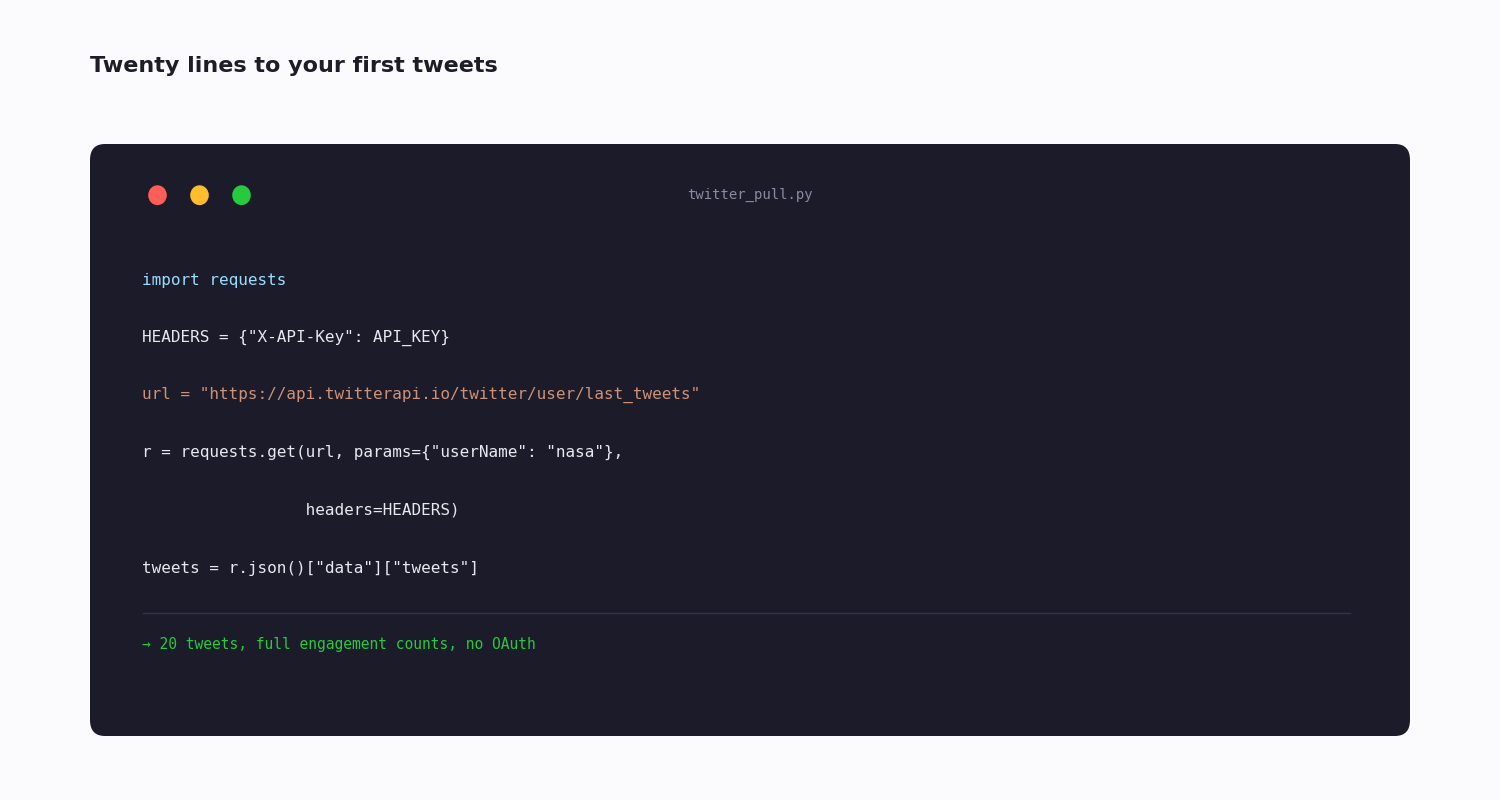
Python is the easiest on-ramp to Twitter (X) data — the language has a mature HTTP story, and the data-analysis tools you will want next (pandas, the sentiment libraries, the plotting stack) are all right there. Python has not changed; what changed is the cost and shape of the API behind it.
There are two distinct ways to reach Twitter data from Python, and most of this page is about choosing well between them. One is the official X API through the long-standing tweepy library. The other is a third-party API called with plain requests — no SDK, no OAuth dance, pay-per-call instead of a monthly tier.
Below: how the two paths differ, how authentication works for each, the core operations (fetching posts, searching, walking follower graphs), pagination and rate-limit handling, and runnable code. Every snippet works in a current Python 3 environment once you install the dependency and set a key.
Two Ways to Reach the Twitter API From Python
The official X API via tweepy. tweepy is the established Python wrapper for X's own API. It handles authentication, pagination and rate-limit waiting for you. The catch is what sits behind it: the official API is priced for businesses now — a new developer account is metered pay-per-use, billed per post, and the old flat hobby-friendly tiers are closed to new signups.
A third-party API via requests. A reseller such as TwitterAPI.io exposes the same public Twitter data over plain HTTP. There is no SDK to learn — you call it with requests — no OAuth flow, and billing is pay-per-call at roughly $0.15 per 1,000 tweets with no subscription.
How to choose: if you need to write (post, reply, DM) or need official-only metadata, you are on the official API regardless. If you are reading public data — timelines, search, followers, profiles — the third-party path is simpler to wire up and cheaper at any non-trivial volume. The rest of this page shows both, and leans on the read path because that is what most Python scripts actually do.
Setting Up
Either path needs a current Python 3 environment and one dependency.
For the official API: pip install tweepy. You will also need an approved X developer account and credentials from the developer portal.
For the third-party path: pip install requests — and requests is often already present. You need only an API key, which issues immediately with no application or review.
Keep the key out of your source. Read it from an environment variable (os.environ["TWITTER_API_KEY"]) rather than pasting it into the file — the examples below use a placeholder, but a real script should never hard-code a credential.
Authentication — OAuth vs an API Key
This is the sharpest practical difference between the two paths.
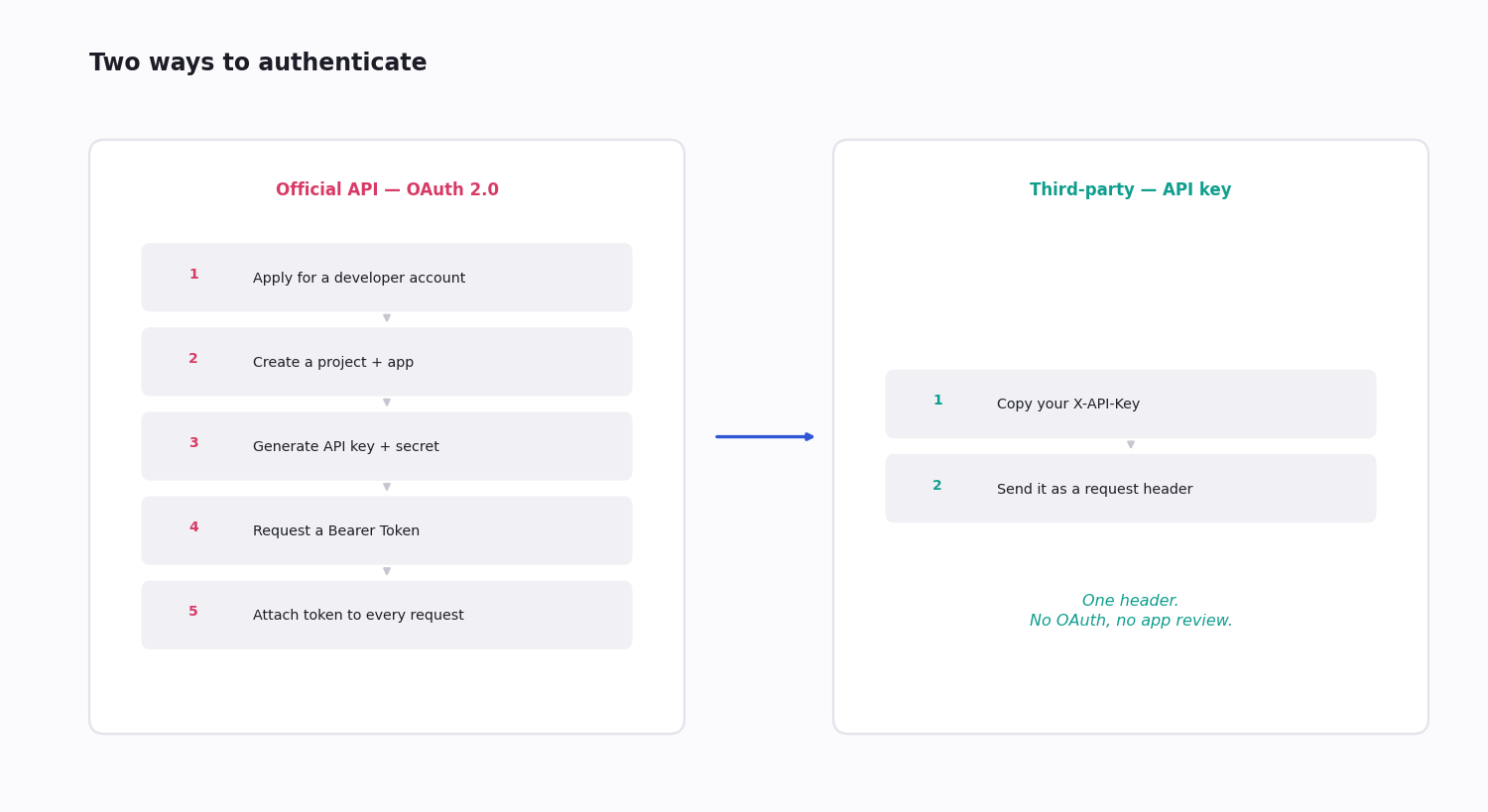
Official API: OAuth. For read-only access you generate an OAuth 2.0 app-only Bearer Token in the developer portal; for write actions you need the fuller OAuth 1.0a user-context flow with consumer keys and access tokens. tweepy manages the tokens once you have created them, but creating an app and getting approved is a real first step.
Third-party API: a single header. You send X-API-Key: <your key> with each request and that is the whole of it — no token exchange, no app review, no callback URLs.
For a script whose job is to read public data, the API-key model removes an entire category of setup work and an entire category of bugs.
The Official Path With tweepy
Against the official X API, tweepy is the standard Python wrapper. You create a tweepy.Client with your OAuth 2.0 Bearer Token, then call typed methods; the library returns parsed objects and handles pagination and rate-limit waiting for you.
What you mainly budget for is not the code — it is access. A new developer account lands on metered pay-per-use, billed for each post read and written, so a read-heavy script accrues a real bill; the familiar flat tiers are legacy and closed to new signups, and the enterprise route is a five-figure monthly contract. Reach for tweepy and the official API when you genuinely need to write to Twitter, or need official-only data.
The example below resolves a handle to a numeric id with get_user, pulls that account's timeline with get_users_tweets, and could just as easily run a query with search_recent_tweets. Each call returns a response whose .data holds the parsed results and .meta carries the pagination token for the next page; with wait_on_rate_limit=True, tweepy sleeps through a rate-limit window instead of raising.
import tweepy

client = tweepy.Client(bearer_token="YOUR_BEARER_TOKEN",
                       wait_on_rate_limit=True)

# Resolve the handle to a numeric id, then pull recent posts
user = client.get_user(username="nasa")
resp = client.get_users_tweets(user.data.id, max_results=10)
for tweet in resp.data or []:
    print(tweet.text)
The Third-Party Path With requests
Calling a third-party API needs no SDK at all. You set one header, and every endpoint is a plain requests.get — no client object to construct and no token to refresh.
The shape below is the whole pattern: a requests.get with params and an X-API-Key header, then raise_for_status() and json(). The fuller snippet at the end of this page builds two reusable functions on exactly this idea.
import requests

HEADERS = {"X-API-Key": "your_api_key"}
r = requests.get(
    "https://api.twitterapi.io/twitter/user/info",
    params={"userName": "nasa"},
    headers=HEADERS, timeout=30,
)
r.raise_for_status()
print(r.json()["data"]["followers"])
The Core Operations
Four operations cover the large majority of what Python scripts do with Twitter data:
Fetch a user's posts — GET /twitter/user/last_tweets with a userName. Returns recent posts with full engagement counts. The basis of timeline analysis and competitor tracking.
Search — GET /twitter/tweet/advanced_search with a query (the operator language) and a queryType of Latest or Top. The basis of brand monitoring and topic collection.
Walk the follower graph — the follower and following endpoints, paginated, to reconstruct who follows whom. The basis of network and audience analysis.
Look up a profile — GET /twitter/user/info with a userName, for the follower count, verification and bio of any public account.
Each returns documented JSON, so the Python side is just a dict access — no scraping, no HTML parsing.
Pagination — the Cursor Loop
A single request returns one page. To collect more than a page you loop on a cursor.
The third-party endpoints return a page of results plus a has_next_page boolean and a next_cursor string. The loop is: make the request, append the results, and if has_next_page is true, pass next_cursor back as a parameter on the next call — stop when it is false.
Always cap the loop with a maximum-results guard. Because billing is per result, an unbounded loop on a broad query is the easiest way to spend more than you meant to. The code snippet below shows the guarded version of the pattern.
Rate Limits and Retries
Both APIs have limits, at different scales and shapes.
The official API limits per fixed 15-minute window per endpoint. tweepy can sleep until the window resets if you ask it to.
A third-party API typically limits by queries-per-second or concurrent connections, with ceilings high enough that most single scripts never approach them — check your provider's documented figure.
The retry pattern that works is exponential backoff on an HTTP 429: wait one second and retry, then two, then four, capping the wait so a stuck loop does not sleep forever. With tweepy this is built in; with requests, implement it yourself or wrap the call with the tenacity library, which makes retry-with-backoff a one-line decorator.
Either way, never retry tightly in a bare loop — an un-backed-off retry storm just burns your rate budget faster.
What People Build With It
The Python-plus-Twitter combination clusters around a few projects:
Bulk collection — run the cursor loop over a list of accounts or a search query and write each post into SQLite or a CSV via pandas. The non-obvious part is deduplication: key the store on tweet id so re-runs and overlapping queries do not double-count.
Network and audience graphs — walk follower and following lists into an edge list, load it into networkx to find communities, or simply rank followers by account size and last-active date to separate a real audience from dormant accounts.
Sentiment and brand monitoring — search brand mentions and score each post with a sentiment library: vaderSentiment for speed, a Hugging Face transformers pipeline for accuracy. Aggregate the scores by day for a brand-health line.
Analytics and charting — load the collected posts into a pandas DataFrame, resample by a time bucket, and plot with matplotlib or plotly — engagement curves, volume over time, an hour-of-day heatmap.
What It Costs
Cost is the deciding factor between the two paths for most read-heavy projects.
Official API — metered pay-per-use for new accounts, billed per post read; the old flat tiers are closed to new signups. A Python script that reads steadily accrues a per-post bill that adds up quickly.
Third-party API — about $0.15 per 1,000 tweets, pay-per-call, no subscription and no minimum. A script pulling a few thousand posts a month costs in the small change range; a quiet month costs nothing.
For a read-only Python project the third-party path is typically far cheaper. Reserve the official API and tweepy for when you genuinely need to write to Twitter or need data only the official API exposes.
import requests

# Third-party API (TwitterAPI.io): no OAuth, single header, pay-per-call.
API_KEY = "your_api_key_here"  # in real code: os.environ["TWITTER_API_KEY"]
BASE = "https://api.twitterapi.io"
HEADERS = {"X-API-Key": API_KEY}

def get_latest_tweets(username, max_count=20):
    """Fetch a user's latest posts, paging on the cursor up to max_count."""
    out, cursor = [], ""
    while len(out) < max_count:
        params = {"userName": username}
        if cursor:
            params["cursor"] = cursor
        r = requests.get(
            f"{BASE}/twitter/user/last_tweets",
            params=params,
            headers=HEADERS,
            timeout=30,
        )
        r.raise_for_status()
        body = r.json()
        out.extend(body["data"]["tweets"])
        if not body["has_next_page"]:
            break
        cursor = body["next_cursor"]
    return out[:max_count]

def search_tweets(query, query_type="Latest"):
    """Run an advanced-search query. query_type: 'Latest' or 'Top'."""
    r = requests.get(
        f"{BASE}/twitter/tweet/advanced_search",
        params={"query": query, "queryType": query_type},
        headers=HEADERS,
        timeout=30,
    )
    r.raise_for_status()
    return r.json()["tweets"]

if __name__ == "__main__":
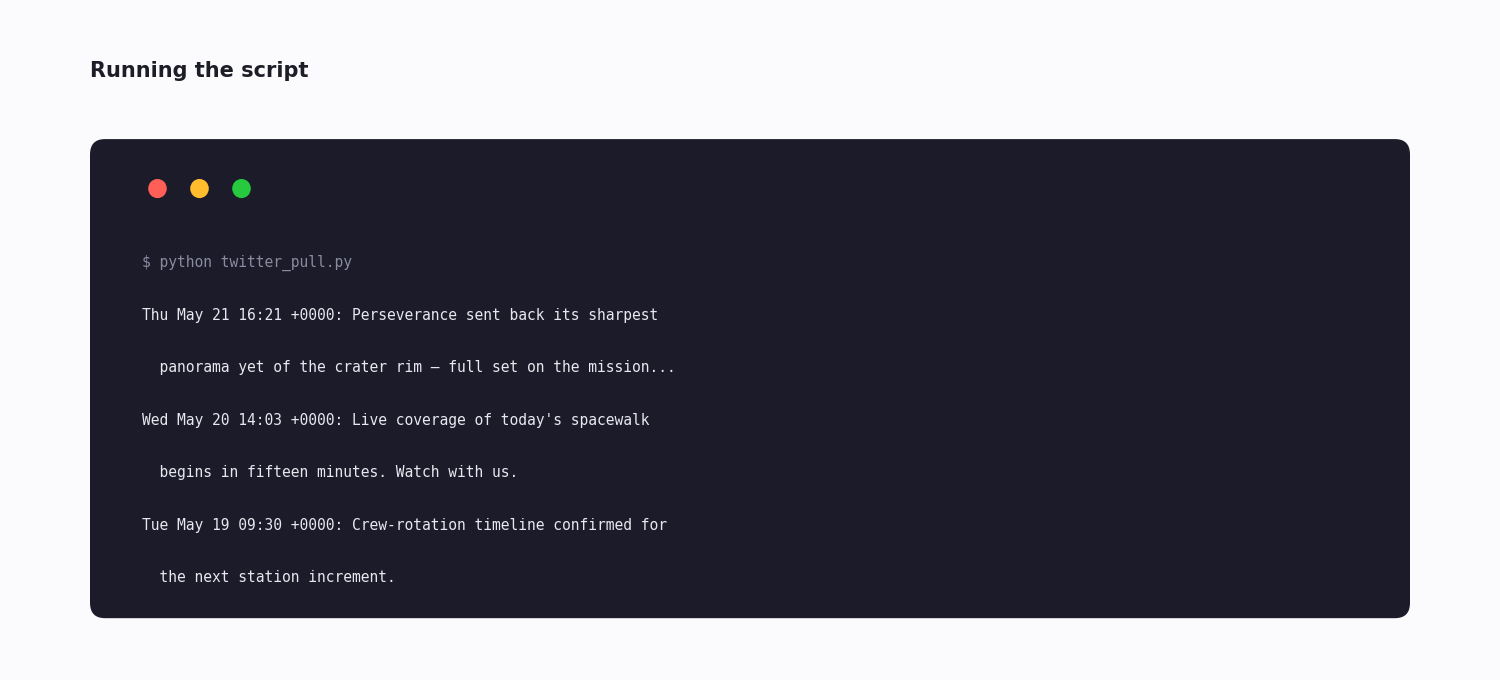
    for t in get_latest_tweets("nasa", max_count=10):
        print(f"{t['createdAt']}: {t['text'][:100]}")
Questions readers ask
What's the easiest way to use the Twitter API in Python?
For reading public data, a third-party API called with the requests library — there is no SDK to learn, no OAuth flow, and you authenticate with a single header. For writing to Twitter or accessing official-only data, the tweepy library against the official X API is the standard choice, at the cost of a developer account and OAuth setup.
Is tweepy still the right library for the Twitter API?
tweepy remains the established Python wrapper for the official X API and is the right tool when you are committed to that API — typically for write access or official-only data. It does not help with third-party APIs, though; for those you use plain requests, which needs no wrapper at all.
Do I need OAuth for Python Twitter API access?
For the official API, yes — an OAuth 2.0 app-only Bearer Token for reads, or the fuller OAuth 1.0a user-context flow for writes. For a third-party API, no — authentication is a single X-API-Key header with no token exchange.
How do I paginate Twitter API results in Python?
Loop on a cursor. The endpoints return a page plus a has_next_page flag and a next_cursor string; request a page, append it, and if the flag is true pass the cursor back on the next call. Always cap the loop with a maximum-results guard, since billing is per result.
How do I avoid hitting rate limits in Python?
Use exponential backoff on an HTTP 429 — wait one second, then two, then four, with a cap. Batch your reads and cache results so you do not re-fetch. With tweepy, set wait_on_rate_limit=True; with requests, implement the backoff yourself or use the tenacity library's retry decorator.
Can I stream real-time tweets in Python?
Yes. The official API offers a filtered stream through tweepy's streaming client. Third-party APIs offer webhook-based delivery instead — you register a filter rule and your own Flask or FastAPI endpoint receives POSTed batches of matched posts as they happen.
What does it cost to use the Twitter API from Python?
On a third-party API it is pay-per-call — about $0.15 per 1,000 tweets, no subscription — so a script pulling a few thousand posts a month costs small change. The official X API is metered pay-per-use for new accounts (billed per post read), which is more expensive for a read-heavy script.
Can I use the Twitter API in Python without a developer account?
Not for the official API — it requires an approved X developer account. A third-party API does not: an API key issues immediately with no application, which is the main reason a read-only Python project is faster to start on the third-party path.
Continue
Stop reading. Start building.
Starter credits cover real testing on real data. Google sign-in, no card, no application queue.
Get an API key