Tweet Character Count — Limits and How Counting Really Works
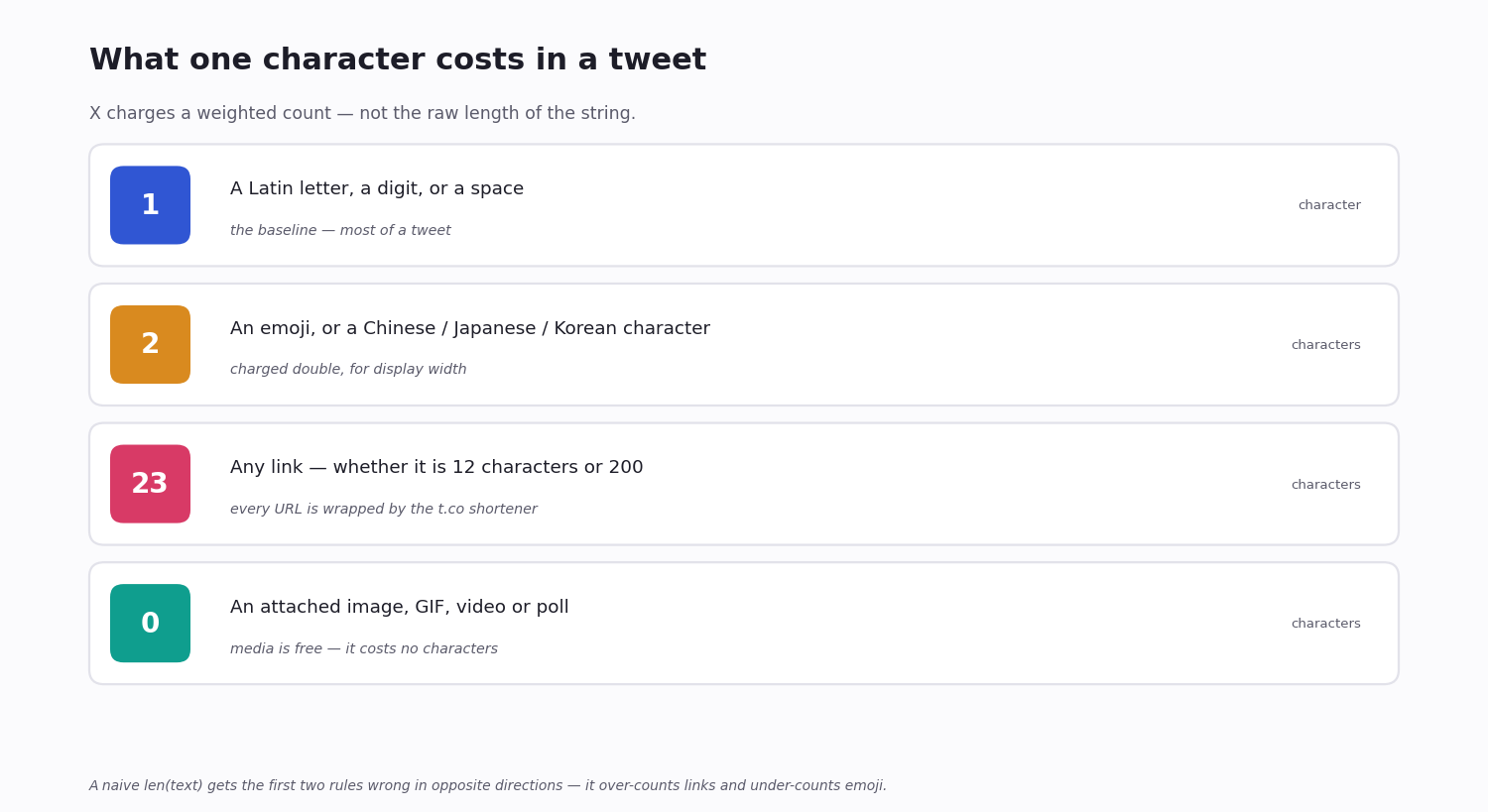
A standard tweet is capped at 280 characters — but that 280 is a weighted count, not the length of the string you typed. X counts some characters as one, some as two, and every link as a flat 23, so the number the compose box shows you is almost never len(text).
That gap matters the moment you automate. A scheduler, a thread-splitter, or a script that posts on your behalf has to compute the same count X computes, or it will reject a tweet X would accept — or worse, accept one X will truncate.
This guide covers the real limits (including the 25,000-character Premium posts), exactly how the weighted count works, every other limit on the platform, and how to count a tweet correctly in code.
How Long Is a Tweet, Really
The standard limit is 280 characters — that is what a non-subscriber gets, and it is what the vast majority of tweets are written against. It has been the default since the platform doubled the original 140.
X Premium subscribers can post up to 25,000 characters. These long posts show up in the timeline as a preview with a "Show more" link; tap it and the full text expands in place. The 25,000 ceiling is per post, not per thread, and it applies only to the subscriber composing — anyone can read a long post.
For almost every API, automation and content-planning purpose, 280 is still the number that matters: it is the limit your audience writes against, the limit a reply has to fit, and the limit a thread-splitter targets. The rest of this guide assumes 280 unless it says otherwise.
X Counts by Weight, Not by Length
Here is the part most character counters get wrong. X does not count text.length. It uses a weighted count: every character has a weight, and the tweet's count is the sum of those weights.
Standard characters — the Latin alphabet, digits, spaces, common punctuation — weigh 1 each. Characters from Chinese, Japanese and Korean scripts (Hanzi, Kana, Hangul), along with most emoji, weigh 2 each. So a 140-character all-Hanzi post already fills the entire 280 budget, and a tweet with ten emoji has spent 20 characters on them, not 10.
The reasoning is display width: a CJK glyph or an emoji takes roughly twice the visual space of a Latin letter, so it is charged twice.
A quick worked example makes it concrete. A 100-character English sentence counts as 100. Add five emoji and it becomes 110, not 105 — each emoji added 2. Now express the same idea in 100 Japanese characters: that is 200, because every CJK character is weighted 2. The same visible "length" can land anywhere from a quarter of your budget to the whole of it.
One subtlety with emoji: a single emoji you see — a flag, a profession with a skin tone, a family — is often several Unicode code points joined by zero-width joiners. X counts the rendered emoji as 2, not each underlying code point, so a naive loop over code points overcounts. This is the single most common bug in homegrown counters.
How Links, Mentions and Hashtags Count
Every URL counts as exactly 23 characters. It does not matter whether the link is 12 characters or 280 — X wraps every link in its t.co shortener, and the wrapped form is charged at a flat 23. Paste a long tracking URL and you spend 23; paste a short one and you still spend 23. (Bio links are the exception — see the next section.)
Hashtags and @mentions count at their full length. #socialmedia is 12 characters, @longusername is 13 — there is no discount for either.
The leading @mentions in a reply do not count. When you reply, the handles X prepends to address the people in the thread sit outside the 280 budget. An @mention you type inside the body of the tweet still counts normally — only the auto-prepended reply handles are free.
Attached media is free. Images, GIFs, videos and polls consume zero characters. A tweet with four images and 280 characters of text is still a valid 280-character tweet. The link X shows for the media is not a real URL in the text and is not charged.
Every Other Character Limit on X
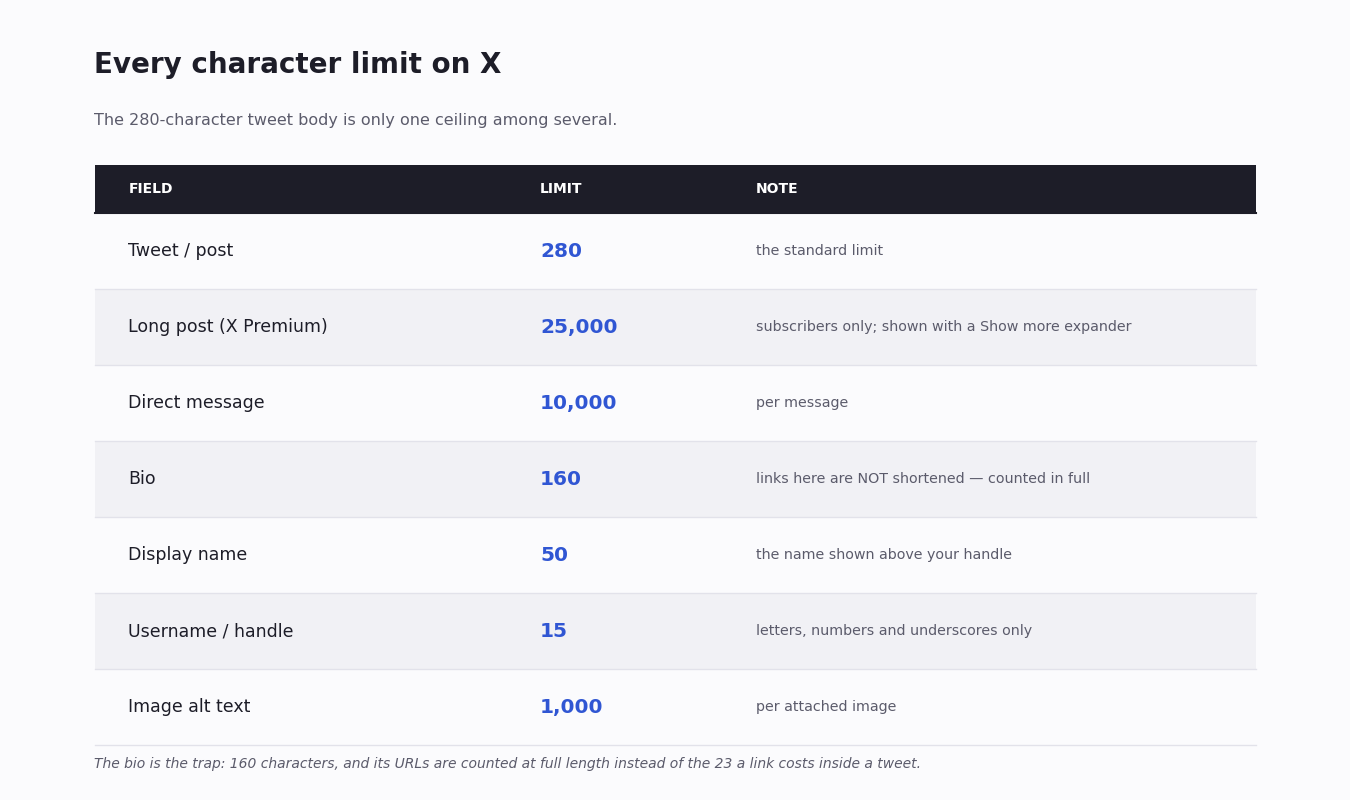
The 280 limit is only the tweet body. The rest of the platform has its own ceilings, and a tool that touches profiles or messages needs all of them — the figure below collects the ones that matter.
Two are worth calling out. The direct message limit is 10,000 characters, far more generous than a tweet. And the bio is the trap: at 160 characters it is short to begin with, and because bio URLs are not wrapped in t.co, a long link there is counted at its real length and can eat most of the field — the opposite of how links behave inside a tweet.
Handles are capped at 15 characters and accept only letters, numbers and underscores; the display name above them allows 50; image alt text allows a generous 1,000 per image.
Counting a Tweet in Code — and the len() Trap
If your code measures a tweet with len(text) or text.length, it is wrong in two directions at once. It overcounts long URLs — a 90-character link reads as 90 when X will charge 23. And it undercounts emoji and CJK — each should be 2, and a multi-code-point emoji can read as 4 or 7 when X charges 2.
The exact, authoritative algorithm is published by X as the open-source twitter-text library, available for JavaScript, Ruby and other languages (community ports cover Python). It exposes a parseTweet() call that returns a weightedLength and a simple valid boolean. For anything user-facing — a compose box, a validator that blocks a bad post — use that library rather than rolling your own; it tracks the weight ranges as X revises them.
For a quick internal audit you can approximate it: strip URLs and charge each one 23, then walk the remaining characters charging 2 for anything in the CJK or emoji ranges and 1 for everything else. That is what the worked example below does, and it is accurate enough to flag which of an account's posts are crowding the limit.
Worked Example: Auditing an Account's Tweet Lengths
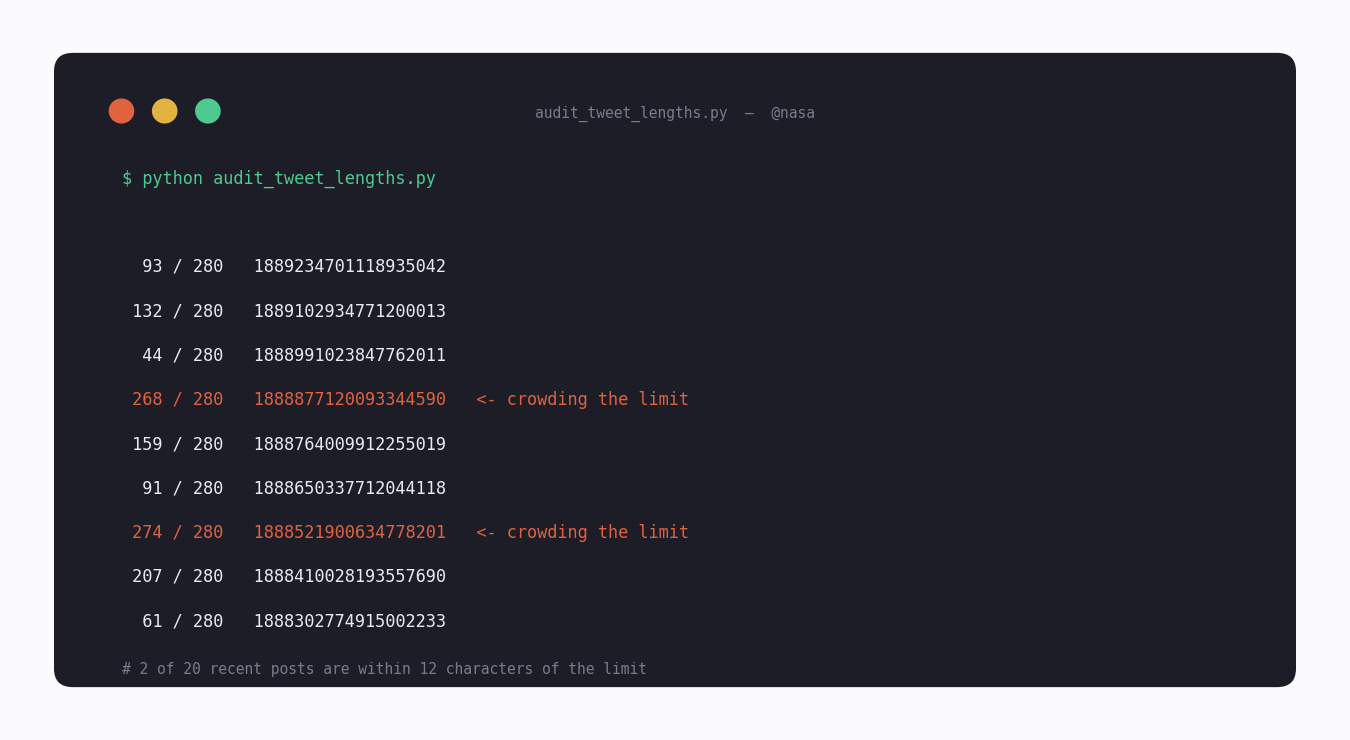
The script below pulls an account's recent posts through TwitterAPI.io's last_tweets endpoint, computes the weighted count for each, and flags the ones running close to 280. It is the practical shape of "tweet character count" for anyone managing a brand account: not measuring one draft, but seeing across a whole timeline which posts are tight and which have room.
weighted_length() does the two things len() will not: it replaces every URL with a flat 23, and it charges 2 for characters in the CJK and emoji ranges. It is an approximation — it covers the common ranges, not every emoji code point — so for production validation swap it for the official twitter-text library; for an audit pass it is enough to find the posts worth a second look.
Reading the output is the point of the exercise. A healthy account shows a spread — most posts well under 280, a few in the 200s. A column of numbers all crowding 260-280 is a warning sign: those posts have no room for a quote-tweet comment, and any automated edit or appended tag will push them over. The audit turns "are our tweets too long" from a guess into a list.
Why the Count Matters for Automation
Thread-splitting. A tool that turns a long article into a thread has to break the text on the weighted count, not the string length — split on len() and the segments with emoji or links silently overflow and get rejected.
Scheduling and drafts. A scheduler that validates a draft hours before it posts needs to compute the count exactly as X will, or a post passes review and then fails at send time.
Truncation handling. When you read tweets back through an API, the text field is the full post. If you display it in a fixed-width UI you are choosing your own truncation — and trimming on code points can cut an emoji in half. Trim on grapheme clusters, not raw characters.
Common Counting Mistakes
Counting code points instead of rendered characters. A flag emoji is two code points; a skin-toned professional can be five or more. X charges 2 for the emoji a reader sees. Iterating code points and charging 2 each overcounts badly.
Charging a URL its real length. The most frequent overcount. Inside a tweet, every link is 23 — no more, no less.
Counting reply handles. The leading @mentions X prepends to a reply are outside the budget. A counter that includes them rejects valid replies.
Assuming the bio behaves like a tweet. Bio URLs are not shortened. A counter that charges bio links 23 will tell a user a too-long bio is fine.
Trusting the compose box to be your API. The on-site composer enforces the count for you. An API client gets no such help — it has to compute the count itself before it calls the post endpoint.
import re
import requests

API_KEY = "your_api_key"

# X counts most characters as 1, CJK characters and emoji as 2, and every
# URL as a flat 23 regardless of its real length. A naive len(text)
# over-counts long links and under-counts emoji / CJK.
URL_RE = re.compile(r"https?://\S+")
WIDE = re.compile(
    r"[\u1100-\u115F\u2600-\u27BF\u2E80-\u303E\u3041-\u33FF\u3400-\u4DBF"
    r"\u4E00-\u9FFF\uA000-\uA4CF\uAC00-\uD7A3\uF900-\uFAFF\uFE30-\uFE4F"
    r"\uFF00-\uFF60\uFFE0-\uFFE6\U0001F000-\U0001FAFF\U00020000-\U0003FFFD]"
)


def weighted_length(text: str) -> int:
    """Approximate X's weighted character count."""
    n_urls = len(URL_RE.findall(text))
    body = URL_RE.sub("", text)
    weight = sum(2 if WIDE.match(ch) else 1 for ch in body)
    return weight + n_urls * 23


# Pull an account's recent posts and measure each one.
r = requests.get(
    "https://api.twitterapi.io/twitter/user/last_tweets",
    params={"userName": "nasa"},
    headers={"X-API-Key": API_KEY},
    timeout=30,
)
r.raise_for_status()

for t in r.json()["data"]["tweets"]:
    wl = weighted_length(t["text"])
    flag = "  <- crowding the limit" if wl > 260 else ""
    print(f"{wl:>4} / 280   {t['id']}{flag}")
Questions readers ask
What is the tweet character limit?
280 characters for a standard account. X Premium subscribers can post up to 25,000 characters, shown in the timeline as a preview with a "Show more" expander. For replies, automation and most content planning, 280 is the number that matters.
Did the tweet character limit used to be 140?
Yes. The original limit was 140 characters; X (then Twitter) doubled it to 280, and 280 has been the standard since. Japanese, Korean and Chinese tweets effectively still fit only about 140 of their own characters — not because of a separate limit, but because each of those characters is weighted 2 against the same 280 budget.
Why does my tweet character count look different from the text length?
Because X uses a weighted count. CJK characters and emoji count as 2 each, every URL counts as a flat 23 regardless of its real length, and the leading @mentions in a reply do not count at all. The raw string length matches X's count only for plain Latin text with no links.
How many characters does a link use in a tweet?
Exactly 23. X wraps every URL in its t.co shortener and charges the wrapped form a flat 23 characters, whether the original link is 10 characters or 200. The one exception is a URL in your bio, which is not shortened and counts at its real length.
Do emojis count as one or two characters?
Two. Emoji are charged 2 characters each, the same weight as CJK characters. Note that one emoji a reader sees can be several Unicode code points joined together — X charges 2 for the rendered emoji, not for each underlying code point.
Do images and videos count toward the character limit?
No. Attached images, GIFs, videos and polls consume zero characters. You can attach up to four images and still use the full 280 characters of text.
Does the @mention in a reply count against the 280?
The handles X automatically prepends when you reply do not count. An @mention you type inside the body of the tweet counts normally — only the auto-prepended reply handles sit outside the budget.
How do I count tweet characters correctly in code?
Don't use len() or .length — it over-counts long URLs and under-counts emoji and CJK. Use X's open-source twitter-text library, which exposes parseTweet().weightedLength, or approximate it: charge every URL 23 and charge 2 for characters in the CJK and emoji ranges. The worked example on this page shows the approximation.
What are the character limits for the bio, DMs and display name?
The bio is 160 characters (and bio URLs are not shortened, so they count in full). Direct messages allow 10,000 characters per message. The display name is capped at 50, and the username / handle at 15 — letters, numbers and underscores only.
Can I get the character count of tweets through an API?
Not as a ready-made number. An API returns each tweet's text field — there is no "character count" field in the response — and you run a weighted-count function over that text yourself. Pulling an account's posts through an endpoint like last_tweets and counting each one is the standard way to audit which tweets are crowding the 280 limit.
Does the X API itself validate tweet length when I post?
Yes — server-side. If you POST to a tweet-creation endpoint (X's /2/tweets or TwitterAPI.io's /twitter/create_tweet_v2) with text whose weighted length exceeds 280 (or the Premium 25,000 ceiling for a Premium author), the request is rejected with a validation error. The body code identifies it as a length violation rather than a generic 400. You still want client-side counting before the call — to give the user feedback as they type — but the server is the source of truth and will catch anything the client mismeasures.
Is there a free real-time tweet character counter I can use?
Yes. We ship a free real-time counter built specifically for X's weighted-count rules — URLs flat at 23, CJK and emoji at 2, the lot — at [twitterapi.io/ja/tools/x-mojisuu-counter](/ja/tools/x-mojisuu-counter). The UI is Japanese-first because that's where the 280-vs-effective-140 gap matters most, but it counts any language correctly. No login, no install, no server upload — the count happens entirely in your browser.
Continue
- /
- /blog/twitter-api-with-python
- /blog/x-post-template
- /blog/twitter-scheduler
- /ja/tools/x-mojisuu-counter
- /pricing
Stop reading. Start building.
Starter credits cover real testing on real data. Google sign-in, no card, no application queue.
Get an API key