Twitter Monitoring — A Practical Guide
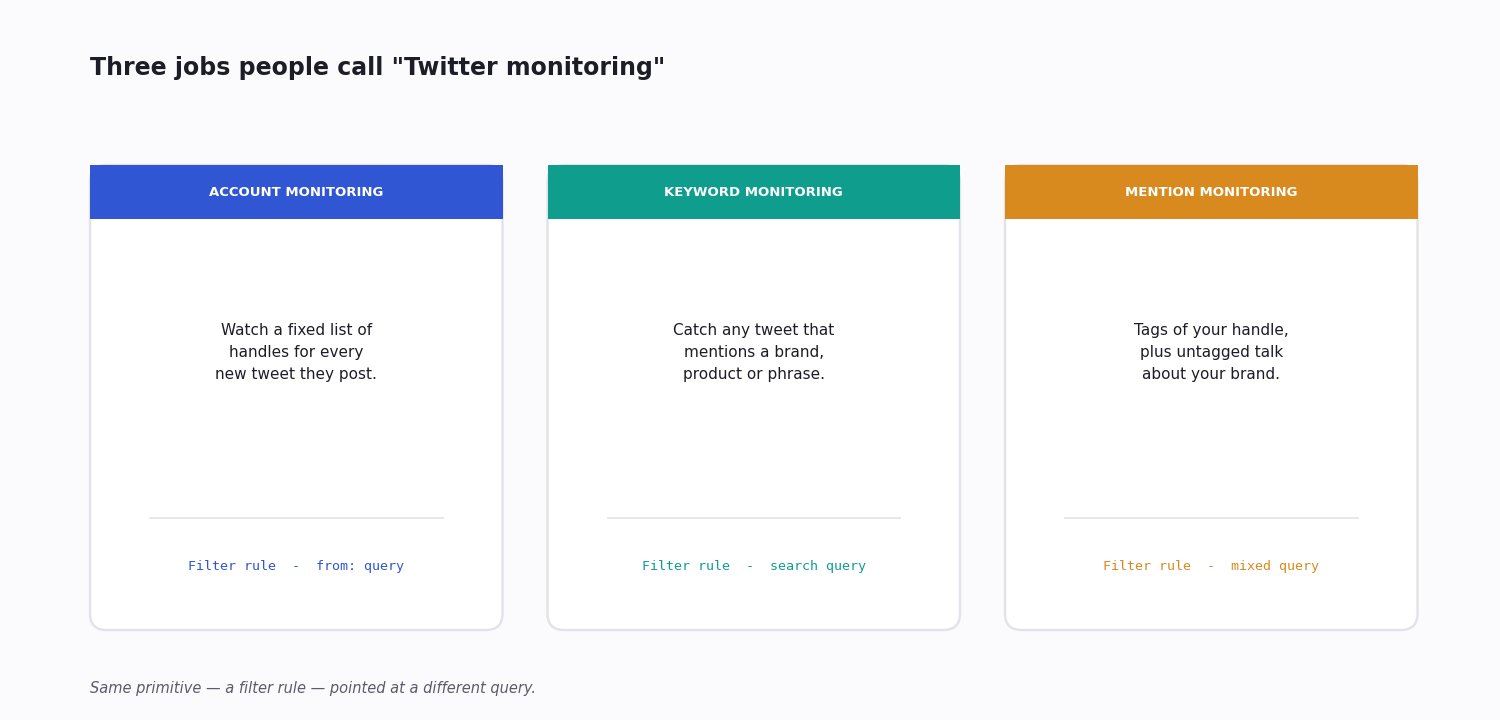
If you ask ten teams what "Twitter monitoring" means, you'll get ten answers. Some want a press alert when their CEO is tagged. Some want to know the second a competitor announces something. Some want to feed a sentiment dashboard. The setup is different for each, but the underlying primitives are the same: a fast read of new tweets, a way to filter them, and somewhere to send the matches.
I've built monitoring rigs for a fintech tracking 200 stock-related accounts and for a brand catching customer support DMs. The pattern is the same once you strip away the dashboards. What follows is how to pick the right primitive for what you're actually trying to do, what each one costs, and the mistakes that quietly break a monitor weeks after you set it up.
Every cheap setup below assumes you read Twitter's data through a third-party API. The official X API is still an option, but since the Free tier was retired for new developers its access is metered per request with no low flat tier underneath — workable at enterprise scale, hard to justify for a monitor that makes many small calls around the clock.
Three Things People Mean by 'Twitter Monitoring'
1. Account monitoring. You have a list of accounts (executives, competitors, partners, influencers in your niche) and you want their new tweets pushed to you as fast as possible. This is the pattern banks and trading firms use to catch market-moving posts. A filter rule with webhook delivery is the right tool — polling profiles by GET is slower and more expensive.
2. Keyword / topic monitoring. You want anything mentioning your brand, product name, or a market signal phrase like "outage," "down," or a hashtag. This is the classic brand-listening setup. It needs a search-based filter rule, not account polling.
3. Mention monitoring. You want everything that tags your account or talks about your handle without tagging. Tag-only is cheap (one query). Untagged mentions need keyword search across the public stream.
Almost every monitoring product on the market is one of these three jobs — or all three bolted together behind a single dashboard. Naming which one you actually need is the difference between a rule that costs a few cents a month and a tool subscription you barely use.
Account Monitoring: A Watchlist of Handles
Account monitoring starts with a list of handles and one question: when any of them posts, how fast do you need to know? For a trading desk the answer is "within seconds"; for competitive intelligence, "within the hour" is usually fine. That latency target decides everything else about the setup.
The efficient way to watch many accounts is one rule, not one rule per handle. Twitter's search grammar lets you OR a batch of from: clauses into a single query — from:nasa OR from:spacex OR from:esa — and a filter rule running that query re-checks every account on each cycle. A 50-handle watchlist is still one rule, one webhook, one line on the bill.
Volume is easy to size in advance. Most monitored accounts post a handful of times a day; multiply your handle count by an average daily post rate and you have a tweets-per-month figure to cost against. A 50-account watchlist at two posts each per day is about 3,000 tweets a month — small by any pricing.
Polling profiles one at a time with a GET loop is the slow, expensive way to do the same job: you pay for every check whether or not anything was posted, and your latency is whatever your loop interval is. A filter rule only ever bills you for tweets that actually matched, and pushes them as they appear.
Keyword and Mention Monitoring: The Noise Problem
Keyword monitoring is harder than account monitoring for one reason: people don't say your brand name the way your rule expects. They misspell it, they tag the wrong handle, they mention you with no handle at all, and — if your brand is also an ordinary English word — they talk about something else entirely.
Twitter's query grammar is the tool for cutting that down. Quote an exact phrase, OR a set of spellings, exclude the noisy variants, and pin the language: ("acme corp" OR acmecorp OR "acme support") -filter:retweets lang:en catches the real mentions and drops the retweet echo. For a brand whose name is a common word, anchor it — add a product term or your own handle so the rule fires on acme pricing but not on an unrelated joke.
Mentions split in two. Tag-only monitoring — every tweet containing @yourhandle — is one cheap query and catches the people talking to you. Untagged mentions — people talking about you without the @ — only a keyword search across the public stream will surface, and that is where most unhappy-customer posts and quiet competitor comparisons live.
Whatever the query, expect to tune it for a week. Watch what matches, add exclusions for the noise you see, re-check the volume. A keyword rule you set once and never revisit will either miss real mentions or bury you in junk — there is no version that gets the balance right on the first try.
What Each Setup Costs
All the numbers below assume third-party API pricing at roughly $0.15 per 1,000 tweets retrieved, billed per call with no monthly minimum. That per-call rate is what makes small monitoring jobs almost free.
The official X API is the other option, and the comparison is stark. Since the Free tier was retired, new developers are on metered pay-per-use — billed per request, on the order of half a cent per post read, with a two-million-read monthly cap. The old flat Basic ($200/month) and Pro ($5,000/month) tiers are closed to new signups; the only contract above pay-per-use is Enterprise, which starts around $42,000 a month. For a monitor reading 100,000 tweets a month, metered official access runs into the hundreds of dollars — the same volume on third-party pricing is about $15.
Account monitoring (50 accounts, ~2 new tweets each per day): roughly 3,000 tweets a month — under $0.50 on third-party pricing. Webhook-pushed, so there is no idle polling cost.
Keyword monitoring (one brand, ~30 mentions a day): about 900 tweets a month — around $0.14. A filter rule, not a full-text search every minute.
Mention monitoring (untagged brand mentions, ~50 a day): about 1,500 tweets a month — around $0.23.
Across all three, you pay for the tweets that match, not for the watching — so the query is the only real lever on cost. Tighten it and the bill drops with it.
Webhook vs WebSocket vs Polling
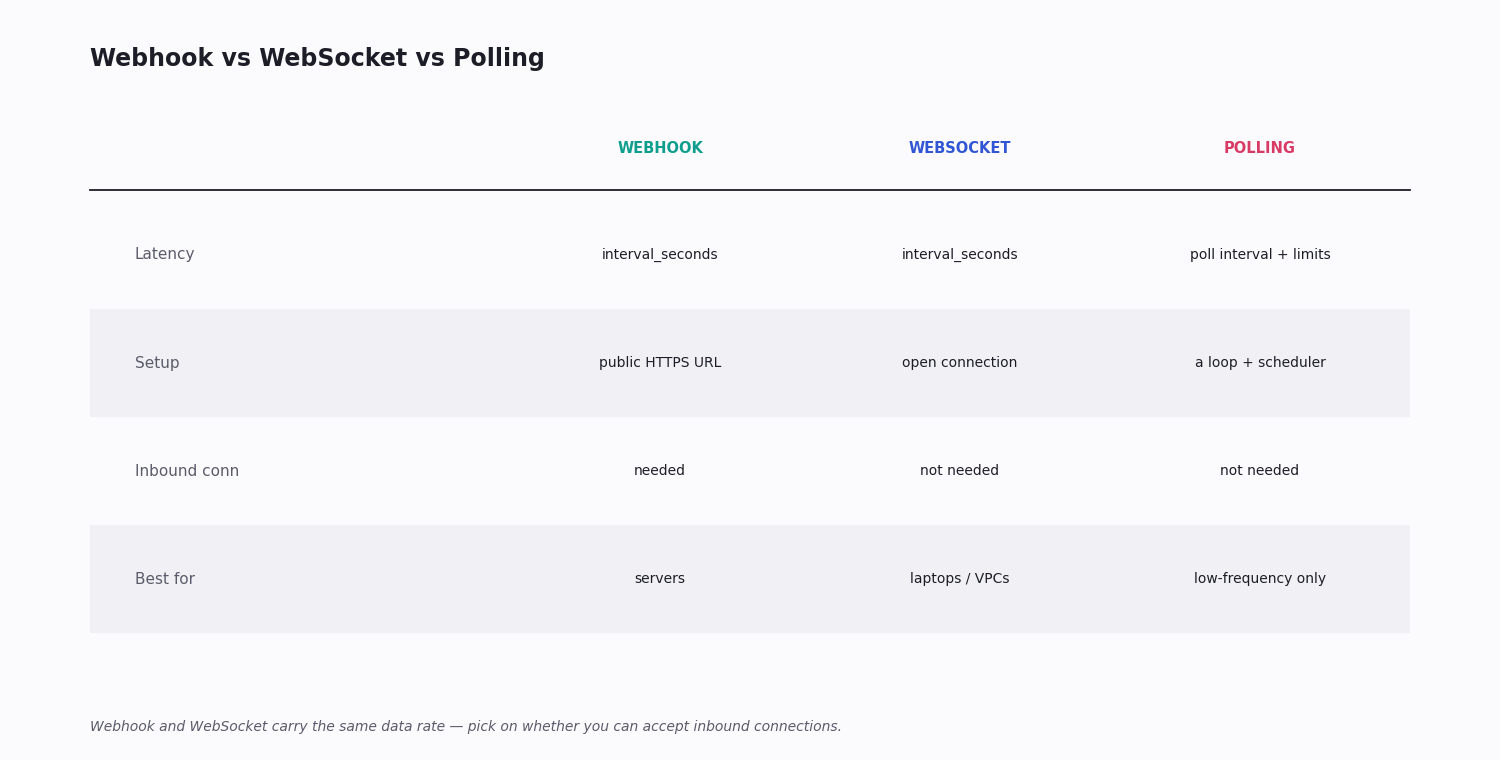
Webhook (push to your server) — best when you have a public HTTPS endpoint. No infrastructure to maintain on your side beyond the receiver. This is how TwitterAPI.io's Tweet Filter delivers matches by default; delivery latency is bounded by your rule's interval_seconds, which you set as low as a few seconds for near-real-time monitoring.
WebSocket (managed open connection) — good when you can't accept inbound connections (some VPC setups, dev laptops). Slightly higher overhead because the connection has to stay alive. Same data rate as a webhook.
Polling (GET in a loop) — only acceptable for low-frequency targets. Anything more than once a minute hits rate limits on the official API and runs up cost on third-party. Avoid for production.
For most teams the decision is simple: if you can expose an HTTPS endpoint, use a webhook; if you genuinely cannot, use a websocket; reach for polling only when the target is so low-frequency that a once-an-hour check is acceptable.
A Working Setup (Account + Keyword Together)
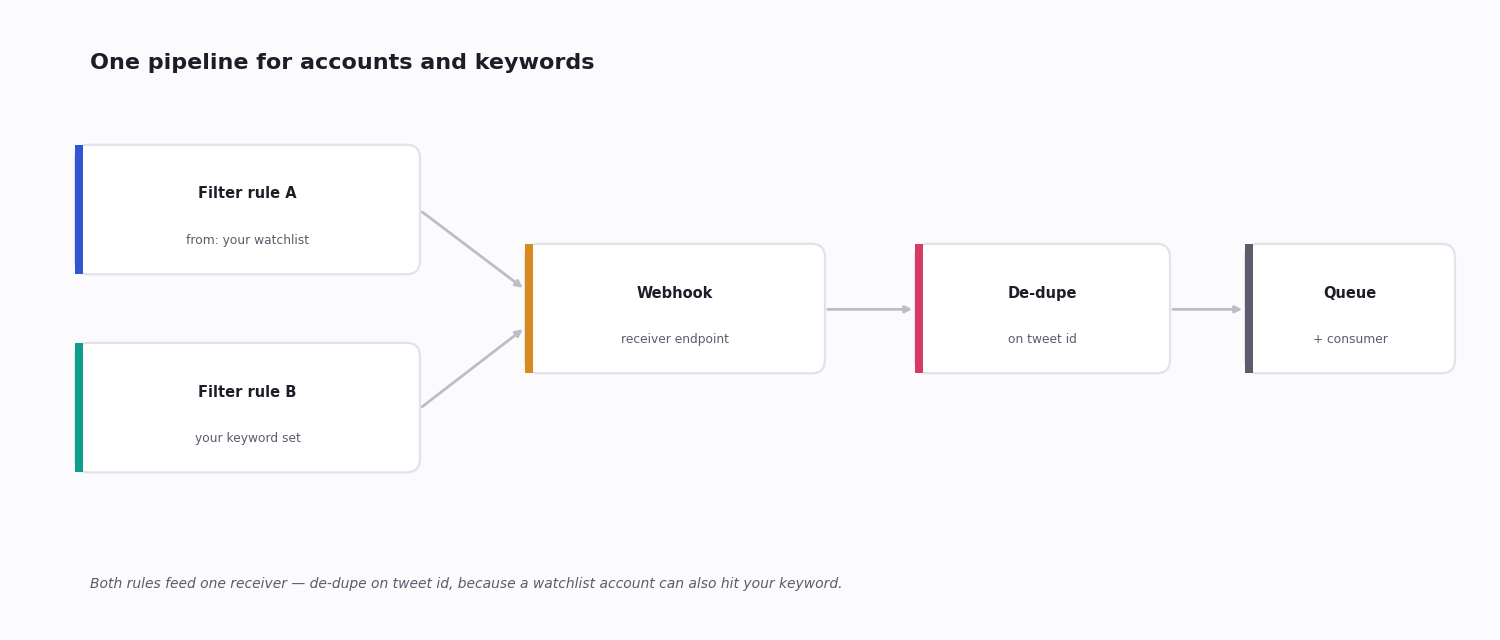
Most teams want both account monitoring (a watchlist of specific handles) and keyword monitoring (mentions of their product) in the same pipeline. The cleanest way to wire this is:
1. Register a filter rule for the account watchlist (one from: query covering each handle) -> matches go to webhook A.
2. Register a filter rule with the keyword set -> matches go to webhook B.
3. Both webhooks dump into the same queue (SQS / Kafka / a Redis list) — your consumer doesn't need to know which source.
4. De-dupe on tweet ID — sometimes a tweet matches both rules (a watchlist account mentions your product), and you don't want it twice.
Tweet ID is the right de-dupe key: it is globally unique and never changes, where a content hash would log an edited tweet as a brand-new one and identical timestamps can collide. De-dupe once, where everything lands in the shared queue, and every consumer downstream can assume each tweet arrives exactly once.
Code: A Minimum Working Monitor
Below is a curl example that registers a filter rule to catch any tweet matching the keyword acmecorp in real time, lists your active rules, and stops a rule when you're done. The value field is an advanced-search query — the same grammar covered above — so swapping in a from: watchlist or a multi-spelling brand query is a one-line change.
Where Monitoring Setups Go Wrong
The webhook handler is too slow. Pushed batches carry a short timeout and are not retried — if your receiver calls Slack or writes to a slow database before it answers, one slow downstream call drops the whole batch. Acknowledge the push immediately and do the real work on a background thread or queue.
No de-duplication. Run an account rule and a keyword rule together and the same tweet will eventually match both — a watchlist account that mentions your product. De-dupe on tweet ID at the point everything lands in one place, or every such tweet alerts twice.
Over-broad queries. A query with no language filter, no retweet exclusion and a common word in it can match ten times the volume you expected — and you pay for all of it. Size the volume before you leave a rule running, and put a cap or an alert on the daily match count.
No monitor for the monitor. The most common silent failure is the rule itself stopping — a deleted rule, an expired key, a webhook endpoint that quietly started returning 500. If nothing matches for a day, is that a slow news day or a dead pipeline? Add a heartbeat that alerts when match volume drops to zero for longer than the account normally goes quiet.
# Step 1 (once): in the twitterapi.io dashboard, open Tweet Filter ->
# Webhook settings and register your receiver URL.
# Step 2: create a filter rule. `value` is an advanced-search query;
# every `interval_seconds` the rule re-runs and newly matched tweets
# are pushed to your webhook.
curl -X POST https://api.twitterapi.io/oapi/tweet_filter/add_rule \
  -H "X-API-Key: YOUR_KEY" \
  -H "Content-Type: application/json" \
  -d '{
    "tag": "brand-mentions",
    "value": "acmecorp -filter:retweets lang:en",
    "interval_seconds": 5
  }'
# -> {"status":"success","rule_id":"..."}

# List your active rules:
curl -G https://api.twitterapi.io/oapi/tweet_filter/get_rules -H "X-API-Key: YOUR_KEY"

# Stop a rule (rule_id goes in the JSON body):
curl -X DELETE https://api.twitterapi.io/oapi/tweet_filter/delete_rule \
  -H "X-API-Key: YOUR_KEY" -H "Content-Type: application/json" \
  -d '{"rule_id": "RULE_ID"}'
Questions readers ask
Can I monitor Twitter for free?
The official X API no longer has a free read tier — it was retired for new developers, and metered pay-per-use is billed from the first request. Third-party APIs like TwitterAPI.io give a small trial credit (about $0.1, roughly 660 tweets) to test with, then bill per call at about $0.15 per 1,000 tweets. There is no genuinely free way to run continuous monitoring at volume; the realistic answer is "a few cents a month," not "zero."
What's the latency for real-time Twitter monitoring?
Delivery latency is bounded by your rule's interval_seconds — set it to a few seconds for near-real-time monitoring. Polling-based setups add whatever your poll interval is, plus any rate-limit delays.
Can I monitor private accounts?
No. Both the official X API and any compliant third-party API only see public tweets. Tweets from protected (private) accounts are not available through any API.
How do I monitor hashtags?
Use a search-based filter rule with the hashtag as the query. Example: create a filter rule with value set to #yourhashtag -filter:retweets — matches will push to your endpoint as they happen.
What if I just want a daily digest, not real-time?
For daily digests, run a search query once a day with a date-range filter. Much cheaper to operate than streaming. Most third-party APIs charge the same per-tweet rate either way, so the savings come from filtering volume, not from the delivery mode.
How many accounts can one filter rule watch?
One rule can hold a long OR-chain of from: clauses, so a single rule comfortably covers a watchlist of dozens of handles. The practical limit is query length, not a hard account cap — past roughly a hundred handles, split the list across two or three rules so a query stays readable and one bad handle can't break the whole thing.
What's the difference between monitoring and scraping?
Monitoring is forward-looking: you set a rule and catch tweets as they post. Scraping is backward-looking: you run a search over tweets that already exist. Most real setups need both — a filter rule for what happens next, a historical search to backfill what happened before you started watching.
Can I monitor Twitter without writing code?
Yes, with a SaaS monitoring tool — you trade per-call pricing and custom logic for a ready-made dashboard and no engineering. The build-it-yourself API route is cheaper and far more flexible but needs someone comfortable with an HTTP API and a small server. The build-or-buy trade-off is compared in detail in our Twitter monitoring tools guide.
Continue
Stop reading. Start building.
Starter credits cover real testing on real data. Google sign-in, no card, no application queue.
Get an API key