Twitter Monitoring Tools — Build or Buy
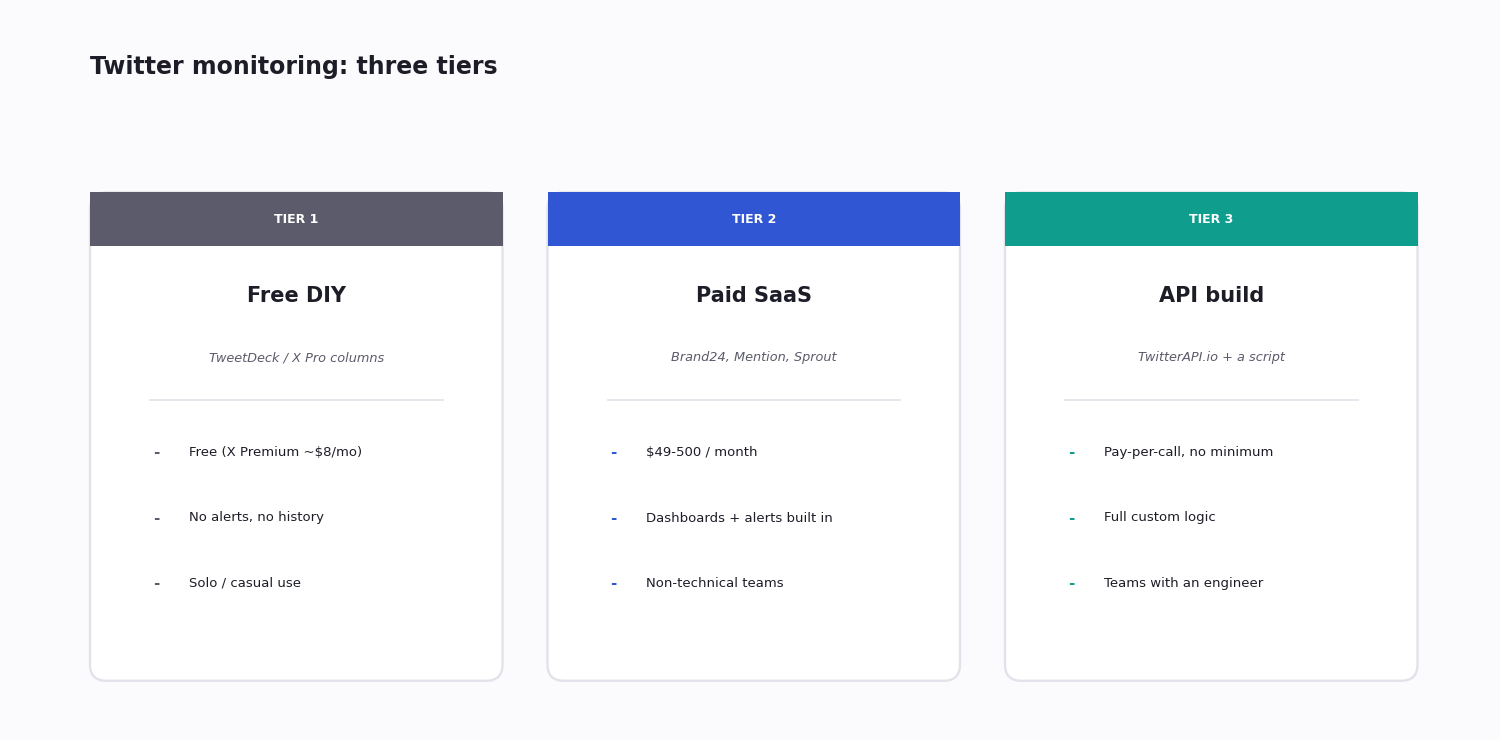
If you're shopping for a Twitter (X) monitoring tool, you're choosing on a hidden axis: build it yourself with an API and a small script, or buy a SaaS dashboard with everything wired up. The decision usually comes down to three things — your developer capacity, how custom your monitoring rules need to be, and your monthly volume.
Below is a clean comparison across the three viable tiers, with current pricing and the trade-offs that don't show up in vendor brochures. Two facts upend a lot of older advice and are reflected throughout: TweetDeck is no longer free, and most SaaS entry prices have climbed.
Quick rule of thumb: under 1,000 mentions a month and you need it working tomorrow, buy SaaS. Over 10,000 mentions a month, or you need custom logic, build with an API. In between it's a genuine coin flip — but the build option scales better long-term.
Tier 1: Free and Near-Free Monitoring
The genuinely free options are thin. Native X search (x.com/search with advanced operators) costs nothing and supports the same query grammar as a paid filter rule — but it is manual, has no alerting, keeps no history, and exports nothing. It is fine for an occasional check and useless for catching anything as it happens.
A common assumption worth correcting: TweetDeck is no longer a free monitoring tool. Rebranded X Pro, it went from free, to $8/month behind X Premium, to its current home behind the Premium+ subscription at $40/month. If a guide still lists TweetDeck as the free way to monitor Twitter, it is out of date — and even at $40/month it only gives you columns to watch, not alerts, history or exports.
The most useful near-free option is a small script against a third-party API's trial credit. TwitterAPI.io, for example, gives about $0.1 in trial credit — roughly 660 tweets — which is enough to stand up a real scripted monitor and see it work end to end, though not enough to run it continuously.
Cost: $0 for native search; ~$0 to prototype on trial credit; $40/month if you specifically want X Pro columns. Good for: solo creators, casual checks, prototyping. Where it breaks: no alerting (you have to be watching), no historical analysis, no exports, no team collaboration, no custom logic.
Tier 2: Paid SaaS Tools
Brand24, Awario, Mention, Sprout Social, Hootsuite — full-service monitoring platforms with dashboards, alerts, sentiment analysis and report exports. Most provide email or Slack alerts and weekly digest exports.
Cost range: the cheapest entry tiers start around $25-40/month (billed annually) but cap you hard — often two or three tracked keywords and a low monthly mention limit. Realistic working tiers run roughly $120-200/month — Brand24's entry Individual plan, for one, is around $199/month. Full-feature plans reach $400-600+/month, and Mention now sells a single Company plan at around $599/month. Read the caps, not just the headline price — a cheap plan that allows three keywords and a 12-hour refresh is not really monitoring.
Good for: marketing teams who want everything done for them, non-technical users, and crisis comms where reaction time matters and you have no on-call engineering.
Where it breaks: limited custom logic; mention-volume caps (most tools rate-limit before an upcharge); sentiment scoring that is often a black box and miscategorizes domain-specific phrases; and vendor lock-in — exporting your accumulated historical data on cancellation is frequently paywalled.
Honest take: pay for a SaaS tool if someone on your team is specifically responsible for catching brand mentions fast, and you have the budget for a real working tier rather than just the capped entry plan. Otherwise the next tier is cheaper and gives you more control.
Tier 3: API-Based Custom Build
Wire your own monitoring using the Twitter (X) API or a third-party reseller. The common pattern: a filter rule for your accounts and keywords with webhook delivery, a lightweight server receiving the matches, and custom alerting into Slack, email or your own database.
Cost via the official X API: there is no longer a cheap flat tier to build on. The Free tier was retired for new developers, and the old Basic ($200/month) and Pro ($5,000/month) plans are closed to new signups. New developers are on metered pay-per-use — billed per request, roughly half a cent per post read — or Enterprise, which starts around $42,000/month. For a monitoring workload of many small reads, metered pricing adds up fast.
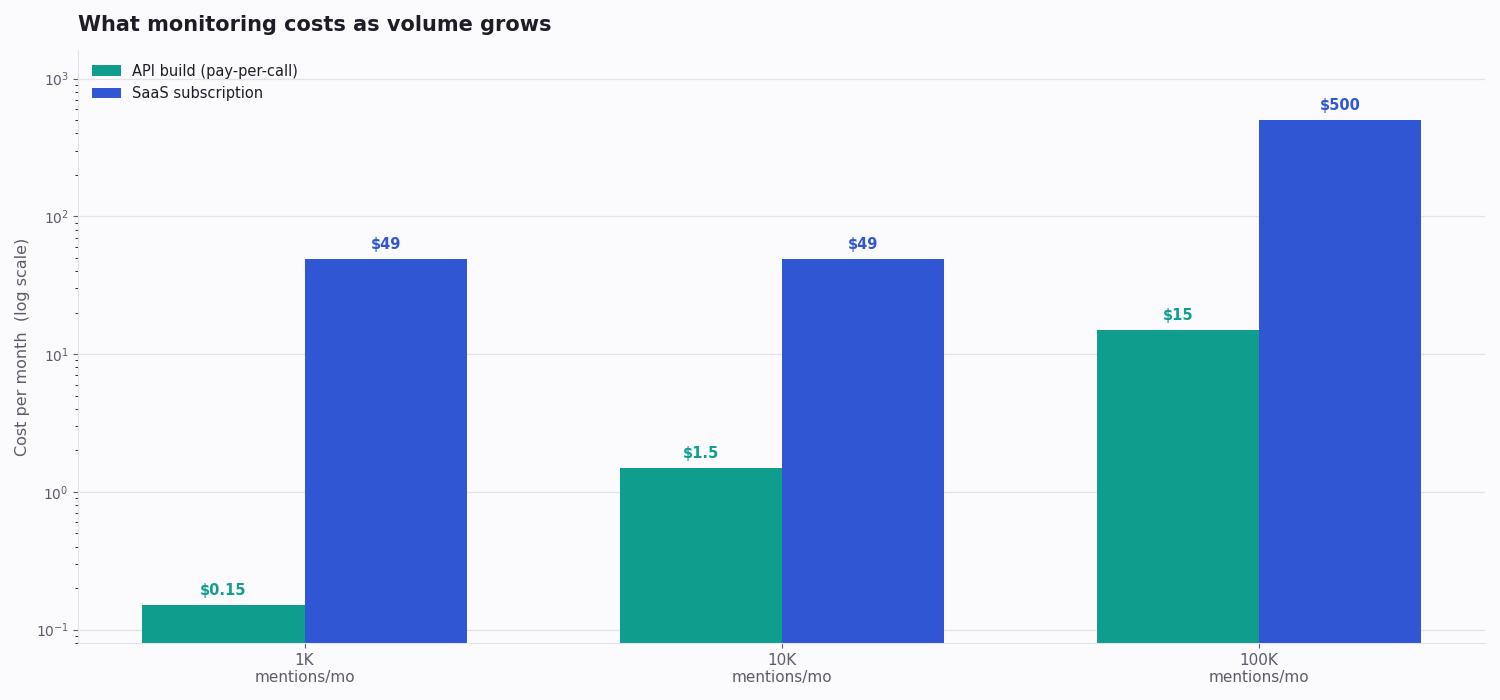
Cost via a third-party API (e.g. TwitterAPI.io): pay-per-call at about $0.15 per 1,000 tweets monitored, with no monthly minimum. Real numbers:
- 1,000 mentions/month -> ~$0.15
- 10,000 mentions/month -> ~$1.50
- 100,000 mentions/month -> ~$15
Engineering investment: about one to two days for a first version (webhook receiver, alert routing, a simple dashboard), then roughly two to four hours a month of maintenance.
Good for: teams with at least one engineer comfortable with HTTP APIs; anyone with custom-logic needs ("alert me only if the mention has more than 10 likes AND comes from an account with more than 5K followers AND is in English"); and teams who want to own their historical data outright.
The Hidden Costs Each Tier Doesn't Advertise
SaaS hides the caps and the exit. The headline price buys a fixed number of keywords and a monthly mention ceiling; cross either and you are upsold to the next tier. And the data you accumulate is the vendor's leverage — many tools limit or paywall the export of your mention history, so leaving costs you either money or your archive. Price the working tier you will actually need, not the entry plan, and check the export terms before you commit.
The API build hides the maintenance and the on-call. The API bill is genuinely small, but a build is software you now own: a webhook endpoint that has to stay up, a key that can expire, queries that drift out of tune. Budget the few hours a month, and decide up front who gets paged when the pipeline goes quiet.
Both hide the tuning cost. Whether you buy or build, a brand query takes about a week of watching-and-adjusting before the signal-to-noise ratio is usable. That effort is the same on either path — a SaaS dashboard does not tune your query for you.
Which Tier Fits Your Situation
Match the need to the tier:
Need it working tomorrow, non-technical team — buy SaaS (Tier 2).
Occasional checks, casual use — native X search or a quick DIY script (Tier 1).
1-10K mentions a month, alerts wanted — SaaS or an API build, depending on whether an engineer is free.
Over 10K mentions a month — an API build (Tier 3); a SaaS subscription gets expensive at this volume.
Custom rules — regex or multi-factor filters — an API build (Tier 3); most SaaS tools cannot express them.
You need to own your historical data — an API build (Tier 3).
A GUI for non-engineers — SaaS (Tier 2).
Crisis comms, 24/7 alerting — SaaS (Tier 2); the alerting infrastructure is already built.
Sizing It by Volume
The cleanest way to choose a tier is to estimate your monthly mention volume and let the cost curves decide.
Under ~1,000 mentions a month. An API build costs cents here — but if you have no engineer and need it working tomorrow, an entry SaaS plan is the pragmatic call. You are paying for the dashboard and the alerting, not for the data.
1,000 to 10,000 mentions a month. The genuine coin-flip range: SaaS at $150-250/month against an API build at a couple of dollars in calls plus a few days of engineering. The deciding factor is whether you have the engineer free and whether you expect to want custom logic later.
Above ~10,000 mentions a month. The SaaS subscription stops scaling with you while the API bill barely moves — about $15/month covers 100,000 mentions. Past this point the build pays for itself within the first few months, and the gap only widens.
What I'd Pick in Each Scenario
Solo founder, 5 keywords, minimal budget: native X search plus a Saturday-morning routine, or a prototype script on trial credit. Effectively free.
Series A startup, marketing team of three: an entry-to-working SaaS tier — Brand24's Individual plan or a comparable Awario mid-tier, roughly $100-200/month. Frees the team from manual checks without needing engineering time.
Mid-stage company, ~30K mentions/month, with an ops team: build with an API — a few dollars a month in calls plus roughly 30 hours of engineering up front. Saves several thousand dollars a year versus the equivalent SaaS tier.
Enterprise, regulated industry: a hybrid — SaaS for the team-facing dashboard, an API build for the compliance archive and custom alerting that the SaaS tool can't express.
Code: A Brand-Mention Monitor in ~40 Lines
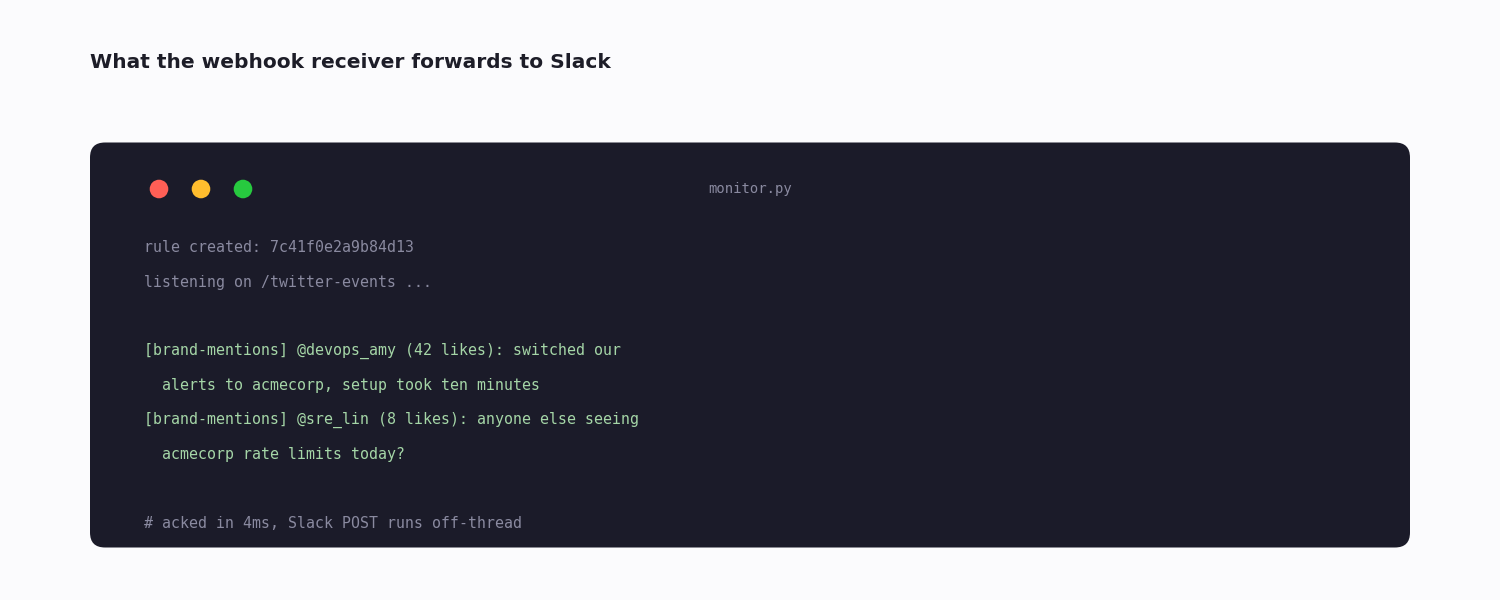
Below is a minimal API-build monitor: one filter rule for your brand keyword, and a Flask receiver that forwards each match to Slack. The detail that matters is the threading — the webhook push carries a short timeout and is not retried, so the handler acknowledges immediately and does the slow Slack call on a background worker.
# Minimal brand-mention monitoring: one filter rule + a webhook receiver.
import os
import queue
import threading
import requests

API_KEY = os.environ["TWITTER_API_KEY"]
SLACK_WEBHOOK = os.environ["SLACK_WEBHOOK"]

# 1. Create the filter rule (do once at setup). Register your receiver URL
#    in the twitterapi.io dashboard under Tweet Filter -> Webhook settings;
#    matched tweets are POSTed there every `interval_seconds`.
resp = requests.post(
    "https://api.twitterapi.io/oapi/tweet_filter/add_rule",
    headers={"X-API-Key": API_KEY},
    json={
        "tag": "brand-mentions",
        "value": "acmecorp -filter:retweets lang:en",
        "interval_seconds": 5,
    },
    timeout=30,
)
resp.raise_for_status()
print("rule created:", resp.json()["rule_id"])

# 2. Receiver (Flask). The push carries a ~1s timeout and is not retried,
#    so the handler must ack immediately and do slow work (Slack, DB)
#    off-thread — otherwise a slow Slack call drops the batch.
from flask import Flask, request
app = Flask(__name__)
work = queue.Queue()

@app.post("/twitter-events")
def on_tweet():
    body = request.get_json()
    if body.get("event_type") == "tweet":
        for t in body.get("tweets", []):
            work.put((body["rule_tag"], t))
    return {"ok": True}  # ack fast — well under the 1s push timeout

def worker():
    while True:
        rule_tag, t = work.get()
        line = f"[{rule_tag}] @{t['author']['userName']} ({t['likeCount']} likes): {t['text'][:200]}"
        requests.post(SLACK_WEBHOOK, json={"text": line})

threading.Thread(target=worker, daemon=True).start()
Questions readers ask
What's the best free Twitter monitoring tool?
There is no full-featured free tool anymore. Native X search is free but manual, with no alerting or history. TweetDeck — once the free power-user option — now sits behind X's Premium+ plan at $40/month. The closest thing to a free, automatable monitor is a small script against a third-party API's trial credit (TwitterAPI.io gives about $0.1, roughly 660 tweets), which is enough to prototype but not to run continuously.
How much do paid Twitter monitoring tools cost?
SaaS entry tiers start around $25-40/month but cap you hard — often two or three keywords and a low monthly mention limit. Realistic working tiers run $120-250/month, and full-feature or enterprise plans reach $400-600+/month. An API-based custom build costs roughly $5-50/month in API calls depending on volume, plus your engineering time.
Can I monitor competitors with these tools?
Yes — most SaaS tools and any API approach can track competitor accounts and keywords. The platform shows you the same public information regardless of whose account you monitor. Protected (private) accounts are not accessible to any tool.
Do I need the official X API for monitoring?
No. Third-party APIs such as TwitterAPI.io provide the same tweet data per call, usually far more cheaply than the official API's metered pricing. The official API is only required if you specifically need certain account metadata or are running ads-related monitoring under X's official partner programs.
How quickly will I get alerts when something is mentioned?
An API-driven monitor (Tier 3) with a low interval_seconds pushes matches within seconds of posting. Polling-based monitoring — most Tier 1 and Tier 2 SaaS tools — adds a 1-5 minute delay depending on the tool's refresh cadence.
Is TweetDeck still a good free monitoring tool?
Not free, and never an ideal monitoring tool. TweetDeck — rebranded X Pro — now sits behind X's Premium+ subscription at $40/month; it was free in its original TweetDeck era and $8/month after that, before the latest increase. For column-based watching it still works if you already pay for Premium+, but it offers no real alerting, history or exports. Any guide that lists it as a free option is out of date.
Can I switch from a SaaS tool to an API build later?
Yes, and many teams do once their volume or custom-logic needs outgrow the dashboard. The one thing to plan for is history: most SaaS tools limit or paywall the export of your accumulated mention data, so pull a full export before you cancel. An API build starts its own history from day one — the sooner you run it in parallel, the smaller the gap you carry over.
Do free trials of monitoring tools tell you enough?
A SaaS free trial shows you the dashboard, but to judge the tool you have to test three things specifically: whether its mention count for your brand query matches what you find by hand, how many minutes the alert latency actually is, and what format the data export comes in. Trials often cap mentions or history, so the dashboard alone won't reveal any of that — you have to run your real brand query through it and check.
Continue
Stop reading. Start building.
Starter credits cover real testing on real data. Google sign-in, no card, no application queue.
Get an API key