Rate Limit Exceeded on Twitter (X) API — Causes & Fixes
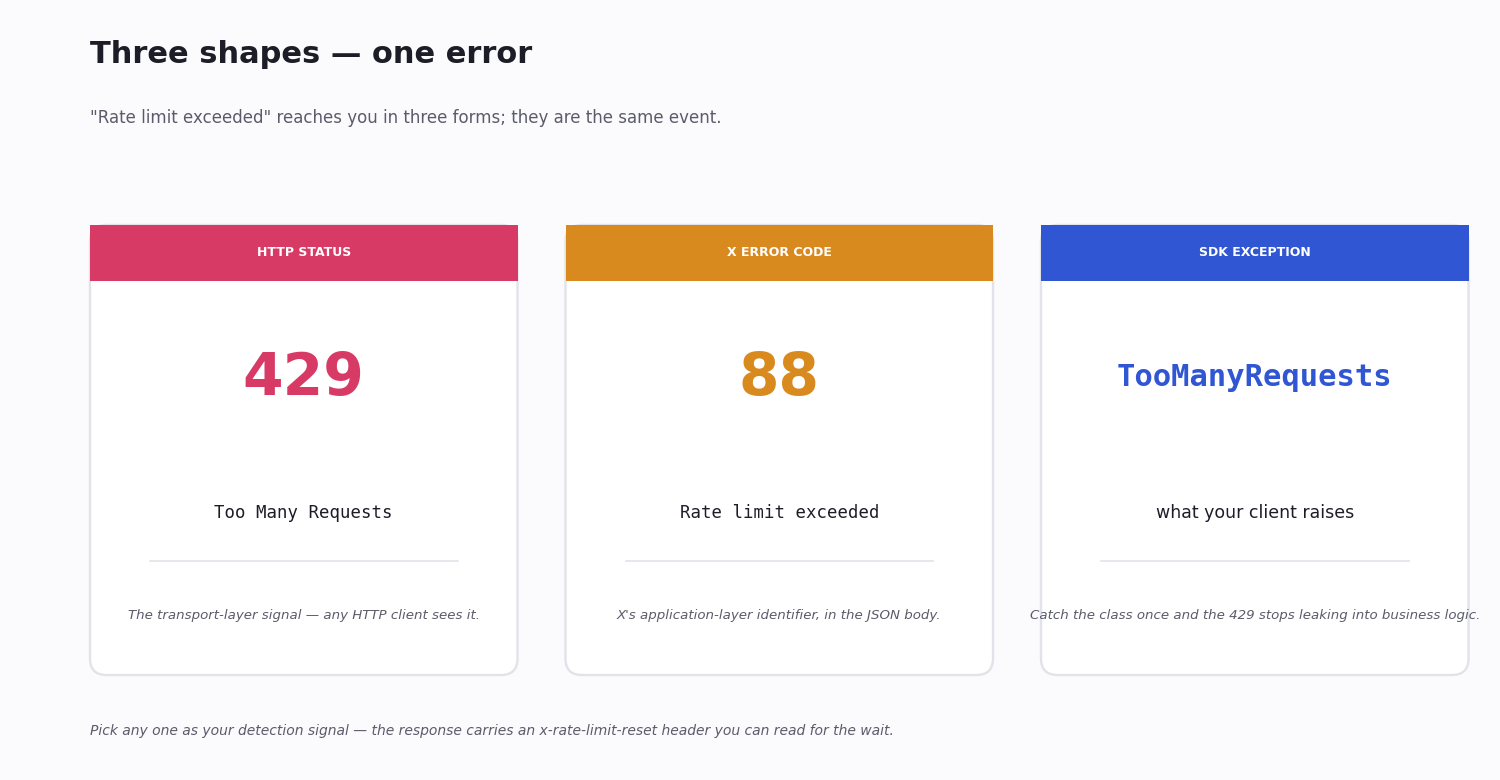
If you call the Twitter (X) API more than X allows in its current window, the next request returns HTTP 429 Too Many Requests — and your script breaks. The error you see in your logs may say "Rate limit exceeded", or error code 88, or simply Too Many Requests; they are the same event. Whether you searched for "twitter rate limit exceeded", "rate limited twitter", "x rate limit exceeded", or "twitter api 429" to land here — the platform's old name, its new name, and the raw HTTP status all refer to this same throttle.
It happens more than it used to. X's rate limits have tightened across the board, the free tier that used to absorb small projects is gone for new developers, and a script that ran cleanly under the old tier now bumps into a 429 inside an hour on the current pay-per-use one. Most teams hit this without any change to their own code.
This guide is the practical fix: what "rate limit exceeded" actually means, the immediate retry pattern that gets your script working again, the longer-term choice between upgrading X's tier and using a pay-per-use alternative, and the code patterns that stop you from hitting the limit in the first place.
What 'Rate Limit Exceeded' Actually Means
A rate limit is a cap on how many requests a client can make in a fixed window — typically 15 minutes for X's REST endpoints. The cap is per-endpoint, and it is enforced two ways at once: per user (the access token making the call) and per app (the API key behind it). Hit either and the next request fails.
When you do hit it, X returns HTTP 429 Too Many Requests and, in the response body, the error code 88 with the message Rate limit exceeded. The two are the same event reported at two layers: the HTTP status code is the transport-layer signal, and code: 88 is X's application-level identifier.
The limit resets automatically when the current window ends — and the response tells you when. Three headers carry the state: x-rate-limit-limit (the cap for that endpoint), x-rate-limit-remaining (how many requests you have left), and x-rate-limit-reset (the Unix timestamp of the next reset). Waiting until the reset is the simplest fix; anything more sophisticated is about how you wait and how you avoid hitting it again.
The Exact Errors You're Seeing
Different X clients surface the same 429 in slightly different shapes. If you are searching for an error message and trying to find this page, here are the variants — they all mean rate-limited:
Plain HTTP: HTTP 429 Too Many Requests — the status line.
X's JSON body: {"errors":[{"code":88,"message":"Rate limit exceeded"}]} — code 88 is the canonical identifier.
v2 endpoints: the body says {"title":"Too Many Requests","detail":"Too Many Requests","type":"about:blank","status":429} — newer schema, same event.
tweepy: raises tweepy.errors.TooManyRequests — it inherits from a base HTTPException, so a generic except over your X calls catches it.
Web UI of a tool that hits the API: the user sees a generic message — "Cannot retrieve tweets right now" or similar — because the front end caught the 429 and replaced it. Check the server logs.
The shape is just packaging. Once you confirm it is a 429 (status code) or code: 88 (X's error code), the fixes below apply regardless of which client you are using.
Why X Rate-Limits So Aggressively Now
X's rate-limiting got tighter for three simultaneous reasons.
The anti-automation push. After the platform's ownership change, X invested heavily in anti-bot and anti-scraping measures — and the rate limits are part of that perimeter. The same caps that frustrate legitimate developers also slow down scrapers, so they have been kept tight as a policy choice, not just a technical one.
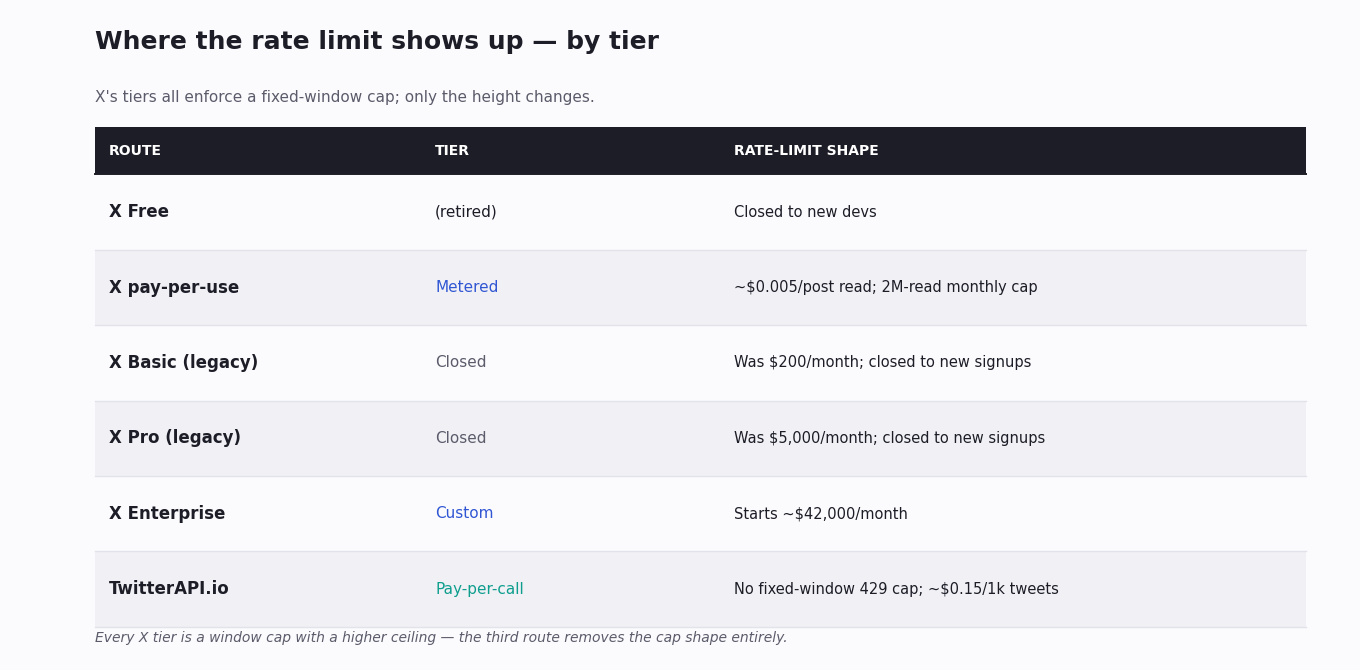
The tier system layered up. What used to be a single generous free tier became a multi-step paid system. The free read access most small projects relied on was removed for new developers; new accounts now land on a metered pay-per-use API or on Enterprise contracts, and the legacy flat Basic and Pro plans have been closed to new signups. Each tier has its own per-window limits, and the cheaper ones are tight.
App-level enforcement is stricter. X also rate-limits at the app level, not only the user. A growing app whose users collectively exceed the app-wide cap will start seeing 429s even when no individual user is over their personal limit. This is the harder failure mode to debug, because nothing your individual users do is wrong.
None of this is fixable from the outside; all three are deliberate.
Immediate Fix — Wait, Then Exponential Backoff
When a request returns 429, do not retry immediately — you will just get a 429 again and waste another token of attention. The right pattern is to read the response, work out when the window resets, and wait until then.
On X's REST endpoints the response includes an x-rate-limit-reset header with the Unix timestamp of the next reset. Compute the seconds-until-reset, sleep that long, then retry. If the header is missing (some endpoints, some clients), fall back to exponential backoff — wait 1 second, then 2, then 4, then 8 — until the call succeeds or you give up.
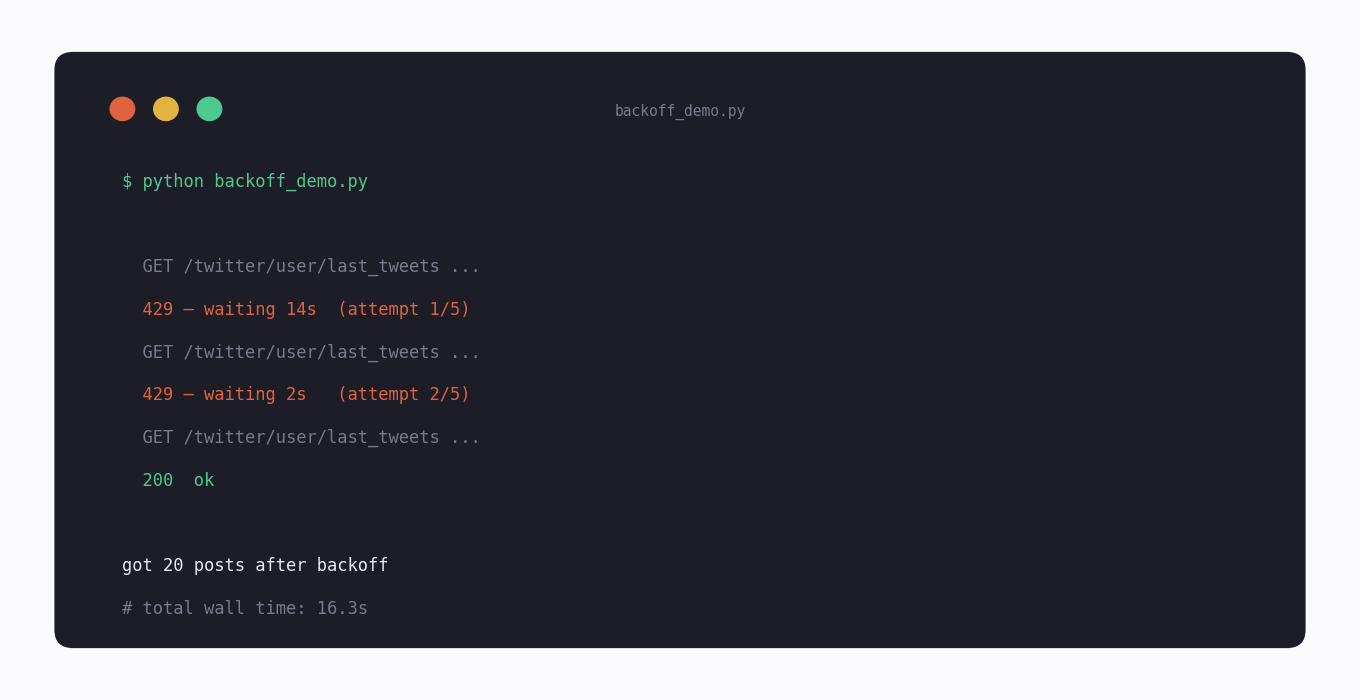
The code below is the pattern. It reads the reset header when present, falls back to exponential backoff when not, and gives up after a small number of retries so a permanent error does not loop forever. Wrap your real API calls in it once and you stop having to think about 429s in your business logic.
Longer-Term Fix — Upgrade or Switch (X's February 2026 Hybrid Pricing)
Retrying gets you through the current window; the structural fix, if you are hitting rate limits repeatedly, is either to raise the ceiling by paying X more or to move to an API that does not have a hard ceiling in the same shape.
Raising the X ceiling. X moved to a hybrid pricing model in February 2026: subscription tiers still exist, but each carries a 2,000,000 Post-reads/month cap as the binding constraint, with usage-based overage layered on top. The published per-resource overage rates are $0.005 per Post read, $0.010 per User or DM read, $0.001 per Owned Read, and $0.200 per Post-with-URL (yes — 40× a plain Post). Basic ($200/mo), Pro ($5,000/mo), and Enterprise ($42,000+/mo) all share the same 2M cap; only the floor and the per-tier endpoint coverage differ. The Free tier is retired for new developers, so new accounts land on pay-per-use credits with the same per-resource overage rates as Basic.
Why this matters at scale. Above 2M reads/month the marginal cost spikes because every additional Post read bills at $0.005. A workload of 5 million Post reads/month on X Basic adds up to $200 + (3,000,000 × $0.005) = $15,200/month; on X Pro the same workload costs $20,000/month. The same 5M reads on TwitterAPI.io's pay-per-call pricing is roughly $750/month — about 20× less than X Basic, 27× less than X Pro. The gap widens for User reads ($0.010/each) and URL-bearing Post reads ($0.200/each, 40× a plain post).
Switching to a pay-per-use third-party API. The other path is to read X's data through a third-party API that is itself billed per call, without the hard window-based ceiling X enforces. Cost scales linearly with what you actually pull, there is no "you used 100% of your monthly allowance, you are throttled" cliff, and the predictability is the point: you size the bill from the work, not the other way around.
Neither choice is right for everyone. If you genuinely need official-only data — verified write access, ads metadata, certain user fields — the official API remains the path. If you mostly read public posts and accounts, the alternative is usually cheaper and quieter.
Why TwitterAPI.io Is the Alternative
TwitterAPI.io is one of those alternatives. It is pay-per-use — about $0.15 per 1,000 tweets retrieved, about $0.18 per 1,000 profiles — with no monthly minimum and no flat-rate tier you have to pre-commit to. You pay for what you actually pull and nothing else.
Where it diverges from the X API on the rate-limit question is in the shape of the throttle. There is no fixed-window hard cap that returns 429 the moment you cross it; the service is designed to absorb steady or bursty load, and a busy script does not suddenly stop working because it crossed an invisible line. That is the point — predictable cost, predictable behaviour, and a 429-free path for code that needs to read X data reliably.
Most teams who arrive here through "rate limit exceeded" do not need every official-only feature. If your job is reading public posts, profiles or searches, the third-party path makes the rate-limit problem stop being a problem. See [the pricing page](/pricing) for the per-call rates; an API key is one Google sign-in and a free trial credit covers end-to-end testing.
When 'rate limit' really means a login-flow anti-bot detect
If your error fires during an X login attempt (not during normal read or post), the underlying cause is often castle.io anti-bot detection — not a real rate limit. X routes login traffic through Castle's risk-scoring layer; requests fingerprinted as scripted (curl_cffi / requests / httpx with default TLS) get blocked even on the first attempt.
twitterapi.io ships a /twitter/user_login_v2 endpoint that handles the Castle layer for you: Go bogdanfinn/tls-client + Chrome 148 TLS fingerprint, sent through your supplied residential / mobile proxy. Single call returns auth_token cookies + user_id; supports username + password + TOTP secret in one shot. Production metrics on the endpoint show 96.4% success rate at 5-7s average duration (twitterapi.io internal call logs, 24h window post-launch).
The endpoint returns a structured error_kind field so you can branch logic cleanly. Four enum values cover the practical cases:
twitter_rate_limit — Twitter / X actually rate-limited you (rare under this endpoint because of fingerprint handling). Retry with backoff.
bad_credentials — username / password / TOTP wrong. Surface to the operator.
needs_verification — Twitter is asking for additional verification (captcha, email confirm). Login flow needs human step.
other — catch-all (network errors, proxy failures, etc).
Wire this into your retry logic: only twitter_rate_limit and other deserve auto-retry; bad_credentials and needs_verification need human attention.
See the full endpoint reference at docs.twitterapi.io/api-reference/endpoint/twitter_user_login_v2 for the complete request / response schema and the proxy guidance.
# POST /twitter/user_login_v2 — handles castle.io fingerprint for you
curl -X POST https://api.twitterapi.io/twitter/user_login_v2 \
  -H "X-API-Key: $TWITTERAPI_IO_KEY" \
  -H "Content-Type: application/json" \
  -d '{
    "username": "your_handle",
    "password": "your_password",
    "totp_secret": "OPTIONAL_TOTP_BASE32",
    "proxy": "http://user:pass@residential-proxy.example.com:8080"
  }'

# Response: { "auth_token": "...", "user_id": "...", "error_kind": null }
# On failure: { "auth_token": null, "error_kind": "bad_credentials" }Code Patterns to Avoid Hitting Limits
Even on a tier with headroom, the cheapest call is the one you do not make. Four patterns get the most out of a fixed rate-limit budget:
Use bulk endpoints, not loops of single calls. An endpoint that returns 20 results in one request consumes one token from your limit. A loop that fetches each id individually consumes 20. The example below uses /twitter/user/last_tweets to pull an account's recent posts in one call instead of paging by id.
Cache aggressively. A user's profile metadata, an account's follower count, the resolution of a handle to a numeric id — these rarely change second-to-second. Cache them for minutes or hours; the slow data does not need a fresh API hit per request.
Page with cursors, do not re-fetch. When you need more than one page of results, use the response's cursor to fetch the next page rather than re-running the original query with an offset. Re-running searches the same content twice — once you have already paid for.
Batch background jobs. If a job runs every 15 minutes, design it so each run sits comfortably inside the per-window limit, with margin. A job that consumes 95% of the window leaves no headroom for retries or one-off lookups; a job at 30% absorbs spikes without going over.
import requests

API_KEY = "your_api_key"
HEADERS = {"X-API-Key": API_KEY}

# Bad: 20 single-tweet lookups = 20 round trips, 20 tokens from your limit.
# Good: one bulk call that returns up to 20 of an account's recent posts.
r = requests.get(
    "https://api.twitterapi.io/twitter/user/last_tweets",
    params={"userName": "nasa"},
    headers=HEADERS,
    timeout=30,
)
r.raise_for_status()
body = r.json()
tweets = body["data"]["tweets"]

# Need more? Page with the response cursor instead of re-running the query.
if body.get("has_next_page"):
    print("more available — pass next_cursor on the next call")
print(f"got {len(tweets)} posts in one request")
import random
import time

import requests

API_KEY = "your_api_key"


def get_with_backoff(url, params=None, max_retries=5):
    """GET that handles 429s by waiting until the rate-limit window resets,
    then falling back to exponential backoff with jitter."""
    delay = 1
    for attempt in range(max_retries):
        r = requests.get(
            url, params=params,
            headers={"X-API-Key": API_KEY},
            timeout=30,
        )
        if r.status_code != 429:
            r.raise_for_status()
            return r.json()
        # We hit a rate limit. Prefer the server's own reset hint.
        reset = r.headers.get("x-rate-limit-reset")
        if reset:
            wait = max(1, int(reset) - int(time.time()))
        else:
            wait = delay * (0.5 + random.random())  # exponential + jitter
            delay *= 2
        print(f"  429 — waiting {wait:.1f}s  (attempt {attempt + 1}/{max_retries})")
        time.sleep(wait)
    raise RuntimeError(f"still rate-limited after {max_retries} retries")


# Drop your real calls into get_with_backoff() and the 429 stops mattering.
data = get_with_backoff(
    "https://api.twitterapi.io/twitter/user/last_tweets",
    params={"userName": "nasa"},
)
print(f"got {len(data['data']['tweets'])} posts after backoff")
Questions readers ask
How long until Twitter rate limits reset?
X's REST rate limits use a 15-minute rolling window for most endpoints. The exact reset time is in the x-rate-limit-reset response header as a Unix timestamp — read that and wait until the timestamp passes before retrying.
What does HTTP 429 mean on Twitter/X?
HTTP 429 "Too Many Requests" means you have crossed the rate limit for the endpoint you called, in the current window, for either your user or your app. X's response body usually also carries error code 88 with the message "Rate limit exceeded" — the same event reported at the application layer.
Is the X rate limit per user or per app?
Both, and either can throttle you. Most endpoints have a per-user limit tied to the access token and a per-app limit tied to the API key. A growing app whose users collectively exceed the app-wide cap will see 429s even when no individual user is over their personal limit.
Does upgrading my X API tier remove the rate limit?
Upgrading raises the ceiling, it does not remove it. Every X tier has rate limits — higher tiers and Enterprise contracts have larger windows and more endpoints unlocked, but every paid plan still throttles. If you need a path without fixed-window throttling, a pay-per-use third-party API is the structural alternative.
Are X free-tier limits enforced more strictly?
The old free read tier was retired for new developers; new accounts land on metered pay-per-use, which has its own monthly read cap rather than a free per-window allowance. The remaining free access is narrow — a small write quota for the user's own posts — and the per-window limits on it are conservative. For any reading workload it is not the right tier.
What's the difference between v1.1 and v2 rate-limit headers?
Both versions return x-rate-limit-limit, x-rate-limit-remaining and x-rate-limit-reset on each response. The mechanics are the same; what differs is the per-endpoint cap, which v2 documents per-endpoint in its docs rather than as a single table. Read your specific endpoint's documented limit before sizing a job.
Can my X account get suspended for hitting rate limits?
Hitting the limit itself does not suspend an account — you just get 429s. What can suspend an account is the pattern around it: repeated automated abuse, ignoring the response codes, or coordinating activity across many accounts. Back off cleanly on 429s and the limit is a throttle, not a strike.
How do I check my current X rate-limit usage?
Every response carries x-rate-limit-remaining — the number of requests left in the current window. Log it on every call and you have a live view of how close you are to the cap. X's developer dashboard also surfaces rate-limit usage if you prefer a UI, but the response headers are the right place to look for ongoing programmatic monitoring.
How much does X charge after I hit the 2M Post-reads cap?
Under X's February 2026 hybrid pricing, every Post read above the 2,000,000/month tier cap bills at $0.005 per resource. User reads and DM reads cost $0.010 each, Owned Reads (your own dev app reading your own account data) are $0.001, and Post creation that includes a URL is the steepest at $0.200 per request — 40 times a plain Post read. A workload of 5M Post-reads/month on the Basic tier ends up at roughly $200 + (3M × $0.005) = $15,200/month; the cap is where the math stops being kind. Confirm current rates against the X Developer Console before purchase, since X has updated them several times during the hybrid rollout.
Does TwitterAPI.io have rate limits?
Cost is the throttle here, not a window. The service is billed per call — about $0.15 per 1,000 tweets — so usage scales linearly with what you pull rather than bumping into a fixed-window 429 cap. For the rare cases where throttling does happen, the response is documented and predictable.
Why are my requests rate-limited even though I have not made many?
Usually one of three things. (1) The cap is per-app as well as per-user — your users collectively are over the app-wide limit. (2) The endpoint you are hitting has a tighter cap than you expect; check the per-endpoint limit, not the headline number. (3) Background processes — retries, health checks, a script you forgot was running — are eating your window. Add x-rate-limit-remaining to your logs and the cause becomes visible.
Continue
- /
- /blog/twitter-api-pricing
- /blog/twitter-api-with-python
- /x-api
- /pricing
- Twitter API rate-limit calculator
- Twitter (X) counter API guide
- /blog/twitter-no-account-api-read-only
Stop reading. Start building.
Starter credits cover real testing on real data. Google sign-in, no card, no application queue.
Get an API key