How to Find Deleted Twitter (X) Accounts: What Still Exists and Where to Look
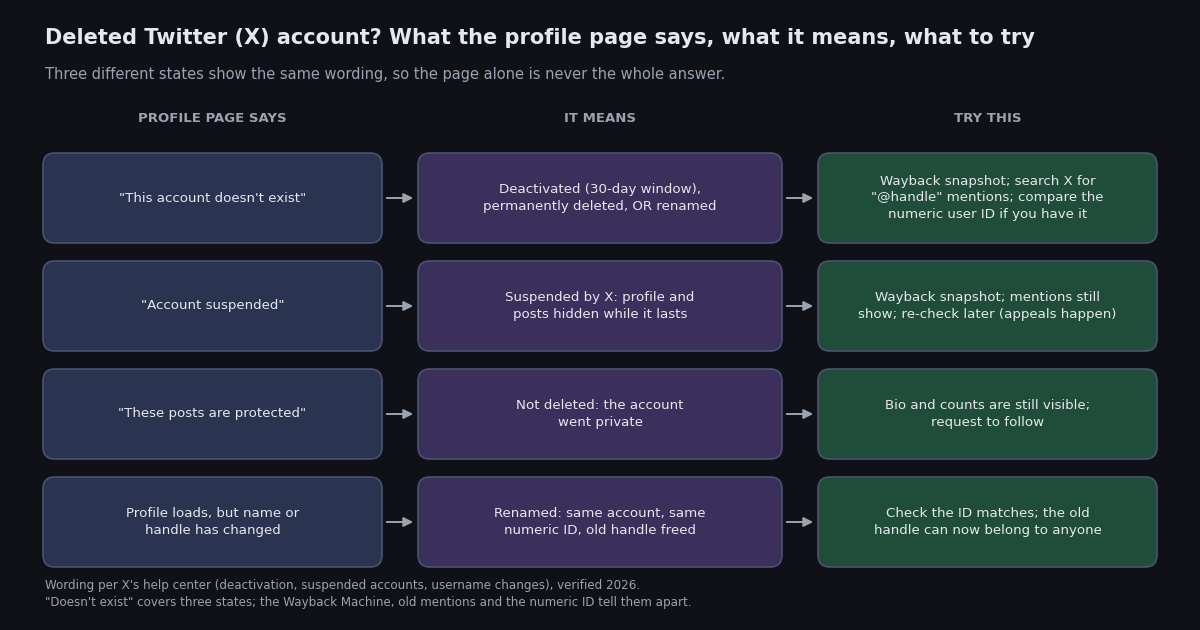
Someone you followed has vanished. The link in your bookmarks now says "This account doesn't exist", the handle no longer autocompletes in search, and you want to know whether the account is gone for good, gone for a while, or just moved. That is the question this page answers. It is about deleted accounts; if you are looking for a single deleted post from an account that still exists, the guide to searching for deleted tweets (linked below) covers that different problem.
X gives you very little to go on: one generic page covers deactivation, permanent deletion and a handle change, and the help center describes those states in separate articles that never put them side by side. So the first half of this page does that, with a matrix of what you can still see and where. The second half is the order of checks, from the free ones anyone can do in a browser to the numeric user ID trick that settles the renamed-or-deleted question for good.
Near the end there is a short section for people who need to do this for a list rather than one account: a Python script that classifies every handle as active, not found, suspended or otherwise unavailable, and counts how many recent posts still mention it. Everything before it needs nothing but a browser.
The five things "deleted" can mean on Twitter (X)
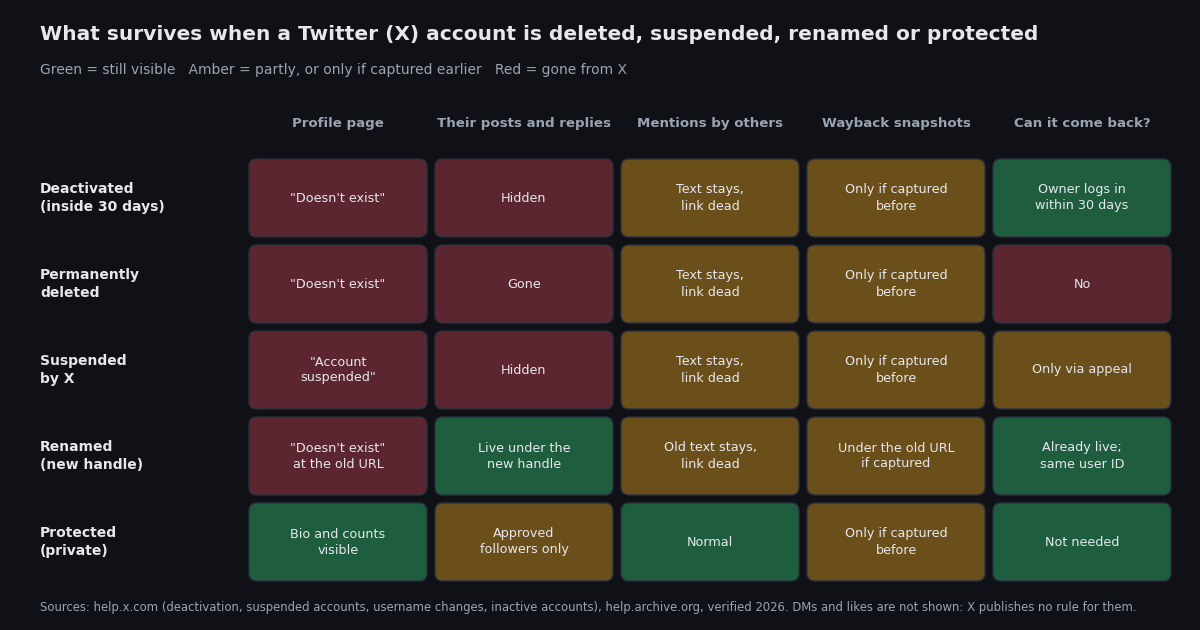
When people say an account was deleted they usually mean one of five states, and X treats each differently. The table puts them side by side using the wording the help center uses, because the wording is the first clue you get.
A sixth situation sits underneath the first two: removal for inactivity. X's inactive-account policy asks users to log in at least every 30 days and says accounts may be permanently removed for prolonged inactivity, without publishing a threshold (help.x.com inactive accounts policy, verified 2026). In May 2023 Elon Musk said the company was purging accounts with no activity at all for several years and warned that follower counts would drop (Engadget, May 2023). From the outside an account removed this way looks exactly like a permanently deleted one, which is why the checks below do not try to distinguish them.
Two practical consequences follow. First, a "doesn't exist" page on its own tells you almost nothing, because it covers the reversible case, the permanent case and the not-deleted-at-all case. Second, a renamed account is the one you can actually find again, so it is worth ruling in or out before you spend time on archives.
What survives after a Twitter (X) account is deleted, and what does not
This is the matrix the help center never draws. Each row is a state from the table above; each column is a place you might look. "Text stays, link dead" is the help center's own description of what happens to mentions: when an account is deactivated, mentions of its username in other people's posts still exist but no longer link to a profile (help.x.com, verified 2026).
Also outside X's control: copies held by search engines and third-party archives. X's help center says plainly that deactivating or deleting an account does not remove information from search engines such as Google or Bing, because X does not control those sites (help.x.com, verified 2026). In practice that remnant is smaller than it used to be: Google removed the cached-page link from results in January 2024 and retired the cache feature entirely in September 2024 (press reports, 2024), so a search result for the old handle now shows a title and snippet at best, not a stored copy.
What you will not get back from the outside, in any state: the profile itself, the account's own posts and replies, the likes it gave, and direct messages. X publishes no rule about what happens to a DM thread on the other side when one party deletes; readers widely report that the conversation remains in their inbox with the other party shown as unavailable, but treat that as unverified and assume DMs are gone. Likes are not shown in the matrix for the same reason.
The two columns that are green or amber in every row, mentions by others and Wayback snapshots, are where the rest of this page spends its time.
Step 1: read the exact wording on the profile page
Open x.com/<handle> in a browser, logged in if you can (as of late 2023 X shows most pages only to logged-in users, which also matters for Step 2). Then read the page rather than the URL.
"This account doesn't exist. Try searching for another." The handle does not currently resolve. Deactivated, deleted or renamed; you cannot tell which from this page, so continue to Steps 2 to 4.
"Account suspended" The account exists and X has hidden it. Nothing to find on X itself; the Wayback Machine and mentions are the only public traces until the suspension is lifted. Re-check in a few weeks, since appeals do succeed.
"These posts are protected" with the bio, follower and following counts still visible. The account is private, not deleted. Request to follow; there is no other legitimate route to a protected account's posts.
"You're blocked" The account exists and is visible to everyone except you. The sibling guide on telling blocks from deactivation (linked below) covers that case; the short version is to open the same URL in a private window or while logged out.
The profile loads but the name or handle looks wrong. Either the handle has been re-registered by someone else after a rename or deletion (X frees a changed handle immediately, per help.x.com), or the account you remember changed its display name. The numeric ID check in Step 4 settles it.
Do not substitute X's search box for this step: an empty search result also happens for protected accounts you do not follow and for live accounts search simply misses, so it is weaker evidence than the profile page itself.
Step 2: pull the profile from the Wayback Machine
The Internet Archive's Wayback Machine is the one place a deleted profile can still be read in full, if it was captured. The URL pattern is the thing to remember: web.archive.org/web/*/x.com/<handle> opens a calendar of every capture of that exact URL, and the asterisk in the date position is the documented way to list all capture dates for a page (help.archive.org, verified 2026). Try it twice: once with x.com/<handle> and once with twitter.com/<handle>, because captures made before the 2023 domain change live under the old host and the archive does not merge the two.
Add a trailing wildcard, web.archive.org/web/*/twitter.com/<handle>/*, to list every archived URL under the profile, which includes individual status pages captured on their own. That is often where you find more than the profile, since a widely shared post is captured more often than a profile page.
Set expectations before you start. Coverage is uneven: the archive captures what crawlers reached and what people saved by hand, so prominent accounts have hundreds of snapshots and small ones may have none. Coverage also thinned after July 2023, when X restricted logged-out viewing and rate-limited reads; press and archivist write-ups since then describe newer X captures as sparse and sometimes rendering as a login prompt rather than the profile (widely reported, 2023 to 2025). A snapshot that loads as a blank page or a sign-in wall is a failed capture, not evidence the account was already gone.
When a capture does load, note the date in the URL (the digits after /web/ are year, month, day, hour, minute, second), the follower count and bio, and the numeric user ID if the page source contains it; older captures of the pre-2023 site often expose it, and it is the key to Step 4.
Step 3: search X for mentions of the old handle
Deleting an account removes its own posts, but it does not remove what other people posted about it. X's help center states that after deactivation, mentions of the username in other people's posts still exist, only without a working link (help.x.com, verified 2026). Those mentions are a timeline of the account's last weeks, from the outside.
Search X for @handle with the quotation marks off and switch to Latest. The operators you might reach for first will not help: from:handle returns nothing because the author no longer resolves, and the profile search tab is gone with the profile. A plain @handle query works because the search is matching text in other people's posts, not looking up an account.
Read the results for three things. The date of the most recent mention that reads like a conversation (someone replying to the account, quoting it, or asking where it went) tells you roughly when the account stopped. Replies that say "why did you change your name" or tag a second handle in the same breath tell you it was a rename, and often give you the new handle outright. And a cluster of mentions on a single day that reference a rules violation or a ban points toward a suspension rather than a voluntary exit.
Replies the account wrote under other people's posts are a related but separate trace. The replies themselves are hidden with the account, but the posts they were replying to remain, and on a deactivated account the thread often shows an unavailable-post notice where the reply used to be. If you know a post the account replied to, open it and look for the gap.
Step 4: use the numeric user ID if you have it
Every X account has a numeric ID that never changes, no matter how many times the handle does. X's help center says that changing a username does not affect followers, direct messages or replies (help.x.com, verified 2026), which is only possible because everything is attached to the ID, not the handle. So if you ever recorded the ID (from an old API export, a Wayback capture of the pre-2023 page source, a data-download archive, or a tool that showed it), you can answer the renamed-or-deleted question directly.
The browser route is the intent URL: x.com/intent/user?user_id=<id> redirects to the account's current profile if the account is live, whatever its handle is now. If the ID returns the same "doesn't exist" page, the account is deactivated, deleted or suspended rather than renamed. This intent endpoint has existed since the Twitter era and still resolves as of 2026, but X has not documented it as a supported feature, so treat it as a convenience that could change.
If you do not have the ID, record one now for the accounts that matter to you: the id field in any API profile response (the script below prints it), or a data download of your own account, which lists the IDs of accounts you follow. A handle-to-ID map turns a future rename from a mystery into a one-line lookup, and it is the only thing that tells you whether a profile at a re-registered handle is the account you remember or a stranger who took the name.
Checking a list of handles at once with the API
Everything above is a one-account, one-browser job. If you maintain a list (sources you monitor, a following list exported a year ago, a research roster), checking a thousand handles by hand is not realistic. Two read endpoints do the job.
GET /twitter/user/info with a userName parameter returns the profile under a data object. For an account X is hiding, the same object carries unavailable (true), unavailableReason (for example suspended) and a message such as "This account is unavailable" (docs.twitterapi.io, verified 2026). For a handle that does not resolve at all, no usable profile comes back and the top-level status is error with a msg. For a live account you get id, userName, name, followers, createdAt and the rest. That gives you four buckets: active, not found, suspended, and unavailable for another stated reason.
GET /twitter/tweet/advanced_search with query=@handle and queryType=Latest returns up to 20 posts per page under tweets with has_next_page and next_cursor for more (docs.twitterapi.io, verified 2026). The count on the first page, and the createdAt of the newest post, are the Step 3 check done by machine: a not-found handle with recent mentions that reference a new name is probably a rename; one whose mentions stop cold is probably gone.
Cost. A profile read is 18 credits, which is $0.18 per 1,000 profiles, so one handle costs $0.00018 to classify. A search page is 15 credits per post returned with a 15-credit minimum, so the mentions check costs at most $0.003 for a full 20-post page and $0.00015 when the page is empty (twitterapi.io/pricing, verified 2026). Classifying 1,000 handles is $0.18 in profile reads, or at most $3.18 with the mentions check on every one. For comparison, the official X API's pay-per-use tier charges $0.010 per user read (docs.x.com pricing, verified 2026), so the same 1,000 profile lookups are $10 before any search calls, and the official API's search returns nothing for a handle that no longer resolves anyway.
The function below is the classifier on its own; the full script at the bottom of the page adds the mentions check and a loop over the command line. Pace the loop: new accounts are limited to 0.2 requests per second until the first payment, 20 per second after it (twitterapi.io/pricing, verified 2026).
import os

import requests

BASE = "https://api.twitterapi.io"
HEADERS = {"X-API-Key": os.environ["TWITTERAPI_IO_KEY"]}  # key from twitterapi.io/dashboard


def classify(handle):
    """Return (status, detail) for one handle: active / not-found / suspended / unavailable-other."""
    r = requests.get(f"{BASE}/twitter/user/info", params={"userName": handle}, headers=HEADERS, timeout=30)
    body = r.json() if r.content else {}
    data = body.get("data") or {}
    if data.get("unavailable"):
        reason = (data.get("unavailableReason") or "").lower()
        status = "suspended" if "suspend" in reason else "unavailable-other"
        return status, data.get("message") or reason or "no reason given"
    if not data.get("id"):
        # no profile came back: the handle does not resolve right now
        return "not-found", body.get("msg") or f"HTTP {r.status_code}"
    return "active", f"@{data.get('userName')} id={data.get('id')} followers={data.get('followers')} since {data.get('createdAt')}"


if __name__ == "__main__":
    for h in ("NASA", "thishandledoesnotexist12345"):
        print(h, classify(h))
"""Classify a list of Twitter (X) handles and count recent mentions of each.

Usage: python handle_status.py handle1 handle2 ...
Needs TWITTERAPI_IO_KEY in the environment (twitterapi.io/dashboard).
Per handle: one profile read ($0.18 per 1,000 profiles) plus one search page
(15 credits per post returned, 15-credit minimum: at most $0.003 for a full 20-post page).
"""
import os
import sys
import time

import requests

BASE = "https://api.twitterapi.io"
HEADERS = {"X-API-Key": os.environ["TWITTERAPI_IO_KEY"]}
PAUSE = 5.0  # seconds between handles: 0.2 requests/s before the first payment, 20/s after it


def classify(handle):
    """active / not-found / suspended / unavailable-other, from GET /twitter/user/info."""
    r = requests.get(f"{BASE}/twitter/user/info", params={"userName": handle}, headers=HEADERS, timeout=30)
    body = r.json() if r.content else {}
    data = body.get("data") or {}
    if data.get("unavailable"):
        reason = (data.get("unavailableReason") or "").lower()
        status = "suspended" if "suspend" in reason else "unavailable-other"
        return status, data.get("message") or reason or "no reason given"
    if not data.get("id"):
        return "not-found", body.get("msg") or f"HTTP {r.status_code}"
    return "active", f"@{data.get('userName')} id={data.get('id')} followers={data.get('followers')} since {data.get('createdAt')}"


def recent_mentions(handle):
    """Posts on the first Latest page that mention @handle, plus the newest post's date."""
    r = requests.get(
        f"{BASE}/twitter/tweet/advanced_search",
        params={"query": f"@{handle}", "queryType": "Latest"},
        headers=HEADERS,
        timeout=30,
    )
    r.raise_for_status()
    body = r.json()
    tweets = [t for t in body.get("tweets") or [] if (t.get("author") or {}).get("userName", "").lower() != handle.lower()]
    newest = tweets[0].get("createdAt") if tweets else None
    return len(tweets), bool(body.get("has_next_page")), newest


if __name__ == "__main__":
    handles = [h.lstrip("@") for h in sys.argv[1:]] or ["NASA", "thishandledoesnotexist12345"]
    counts = {}
    for i, h in enumerate(handles):
        status, detail = classify(h)
        n, more, newest = recent_mentions(h)
        counts[status] = counts.get(status, 0) + 1
        print(f"@{h:24} {status:18} {detail}")
        line = f"mentions on first page: {n}" + (" (more pages)" if more else "")
        if newest:
            line += f"; newest {newest}"
        print(f"{'':25} {line}")
        if i < len(handles) - 1:
            time.sleep(PAUSE)
    print("summary:", counts)
Questions readers ask
How can I view a deleted Twitter (X) account?
Not on X itself: once an account is deactivated, deleted or suspended, X stops serving its profile and posts to everyone. What you can view is a copy made earlier. Open web.archive.org/web/*/x.com/<handle> and web.archive.org/web/*/twitter.com/<handle> in the Wayback Machine; if the profile was captured before it disappeared, you will see it as it was on that date. If it was never captured, there is no public copy of the profile to view.
What does "This account doesn't exist" mean on X?
That the handle does not currently resolve to an account. It covers three cases: the owner deactivated the account (reversible by logging in within 30 days), the account was permanently deleted after that window or removed by X, or the owner changed the handle and the account is live under a new name. A suspended account shows a different page, "Account suspended". Use a Wayback capture, a search for mentions of the handle, or the numeric user ID to tell the cases apart.
Is there a deleted Twitter account viewer?
No tool can show a profile X has taken down, because the data is no longer served. Every "viewer" works from copies made earlier, usually the Internet Archive's captures, plus whatever other accounts posted about the handle. The Wayback Machine is free and the most complete of those sources; the script on this page automates the other half, checking which handles on a list are gone and how recently they were mentioned.
How do I tell a deactivated account from a renamed one?
Search X for @handle and read the latest mentions: replies asking about a name change, or tagging a second handle, point to a rename. If you have the numeric user ID, open x.com/intent/user?user_id=<id>; a live account redirects to its current profile under the new handle, while a deactivated or deleted one shows the same "doesn't exist" page. With an API key, GET /twitter/user/info for the old handle returns no profile for both cases, so the ID is the decisive check.
Can a deleted Twitter (X) account come back?
Only within the 30-day deactivation window. X's help center says logging in during those 30 days restores the account with its posts and followers; after the window the account is permanently deleted and cannot be reactivated. A suspended account can return if an appeal succeeds. A renamed account was never gone.
Does X delete inactive accounts?
X's inactive-account policy asks users to log in at least every 30 days and says accounts may be permanently removed for prolonged inactivity, without stating a deadline. In May 2023 Elon Musk said accounts with no activity for several years were being purged and that follower counts would drop. From the outside a removed inactive account looks the same as a permanently deleted one.
Do old mentions and replies disappear when an account is deleted?
Other people's posts that mention the handle stay, but the mention no longer links anywhere; X's help center describes exactly this for deactivated accounts. The deleted account's own replies disappear along with its profile, though the posts they were replying to remain. That is why searching X for @handle still works after the account is gone, while from:handle returns nothing.
Continue
- X Help Center: how to deactivate your account (30-day window, permanent deletion after, mentions remain, search engines not controlled by X)
- X Help Center: about suspended accounts (the "Account suspended" notice and the appeal route)
- X Help Center: how to change your username (followers, DMs and replies unaffected; old handle freed immediately)
- Internet Archive help: using the Wayback Machine (the asterisk date wildcard and the capture calendar)
- twitterapi.io docs: Get User Info (unavailable, unavailableReason, message, id, userName, followers, createdAt)
- X API pay-per-usage pricing (docs.x.com), the official and more expensive route to the same profile reads
- Twitter (X) API overview: the hub for reading X data
- How to search for deleted tweets from an account that still exists
- Twitter (X) "Content is not available": every cause and how to tell which
- Building a Twitter (X) archive and tweet finder with the API
- Who blocked me on Twitter (X): telling a block from a deactivation
- twitterapi.io pay-per-call pricing: $0.18 per 1,000 profile reads
Stop reading. Start building.
Starter credits cover real testing on real data. Google sign-in, no card, no application queue.
Get an API key