Open AI API Key: How to Get One, Pay for It, Keep It Safe and Feed It Live Twitter (X) Data
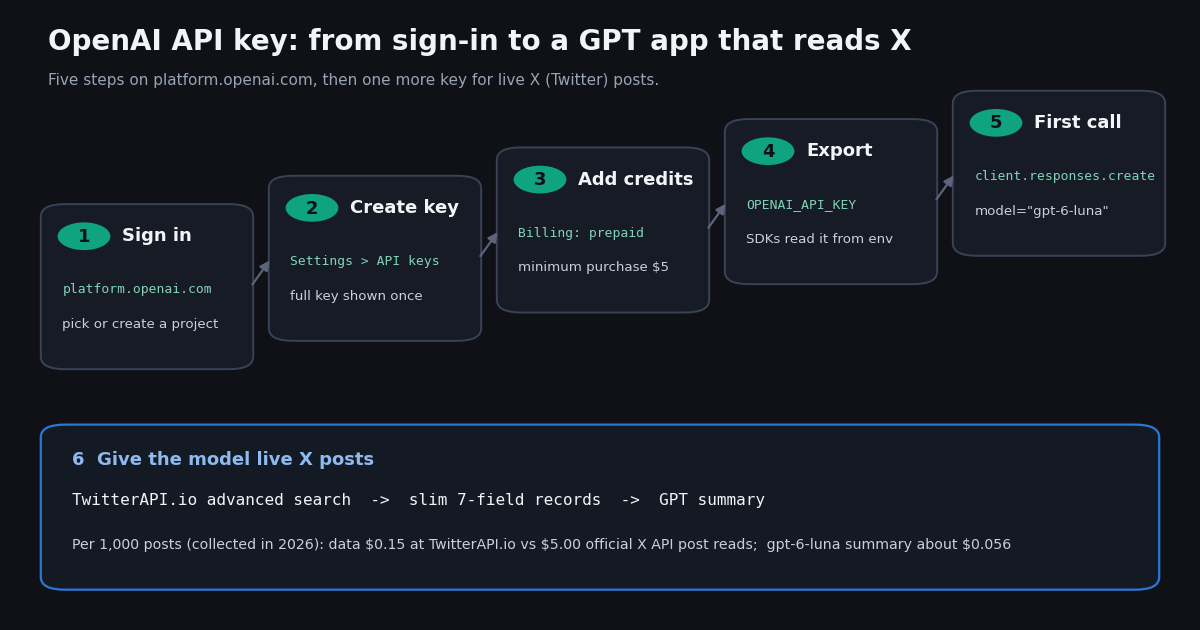
An OpenAI API key is the secret that authenticates your code to the OpenAI API: you create it on the OpenAI Platform and send it as a Bearer token with every request. This guide covers the OpenAI key end to end, from creating it to paying for it and keeping it safe. If you are setting up xAI instead, our Grok API key guide covers console.x.ai, and the Claude API key guide covers the Anthropic Console; this page is only about OpenAI.
Everything below was checked against OpenAI's own documentation and help center this session: the quickstart, the authentication reference, the rate-limit and usage-tier guide, the pricing page, the prepaid billing article and the API key safety article. OpenAI changes model names and prices often, so each price on this page names the model ID it belongs to, and the sources section lists the exact pages.
We also pulled 899 recent X posts that mention an OpenAI API key and measured two things a developer runs into quickly: what goes wrong with keys in practice, and how many tokens a real X post costs when you feed it to a GPT model. The last part of the guide pairs your OpenAI key with live X (Twitter) data, with both data prices printed side by side.
How to get an OpenAI API key (step by step)
1. Sign in to the OpenAI Platform. Go to platform.openai.com and sign in or create an account. The API Platform is billed separately from ChatGPT: a ChatGPT plan only adds API credits on the eligible Pro and Business tiers described below.
2. Pick the project. Keys belong to a project inside your organization, and usage, rate limits and spend limits can be set per project. OpenAI's production guide suggests separate projects for staging and production so a test script cannot drain the production budget.
3. Create the key. Open Settings, then API keys (platform.openai.com/api-keys), select Create new secret key, give it a name you will recognize later, and choose its permissions and expiry if offered. OpenAI strongly recommends setting an expiration date on project keys.
4. Copy it once. The help center is explicit: a full secret key is only shown when you create it. If you close the dialog without saving it, delete the key (trash icon on the same page) and create a new one.
5. Add credits. Open Billing (platform.openai.com/account/billing), add payment details and buy credits. Without a balance, requests fail with a billing error, even though the key itself is valid.
6. Export it and make a test call. The quickstart puts the key in an environment variable and lets the SDK pick it up, which keeps the secret out of your code and out of git:
# macOS / Linux: put the key in your shell profile, never in code
export OPENAI_API_KEY="your_api_key_here"
# Windows PowerShell (applies to new windows)
setx OPENAI_API_KEY "your_api_key_here"

pip install openai

# example.py
from openai import OpenAI

client = OpenAI()  # reads OPENAI_API_KEY from the environment

response = client.responses.create(
    model="gpt-6-luna",
    input="Write a one-sentence bedtime story about a unicorn.",
)
print(response.output_text)

# Same call over plain HTTP
# curl https://api.openai.com/v1/responses \
#   -H "Content-Type: application/json" \
#   -H "Authorization: Bearer $OPENAI_API_KEY" \
#   -d '{"model": "gpt-6-luna", "input": "Say hello"}'
Project keys, service accounts, admin keys and legacy user keys
OpenAI now has several kinds of credentials, and picking the wrong one is a common source of 401 errors. The authentication reference and the production best-practices guide describe them like this:
Governance. Organization and project admins can enforce a maximum key lifetime and restrict which key types may be created (only service-account keys, only user-owned project keys, or no new keys at all). Organization rules always win over project rules.
Revocation is fast. The authentication reference says revoking a key takes effect within a few seconds, while most other changes to a key's authentication settings propagate within 15 minutes. If a key just stopped working, check whether someone rotated it.
Usage tracking. All keys created after December 20, 2023 have usage tracking enabled; older keys show their usage as Untracked until you turn tracking on in the key dashboard.
Billing, usage tiers and current OpenAI API prices
Creating a key is free; requests are billed per token from prepaid credits. According to OpenAI's prepaid billing article, new API accounts use prepaid billing, the minimum purchase is $5 (default $10), auto-reload is on by default during setup, purchased credits expire after one year, and credits are generally non-refundable. Free credits on an account are used before purchased ones.
Your usage tier rises automatically with total credit purchases, and each tier carries an OpenAI-assigned monthly usage limit (separate from the spend limits you set yourself):
Standard rate limits at Build are 5,000 requests per minute for the Astra, Sol and Terra models (1,000,000 tokens per minute) and 5,000 RPM / 2,000,000 TPM for Luna; your exact numbers are under Settings, Organization, Limits.
Prices per 1M tokens on OpenAI's pricing page for the four flagship models (standard processing; Batch halves each price):
OpenAI's models page describes GPT-6 Astra as the flagship for complex reasoning and coding, GPT-6.1 Sol as the balance of intelligence and cost, and GPT-6 Luna as the model for cost-sensitive, high-volume work; Astra and Luna both list a 1.05M-token context window. Fast and Ultrafast processing modes cost more; check developers.openai.com/api/docs/pricing before you budget.
Set a hard spend limit. Spend alerts only notify you. A hard spend limit on the organization or project makes requests fail with 429 once tracked spend reaches it, and OpenAI warns that enforcement is not instantaneous, so spend can slightly overshoot.
Is there a free OpenAI API key?
Not in the sense most searches mean. A key is free to create, but every request is billed against a balance, and the documentation we read this session describes no standing sign-up grant for new API accounts. Older guides that promise a $5 trial credit describe a program that does not appear in the current billing docs. The quickstart does call your first request a "free test API request" before sending you to Billing, and the rate-limit guide lists a Free tier for users in allowed geographies, so check your Billing page for any grant your account shows.
The free route OpenAI does document is the API credit benefit for ChatGPT subscribers. Eligible Pro and Business subscriptions can link to an API organization they own and receive monthly credits:
The fine print. The subscription must be paid and at least seven days old (free trials and complimentary plans do not qualify), you must own both the subscription and the API organization with the same email, the first grant is prorated, and unused credits expire at the end of each billing cycle. No API payment method is needed while the credits last. Codex usage through API keys is not covered.
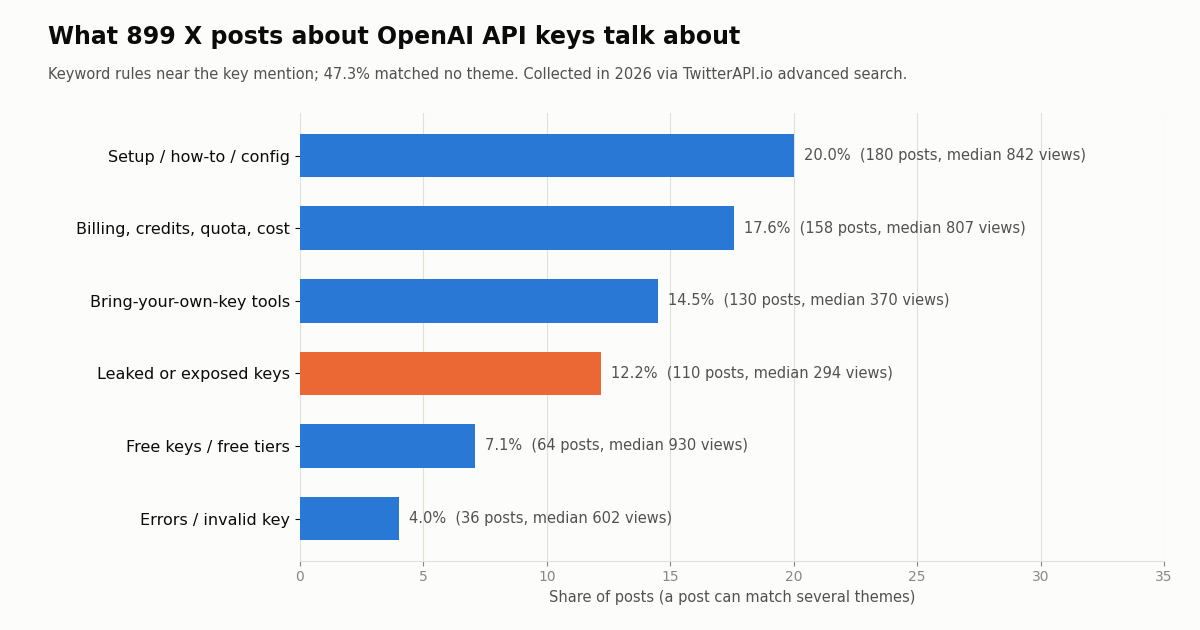
Be careful with "free key" offers. In our X sample, 7.1% of posts about OpenAI keys mentioned free keys or free tiers, and a further handful offered keys for sale or for sharing. OpenAI's key safety article says sharing API keys is against its Terms of Use, and a shared key bills its owner, so a key you did not create is either someone else's leaked secret or a resold one.
OpenAI API key not working? Error codes and fixes
OpenAI's error-code guide separates authentication failures (401) from rate and billing failures (429). The second group is the confusing one: a 429 can mean you sent requests too fast or that your balance is empty, and retrying a billing error never helps.
The error guide adds that the broad error.type can still read insufficient_quota for billing problems, so branch on error.code. A key check that bills no tokens is listing models:
import os
from openai import OpenAI, AuthenticationError, RateLimitError

client = OpenAI(api_key=os.environ["OPENAI_API_KEY"])

try:
    # Listing models proves the key works without generating any tokens.
    names = [m.id for m in client.models.list().data]
    print("key ok,", len(names), "models visible")
except AuthenticationError as e:
    print("401: wrong, revoked or expired key, or IP not on the allowlist:", e)
except RateLimitError as e:
    # 429 covers rate limits AND billing: read the code, not just the status
    code = getattr(e, "code", None) or (e.body or {}).get("code")
    print("429 with code", code)  # credit_balance_exhausted, project_spend_limit_exceeded, ...
Keep your OpenAI API key safe (and what to do after a leak)
OpenAI's key safety article lists the rules plainly: one key per team member (invite people instead of sharing a key), keys with an expiry date and a rotation routine, never a key in a browser or mobile app, never a key in a repository, environment variables or a key management service instead, monitoring on the Usage page, and optional IP allowlisting so a stolen key fails from any other network.
Why this matters in practice. Leaked or exposed keys were 12.2% of the 899 X posts about OpenAI keys we sampled: keys sitting in a .env that went into git history, keys bundled into a frontend, keys typed into a shell history, and malware samples that read keys from developer machines. Separately, 14.5% of posts were tools asking users to paste their own OpenAI key, which is legitimate but means that key now lives in someone else's software.
If a key leaks. Revoke it on the API keys page (revocation takes effect within seconds), create a replacement, update your deployments, then review the Usage page for activity you do not recognize and contact OpenAI support if charges look wrong. A hard spend limit on the project caps the damage from the next leak.
A few habits that close the common leak paths:
# Read a key into the shell without echoing it or saving it to history (bash/zsh)
read -rs OPENAI_API_KEY && export OPENAI_API_KEY

# Local dev: keep it in .env and make sure git ignores that file
echo "OPENAI_API_KEY=..." >> .env
echo ".env" >> .gitignore

# Before every push: look for anything that resembles a committed key
git grep -nI "OPENAI_API_KEY=" -- ':!*.example'
What 899 X posts about OpenAI API keys talk about
We searched X for posts that mention an OpenAI API key ("openai api key", "openai key" or OPENAI_API_KEY) and classified each by keyword rules applied to the text around the key mention. The sample covers 899 posts from 801 distinct accounts over about 167 days, roughly 5.4 posts a day; 64.8% were in English and 23.1% were replies.
Reading the table. Setup questions and billing confusion together touch more than a third of posts, which matches the two steps people trip on: where to export the key and why a valid key still fails without credits. Leak posts draw the fewest views (median 294 vs 851 for the whole sample), which fits the pattern of quiet warnings and incident write-ups rather than viral threads. 47.3% of posts matched no theme, mostly product launches that mention a key in passing.
The vendor's side. On @OpenAIDevs, OpenAI's developer account, 56.2% of 160 recent posts were about the API platform (models, SDKs, the Responses and Agents APIs, Codex, pricing), at about 5.5 posts a day, yet only 2 mentioned API keys, billing, credits or pricing directly. Key and billing help lives in the docs and help center, not the feed, which is why this guide links those pages.
Pair your OpenAI key with live X (Twitter) data: what 1,000 posts cost
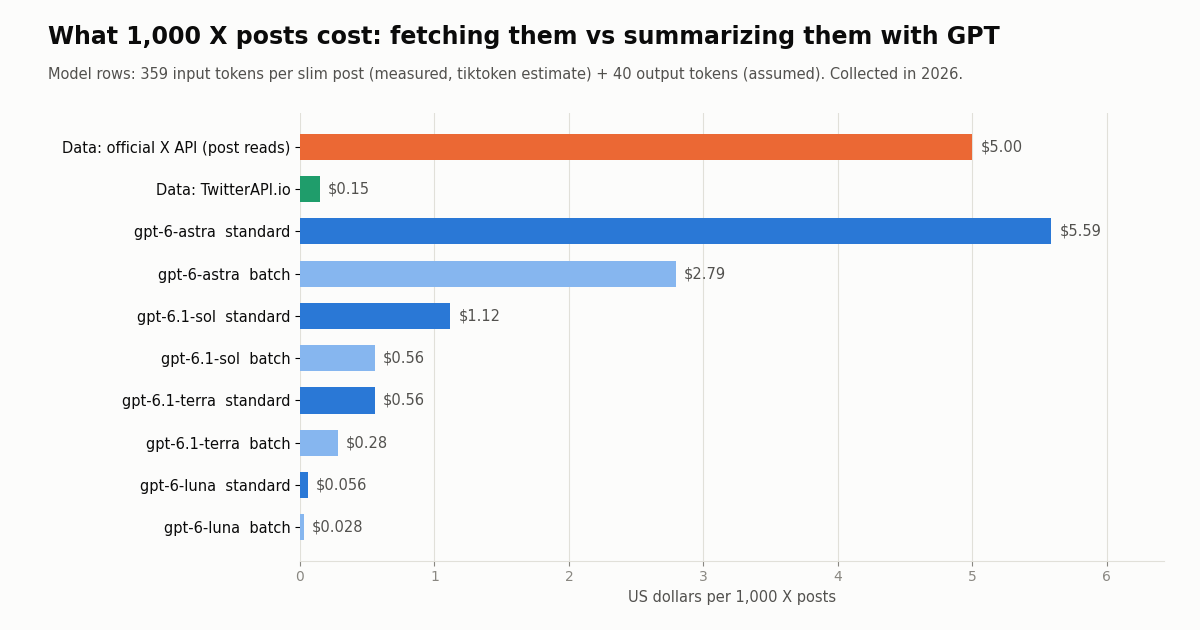
GPT models do not read X on their own, so an app that summarizes, classifies or answers questions about posts needs a second key for the data. Reads through TwitterAPI.io need no X account: you send an X-API-Key header to https://api.twitterapi.io and pay only for the data returned, 15 credits per tweet, which is $0.15 per 1,000 tweets. X's own pay-per-usage rate card on docs.x.com/x-api/getting-started/pricing charges $0.005 per post read, which is $5.00 per 1,000 posts (capped at 3 million post reads a month before Enterprise). That is about 33x more per 1,000 posts for the same reads.
The second cost is tokens. We measured our 899 sampled posts with the o200k_base tokenizer (an estimate, since OpenAI does not publish a tokenizer for the GPT-6 models): the raw JSON of one post averages 1,777 tokens (median 1,271), while a slim record with the 7 fields a model needs averages 359 (median 154). Slimming cuts input by about 5x before you pick a model.
Model rows assume 359 input tokens per slim post (measured) plus 40 output tokens per post for a one-line label (assumed). Sending raw JSON instead of slim records to gpt-6-astra would cost about $17.77 in input tokens alone per 1,000 posts. With gpt-6-luna, the data bill is the larger line; with gpt-6-astra, the model is.
The script below wires both keys together: it pages through advanced search with has_next_page and next_cursor, slims each post, and asks gpt-6-luna to group the posts into themes. Keep both keys in environment variables on a server, never in the client.
import json
import os

import requests
from openai import OpenAI

TWITTERAPI_KEY = os.environ["TWITTERAPI_IO_KEY"]   # from twitterapi.io/dashboard
BASE = "https://api.twitterapi.io"
client = OpenAI()                                  # reads OPENAI_API_KEY


def search_posts(query, max_pages=5):
    """Fetch recent X posts with TwitterAPI.io advanced search (20 per page)."""
    posts, cursor = [], ""
    for _ in range(max_pages):
        r = requests.get(
            f"{BASE}/twitter/tweet/advanced_search",
            headers={"X-API-Key": TWITTERAPI_KEY},
            params={"query": query, "queryType": "Latest", "cursor": cursor},
            timeout=30,
        )
        r.raise_for_status()
        body = r.json()
        posts.extend(body.get("tweets", []))
        if not body.get("has_next_page"):
            break
        cursor = body.get("next_cursor", "")
    return posts


def slim(t):
    """Keep the 7 fields the model needs: about 5x fewer tokens than raw JSON."""
    a = t.get("author") or {}
    return {
        "id": t["id"],
        "createdAt": t["createdAt"],
        "author": a.get("userName"),
        "followers": a.get("followers"),
        "text": t.get("text", ""),
        "likeCount": t.get("likeCount"),
        "viewCount": t.get("viewCount"),
    }


posts = search_posts('"responses api" lang:en -filter:retweets', max_pages=5)
records = "\n".join(json.dumps(slim(t), ensure_ascii=False) for t in posts)

response = client.responses.create(
    model="gpt-6-luna",
    input=(
        "You get X posts as JSON lines. Group them into 3-5 themes, give each theme "
        "one sentence and the ids of two example posts.\n\n" + records
    ),
)
print(f"{len(posts)} posts analyzed")
print(response.output_text)
How we collected this
Question. What do people post about OpenAI API keys on X, how many tokens does a real X post cost as GPT input, and how much of OpenAI's developer account is about the API platform?
Data. TwitterAPI.io /twitter/tweet/advanced_search with the query ("openai api key" OR "openai key" OR "OPENAI_API_KEY") -filter:retweets, queryType=Latest, 45 pages, giving 899 posts; plus /twitter/user/last_tweets for @OpenAIDevs, 8 pages, giving 160 posts. 53 requests in total, about $0.16 of data. Collected in 2026; the window is the most recent matching posts at collection time.
Method. Themes come from keyword rules (in English, Chinese and Japanese) applied to 220 characters either side of the key mention; a post can match several themes, and the rules were spot-checked, not hand-labeled, so treat shares as approximate. Tokens were counted with tiktoken o200k_base and are an estimate for GPT-6 models. Model prices come from OpenAI's pricing page as read this session.
What the sample cannot show. It reflects public posts that use these exact phrases, not all developers; it says nothing about how often keys actually leak, and engagement numbers are medians of a skewed distribution. Privacy. Aggregates only; the raw search pages were never stored in the repository, the published sample has no ids, handles, URLs or text, and the only account named is OpenAI's organization account.
import json
import os

import requests
from openai import OpenAI

TWITTERAPI_KEY = os.environ["TWITTERAPI_IO_KEY"]   # from twitterapi.io/dashboard
BASE = "https://api.twitterapi.io"
client = OpenAI()                                  # reads OPENAI_API_KEY


def search_posts(query, max_pages=5):
    """Fetch recent X posts with TwitterAPI.io advanced search (20 per page)."""
    posts, cursor = [], ""
    for _ in range(max_pages):
        r = requests.get(
            f"{BASE}/twitter/tweet/advanced_search",
            headers={"X-API-Key": TWITTERAPI_KEY},
            params={"query": query, "queryType": "Latest", "cursor": cursor},
            timeout=30,
        )
        r.raise_for_status()
        body = r.json()
        posts.extend(body.get("tweets", []))
        if not body.get("has_next_page"):
            break
        cursor = body.get("next_cursor", "")
    return posts


def slim(t):
    """Keep the 7 fields the model needs: about 5x fewer tokens than raw JSON."""
    a = t.get("author") or {}
    return {
        "id": t["id"],
        "createdAt": t["createdAt"],
        "author": a.get("userName"),
        "followers": a.get("followers"),
        "text": t.get("text", ""),
        "likeCount": t.get("likeCount"),
        "viewCount": t.get("viewCount"),
    }


posts = search_posts('"responses api" lang:en -filter:retweets', max_pages=5)
records = "\n".join(json.dumps(slim(t), ensure_ascii=False) for t in posts)

response = client.responses.create(
    model="gpt-6-luna",
    input=(
        "You get X posts as JSON lines. Group them into 3-5 themes, give each theme "
        "one sentence and the ids of two example posts.\n\n" + records
    ),
)
print(f"{len(posts)} posts analyzed")
print(response.output_text)
Questions readers ask
How do I get an OpenAI API key?
Sign in at platform.openai.com, open Settings, then API keys (platform.openai.com/api-keys), choose the project and select Create new secret key. Copy the key right away because the full secret is shown only once, then add prepaid credits under Billing so requests can run.
Is the OpenAI API key free?
Creating the key is free, but API usage is billed from prepaid credits with a $5 minimum purchase. There is no general free key. Eligible ChatGPT Pro and Business subscribers can claim monthly API credits (up to $500), which expire at the end of each billing cycle.
Does ChatGPT Plus include API access?
No. ChatGPT and the API Platform are billed separately. OpenAI's API credit benefit applies to eligible Pro and Business subscriptions; its docs list downgrading to Plus, Go or Free as removing the API organization link at the end of the billing cycle.
I lost my OpenAI API key. Can I see it again?
No. OpenAI shows the full secret key only when you create it. Delete the old key on the API keys page, create a new one and update every application that used the old key.
Why does my OpenAI API key return a 429 error?
A 429 is either a rate limit or a billing stop. Check error.code: credit_balance_exhausted means no prepaid credits remain, organization_spend_limit_exceeded or project_spend_limit_exceeded means a hard spend limit was reached, and slow_down means you ramped traffic too fast. Retrying billing errors does not help.
What is the difference between a project key and a user key?
Project keys are scoped to one project and can carry an expiry date. Legacy user keys can reach several organizations or projects and need the OpenAI-Organization and OpenAI-Project headers to bill the right one. Admin keys are only for administration endpoints.
Can I put my OpenAI API key in a frontend or mobile app?
No. OpenAI's key safety guidance says never to deploy keys in browsers or mobile apps, because anyone can extract the key and spend your credits. Route requests through your own backend and keep the key in an environment variable or a key management service.
How do I give a GPT app live Twitter (X) data?
Use a second key for the data. TwitterAPI.io returns X posts as JSON for $0.15 per 1,000 tweets with no X account needed; the official X API charges $0.005 per post read ($5.00 per 1,000). Slim each post to a few fields before sending it to the model to cut input tokens about 5x.
Continue
- OpenAI developer quickstart: create and export an API key, first request
- OpenAI API reference: authentication, project and organization headers
- OpenAI Help Center: best practices for API key safety
- OpenAI Help Center: prepaid API billing ($5 minimum, auto-reload, expiry)
- OpenAI docs: rate limits and usage tiers
- X API pricing: pay-per-usage rate card
- X (Twitter) API guide and endpoint hub
- How to get a Grok API key on console.x.ai
- How to get a Claude API key from the Anthropic Console
- Connect ChatGPT to Twitter via API
- Build OpenAI Agents SDK tools on the Twitter API
- How the X-API-Key header authenticates requests
- Twitter advanced search API guide
- TwitterAPI.io pricing: pay per tweet returned
- 01Twitter (X) API License: The Developer Agreement in Plain English
- 02Claude Agent SDK: Build a Twitter (X) Research Agent in Python
- 03OpenRouter API: Base URL, API Key, Free Models and Pricing, Plus a Twitter (X) Agent That Swaps Models
- 04Codex vs Claude Code: Setup, MCP, Headless Runs and Pricing Compared for Twitter (X) Data Agents
- 05How to Get a Claude API Key: Console Steps, Billing, First Call and Live X (Twitter) Data
- 06How to Use the OpenAI Agents SDK with the Twitter (X) API
- 07The X-API-Key Header: How to Send an API Key in a Request
- 08How to Get a Grok API Key: Setup, Pricing and Live X Data for the xAI API
Stop reading. Start building.
Starter credits cover real testing on real data. Google sign-in, no card, no application queue.
Get an API keyAlready building with TwitterAPI.io? Publish an honest tutorial or build log about it and earn up to $200 a month in API credits.