Claude Agent SDK: Build a Twitter (X) Research Agent in Python
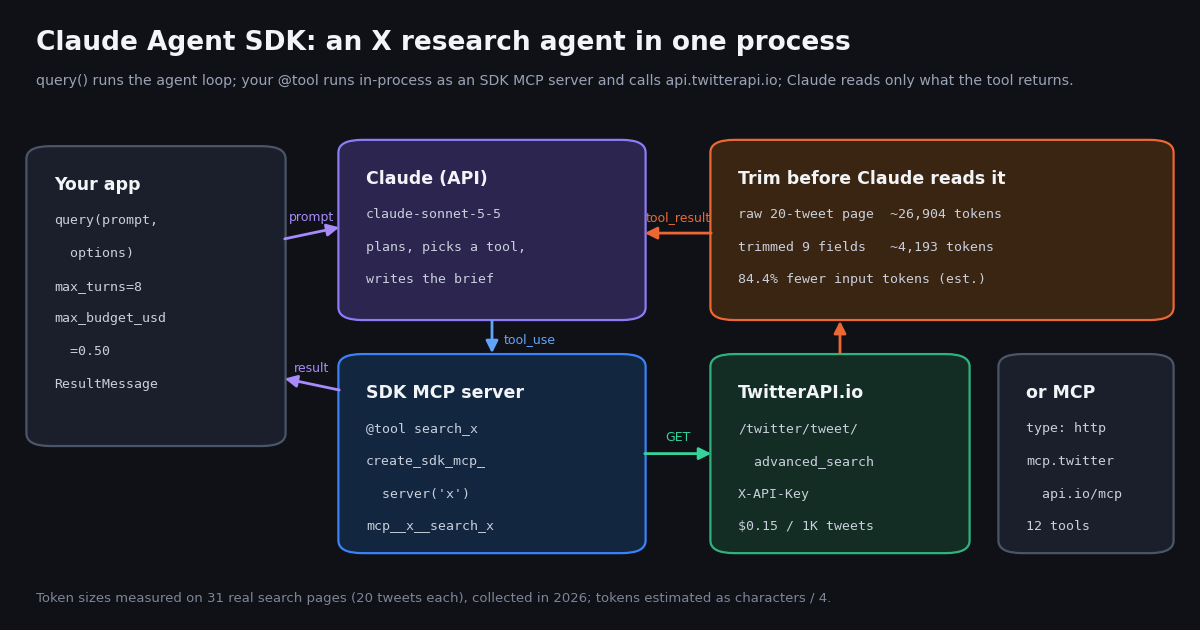
This page is about building your own agent program with the Claude Agent SDK library. If you only want Claude (the app or the Claude Code CLI) to read X data, our setup guide for connecting Claude to TwitterAPI.io's MCP server is the shorter path; if you want a framework-neutral overview, see the general guide to building an AI agent. Here we write Python, register tools in code, and control turns, permissions and spend from the program itself.
Every SDK fact below comes from Anthropic's Agent SDK docs at code.claude.com/docs/en/agent-sdk and the PyPI and npm package pages, read while writing this guide. The worked example is an X (Twitter) research agent: Claude plans the searches, a custom tool fetches posts through TwitterAPI.io, and the SDK returns a brief plus an estimated model cost. We did not execute the agent for this page; the numbers on it come from a separate data study described at the end.
That study pulled 945 posts in 48 API requests (about $0.14 of data) to answer two practical questions: how large is the tweet JSON your tool hands to Claude, and what do developers actually post about the SDK?
What the Claude Agent SDK is, and how it differs from the other Claude tools
Anthropic describes the Agent SDK as "the same tools, agent loop, and context management that power Claude Code, programmable in Python and TypeScript." The practical difference from the plain Client SDK (the anthropic package) is who runs the loop: with the Client SDK you send a message, read the tool_use block, execute the tool and send the result back yourself; with the Agent SDK, Claude Code's loop does that until the task is done or a limit you set is reached.
The docs place it next to three siblings. This table condenses Anthropic's own comparison:
Capabilities you inherit. Built-in tools (read, write, edit files, run commands, search the web), hooks, subagents, MCP, permissions, sessions that can be resumed or forked, skills, slash commands and memory loaded from .claude/ and ~/.claude/, and plugins. With default options the SDK loads the same filesystem settings as the CLI, so a stray CLAUDE.md in the working directory changes your agent's behavior unless you pass setting_sources=[].
The rename. The library shipped as the Claude Code SDK. The migration guide states it "has been renamed to the Claude Agent SDK": the npm package moved from @anthropic-ai/claude-code to @anthropic-ai/claude-agent-sdk, the Python package from claude-code-sdk to claude-agent-sdk, and the Python options class from ClaudeCodeOptions to ClaudeAgentOptions. Old tutorials that import claude_code_sdk need those three edits.
Terms and branding. Use of the SDK is governed by Anthropic's Commercial Terms of Service, including when it powers products you sell. Partners may call their product "Claude Agent" or "YourAgent Powered by Claude", but not "Claude Code" or "Claude Code Agent".
Install, authenticate and make the first query() call
The quickstart lists two prerequisites: Node.js 18.14 or later, or Python 3.10 or later. Both SDKs bundle a native Claude Code binary, so most installs need nothing else; the exception the docs call out is a Python source install with no platform wheel (for example ARM64 Windows), where you install Claude Code natively and the SDK finds it on your PATH.
Authentication. Export ANTHROPIC_API_KEY from the Claude Console. For cloud providers set CLAUDE_CODE_USE_BEDROCK=1 (AWS credentials), CLAUDE_CODE_USE_FOUNDRY=1 (Azure credentials), or follow the Vertex AI guide. The SDK does not load .env files on its own, so a Not logged in or Invalid API key error usually means the variable is missing in the shell that runs the agent.
Subscription logins. The overview carries an explicit note: "Unless previously approved, Anthropic does not allow third party developers to offer claude.ai login or rate limits for their products, including agents built on the Claude Agent SDK." Plan on API-key billing for anything you ship to other people.
The core call. Everything starts with query(prompt=..., options=ClaudeAgentOptions(...)), an async iterator. It yields a system init message (which lists the tools that connected), AssistantMessage objects whose content holds TextBlock and ToolUseBlock items, user messages carrying tool results, and finally one ResultMessage. That last message has subtype (success, error_max_turns, error_max_budget_usd, error_during_execution and a structured-output variant), the final result text, num_turns, usage and total_cost_usd.
The options worth setting on day one are few. model takes an alias or a full ID such as claude-sonnet-5-5. system_prompt takes a string, or the claude_code preset with an append. mcp_servers registers tools, allowed_tools pre-approves them, tools controls which built-ins exist at all, max_turns caps the loop, and max_budget_usd stops the query when the client-side cost estimate reaches a value.
query() or ClaudeSDKClient. The Python reference draws the line clearly:
A daily X digest is a one-off task, so the example on this page uses query(). A Slack bot that answers follow-ups about the same search results would use ClaudeSDKClient so the second question sees the first answer's context.
# Python
python3 -m venv .venv && source .venv/bin/activate
pip install claude-agent-sdk requests

# TypeScript
npm install @anthropic-ai/claude-agent-sdk zod
npm install --save-dev tsx

# Keys (never commit them)
export ANTHROPIC_API_KEY=sk-ant-...          # Claude Console
export TWITTERAPI_IO_API_KEY=... # twitterapi.io/dashboardGive the agent live X data with a custom tool
A custom tool has four parts: a name, a description Claude reads to decide when to call it, an input schema, and an async handler that returns {"content": [{"type": "text", "text": ...}]}. You wrap one or more tools in create_sdk_mcp_server(name="x", version="1.0.0", tools=[...]). Despite the name, nothing starts on a port: the docs state the server "runs in-process inside your application, not as a separate process."
Naming and permission. Claude sees each tool as mcp__{server_name}__{tool_name}, where the server name is the key you use in mcp_servers. Register {"x": x_server} and the search tool becomes mcp__x__search_x. List that full name in allowed_tools so it runs without a permission prompt, or use the wildcard mcp__x__*. Note that allowed_tools approves; it does not restrict. To keep Claude away from Bash, file edits and web fetches in a data agent, pass tools=[], which the docs describe as "All built-ins are removed. Claude can only use your MCP tools."
Schemas. The Python simple form {"query": str, "pages": int} makes every key required. For optional parameters, switch to the JSON Schema form and leave the key out of required, then read it with args.get().
Errors. A handler that raises does not end the run: the SDK converts the exception into an error result and Claude keeps going. Catch failures yourself and return "is_error": True with a message that tells Claude what to try next, for example that the API returned HTTP 429 and it should wait or narrow the query.
Which X endpoint. For research, /twitter/tweet/advanced_search takes query (X search operators such as from:, lang:, since_time:, min_faves:) and queryType (Latest or Top) and returns a top-level tweets[] with has_next_page and next_cursor, 20 posts per page. Profiles come from /twitter/user/info, whose unknown-user reply is HTTP 200 with status: "error" and msg: "user not found", so check the body rather than the status code. Reads need no X account.
from typing import Any
import asyncio, json, os, requests
from claude_agent_sdk import tool, create_sdk_mcp_server

BASE = "https://api.twitterapi.io"
HEADERS = {"X-API-Key": os.environ["TWITTERAPI_IO_API_KEY"]}

def fetch(q: str, query_type: str) -> list[dict]:
    r = requests.get(f"{BASE}/twitter/tweet/advanced_search", headers=HEADERS,
                     params={"query": q, "queryType": query_type}, timeout=30)
    r.raise_for_status()
    return r.json().get("tweets", [])

@tool("search_x", "Search X (Twitter) posts with X search operators. query_type: Latest or Top.",
      {"query": str, "query_type": str})
async def search_x(args: dict[str, Any]) -> dict[str, Any]:
    try:
        rows = await asyncio.to_thread(fetch, args["query"], args["query_type"])
    except Exception as e:
        return {"content": [{"type": "text", "text": f"search failed: {e}"}], "is_error": True}
    slim = [{"text": t["text"], "likes": t.get("likeCount"), "author": t["author"]["userName"]} for t in rows]
    return {"content": [{"type": "text", "text": json.dumps(slim, ensure_ascii=False)}]}

x_server = create_sdk_mcp_server(name="x", version="1.0.0", tools=[search_x])
# ClaudeAgentOptions(mcp_servers={"x": x_server}, allowed_tools=["mcp__x__search_x"], tools=[])Or attach TwitterAPI.io's hosted MCP server instead
If you would rather not write tools, the SDK connects to remote MCP servers directly. In code, pass a config with "type": "http" (streamable HTTP; "sse" for older servers), the URL, and auth headers. The same server can live in a .mcp.json at the project root, which loads when the project setting source is enabled (it is by default).
TwitterAPI.io's hosted server is at https://mcp.twitterapi.io/mcp and takes your key as a Bearer token. When we called its tools/list while writing this page it returned 12 read tools: search_tweets, get_user_info, get_user_about, get_user_followers, get_user_followings, get_user_last_tweets, get_user_mentions, get_tweets_by_ids, get_tweet_replies, get_tweet_quotes, get_tweet_retweeters and get_trends. With the key twitterapi in mcp_servers, allow them as mcp__twitterapi__*.
Custom tool or MCP? The hosted server is faster to wire up and covers more endpoints. A custom tool gives you control over exactly which fields reach Claude, hard caps on pages per call, and your own retry logic. Tool search is on by default in the SDK: tool definitions are withheld from the context window and Claude searches for and loads the ones a turn needs, so a 12-tool server does not put all 12 schemas into every request. Set alwaysLoad: true on a server to exempt it.
import os
from claude_agent_sdk import ClaudeAgentOptions

options = ClaudeAgentOptions(
    model="claude-sonnet-5-5",
    mcp_servers={
        "twitterapi": {
            "type": "http",
            "url": "https://mcp.twitterapi.io/mcp",
            "headers": {"Authorization": f"Bearer {os.environ['TWITTERAPI_IO_API_KEY']}"},
        }
    },
    allowed_tools=["mcp__twitterapi__*"],
    tools=[],          # X tools only, no built-in Bash/Edit
    max_turns=8,
)Measured: trim tweet JSON before your tool returns it
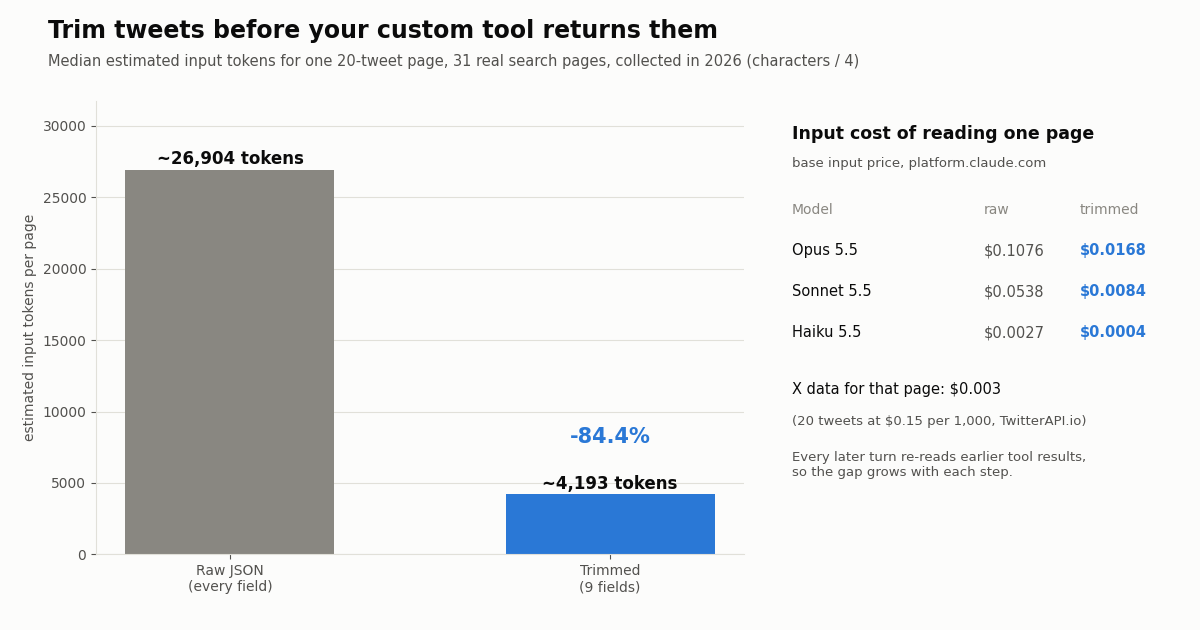
A search page from the API carries every field X exposes: entities, media variants, card data, quoted and retweeted posts nested in full, and a complete author object. Useful for storage, expensive as model input. We serialized 31 real 20-tweet search pages two ways: exactly as returned, and trimmed to nine fields (text, createdAt, lang, likeCount, retweetCount, replyCount, viewCount, author userName, author followers).
Trimming removed 84.4% of the bytes. On Sonnet 5.5 the raw page costs about $0.0538 of input every time Claude reads it, roughly 18 times the $0.003 the 20 tweets cost to fetch from TwitterAPI.io. The trimmed page costs about $0.0084. In an agent loop the difference compounds, because each later turn sends the conversation, including earlier tool results, back to the model (cache hits are billed at a fraction of the base input price, which softens but does not remove the cost).
Caveats. Characters divided by four is a rough estimate, not a tokenizer count; Chinese and Japanese text, which made up a third of our Latest sample, usually tokenizes to more tokens per character, so real counts for those pages are likely higher. Prices are the base input rates from Anthropic's pricing page; output tokens, cache writes and data-residency multipliers are extra. Keep the raw JSON in your own database if you need it later and give Claude only what the task needs.
Guardrails: turns, budget, permissions, hooks and subagents
Cap the loop. max_turns limits agentic turns and max_budget_usd stops the query when the estimated spend reaches a value. The reference warns that the estimate "can pass this value, so leave headroom." When either limit trips you get error_max_turns or error_max_budget_usd in the result's subtype.
Read cost the right way. total_cost_usd and per-model model_usage are, in Anthropic's words, "client-side estimates, not authoritative billing data," computed from a price table bundled with the SDK. Use them for budgeting and logs; use the Usage and Cost API or the Console usage page for real billing, and never bill your own customers from them. total_cost_usd and model_usage include subagent spend, while the result's usage field counts only the top-level loop.
Cap the data side too. The Claude estimate does not include what your tools spend. Put the cap in the handler: the example limits search_x to three pages (60 posts, at most $0.009 of X data) per call and the system prompt asks for at most four tool calls, so a run cannot fetch more than about $0.04 of tweets.
Permissions and hooks. Anything not in allowed_tools falls through to permission_mode and an optional can_use_tool callback. To inspect or block every call, including pre-approved ones, register a PreToolUse hook in hooks; that is the place to log queries or reject searches that would profile a private person.
Subagents. Pass agents={"collector": AgentDefinition(description=..., prompt=..., tools=["mcp__x__search_x"], model="haiku")} to delegate bulk reading to a cheaper model while the main agent writes the brief. Each AgentDefinition can also set its own maxTurns and MCP servers.
Scheduling. A daily digest needs no long-running server: run the script from cron or a CI job. If it polls for new posts, remember the floor on our side: a search that finds nothing still bills the 15-credit minimum ($0.00015), which is $6.48 a month at one check a minute and $1.30 at one every five minutes, before any model tokens.
What the X data costs next to the official X API
The agent needs a source for posts. Two rate cards, both per item returned:
Per 1,000 posts that is $0.15 against $5, about 33 times less, using the pay-per-usage card on docs.x.com/x-api/getting-started/pricing. Our minimum is 15 credits per request, so a full 20-tweet page costs $0.003 and an empty search $0.00015. $1 buys 100,000 credits; purchased credits never expire. New accounts that pass the automatic bot check get up to $1 of free credits (at most 100,000 credits, no card, one per person or network, expiring after 31 days). Rate limits start at 0.2 requests per second before the first payment and rise to 20 once paid, which is why the example retries on HTTP 429.
Write actions. An agent can also post, but only through an authenticated session: one /twitter/user_login_v2 login ($0.10, with a proxy you supply) returns login_cookies, and each post, like, retweet or follow (/twitter/create_tweet_v2, /twitter/follow_user_v2) is then 60 credits, $0.0006, billed per HTTP 200 call. Every such call acts as that account, so X can rate-limit, lock or suspend it; keep a human pace, expect to re-login when the session expires, and keep a human approval step (a PreToolUse hook that asks) in front of anything an agent publishes.
What developers post about the Claude Agent SDK on X
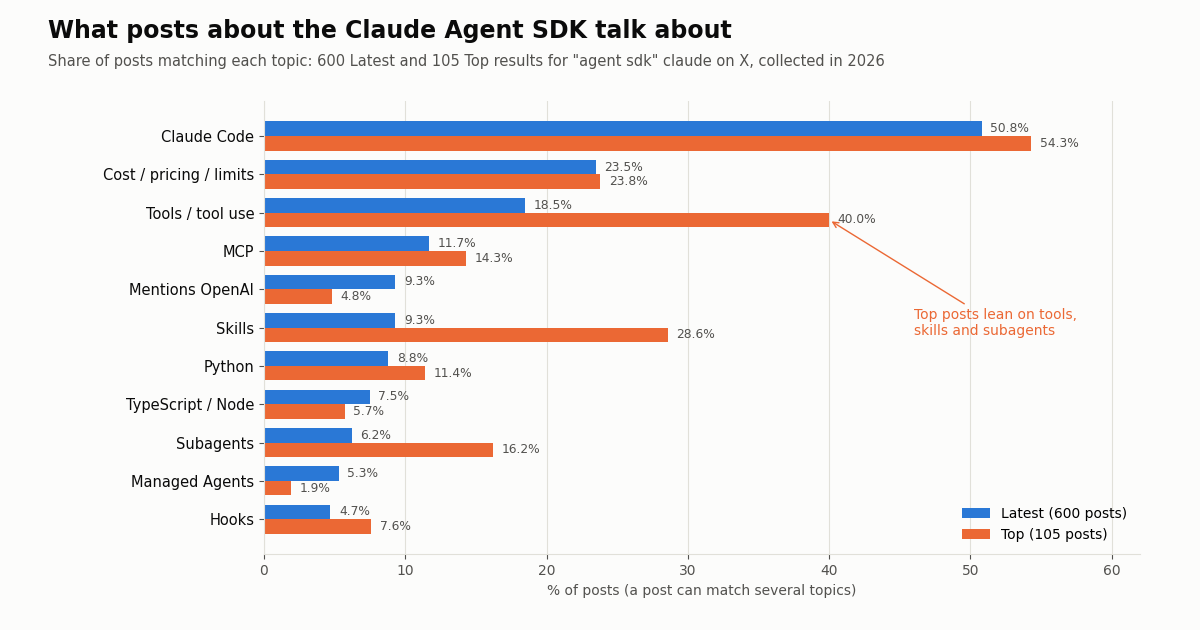
We searched X for "agent sdk" claude. The Latest feed returned 600 posts from 475 distinct accounts over 21.5 days, about 27.9 a day (between 8 and 69 on a single day). Top returned 105 higher-engagement posts spanning a longer period.
Claude Code dominates the conversation. Half the posts in both feeds name Claude Code, which fits the docs' framing of the SDK as Claude Code as a library. Cost and limits come up in roughly one post in four in both feeds, more than MCP or either language.
Top posts are about capabilities. Tools (40.0% vs 18.5%), skills (28.6% vs 9.3%) and subagents (16.2% vs 6.2%) are all overrepresented among the most-engaged posts. 72.4% of Top posts carry media (demos and diagrams) against 30.2% in Latest.
A multilingual audience. In Latest, 52.2% of posts are English, 20.5% Chinese and 14.0% Japanese. 48.5% carry a link and 12.0% link to GitHub, mostly people sharing what they built. Engagement is typical of developer chatter: median 3 likes and 346 views in Latest, with 25.8% of posts at zero likes; the Top median is 345 likes and 39,463 views.
Official accounts barely mention it. Across the latest 120 posts from @AnthropicAI (about 207 days) and 120 from @claudeai (about 214 days), 0 posts named the Agent SDK. SDK news travels through the docs, the two GitHub changelogs and developers' own posts, so watch those, or point the example agent at the topic.
How we collected this
Question. How large is the tweet JSON an Agent SDK tool hands to Claude, raw versus trimmed, and what do public posts about the SDK discuss?
Accounts and query. /twitter/tweet/advanced_search with query "agent sdk" claude, 30 pages of Latest and 6 of Top; /twitter/user/last_tweets for the organization accounts @AnthropicAI and @claudeai, 6 pages each. 48 requests and 945 posts in total (about $0.14 at $0.15 per 1,000), collected in 2026.
Method. Topics are case-insensitive keyword families matched on post text (for example \bmcp\b, sub-?agents?, cost|pric|tokens|rate limit); broad words such as "tools" make that row an upper bound. Sizes come from serializing each full 20-tweet page as returned and as nine fields, then dividing characters by four. The analysis script and the protocol, written before collection, are kept with the study.
What the sample cannot show. A three-week Latest window and the 105 posts X ranks as Top are not the whole conversation, posts that discuss the SDK without the words "agent sdk" are missed, and keyword matching misreads sarcasm and context. Token counts are estimates; a tokenizer would give different, likely higher, numbers for CJK text. We did not run the example agent for this page, so no per-run model cost is claimed.
Privacy. Search authors are private individuals: their raw posts stayed outside the repository, only aggregates and de-identified rows (no IDs, URLs, text or handles) were kept, and no individual is named. Only the organization accounts @AnthropicAI and @claudeai are named.
"""x_research_agent.py - a Claude Agent SDK agent that researches a topic on X (Twitter)
through two custom tools backed by TwitterAPI.io, then writes a short brief.

    pip install claude-agent-sdk requests
    export ANTHROPIC_API_KEY=...        # key from the Claude Console
    export TWITTERAPI_IO_API_KEY=...    # key from twitterapi.io/dashboard
    python3 x_research_agent.py "claude agent sdk"
"""
import asyncio
import json
import os
import sys
import time
from typing import Any

import requests
from claude_agent_sdk import (
    AssistantMessage,
    ClaudeAgentOptions,
    ResultMessage,
    TextBlock,
    ToolUseBlock,
    create_sdk_mcp_server,
    query,
    tool,
)

BASE = "https://api.twitterapi.io"
HEADERS = {"X-API-Key": os.environ["TWITTERAPI_IO_API_KEY"]}
KEEP = ("text", "createdAt", "lang", "likeCount", "retweetCount", "replyCount", "viewCount")


def trim(t: dict) -> dict:
    """Keep 9 fields per tweet. In our sample this cut a 20-tweet page by about 84%."""
    row = {k: t.get(k) for k in KEEP}
    author = t.get("author") or {}
    row["author"] = author.get("userName")
    row["followers"] = author.get("followers")
    return row


def get_json(url: str, params: dict) -> dict:
    for attempt in range(4):
        r = requests.get(url, headers=HEADERS, params=params, timeout=30)
        if r.status_code == 429:          # free tier: 0.2 requests/s until the first payment
            time.sleep(5 * (attempt + 1))
            continue
        r.raise_for_status()
        return r.json()
    raise RuntimeError("rate limited four times in a row")


def search_pages(q: str, query_type: str, pages: int) -> list[dict]:
    tweets, cursor = [], ""
    for _ in range(pages):
        body = get_json(f"{BASE}/twitter/tweet/advanced_search",
                        {"query": q, "queryType": query_type, "cursor": cursor})
        tweets += body.get("tweets", [])            # top-level tweets[] on this endpoint
        if not body.get("has_next_page"):
            break
        cursor = body.get("next_cursor", "")
    return tweets


def err(msg: str) -> dict[str, Any]:
    return {"content": [{"type": "text", "text": msg}], "is_error": True}


@tool(
    "search_x",
    "Search X (Twitter) posts. query accepts X search operators such as from:, lang:, "
    "since_time:, min_faves:, -is:retweet. query_type is Latest or Top. pages is 1-3 "
    "(20 posts per page). Returns compact JSON rows.",
    {"query": str, "query_type": str, "pages": int},
)
async def search_x(args: dict[str, Any]) -> dict[str, Any]:
    qt = args["query_type"] if args["query_type"] in ("Latest", "Top") else "Latest"
    pages = max(1, min(int(args["pages"]), 3))      # hard cap: at most 60 posts per call
    try:
        rows = await asyncio.to_thread(search_pages, args["query"], qt, pages)
    except Exception as e:                           # Claude reads this text and can retry
        return err(f"TwitterAPI.io search failed: {e}")
    text = json.dumps([trim(t) for t in rows], ensure_ascii=False, separators=(",", ":"))
    return {"content": [{"type": "text", "text": f"{len(rows)} posts\n{text}"}]}


@tool("get_x_user", "Look up one X (Twitter) profile by handle, without the @.", {"username": str})
async def get_x_user(args: dict[str, Any]) -> dict[str, Any]:
    try:
        body = await asyncio.to_thread(get_json, f"{BASE}/twitter/user/info",
                                       {"userName": args["username"].lstrip("@")})
    except Exception as e:
        return err(f"TwitterAPI.io user lookup failed: {e}")
    if body.get("status") == "error" or not body.get("data"):   # unknown user: HTTP 200 + msg
        return err(f"No such user: {body.get('msg', 'user not found')}")
    d = body["data"]
    keep = {k: d.get(k) for k in ("userName", "name", "description", "followers",
                                   "following", "statusesCount", "createdAt", "isBlueVerified")}
    return {"content": [{"type": "text", "text": json.dumps(keep, ensure_ascii=False)}]}


x_server = create_sdk_mcp_server(name="x", version="1.0.0", tools=[search_x, get_x_user])

SYSTEM = (
    "You research what people on X say about a topic. Use search_x with Top first, then "
    "Latest for recency. Use at most 4 tool calls. Quote numbers exactly as returned, never "
    "invent posts, and name only organizations or public figures. Finish with: 5 themes, "
    "3 notable posts (author, likes, one-line summary), and open questions."
)


async def main(topic: str) -> None:
    options = ClaudeAgentOptions(
        model="claude-sonnet-5-5",
        system_prompt=SYSTEM,
        mcp_servers={"x": x_server},
        tools=[],                                    # no built-in Bash/Edit/Read: X tools only
        allowed_tools=["mcp__x__search_x", "mcp__x__get_x_user"],
        setting_sources=[],                          # ignore local .claude/ settings and CLAUDE.md
        max_turns=8,
        max_budget_usd=0.50,                         # client-side estimate; leave headroom
    )
    async for message in query(prompt=f"Research this topic on X: {topic}", options=options):
        if isinstance(message, AssistantMessage):
            for block in message.content:
                if isinstance(block, ToolUseBlock):
                    print(f"-> {block.name} {json.dumps(block.input)}")
        elif isinstance(message, ResultMessage):
            if message.subtype == "success":
                print("\n" + (message.result or ""))
            else:
                print(f"stopped: {message.subtype}")
            print(f"\nturns={message.num_turns}  est. model cost=${message.total_cost_usd or 0:.4f}")


if __name__ == "__main__":
    asyncio.run(main(" ".join(sys.argv[1:]) or "claude agent sdk"))
Questions readers ask
Is the Claude Agent SDK the same as the Claude Code SDK?
Yes, renamed. Anthropic's migration guide says the Claude Code SDK "has been renamed to the Claude Agent SDK." Replace @anthropic-ai/claude-code with @anthropic-ai/claude-agent-sdk on npm, claude-code-sdk with claude-agent-sdk on PyPI, and ClaudeCodeOptions with ClaudeAgentOptions in Python code.
Is the Claude Agent SDK free?
Installing it costs nothing, but every run calls a Claude model and is billed at API rates through your ANTHROPIC_API_KEY (or your Bedrock, Vertex or Foundry account). Its use is governed by Anthropic's Commercial Terms of Service. The SDK reports an estimated total_cost_usd per query; your actual bill is in the Claude Console. Per-model token prices are covered in our Claude API pricing guide.
Can I use my Claude Pro or Max subscription with the Agent SDK?
Anthropic's overview says that unless previously approved, third-party developers may not offer claude.ai login or rate limits for their products, including agents built on the Agent SDK, and points to API-key authentication instead. Build anything you distribute on an API key.
Do I need Claude Code installed to use the Agent SDK?
Usually not. Both the Python and TypeScript packages bundle a native Claude Code binary. The quickstart's exception is a Python source install without a platform wheel, such as ARM64 Windows, where you install Claude Code natively and the SDK finds it on PATH.
Should I use the Python or the TypeScript Agent SDK?
Both expose the same loop and options. Python needs 3.10+ and defines tool schemas as dicts or JSON Schema with the @tool decorator; TypeScript needs Node.js 18.14+ and uses Zod with tool(). A few features land in one first, for example the docs mark a tool's permission_policy as TypeScript-only. Pick the language of the app you are embedding the agent in.
How do I give a Claude agent access to Twitter (X) data?
Either write a custom tool with @tool that calls https://api.twitterapi.io/twitter/tweet/advanced_search with your X-API-Key header and register it with create_sdk_mcp_server(), or add TwitterAPI.io's hosted MCP server (https://mcp.twitterapi.io/mcp, type: "http", Bearer key) to mcp_servers. Reads need no X account and cost $0.15 per 1,000 tweets returned.
What is the difference between the Agent SDK and Claude Managed Agents?
With the Agent SDK the agent loop runs in a process you operate. Managed Agents is Anthropic's hosted harness: you configure the agent through the Claude API and sessions run in an Anthropic-managed cloud sandbox or a self-hosted sandbox. Choose the SDK when you want the agent inside your own app and infrastructure.
Can a Claude agent post tweets?
It can, through TwitterAPI.io write endpoints such as /twitter/create_tweet_v2 after one /twitter/user_login_v2 login ($0.10, with your own proxy). Each write is 60 credits ($0.0006), billed per HTTP 200 call, and acts as that account, so X can rate-limit, lock or suspend it. Keep a human pace, expect occasional re-logins, and put a human approval step in front of anything the agent publishes.
Continue
- Anthropic: Agent SDK overview (capabilities, comparison, auth note, terms)
- Anthropic: Give Claude custom tools (@tool, create_sdk_mcp_server, tools=[])
- Anthropic: Track cost and usage (total_cost_usd is a client-side estimate)
- PyPI: claude-agent-sdk (Python package)
- npm: @anthropic-ai/claude-agent-sdk (TypeScript package)
- X developer docs: pay-per-usage pricing
- X (Twitter) API hub: endpoints, pricing and guides
- Connect Claude and Claude Code to X data over MCP
- What an MCP server is, with a wire-level walkthrough
- Build your own MCP server for X data
- The same X agent built with the OpenAI Agents SDK
- Tool calling over X data with the Vercel AI SDK
- Claude API pricing per model and per token
- How to build an AI agent, framework-neutral
- TwitterAPI.io pricing: pay per tweet returned
- 01Twitter (X) API License: The Developer Agreement in Plain English
- 02OpenRouter API: Base URL, API Key, Free Models and Pricing, Plus a Twitter (X) Agent That Swaps Models
- 03Codex vs Claude Code: Setup, MCP, Headless Runs and Pricing Compared for Twitter (X) Data Agents
- 04Open AI API Key: How to Get One, Pay for It, Keep It Safe and Feed It Live Twitter (X) Data
- 05How to Get a Claude API Key: Console Steps, Billing, First Call and Live X (Twitter) Data
- 06Grok Bot vs Claude: which agent can read and act on Twitter (X) data, and what it costs
- 07Agent Reach and Twitter (X): What the Twitter Channel Does, What It Needs, and the API Route
- 08OpenAI Agent Builder (AgentKit): add Twitter (X) data with MCP, then move to the Agents SDK
Stop reading. Start building.
Starter credits cover real testing on real data. Google sign-in, no card, no application queue.
Get an API keyAlready building with TwitterAPI.io? Publish an honest tutorial or build log about it and earn up to $200 a month in API credits.