What Does RT Mean on Twitter (X), and How Do You RT a Post?
If you have seen "RT" in a post, a bio, or a reply and are not sure what it means, the short version is that it stands for retweet, the action of re-sharing someone else's post to your own followers. X now labels that action Repost, so you will meet both words: "retweet" and "RT" in conversation, "Repost" in the app's menus. This page is written for the reader who wants the meaning first, the menu path second, and the fine print (who sees it, whether the author is told, what the counts mean) after that.
Three sibling pages cover the neighbouring questions so this one does not have to. The step-by-step on quote posts, with screenshots of the compose box, lives on the how-to-quote-a-tweet page; the programmatic quote-retweet guide covers posting quotes through an API; and the bulk unlike and unretweet guide covers removing hundreds of your own old reposts at once. Here, quoting and un-reposting appear only as far as the comparison needs them.
The last section is for readers who need repost numbers for many posts, not one: how to read retweetCount and quoteCount by post ID, how to list who reposted a post, and what that costs. If that is not you, stop before it.
What RT means on Twitter (X): retweet, repost, and the "RT @" habit
RT is shorthand for retweet. On Twitter, a retweet was the built-in way to put another person's post in front of your followers without changing it: the post appears in their Home timeline with a line above it saying you reposted it, and the original author's name, avatar, and text are untouched. After Twitter became X in July 2023 the company began replacing "tweet" with "post" throughout the product, and the terms of service dated 29 September 2023 use "post" and "repost" in place of the old words (Fortune, 8 September 2023; Wikipedia, Tweet (social media)). The icon under each post did not change: it is still the two circling arrows, and the menu that opens from it says Repost and Quote.
So in 2026, RT, retweet, and repost all mean the same feature. The only place the vocabulary actually matters is in the app's menus, which say Repost, and in X's own help pages, which were renamed from "How to Retweet" to "How to Repost" but still resolve from the old address (X Help Center).
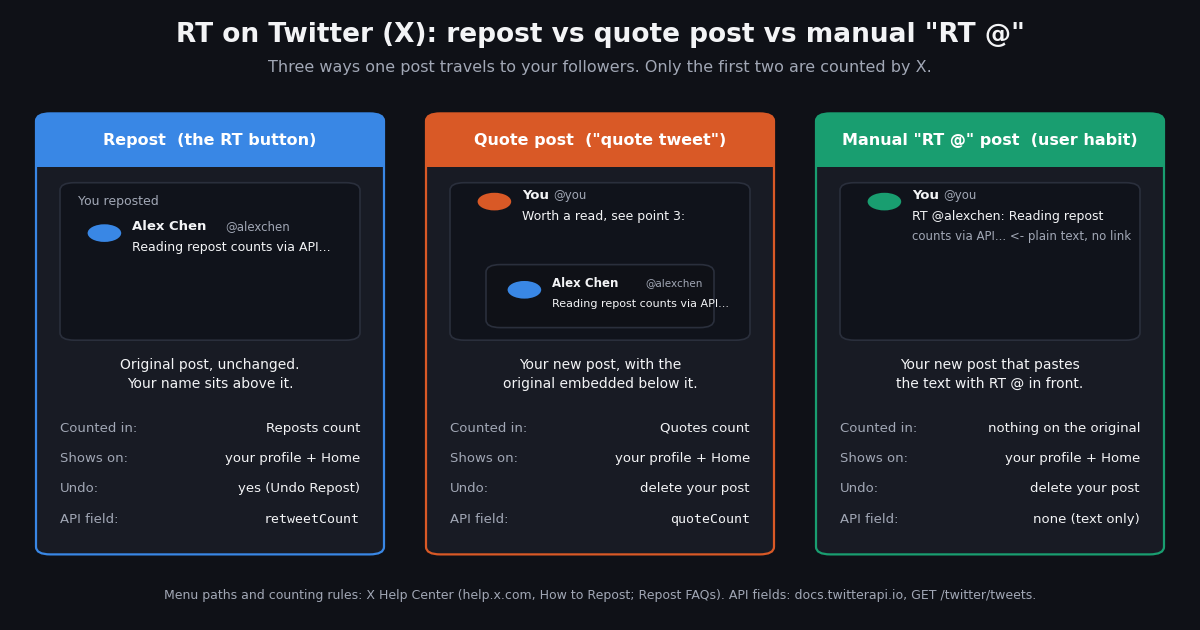
There is a second, older meaning you will still run into. Before Twitter had a button, users typed a retweet by hand: they copied the text and put "RT @username:" in front. Twitter never built this; its users did (the history section below has the dates and sources). People still type it today, usually to quote only part of a post, to share a post that has since been deleted, or out of habit, and the thing to know is that X treats such a post as ordinary text: it is not linked to the original and does not count toward anything.
Repost vs quote post vs manual "RT @": the comparison
This table is the part of the page to bookmark. It covers the three forms a reader might call an RT, what each one does, where it appears, what X counts, whether you can take it back, and which field carries it when you read a post through an API (the API column uses the field names returned by twitterapi.io's tweets-by-ID endpoint, docs.twitterapi.io/api-reference/endpoint/get_tweet_by_ids).
How to RT (repost) and undo a repost on web, iPhone, and Android
The menu path is the same on every platform; only the verb differs (click on the web, tap in the apps). The steps follow X's How to Repost help page (help.x.com/en/using-x/how-to-repost); the help site blocks automated fetches, so each step was confirmed against its indexed text and a second how-to source.
On the web: hover over the post, click the Repost icon (the two circling arrows under the post), and when the pop-up shows the post you are about to share, click Repost again to confirm. The post is now shared with all your followers as a repost.
On iPhone and Android: tap the Repost icon under the post, then tap Repost from the menu that appears. The same menu offers Quote, which opens the compose box with the original post embedded; that path, with screenshots, is on the how-to-quote-a-tweet sibling page.
To undo a repost: find the post you reposted (the Repost icon under it is highlighted), tap or click the icon, and choose Undo Repost. X's help page adds a caveat worth repeating: an undone repost disappears from other people's timelines, but it may still appear on phones showing a cached timeline or in cross-posts to third-party sites for a while.
To repost your own post: the same path works on your own posts; X's Repost FAQs say you can repost your own posts as well as other people's.
If the Repost option is missing: the most common reason is that the post is from a protected account; X's help page on protected posts says followers cannot repost or quote them (details in the section on who sees a repost). If you are looking at a friend's repost, note that the icons under it belong to the original post, so reposting from there reposts the original.
A short history: from "RT @" to the Repost button
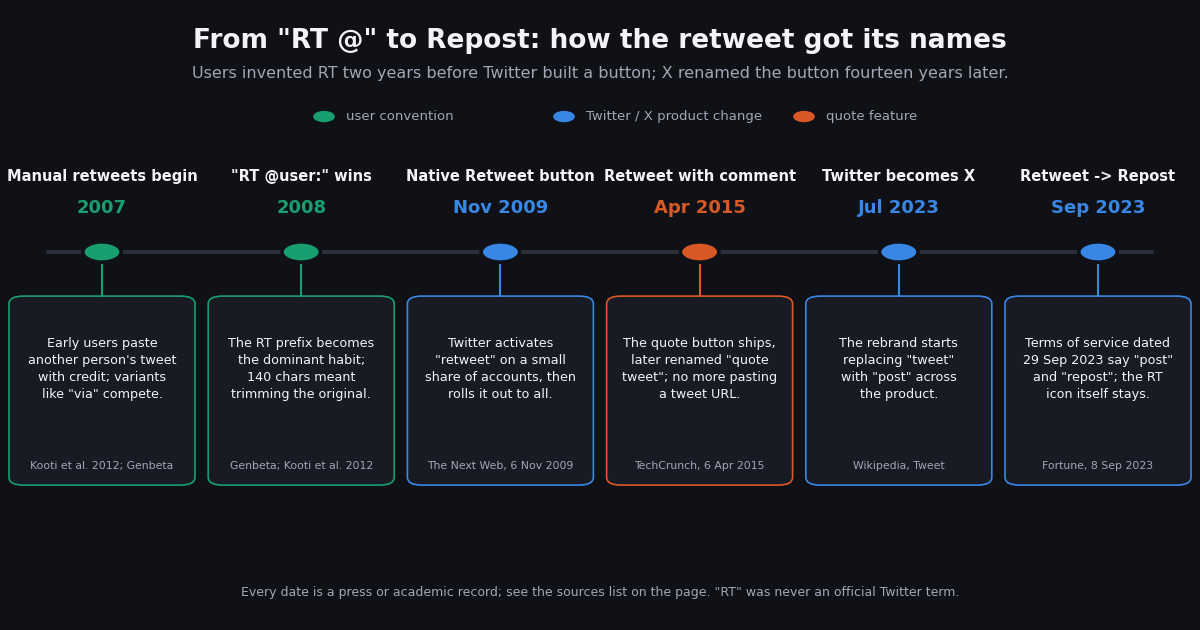
The naming confusion has a simple cause: the feature was named three times by three different parties. Users named it first, Twitter second, X third.
2007-2008, users invent RT. Early Twitter users wanted to pass along a post with credit, and several conventions appeared at once; Kooti and colleagues' ICWSM 2012 study of the period found variants borrowed from ordinary language ("via", "retweeting") and the community-specific "RT", with only two spreading widely. Genbeta's history of Twitter dates the first "RT @usuario:" form to January 2008. Because posts were capped at 140 characters, a manual RT often meant trimming the original to make room for the prefix, which is one of the reasons Twitter decided to build the feature in.
November 2009, the Retweet button. On 6 November 2009 Twitter announced it had "activated a feature called retweet on a very small percentage of accounts in order to see how it works in the wild" (The Next Web, 6 November 2009); Wikipedia records the rollout as beginning that month. The native retweet carried the original post intact under the sharer's name, which is exactly what a repost does today.
April 2015, retweet with comment. Twitter tested a way to embed a post inside a new one in 2014 and launched it as "retweet with comment" on 6 April 2015 (TechCrunch); it was later renamed quote tweet (Wikipedia). Before that, quoting meant pasting the post's URL into your own.
July to September 2023, Repost. After the rebrand to X in July 2023 the product began saying "post" instead of "tweet", and the terms of service dated 29 September 2023 formalised "post" and "repost" (Fortune; Wikipedia). Wikipedia notes that "tweet" and "retweet" remain the more popular words in everyday use, which matches what you will see in replies and bios.
Who sees a repost, whether the author is notified, and protected accounts
Your followers see it in Home. X's Repost FAQs say you can see posts that people you follow have reposted and quoted in your Home timeline. A repost is also listed on your profile with the "You reposted" line, so anyone who opens your public profile can see it.
The author is notified. The same help page says that when others repost or quote your content, the activity appears in your Notifications tab, including which posts were recently reposted and by whom. There is no silent repost; if you would rather the author not know, the only option is not to share it.
Blocked and muted accounts. Reposts and quotes, like ordinary posts, do not show up from accounts you have blocked (X Help Center, Repost FAQs). And if one account's reposts clutter your timeline, the Repost FAQs describe an option to turn off reposts from a specific account without unfollowing it.
Protected accounts cannot be reposted. X's page on public and protected posts states that when you protect your posts, your followers will not be able to use the Repost icon to repost or quote them. The Repost option simply does not appear. This is the one case where the manual "RT @" form still gets used, and it is also why that form is frowned on: typing out a protected post defeats the protection the author chose.
Reposts of reposts. A repost in your timeline is the original post with a "reposted" line above it, and the icons under it belong to the original. Reposting from there reposts the original: its count changes and its author is notified; the friend who surfaced it is not involved.
"RT does not equal endorsement": what the bio line means
You will see "RTs are not endorsements" or "RT does not equal endorsement" in the bios of journalists, academics, and anyone whose employer might be read into what they share. It means what it says: the person reposts things to pass them along, as a record or as something to discuss, and the repost does not mean they agree.
The line comes from the newsroom. A 2022 account on the Beast of Traal blog credits New York Times editor Patrick LaForge, then running the paper's City Room blog, with coining the disclaimer around August 2009, with his colleague Brian Stelter using the variant "RT and links aren't endorsements" (Digital Media Law Project, which also reproduces Stelter's wording). It spread as a way for reporters to share material from sources, rivals, and opponents without appearing to take sides.
Whether the line works is a different question. The Digital Media Law Project's discussion compares it to boilerplate non-endorsement disclaimers in consumer law and concludes that a generic line may not be enough on its own; it cites the Associated Press's social-media guidance that a repost with no comment can still look like approval. In practice the bio line is a courtesy to readers, not a rule X enforces, and if a repost could be read as agreement, a quote post with a sentence of context is the clearer choice.
How reposts are counted: the number, the Reposts tab, and the Quotes tab
Under every post, next to the two-arrow icon, is a number: the count of reposts. Open the post and X shows the breakdown. From the post's detail page you can see how many Reposts and Quotes it has; tap the Reposts tab to see who reposted it and the Quotes tab to see who quoted it (X Help Center, Repost FAQs).
Three things the number does and does not tell you. It counts reposts and quotes separately. A post with 400 reposts and 50 quotes shows those as two figures, and a quote post is itself a new post with its own repost count. It does not count manual "RT @" copies, since those are ordinary posts; if you want to find them you have to search for the text. It does not count reach. A repost puts the post into followers' timelines, but how many of them actually saw it is a separate number, impressions, which X shows only to the author in the post's analytics; the what-are-twitter-impressions sibling page covers how that number is counted.
For a single post, the tabs are all you need. The problem starts when you need the counts for 200 posts, or the list of everyone who reposted a post with 3,000 reposts: the Reposts tab loads a screen at a time and there is no export. That is the case for the next section.
Reading repost counts and retweeters at scale with the API
If you need repost numbers for many posts, or the full list of who reposted one, a read API returns in one request what the app shows a screen at a time. Three read-only endpoints on twitterapi.io cover it, all keyed by the post ID (the long number at the end of a post's URL).
Counts by post ID. GET /twitter/tweets?tweet_ids= takes a comma-separated list of post IDs and returns a tweets array in which each post carries retweetCount, quoteCount, likeCount, replyCount, viewCount, and bookmarkCount, plus author, createdAt, and, when the post is itself a repost or a quote, retweeted_tweet or quoted_tweet (docs.twitterapi.io, Get Tweets by IDs, verified 2026). Tweets by ID are a tweet endpoint: 15 credits per post returned, which is $0.15 per 1,000 posts, with a 15-credit ($0.00015) minimum per request (twitterapi.io/pricing, verified 2026).
Who reposted. GET /twitter/tweet/retweeters?tweetId= returns a users array of full profiles (userName, name, followers, following, isBlueVerified, createdAt, statusesCount) about 100 at a time, with has_next_page and next_cursor for paging; the docs warn that has_next_page can occasionally be true when nothing further exists, so stop on an empty page as well (docs.twitterapi.io, Get Tweet Retweeters, verified 2026). This endpoint returns user profiles, not posts, and is priced per user returned; the current rate is on the endpoint page and the pricing page rather than repeated here.
Who quoted. GET /twitter/tweet/quotes?tweetId= returns the quote posts themselves as a tweets array, exactly 20 per page, with an includeReplies flag (default true) and the same cursor pair (docs.twitterapi.io, Get Tweet Quotes, verified 2026). As a tweet endpoint it costs 15 credits per quote returned, so a full page is $0.003.
Cost comparison. Reading the repost and quote counts of 1,000 posts costs $0.15 on twitterapi.io (1,000 posts at $0.15 per 1,000). The official X API prices pay-per-use reads at $0.005 per post, so the same 1,000 posts cost $5 (docs.x.com/x-api/getting-started/pricing, verified 2026), about 33 times more; the official API's retweeted-by lookup is also rate-limited to 75 requests per 15 minutes (docs.x.com, Repost lookup migration guide). The official route is still the one to use if you need to post, repost, or act on an account's behalf, which this page does not cover; the writes we support are human-paced and described in the programmatic quote guide linked below.
The script below takes one post ID, prints its counts, then pages through the retweeters and prints the first 20 handles with follower counts. Set TWITTERAPI_IO_KEY in your environment (the key is on the dashboard after sign-up) and change the ID. New accounts that pass the automatic bot check get $1 of free credits (100,000 credits, no card, one per person or network, expiring after 31 days), enough to run it a few thousand times (twitterapi.io/pricing, verified 2026).
import os

import requests

BASE = "https://api.twitterapi.io"
HEADERS = {"X-API-Key": os.environ["TWITTERAPI_IO_KEY"]}  # key from twitterapi.io/dashboard


def counts_for(tweet_ids):
    """Repost / quote / like counts for up to a few dozen post IDs in one call."""
    r = requests.get(
        f"{BASE}/twitter/tweets",
        params={"tweet_ids": ",".join(tweet_ids)},
        headers=HEADERS,
        timeout=30,
    )
    r.raise_for_status()
    return r.json().get("tweets") or []


if __name__ == "__main__":
    for t in counts_for(["1846987139428634858"]):
        print(f"@{t['author']['userName']}: reposts={t.get('retweetCount')} "
              f"quotes={t.get('quoteCount')} likes={t.get('likeCount')} views={t.get('viewCount')}")
"""RT on Twitter (X) via API: print a post's repost / quote / like counts,
then page through who reposted it and print the first 20 handles with follower counts.

Usage: python rt_counts.py <tweet_id>
Needs TWITTERAPI_IO_KEY in the environment (twitterapi.io/dashboard).
Cost: tweets by ID = 15 credits per post ($0.15 per 1,000 posts, $0.00015 minimum per request);
retweeters returns user profiles and is priced per user returned, see
docs.twitterapi.io/api-reference/endpoint/get_tweet_retweeter and twitterapi.io/pricing.
"""
import os
import sys

import requests

BASE = "https://api.twitterapi.io"
HEADERS = {"X-API-Key": os.environ["TWITTERAPI_IO_KEY"]}


def get(url, params):
    r = requests.get(url, params=params, headers=HEADERS, timeout=30)
    r.raise_for_status()
    return r.json()


def post_counts(tweet_id):
    body = get(f"{BASE}/twitter/tweets", {"tweet_ids": tweet_id})
    tweets = body.get("tweets") or []
    if not tweets:
        raise SystemExit(f"no post found for id {tweet_id}: {body.get('message')}")
    return tweets[0]


def retweeters(tweet_id, limit=20):
    """Yield retweeter profiles, newest first, about 100 per page."""
    seen, cursor = 0, ""
    while seen < limit:
        body = get(f"{BASE}/twitter/tweet/retweeters", {"tweetId": tweet_id, "cursor": cursor})
        users = body.get("users") or []
        if not users:  # has_next_page can be true on an empty tail; stop here too
            break
        for u in users:
            yield u
            seen += 1
            if seen >= limit:
                return
        if not body.get("has_next_page") or not body.get("next_cursor"):
            break
        cursor = body["next_cursor"]


if __name__ == "__main__":
    tweet_id = sys.argv[1] if len(sys.argv) > 1 else "1846987139428634858"
    t = post_counts(tweet_id)
    print(f"@{t['author']['userName']} on {t.get('createdAt')}")
    print(f"  reposts (retweetCount) {t.get('retweetCount'):>8,}")
    print(f"  quotes  (quoteCount)   {t.get('quoteCount'):>8,}")
    print(f"  likes   (likeCount)    {t.get('likeCount'):>8,}")
    print(f"  views   (viewCount)    {t.get('viewCount') or 0:>8,}")
    print("\nfirst 20 reposters (handle, followers):")
    for u in retweeters(tweet_id, limit=20):
        print(f"  @{u.get('userName'):<20} {u.get('followers') or 0:>10,}")
Questions readers ask
What does RT mean on Twitter (X)?
RT stands for retweet: re-sharing someone else's post to your own followers, unchanged and credited to the author. X renamed the feature Repost in 2023, so the menu says Repost while people still say RT or retweet. A typed "RT @user:" at the start of a post is the older manual form from before the button existed.
How do I RT on Twitter (X)?
Click or tap the Repost icon (two circling arrows) under the post, then choose Repost; on the web, confirm in the pop-up. Choose Quote instead to add your own text above the original. The steps are the same on iPhone, Android, and the web (X Help Center, How to Repost).
Does the original author know when I RT their post?
Yes. X's Repost FAQs say reposts and quotes of your posts appear in your Notifications tab, including who reposted them. The author can also open the post and see every reposter in the Reposts tab and every quote in the Quotes tab.
How do I undo a retweet (repost) on X?
Find the post you reposted; the Repost icon under it is highlighted. Tap or click it and choose Undo Repost. X notes the repost may linger briefly on devices showing a cached timeline. To remove hundreds of old reposts at once, see the bulk unlike and unretweet guide linked on this page.
Can I repost a protected account's post?
No. X's help page on public and protected posts says that when an account protects its posts, its followers cannot use the Repost icon to repost or quote them. The Repost option does not appear. Copying the text out by hand is possible but defeats the protection the author chose.
What does "RT does not equal endorsement" mean in a bio?
It is a disclaimer that reposts are shared for information, not agreement. It started with New York Times journalists around 2009 and spread among reporters and academics. It is a courtesy rather than an X rule; press-ethics guidance quoted by the Digital Media Law Project warns that a bare repost can still read as approval, so add context in a quote post when the distinction matters.
Continue
- X Help Center: How to Repost (repost and undo-repost steps on web and mobile)
- X Help Center: Repost FAQs (notifications, Reposts and Quotes tabs, Home timeline, blocked accounts)
- Fortune, 8 September 2023: X's new terms of service rename tweets to posts and retweets to reposts, effective 29 September 2023
- Wikipedia, Tweet (social media): the "RT @username" convention, the November 2009 retweet rollout, retweet with comment, and the 2023 renaming
- twitterapi.io docs: Get Tweets by IDs (retweetCount, quoteCount, likeCount, viewCount per post)
- X API pay-per-usage pricing (docs.x.com), the official and more expensive route to the same reads
- Twitter (X) API overview: the hub for reading X data
- How to quote a tweet (quote post) on X, with screenshots
- Posting quote retweets programmatically through the Twitter (X) API
- Bulk unlike and unretweet: removing old reposts with the API
- What Twitter (X) impressions are and how they are counted
- twitterapi.io pay-per-call pricing: tweets, profiles, and retweeters
Stop reading. Start building.
Starter credits cover real testing on real data. Google sign-in, no card, no application queue.
Get an API key