How to Quote a Tweet (Quote Post) on X
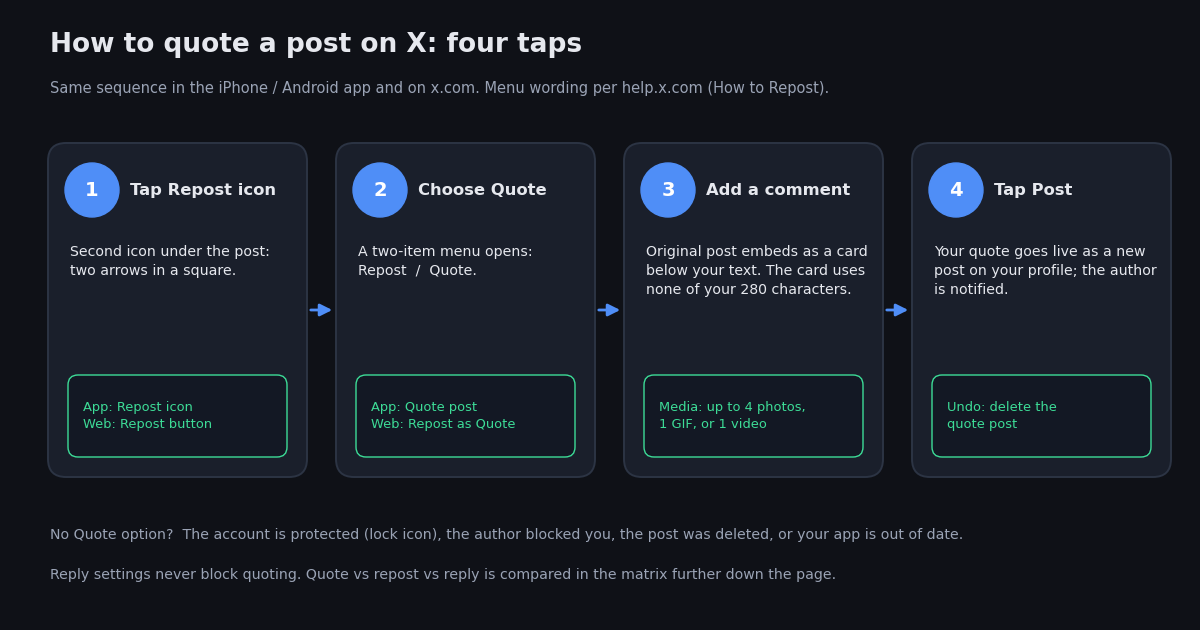
A quote post, still called a quote tweet by most people, is the way to share someone's post with your own take on top. It is different from a plain repost (nothing added, the post simply appears in your followers' feeds) and from a reply (your comment sits under the original, inside its thread). This page walks through the exact taps and clicks in the X app and on x.com, then covers the questions that come up right after: what the audience sees, how to find the quotes of a post, what to do when the Quote option is not there, and whether you can stop people from quoting you.
X renamed Tweet to Post and Retweet to Repost in 2023, so the official help pages now say Repost and Quote. The buttons moved around a little with that change, and the web client dropped one shortcut for viewing quotes in 2026, which is why older guides send you to menu entries that no longer exist. Everything below matches the current app and website, with the X help pages cited where a fact depends on them.
The last section is for creators and community managers who want to measure a post's quotes rather than scroll through them: a short script that lists every quote with the author's handle and follower count. If instead you want to post quotes from code, that is a different job and lives on our API guide to quote-retweeting programmatically.
Quote a post in the X app (iPhone and Android)
The iPhone and Android apps use the same layout, so one set of steps covers both. You need to be signed in; logged-out visitors can read posts but cannot repost or quote them.
Step 1. Find the post and tap the Repost icon. It is the second icon in the row under the post, two arrows forming a square. On a post you have already reposted the icon is green; tapping it again offers Undo repost as well as Quote.
Step 2. Tap Quote in the menu. A small sheet slides up with two choices, Repost and Quote. X's help page describes this as tap the Repost icon, then tap Repost as Quote (help.x.com). Choose that entry, whichever label your app shows.
Step 3. Write your comment above the embedded post. The compose screen opens with the original post shown as a card under your cursor. Type what you want to say. The card does not use any of your 280 characters, and if you subscribe to X Premium the longer-post limit applies to quotes as well (help.x.com, verified 2026). You can mention accounts and add hashtags as in any post.
Step 4. Add media if you want, then tap Post. The media buttons under the text box accept up to four photos, one GIF, or one video, the same limits as a normal post. Tap Post in the top-right corner. Your quote appears on your profile and in your followers' timelines immediately.
A quote can itself be quoted. When someone quotes your quote, the viewer sees your text and a card of your post; the post you quoted is one tap deeper, not shown inline. Keep that in mind when your comment only makes sense next to the original.
If you change your mind, a quote is your own post: open it, tap the three-dot More menu, and choose Delete. There is no separate undo for quotes the way there is for a plain repost.
Quote a post on x.com in a desktop browser
The website follows the same four moves with mouse clicks, and X's help page phrases the web route as hover over the post, click the Repost button, then click Repost as Quote (help.x.com, verified 2026). Some web builds label that second entry simply Quote; either way it is the second item in the two-item menu.
Step 1. Click the Repost icon under the post in your timeline, in search results, or on the post's own page. A two-item menu opens directly beneath the icon.
Step 2. Click Quote (or Repost as Quote). A compose dialog opens in the middle of the page with the original post embedded below the text area.
Step 3. Type your comment in the text area above the card. The character counter in the bottom-right only counts your words. You can drag and drop images into the dialog or use the media button, with the same four-photo, one-GIF, or one-video limit as the app.
Step 4. Click Post. The dialog closes and your quote is live. Open your profile to confirm it is there; it will show your text with the original post rendered as a card underneath.
One difference from the app is worth knowing. From the post's own page on x.com you can also start a quote from the Repost icon in the larger action bar under the full post, and from a post embedded on another website the Repost icon takes you to x.com first. If you are signed out, clicking Repost opens the sign-in prompt instead of the menu.
Quote vs repost vs reply: what the audience actually sees
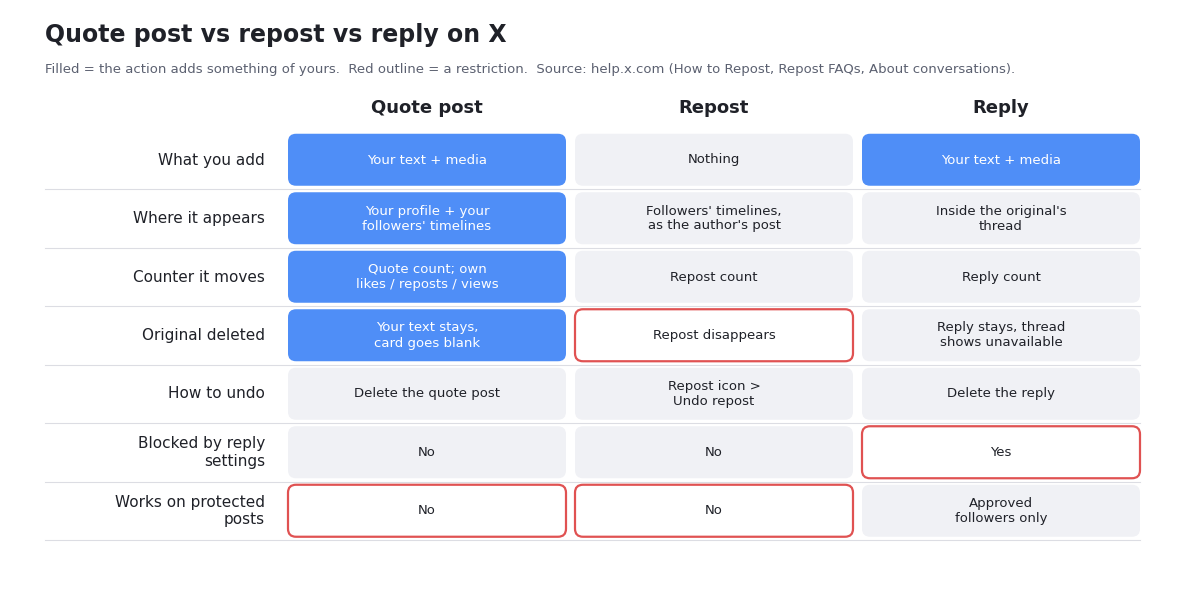
People mix these up because all three start from the row under a post, but they do different things. The table below is the practical version: who sees the result, where it shows up, what happens if the original is deleted, and how to take it back.
The row that surprises most people is the reply-settings one. X lets authors restrict replies to accounts they follow, accounts they mention, or verified accounts (help.x.com, verified 2026), but those settings do not stop anyone from quoting the post. If an author has closed replies and you still want to respond publicly, a quote is the route, which is also why the quote count on a replies-locked post is often the more honest measure of how people reacted.
Which should you use? Creators widely treat a quote as the stronger reach move, because it is a new post of yours that your followers see even if they do not follow the original author, while a reply mostly earns conversation signals for the original. That is a description of how the product is built, not a promise about numbers; the difference you actually get depends on your audience and topic, so compare your own quotes and replies before you adopt a rule.
How to see the quotes of a post
A post's page counts reposts and quotes separately, and each count opens a list. X's Repost FAQ says that from the post detail page you can see how many reposts and how many quote posts there are, and that tapping the Quote posts tab shows who quoted you (help.x.com). The route differs slightly between the app and the website, and the website route changed in 2026.
In the app: open the post so it fills the screen, then tap the repost count under it (the number next to the Repost icon, or the Reposts line under the post). A screen opens with tabs, one of them labelled Quotes or Quote posts. Tap it to scroll the visible quotes.
On x.com: open the post, then either click the View activity button under the action row, or click the three-dot More menu in the post's top-right corner and choose View post activity (some builds and older guides call it View post engagements). The activity view lists reposts and quotes. Older guides tell you to click the Repost icon and pick Show quotes; a third-party report in 2026 said that entry was removed from the web client, so if you cannot find it, that is why rather than a bug on your side.
On someone else's post the same routes work; you do not need to be the author. On your own posts you additionally see the quotes in your Notifications feed as they happen, which is the quickest way to catch a quote that is gaining traction.
The count and the list will not always match. Quotes from protected accounts are counted but only visible to their approved followers, a deleted quote can stay in the count for a while, and X may hide quotes it treats as spam or from accounts you have blocked or muted. A count that is higher than the number of entries you can scroll is normal, not a glitch. If you need the full visible set, or a count you can trust over time, the API section at the end of this page returns the list page by page.
Quoting your own post, protected accounts, and whether you can turn quotes off
Quoting your own post works exactly like quoting anyone else's: Repost icon, Quote, comment, Post. People use it to resurface an older post with an update, or to add context to something that is getting attention. The self-quote shows on your profile as a new post, so your followers see it even if they missed the original. It is not the same as a thread; a thread is a reply to yourself and stays attached to the first post, while a self-quote is a separate post that embeds the old one.
Protected accounts cannot be quoted. X's help page states that when posts are protected, followers cannot use the Repost icon to repost or repost with comment, and its Repost FAQ says protected posts cannot be reposted by you or anyone else (help.x.com, verified 2026). If you see a lock icon next to the account name, the Repost icon will not offer a Quote option, and there is no workaround inside X. Screenshotting a protected post to quote it is a choice the author deliberately tried to prevent; treat it accordingly.
If your own account is protected, you can still quote public posts, but your quote is itself protected: only your approved followers see it, and the author of the post you quoted will see it only if they follow you. The quote also will not appear in the original post's public Quote posts tab for people who do not follow you.
Can you stop people from quoting your posts? As of 2026, no. X's conversation settings cover replies only, with the options everyone, accounts you follow, accounts you mention, and verified accounts (help.x.com, verified 2026). Those settings do not block quotes, and we found no quote-specific control in X's help pages this year. The tools you do have: protect your account (nobody can quote any of your posts, at the price of a private profile), block an account (it can no longer quote you), and delete the original (existing quotes keep their text but the card goes blank). If X ships a quote control later, it will appear in the same Who can reply sheet, so that is the place to check.
Why the Quote option is missing, and what to do about it
When the Repost menu shows only Repost, or the icon does nothing at all, the cause is almost always on the post's side, not your phone. The same post will show the same behaviour on every device you own, which is the quickest way to confirm that. Match what you see against the table before you reinstall anything.
Two things that are not causes: the author's reply settings (they never block quoting), and the original post being a quote itself (you can quote a quote). If the table does not match and every post on X shows the problem, treat it as an app or connection issue: update, restart, and if it persists check whether other people are reporting the same thing, since repost and quote actions have had platform-wide outages before.
If you are a developer hitting the equivalent problem from code, the API returns an error rather than a missing button; the write-side error cases are covered on our quote-retweet API guide, not here.
Measuring who quoted a post, at scale, with the API
Scrolling a Quote posts tab is fine for a dozen quotes. For a post that got hundreds, or when you want to know which quoters have real audiences, it is faster to pull the list. On twitterapi.io, GET /twitter/tweet/quotes takes a tweetId and returns 20 quotes per page, newest first, with each quote's text, counts, and an author object that includes userName, name, and followers (docs.twitterapi.io, verified 2026). Pass the next_cursor from one page as cursor on the next until has_next_page is false. Optional sinceTime and untilTime (unix seconds) narrow the window, and includeReplies (default true) controls whether quotes that are also replies come back.
The script below prints each quoter's handle, follower count, and the first line of their text. The end-to-end version at the bottom of the page sorts quoters by audience and totals their follower counts, which gives a reach ceiling for the quotes: the most people who could have seen them, not how many did. Use it as a ranking, not a metric to report.
Cost, since it is the question people ask next. Tweets cost $0.15 per 1,000 on twitterapi.io, so a 20-quote page is about $0.003 and 1,000 quotes cost $0.15 (twitterapi.io/pricing, verified 2026). The official X API's pay-per-use pricing charges $0.005 per post read, so the same 1,000 quotes cost $5.00 there (docs.x.com, verified 2026), roughly 33 times more, and it requires a developer app before the first call; an API key from the dashboard is the only setup on twitterapi.io. The comparison in one table:
Reading quotes is a read operation and is the only thing this page covers. If you want to create quote posts from a script, see our separate guide on how to quote-retweet via the API programmatically, which covers the write endpoint, authentication, and human-paced rate limiting.
import os
import requests

HEADERS = {"X-API-Key": os.environ["TWITTERAPI_IO_KEY"]}  # from twitterapi.io/dashboard


def quotes_of(tweet_id, max_pages=5):
    """Yield every quote post of a post, newest first. Each page holds 20 quotes."""
    cursor = ""
    for _ in range(max_pages):
        r = requests.get(
            "https://api.twitterapi.io/twitter/tweet/quotes",
            params={"tweetId": tweet_id, "cursor": cursor},
            headers=HEADERS,
            timeout=30,
        )
        r.raise_for_status()
        data = r.json()
        for t in data.get("tweets") or []:
            yield t
        if not data.get("has_next_page"):
            break
        cursor = data.get("next_cursor") or ""


if __name__ == "__main__":
    tweet_id = "1234567890123456789"  # the number at the end of the post URL
    for q in quotes_of(tweet_id):
        author = q.get("author") or {}
        print(f"@{author.get('userName')}  ({author.get('followers')} followers)")
        print(f"  {q.get('text', '').strip()[:140]}")
        print(f"  likes={q.get('likeCount')} views={q.get('viewCount')}  {q.get('url')}")
"""List who quoted a post, rank them by audience, and total the reach ceiling.

Run: TWITTERAPI_IO_KEY=... python quote_reach.py <tweet_id>
Each page of /twitter/tweet/quotes returns 20 quotes and costs about $0.003
(20 x $0.00015 per tweet, twitterapi.io/pricing, verified 2026).
"""
import os
import sys
import requests

HEADERS = {"X-API-Key": os.environ["TWITTERAPI_IO_KEY"]}


def fetch_quotes(tweet_id, max_pages=10):
    quotes = []
    cursor = ""
    for _ in range(max_pages):
        r = requests.get(
            "https://api.twitterapi.io/twitter/tweet/quotes",
            params={"tweetId": tweet_id, "cursor": cursor},
            headers=HEADERS,
            timeout=30,
        )
        r.raise_for_status()
        data = r.json()
        quotes.extend(data.get("tweets") or [])
        if not data.get("has_next_page"):
            break
        cursor = data.get("next_cursor") or ""
    return quotes


def main(tweet_id):
    quotes = fetch_quotes(tweet_id)
    if not quotes:
        print("No quotes returned: the post has none, is protected, or was deleted.")
        return
    rows = []
    for q in quotes:
        a = q.get("author") or {}
        rows.append({
            "handle": a.get("userName"),
            "followers": a.get("followers") or 0,
            "likes": q.get("likeCount") or 0,
            "views": q.get("viewCount") or 0,
            "text": (q.get("text") or "").replace("\n", " ")[:90],
        })
    rows.sort(key=lambda r: r["followers"], reverse=True)
    print(f"{len(rows)} quotes fetched\n")
    print(f"{'handle':22} {'followers':>10} {'likes':>7} {'views':>9}  text")
    for r in rows:
        print(f"@{r['handle']:21} {r['followers']:>10,} {r['likes']:>7,} {r['views']:>9,}  {r['text']}")
    reach_ceiling = sum(r["followers"] for r in rows)
    print(f"\nSum of quoters' follower counts (reach ceiling, not actual views): {reach_ceiling:,}")
    print(f"Approximate cost of this run: ${len(rows) * 0.00015:.4f}")


if __name__ == "__main__":
    main(sys.argv[1] if len(sys.argv) > 1 else "1234567890123456789")
Questions readers ask
How do I quote a tweet on iPhone?
In the X app, tap the Repost icon (two arrows in a square) under the post, tap Quote, type your comment above the embedded post, add media if you want, and tap Post. The Android app is identical. Your quote appears on your profile as a new post with the original embedded.
How do you quote a tweet on a computer?
On x.com, click the Repost icon under the post, click Repost as Quote (some builds show just Quote), write your comment in the dialog that opens with the original embedded below it, then click Post. You must be signed in; logged-out visitors get a sign-in prompt instead of the menu.
What is the difference between a quote tweet and a retweet?
A retweet, now called a repost, shares the author's post to your followers with nothing added and does not appear as a separate post on your profile. A quote (quote post) is a new post of yours with your comment on top and the original embedded as a card, so it has its own likes, reposts, and views and stays on your profile.
How do I see who quoted my post?
Open the post, tap the repost count, and choose the Quote posts tab in the app. On x.com, click View activity under the post or choose View post activity from the three-dot menu. Quotes from protected accounts and quotes X hides as spam are counted but not shown, so the list can be shorter than the count.
Why can't I quote a tweet?
The post is from a protected account (lock icon; protected posts cannot be reposted or quoted at all), the author has blocked you, the post has been deleted, you are logged out, or your app is out of date. The author's reply settings are not a cause: they limit replies, not quotes.
Can I stop people from quoting my posts?
Not with a setting, as of 2026. X's Who can reply control limits replies only and has no quote option. Protecting your account prevents all quoting of your posts, blocking an account stops that account, and deleting the original blanks the card inside existing quotes while their text remains.
Does the quoted post count toward my 280 characters?
No. The embedded post is attached as a card and does not use any of your characters, so you have the full 280 for your comment. X Premium subscribers can write longer posts, and X's help page confirms the longer limit applies in a quote as well.
Can I quote a tweet from a private account?
No. X states that protected posts cannot be reposted or quoted by anyone, including approved followers, because the author chose not to share them publicly. You can reply if you are an approved follower, and only other approved followers will see the reply.
Continue
- X Help Center: How to Repost (Repost icon, Repost as Quote, character and media limits)
- X Help Center: Repost FAQs (protected posts cannot be reposted or quoted)
- X Help Center: About public and protected posts
- X Help Center: About conversations on X (Who can reply settings)
- X Help Center: X Premium how-to (longer posts in a quote or reply)
- twitterapi.io docs: Get Tweet Quotes endpoint (tweetId, cursor, sinceTime, untilTime, includeReplies)
- Twitter (X) API overview: the hub for reading X data
- How to quote-retweet via the API programmatically (posting quotes from code)
- Why you can't see likes on X, and which engagement lists are still public
- Read and post replies to an X post through the API
- Calculate an X post's engagement rate from its counts
- Track a post's reposts, quotes, and replies over time
- twitterapi.io pay-per-call pricing
Stop reading. Start building.
Starter credits cover real testing on real data. Google sign-in, no card, no application queue.
Get an API key