Searching for a Tweet — Operators, Filters, and API
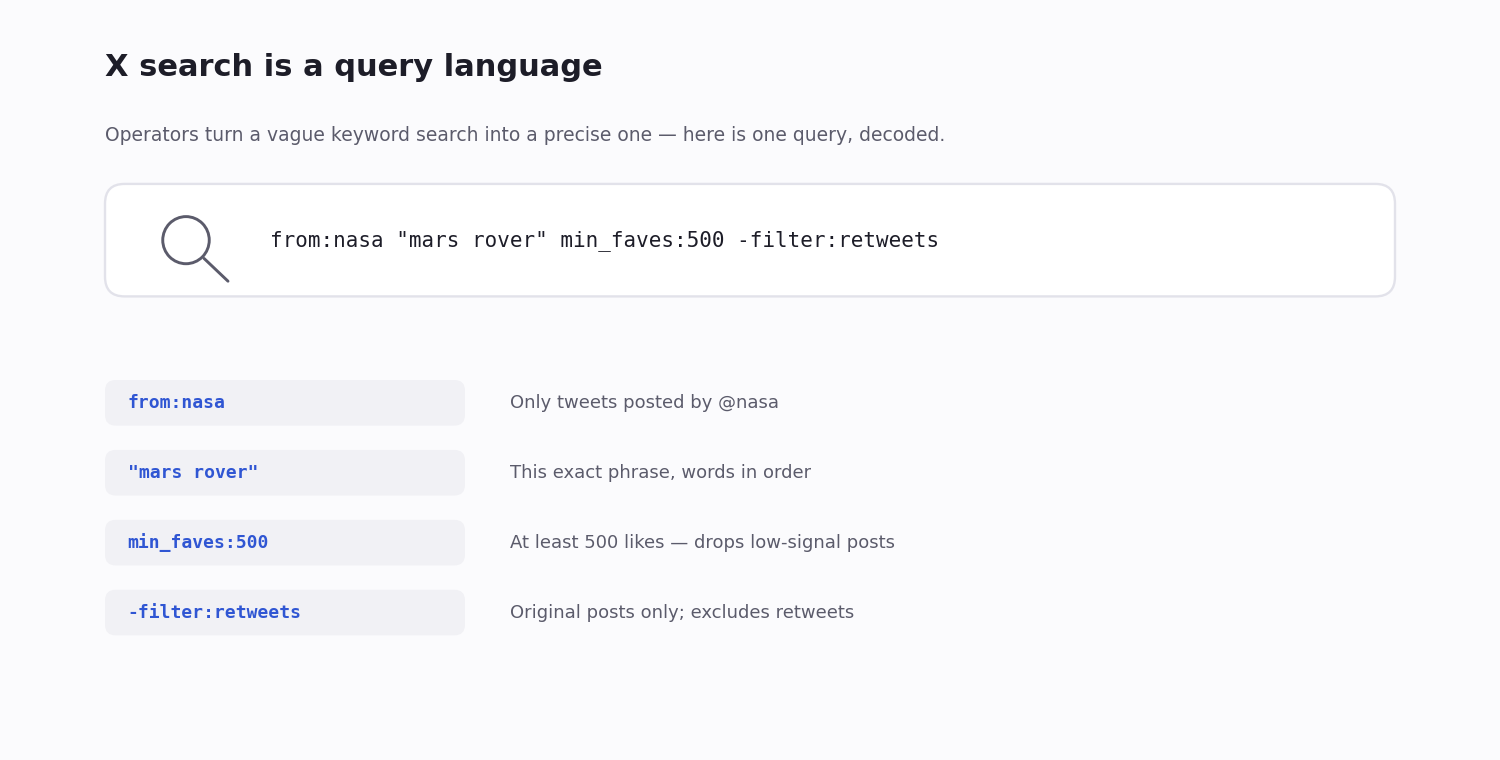
X (Twitter) has a genuinely powerful search engine — but most people only ever type a plain keyword into it. Behind that box sits a real query language: more than two dozen operators for exact phrases, account filters, date ranges, geographic bounds, language, engagement thresholds and media type. Stack a few of them and you can pull a single tweet out of a thread from years ago, or collect every post matching a precise criterion in one query.
There are two front doors to the same engine. The advanced-search form at x.com/search-advanced builds a query for you from labelled fields; the main search bar accepts the same operators typed directly. Both produce an identical operator string — the form is a training-wheels view of the syntax, and it can't express everything the raw operators can.
When the interface runs out of room — past the first hundred-or-so results, or when you need machine-readable output for a script — the same query language is available through a search API. This page is the full reference: every operator worth knowing, how they combine, the web-versus-API naming differences that quietly break queries, and the API path for searching at scale.
Two Ways In: the Search Bar and the Advanced Form
The advanced-search form — x.com/search-advanced — gives you labelled fields: words, exact phrase, accounts, dates, engagement minimums, language. You fill them in and X assembles the operator string. It is the easiest way to learn the syntax, because you can run a search from the form and then read the query it generated in the address bar.
The search bar — type operators directly into the normal search box. Once you know the syntax this is far faster than the form, and it reaches operators the form has no field for (most card_name: and geo operators, for example).
Both hit the same index and return the same results for the same query. Everything below works in either place — and, with the naming caveats noted later, in a search API as well.
Core Operators
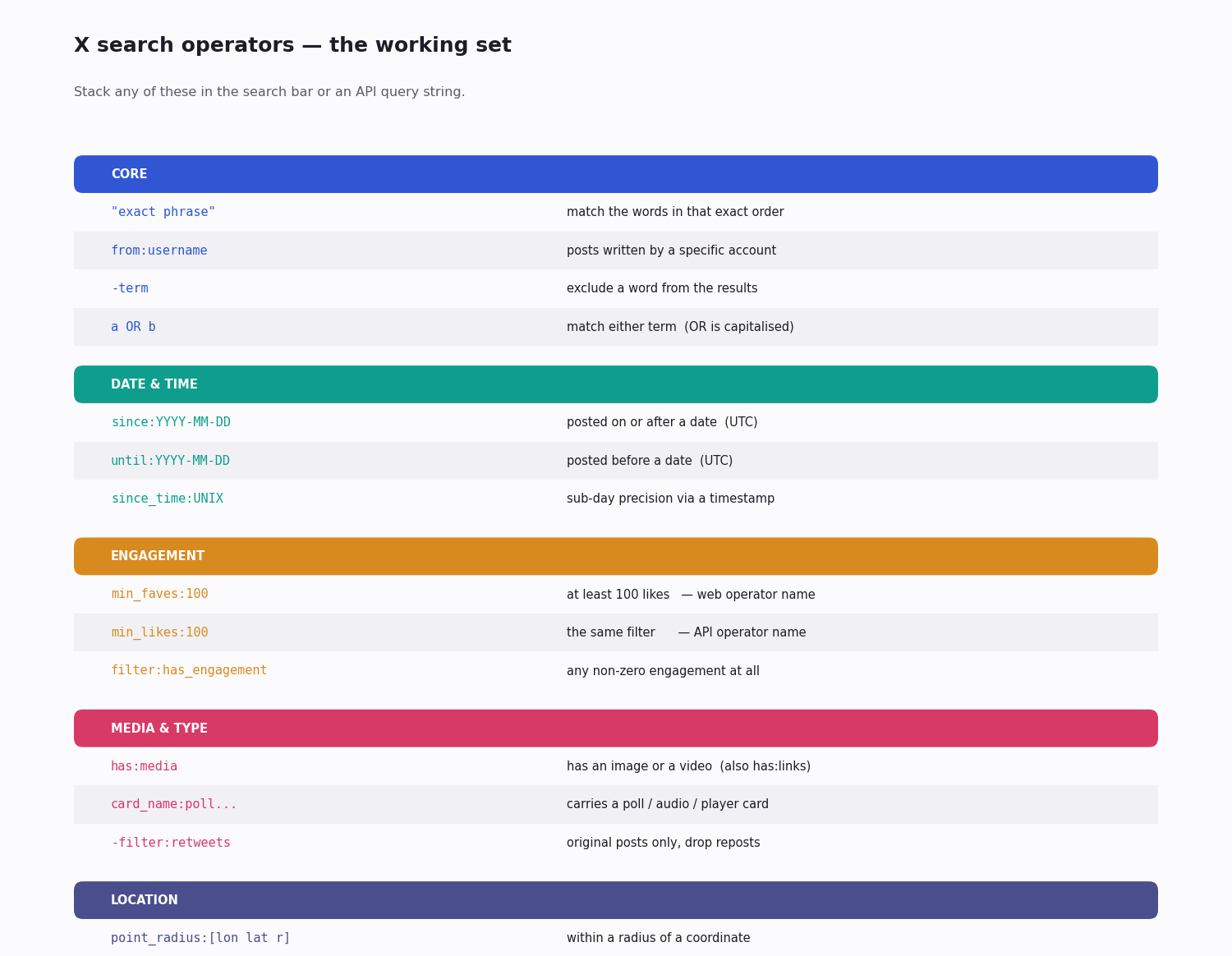
Exact phrase — wrap in quotes. "product launch" matches those two words in that order, not the words scattered across a tweet.
Exclude a term — prefix with a minus. dogs -puppies matches tweets about dogs but drops any that also say puppies.
AND — just separate terms with spaces. apollo nasa requires both words to appear.
OR — the word OR, capitalised. tesla OR spacex matches tweets containing either.
Grouping — parentheses combine logic. (tesla OR spacex) -filter:retweets matches either brand and excludes retweets across the whole group.
From an account — from:username. from:nasa returns only posts authored by @nasa.
To an account — to:username. to:nasa returns replies and direct addresses to that account.
Mentioning an account — a bare @username. @nasa finds tweets that mention the handle, regardless of who wrote them.
Hashtag — #tag. #worldcup matches the exact tag as a tag, not the loose word.
Date and Time Operators
Since a date — since:YYYY-MM-DD. Returns tweets posted on or after that day. The format is strict: YYYY-MM-DD only — a slash-formatted or two-digit-year date is silently ignored rather than rejected, which is a common reason a date filter "does nothing."
Until a date — until:YYYY-MM-DD. Tweets posted before that day. Combine the two for a window: since:2024-01-01 until:2024-04-01 confines results to that span.
Sub-day precision — since_time: and until_time: take Unix timestamps (seconds), so you can bound a search to a specific hour rather than a whole day. Useful for pinning a search to a known event.
A timezone note — date and time operators are evaluated in UTC, not your local time. If a search around a boundary looks off by a few hours, this is usually why — shift the bound to compensate.
Engagement Filters — and the Web/API Naming Trap
Engagement operators keep low-signal posts out of a result set:
min_faves:100 — at least 100 likes. min_retweets:50 — at least 50 reposts. min_replies:10 — at least 10 replies. filter:has_engagement — any non-zero engagement at all.
The trap: those min_faves / min_retweets names are the web operators. Several search APIs expect different names for the same filters — typically min_likes:, min_reposts: and min_replies:. A query that works perfectly in the search bar can silently return an empty or unfiltered result set through an API if you carry the web names across unchanged. When an API search behaves unexpectedly, the engagement-operator names are the first thing to check.
When you move a query from the search bar to code, treat the engagement operators as the part most likely to need a rename — confirm the exact spelling in your API provider's reference.
Media and Content-Type Filters
Media presence — has:media matches any image or video; has:images, has:videos and has:links narrow to a single type.
Card types — card_name: matches the rich-card kind attached to a tweet: card_name:poll2choice_text_only and its siblings for polls, card_name:audio, card_name:player, card_name:animated_gif, card_name:summary for link previews. Handy when you specifically want, say, only tweets carrying a poll.
Post-type filters — filter:retweets, filter:replies, filter:verified, filter:nativeretweets. Each can be negated: -filter:retweets drops reposts, -filter:replies keeps only top-level tweets.
Verified authors — is:verified restricts to posts from verified accounts. Pair it with a topic to cut a noisy result set down to recognised voices.
Geographic Operators
Geo search has moved on from the old geocode: operator, which is now unreliable. The current operators:
point_radius:[lon lat radius] — tweets within a radius of a coordinate, e.g. point_radius:[-122.4 37.7 10km] for a 10 km circle around San Francisco. Longitude comes first.
bounding_box:[west south east north] — tweets inside a rectangle defined by four coordinates. Better than a radius for non-circular areas like a city or a country.
place:"Name" or a place ID, and place_country:US — match tweets tagged with a named place or a country.
The caveat that matters: geo operators only match the small minority of tweets that actually carry location metadata. Most tweets have none, so a geo-filtered search is a sample of geotagged posts, not of all posts from an area — size your expectations accordingly.
Practical Query Recipes
Operators earn their keep when you combine them. A few patterns that come up constantly:
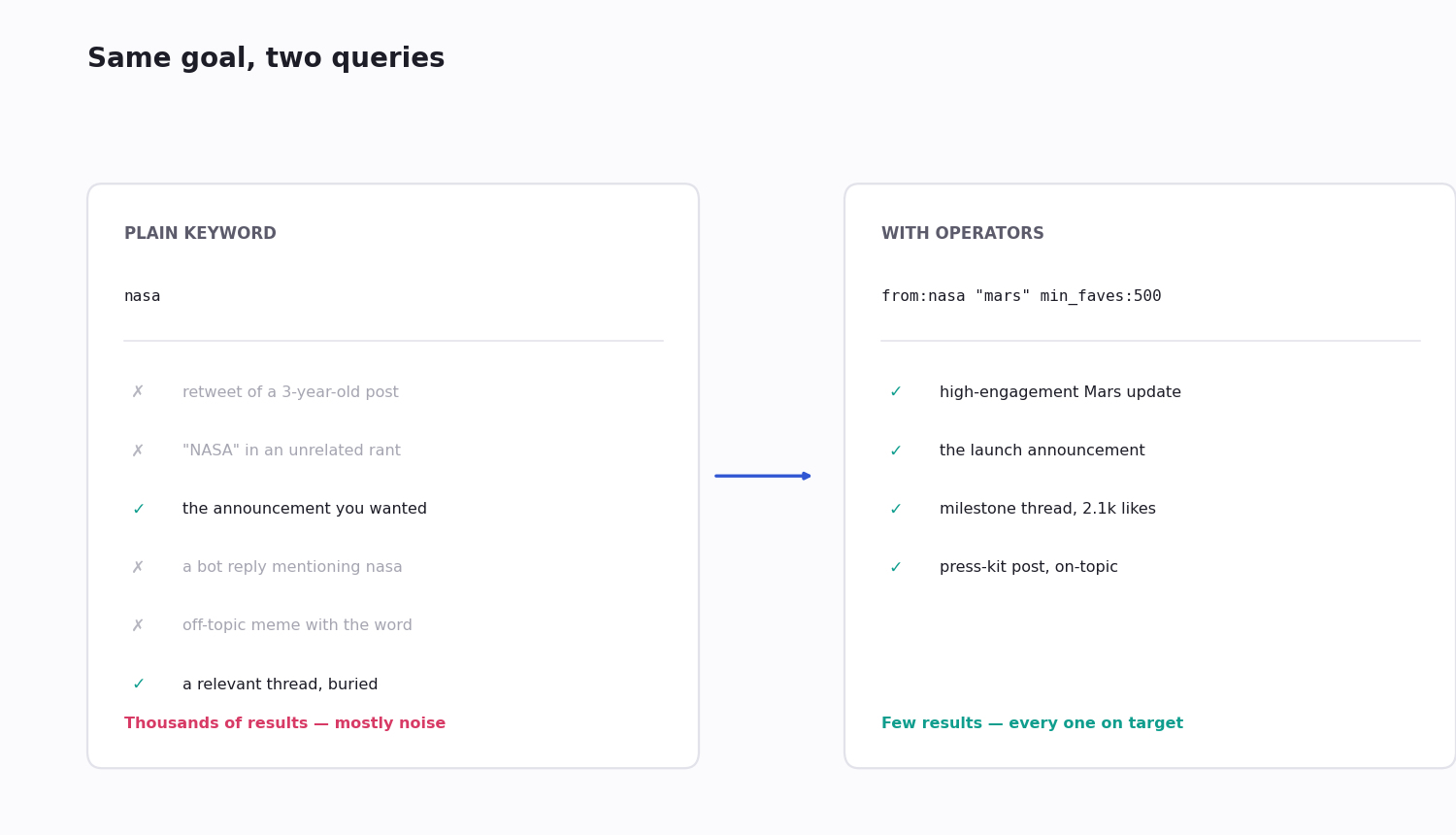
Find a half-remembered tweet — from:nasa "mars rover" since:2024-01-01 until:2024-04-01: one author, an exact phrase you do remember, and a date window to cut the noise. This is the fastest way to recover a specific old post.
Brand monitoring with a quality floor — acmecorp -filter:retweets min_faves:5 lang:en: original English posts mentioning your brand that cleared a small engagement bar, so you read signal instead of every echo.
Crisis listening — (outage OR down OR broken OR "not working") acmecorp -filter:retweets: original complaint-shaped posts about your product, grouped so the exclude applies to all of them.
Viral-content discovery — topic min_faves:1000 min_retweets:200 -filter:retweets: only the original posts on a topic that genuinely landed.
Competitor watch — from:competitor -filter:replies: a competitor's own announcements, with their reply chatter filtered out.
When the Interface Isn't Enough — Searching via API
The web and app search handle light, interactive use well. They break down for four jobs:
Scale — past roughly a hundred results deep, scrolling pagination gets flaky and starts repeating or dropping posts. An API paginates with explicit cursors that do not lose their place.
Automation — a script cannot drive the web UI reliably; layout changes break scrapers. An API is a stable contract.
Historical depth — the interface reliably surfaces only recent posts. A search API reaches meaningfully further back.
Machine-readable output — the UI is HTML; an API returns documented JSON you can parse directly.
A third-party search API such as TwitterAPI.io's /twitter/tweet/advanced_search takes the same operator language as a query string plus a queryType of Top or Latest, and bills pay-per-call — about $0.15 per 1,000 tweets returned, with no subscription. The official X API can also search, but for a new developer account it is now metered pay-per-use (billed per post read); the old flat $200/month Basic tier is closed to new signups, so for most search workloads a pay-per-call third-party API is both simpler and cheaper.
Why a Tweet Won't Show Up
When a search returns nothing for a tweet you are sure exists, it is almost always one of these:
It was removed — the tweet was deleted, or the account was suspended or set to protected. Removed content leaves the search index.
Your terms don't match the text — search matches the literal words in the post. Paraphrasing what you remember will miss it; search by from:author plus one exact word you are certain of.
A filter is too tight — a stray lang:, a date window, or an engagement minimum can exclude the very tweet you want. Strip the query back to its core and re-add filters one at a time.
An operator was mistyped — a wrong date format, or web engagement-operator names used against an API, fail quietly rather than erroring. Re-check the syntax against the relevant reference.
Indexing lag — very new posts can take a short while to become searchable. If a tweet is minutes old, give it time.
import requests

API_KEY = "your_api_key"
HEADERS = {"X-API-Key": API_KEY}

def search_tweets(query: str, query_type: str = "Top"):
    """
    query:      any advanced-search operator string (see this page)
    query_type: 'Top' (engagement-ranked) or 'Latest' (newest first)
    Note: confirm engagement-operator names for the API — min_likes /
    min_reposts may differ from the web's min_faves / min_retweets.
    """
    r = requests.get(
        "https://api.twitterapi.io/twitter/tweet/advanced_search",
        params={"query": query, "queryType": query_type},
        headers=HEADERS,
        timeout=30,
    )
    r.raise_for_status()
    return r.json()["tweets"]

if __name__ == "__main__":
    # Original English brand mentions that cleared a small engagement bar
    query = "acmecorp -filter:retweets lang:en min_faves:5"
    for t in search_tweets(query, query_type="Top"):
        print(f"{t['createdAt']} @{t['author']['userName']}: {t['text'][:100]}")
Questions readers ask
Why can't I find a tweet I know existed?
Usually one of: the tweet was deleted, the account was suspended or set to protected, your search terms don't match the post's literal wording, or a filter is excluding it. Try from:author plus one exact word you are sure of. If nothing turns up, the content has likely left the index — check the Internet Archive for a snapshot.
How far back can X search go?
The web interface reliably surfaces only recent posts — roughly the last week or two for most queries. A search API reaches meaningfully further back; how far depends on the provider's retention. The complete historical archive is only available on the official X API's top, enterprise-level access.
Why does my min_faves query return nothing through an API?
Because min_faves and min_retweets are the web operator names. Several search APIs expect different names for the same filters — commonly min_likes and min_reposts. The query is valid syntax either way, so it fails silently rather than erroring. Check your API provider's reference for the exact engagement-operator spelling.
What date format do since: and until: need?
Strictly YYYY-MM-DD, for example since:2024-06-15. Slash-separated dates, two-digit years and other formats are ignored rather than rejected, so the filter appears to do nothing. Date and time operators are also evaluated in UTC, not your local timezone.
Can I search protected (private) tweets?
Only if you are an approved follower of that protected account, and only while logged in to the web or app interface. Protected tweets are never available through any public search API.
What's the difference between Top and Latest results?
Top ranks results by engagement (likes, reposts and replies, weighted); Latest returns them strictly newest-first. The web UI exposes this as a toggle; in a search API it is the queryType parameter, set to Top or Latest. Use Latest for monitoring, Top for finding the posts that landed.
Can I search tweets by location?
Yes — with point_radius:[lon lat radius] for a circle around a coordinate, bounding_box:[...] for a rectangle, or place: and place_country: for tagged places. The catch: only the small minority of tweets that carry location metadata can match, so a geo search samples geotagged posts rather than all posts from an area.
Is there a Twitter advanced search page?
Yes — x.com/search-advanced opens a form with fields for words, accounts, dates and engagement. It builds the operator string for you; run a search and read the query it produced in the address bar to learn the syntax. The same operators can be typed straight into the normal search bar.
Do X search operators still work?
The core set does — from:, to:, lang:, since:, until:, the engagement minimums, has:media, is:verified, and exclusion with a leading minus. Geo search moved from the old geocode: operator to point_radius: and bounding_box:. A few legacy operators were dropped, so confirm anything obscure against a current reference before relying on it.
Continue
- /
- /twitter-scraper
- /blog/twitter-advanced-search-guide
- /blog/tweet-search-by-date
- /blog/twitter-api-cost
- /pricing
Stop reading. Start building.
Starter credits cover real testing on real data. Google sign-in, no card, no application queue.
Get an API key