How to Audit a Twitter (X) Account for Fake Followers and Engagement Health
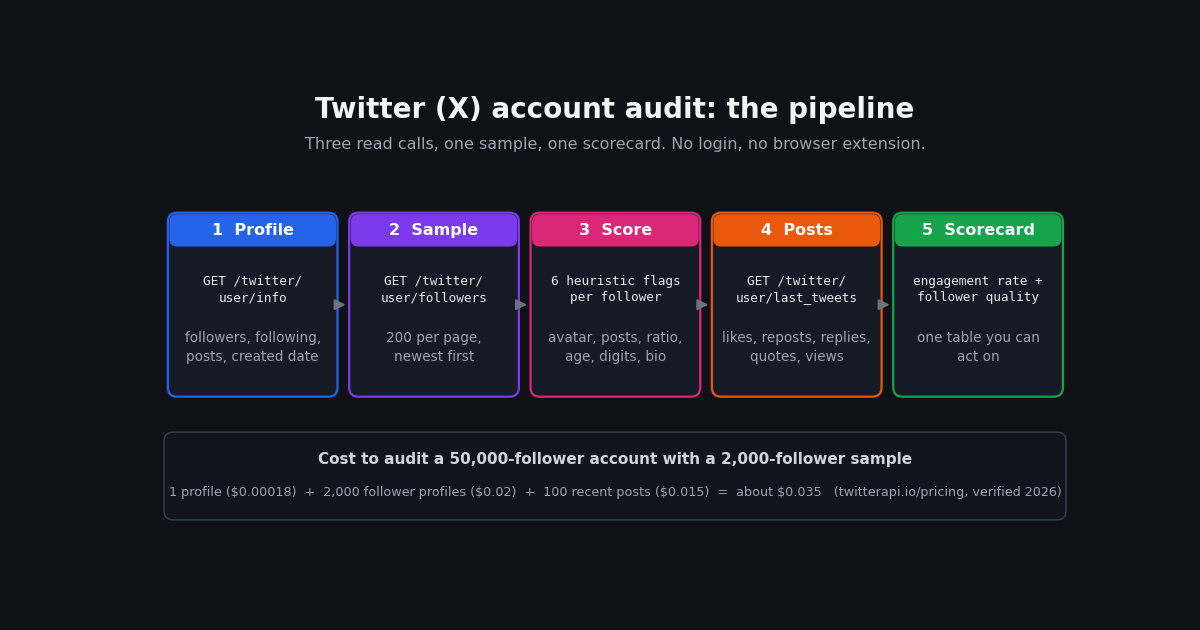
People search for a Twitter audit for three reasons. They are about to pay an account for a sponsored post and want to know whether the follower count is real. They run an account and want to know why 40,000 followers produce a dozen likes. Or they are cleaning up their own profile and want to see what sort of accounts follow them. All three come down to the same work: pull a sample of followers, score each one on what its public profile shows, and compare the account's engagement with its size.
Most guides on this query are a checklist of things to look at plus a list of tools, several of which no longer work. This page keeps the checklist, states the heuristics with the caveats they deserve, reports which free tools still run as of 2026, and then adds the thing the guides leave out: a Python script that performs the audit against any public account, prints a scorecard, and costs a few cents.
Scope notes. This is a how-to for a one-time audit. Tracking follower counts over time, calculating engagement rate in depth, and detecting whether a single account is a bot each have their own page, linked where relevant. The live follow-checker tool on this site answers a narrower question (does A follow B), and it is linked as a sibling rather than repeated here.
What a Twitter (X) account audit covers
A full audit looks at five things. Follower quality is the headline, but the other four are what let you interpret it, because a low engagement rate means something different on an account that posts twice a day than on one that posts twice a month.
Two of these deserve a note. Engagement rate benchmarks published by analytics vendors differ by an order of magnitude depending on how they count interactions and which accounts they sample, so compare an account against itself over time and against peers of similar size rather than against a single published figure. And growth shape is the one area a one-off audit cannot fully cover: a snapshot shows you the creation dates of the newest followers (a cluster of accounts all created in the same week is a classic purchased-follower tell, as the detection literature describes it), but a real growth curve needs repeated samples, which is the subject of the follower-tracking guide linked below.
If you only have ten minutes, do follower quality and engagement rate. Those two answer the question most people are asking: is this follower count real, and does it behave like it is.
The fake-follower heuristics, and why none of them is proof
Every fake-follower checker, free or paid, works from the same handful of public profile fields, because that is all anyone outside X can see. The signals below are the ones practitioners and the academic detection literature use most. The Fame for Sale study (Cresci and colleagues, arXiv 2015) compiled the rule sets used by earlier checkers and tested them against a labelled set of purchased followers; its finding, in short, was that simple profile rules catch a useful share of bought followers but misclassify some real accounts, which is why every row in this table carries a caveat.
Two further signals are widely reported but harder to read from a single snapshot: zero likes given (favouritesCount) and an account that has posted nothing in over a year. The second needs the follower's own recent posts, which costs one extra call per follower, so the script below leaves it out of the default scoring and notes where to add it.
The method that practitioners converge on is to count how many signals each follower trips and to treat a threshold, commonly three or more, as "likely low quality". The threshold is yours to calibrate: run the script on an account whose followers you know are real, see where real accounts land, and set the cut-off above that. Reporting a share of the sample above the threshold is honest; reporting a single "fake percentage" to a decimal place, as several tools do, implies a precision the inputs cannot support.
Three ways to run the audit: manual, free web tool, API script
You can audit by hand, with a web tool, or with a script. They differ in what they can see, how far they scale, and what they cost. The table is the honest comparison; the sections that follow cover each route.
The manual route. Open the account's Followers tab, scroll a screen or two, and open every account whose avatar is a default image, whose handle ends in digits, or whose counts look wrong. You will know within a few minutes whether the account has a problem; what you will not know is how big it is, because the tab shows newest followers first and a sample of 30 is too small to estimate a share. For engagement, open the last 20 posts, add up the likes and reposts, and divide by the follower count; X shows views on each post, so you can also note how views compare with followers (practitioners commonly treat views well below the follower count on every post as a sign that most followers are not being shown the posts, though X does not publish how it counts views and the ratio varies by account).
The script route is what the rest of this page is about. It gives you the manual method at any sample size, with the evidence for each follower written to a CSV you can sort.
Which free Twitter audit tools still work in 2026
This is the part of the usual guide that goes stale fastest, so here is what we could verify this session. If a tool is not listed, we did not check it; treat any "free Twitter audit" result as unconfirmed until you have run it.
Three things to keep in mind with any of them. First, they all read the same public profile fields the table above lists; a tool that claims to detect something not in those fields is guessing. Second, most sample the newest followers, because that is the order X serves them in, so an account that bought followers a year ago and has grown honestly since will score better than it should. Third, the percentage is an estimate from a threshold the tool chose and does not disclose; two tools on the same account routinely disagree by several points, and neither is wrong.
The script below is not a replacement for a polished dashboard. What it gives you that the tools do not is the per-follower evidence, a sample size you choose, a threshold you control, and a cost of cents.
Step 1: pull the profile and the engagement rate
Start with two calls. GET /twitter/user/info with a userName parameter returns the profile under a data key: followers, following, statusesCount, createdAt (in the form Thu Dec 13 08:41:26 +0000 2007), profilePicture, description, isBlueVerified, and isAutomated (docs.twitterapi.io, verified 2026). GET /twitter/user/last_tweets with the same userName returns up to 20 posts per page under a top-level tweets array, each with likeCount, retweetCount, replyCount, quoteCount, viewCount, createdAt, and isReply, plus has_next_page and next_cursor for paging (docs.twitterapi.io, verified 2026).
Engagement rate per post is the sum of likes, reposts, replies, and quotes divided by the follower count. Average it over the last 100 original posts (replies excluded by default, which is why the call below does not set includeReplies). View-to-follower ratio is the median viewCount divided by followers; X does not publish how views are counted, so use it as a relative signal across accounts of similar size rather than as an absolute.
Cadence comes from two places: lifetime posts per day is statusesCount divided by the account's age in days, and recent cadence is the number of posts in the sample divided by the span between the oldest and newest timestamps. A wide gap between the two (an account that used to post ten times a day and now posts once a week) is worth noting on its own.
The snippet pulls both, prints the headline numbers, and returns them for the scorecard. It costs one profile read at $0.18 per 1,000 profiles and five pages of posts at $0.15 per 1,000 posts, which is under two cents (twitterapi.io/pricing, verified 2026).
import os
import statistics
from datetime import datetime, timezone

import requests

BASE = "https://api.twitterapi.io"
HEADERS = {"X-API-Key": os.environ["TWITTERAPI_IO_KEY"]}  # key from twitterapi.io/dashboard
X_DATE = "%a %b %d %H:%M:%S %z %Y"  # createdAt format used by the API


def profile_and_engagement(handle, max_posts=100):
    r = requests.get(f"{BASE}/twitter/user/info", params={"userName": handle}, headers=HEADERS, timeout=30)
    r.raise_for_status()
    user = r.json().get("data") or {}

    posts, cursor = [], ""
    while len(posts) < max_posts:
        r = requests.get(
            f"{BASE}/twitter/user/last_tweets",
            params={"userName": handle, "cursor": cursor},
            headers=HEADERS,
            timeout=30,
        )
        r.raise_for_status()
        body = r.json()
        posts.extend(t for t in body.get("tweets") or [] if not t.get("isReply"))
        if not body.get("has_next_page") or not body.get("next_cursor"):
            break
        cursor = body["next_cursor"]
    posts = posts[:max_posts]

    followers = user.get("followers") or 0
    created = datetime.strptime(user["createdAt"], X_DATE)
    age_days = max((datetime.now(timezone.utc) - created).days, 1)

    def interactions(t):
        return sum(t.get(k) or 0 for k in ("likeCount", "retweetCount", "replyCount", "quoteCount"))

    rates = [interactions(t) / followers for t in posts] if followers and posts else []
    views = [t.get("viewCount") or 0 for t in posts]
    times = sorted(datetime.strptime(t["createdAt"], X_DATE) for t in posts if t.get("createdAt"))
    span_days = max((times[-1] - times[0]).days, 1) if len(times) > 1 else None

    return {
        "followers": followers,
        "following": user.get("following"),
        "posts_lifetime": user.get("statusesCount"),
        "account_age_days": age_days,
        "posts_per_day_lifetime": round((user.get("statusesCount") or 0) / age_days, 2),
        "posts_per_day_recent": round(len(posts) / span_days, 2) if span_days else None,
        "engagement_rate_pct": round(100 * statistics.mean(rates), 3) if rates else None,
        "median_views_per_follower": round(statistics.median(views) / followers, 3) if views and followers else None,
        "sampled_posts": len(posts),
    }


if __name__ == "__main__":
    for k, v in profile_and_engagement("NASA").items():
        print(f"{k:26} {v}")
Step 2: sample followers and score each one
GET /twitter/user/followers takes userName, cursor, and pageSize (20 to 200, default 200) and returns a followers array of full profiles: id, userName, name, profilePicture, description, followers, following, statusesCount, favouritesCount, createdAt, and isAutomated, with has_next_page and next_cursor for the next page (docs.twitterapi.io, verified 2026). Followers come newest first, which matters: a 2,000-follower sample is the 2,000 most recent followers, not a random draw. For a one-off audit that is usually what you want, because purchased followers are most often recent; for an unbiased estimate of the whole list, page through all of it, which at $0.01 per 1,000 follower profiles costs $0.50 for a 50,000-follower account (twitterapi.io/pricing, verified 2026).
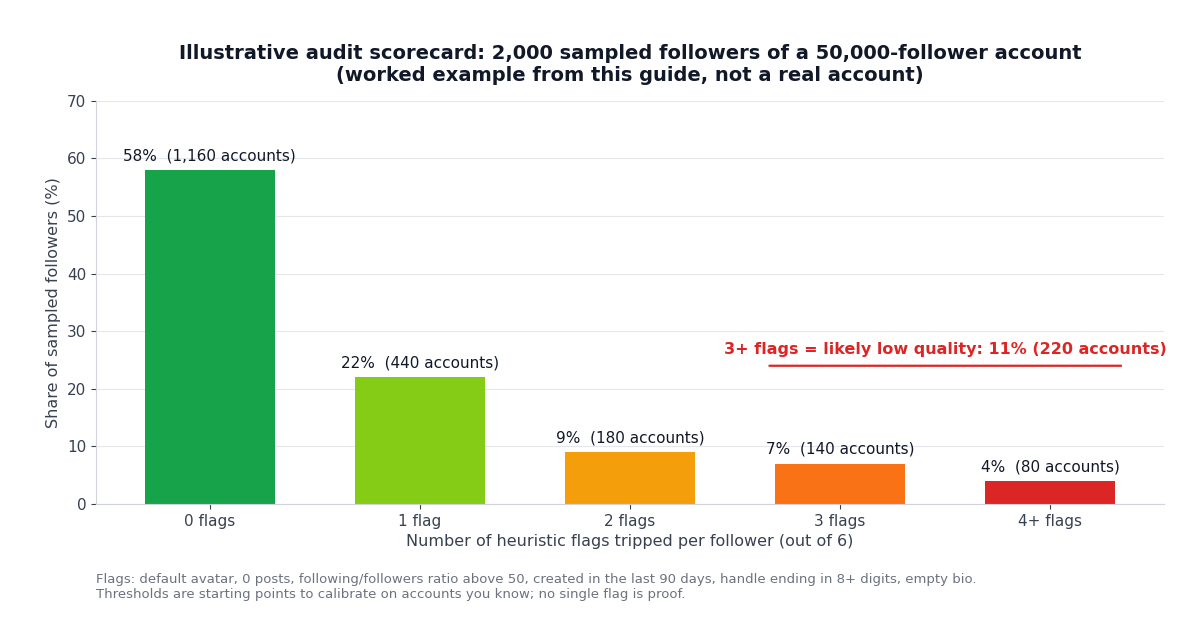
The six flags the script applies to each follower: avatar is X's default image (the profilePicture URL contains default_profile), statusesCount is 0, following is more than 50 times followers (with at least 100 following, so brand-new real accounts are not caught), createdAt is within the last 90 days, userName ends in eight or more digits, and description is empty. Each flag is worth one point; three or more marks the follower "likely low quality". The ratio threshold of 50 is deliberately looser than the 100:1 figure cited in the detection literature so that the flag fires on more candidates and the other flags do the filtering; tighten it after you have seen where real accounts land.
The script writes one CSV row per follower with every flag as its own column, so you can open it in a spreadsheet, sort by score, and look at the accounts the heuristics caught. That inspection step is the part no one-click tool gives you, and it is where you discover that, say, half the three-flag accounts are real people who signed up last month from a conference.
The chart below shows what the output looks like on a worked example: a 2,000-follower sample in which 11% of accounts trip three or more flags. The numbers are illustrative, chosen to show the shape of a typical scorecard; they are not measurements from any real account.
import csv
import os
import re
from datetime import datetime, timezone

import requests

BASE = "https://api.twitterapi.io"
HEADERS = {"X-API-Key": os.environ["TWITTERAPI_IO_KEY"]}
X_DATE = "%a %b %d %H:%M:%S %z %Y"
NOW = datetime.now(timezone.utc)


def flags_for(f):
    """Six heuristic flags for one follower profile. Calibrate the thresholds on accounts you know."""
    created = datetime.strptime(f["createdAt"], X_DATE) if f.get("createdAt") else None
    followers, following = f.get("followers") or 0, f.get("following") or 0
    return {
        "default_avatar": "default_profile" in (f.get("profilePicture") or ""),
        "zero_posts": (f.get("statusesCount") or 0) == 0,
        "ratio_extreme": following >= 100 and following > 50 * max(followers, 1),
        "created_90d": bool(created) and (NOW - created).days < 90,
        "digit_handle": bool(re.search(r"\d{8,}$", f.get("userName") or "")),
        "empty_bio": not (f.get("description") or "").strip(),
    }


def sample_followers(handle, n=2000):
    out, cursor = [], ""
    while len(out) < n:
        r = requests.get(
            f"{BASE}/twitter/user/followers",
            params={"userName": handle, "cursor": cursor, "pageSize": 200},
            headers=HEADERS,
            timeout=60,
        )
        r.raise_for_status()
        body = r.json()
        out.extend(body.get("followers") or [])
        if not body.get("has_next_page") or not body.get("next_cursor"):
            break
        cursor = body["next_cursor"]
    return out[:n]


if __name__ == "__main__":
    handle = "NASA"
    rows = []
    for f in sample_followers(handle, n=2000):
        fl = flags_for(f)
        rows.append({"userName": f.get("userName"), "followers": f.get("followers"),
                     "following": f.get("following"), "posts": f.get("statusesCount"),
                     "created": f.get("createdAt"), **fl, "score": sum(fl.values())})
    with open(f"{handle}-followers-audit.csv", "w", newline="", encoding="utf-8") as fh:
        w = csv.DictWriter(fh, fieldnames=list(rows[0].keys()))
        w.writeheader()
        w.writerows(rows)
    low = sum(1 for r in rows if r["score"] >= 3)
    print(f"sampled {len(rows)} followers; {low} ({100 * low / len(rows):.1f}%) trip 3+ flags")
Step 3: read the scorecard, and what it costs
Put the two halves together and you have a scorecard with four lines: the share of sampled followers that trip three or more flags, the average engagement rate on recent original posts, the median view-to-follower ratio, and the lifetime versus recent posting cadence. Here is how practitioners commonly read it, with the caveat that every account and niche has its own normal.
A high low-quality share with a low engagement rate is the classic purchased-follower profile: the count is large, the audience is not there. A low low-quality share with a low engagement rate usually means a real but passive audience, or an account whose posts are not being distributed widely; check the view-to-follower ratio, and if it is also low, look at what the account posts and how often. A high low-quality share with a healthy engagement rate does happen, typically on large accounts that attract follow-farm accounts organically; the real audience is still there underneath. A high reply share on the account's own posts is not a fake-follower signal at all; it is a style signal, and it matters only because it changes how you should compute engagement (replies to other people get far fewer impressions than original posts).
Whatever the pattern, open the CSV and read twenty of the three-flag accounts before you conclude anything. The heuristics are tuned to catch the cheap kind of fake follower; they will also catch some real people, and the only way to know the ratio for this account is to look.
For comparison, the official X API prices pay-per-use reads at $0.005 per post and $0.010 per user object (docs.x.com pricing, verified 2026), so the same 2,000-follower sample would cost about $20 in user reads alone before the developer-tier fee; that gap, roughly 1,000 times on follower profiles, is why one-off audits moved to third-party read APIs after 2023. The official API remains the route if you need write access or first-party guarantees.
Auditing your own account versus someone else's
The script works the same way on any public account, but what you do with the result differs.
Your own account. Removing low-quality followers is possible but slow: X has no bulk remove, so each one is a block-and-unblock or the "Remove this follower" option on the profile. Practitioners generally advise against mass removal; a few hundred inactive followers do not hurt distribution in any way X has documented, and the time is better spent on the engagement half of the audit. The useful outcome of a self-audit is knowing your real reach when you quote numbers to a sponsor, and spotting a follower-buying episode you did not authorise (an agency, a contest tool) before someone else does.
An account you are about to pay. This is where the audit earns its keep. Run the script with a larger sample (5,000 is a few cents more), look at the three-flag share, then read the engagement rate against the follower count and the view-to-follower ratio. Ask for the account's own analytics screenshots as a second source; the public numbers and the private ones should agree on cadence and on the order of magnitude of impressions.
A competitor or peer. Compare like with like: run the same script on three or four accounts of similar size in the same niche, and read your account's numbers against that set rather than against a vendor benchmark. The competitor-analysis guide linked below extends this into a repeatable report.
Do not automate follows, unfollows, or removals off the back of an audit. X treats bulk follow churn as platform manipulation, and the audit's purpose is to inform a human decision, not to drive one. The end-to-end script at the bottom of this page combines Steps 1 and 2 into one run that prints the scorecard and writes the CSV; set TWITTERAPI_IO_KEY in your environment and change the handle.
"""Twitter (X) account audit in one run: follower quality sample + engagement rate + cadence.

Usage: python audit.py <handle> [sample_size]
Writes <handle>-followers-audit.csv with one row per sampled follower and prints a scorecard.
Needs TWITTERAPI_IO_KEY in the environment. Thresholds are starting points: calibrate them
on an account whose followers you know are real before trusting the share.
"""
import csv
import os
import re
import statistics
import sys
from datetime import datetime, timezone

import requests

BASE = "https://api.twitterapi.io"
HEADERS = {"X-API-Key": os.environ["TWITTERAPI_IO_KEY"]}
X_DATE = "%a %b %d %H:%M:%S %z %Y"
NOW = datetime.now(timezone.utc)


def get(url, params):
    r = requests.get(url, params=params, headers=HEADERS, timeout=60)
    r.raise_for_status()
    return r.json()


def parse_date(s):
    return datetime.strptime(s, X_DATE) if s else None


def recent_posts(handle, max_posts=100):
    posts, cursor = [], ""
    while len(posts) < max_posts:
        body = get(f"{BASE}/twitter/user/last_tweets", {"userName": handle, "cursor": cursor})
        posts.extend(t for t in body.get("tweets") or [] if not t.get("isReply"))
        if not body.get("has_next_page") or not body.get("next_cursor"):
            break
        cursor = body["next_cursor"]
    return posts[:max_posts]


def sample_followers(handle, n):
    out, cursor = [], ""
    while len(out) < n:
        body = get(f"{BASE}/twitter/user/followers", {"userName": handle, "cursor": cursor, "pageSize": 200})
        out.extend(body.get("followers") or [])
        if not body.get("has_next_page") or not body.get("next_cursor"):
            break
        cursor = body["next_cursor"]
    return out[:n]


def flags_for(f):
    created = parse_date(f.get("createdAt"))
    followers, following = f.get("followers") or 0, f.get("following") or 0
    return {
        "default_avatar": "default_profile" in (f.get("profilePicture") or ""),
        "zero_posts": (f.get("statusesCount") or 0) == 0,
        "ratio_extreme": following >= 100 and following > 50 * max(followers, 1),
        "created_90d": bool(created) and (NOW - created).days < 90,
        "digit_handle": bool(re.search(r"\d{8,}$", f.get("userName") or "")),
        "empty_bio": not (f.get("description") or "").strip(),
    }


def audit(handle, sample_size=2000):
    user = get(f"{BASE}/twitter/user/info", {"userName": handle}).get("data") or {}
    followers = user.get("followers") or 0
    age_days = max((NOW - parse_date(user["createdAt"])).days, 1)

    # Engagement and cadence from recent original posts
    posts = recent_posts(handle)
    inter = [sum(t.get(k) or 0 for k in ("likeCount", "retweetCount", "replyCount", "quoteCount")) for t in posts]
    views = [t.get("viewCount") or 0 for t in posts]
    times = sorted(parse_date(t.get("createdAt")) for t in posts if t.get("createdAt"))
    span_days = max((times[-1] - times[0]).days, 1) if len(times) > 1 else None

    # Follower quality from a sample (newest followers first)
    rows = []
    for f in sample_followers(handle, sample_size):
        fl = flags_for(f)
        rows.append({"userName": f.get("userName"), "followers": f.get("followers"),
                     "following": f.get("following"), "posts": f.get("statusesCount"),
                     "created": f.get("createdAt"), **fl, "score": sum(fl.values())})
    if rows:
        with open(f"{handle}-followers-audit.csv", "w", newline="", encoding="utf-8") as fh:
            w = csv.DictWriter(fh, fieldnames=list(rows[0].keys()))
            w.writeheader()
            w.writerows(rows)
    dist = {k: sum(1 for r in rows if r["score"] == k) for k in range(0, 7)}
    low = sum(1 for r in rows if r["score"] >= 3)

    print(f"@{handle}: {followers:,} followers, {user.get('following'):,} following, "
          f"{user.get('statusesCount'):,} posts over {age_days:,} days")
    print(f"posts/day lifetime {(user.get('statusesCount') or 0) / age_days:.2f}"
          + (f", recent {len(posts) / span_days:.2f}" if span_days else ""))
    if posts and followers:
        print(f"engagement rate (last {len(posts)} original posts): "
              f"{100 * statistics.mean(inter) / followers:.3f}% of followers per post")
        print(f"median views per follower: {statistics.median(views) / followers:.3f}")
    if rows:
        print(f"follower sample: {len(rows):,} newest followers; {low:,} ({100 * low / len(rows):.1f}%) trip 3+ flags")
        print("flag distribution:", {k: v for k, v in dist.items() if v})
        print(f"per-follower evidence written to {handle}-followers-audit.csv")


if __name__ == "__main__":
    handle = sys.argv[1] if len(sys.argv) > 1 else "NASA"
    n = int(sys.argv[2]) if len(sys.argv) > 2 else 2000
    audit(handle, n)
Questions readers ask
What is a Twitter (X) audit?
A review of an account's public numbers to answer two questions: how much of the follower count is made of low-quality or inactive accounts, and whether engagement is in line with the account's size. It also covers posting cadence, reply share, and growth shape. You can do it by hand on a small sample, with a web tool, or with a script against a read API.
How do I check for fake followers on Twitter (X)?
Sample the account's followers and score each on public signals: default avatar, zero posts, following far more accounts than follow it back, created in the last few months, a handle ending in a run of digits, and an empty bio. Count how many signals each follower trips; three or more is the common cut-off. Report the share of the sample above the cut-off, and read a few of those accounts by hand before drawing conclusions.
Is there still a free Twitter audit tool?
Fewer than there were. SparkToro retired its Fake Followers Audit when X closed the free API in 2023. twitteraudit.com now runs as Fedica's audit with one free run and paid tiers above that. FollowerAudit is paid. The script on this page is free to run apart from a few cents of API reads and shows you the per-follower evidence the tools do not.
How accurate are fake-follower percentages?
They are estimates from the same handful of public profile fields, filtered through a threshold the tool chose and usually does not disclose. Two tools on the same account often differ by several points. Treat the number as a rough share, inspect the flagged accounts yourself, and calibrate the threshold on an account whose followers you know are real.
What is a good engagement rate on Twitter (X)?
There is no single number worth quoting: published benchmarks differ by an order of magnitude depending on how interactions are counted and which accounts are sampled. Compute the rate the same way for the account you are auditing and for three or four peers of similar size in the same niche, and compare within that set. Also check the median view-to-follower ratio, which tells you whether posts are reaching the audience at all.
How much does it cost to audit a Twitter account with the API?
On twitterapi.io, about $0.035 for a 50,000-follower account with a 2,000-follower sample and 100 recent posts: one profile read at $0.18 per 1,000, 2,000 follower profiles at $0.01 per 1,000, and 100 posts at $0.15 per 1,000. Scoring every one of the 50,000 followers is about $0.52. The official X API's pay-per-use tier prices user reads at $0.010 each, so the same sample is about $20 before the developer-tier fee.
Should I remove fake followers from my account?
Usually not in bulk. X has no bulk-remove option, each removal is manual, and X has not documented any distribution penalty for having inactive followers. The practical value of a self-audit is knowing your real reach when you quote numbers to a sponsor and spotting a follower-buying episode you did not authorise. Never automate follows, unfollows, or removals; X treats bulk follow churn as platform manipulation.
Can I audit someone else's Twitter account?
Yes, if the account is public. Followers, follower profiles, and recent posts are public data, and the script on this page needs only the handle. For a protected account you can only audit what you can see as an approved follower. Use a larger sample (5,000 followers costs a few cents more) when the audit will decide a sponsorship.
Continue
- twitterapi.io docs: Get User Followers (userName, cursor, pageSize 20-200; follower profile fields used for scoring)
- twitterapi.io docs: Get User Info (profile fields: followers, following, statusesCount, createdAt, profilePicture, isAutomated)
- twitterapi.io docs: Get User Last Tweets (likeCount, retweetCount, replyCount, quoteCount, viewCount, isReply)
- Cresci et al., Fame for Sale: efficient detection of fake Twitter followers (arXiv 2015), the academic source for the profile-rule heuristics and their error rates
- SparkToro support: Twitter features including the Fake Followers Audit ended when X shut down the free API
- X API pay-per-usage pricing (docs.x.com), the official and more expensive route to the same reads
- Twitter (X) API overview: the hub for reading X data
- How to tell whether a single Twitter (X) account is a bot
- Tracking Twitter (X) follower growth over time with the API
- Twitter (X) engagement rate: formulas and an API calculator
- Twitter (X) competitor analysis with the API
- Social Blade for Twitter (X): what it shows and the API alternative
- Free tool: check whether one X account follows another
- twitterapi.io pay-per-call pricing
Stop reading. Start building.
Starter credits cover real testing on real data. Google sign-in, no card, no application queue.
Get an API key