What Are Twitter (X) Bots and How Do They Work in 2026?
"Twitter bots" means three different things depending on who is asking. To a reader, it means the suspicious accounts replying under every big post. To a developer, it means a program that posts, replies, or collects data on a schedule. To X's trust and safety team, it means a policy category with specific rules and a label. This page covers all three, because you cannot build one well, or spot one reliably, without understanding the other two views.
What you will find here: the main kinds of bots and what each is for; the automation rules as X publishes them in 2026, including the Automated label; a practical, honest way to tell bots from people using only public profile and post data; and a build section that covers the common case most guides skip, which is a bot that reads X rather than writes to it. Every endpoint named on this page is a real path, and the code runs as written with an API key.
A boundary up front: we do not cover sending direct messages by bot, and we frame posting automation as human-paced. Bulk DMs and rapid-fire posting are exactly the behaviours that get accounts suspended, and no amount of clever engineering changes that.
What counts as a Twitter (X) bot, and the five kinds you will meet
X's own definition, in its automation rules, is behavioural: an account is automated when software performs actions on it. The label it asks for is "Automated", and the help page describing it says the label is for accounts that post or act through the API without a human in the loop. By that definition, these are the five kinds that matter in 2026.
1. Alert and feed bots. Earthquake and weather services, transit agencies, release-notes feeds, price alerts. They post on a trigger, carry the Automated label, and nobody minds them. This is the oldest and most accepted kind.
2. Data and research bots. They never post. They watch accounts or keywords, store what they find, and feed dashboards, trading signals, research datasets, or alerting. On TwitterAPI.io these are the majority of traffic: scheduled monitoring and search collection are about 70% of recent usage, and in the tweet filter rules customers set up, about two thirds are plain lists of accounts to watch (API logs, aggregated).
3. Creative and utility bots. Art generators, "on this day" bots, bots that reply with a transcript or a thread-unroll when mentioned. Welcome under the rules as long as replies are only sent when invited by a mention.
4. Business automation. Scheduled marketing posts, auto-replies to support mentions during off hours, cross-posting from a blog. Allowed, though a human account that schedules posts does not need the Automated label; an account that posts with no human review does.
5. Spam and manipulation networks. Reply spam under viral posts, follower farms, engagement pods, coordinated hashtag pushing, impersonation. These are what the public means by "bots" and what X's enforcement is aimed at. They are also, as we will see, the easiest to spot because their economics force them into detectable behaviour.
Are Twitter bots allowed? The 2026 rules in one table
Yes, with conditions. X publishes its automation rules on the help centre, and the Developer Agreement adds the API-side obligations. The table below is our reading of those two documents as checked in 2026; the help pages are the authority, and they change, so re-read them before you ship anything that writes to X.
Two things have changed in tone since 2024. Guides that track enforcement report that it has become markedly stricter, with waves of suspensions hitting accounts that use unauthorised tools, and the automation rules themselves were revised in 2026. The practical consequence for builders: the gap between "technically possible" and "survives a month" is now wide, and the behaviours in the prohibited rows are detected at scale rather than by complaint.
The Automated label: what it is and when you need it
The Automated label is a line under the account name that reads "Automated" followed by the handle of the account that runs it. It was introduced so that readers can tell a service account from a person and so that there is always a human-managed account accountable for the bot. X's rules require it for accounts that are fully automated.
When you need it: the account posts, replies, likes, or follows with no human reviewing each action. An alert feed, a scheduled AI-written news summary, an art bot.
When you do not: a human account where software drafts and schedules posts that a person approves; and anything read-only, because reading public data is not an account action and does not need an account at all on a third-party read API.
How to set it: it is enabled from the bot account's own settings, under the account-information or automation section (the exact menu label has moved between app versions; the help page linked in the sources describes the current path). You choose the human account that manages the bot, and X shows the link on the profile. There is no approval step.
Two notes from the field. Labelled bots do not get special rate limits; they get the same limits as any account, and the label is a disclosure, not a licence. And an unlabelled bot that is clearly automated is a policy violation on its own, before any of its behaviour is considered.
How to spot a Twitter bot from public signals
There is no reliable single tell, and the free "bot or not" checkers that claim a precise percentage are guessing from the same handful of public fields you can read yourself. What works in practice is combining several weak signals. Here are the ones practitioners commonly use, with the field each one comes from in a user or post object, and the caveat you should keep in mind.
The script below pulls a profile and its recent posts through two read endpoints, computes those signals, and prints a plain scorecard. It deliberately does not output a "bot probability": calibrate the thresholds against accounts you know, because the right cut-offs differ between a sports community, a crypto community, and a newsroom.
import os
import statistics
from collections import Counter
from datetime import datetime, timezone

import requests

HEADERS = {"X-API-Key": os.environ["TWITTERAPI_IO_KEY"]}  # from twitterapi.io/dashboard
X_DATE = "%a %b %d %H:%M:%S %z %Y"  # createdAt format used by the API


def get_json(path, params):
    r = requests.get("https://api.twitterapi.io" + path, params=params, headers=HEADERS, timeout=30)
    r.raise_for_status()
    return r.json()


def bot_signals(username):
    user = get_json("/twitter/user/info", {"userName": username}).get("data") or {}
    body = get_json("/twitter/user/last_tweets", {"userName": username, "includeReplies": "true"})
    tweets = body.get("tweets") or (body.get("data") or {}).get("tweets") or []

    created = datetime.strptime(user["createdAt"], X_DATE)
    age_days = max((datetime.now(timezone.utc) - created).days, 1)
    posts_per_day = (user.get("statusesCount") or 0) / age_days

    times = sorted(datetime.strptime(t["createdAt"], X_DATE) for t in tweets if t.get("createdAt"))
    gaps = [(b - a).total_seconds() / 60 for a, b in zip(times, times[1:])]
    # Coefficient of variation of the gaps: near 0 = metronome, near or above 1 = human-like clustering
    gap_cv = (statistics.pstdev(gaps) / statistics.mean(gaps)) if len(gaps) > 2 and statistics.mean(gaps) > 0 else None

    sources = Counter((t.get("source") or "unknown") for t in tweets)
    reply_share = sum(1 for t in tweets if t.get("isReply")) / len(tweets) if tweets else 0
    texts = [(t.get("text") or "").strip() for t in tweets]
    dup_share = 1 - len(set(texts)) / len(texts) if texts else 0
    followers, following = user.get("followers") or 0, user.get("following") or 0

    return {
        "account_age_days": age_days,
        "posts_per_day_lifetime": round(posts_per_day, 2),
        "gap_cv_recent_posts": None if gap_cv is None else round(gap_cv, 2),
        "top_sources": sources.most_common(3),
        "reply_share_recent": round(reply_share, 2),
        "duplicate_text_share": round(dup_share, 2),
        "follow_ratio": round(followers / following, 2) if following else None,
        "has_bio": bool((user.get("description") or "").strip()),
        "blue_verified": user.get("isBlueVerified"),
    }


if __name__ == "__main__":
    for k, v in bot_signals("NASA").items():
        print(f"{k:26} {v}")
How Twitter bots are built: the four parts every bot has
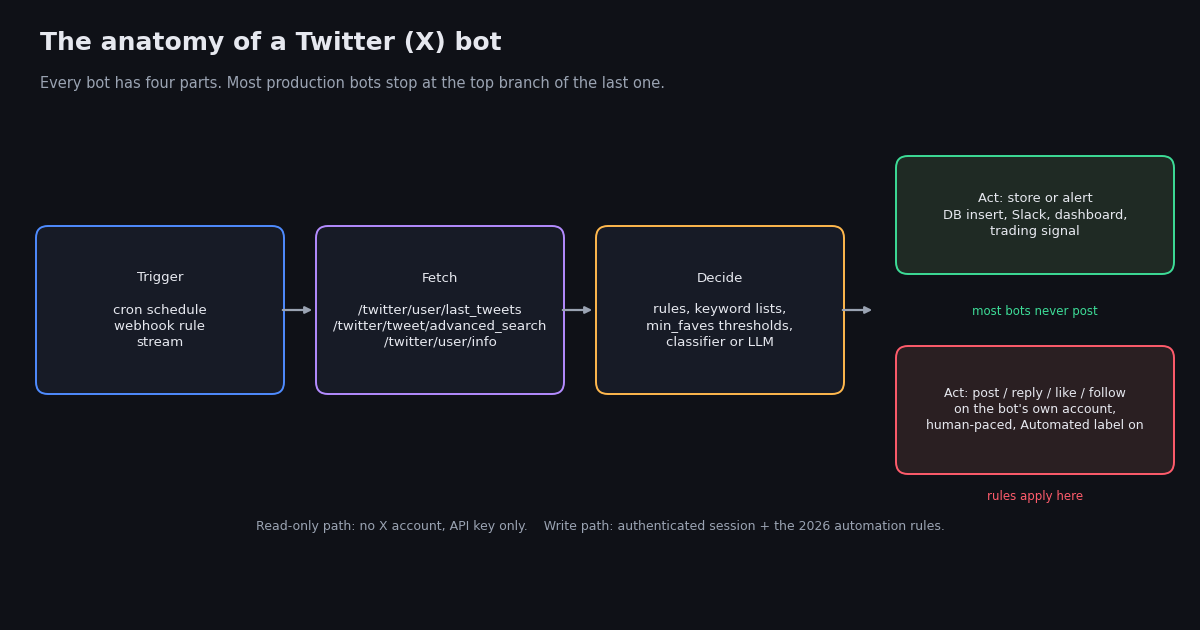
Strip away the use case and every bot is the same four parts: a trigger, a fetch, a decision, and an action. The diagram at the top of the page shows them. Getting the first three right is most of the work, and for the most common kind of bot, the action is "store it" or "send an alert", not "post".
Trigger. A schedule (cron every minute, a GitHub Actions workflow every ten minutes), a webhook from a monitoring rule that fires when a matching post appears, or a long-lived stream. Among TwitterAPI.io customers who monitor accounts, a 60-second polling interval is the most common choice (API logs, aggregated); it is the sweet spot between freshness and cost for anything that is not a trading signal.
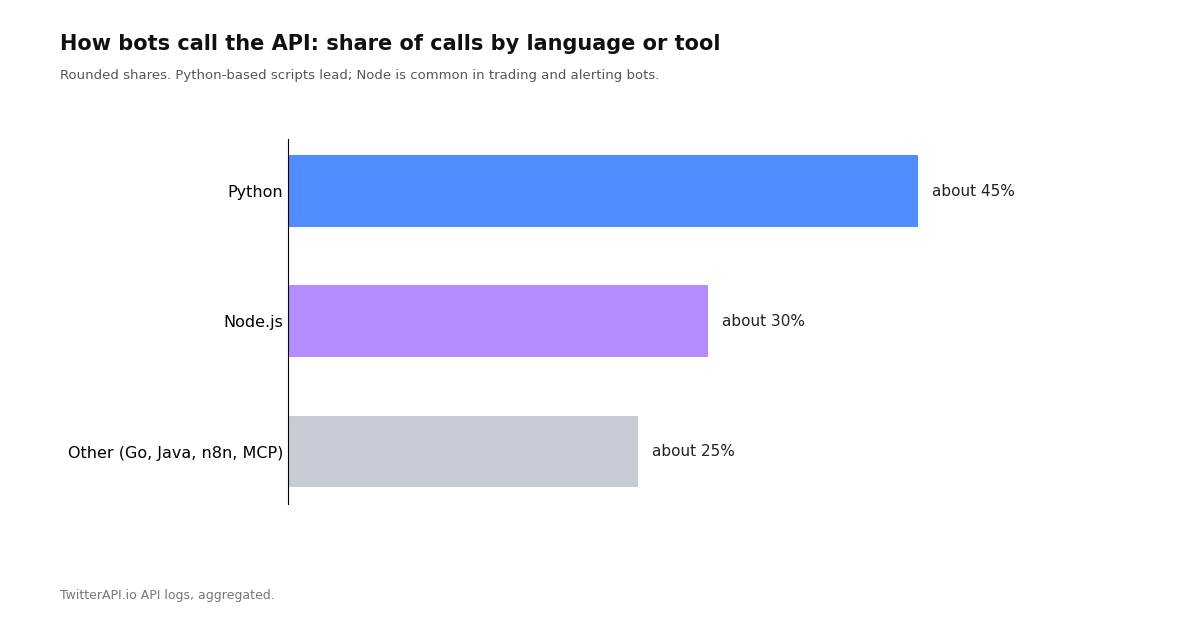
Fetch. Read endpoints: a user's latest posts (/twitter/user/last_tweets), a search with operators (/twitter/tweet/advanced_search, with since: or since_time: so you only get new posts), a profile (/twitter/user/info), or specific posts by ID (/twitter/tweets). This is where language choice shows up: in our logs about 45% of calls come from Python and about 30% from Node, with the remainder spread across Go, Java, no-code tools such as n8n, and MCP clients (API logs, aggregated).
Decision. Rules (min_faves: thresholds, keyword lists, account lists), a classifier, or a language model that summarises or scores what was fetched. Keep state: the ID or timestamp of the last post you handled, so a crash or a retry does not double-process.
Action. For data bots: write to a database, push to Slack or a trading terminal, update a dashboard. For posting bots: create a post, reply, like, or follow, through an authenticated session on the bot's own account, at a human pace, and with the Automated label on. The posting side is where the rules in the table above apply, and where most bots that get suspended went wrong.
Build a read-only bot in 40 lines: watch accounts and alert on keywords
This is the bot most people actually need, and the one most tutorials skip in favour of a hello-world poster. It watches a list of accounts, pulls only posts newer than the last run, keeps the ones that match your keywords, and prints them (swap the print for a Slack webhook, an email, or a database insert). It uses a single search call with from: operators joined by OR, which is exactly the pattern most monitoring customers converge on, and it costs the API minimum of $0.00015 per call when nothing new matches, plus $0.00015 per post returned (pricing page checked in 2026).
Two practical notes from running this at scale. First, the search query has a length limit of 512 characters, so a long watch list must be split into several queries. Second, pass since_time as a Unix timestamp from your last successful run rather than relying on the clock, so that a missed run catches up instead of leaving a gap.
If you need sub-minute latency or do not want to run a scheduler at all, the filter-rule and webhook route described in the real-time monitoring guide linked below does the same job with the API pushing matches to your endpoint; it is a different trade-off (persistent endpoint, per-match pricing) rather than a strictly better one.
"""Read-only Twitter (X) bot: new posts from a watch list that match keywords, since the last run.

Run it every minute from cron or a scheduler. State lives in a small JSON file.
Needs TWITTERAPI_IO_KEY in the environment.
"""
import json
import os
import time

import requests

HEADERS = {"X-API-Key": os.environ["TWITTERAPI_IO_KEY"]}
WATCH = ["NASA", "nasawebb", "SpaceX"]          # accounts to watch (keep each query under 512 chars)
KEYWORDS = ["launch", "artemis", "starship"]     # case-insensitive match on the post text
STATE_FILE = "bot-state.json"


def load_state():
    if os.path.exists(STATE_FILE):
        with open(STATE_FILE) as f:
            return json.load(f)
    return {"since_time": int(time.time()) - 3600}  # first run: look back one hour


def fetch_new_posts(since_time):
    query = "(" + " OR ".join(f"from:{h}" for h in WATCH) + f") since_time:{since_time}"
    r = requests.get(
        "https://api.twitterapi.io/twitter/tweet/advanced_search",
        params={"query": query, "queryType": "Latest"},
        headers=HEADERS,
        timeout=30,
    )
    r.raise_for_status()
    return r.json().get("tweets") or []


if __name__ == "__main__":
    state = load_state()
    run_started = int(time.time())
    posts = fetch_new_posts(state["since_time"])
    for t in posts:
        text = (t.get("text") or "")
        if any(k.lower() in text.lower() for k in KEYWORDS):
            author = (t.get("author") or {}).get("userName")
            print(f"[{t.get('createdAt')}] @{author}: {text[:140]}  {t.get('url')}")
            # replace print with a Slack webhook, email, or database insert
    state["since_time"] = run_started
    with open(STATE_FILE, "w") as f:
        json.dump(state, f)
    print(f"checked {len(posts)} new posts")
Posting bots: how to automate without getting the account suspended
If your bot must write to X, the engineering is the easy part; staying within the rules is the work. These are the practices that separate the alert bots that have run for years from the accounts that last a week.
Label it. Turn on the Automated label before the first automated post. It costs nothing and removes the simplest reason for a suspension.
Pace it like a person. Guides that track enforcement suggest that established accounts posting roughly 5 to 20 well-spaced posts a day are treated as normal, and that the same count compressed into minutes is not. Add jitter to schedules; never post on the exact minute every hour.
Never duplicate across accounts. One bot, one account. Cross-posting identical content to several accounts is the single clearest manipulation signal.
Reply only when invited. Respond to mentions of the bot, not to keywords, trends, or other people's conversations.
Do not automate follows, likes, or DMs. All three are in the prohibited rows, DMs in particular tend to lock the sending account quickly, and none of them is worth the account.
Keep a human account accountable. The label links to it; make sure it is real and monitored, because that is where X's enforcement notices will land.
On the API side, posting requires an authenticated session for the bot's own account; on twitterapi.io that means the login flow and the create-post endpoint under your own account, documented in the posting guide linked below, and on the official X API it means a developer app with write scope on a paid tier. Either way, the write path is a fraction of the volume of the read path, and the rules above matter more than which API you use.
What a bot costs to run: reading X at scale
Because most bots read far more than they write, reading cost decides whether a bot is viable. The official X API prices pay-per-use reads at $0.005 per post and $0.010 per user profile (docs.x.com pricing, checked in 2026). twitterapi.io prices reads at $0.15 per 1,000 posts and $0.18 per 1,000 profiles, with a $0.00015 minimum per call (pricing page, checked in 2026). The table applies both to the read-only bot above.
The per-post gap is roughly 33 times ($0.005 / $0.00015), which is the number that matters for a bot that watches many accounts. The other difference is setup: a twitterapi.io key works immediately from the dashboard, while the official API needs a developer application and, for the volumes above, a paid tier. Both are legitimate; the official API is the right choice when you need write access with first-party guarantees, and the third-party read API is the usual choice for the fetch step.
"""Score a list of accounts for bot-like behaviour and write a CSV you can sort.

Uses two read endpoints per account. Thresholds are yours to calibrate:
run it on accounts you know are human and known bots first.
Needs TWITTERAPI_IO_KEY in the environment.
"""
import csv
import os
import statistics
from datetime import datetime, timezone

import requests

HEADERS = {"X-API-Key": os.environ["TWITTERAPI_IO_KEY"]}
X_DATE = "%a %b %d %H:%M:%S %z %Y"
ACCOUNTS = ["NASA", "earthquakeBot", "year_progress"]


def get_json(path, params):
    r = requests.get("https://api.twitterapi.io" + path, params=params, headers=HEADERS, timeout=30)
    r.raise_for_status()
    return r.json()


def score(username):
    user = get_json("/twitter/user/info", {"userName": username}).get("data") or {}
    body = get_json("/twitter/user/last_tweets", {"userName": username, "includeReplies": "true"})
    tweets = body.get("tweets") or (body.get("data") or {}).get("tweets") or []

    created = datetime.strptime(user["createdAt"], X_DATE)
    age_days = max((datetime.now(timezone.utc) - created).days, 1)
    ppd = (user.get("statusesCount") or 0) / age_days

    times = sorted(datetime.strptime(t["createdAt"], X_DATE) for t in tweets if t.get("createdAt"))
    gaps = [(b - a).total_seconds() / 60 for a, b in zip(times, times[1:])]
    gap_cv = statistics.pstdev(gaps) / statistics.mean(gaps) if len(gaps) > 2 and statistics.mean(gaps) > 0 else None
    texts = [(t.get("text") or "").strip() for t in tweets]
    dup = 1 - len(set(texts)) / len(texts) if texts else 0
    replies = sum(1 for t in tweets if t.get("isReply")) / len(tweets) if tweets else 0

    flags = 0
    flags += ppd > 50            # lifetime average above 50 posts/day
    flags += gap_cv is not None and gap_cv < 0.2   # metronome posting
    flags += dup > 0.3           # a third of recent posts are duplicates
    flags += replies > 0.8       # almost everything is a reply
    flags += not (user.get("description") or "").strip()
    return {
        "account": username,
        "age_days": age_days,
        "posts_per_day": round(ppd, 2),
        "gap_cv": None if gap_cv is None else round(gap_cv, 2),
        "duplicate_share": round(dup, 2),
        "reply_share": round(replies, 2),
        "followers": user.get("followers"),
        "following": user.get("following"),
        "flags_of_5": flags,
    }


if __name__ == "__main__":
    rows = [score(a) for a in ACCOUNTS]
    with open("bot-scores.csv", "w", newline="", encoding="utf-8") as f:
        w = csv.DictWriter(f, fieldnames=list(rows[0].keys()))
        w.writeheader()
        w.writerows(rows)
    for r in rows:
        print(r["account"], "flags:", r["flags_of_5"], "posts/day:", r["posts_per_day"])
Questions readers ask
Are Twitter (X) bots legal and allowed?
Bots are allowed on X as long as they follow the automation rules: fully automated accounts carry the Automated label, posting goes through the API or a compliant tool, and the account avoids platform manipulation such as duplicate posting across accounts, follow and unfollow churn, bulk likes, mass mentions, and automated DMs. Read-only bots that only collect public data do not act on an account at all.
How can I tell if a Twitter account is a bot?
Combine several public signals rather than trusting one: lifetime posts per day from the account's creation date and post count, how regular the gaps between recent posts are, the source app on posts, the share of posts that are replies, duplicate text, the follower-to-following ratio, and whether the profile is filled in. The Automated label, when present, settles it. The scripts on this page compute these from two API calls.
What is the Automated label on X?
A disclosure line under the account name that says Automated and names the human or company account that runs the bot. X requires it on accounts that post or act with no human review. It is enabled from the bot account's settings and does not need approval.
How do I make a Twitter bot?
Decide whether it reads or writes. A read-only bot needs a trigger (a cron schedule or a webhook), a read API call such as advanced search with from: operators and a since_time, a decision rule, and an action like a Slack message or a database insert; the 40-line example on this page is a complete one. A posting bot adds an authenticated session for the bot's own account, the Automated label, and human-paced scheduling.
Why do bots reply to every viral post with crypto links?
Because it is cheap and occasionally pays. Reply spam targets posts with large audiences to harvest clicks, and the accounts are disposable, so suspensions are a cost of doing business rather than a deterrent. These networks are detectable precisely because the economics force them into high reply shares, duplicate text, and new accounts with empty profiles.
What does it cost to run a Twitter bot?
Mostly the reading. On twitterapi.io, a post read costs about $0.00015 and a profile read about $0.00018, with a $0.00015 minimum per call; polling a quiet watch list every minute runs in the region of a quarter a day. The official X API's pay-per-use pricing is $0.005 per post read and $0.010 per profile, about 33 times more per post, plus a developer tier for write access.
Can a bot send direct messages on X?
Automated DMs are prohibited by X's automation rules and are one of the fastest ways to get an account locked. We do not offer DM sending and do not recommend automating it with any tool. Reply to mentions instead, and only when the bot is addressed.
Continue
- X Help Center: automation rules (what automation is allowed and prohibited)
- X Help Center: automated account labels
- X Help Center: platform manipulation and spam policy
- X Developer Agreement and Policy (docs.x.com)
- X API pay-per-usage pricing (docs.x.com), the official and more expensive route to the same reads
- twitterapi.io docs: Get User Last Tweets (createdAt, source, isReply fields used by the scoring script)
- Twitter (X) API overview: the hub for reading X data
- Twitter (X) automation in 2026: what is allowed and how to do it
- Monitoring Twitter (X) via API: polling, streams, and webhooks
- Login and post through the API: the write path for a posting bot
- Search operators for the API (from:, since:, min_faves:)
- Error 226: "this request looks like it might be automated"
- twitterapi.io pay-per-call pricing
Stop reading. Start building.
Starter credits cover real testing on real data. Google sign-in, no card, no application queue.
Get an API key