Social Blade Twitter Stats: What Happened and How to Rebuild Them
If you typed "social blade twitter" into a search engine recently, you were probably looking for the follower-history page of some X account and found that the link no longer works. That is not a glitch. Social Blade, which had tracked Twitter profiles for roughly a decade, removed the platform entirely in March 2025, and most of the articles still ranking for the query were written before that and describe a product that no longer exists.
This page does three things. It records what Social Blade actually offered for Twitter and why it stopped, with primary sources. It separates the stats that are genuinely unavailable now from the ones that only look unavailable because nobody is collecting them. And it gives you a complete replacement for the part people miss most, the daily follower table, as a Python script you can run from cron for a fraction of a cent per account per day.
The rebuild uses read-only API calls against public profiles. No login to your X account, no browser extension, nothing that touches write permissions. Every endpoint path below is real and the scripts were run before publishing.
What Social Blade offered for Twitter, and why it stopped in March 2025
Social Blade was founded in 2008 and added Twitter statistics some years later; in its own account of the shutdown it describes adding Twitter stats "a decade ago", when the Twitter API was free for developers. The Twitter section worked the way the YouTube one still does: you entered any public handle, the site began collecting a daily snapshot, and from then on the handle's page showed total followers, following and tweets with the day-over-day change for each, line graphs of follower history over 30, 90 and 365 days, a projection of when the account would hit the next round-number milestone, a letter grade from A+ to F, and a place in the site-wide top lists (most followers, most following, most tweets).
In March 2025 the section disappeared. Social Blade explained why in a long post on its X account on 14 March 2025, and Wikipedia records the removal date as 13 March 2025. The short version: after X moved the API to paid tiers in 2023, Social Blade ran on the lowest tier, first $100 then $200 a month. In February 2025 X's lawyer told the company that an established site was not allowed on that tier and had to be on Enterprise, which X's developer site quotes at $42,000 to $210,000 a month. Social Blade's choice was to paywall X stats aggressively or remove them, and it removed them; the same update also dropped Trovo, Mixer, Dailymotion and DLive. The company said it holds no ill will toward X and would bring the section back if a sustainable deal were offered.
Two things follow. This was a pricing decision, not a technical one; the underlying numbers never stopped being public. And Social Blade's history for X accounts, over a decade of daily snapshots for millions of handles, is no longer served, and as far as we can verify it has not been published or exported anywhere. Any follower-history graph you see for an X account today was collected by someone else, starting on whatever day they started.
What is still available for X stats, and what is not
Social Blade never had privileged access. Everything on a Twitter page came from the same public profile fields that any API client can read today: followers, following, tweet count, account creation date. The value was in collecting them every day and keeping the history. That split tells you exactly which parts you can rebuild and which you cannot.
The one row with a hard no is the global grade and rank. Social Blade's grade compared an account's growth with every other account it tracked; without that population the grade cannot be reproduced, and any tool that still shows one is computing it against its own, usually much smaller, set. For the other rows the only thing you lose is history before your first snapshot, which is why the sensible move is to start collecting today even if you do not need the graph yet.
The rebuild: one profile call per account per day into SQLite
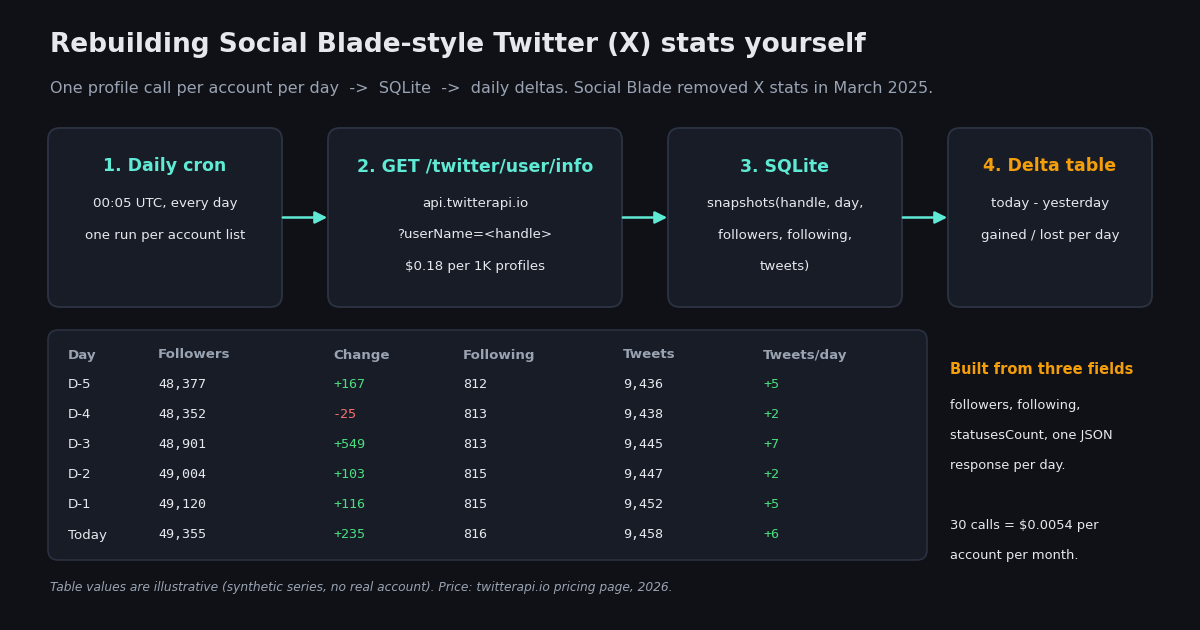
The endpoint is GET https://api.twitterapi.io/twitter/user/info?userName=<handle> with your key in the X-API-Key header. The response carries the profile object with id, userName, followers, following, statusesCount, mediaCount, favouritesCount, createdAt and isBlueVerified, among others (twitterapi.io API reference, 2026). For a Social Blade-style table you need three of those fields once a day. Pricing is $0.18 per 1,000 profiles, which is 18 credits or $0.00018 per call at the current rate of 100,000 credits per dollar (twitterapi.io pricing page, 2026); the $0.00015 per-call minimum does not kick in because a profile read is already above it.
The script below is the Unique Value Asset of this page and it runs as written with TWITTERAPI_IO_KEY set. It creates a snapshots table keyed on handle and day, inserts one row per tracked handle, and prints the familiar table: followers, change, following, tweets, tweets per day, plus a net line with the average daily gain. Re-running on the same day overwrites that day's row rather than duplicating it, so a retried cron job is harmless. Store the numeric user_id as well; handles change, IDs do not, and when a tracked account renames itself you can re-point the handle without losing its history.
Run it at a fixed time, for example five minutes past midnight UTC, so that each day's number is comparable with the last. Social Blade's own tables had the same property and the same caveat: a daily snapshot cannot tell you whether a spike happened at 09:00 or 21:00. If you need intra-day resolution, snapshot more often; at $0.00018 a call, hourly snapshots of one account are still only about $0.13 a month.
"""Social Blade-style daily stats for Twitter (X) accounts, self-hosted.

Run once a day (cron: 5 0 * * * python3 snapshot.py). One GET /twitter/user/info
call per handle ($0.18 per 1K profiles on twitterapi.io, so 30 calls = $0.0054
per account per month). Snapshots go to SQLite; the report prints the daily
gained / lost table that Social Blade used to show.

Needs TWITTERAPI_IO_KEY in the environment.  pip install requests
"""
import os
import sqlite3
import sys
import time
from datetime import date

import requests

HEADERS = {"X-API-Key": os.environ["TWITTERAPI_IO_KEY"]}
WATCHLIST = ["NASA", "github", "vercel"]   # public handles you want to track
DB = "x-stats.sqlite"


def fetch_profile(handle):
    r = requests.get(
        "https://api.twitterapi.io/twitter/user/info",
        params={"userName": handle},
        headers=HEADERS,
        timeout=30,
    )
    r.raise_for_status()
    body = r.json()
    if body.get("status") != "success":
        raise RuntimeError(f"{handle}: {body.get('msg')}")
    return body.get("data") or body


def init_db(conn):
    conn.execute(
        """CREATE TABLE IF NOT EXISTS snapshots (
               handle TEXT NOT NULL,
               day TEXT NOT NULL,
               user_id TEXT,
               followers INTEGER,
               following INTEGER,
               tweets INTEGER,
               PRIMARY KEY (handle, day))"""
    )


def take_snapshot(conn, today):
    for handle in WATCHLIST:
        u = fetch_profile(handle)
        conn.execute(
            "INSERT OR REPLACE INTO snapshots VALUES (?, ?, ?, ?, ?, ?)",
            (handle.lower(), today, str(u.get("id")), u.get("followers"),
             u.get("following"), u.get("statusesCount")),
        )
        time.sleep(0.2)  # polite pacing; the API allows far more than this
    conn.commit()


def report(conn, handle, days=14):
    rows = conn.execute(
        "SELECT day, followers, following, tweets FROM snapshots "
        "WHERE handle = ? ORDER BY day DESC LIMIT ?",
        (handle.lower(), days + 1),
    ).fetchall()[::-1]
    print(f"\n@{handle}  (last {min(days, len(rows) - 1)} days)")
    print(f"{'Day':<12}{'Followers':>12}{'Change':>9}{'Following':>11}{'Tweets':>9}{'Tweets/day':>12}")
    prev = None
    for day, fol, fow, tw in rows:
        if prev is not None:
            d_fol = fol - prev[1]
            d_tw = tw - prev[3]
            print(f"{day:<12}{fol:>12,}{d_fol:>+9,}{fow:>11,}{tw:>9,}{d_tw:>+12,}")
        prev = (day, fol, fow, tw)
    if len(rows) > 1:
        span = len(rows) - 1
        total = rows[-1][1] - rows[0][1]
        print(f"{'Net':<12}{'':>12}{total:>+9,}   avg {total / span:+.1f}/day over {span} days")


if __name__ == "__main__":
    conn = sqlite3.connect(DB)
    init_db(conn)
    today = date.today().isoformat()
    if "--report-only" not in sys.argv:
        take_snapshot(conn, today)
    for h in WATCHLIST:
        report(conn, h)
Posting cadence: tweets per day and busiest hours
Social Blade showed tweets posted per day next to follower change. You get that for free from the snapshot above, because statusesCount is the account's lifetime post count and the daily delta is the number posted (minus any deleted) that day. For most comparisons that is enough.
If you want the shape of the cadence, which weekdays and which hours an account posts, you need the posts themselves. GET /twitter/user/last_tweets returns an account's recent posts newest first, 20 per page, with has_next_page and next_cursor for paging and an includeReplies flag that defaults to false (twitterapi.io API reference, 2026). Posts are priced at $0.15 per 1,000, so one page costs about $0.003 and five pages, 100 posts, about $0.015. The docs explicitly warn against polling this endpoint frequently for a single account, and that advice applies here: run the cadence script weekly, not daily, and let the snapshot deltas carry the day-to-day number.
The createdAt field uses Twitter's classic format, Tue Dec 10 07:00:00 +0000 2024, so parse it with %a %b %d %H:%M:%S %z %Y. The script counts posts per weekday and per UTC hour and prints the five busiest hours.
"""Posting cadence for one account: tweets per weekday and per UTC hour.

GET /twitter/user/last_tweets returns 20 tweets per page ($0.15 per 1K tweets,
so about $0.003 per page). Five pages (100 tweets) cost about $0.015 and are
enough for a cadence histogram; statusesCount from the daily snapshot already
gives tweets-per-day for free, so run this one weekly, not daily.
"""
import os
from collections import Counter
from datetime import datetime

import requests

HEADERS = {"X-API-Key": os.environ["TWITTERAPI_IO_KEY"]}
HANDLE = "NASA"
PAGES = 5


def recent_tweets(handle, pages):
    tweets, cursor = [], ""
    for _ in range(pages):
        r = requests.get(
            "https://api.twitterapi.io/twitter/user/last_tweets",
            params={"userName": handle, "cursor": cursor, "includeReplies": "false"},
            headers=HEADERS,
            timeout=30,
        )
        r.raise_for_status()
        body = r.json()
        data = body.get("data") or body
        tweets.extend(data.get("tweets") or [])
        if not body.get("has_next_page") and not data.get("has_next_page"):
            break
        cursor = body.get("next_cursor") or data.get("next_cursor") or ""
    return tweets


if __name__ == "__main__":
    tweets = recent_tweets(HANDLE, PAGES)
    by_day, by_hour = Counter(), Counter()
    for t in tweets:
        # createdAt looks like "Tue Dec 10 07:00:00 +0000 2024"
        dt = datetime.strptime(t["createdAt"], "%a %b %d %H:%M:%S %z %Y")
        by_day[dt.strftime("%a")] += 1
        by_hour[dt.hour] += 1
    print(f"@{HANDLE}: {len(tweets)} recent posts (replies excluded)")
    print("per weekday:", dict(by_day))
    print("busiest UTC hours:", by_hour.most_common(5))
Follower-list diffs: who followed and who unfollowed
The count tells you that an account lost 25 followers; the list tells you which 25. Social Blade never showed names, but it is the most common follow-up question, and the API makes it a set difference between two daily snapshots of the follower list.
There are two endpoints for the list and the price difference matters. GET /twitter/user/followers returns full profiles, up to 200 per page, at 1 credit per follower at the maximum page size ($0.01 per 1,000) with a 60-credit minimum per call. GET /twitter/user/followers_ids returns IDs only, up to 5,000 per page, at 0.45 credits per ID at that page size ($0.0045 per 1,000) with a 100-credit minimum per call (twitterapi.io API reference, 2026). For a diff you only need IDs, so use the IDs endpoint and resolve just the handful that changed with GET /twitter/user/batch_info_by_ids, which accepts comma-separated IDs and returns a users array, priced at 18 credits per user for small requests and 10 credits per user when you send 100 or more.
Cost per pull is followers times $0.0000045. Above roughly 100,000 followers a daily full pull stops being cheap, so the sensible pattern is a daily count snapshot for everyone and a weekly list diff for the accounts where the names matter. The script stores each day's ID set as JSON in SQLite; for accounts in the millions, swap that for a table of IDs so the diff runs as a SQL EXCEPT. Note that the list is a point-in-time view: an account that followed and unfollowed between two pulls will not appear in either diff.
"""Who followed / unfollowed since the last run: follower-ID diff for one account.

GET /twitter/user/followers_ids returns up to 5,000 IDs per page at 0.45 credits
per ID ($0.0045 per 1K), so a 20,000-follower account costs about $0.09 per full
pull. New and lost IDs are then resolved to handles with
GET /twitter/user/batch_info_by_ids ($0.18 per 1K profiles), only for the diff.
"""
import json
import os
import sqlite3
from datetime import date

import requests

HEADERS = {"X-API-Key": os.environ["TWITTERAPI_IO_KEY"]}
HANDLE = "NASA"
DB = "x-stats.sqlite"


def all_follower_ids(handle):
    ids, cursor = [], ""
    while True:
        r = requests.get(
            "https://api.twitterapi.io/twitter/user/followers_ids",
            params={"userName": handle, "count": 5000, "cursor": cursor},
            headers=HEADERS,
            timeout=60,
        )
        r.raise_for_status()
        body = r.json()
        ids.extend(body.get("ids") or [])
        if not body.get("has_next_page"):
            return set(ids)
        cursor = body.get("next_cursor") or ""


def resolve(user_ids):
    out = {}
    user_ids = sorted(user_ids)
    for i in range(0, len(user_ids), 100):
        r = requests.get(
            "https://api.twitterapi.io/twitter/user/batch_info_by_ids",
            params={"userIds": ",".join(user_ids[i:i + 100])},
            headers=HEADERS,
            timeout=60,
        )
        r.raise_for_status()
        for u in r.json().get("users") or []:
            out[str(u.get("id"))] = u.get("userName")
    return out


if __name__ == "__main__":
    conn = sqlite3.connect(DB)
    conn.execute("CREATE TABLE IF NOT EXISTS follower_sets (handle TEXT, day TEXT, ids TEXT, PRIMARY KEY (handle, day))")
    today = date.today().isoformat()
    current = all_follower_ids(HANDLE)
    row = conn.execute("SELECT ids FROM follower_sets WHERE handle = ? AND day < ? ORDER BY day DESC LIMIT 1", (HANDLE.lower(), today)).fetchone()
    conn.execute("INSERT OR REPLACE INTO follower_sets VALUES (?, ?, ?)", (HANDLE.lower(), today, json.dumps(sorted(current))))
    conn.commit()
    if row is None:
        print(f"first pull: {len(current):,} follower IDs stored; run again tomorrow for the diff")
    else:
        previous = set(json.loads(row[0]))
        gained, lost = current - previous, previous - current
        names = resolve(gained | lost) if (gained | lost) else {}
        print(f"@{HANDLE} {today}: +{len(gained):,} new, -{len(lost):,} lost")
        for uid in sorted(gained):
            print("  + @" + str(names.get(uid, uid)))
        for uid in sorted(lost):
            print("  - @" + str(names.get(uid, uid)))
Cost comparison: Social Blade, self-built on twitterapi.io, official X API
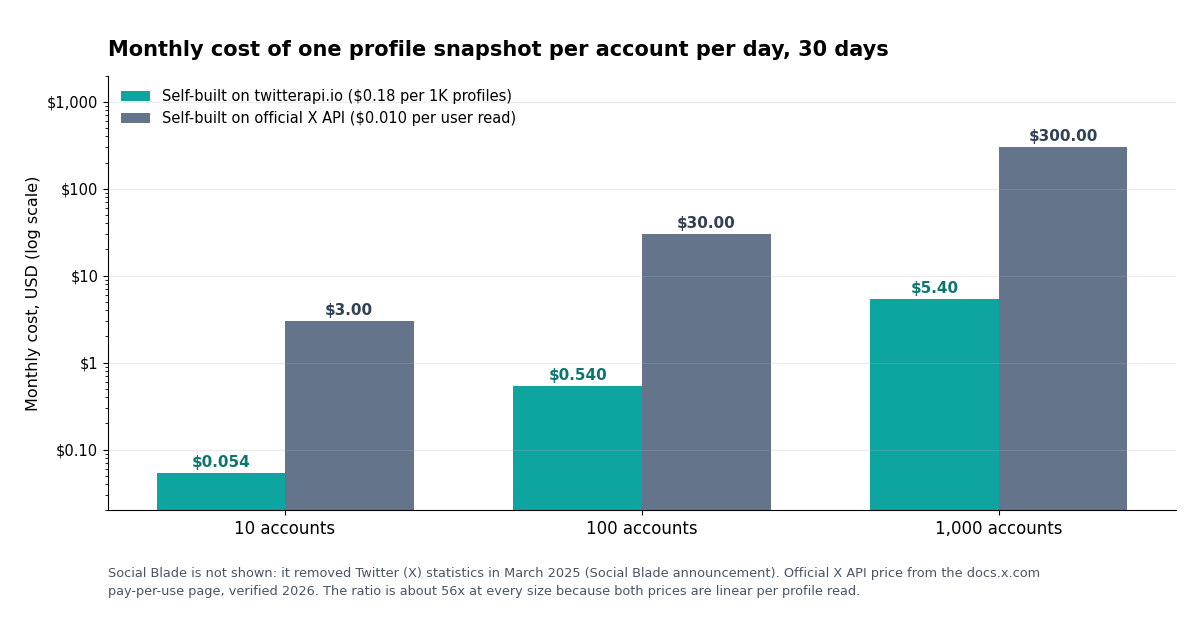
The honest matrix, with prices taken from each vendor's own page in 2026 and the assumption spelled out: one profile read per tracked account per day, 30 days a month. Social Blade is included for completeness even though its X section is offline, because that is the product people are searching for.
The ratio between the two self-built columns is about 56 to 1 ($0.010 divided by $0.00018) and it does not change with scale, because both vendors price linearly per profile read; the chart below shows the same numbers for 10, 100 and 1,000 accounts. The official route also starts with $20 of free credits when you add a payment card (docs.x.com, verified 2026), which covers 2,000 user reads, roughly two months of daily snapshots for 33 accounts, before billing begins. For a single personal account either route costs cents; the difference matters once you track a competitor set or a whole industry.
To be fair to Social Blade: at $200 a month for its API tier it was serving millions of handles for free and would have been cheaper per account than anything here, had X let it continue. The comparison is between what you can actually run today.
Backfilling history you did not capture
This is the part no replacement can fix, so it is worth being direct. Neither the official X API nor any third-party API returns an account's follower count as of a past date; the profile object only has the current value. X's own analytics for an account you control show follower change over time, but only for your own account and only inside the product. Social Blade's archive of daily X snapshots is offline and has not been released.
The practical backfill options are limited. The Wayback Machine crawled Social Blade's Twitter pages for many large accounts over the years, and a capture of a handle's page carries the follower-history table as it stood on the capture date; stitching captures together gives a sparse history for well-known accounts and nothing for small ones. Press coverage and the account's own milestone posts ("we just hit 100K") give a few more anchor points. For anything else, the honest answer is that the history starts the day you start collecting, which is the strongest argument for starting the snapshot job now and worrying about the graph later. The historical-follower-count guide linked below walks through the Wayback approach in detail.
One more detail for accounts you tracked on Social Blade for years: if you ever exported or screenshotted the table, those numbers are real daily snapshots and can be loaded straight into the snapshots table above with the date they were captured. Mixing a sparse backfill with dense new data is fine as long as your delta logic divides by the number of days between rows rather than assuming consecutive days, as the net line in the script does.
Operational notes: scheduling, renames, suspensions and ranks
Scheduling. Run the snapshot once a day at a fixed UTC time. A daily job is nowhere near any rate limit; a 1,000-account list with a 0.2-second pause between calls finishes in under four minutes. If you prefer fewer requests, GET /twitter/user/batch_info_by_ids takes a comma-separated list of user IDs and returns all profiles in one response at 10 credits per user when you send 100 or more, which also happens to be the cheaper rate.
Renames and suspensions. Store the numeric user_id on day one and key your history on it. When a handle changes, the lookup by userName starts failing or returns a different account; look the ID up by the stored value instead and update the handle. A suspended or deleted account returns status: error with a message; log it and keep the history, do not delete rows.
Counts move for reasons other than growth. X periodically removes spam accounts, which shows up as a one-day drop across many handles at once; a diff of your whole tracked set on that day makes it obvious. Deleted posts lower statusesCount, so a negative tweets-per-day is not a bug. Treat single-day moves as noise and look at 7-day averages, which is also how Social Blade's graphs were usually read.
Ranks and grades. You cannot reproduce Social Blade's global grade, but ranking within your own set is a one-line SQL query: order today's snapshot by followers, or by 30-day gain for a growth leaderboard. For a competitor set of a few dozen accounts that is more useful than a global letter anyway, because the comparison population is the one you care about.
Keep it read-only. Everything here reads public data. There is no reason to connect the job to your own X login, and doing so adds nothing except risk. If you also want alerts when a tracked account posts, that is a different pipeline; the account-monitoring guides linked below cover it.
"""Social Blade-style daily stats for Twitter (X) accounts, self-hosted.

Run once a day (cron: 5 0 * * * python3 snapshot.py). One GET /twitter/user/info
call per handle ($0.18 per 1K profiles on twitterapi.io, so 30 calls = $0.0054
per account per month). Snapshots go to SQLite; the report prints the daily
gained / lost table that Social Blade used to show.

Needs TWITTERAPI_IO_KEY in the environment.  pip install requests
"""
import os
import sqlite3
import sys
import time
from datetime import date

import requests

HEADERS = {"X-API-Key": os.environ["TWITTERAPI_IO_KEY"]}
WATCHLIST = ["NASA", "github", "vercel"]   # public handles you want to track
DB = "x-stats.sqlite"


def fetch_profile(handle):
    r = requests.get(
        "https://api.twitterapi.io/twitter/user/info",
        params={"userName": handle},
        headers=HEADERS,
        timeout=30,
    )
    r.raise_for_status()
    body = r.json()
    if body.get("status") != "success":
        raise RuntimeError(f"{handle}: {body.get('msg')}")
    return body.get("data") or body


def init_db(conn):
    conn.execute(
        """CREATE TABLE IF NOT EXISTS snapshots (
               handle TEXT NOT NULL,
               day TEXT NOT NULL,
               user_id TEXT,
               followers INTEGER,
               following INTEGER,
               tweets INTEGER,
               PRIMARY KEY (handle, day))"""
    )


def take_snapshot(conn, today):
    for handle in WATCHLIST:
        u = fetch_profile(handle)
        conn.execute(
            "INSERT OR REPLACE INTO snapshots VALUES (?, ?, ?, ?, ?, ?)",
            (handle.lower(), today, str(u.get("id")), u.get("followers"),
             u.get("following"), u.get("statusesCount")),
        )
        time.sleep(0.2)  # polite pacing; the API allows far more than this
    conn.commit()


def report(conn, handle, days=14):
    rows = conn.execute(
        "SELECT day, followers, following, tweets FROM snapshots "
        "WHERE handle = ? ORDER BY day DESC LIMIT ?",
        (handle.lower(), days + 1),
    ).fetchall()[::-1]
    print(f"\n@{handle}  (last {min(days, len(rows) - 1)} days)")
    print(f"{'Day':<12}{'Followers':>12}{'Change':>9}{'Following':>11}{'Tweets':>9}{'Tweets/day':>12}")
    prev = None
    for day, fol, fow, tw in rows:
        if prev is not None:
            d_fol = fol - prev[1]
            d_tw = tw - prev[3]
            print(f"{day:<12}{fol:>12,}{d_fol:>+9,}{fow:>11,}{tw:>9,}{d_tw:>+12,}")
        prev = (day, fol, fow, tw)
    if len(rows) > 1:
        span = len(rows) - 1
        total = rows[-1][1] - rows[0][1]
        print(f"{'Net':<12}{'':>12}{total:>+9,}   avg {total / span:+.1f}/day over {span} days")


if __name__ == "__main__":
    conn = sqlite3.connect(DB)
    init_db(conn)
    today = date.today().isoformat()
    if "--report-only" not in sys.argv:
        take_snapshot(conn, today)
    for h in WATCHLIST:
        report(conn, h)
Questions readers ask
Does Social Blade still work for Twitter (X)?
No. Social Blade removed Twitter (X) statistics from its website in March 2025, together with Trovo, Mixer, Dailymotion and DLive. The profile pages, follower-history graphs and rankings for X handles are no longer served. The site still covers YouTube, Twitch, Instagram, TikTok and Facebook.
Why did Social Blade remove Twitter?
According to Social Blade's own post on X from March 2025, X's legal team said the company could no longer use the $200-a-month API tier and had to move to the Enterprise tier, which X's developer site lists at $42,000 to $210,000 a month. Social Blade judged that it could not paywall a free feature hard enough to cover that and removed the section instead.
Is there a free Social Blade alternative for Twitter?
Several sites show current X follower counts and some collect their own daily history, but none has Social Blade's archive, and the ones that stay free have to recoup API costs somehow. The cheapest reliable option for a specific set of accounts is to collect the numbers yourself: one profile call per account per day costs $0.00018 on twitterapi.io, about half a cent per account per month.
How do I see the follower history of a Twitter account?
Only from the day someone started recording it. X profiles expose the current follower count, not past values, so a history graph is a series of saved snapshots. Run the script on this page daily and plot the followers column; for history before your first snapshot, the only sources are Wayback Machine captures of old tracking pages and the account's own milestone posts.
How much does it cost to track 100 Twitter accounts like Social Blade did?
With one profile snapshot per account per day: 100 accounts x 30 days x $0.00018 = $0.54 a month on twitterapi.io. The same reads on the official X API are $0.010 each, so $30 a month, after the $20 of free credits that X grants when you add a payment card.
Can I see who unfollowed a Twitter account?
Yes, by diffing two snapshots of the follower-ID list. GET /twitter/user/followers_ids returns up to 5,000 IDs per page at $0.0045 per 1,000, so a 20,000-follower account costs about $0.09 per pull; subtract yesterday's set from today's for new followers and the reverse for unfollows, then resolve only the changed IDs to handles.
Does rebuilding these stats require logging in to my X account?
No. Every call on this page reads public profile data with an API key; your X login, password and write permissions are never involved. That is also why the approach is safe to run for accounts you do not own, such as competitors.
Can I get Social Blade's old Twitter data back?
Not from Social Blade; the archive is offline and has not been published. If you kept exports or screenshots of a handle's table, those are real daily snapshots and can be loaded into your own database with their capture dates. Otherwise the Wayback Machine is the only partial source.
Continue
- Social Blade on X (March 2025): why X was removed from the site, including the $200 tier and the Enterprise price range
- Wikipedia: Social Blade, including the removal of Twitter statistics on 13 March 2025
- Social Blade blog: the original announcement of Twitter statistics (daily followers, following, tweets, graphs, projections)
- X API pay-per-use pricing (docs.x.com): $0.010 per user read, $0.005 per post read, the official and more expensive route
- twitterapi.io API reference: GET /twitter/user/info response fields (followers, following, statusesCount)
- twitterapi.io API reference: GET /twitter/user/followers_ids, 5,000 IDs per page, credits per ID
- twitterapi.io pricing: $0.18 per 1K profiles, $0.15 per 1K tweets, follower IDs from $0.0045 per 1K
- Twitter (X) API overview: every read endpoint and its price
- Historical Twitter (X) follower count: snapshot store and Wayback reconstruction
- Twitter (X) follower tracking API: new followers and unfollows
- Twitter (X) follower count API tutorial
- TweetStats alternative: graph your posting cadence
- Free Twitter (X) analytics: the $0 setup
- Twitter (X) analytics tools compared
- Free tool: check whether one X account follows another
- twitterapi.io pay-per-call pricing: $0.18 per 1K profiles
Stop reading. Start building.
Starter credits cover real testing on real data. Google sign-in, no card, no application queue.
Get an API key