Twitter Streaming API
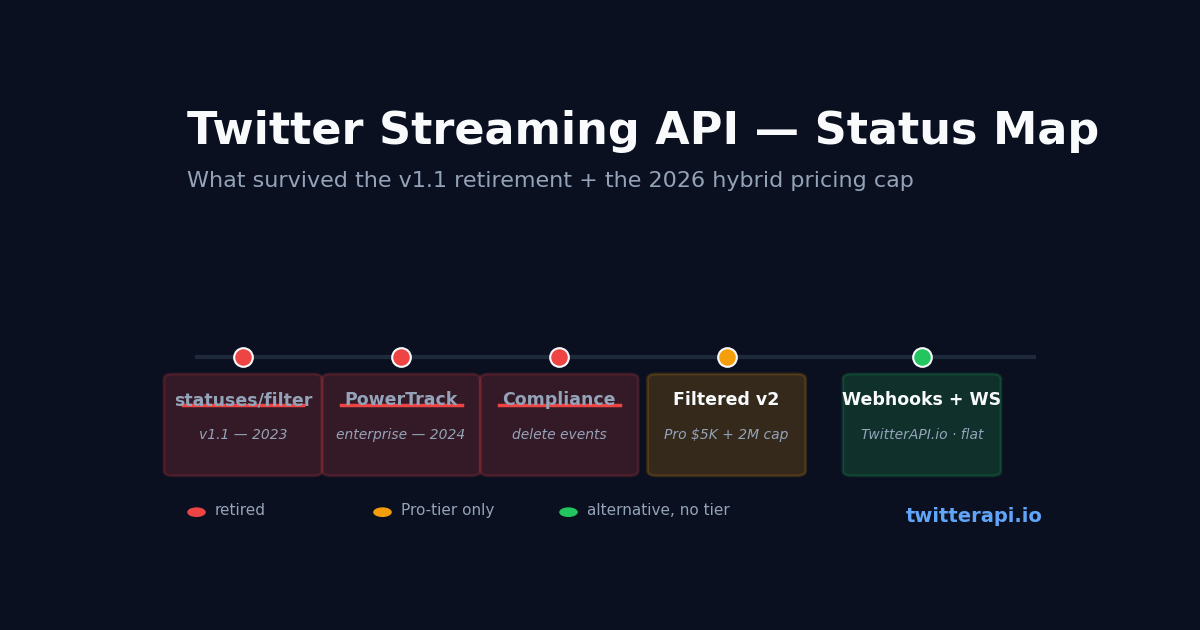
If you searched "Twitter Streaming API" expecting to find the same set of endpoints you used in 2018 or 2020, the answer is — most of it is gone, and the survivor is paywalled. X (then Twitter) retired PowerTrack, Compliance Stream, and the Filtered Stream v1 in the years leading up to 2024, folded a much smaller subset into Filtered Stream v2 under the v2 API tier system, and in February 2026 layered the whole tier system on top of a 2,000,000 Post-reads/month hard cap. The shape of real-time access changed; this page maps what's actually available now.
Two audiences land on this page. The first is teams who built on PowerTrack or v1 streams years ago and are looking at a migration deadline. The second is builders evaluating real-time X data for a new project and trying to figure out whether the official streaming surface is reachable at their budget. Both audiences need the same map: what X kept, what they killed, and what works outside the X API entirely.
Underneath all the naming churn, the practical pattern is simple. The official path is Filtered Stream v2 at the Pro tier ($5,000/month entry) with a 2M Post-reads/month cap shared across all Pro accounts. The alternative path is a third-party API that offers webhooks or websockets without the cap and without the tier wall — usually at a fraction of the cost. The rest of this guide is the detail.
What "Twitter Streaming API" Used to Mean
Through 2022, the term "Twitter Streaming API" covered three very different products. PowerTrack was the enterprise firehose — a server-to-server stream of every public post matching a set of rules, designed for newsrooms, brand-monitoring vendors, and trading firms. Compliance Stream carried delete events and account-status changes, used by anyone storing X data who needed to honour user deletions. Filtered Stream v1 was the standard-tier streaming endpoint — statuses/filter, the one most third-party Twitter apps were built on — with a 1% sample-of-the-firehose ceiling.
Each had its own API surface, its own auth flow, and its own rate-limit model. The combined offering looked rich on paper. In practice almost every team that integrated it ended up on statuses/filter because PowerTrack required an enterprise contract and Compliance Stream was an add-on most builders did not need.
Today none of those three names exist as live products. PowerTrack was end-of-life'd as part of the broader v1.1 retirement push that began in 2023. Compliance Stream was wrapped into a v2 "compliance batch" endpoint with a different mechanic. And the statuses/filter v1 stream was shut down with the rest of v1.1 in early 2023. The surviving streaming surface on X has a different name and lives in a different tier.
What X Eliminated in 2023-2026
The retirement was deliberate and is not being reversed. X's stated reasons combine policy and economics — suppressing automation, ending the era of low-cost firehose access, and consolidating revenue around fewer, higher-priced contracts.
PowerTrack: end-of-life. The enterprise firehose was the most expensive product to operate and the most politically sensitive (it was the source of most third-party analytics products). It is no longer sold. Existing enterprise customers were migrated to the v2 Filtered Stream Pro / Enterprise plans or to fully-custom data contracts.
v1.1 statuses/filter: shut down. This was the path most open-source Twitter clients and small data-collection projects used. Its retirement broke years of integrations and forced every downstream user to either migrate to v2 or stop streaming.
Standard tier free streaming: gone. The free read tier (~1,500 posts/month) does not include streaming at all. Any real-time access requires a paid tier.
What X Offers in 2026 — Filtered Stream v2
The surviving X streaming surface is Filtered Stream v2 — endpoint /2/tweets/search/stream with a rule-management endpoint at /2/tweets/search/stream/rules. The pattern is similar to v1 in spirit: you POST rules to define what you want, then GET the stream and receive matching posts in near-real-time.
Tier requirement: Pro ($5,000/month) or Enterprise. Filtered Stream v2 is not available on Free, on Basic ($200/month), or on the new pay-per-use plan. The minimum monthly commitment to access real-time streaming on X officially is $5,000, before any per-resource overage.
The February 2026 cap applies. Pro tier includes 2,000,000 Post reads per month under the hybrid pricing model. A high-velocity stream — even matching a moderately broad rule set — can exhaust that cap mid-month, triggering $0.005 per additional Post read overage. A modestly busy streaming project on Pro can therefore cost considerably more than the $5,000 floor.
Rule complexity is capped per tier. The number of rules you can have active simultaneously and the length of each rule (operator complexity) are capped per tier. Pro allows more rules than Basic; Enterprise allows the most. For a team that wants to monitor hundreds of brand keywords or competitor handles, the rule limit can bind before the cap does.
Why the Official Pro Path Is Hard for Most Teams
The gap between "I want real-time X data" and "I am paying $5,000/month + overage on a tier with a rule limit and a 2M cap" is what brings most teams to this page. Three failure modes are common.
Budget mismatch. A side project or early-stage startup with $50-300/month for data services cannot use Filtered Stream v2 at all — the entry tier is 100× the realistic budget. The free-to-Pro jump on X has no middle.
Workload mismatch. A medium-volume streaming workload — say monitoring 200 keywords for a brand-safety product — can blow past the 2M Post-read cap mid-month. The published rate sheet ($0.005 per Post-read overage) means a busy stream layered on top of Pro can land in the $10,000-$15,000/month range for what feels like "just streaming."
Rule mismatch. The per-tier rule limit can constrain a real product before the cap does. A monitoring product that wants 5,000 active filter rules will find Filtered Stream v2 a poor fit at any tier short of Enterprise.
Real-Time Alternatives That Work — Webhooks, WebSockets, Polling
Most teams that hit the Pro wall end up moving real-time consumption off the official streaming endpoint and onto one of three alternative patterns. All three are supported by TwitterAPI.io, the third-party API this site documents.
Webhooks. You define a filter rule (a list of accounts, keywords, or both), provide a callback URL, and TwitterAPI.io POSTs matching posts to that URL as they happen. The rule infrastructure is /oapi/tweet_filter/add_rule, /oapi/tweet_filter/get_rules, /oapi/tweet_filter/update_rule, /oapi/tweet_filter/delete_rule — same rule definitions are reusable across webhook and websocket transport. Best fit for server-side ingestion that does its own routing.
WebSockets. The same rule infrastructure feeds a persistent websocket connection that streams matching posts to a long-lived client. Best fit for dashboards, browser-side live feeds, and any UI that needs the post on screen with sub-second latency. No tier wall and no $5,000 floor.
Polling pseudo-streaming. For workloads where 5-30 second latency is acceptable, polling /twitter/user/last_tweets for a target account in a loop is operationally simpler than streaming — no long-lived connections to manage, no reconnect logic, no rule-state to maintain. Billed per call at the same flat rate (about $0.15 per 1,000 tweets returned), so a low-target-count polling job is the cheapest of the three.
All three sit on the same pay-per-call billing — there is no tier wall, no monthly minimum, and no $5,000-to-$15,000 cliff at the Pro / Enterprise boundary. For teams that need real-time X data but can't sit on Pro, the webhook + websocket path is the practical answer.
Side-by-Side: Filtered Stream v2 vs TwitterAPI.io Webhook — Filtered Stream v2 (Pro tier required)
The code patterns are different but the work is the same — define a rule, receive matching posts. Here are minimal examples for both. The X v2 example assumes you have a Pro-tier bearer token; the TwitterAPI.io example needs only an API key from a Google sign-in.
This is the X official path: post your rules with a separate API call, then open a long-running HTTP stream connection and process the JSON-lines as they arrive.
# 1. Add a rule to your stream — POST a value + tag
curl -X POST 'https://api.twitter.com/2/tweets/search/stream/rules' \
  -H 'Authorization: Bearer $X_PRO_TOKEN' \
  -H 'Content-Type: application/json' \
  -d '{"add": [{"value": "from:openai", "tag": "openai-posts"}]}'

# 2. Open the stream — long-running HTTP GET
curl 'https://api.twitter.com/2/tweets/search/stream' \
-H 'Authorization: Bearer $X_PRO_TOKEN'And via twitterapi.io — TwitterAPI.io webhook (no tier)
No tier upgrade required; configure the callback URL in the dashboard and start receiving posts.
# 1. Register a rule + callback URL — one POST
curl -X POST 'https://api.twitterapi.io/oapi/tweet_filter/add_rule' \
  -H 'X-API-Key: $TWITTERAPI_IO_KEY' \
  -d 'tag=openai-posts&value=from:openai&interval_seconds=5'

# 2. Done — posts get POSTed to the callback URL you configured
#    in the TwitterAPI.io dashboard for that rule. No connection
# to keep alive on your side.Webhook vs streaming connection — operational tradeoff
The webhook pattern is conceptually simpler — you do not maintain a long-lived HTTP connection, you do not handle reconnect-on-disconnect, and you do not consume monthly cap room on idle time. The X stream pattern is what teams already running long-lived consumers prefer because it keeps state on the connection.
Choosing — A Quick Decision Tree
If you need streaming + can sustain $5,000+/month + can fit your rules in the Pro tier limit + can stay under or budget the 2M cap → Filtered Stream v2 is the official path and works.
If you are budget-constrained or workload-spiky → TwitterAPI.io webhooks or websockets. No tier, no cap, ~$0.15 per 1,000 posts returned, same rule-management primitives.
If sub-second latency is not required and you have a short list of target accounts → polling /twitter/user/last_tweets in a loop. Operationally the simplest of the three; cheaper than streaming for low target counts.
If you need verified write access, ads metadata, or other official-only data → the official API is the path regardless. Streaming and writing are separable in your architecture; you can read via TwitterAPI.io and write via the official surface for the operations that require it.
import json
import os
import requests

API_KEY = os.environ["TWITTERAPI_IO_KEY"]
HEADERS = {"X-API-Key": API_KEY}

# Pattern 1 — register a webhook rule (server pushes posts to your callback)
# Webhook callback URL is configured in the dashboard for the rule, not in this call.
rule = requests.post(
    "https://api.twitterapi.io/oapi/tweet_filter/add_rule",
    headers=HEADERS,
    data={
        "tag": "openai-posts",
        "value": "from:openai OR @openai",  # standard advanced-search syntax
        "interval_seconds": 5,                # how often to flush matches
    },
    timeout=30,
)
rule.raise_for_status()
print("rule registered:", rule.json())

# Pattern 2 — list active rules (rule_id needed for update/delete)
list_rules = requests.get(
    "https://api.twitterapi.io/oapi/tweet_filter/get_rules",
    headers=HEADERS,
    timeout=30,
)
list_rules.raise_for_status()
for r in list_rules.json().get("rules", []):
    print(r["rule_id"], r["tag"], r["value"])

# Pattern 3 — polling pseudo-streaming when sub-second latency is not required
# Cheaper than webhooks for a small target-account count.
last_seen_id = None
while True:
    r = requests.get(
        "https://api.twitterapi.io/twitter/user/last_tweets",
        params={"userName": "openai"},
        headers=HEADERS,
        timeout=30,
    )
    r.raise_for_status()
    for t in r.json()["data"]["tweets"]:
        if t["id"] == last_seen_id:
            break
        print(t["createdAt"], "::", t["text"][:80])
    if r.json()["data"]["tweets"]:
        last_seen_id = r.json()["data"]["tweets"][0]["id"]
    # sleep N seconds — adjust to your latency tolerance vs cost target
Questions readers ask
Does X still have a Streaming API in 2026?
Yes — but only Filtered Stream v2 at the Pro tier ($5,000/month entry) or Enterprise. PowerTrack, Compliance Stream, and Filtered Stream v1 were all retired through the v1.1 retirement push 2023-2024. The free read tier does not include streaming.
How much does Twitter Streaming API cost in 2026?
The entry point is Pro at $5,000/month, which includes 2,000,000 Post reads per month under the February 2026 hybrid pricing. Above the cap, every additional Post read bills at $0.005 overage. A moderately active stream can therefore cost $7,500-$15,000/month including overage. Enterprise pricing starts around $42,000/month with custom contract terms.
What replaced PowerTrack on Twitter / X?
Nothing replaced PowerTrack on the X official side — it was end-of-life'd as part of the broader v1.1 retirement. Existing enterprise customers were migrated to v2 Filtered Stream Pro / Enterprise plans or to fully-custom data contracts. For new builders, the closest functional equivalent at non-enterprise budget is a third-party API offering webhooks or websockets without the Pro-tier wall.
Can I stream tweets in real-time without paying $5,000/month?
Yes — through a third-party API. TwitterAPI.io exposes webhooks (POST to a callback URL on each match) and websockets (persistent connection that pushes matching posts) on a flat pay-per-call rate of about $0.15 per 1,000 posts returned. No tier wall, no monthly minimum, no 2M-cap-shared scarcity model. Same rule-management primitives (/oapi/tweet_filter/add_rule, /oapi/tweet_filter/get_rules, etc.) feed both transports.
What's the difference between webhooks and websockets for Twitter streaming?
Webhooks push matching posts to a server-side HTTP callback you control — best for backend ingestion that does its own routing. WebSockets hold a persistent connection that streams posts to a long-lived client — best for browser-side dashboards or any UI that needs sub-second latency. Both use the same rule definitions so you can write one rule and switch transports without rewriting the matching logic.
Is polling /user/last_tweets a real alternative to streaming?
For workloads where 5-30 second latency is acceptable, yes — and often the operationally simplest path. Polling avoids reconnect logic, long-lived connections, and rule-state maintenance. For a small list of target accounts the per-call cost is cheaper than streaming. Polling stops being efficient when you want to watch many accounts in parallel or need true sub-second latency; switch to webhook or websocket at that point.
Can I migrate from PowerTrack to a non-X streaming API?
Yes — most former PowerTrack workloads (broad keyword monitoring, brand mention tracking, news-feed ingestion) map cleanly onto a webhook + rule pattern. The migration steps are: enumerate your active PowerTrack rules → translate each to advanced-search syntax (most are direct ports — the operator vocabulary is shared) → POST each to /oapi/tweet_filter/add_rule with a callback URL → consume the callback. Volume budgeting is different (pay-per-call vs flat enterprise contract) but for most workloads the new cost is dramatically lower.
Continue
- /
- /blog/twitter-api-pricing
- /blog/twitter-rate-limit-exceeded
- /blog/using-websocket-for-real-time-twitter-data
- /blog/using-webhooks-for-real-time-twitter-data
- /pricing
Stop reading. Start building.
Starter credits cover real testing on real data. Google sign-in, no card, no application queue.
Get an API key