TwitterAPI.io vs SocialData: price per item, limits, monitoring and how to switch
TwitterAPI.io and SocialData (socialdata.tools) both sell public X (Twitter) data over a REST API without an X developer account, and both bill pay-as-you-go by what comes back (TwitterAPI.io also offers optional subscriptions). The difference is the rate. SocialData charges $0.0002 for every tweet or profile returned, so a full 20-tweet page costs $0.004. TwitterAPI.io charges 15 credits ($0.00015) per tweet, so the same page costs $0.003: 25% lower per item at list price. Search, timelines, tweets by ID, profiles and follower lists cost less on TwitterAPI.io, and so do polling at more than 12 checks a minute and real-time feeds of 18 or more accounts.
The short verdict
- Searches that return tweets, replies, quotes, mentions: TwitterAPI.io costs 25% lower per tweet: $0.00015 against $0.0002, so a full page is $0.003 against $0.004 and 1,000 tweets are $0.15 against $0.20.
- Polling and keyword monitoring at volume: above 12 checks a minute TwitterAPI.io costs less whatever share comes back empty: an empty check is $0.00015 here against $0.0002 per billable empty check there, and each tweet found is $0.00015 against $0.0002.
- Profiles, followers, verified followers: TwitterAPI.io costs far less: $0.01 per 1,000 profiles in bulk and per 1,000 followers, $0.0075 per 1,000 verified followers, against $0.20 for each on SocialData.
- Timelines and tweets by ID: TwitterAPI.io costs 25% lower: $0.15 against $0.20 per 1,000 tweets.
- Watching 18 or more accounts: TwitterAPI.io costs less ($79 against about $89.80 for 20, $149 against about $224.50 for 50), and Twitter Stream delivers most tweets in under a second, against up to 30 seconds.
- Throughput and coverage: 120 requests a minute on SocialData, 20 a second here once paid. SocialData is read-only; TwitterAPI.io adds write actions, trends, follower IDs and keyword rules pushed over WebSocket.
How each one bills
Both services bill per item returned, which makes them easier to compare than flat per-call providers: the question is simply what one item costs, and what happens at the edges, when a request returns nothing.
SocialData charges, according to its pricing page (docs.socialdata.tools/getting-started/pricing), “$0.0002 per tweet or user profile returned (or $0.2 per 1000 items)” on most endpoints: search, user tweets, mentions, followers, verified followers, following, comments, quotes, retweeters, threads, list and community tweets, and profiles in batches of up to 100. A few endpoints are priced per request: a single profile, a single tweet, list, community, Space and article details at $0.0002, the extended bio at $0.001, and the three social-action checks (did a user follow, retweet or reply) at $0.004 to $0.008. Requests that fail on its side are not billed. You prepay a balance; there are no plans.
TwitterAPI.io uses credits: 100,000 credits are $1. Tweets cost 15 credits each on search, timelines, replies, quotes, mentions, list and community tweets and tweets by ID alike, with a 15-credit minimum per request and no per-request cap. Profiles cost 18 credits each; profiles in bulk, followers and follower IDs get cheaper per item the more one request returns. The formula is:
request = max(15, 15 × tweets returned) credits · user search = 18 per user
Per tweet the difference is fixed: $0.00015 here, $0.0002 there, 25% lower here at every page size, so a full page is $0.003 against $0.004. Subscriptions lower our per-credit price: $1 buys 1.22× the credits on Builder and 1.9× on Business, counting the first-month bonus plus 12 monthly returns, so a full page is $0.0025 on Builder and $0.0016 on Business.
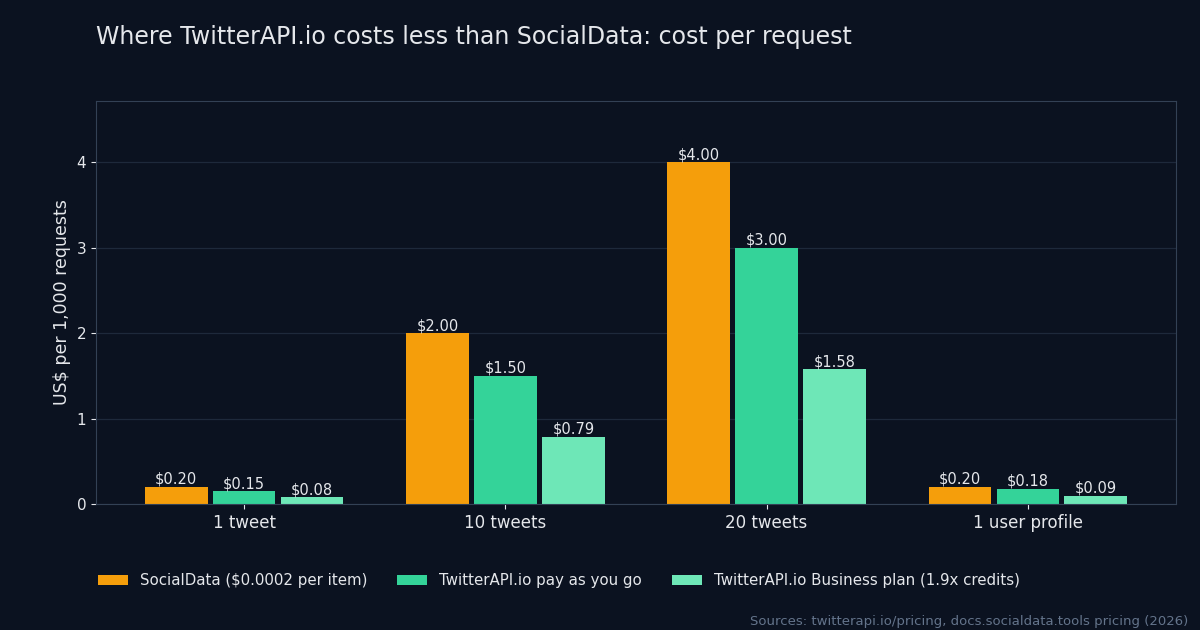
Price per data type
Because both bill per item, the difference on each endpoint comes down to page size and volume pricing. This table prices each kind of data the way you would actually fetch it. Green marks the lower price on that row.
| Data | TwitterAPI.io | SocialData |
|---|---|---|
| Keyword search page (advanced_search, ~20 tweets) | $0.003 (20 × $0.00015) | $0.004 (20 × $0.0002) |
| Search that returns 1 tweet | $0.00015 | $0.0002 |
| Full search pages, per 1,000 tweets | $0.15 | $0.20 |
| Replies, quotes, mentions, list tweets, community tweets | $0.00015 per tweet returned ($0.003 for 20) | $0.0002 per item returned ($0.004 for 20) |
| Retweeters, page of 100 users | $0.015 (15 credits per user) | $0.02 ($0.0002 per user) |
| User timeline page (~20 tweets) | $0.003 | $0.004 |
| Tweets by ID, per 1,000 | $0.15 | $0.20 (up to 100 per request) |
| Single profile lookup | $0.00018 | $0.0002 |
| Profiles in bulk, per 1,000 | $0.01 (100+ per request, by user ID) | $0.20 (up to 100 per request) |
| Followers / followings, per 1,000 | $0.01 (200 per page) | $0.20 |
| Follower IDs only, per 1,000 | $0.0045 (up to 5,000 per page) | No IDs-only endpoint |
| Verified followers, per 1,000 | $0.0075 ($0.00015 per page of 20) | $0.20 |
| Does account A follow account B? | $0.001 (check_follow_relationship) | $0.004 (Verify User Following) |
| Trends | 15 credits per trend returned | Not offered |
| Keyword rule checked on a schedule, pushed to you | $0.00015 per empty check; $0.00015 per matched tweet | Search monitor: $0.0002 per empty execution, $0.0002 per tweet delivered |
| Real-time feed of 50 fixed accounts | Twitter Stream Professional: $149 a month | 50 user monitors: about $224.50 a month |
Items per page: SocialData's search reference (docs.socialdata.tools/reference/get-search-results) says Twitter typically returns about 20 results per page, and its batch endpoints take up to 100 IDs. TwitterAPI.io returns up to 20 tweets per search or timeline page, up to 200 followers and 20 verified followers per page, and up to 5,000 follower IDs. TwitterAPI.io prices are from our pricing page and API reference; SocialData prices from its pricing page (docs.socialdata.tools/getting-started/pricing) and monitoring pricing (docs.socialdata.tools/monitoring/pricing), checked in 2026.
What a month costs: nine workloads
Rate cards only matter once they meet a workload. These are nine common jobs, each costed on both services with the arithmetic shown, so you can swap in your own numbers.
- Thirty keyword alerts, each polled every 60 seconds
- 1,296,000 checks a month; 90% find nothing, 10% find 3 tweets (30 requests a minute, inside its 120 limit)
- TwitterAPI.io30 × (38,880 × $0.00015 + 4,320 × $0.00045) = $233.28
- SocialData1,036,800 billable empty checks × $0.0002 + 388,800 tweets × $0.0002 = $285.12
- Research backfill, 1 million tweets
- 50,000 full 20-tweet search pages
- TwitterAPI.io50,000 × $0.003 = $150.00
- SocialData1,000,000 × $0.0002 = $200.00
- 200 accounts, user timeline every hour
- 144,000 timeline calls, ~20 tweets each
- TwitterAPI.io144,000 × $0.003 = $432.00
- SocialData2,880,000 tweets × $0.0002 = $576.00
- Same 200 accounts via search (from:handle, since_id)
- 144,000 searches, about 1 new tweet each
- TwitterAPI.io144,000 × $0.00015 = $21.60
- SocialData144,000 × $0.0002 = $28.80
- Enrich 100,000 profiles
- by user ID in batches of 100
- TwitterAPI.io100,000 × $0.00001 = $1.00
- SocialData100,000 × $0.0002 = $20.00
- Hydrate 100,000 tweets by ID
- IDs you already have, in batches
- TwitterAPI.io100,000 × $0.00015 = $15.00
- SocialData100,000 × $0.0002 = $20.00
- Export 1 million followers
- 200 per page here
- TwitterAPI.io5,000 pages × $0.002 = $10.00
- SocialData1,000,000 × $0.0002 = $200.00
- 100,000 verified followers
- 20 per page here, billed per page
- TwitterAPI.io5,000 pages × $0.00015 = $0.75
- SocialData100,000 × $0.0002 = $20.00
- Real-time feed of 50 fixed accounts
- push delivery of new tweets
- TwitterAPI.ioTwitter Stream Professional: $149.00
- SocialData50 user monitors × ~$4.49 = ~$224.50
| Workload | Assumption | TwitterAPI.io | SocialData |
|---|---|---|---|
| Thirty keyword alerts, each polled every 60 seconds | 1,296,000 checks a month; 90% find nothing, 10% find 3 tweets (30 requests a minute, inside its 120 limit) | 30 × (38,880 × $0.00015 + 4,320 × $0.00045) = $233.28 | 1,036,800 billable empty checks × $0.0002 + 388,800 tweets × $0.0002 = $285.12 |
| Research backfill, 1 million tweets | 50,000 full 20-tweet search pages | 50,000 × $0.003 = $150.00 | 1,000,000 × $0.0002 = $200.00 |
| 200 accounts, user timeline every hour | 144,000 timeline calls, ~20 tweets each | 144,000 × $0.003 = $432.00 | 2,880,000 tweets × $0.0002 = $576.00 |
| Same 200 accounts via search (from:handle, since_id) | 144,000 searches, about 1 new tweet each | 144,000 × $0.00015 = $21.60 | 144,000 × $0.0002 = $28.80 |
| Enrich 100,000 profiles | by user ID in batches of 100 | 100,000 × $0.00001 = $1.00 | 100,000 × $0.0002 = $20.00 |
| Hydrate 100,000 tweets by ID | IDs you already have, in batches | 100,000 × $0.00015 = $15.00 | 100,000 × $0.0002 = $20.00 |
| Export 1 million followers | 200 per page here | 5,000 pages × $0.002 = $10.00 | 1,000,000 × $0.0002 = $200.00 |
| 100,000 verified followers | 20 per page here, billed per page | 5,000 pages × $0.00015 = $0.75 | 100,000 × $0.0002 = $20.00 |
| Real-time feed of 50 fixed accounts | push delivery of new tweets | Twitter Stream Professional: $149.00 | 50 user monitors × ~$4.49 = ~$224.50 |
Anything that moves real volume costs less on TwitterAPI.io: by about 1.3 times on search backfills, timelines and tweets by ID (25% lower per tweet), and 20 times or more on profiles in bulk, followers and verified followers.
Polling and keyword monitoring at volume
Above 12 checks a minute, polling costs less on TwitterAPI.io whatever share of checks comes back empty: an empty check is $0.00015 here against $0.0002 per billable empty check there, and each tweet found is $0.00015 against $0.0002. The thirty-alert workload above shows it at scale: $233.28 a month here against $285.12.
SocialData's rate limit is 120 requests a minute in total, so one account can run at most 120 one-minute polls. Its hosted search monitors are billed separately: its monitoring pricing (docs.socialdata.tools/monitoring/pricing) charges $0.0002 for every execution that delivers nothing, which at the default 30-second refresh is a floor of about $17.28 a month per query. Our keyword filter rules charge $0.00015 for an empty check ($12.96 a month at the same refresh) and $0.00015 per matched tweet against $0.0002, so a filter rule costs less per query than a search monitor at any match rate.
Poll accounts for new posts at the minimum price
Timelines already cost less here than on SocialData ($0.003 against $0.004 for a 20-tweet page), but most timeline polling is really asking “has this account posted anything new?”. A timeline call answers by returning the latest 20 tweets, and you pay for all of them. Asked as a search, the question only returns what is new. A query like from:nasa since_id:<last id> costs $0.00015 when nothing is new and $0.0003 for two new tweets, 15 credits per tweet it returns.
import os, time, requests

KEY = os.environ["TWITTERAPI_IO_KEY"]
HANDLES = ["nasa", "spacex", "esa"]  # accounts to watch
since = {h: None for h in HANDLES}

def check(handle):
    # the first run (no since_id yet) returns up to 20 recent tweets
    q = f"from:{handle}" + (f" since_id:{since[handle]}" if since[handle] else "")
    for _ in range(5):
        r = requests.get("https://api.twitterapi.io/twitter/tweet/advanced_search",
                         headers={"X-API-Key": KEY},
                         params={"query": q, "queryType": "Latest"}, timeout=30)
        if r.status_code == 429:
            # unpaid accounts are limited to 1 request every 5 s: wait, retry this account
            time.sleep(5)
            continue
        break
    r.raise_for_status()
    tweets = r.json().get("tweets", [])
    if tweets:
        since[handle] = max(tweets, key=lambda t: int(t["id"]))["id"]
    return tweets  # 0 new tweets costs $0.00015; each new tweet $0.00015

while True:
    for h in HANDLES:
        try:
            for t in check(h):
                print(h, t["id"], t["text"][:80])
        except requests.RequestException as e:
            print("skipped", h, e)  # network error or 5xx: retry next round
    time.sleep(3600)  # hourly; 3 accounts x 720 checks = 2,160 checks a month
Every new tweet a check finds costs $0.00015 here against $0.0002 on SocialData, so the 200-account workload in the table above (about one new tweet per check) comes to $21.60 a month here against $28.80. Test the delay before relying on search for alerts measured in seconds: search results can arrive a little later than the timeline.
Features and limits
| TwitterAPI.io | SocialData | |
|---|---|---|
| Billing unit | Per item returned: $0.00015 per tweet, $0.00018 per profile, less per item for bulk profiles and follower pages; $0.00015 minimum per request | $0.0002 per item returned on most endpoints; a few per request ($0.001 extended bio, $0.004–$0.008 social-action checks) |
| Free credits | $1, no card, if the account passes the invisible bot check (one per person and network); valid 31 days | Home page: "Try for Free", no credit card required; fulfillment policy: a trial balance on sign-up (amount not stated); FAQ: no free plan (a demo account on request) |
| Refunds | Unused purchased top-up credits, on request within 30 days of purchase; subscriptions non-refundable except where the law requires | Unused deposits, within 14 days of payment, "no questions asked" |
| Rate limit | 20 requests/s once you have paid (0.2 before); 50 on Scale, 500 on Business, higher on request | 120 requests per minute (2/s) per account, shared across endpoints; higher on request at no charge |
| Endpoints | 76 in the public API reference: reads, writes, filter rules, monitoring | About 30 data endpoints, 3 social-action checks and a monitoring API; read-only |
| Keyword rules pushed to you | Filter rules by webhook or WebSocket | Search monitors by webhook (refresh every 1–3,600 seconds) |
| Account monitoring delay | Twitter Stream: under 1 second for 80% of tweets | User monitors: up to 30 seconds |
| Write actions | Post, reply, like, retweet, follow, DM and more (login cookies plus a proxy) | None: read-only by design, no X account connected |
| Auth | X-API-Key header | Authorization: Bearer |
| Response shape | camelCase tweet fields (id, text, createdAt, likeCount, author.userName); next_cursor and has_next_page | Twitter v1.1-style snake_case fields (id_str, full_text, tweet_created_at, favorite_count, user.screen_name); next_cursor |
| SDK | Plain HTTP; code samples in the docs | Plain HTTP ("No SDK"); code samples in the docs |
SocialData figures from its home page and FAQ (socialdata.tools), pricing (docs.socialdata.tools/getting-started/pricing), rate limits (docs.socialdata.tools/getting-started/rate-limits), API overview (docs.socialdata.tools/getting-started/overview), monitoring (docs.socialdata.tools/monitoring/introduction), MCP (docs.socialdata.tools/mcp/introduction) and fulfillment policy (socialdata.tools/legal/fulfillment-policy) pages; TwitterAPI.io from our pricing, rate limits, Twitter Stream, MCP server and refund policy pages. Checked in 2026.
Rate limits in practice
SocialData's rate-limit page (docs.socialdata.tools/getting-started/rate-limits) gives every account 120 requests a minute, shared across all endpoints, and offers higher limits “at no extra charge” if your app generates significant volume; over the limit you get a 429 and its errors page (docs.socialdata.tools/getting-started/errors) recommends exponential backoff. TwitterAPI.io allows 0.2 requests a second before the first payment, 20 after it (1,200 a minute), 50 on the Scale plan and 500 on Business, higher on request, and returns 429 with no Retry-After header, so back off about a second and retry. Your normal load may never notice the difference; a backfill will. Fetching 1 million tweets as 50,000 full search pages takes about 7 hours at 120 a minute and about 42 minutes at 20 a second.
Endpoint coverage
Most read endpoints exist on both: search with the full Twitter operator syntax, profiles (single and in batches), user tweets, mentions, followers, following, verified followers, replies, quotes, retweeters, threads, articles, list members and tweets, community details, members and tweets, and Spaces. TwitterAPI.io also has endpoints SocialData does not offer:
- Trends (
/twitter/trends) - Follower IDs only, up to 5,000 per page (
/twitter/user/followers_ids) - List followers; community moderators
- Write actions: post, reply, like, retweet, follow, DM, media upload
- Keyword filter rules pushed by webhook or WebSocket
Real-time delivery
Both push data instead of making you poll, in different shapes. SocialData's Monitoring API (docs.socialdata.tools/monitoring/introduction) creates one monitor per account and event type (new tweets, new follows, profile changes) or per search query, and sends each event as its own signed webhook. Its docs state: “We do not promise real-time delivery”; a user monitor delivers an event up to 30 seconds after it happens. User monitors are billed by the hour per monitor. TwitterAPI.io's Twitter Stream is a monthly plan for a list of accounts and delivers 80% of tweets in under a second; keyword filter rules run on our side and push matches by webhook or WebSocket, billed like polling the search yourself.
| Accounts watched | TwitterAPI.io Twitter Stream | SocialData user monitors |
|---|---|---|
| 20 accounts | $79 | ≈ $89.80 |
| 50 accounts | $149 | ≈ $224.50 |
| 150 accounts | $299 | ≈ $598.50 |
| 500 accounts | $499 | ≈ $1,745 |
| Detection delay | Under 1 second for 80% of tweets (Twitter Stream page) | Up to 30 seconds, usually less; SocialData says it does not promise real-time delivery |
SocialData monthly figures are its own estimates per monitor, from its monitoring pricing (docs.socialdata.tools/monitoring/pricing). From 18 accounts up Twitter Stream costs less: by about a third at 50 ($149 against about $224.50) and about 3.5 times less at 500, with most tweets delivered in under a second.
AI agents and MCP
SocialData runs a hosted MCP server (docs.socialdata.tools/mcp/introduction) at its API address, authenticated with the same Bearer key and billed like the REST calls; it notes that the claude.ai and ChatGPT connector interfaces cannot use it because they need OAuth. TwitterAPI.io's MCP server covers search, users, followers, replies and trends, open source under the MIT license and run as an npx package. Both are read-only. The cost difference follows the REST prices: an agent paging through followers pays $0.20 per 1,000 there and $0.01 here, and an agent running searches pays $0.003 for a full page here against $0.004 there.
Write actions
SocialData is read-only: it does not post, like or follow, and has no X account connection. TwitterAPI.io has write endpoints (post, reply, like, retweet, follow, DM, media upload) that take login cookies from its login endpoint plus a proxy. If you need both reading and posting from one provider, only TwitterAPI.io covers it; either way, keep automated actions on an X account human-paced.
The same request on both
The paths and field names differ more than between most providers, because SocialData returns Twitter v1.1-style objects and puts user IDs in the path. A search is still one GET on each:
# TwitterAPI.io
curl -H "X-API-Key: $TWITTERAPI_IO_KEY" \
  "https://api.twitterapi.io/twitter/tweet/advanced_search?query=from%3Anasa&queryType=Latest"

# SocialData
curl -H "Authorization: Bearer $SOCIALDATA_KEY" -H "Accept: application/json" \
"https://api.socialdata.tools/twitter/search?query=from%3Anasa&type=Latest"| TwitterAPI.io | SocialData | |
|---|---|---|
| Base URL | https://api.twitterapi.io | https://api.socialdata.tools |
| Auth header | X-API-Key: <key> | Authorization: Bearer <key> |
| Search | /twitter/tweet/advanced_search?query=&queryType=Latest | /twitter/search?query=&type=Latest |
| User timeline | /twitter/user/last_tweets?userName= | /twitter/user/{user_id}/tweets |
| Followers | /twitter/user/followers?userName= | /twitter/user/{user_id}/followers |
| Profiles in bulk | /twitter/user/batch_info_by_ids?userIds= | POST, up to 100 IDs or usernames |
| Results array | tweets | tweets (users for follower lists) |
| Tweet ID / text | id / text | id_str / full_text |
| Created at | createdAt | tweet_created_at |
| Likes / retweets / replies | likeCount / retweetCount / replyCount | favorite_count / retweet_count / reply_count |
| Views / quotes / bookmarks | viewCount / quoteCount / bookmarkCount | views_count / quote_count / bookmark_count |
| Author handle / followers | author.userName / author.followers | user.screen_name / user.followers_count |
| Next page | next_cursor + has_next_page | next_cursor |
SocialData request and response fields from its search (docs.socialdata.tools/reference/get-search-results), followers (docs.socialdata.tools/reference/get-user-followers), authentication (docs.socialdata.tools/getting-started/authentication) and errors (docs.socialdata.tools/getting-started/errors) pages. Compare the full objects for every endpoint you use before moving production traffic.
One adapter for either provider
If you want to run both, or keep the option to move, put the differences in one place. This TypeScript generator pages through a search on either service, maps each tweet to one shape, backs off and retries on 429, and stops with a clear error on SocialData's 402 (balance empty):
// One client, either provider. Base URL, auth header, search path,
// sort parameter, end-of-results rule and tweet fields differ.
type Provider = "twitterapi.io" | "socialdata"

type Tweet = { id: string; text: string; createdAt: string; likes: number; author: string }

const CONFIG = {
  "twitterapi.io": {
    url: (q: URLSearchParams) => `https://api.twitterapi.io/twitter/tweet/advanced_search?${q}`,
    headers: (key: string) => ({ "X-API-Key": key }),
    params: (query: string) => ({ query, queryType: "Latest" }),
    hasMore: (body: any) => Boolean(body.has_next_page),
    toTweet: (t: any): Tweet => ({ id: t.id, text: t.text, createdAt: t.createdAt, likes: t.likeCount, author: t.author?.userName }),
  },
  socialdata: {
    url: (q: URLSearchParams) => `https://api.socialdata.tools/twitter/search?${q}`,
    headers: (key: string) => ({ Authorization: `Bearer ${key}`, Accept: "application/json" }),
    params: (query: string) => ({ query, type: "Latest" }),
    hasMore: (body: any) => (body.tweets ?? []).length > 0, // no separate flag: stop on an empty page
    toTweet: (t: any): Tweet => ({ id: t.id_str, text: t.full_text ?? t.text, createdAt: t.tweet_created_at, likes: t.favorite_count, author: t.user?.screen_name }),
  },
} as const

const sleep = (ms: number) => new Promise((r) => setTimeout(r, ms))

export async function* searchTweets(provider: Provider, key: string, query: string, maxPages = 10) {
  const c = CONFIG[provider]
  let cursor = ""
  for (let page = 0; page < maxPages; page++) {
    const params = new URLSearchParams(c.params(query))
    if (cursor) params.set("cursor", cursor)
    let res: Response
    for (let attempt = 0; ; attempt++) {
      res = await fetch(c.url(params), { headers: c.headers(key) })
      if (res.status !== 429 || attempt === 5) break
      await sleep(1000 * 2 ** attempt) // exponential backoff: 1 s, 2 s, 4 s...
    }
    if (res.status === 402) throw new Error(`${provider}: balance empty, top up`)
    if (!res.ok) throw new Error(`${provider} ${res.status}`)
    const body = await res.json()
    for (const t of body.tweets ?? []) yield c.toTweet(t)
    if (!c.hasMore(body) || !body.next_cursor) return
    cursor = body.next_cursor
  }
}
Switching checklist
- List the endpoints you call and how often. Price the list with the table above; most bills are two or three endpoints.
- Measure your real items per request and how many checks you run per minute; above 12 checks a minute polling costs less here whatever share comes back empty.
- Count the accounts you watch and decide how much delay you can accept: from 18 accounts up, or for sub-second alerts, Twitter Stream costs less and delivers faster.
- Replace user-ID path parameters with query parameters, and map the snake_case tweet fields to camelCase (or use the adapter above).
- Replace one-by-one profile lookups with
/twitter/user/batch_info_by_idsin batches of 100 or more, and use/twitter/user/followers_idsif you only need IDs. - Load-test with your real backfill. On TwitterAPI.io make a first payment first (unpaid accounts are limited to 0.2 requests a second); on SocialData ask support for a higher limit before you need it.
- Run both in parallel for a few days and compare bills and row counts before cutting over. TwitterAPI.io's signup credit covers a test without a card.
Where TwitterAPI.io is the better pick
- Your searches and timelines usually return tweets: $0.00015 per tweet against $0.0002 (25% lower), $0.003 for a full page against $0.004.
- You enrich profiles or export followers: $0.01 per 1,000 against $0.20.
- You poll or monitor keywords at more than 12 checks a minute.
- You backfill at volume and need more than 2 requests a second: 20 once paid, up to 500 on Business.
- You watch 18 or more accounts, or need most tweets in under a second.
- You need keyword rules pushed over WebSocket, trends, follower IDs, or write actions.
Price your own workload
The calculator from our Twitter API price comparison, with SocialData highlighted. Enter how many searches you run, how many tweets they usually return and the request rate you need. It prices every SocialData item at $0.0002 and counts every empty response there as free, so for polling above 3 empty checks a minute it understates SocialData's bill. If most of your checks come back empty (low-frequency polling), compare the per-check price for your volume; on the Business plan an empty check costs $0.000079 after 12 monthly payments ($0.0001 in the first month). For the full rate cards see Twitter API pricing.
Each advanced-search call returns up to 20 posts.
Lower this if many of your searches come back empty or short (monitoring jobs usually do).
User info / follower pages, priced per profile on most APIs.
Vendors with a lower published limit are flagged.
| Provider | Pricing model | Per 1K posts | Monthly cost | Rate limit |
|---|---|---|---|---|
| GetXAPI | Growth plan | $0.025 | $49.00 | not published |
| TwitterAPIs.com | $0.0008 per call | $0.044 | $88.00 | 600 rpm (10 rps) |
| TwitterAPI.io (pay-as-you-go) | $0.15 / 1K posts, $0.18 / 1K profiles, min $0.00015 per call | $0.151 | $302 | 20 rps (0.2 before first payment) |
| SocialData | $0.0002 per item returned | $0.201 | $402 | 120 rpm (2 rps): below your 5 rps |
| TwitterAPI.io (subscription) | Scale plan, 50 rps | $0.249 | $499 | 20–500 rps by tier |
| Sorsa | Enterprise plan (500,000 requests) | $0.449 | $899 | 20 rps |
| Official X API | $0.005 per post read, $0.010 per user read | $5.05 | $10,100 | per-endpoint limits |
Prices from each provider's own pricing page (sources below). Per-call providers charge the same for a call that returns 20 posts or none; TwitterAPI.io charges per post with a 15-credit ($0.00015) minimum per call. SocialData doesn't charge empty responses up to 3 a minute; the calculator assumes your requests are spread evenly across the month. Rows are sorted by monthly cost for the workload above.
Is TwitterAPI.io legit? What our public pages state
People comparing API providers reasonably ask who is behind them. These are the facts TwitterAPI.io publishes about itself, each with the page it comes from.
| What it says | Where | |
|---|---|---|
| Operator | Prism Digital, LLC, 131 Continental Dr Suite 305, Newark, DE 19713, United States | Contact page and site footer |
| Governing law | The Terms of Service are governed by the laws of the State of Delaware | Terms of Service |
| Payments | Processed by Stripe; subscriptions are Stripe only; crypto top-ups are also accepted | Terms, payment page |
| Refunds | Unused purchased top-up credits refundable on request within 30 days of purchase; subscriptions non-refundable except where required by law; cancel any time from the dashboard | Refund policy |
| Card statement | Subscription renewals appear under the descriptor TWITTERAPI.IO | Refund policy |
| Affiliation | An independent third-party service, not affiliated with X Corp. | Site footer |
| Support | hello@twitterapi.io, plus Telegram and Discord | Contact page |
| Pricing and limits | Prices and rate limits are published, along with the full API reference | Pricing, rate limits, docs |
SocialData publishes the equivalent on its side: its home page states it is an independent third-party service not affiliated with X Corp., its status page (status.socialdata.tools) reports service uptime, and its fulfillment policy (socialdata.tools/legal/fulfillment-policy) sets out the 14-day refund. Whichever you choose, the simplest due diligence is the same: start on a small balance, check the bill against your own request log, and keep the refund window in mind.
Both against the official X API
Both services exist because of what the official API costs. X now bills per resource read with no subscriptions: according to its pricing documentation, $0.005 per post read, $0.010 per user read and $0.010 per follower or following read; creating a post costs $0.015, or $0.20 if it contains a URL. Pay-per-use is capped at 3 million post reads per monthly billing cycle, above which you need an Enterprise agreement. New accounts get $20 of credits when they save a first eligible card, plus a match of the first auto-recharge up to $50.
| 1 million tweets read | Cost | Share of the official price |
|---|---|---|
| Official X API ($0.005 per post) | $5,000 | 100% |
| SocialData ($0.0002 per tweet) | $200 | 1/25 |
| TwitterAPI.io (full search pages) | $150.00 | 1/33 |
The official API still makes sense when you need a contract with X, posting through X's own consent screen, or data that only an authenticated first-party app can read. For profiles and follower lists the gap is wider: 1,000 user reads are $10 officially, $0.20 on SocialData and $0.01 here in bulk. See TwitterAPI.io vs the official X API for the full comparison.
Quick decision guide
| If your main workload is | Lower cost on | Why |
|---|---|---|
| Brand monitoring and social listening above 12 checks a minute | TwitterAPI.io | $0.00015 vs $0.0002 per billable empty check; $0.00015 vs $0.0002 per tweet returned |
| Keyword backfills and research datasets | TwitterAPI.io | $0.15 vs $0.20 per 1,000 tweets; 20 vs 2 requests a second |
| New posts from a list of accounts (polling) | TwitterAPI.io | from: search with since_id, $0.00015 vs $0.0002 per new tweet |
| Full history of accounts | TwitterAPI.io | $0.003 vs $0.004 per 20-tweet page |
| Profile enrichment | TwitterAPI.io | $0.01 vs $0.20 per 1,000 in bulk |
| Follower graphs | TwitterAPI.io | $0.01 vs $0.20 per 1,000 (IDs only: $0.0045 here) |
| Real-time feed of 18+ accounts, or sub-second alerts | TwitterAPI.io | $79 vs ~$90 for 20, $149 vs ~$225 for 50; most tweets under a second |
| Posting, likes, DMs | TwitterAPI.io | SocialData is read-only |
Questions
- Is TwitterAPI.io cheaper than SocialData?
- For requests that return data, yes. Both bill per item: $0.00015 per tweet here against $0.0002 there, 25% lower at list price, so a full 20-tweet search or timeline page is $0.003 against $0.004 and 1,000 tweets are $0.15 against $0.20. Profiles in bulk and followers cost $0.01 per 1,000 here and verified followers $0.0075 per 1,000, against $0.20 for each there. Polling at more than 12 checks a minute also costs less here, whatever share of checks comes back empty, and so does watching 18 or more accounts in real time.
- Is TwitterAPI.io legit?
- TwitterAPI.io is operated by Prism Digital, LLC, with a business address at 131 Continental Dr Suite 305, Newark, DE 19713, United States, as stated in the site footer and on the contact page. Its Terms of Service are governed by Delaware law. Card payments and subscriptions are processed by Stripe, and the payment page also accepts crypto top-ups. Unused purchased top-up credits can be refunded on request within 30 days of purchase; subscriptions are non-refundable except where the law requires, and can be cancelled from the dashboard at any time. Pricing, rate limits and the full API reference are public, and support is reached at hello@twitterapi.io. It is an independent third-party service, not affiliated with X Corp.
- Does SocialData have a free plan?
- Its own pages differ. The home page offers 'Try for Free', with no credit card required, and its fulfillment policy says new accounts get a trial balance on sign-up, without stating the amount, while its FAQ says it does not currently offer a free plan but may set up a demo account if you contact support. TwitterAPI.io gives $1 with no card if the account passes the invisible bot check (one per person and network), valid for 31 days: about 333 full search pages or 6,666 empty ones.
- Which one has higher rate limits?
- SocialData allows 120 requests a minute per account (2 a second), shared across all endpoints, and raises it on request at no extra charge. TwitterAPI.io allows 20 requests a second once you have paid (0.2 before the first payment), 50 on the Scale plan and 500 on Business, and higher on request. A 50,000-page backfill takes about 7 hours at 120 a minute and about 42 minutes at 20 a second.
- What are the refund policies?
- SocialData refunds unused deposits within 14 days of payment, "no questions asked". TwitterAPI.io refunds unused purchased top-up credits on request within 30 days of purchase, less any bonus credits issued with that purchase; subscriptions are non-refundable except where the law requires.
- Can I switch from SocialData to TwitterAPI.io without rewriting my code?
- The request side is small: a different base URL, the X-API-Key header instead of a Bearer token, and different paths (SocialData puts the user ID in the path, such as /twitter/user/{id}/tweets; TwitterAPI.io uses query parameters, such as /twitter/user/last_tweets?userName=). The bigger change is the response: SocialData returns Twitter v1.1-style snake_case fields (id_str, full_text, favorite_count, user.screen_name) and TwitterAPI.io returns camelCase fields (id, text, likeCount, author.userName). The field map and adapter on this page cover both.
- Which is better for real-time alerts?
- For speed, TwitterAPI.io: Twitter Stream delivers most tweets in under a second, and keyword filter rules push matches by webhook or WebSocket. SocialData's monitors deliver within about 30 seconds and it says it does not promise real-time delivery. From 18 accounts up, Twitter Stream also costs less: $79 against about $89.80 for 20 accounts, and $149 against about $224.50 for 50.
- Is either one an official X API?
- No. Both are independent third-party services that read public X data without an X developer account, and both state they are not affiliated with X Corp. The official X API is billed per resource read: $0.005 per post and $0.010 per user, capped at 3 million post reads a month before an Enterprise agreement.
Sources
- TwitterAPI.io: pricing, rate limits, Twitter Stream, MCP server, terms, refund policy, contact, API docs.
- SocialData: home page and FAQ (socialdata.tools), pricing (docs.socialdata.tools/getting-started/pricing), rate limits (docs.socialdata.tools/getting-started/rate-limits), API overview (docs.socialdata.tools/getting-started/overview), authentication (docs.socialdata.tools/getting-started/authentication), errors (docs.socialdata.tools/getting-started/errors), search (docs.socialdata.tools/reference/get-search-results), followers (docs.socialdata.tools/reference/get-user-followers), monitoring (docs.socialdata.tools/monitoring/introduction), monitoring pricing (docs.socialdata.tools/monitoring/pricing), MCP (docs.socialdata.tools/mcp/introduction), MCP tools (docs.socialdata.tools/mcp/tools), fulfillment policy (socialdata.tools/legal/fulfillment-policy), status page (status.socialdata.tools).
- Official X API: pricing documentation.
- All figures checked in 2026. Prices change; check both pricing pages before you commit to a large job.