Usernames for Twitter (X): The Rules, 48 Ideas, and How to Check Availability in 2026
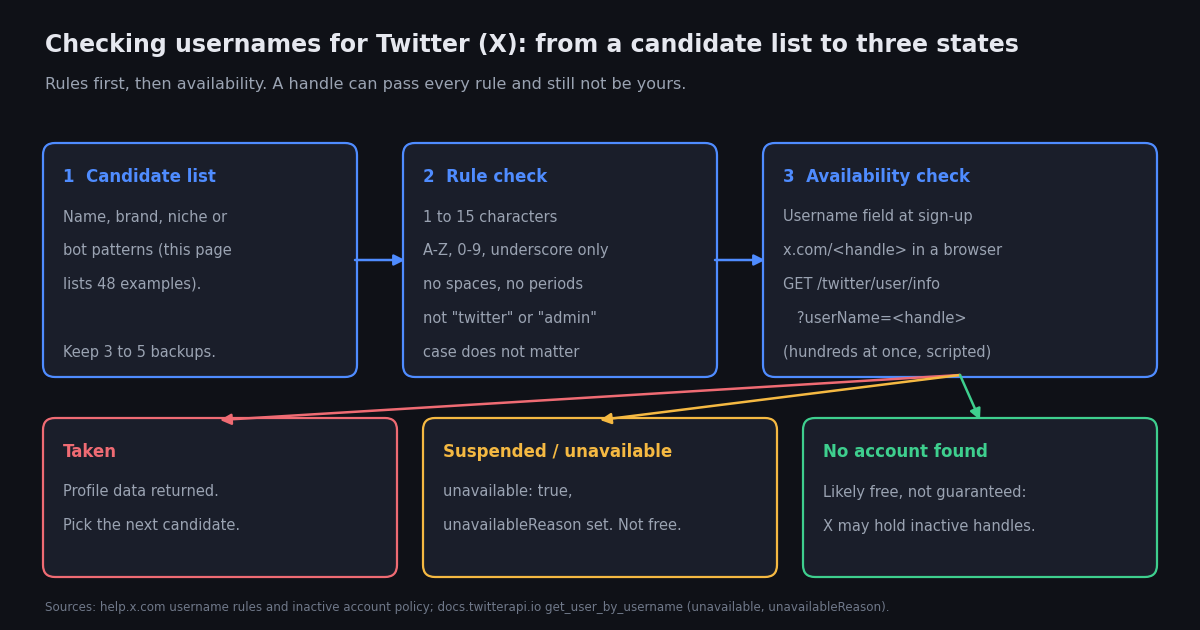
People searching for usernames for Twitter usually want three things at once: the rules, so the handle they have in mind is not rejected at sign-up; a list of ideas, because the obvious ones are taken; and a fast way to find out whether a candidate is free before they get attached to it. Most pages on this query answer the second with a random generator and skip the first and third. This one does all three, in that order, and ends with the method that scales: a short Python script that checks a whole list of candidates against a profile endpoint and tells you which are taken, which belong to suspended accounts, and which return no account at all.
A note on scope. This is a consumer guide to choosing and checking a handle. The username lookup API reference on this site is a different page for a different reader: it documents how developers resolve a known handle to a user ID and profile fields. If you already have a handle and want its data, go there; if you are still choosing one, stay here.
Everything about X's rules below is taken from X's own help center and developer documentation and was re-verified for 2026; where X's behaviour is reported by press rather than stated in its own documentation, the text says so. The 48 example handles were generated for this page to show the pattern logic. They are examples, not a claim that any of them is free.
The username rules X enforces
X publishes its username rules on a single help-center page, and the sign-up form and the Settings page enforce them live: type a handle that breaks one and the field tells you before you can save. The rules are short, and the table gives each one with its source and the practical consequence.
Two things the rules page does not say, and that trip people up. First, underscores at the start or end are allowed, and X's own help page suggests adding them to claim a unique variant; they are legal but easy to mistype when read aloud, so use at most one. Second, the rules apply to the @handle only. The display name that appears next to it accepts spaces and emoji and runs to 50 characters, a limit Twitter raised from 20 in 2017 (widely reported at the time, for example by Digital Trends), and changing it does nothing to your URL, so most of the creativity that overflows 15 characters belongs in the display name, not the handle.
Username versus display name, and what changing your handle does
X has two names per account. The username is the @handle: unique, 15 characters at most, and the thing in your profile URL. The display name is free text shown in bold above it, changeable at any time, and not unique. Many people searching for username ideas are really looking for a display name, and the distinction matters because the display name is where you can write Jane Okafor | Food writer, while the handle has to be janeokwrites.
Changing the handle is done in Settings. On the web, X's help center lists the path as the More button, then Settings and privacy, then Your account, then Account information, where you are asked for your password and can edit the Username field and save; on the mobile apps it is Settings and privacy, then Account, then Username (help.x.com change-handle page, verified 2026). If the handle is taken, the field says so and you pick another.
What carries over. X's help center states that changing your username does not affect your existing followers, Direct Messages, or replies (help.x.com, verified 2026). What it does not promise is that the old handle is held for you. The old @handle becomes a free username as far as the rules are concerned, old links to x.com/<oldhandle> stop resolving to your profile, and mentions in other people's historical posts stay as plain text pointing at whoever claims it next. Update your website, email signature, and printed material before you switch, not after.
How often can you change it? X's help pages do not state a limit, and we could not verify one from a second source, so treat frequent changes as a trust cost rather than a rule: followers who search for the old handle will not find you, and third-party tools that track by handle rather than by user ID will lose the thread. If you run anything that tracks accounts by name, the lookup reference linked at the bottom explains why to key on the numeric id instead.
Four idea frameworks with 48 example handles
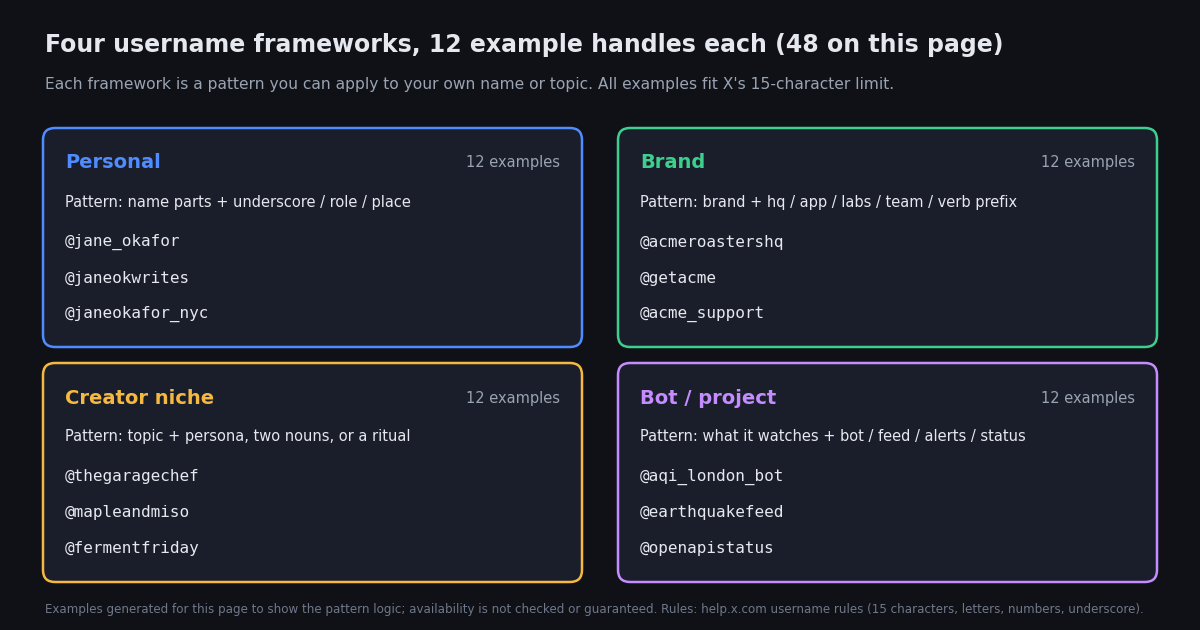
A username generator gives you random words. A framework gives you a pattern you can apply to your own name or topic and iterate when the first result is taken. The four below cover almost every account type; each comes with its pattern logic and twelve examples generated for this page. Every example fits the 15-character limit and the character rules. None has been checked for availability, and the point is the pattern, not the specific string.
Personal accounts. Start with the plain name and work outward: one underscore, then initial plus surname, then name plus what you do or where you are. Prefixes like its, hello, and real are the usual last resort and read fine, but real carries an implied claim and is best left to people who are actually impersonated. Avoid your birth year or a long run of digits: it leaks personal data, and fake-follower checkers commonly treat a handle ending in a long string of digits as one weak signal of a mass-created account, so a real person can be scored as a bot by tools their followers run (the twitter audit guide on this site explains the heuristic and its caveats).
Brands. The brand alone if you can get it; otherwise a suffix that describes the account's job rather than a random word. hq and team suit a main account, support a service account, app or labs a product account, and a verb prefix (get, try, drink) is what companies reach for when the noun is taken, because it reads as a call to action rather than a compromise. If you hold a registered trademark and the matching handle sits on an account that looks inactive, X's inactive account policy points trademark holders to its trademark policy rather than to a release request (help.x.com, verified 2026); for everyone else, the policy's advice is to pick a variation.
Creator niches. The handle should say what the account is about before the bio does. Topic plus persona (thegaragechef), two concrete nouns (mapleandmiso, byteandbrew), and a ritual (fermentfriday, sketchdaily_) all do that in under 15 characters. Avoid trend words you will outgrow and anything that pins you to one platform feature.
Bots and projects. Name the thing being watched and what the account does with it: aqi_london_bot, outagealerts_eu, openapistatus. X asks automated accounts to identify themselves: its help center describes an automated account label that appears under the profile name and handle and links the bot to the human-run account that manages it (help.x.com automated account labels, verified 2026), so the bot or feed suffix is a courtesy that matches what the label will say anyway.
How to check whether a username is available, one at a time
There are three manual ways to check a single candidate, and they tell you slightly different things.
The Username field. During sign-up, and later under Settings and privacy, Your account, Account information, the Username field validates as you type and tells you if a handle is taken or breaks a rule (help.x.com change-handle page, verified 2026). This is the authoritative answer, because it is X's own availability check, but it only works for one handle at a time and, after sign-up, only from inside an account you are willing to rename.
The profile URL. Open x.com/<handle> in a browser. A live account shows a profile; a suspended account shows a notice that the account is suspended; a handle with no account behind it shows a page saying the account does not exist. This is quick and needs no login, but it conflates two cases that matter: a handle with no account and a handle X is holding. Both show the same empty page.
Search. Searching the handle inside X, or through the user search guide linked below, finds accounts whose display name or handle contains the string, which is useful for spotting near-duplicates (janeokafor versus jane_okafor) that would confuse your audience even if your exact candidate is free.
Why "no account found" is not the same as "available"
The gap between an empty profile page and a handle you can actually register comes from three things X does with handles that are not in active use.
Inactive accounts are not released. X's inactive account policy says that to keep an account active you should log in at least every 30 days and that accounts may be permanently removed after prolonged inactivity, but in the same breath it says X cannot release inactive usernames at this time and advises picking an available variation instead; the only exception it points to is a trademark claim under X's trademark policy (help.x.com inactive account policy, verified 2026). In practice, a handle on an account that has not posted since 2012 may still be registered and will fail the Username field even though its profile page looks abandoned.
Deactivated accounts hold their handle for 30 days. X's help center says deactivation lasts 30 days, that the account can be reactivated within that window, and that the username and email address on a deactivated account become available for use on another account 30 days after deactivation (help.x.com deactivation page, verified 2026). During those 30 days the profile page is gone but the handle is not free.
Inactive handles are now distributed through a marketplace, not released. X has said it is launching a Handle Marketplace for inactive usernames, available to Premium subscribers: "priority" handles such as full names, multi-word phrases, and alphanumeric combinations are free to request for Premium Plus and Premium Business subscribers, with the handle returning to X after a 30-day grace period if the subscription lapses, while "rare" handles (short, generic, or culturally significant names) are sold through public drops and invitation-only purchases at prices X put at $2,500 to over seven figures (TechCrunch, 20 October 2025). We have not verified the marketplace's current state or terms from X's own documentation, so treat the details as reported rather than confirmed; the implication for a handle search is that short and generic handles with no account behind them are very likely held by X rather than free.
The practical rule: a handle that returns no account is a candidate, not a result. Keep three to five candidates per framework, check them in the order you prefer them, and register the first one the Username field accepts.
Check hundreds of candidate handles at once with the API
If you are naming a product, running a brand workshop, or registering bot accounts for several cities, you will have dozens of candidates and the browser method becomes tedious. A profile lookup endpoint turns the profile-URL test into a loop. GET /twitter/user/info takes a userName parameter and returns the profile under data with a status of success or error and a msg; the profile object includes userName, id, followers, createdAt, and three fields that matter here: unavailable (boolean), unavailableReason (for example suspended), and message (for example This account is suspended) (docs.twitterapi.io get_user_by_username, verified 2026). The lookup reference on this site documents a 404 status for a handle that does not exist, so the script treats a 404, or a non-success status with no profile, as "no account found".
That gives three states per handle, which map onto the table above: profile data returned means taken; unavailable true means a suspended or otherwise unavailable account, which is also not free; and no account found means likely free, with the caveats of the previous section, which the script prints at the end so nobody mistakes its output for a registration guarantee.
Rate limits and cost. Before the first payment an account is limited to 0.2 requests per second, so the script sleeps 5 seconds between calls and 1,000 candidates take about 83 minutes; once paid, the limit is 20 requests per second and the same list takes under a minute if you set TWITTERAPI_IO_RATE=20 (twitterapi.io/pricing, verified 2026). Profile reads are priced at 18 credits per profile returned, which is $0.18 per 1,000 profiles at 100,000 credits per dollar, so checking 1,000 candidate handles costs at most $0.18 on twitterapi.io; the official X API's pay-per-use tier prices user reads at $0.010 each, so the same 1,000 lookups would be about $10 there (docs.x.com pricing, verified 2026). New accounts that pass the automatic bot check get $1 in free credits (100,000 credits, no card, one per person or network, expiring after 31 days), which covers several thousand checks.
The function below classifies one handle; the end-to-end script at the bottom of the page reads a file of candidates, applies the rule check first so you do not spend a call on jane.okafor, and prints one line per handle.
import os

import requests

BASE = "https://api.twitterapi.io"
HEADERS = {"X-API-Key": os.environ["TWITTERAPI_IO_KEY"]}  # key from twitterapi.io/dashboard


def classify(handle):
    """Return (state, note) for one candidate handle: taken / suspended or unavailable / no account found."""
    r = requests.get(f"{BASE}/twitter/user/info", params={"userName": handle}, headers=HEADERS, timeout=30)
    if r.status_code == 404:
        return "no account found", None
    r.raise_for_status()
    body = r.json()
    user = body.get("data") or {}
    if body.get("status") != "success" or not user.get("userName"):
        return "no account found", body.get("msg")
    if user.get("unavailable"):
        return "suspended or unavailable", user.get("unavailableReason") or user.get("message")
    return "taken", f"@{user['userName']} ({user.get('followers') or 0:,} followers, since {user.get('createdAt')})"


if __name__ == "__main__":
    for h in ("nasa", "janeokafor_nyc"):
        state, note = classify(h)
        print(f"{h:16} {state:24} {note or ''}")
A checklist before you commit to a handle
Once the Username field accepts a candidate, run through this list before you save, because the handle is the one part of the profile that is painful to change later.
Say it out loud. If you have to spell it ("underscore, then jane"), it will be mistyped on podcasts and business cards. One underscore at most, no adjacent repeated letters that look like a typo, no digit that could be read as a letter.
Check the near-duplicates. Search the handle without its underscore and with common suffixes; if janeokafor is a live account with a similar display name, jane_okafor will send a share of your mentions to the wrong person. The user search guide linked below covers how to do this quickly.
Mind trademarks and impersonation. X's rules prohibit misleading impersonation, and its inactive account policy routes trademark disputes to a separate trademark policy (help.x.com, verified 2026). A handle that reads as a well-known brand or person, even if it is technically free, is a dispute waiting to happen.
Decide the capitalisation once. Uniqueness ignores case, so JaneOkafor and janeokafor are the same handle; the version you type in Settings is the version displayed. Pick the styling that reads best in a sentence and keep it consistent across your other profiles.
Set the profile up in the same sitting. A fresh handle with a default avatar, no banner, and no bio looks like the mass-created accounts that fake-follower checkers flag. The banner size guide linked below has the current dimensions; add the avatar, banner, and bio before you tell anyone the handle.
Keep the numeric ID, not just the handle. If you or anyone else will track the account programmatically, store the id the profile lookup returns alongside the handle. Handles change; the ID does not, which is why the lookup reference linked below keys everything on it.
"""Check a list of candidate Twitter (X) usernames: taken / suspended or unavailable / no account found.

Usage: python check_handles.py candidates.txt
One handle per line, with or without the leading @. Needs TWITTERAPI_IO_KEY in the environment.
Sleeps between calls to respect the 0.2 requests/s limit that applies before the first payment;
set TWITTERAPI_IO_RATE=20 once your account is paid. 'no account found' means likely free, not
guaranteed: X holds inactive handles and distributes some through its Handle Marketplace.
"""
import os
import re
import sys
import time

import requests

BASE = "https://api.twitterapi.io"
HEADERS = {"X-API-Key": os.environ["TWITTERAPI_IO_KEY"]}  # key from twitterapi.io/dashboard
RATE = float(os.environ.get("TWITTERAPI_IO_RATE", "0.2"))  # requests per second allowed on your tier
RULE = re.compile(r"^[A-Za-z0-9_]{1,15}$")  # X username pattern (docs.x.com user lookup by username)
RESERVED = ("twitter", "admin")  # help.x.com username rules: not allowed unless the account is official


def rule_check(handle):
    """Return a reason string if the handle breaks X's published rules, else None."""
    if not RULE.match(handle):
        return "fails format: 1-15 characters, letters, digits, underscore only"
    if any(word in handle.lower() for word in RESERVED):
        return "contains a reserved word (twitter / admin)"
    return None


def classify(handle):
    """Return (state, note) using the profile lookup endpoint."""
    r = requests.get(f"{BASE}/twitter/user/info", params={"userName": handle}, headers=HEADERS, timeout=30)
    if r.status_code == 404:
        return "no account found", None
    r.raise_for_status()
    body = r.json()
    user = body.get("data") or {}
    if body.get("status") != "success" or not user.get("userName"):
        return "no account found", body.get("msg")
    if user.get("unavailable"):
        return "suspended or unavailable", user.get("unavailableReason") or user.get("message")
    return "taken", f"@{user['userName']} ({user.get('followers') or 0:,} followers, since {user.get('createdAt')})"


if __name__ == "__main__":
    path = sys.argv[1] if len(sys.argv) > 1 else "candidates.txt"
    with open(path, encoding="utf-8") as fh:
        handles = [line.strip().lstrip("@") for line in fh if line.strip()]

    counts = {"taken": 0, "suspended or unavailable": 0, "no account found": 0, "skipped": 0}
    for handle in handles:
        problem = rule_check(handle)
        if problem:
            counts["skipped"] += 1
            print(f"{handle:16} skipped                  {problem}")
            continue
        state, note = classify(handle)
        counts[state] += 1
        print(f"{handle:16} {state:24} {note or ''}")
        time.sleep(1 / RATE)

    print()
    print(f"{len(handles)} candidates: {counts['taken']} taken, {counts['suspended or unavailable']} suspended or unavailable, "
          f"{counts['no account found']} no account found, {counts['skipped']} skipped by the rule check")
    print("'no account found' is likely free, not guaranteed: confirm in the Username field before you announce it.")
Questions readers ask
How many characters can a Twitter (X) username have?
At most 15, according to X's help center username rules. X's page on changing a handle adds that a username must be more than 4 characters, so new handles are effectively 5 to 15 characters. Shorter handles exist on accounts registered in earlier years, and X has said it treats short, generic handles as rare and sells them rather than releasing them.
Can a Twitter (X) username have spaces, periods, or hyphens?
No. X's help center allows only letters, numbers, and underscores, and the developer documentation encodes the same rule as the pattern ^[A-Za-z0-9_]{1,15}$. Spaces, periods, hyphens, emoji, and accented letters are rejected by the sign-up form. The display name shown above the handle is free text and can contain all of those.
Are Twitter (X) usernames case sensitive?
Not for uniqueness. x.com/nasa and x.com/NASA open the same profile, and the lookup pattern in X's developer documentation accepts both upper- and lower-case letters for the same handle. The capitalisation you type in Settings is the capitalisation displayed, so you can style the handle without changing who owns it.
Can I change my Twitter (X) username, and will I lose followers?
Yes, and no. X's help center lists the path as Settings and privacy, Your account, Account information, Username on the web, and Settings and privacy, Account, Username in the apps, and it states that changing your username does not affect your followers, Direct Messages, or replies. Old links to your previous handle stop resolving to your profile, and the old handle becomes claimable by someone else, so update your links first.
How do I get a username that belongs to an inactive account?
In most cases you cannot. X's inactive account policy says it cannot release inactive usernames and advises choosing a variation; trademark holders are pointed to X's trademark policy. X has said it is distributing inactive handles to Premium subscribers through a Handle Marketplace, with priority handles free to request for Premium Plus and Premium Business subscribers and rare handles sold at $2,500 and up (TechCrunch, October 2025); we have not verified the marketplace's current terms from X's own documentation.
If x.com/<handle> says the account doesn't exist, is the username free?
Probably, but not certainly. The same empty page appears for a handle nobody has registered, a handle on an account deactivated within the last 30 days (which stays tied to that account for 30 days, per X's help center), and a handle X is holding. The only authoritative check is the Username field at sign-up or in Settings, which tells you instantly whether you can save it.
What is a good username for Twitter (X)?
One that fits 15 characters, says who or what the account is, is easy to say and type, and will still fit in two years. For a person, your name with at most one underscore or a role or place suffix; for a brand, the brand plus hq, app, labs, team, or a verb prefix like get; for a creator, a topic plus persona; for a bot, what it watches plus bot, feed, or alerts. This page lists 48 examples across those patterns.
Is there a Twitter (X) username availability checker that works in bulk?
X does not offer one, but a profile lookup endpoint does the job. The script on this page reads a list of candidates, applies X's rules locally, calls GET /twitter/user/info for each, and prints taken, suspended or unavailable, or no account found. It respects the 0.2 requests per second free-tier limit and costs about $0.18 per 1,000 handles on twitterapi.io; the official X API prices the same user reads at $0.010 each.
Continue
- X Help Center: username rules (15 characters; letters, numbers, underscores; no Twitter or Admin unless official)
- X Help Center: how to change your username (Settings path; followers, DMs and replies unaffected)
- X Help Center: inactive account policy (log in every 30 days; inactive usernames are not released; trademark route)
- X developer docs: user lookup by username, the ^[A-Za-z0-9_]{1,15}$ pattern, the official and more expensive route to the same lookup
- TechCrunch, October 2025: X to launch a marketplace for inactive handles (priority vs rare, Premium tiers, pricing)
- twitterapi.io docs: Get User Info by userName (data, status, msg; unavailable, unavailableReason, message fields)
- Twitter (X) API overview: the hub for reading X data
- Twitter (X) username lookup API reference: resolve a handle to its user ID and profile fields
- Searching Twitter (X) users by name or handle, in the app and by API
- Twitter (X) banner size and profile image dimensions
- Free tool: check whether one X account follows another
- twitterapi.io pay-per-call pricing: 18 credits per profile read
Stop reading. Start building.
Starter credits cover real testing on real data. Google sign-in, no card, no application queue.
Get an API key