Twitter (X) User Search: Find Accounts by Name, Keyword or Bio
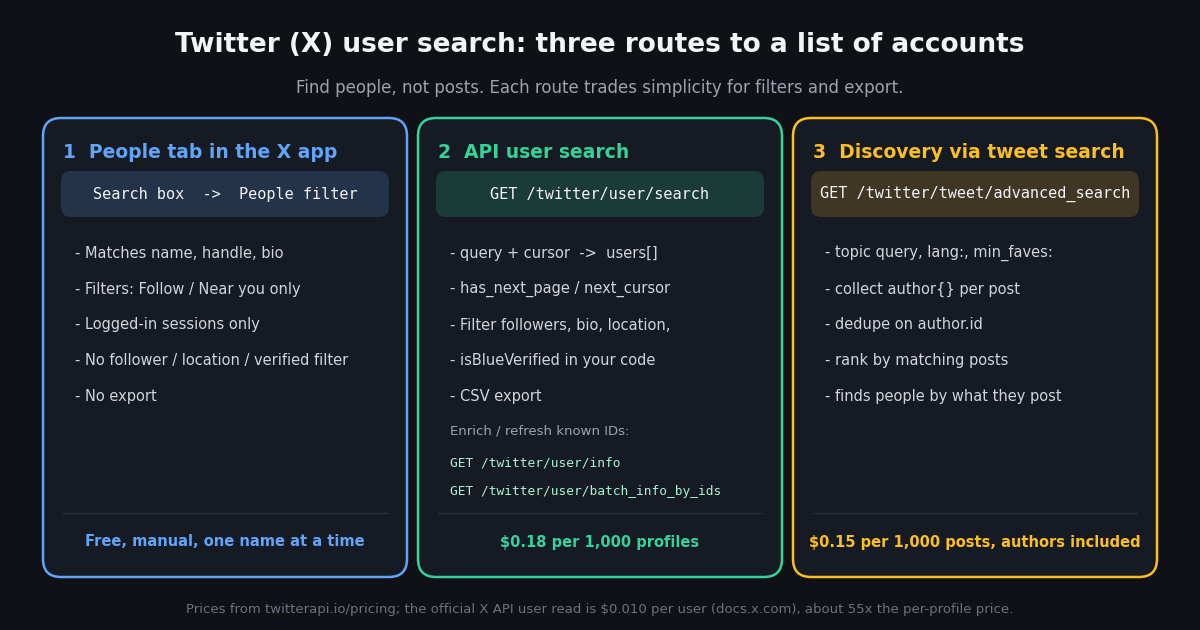
This page is about finding accounts, not posts. If you want to search what people have written, the advanced-search and search-operators guides linked at the bottom cover tweet search in depth; here the output is always a list of profiles. The two groups of people who search "twitter user search" want different things. One group wants to find a specific person or a type of account from inside the X app and keeps running into the limits of the People tab. The other group, mostly developers and analysts, wants a list they can filter and keep: creators in a niche, accounts with a keyword in the bio, people in a city, candidates for a follow list or an outreach sheet.
Both get a working answer here. The first half explains how X's own people search behaves in 2026, what it matches on and what it cannot do, so you stop fighting it. The second half gives the API route: one search endpoint that returns full profile objects, two enrichment endpoints, one indirect discovery path through post search, and a complete Python script that paginates, filters by follower count, bio keyword and verification, and exports a CSV. Every endpoint named is a real path, every price is quoted from the vendor's own pricing page, and the official X API is covered honestly as the more expensive alternative.
Nothing here touches your own X account. The API calls are read-only against public profile data, authenticated with an API key from the twitterapi.io dashboard, so there is no OAuth dance, no browser extension and no risk to the account you log in with.
How people search works inside X, and where it stops
X's own help page on finding people describes the feature in one paragraph: type a name or username into the search box at the top of the Home timeline (or the Explore tab in the app), then narrow the results with the People filter at the top of the results page. The filter panel adds two toggles, From anyone or People you follow, and Anywhere or Near you. The match runs across display name, username and bio text, so a keyword search such as "machine learning" does surface accounts with that phrase in their bio, ranked by X's own relevance model, which weights follower count and your social graph in ways X does not document.
Two constraints shape everything else on this page. First, search is for logged-in accounts only: X removed search for logged-out visitors in April 2023, so there is no way to run a people search from a plain browser session or a script that is not signed in. Second, the Advanced search form filters posts, not people. Its Accounts section (from these accounts, to these accounts, mentioning these accounts) narrows which posts you see; none of its fields applies to the People tab. There is no operator for follower count, for text in the location field, for account age, for verification, or for excluding a word from the bio.
If your need sits in a row with a "no", the rest of this page is for you. If you only need to find one person whose name you know, the People tab is the right tool and nothing below will be faster.
Three routes to find X accounts, compared
The honest comparison, with prices quoted from the twitterapi.io pricing page and the official X API pricing page on docs.x.com (both verified in 2026). The official route is covered properly because it is the reference implementation; it is also the one most people abandon once they see the per-profile price and the user-context authentication it requires.
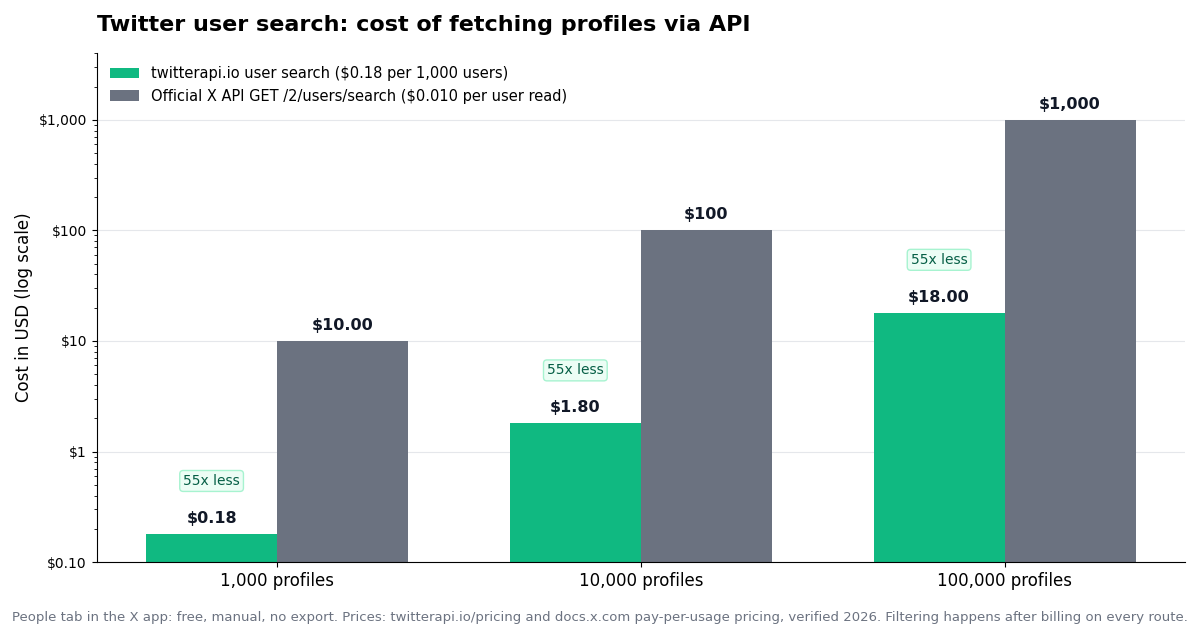
The cost row is the one that decides most projects. At $0.010 per user read, a 50,000-profile sweep costs $500 on the official API; at $0.18 per 1,000 it costs $9 on twitterapi.io, roughly 55 times less. The authentication row decides the rest: the official user-search endpoint is documented with user-context scopes, which means an OAuth flow and a real X account behind every request, where the third-party route needs one header.
A note on the official rate limit so the comparison is fair: 300 requests per 15 minutes at up to 1,000 results each is a lot of throughput, and the 3-million-post monthly cap on X's pay-per-use plans applies to post reads, not user reads (docs.x.com, verified 2026). The official route is not slow; it is expensive and awkward to authenticate.
Route 2: search users by keyword with the API
The endpoint is GET https://api.twitterapi.io/twitter/user/search, authenticated with an X-API-Key header. It takes two query parameters: query, the keyword to search, and cursor, which is an empty string for the first page and the next_cursor from the previous response afterwards. The response is a JSON object with a users array, a boolean has_next_page, a string next_cursor, and status set to success or error with a msg on failure.
Each element of users is a full profile object, the same shape the user-info endpoint returns, so you do not need a second call to get the fields you filter on. The ones that matter for people search are userName, name, id, description (the bio), location (free text, whatever the account typed), followers, following, statusesCount, createdAt, isBlueVerified, verifiedType, profilePicture and url. Billing is per profile returned, $0.18 per 1,000, with a $0.00015 per-call floor that only matters on an empty page (a single returned user already costs $0.00018).
The query behaves like the search box, not like a database filter: it is a relevance-ranked keyword match, and the result ordering is X's. Pagination with cursor is how you get past the first screen. Expect the useful results to thin out after a few pages for broad queries; for a narrow query such as a product name or a city plus a profession, you can usually walk to the end. The snippet below fetches one page and prints the handles; the full script further down turns it into a filtered CSV.
import os
import requests

HEADERS = {"X-API-Key": os.environ["TWITTERAPI_IO_KEY"]}
BASE = "https://api.twitterapi.io"


def search_users_page(query: str, cursor: str = "") -> dict:
    """One page of Twitter user search. Returns the raw JSON: users, has_next_page, next_cursor."""
    r = requests.get(
        f"{BASE}/twitter/user/search",
        headers=HEADERS,
        params={"query": query, "cursor": cursor},
        timeout=30,
    )
    r.raise_for_status()
    return r.json()


if __name__ == "__main__":
    page = search_users_page("climate scientist")
    for u in page.get("users") or []:
        print(f"@{u.get('userName'):<20} {u.get('followers', 0):>9,}  {u.get('location') or '-'}")
    print("more pages:", page.get("has_next_page"), "cursor:", page.get("next_cursor"))
Filter the results: followers, bio keywords, location, verification
Neither the native People tab nor either API offers server-side filters, so filtering is a loop over the profile objects you already paid for. That has a cost implication worth stating plainly: you pay for every profile the search returns, not for the ones you keep, so a tight query saves more money than a clever filter. Search for "solar installer texas" rather than "solar" and filter from there.
Two practical notes from running this on real queries. The location field is whatever the account typed, so a country filter needs a small alias table ("UK", "United Kingdom", "England", "London") rather than one string. And isBlueVerified is a paid-subscription flag in 2026, not an identity check; if you want institutions, look at verifiedType instead. The full script below applies all three filter families and writes the survivors to a CSV with the fields above as columns.
Enrich or refresh: user/info and batch_info_by_ids
Search results carry full profiles, but two cases need a second endpoint. The first is when you already have the handles or IDs (a CSV from last month, a list someone sent you) and want current follower counts and bios. The second is when a search result looks stale and you want to re-read one account before acting on it.
For a single handle use GET /twitter/user/info with a userName parameter; the profile is under the data key of the response. For a list of IDs use GET /twitter/user/batch_info_by_ids with userIds set to the IDs joined by commas; the response has a users array. Both are billed at the same $0.18 per 1,000 users as search, and the batch endpoint is the one to reach for when refreshing hundreds of accounts, since it avoids one HTTP round trip per profile. For the official-API equivalent, GET /2/users and GET /2/users/by accept up to 100 IDs or usernames per request at $0.010 per user read (docs.x.com, verified 2026).
The snippet refreshes a list of IDs in chunks and prints the follower delta against the stored value. The username-lookup reference linked below goes deeper on resolving handles to IDs and on edge cases such as suspended or renamed accounts.
import os
import requests

HEADERS = {"X-API-Key": os.environ["TWITTERAPI_IO_KEY"]}
BASE = "https://api.twitterapi.io"


def user_by_handle(handle: str) -> dict | None:
    r = requests.get(
        f"{BASE}/twitter/user/info",
        headers=HEADERS,
        params={"userName": handle},
        timeout=30,
    )
    if r.status_code != 200:
        return None
    return r.json().get("data")


def users_by_ids(user_ids: list[str], chunk: int = 100) -> list[dict]:
    out: list[dict] = []
    for i in range(0, len(user_ids), chunk):
        r = requests.get(
            f"{BASE}/twitter/user/batch_info_by_ids",
            headers=HEADERS,
            params={"userIds": ",".join(user_ids[i:i + chunk])},
            timeout=60,
        )
        r.raise_for_status()
        out.extend(r.json().get("users") or [])
    return out


if __name__ == "__main__":
    stored = {"2244994945": 650_000}  # id -> follower count you saved last time
    for u in users_by_ids(list(stored)):
        delta = (u.get("followers") or 0) - stored.get(str(u.get("id")), 0)
        print(f"@{u.get('userName')}: {u.get('followers'):,} followers ({delta:+,} since last run)")
    nasa = user_by_handle("NASA")
    if nasa:
        print(nasa.get("name"), "-", (nasa.get("description") or "")[:80])
Route 3: find accounts through the posts they write
Bio search finds people by how they describe themselves. Many of the accounts you actually want, the ones active on a topic, say nothing about it in their bio. The indirect route is to search posts on the topic with GET /twitter/tweet/advanced_search (parameters query, queryType set to Latest or Top, and cursor) and collect the author object attached to each returned post. Dedupe on author.id, count how many matching posts each author produced, and you have a ranked list of people who talk about the subject, each with the same profile fields as the user-search results.
The query syntax is X's own operator set, which the search-operators guide linked below documents in full. For discovery the useful ones are a quoted phrase or a hashtag for the topic, lang:en to keep one language, min_faves: to drop noise, -filter:replies to keep original posts, and -from:handle to exclude accounts you already know. X's near:city within:15mi operators are accepted in the syntax but only match posts that carry location data, which in our experience is a small share of results, so treat them as a supplement to the location field on the profile, not as a replacement for it.
Cost works differently on this route: you pay $0.15 per 1,000 posts returned (the author objects ride along free), so a topic with many posts per author is cheap to mine and a topic where every post is a new author costs about the same as user search. The snippet walks a few pages of posts and prints the authors by frequency; feed the resulting IDs to users_by_ids above if you need to refresh them later.
import os
from collections import Counter

import requests

HEADERS = {"X-API-Key": os.environ["TWITTERAPI_IO_KEY"]}
BASE = "https://api.twitterapi.io"


def authors_from_posts(query: str, pages: int = 5) -> dict[str, dict]:
    """Collect distinct authors of posts matching an X search query."""
    authors: dict[str, dict] = {}
    hits: Counter = Counter()
    cursor = ""
    for _ in range(pages):
        r = requests.get(
            f"{BASE}/twitter/tweet/advanced_search",
            headers=HEADERS,
            params={"query": query, "queryType": "Latest", "cursor": cursor},
            timeout=30,
        )
        r.raise_for_status()
        data = r.json()
        for t in data.get("tweets") or []:
            a = t.get("author") or {}
            if a.get("id"):
                authors[a["id"]] = a
                hits[a["id"]] += 1
        if not data.get("has_next_page"):
            break
        cursor = data.get("next_cursor") or ""
    for uid, a in authors.items():
        a["matching_posts"] = hits[uid]
    return authors


if __name__ == "__main__":
    found = authors_from_posts('"solid state battery" lang:en min_faves:5 -filter:replies')
    for a in sorted(found.values(), key=lambda x: -x["matching_posts"])[:20]:
        print(f"{a['matching_posts']:>2}  @{a.get('userName'):<18} {a.get('followers', 0):>8,}  {(a.get('description') or '')[:60]}")
What Twitter user search costs at scale
The arithmetic behind the chart above. Prices: twitterapi.io $0.18 per 1,000 user profiles and $0.15 per 1,000 posts, with a $0.00015 minimum per call (twitterapi.io pricing page, verified 2026); official X API $0.010 per user read and $0.005 per post read on pay-per-use, resources deduplicated within a 24-hour UTC window (docs.x.com, verified 2026). Native search is free and manual.
Two things the table hides. The first is that filtering happens after billing on every route, so the cheapest optimisation is a narrower query, not a faster filter. The second is that the official API's 24-hour deduplication means re-reading the same user twice in a day is charged once there, while on twitterapi.io each returned profile is billed each time; if your pipeline refreshes the same accounts several times a day, cache the responses yourself. At these prices the dollar amounts are small on the third-party route either way; the decision usually comes down to authentication effort and to the 50-character query limit on the official endpoint.
Which route should you use?
You know the person's name or handle. Use the People tab in the X app. Nothing else is faster, and it is free.
You want a filterable, exportable list of accounts matching a keyword. GET /twitter/user/search with the script below. Narrow query, paginate with cursor, filter on followers, description, location and isBlueVerified, write the CSV.
You already have handles or IDs and want current numbers. GET /twitter/user/batch_info_by_ids in chunks of IDs, or GET /twitter/user/info for one handle. Same price per profile as search, far fewer calls.
You want people active on a topic, whatever their bio says. The tweet-search route: /twitter/tweet/advanced_search on the topic, collect authors, rank by matching posts. Pay per post rather than per profile.
You need a location filter. Combine a place name in the query with a substring match on the location field and an alias table, and accept that the field is self-reported. The near: operator on post search is a weak supplement, not a filter.
You must use the official X API. GET /2/users/search with max_results up to 1,000 and next_token, under OAuth 2.0 user context, at $0.010 per user read; budget about 55 times the third-party cost and keep the query under 50 characters (docs.x.com, verified 2026).
You want to grow a following from the results. Keep it human-paced. Export the list, review it, and follow at the pace you would by hand; the API supports follow actions but automated bulk following is what gets accounts restricted.
"""Twitter (X) user search to CSV: search by keyword, paginate, filter, export.

Usage:
  TWITTERAPI_IO_KEY=... python3 user_search.py "climate scientist" --min-followers 1000 \
      --bio "phd,professor,researcher" --location "london,uk,united kingdom" --out scientists.csv

Filters run on the profile fields the search already returns, so there is no second call per user.
Billing is per profile returned ($0.18 per 1,000), so keep the query as specific as you can.
"""
import argparse
import csv
import os
import time

import requests

HEADERS = {"X-API-Key": os.environ["TWITTERAPI_IO_KEY"]}
BASE = "https://api.twitterapi.io"
FIELDS = ["userName", "name", "id", "followers", "following", "statusesCount",
          "isBlueVerified", "verifiedType", "location", "createdAt", "url", "description"]


def search_users(query: str, max_pages: int = 10):
    """Yield profile dicts across pages until has_next_page is false or max_pages is hit."""
    cursor = ""
    for _ in range(max_pages):
        r = requests.get(
            f"{BASE}/twitter/user/search",
            headers=HEADERS,
            params={"query": query, "cursor": cursor},
            timeout=30,
        )
        if r.status_code == 429:
            time.sleep(2)
            continue
        r.raise_for_status()
        data = r.json()
        if data.get("status") == "error":
            raise RuntimeError(data.get("msg"))
        yield from data.get("users") or []
        if not data.get("has_next_page"):
            return
        cursor = data.get("next_cursor") or ""


def keep(u: dict, args) -> bool:
    if (u.get("followers") or 0) < args.min_followers:
        return False
    if args.verified_only and not u.get("isBlueVerified"):
        return False
    bio = (u.get("description") or "").lower()
    if args.bio and not any(w in bio for w in args.bio):
        return False
    loc = (u.get("location") or "").lower()
    if args.location and not any(w in loc for w in args.location):
        return False
    return True


def main():
    p = argparse.ArgumentParser()
    p.add_argument("query")
    p.add_argument("--min-followers", type=int, default=0)
    p.add_argument("--bio", default="", help="comma-separated words, any match keeps the account")
    p.add_argument("--location", default="", help="comma-separated place aliases")
    p.add_argument("--verified-only", action="store_true")
    p.add_argument("--pages", type=int, default=10)
    p.add_argument("--out", default="users.csv")
    args = p.parse_args()
    args.bio = [w.strip().lower() for w in args.bio.split(",") if w.strip()]
    args.location = [w.strip().lower() for w in args.location.split(",") if w.strip()]

    seen, kept, fetched = set(), [], 0
    for u in search_users(args.query, args.pages):
        fetched += 1
        if u.get("id") in seen:
            continue
        seen.add(u.get("id"))
        if keep(u, args):
            kept.append({k: (u.get(k) if u.get(k) is not None else "") for k in FIELDS})

    with open(args.out, "w", newline="", encoding="utf-8") as f:
        w = csv.DictWriter(f, fieldnames=FIELDS)
        w.writeheader()
        for row in kept:
            row["description"] = str(row["description"]).replace("\n", " ")
            w.writerow(row)
    print(f"fetched {fetched} profiles, kept {len(kept)}, wrote {args.out}; "
          f"approx cost ${fetched * 0.00018:.4f}")


if __name__ == "__main__":
    main()
Questions readers ask
How do I search for a Twitter (X) user without an account?
You cannot through X itself: search has been limited to logged-in accounts since April 2023. A direct profile URL such as x.com/handle still loads when you know the handle. For search by keyword without logging in, use a read-only API such as GET /twitter/user/search on twitterapi.io, which needs an API key rather than an X login.
Can I search Twitter users by bio keyword?
Partly in the app: the People tab matches bio text, but you cannot combine conditions, exclude words or see every match. With the API, search for the keyword and then filter the description field of the returned profiles in your own code; the script on this page does this with a comma-separated word list.
Can I search Twitter users by location?
The X app only offers a Near you toggle based on your own location. Through the API, the location field on each profile is free text typed by the account, so filter it with a list of aliases (city, country, abbreviations). Putting the place name into the search query itself also helps, because it matches bios and locations that mention it.
How do I find Twitter accounts with a minimum follower count?
Neither X's People tab nor any user-search API filters by follower count server-side. Fetch the search results, which include a followers field on every profile, and keep the ones above your threshold. Because you pay per profile returned, a more specific query is the cheapest way to raise the share of results that pass the filter.
Is there an API for Twitter people search, and what does it cost?
Yes. On twitterapi.io, GET /twitter/user/search takes a query and a cursor and returns pages of full profiles at $0.18 per 1,000 users. The official X API has GET /2/users/search with up to 1,000 results per request, under OAuth 2.0 user context, at $0.010 per user read on its pay-per-use pricing (docs.x.com, verified 2026), about 55 times the per-profile price.
What is the difference between Twitter user search and tweet search?
User search returns accounts matched on name, handle and bio; tweet search returns posts matched on their text and operators such as from:, lang: and min_faves:. They are different endpoints with different prices ($0.18 per 1,000 users versus $0.15 per 1,000 posts on twitterapi.io). You can combine them: search posts on a topic and collect the author objects to discover accounts that never mention the topic in their bio.
How many results does Twitter user search return?
The X app shows results until its ranking runs out, with no count. The twitterapi.io endpoint returns one page per call and a has_next_page flag with a next_cursor, so you continue until the flag is false or you stop. The official endpoint lets you set max_results between 1 and 1,000 per request and paginates with next_token (docs.x.com, verified 2026).
Continue
- X Help Center: how to find people on X (search box, People filter, follow and location toggles)
- twitterapi.io docs: Search User (GET /twitter/user/search, query and cursor, users / has_next_page / next_cursor)
- twitterapi.io docs: Get User Info (GET /twitter/user/info, full profile field list)
- twitterapi.io pricing: $0.18 per 1K user profiles, $0.15 per 1K tweets, $0.00015 minimum per call
- X API pay-per-usage pricing (docs.x.com): $0.010 per user read, $0.005 per post read, the official and more expensive route
- X API: Search Users (GET /2/users/search), the official endpoint with user-context auth and a 50-character query
- Twitter (X) API overview: the hub for reading X data
- Twitter (X) username lookup: resolving handles to IDs and profile data
- Twitter (X) advanced search API guide for finding posts
- Twitter (X) search operators reference for tweet queries
- Twitter (X) follower count via API
- Twitter (X) profile analytics: pulling user metrics via API
- Twitter API rate limit calculator (per-plan QPS)
- twitterapi.io pay-per-call pricing
Stop reading. Start building.
Starter credits cover real testing on real data. Google sign-in, no card, no application queue.
Get an API key