Twitter Banner Size: 1500 x 500 px and the Safe Zone That Survives Every Crop
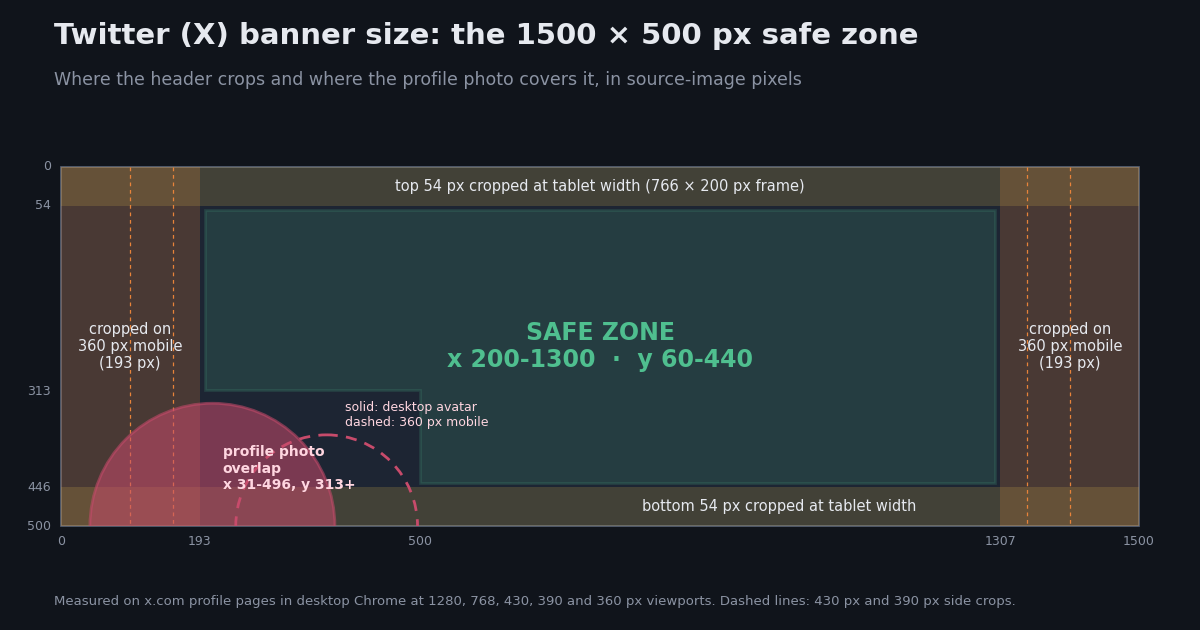
Every guide agrees on the headline number: 1500 x 500 pixels. What they rarely tell you is how much of that canvas actually shows up. X stretches the header across a frame whose shape changes with the screen, and it scales the image to fill that frame with CSS object-fit: cover. So whenever the frame is not exactly 3:1, part of your banner gets trimmed. The profile photo then covers another chunk in the bottom-left.
To get real numbers instead of rules of thumb, we loaded an x.com profile page in Chrome at five viewport widths (1280, 768, 430, 390 and 360 px). We read the rendered size of the header image and the avatar at each width and mapped those boxes back onto the 1500 x 500 source image. The result is a safe zone with pixel coordinates you can drop straight into Figma, Photoshop or Canva as guides.
Below you will find the official sizes for the header, profile photo and in-post images, the measured crop at each screen width, a template setup, export settings that hold up after X re-compresses your upload, and, for developers, how to pull banner and avatar URLs for thousands of accounts through an API.
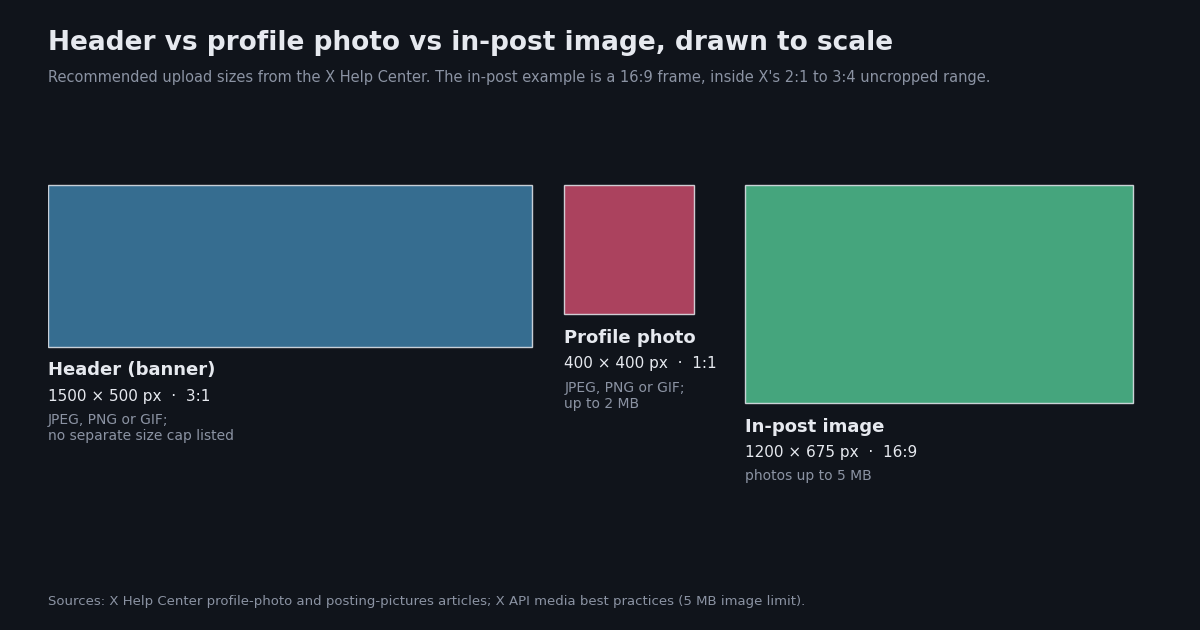
Twitter (X) image sizes at a glance: header, profile photo and post images
These are the dimensions X publishes, plus the size each image actually renders at on a desktop profile. The upload recommendations come from the X Help Center. The rendered sizes are our own measurements on x.com in a 1280 px wide Chrome window.
Why 1500 wide when it only renders at 598 CSS px? On a 2x retina display a 598 px frame is 1,196 device pixels, so a 1500 px source still has headroom (598 x 2 = 1,196, below 1,500). A smaller upload would be upscaled and look soft on high-density screens.
On file size for headers: the Help Center's troubleshooting article states the 2 MB cap for profile photos but does not state a separate number for headers. Exporting your header under 2 MB keeps you inside the only limit X publishes for profile images, and a well-compressed 1500 x 500 JPEG is usually far smaller than that anyway.
Post images: the Help Center says single photos with standard aspect ratios between 2:1 and 3:4 display in full in the timeline. A 1200 x 675 (16:9) or 1080 x 1350 (4:5) image therefore shows without a crop, while a 3:1 panorama would not.
Where the banner gets cropped: desktop vs tablet vs mobile
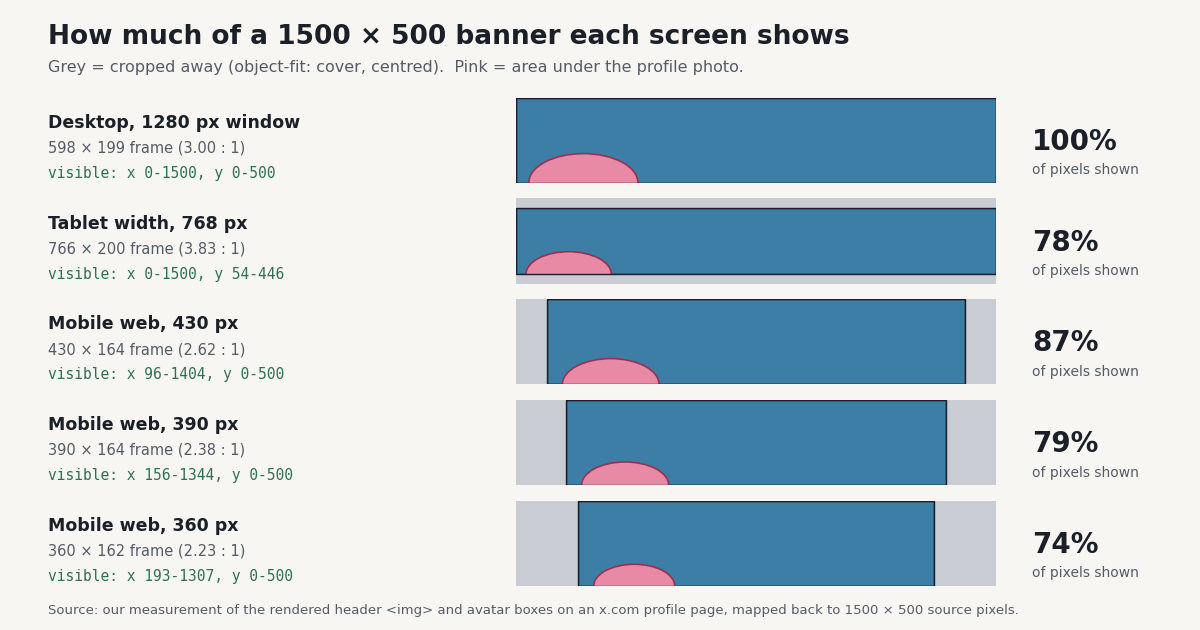
X renders the header inside a frame and scales the image with object-fit: cover, centred. When the frame is exactly 3:1 you see everything. When it is wider than 3:1, the top and bottom are trimmed; when it is narrower, the sides are trimmed. Here is what we measured, converted back into pixels of your 1500 x 500 file.
How to read the numbers: at 360 px the frame is 2.23:1, so the image is scaled to the frame height (500 source px become 161.6 CSS px) and the width that fits is 2.23 x 500 = 1,114 source px. That leaves (1500 - 1114) / 2 = 193 px trimmed from each side. The tablet case works the other way: the frame is 766 px wide but capped at 200 px tall, so only 392 of the 500 source rows fit, trimming 54 px top and bottom.
The tablet result lines up with the X Help Center, which warns that up to 60 pixels at the top and bottom of a correctly sized header can be cropped depending on monitor size and browser. The mobile side-crop is the one most templates ignore, and it is the bigger loss: on a 360 px phone a quarter of your banner never appears.
What we did not measure: these figures come from x.com in Chrome (desktop and mobile-emulated viewports, logged out). The native iOS and Android apps draw their own header and may crop differently, so test your final banner on a real phone before you commit to edge-to-edge text.
The profile photo overlap zone, in pixels
On every layout the profile photo straddles the bottom edge of the header, about half on the banner and half below it. It always sits 16 CSS px from the left edge of the frame, so in source pixels it lands in a slightly different place at each width.
Combine the rows and the region that can be covered runs from x 31 to x 496, from y 313 to the bottom edge. Anything you place there, such as a tagline, a URL or a face, risks being hidden on at least one screen. The rest of the bottom strip, from x 500 to the right, stays visible on desktop and phones, apart from the 54 px tablet trim.
On desktop the avatar box is 136 CSS px, and the avatar overlaps the header by 68 CSS px, exactly half its height. Accounts with a gold or grey organisation check show a square-cornered avatar (we saw this on the @XDevelopers profile used for the measurements) instead of a circle, so a square footprint is the safer assumption for business accounts.
Building a safe-zone template in Figma, Photoshop or Canva
Combining the crop table and the avatar table gives one practical rule set. These guides are rounded inward by a few pixels from the measured edges so small rendering differences do not bite.
Canvas: 1500 x 500 px, RGB (sRGB), 72 ppi is fine since only the pixel count matters.
Vertical guides at x 200 and x 1300: content between them survives the 360 px mobile side-crop (measured edges 193 and 1307).
Horizontal guides at y 60 and y 440: content between them survives the tablet top/bottom trim (measured 54 and 446) and matches the Help Center's 60 px warning.
Avatar block-out: draw a rectangle from x 0 to x 500, y 310 to y 500 and keep it free of text and faces.
Bleed: extend backgrounds, gradients and photos to all four edges. The cropped bands are not wasted; desktop shows them in full.
Text size: text that is 40 px tall in the 1500 px file renders at roughly 16 CSS px on desktop (40 x 598 / 1500 = 15.9) and about 13 CSS px on a 360 px phone (40 x 161.6 / 500 = 12.9). Below that, words become hard to read, so treat 40 px as a practical minimum for any line that matters.
Export settings that hold up after X re-compresses your header
X does not serve your original file. It stores the upload and generates fixed-size copies. We requested the size variants of a live header on pbs.twimg.com in 2026 and checked what came back:
Two things follow from this. First, every copy came back as JPEG, even though Twitter's older developer documentation said banner variants were PNG. A PNG upload is therefore re-encoded, and fine text, thin lines and flat-colour gradients can pick up compression artefacts. Second, the 2:1 variants are a different shape from your 3:1 upload, which is one more reason to keep important content away from the left and right edges.
Practical export: a high-quality JPEG (quality around 85-90) at exactly 1500 x 500 gives X a clean source to re-compress. If your design is mostly flat colour with text, add a very light texture or noise layer so the gradient banding from re-compression is less visible. Upload at the exact size; a larger file is simply scaled down and gains nothing.
Animated GIF headers: GIF is an accepted format, but we could not confirm in X's published documentation whether headers animate. Plan for the first frame to be what most visitors see.
Twitter profile picture size and how it displays
Upload the profile photo at 400 x 400 px, square, as JPEG, PNG or GIF and under 2 MB (X Help Center). X crops it to a circle for personal accounts; organisation accounts show a rounded square.
It renders much smaller than 400 px. We measured a 136 CSS px box on desktop and 82 to 99.5 CSS px on phone browsers (360 to 430 px wide). Inside timelines it shrinks further. Twitter's archived developer documentation lists the stored variants as _mini (24 x 24), _normal (48 x 48) and _bigger (73 x 73), plus the original upload when the suffix is removed.
Design for 48 px. Most people will see your avatar next to a post, not on your profile. A face that fills most of the frame, or a single bold logo mark, still reads at 48 px; a full logo lockup with small type does not.
Keep it centred. The circle crop removes the four corners, about 21% of a square (1 - pi / 4 = 0.215), so anything near a corner disappears.
Getting banner and profile photo URLs in bulk with an API
If you design for clients, run a brand audit, or build a tool that shows X profiles, opening profiles one by one does not scale. The TwitterAPI.io user endpoints return both images as URLs: coverPicture is the header and profilePicture is the avatar (field names from the docs.twitterapi.io OpenAPI spec). /twitter/user/info looks up one account by userName; /twitter/user/batch_info_by_ids takes a comma-separated list of numeric userIds and returns a users array.
A missing or empty coverPicture means the account never set a header, which is handy if you are auditing a list of brand or partner accounts for incomplete profiles. To get the full-size image, request the /1500x500 variant of the banner URL as shown in the code below.
What it costs compared with the official X API (TwitterAPI.io prices from its pricing page and the batch endpoint's documentation; X prices from docs.x.com):
| Price per profile | $0.00018 (18 credits); $0.00010 (10 credits) in batches of 100+ | $0.010 per user read |
| 1,000 profiles | $0.18 single lookups, $0.10 batched | $10.00 |
| 100,000 profiles | $18 single lookups, $10 batched | $1,000 |
| 1,000 profiles | $0.18 | $10.00 |
| 100,000 profiles | $18 | $1,000 |
| Auth | one X-API-Key header | developer account + app credentials |
| Banner field | coverPicture | profile_banner_url |
At the published rates that is $0.010 / $0.00018 = about 56x cheaper per profile for single lookups, and $0.010 / $0.00010 = 100x when you batch 100 or more IDs per request. For a one-off check of a few accounts, opening the profile in a browser is free and perfectly fine; the API only makes sense once you are dealing with hundreds or thousands of accounts.
import os
import time
import requests

HEADERS = {"X-API-Key": os.environ["TWITTERAPI_KEY"]}


def fetch_profiles(user_ids, chunk=100):
    """Look up many accounts by numeric ID; yields one dict per profile."""
    for i in range(0, len(user_ids), chunk):
        ids = ",".join(user_ids[i:i + chunk])
        r = requests.get(
            "https://api.twitterapi.io/twitter/user/batch_info_by_ids",
            headers=HEADERS,
            params={"userIds": ids},
            timeout=60,
        )
        r.raise_for_status()
        for u in r.json().get("users", []):
            yield {
                "id": u.get("id"),
                "userName": u.get("userName"),
                "has_banner": bool(u.get("coverPicture")),
                "coverPicture": u.get("coverPicture"),
                "profilePicture": u.get("profilePicture"),
            }
        time.sleep(0.2)  # stay polite between chunks


if __name__ == "__main__":
    ids = ["2244994945"]  # replace with your list of user IDs
    rows = list(fetch_profiles(ids))
    with_banner = sum(r["has_banner"] for r in rows)
    print(f"{with_banner}/{len(rows)} accounts have a custom header")
    for r in rows:
        print(r["userName"], r["coverPicture"])
import os
import requests

API_KEY = os.environ["TWITTERAPI_KEY"]  # from your twitterapi.io dashboard
HEADERS = {"X-API-Key": API_KEY}


def banner_and_avatar(user_name):
    """Return the header (banner) URL and profile photo URL for one account."""
    r = requests.get(
        "https://api.twitterapi.io/twitter/user/info",
        headers=HEADERS,
        params={"userName": user_name},
        timeout=30,
    )
    r.raise_for_status()
    body = r.json()
    if body.get("status") != "success":
        raise RuntimeError(body.get("msg"))
    user = body["data"]
    return {
        "userName": user.get("userName"),
        "followers": user.get("followers"),
        "coverPicture": user.get("coverPicture"),      # header / banner URL (may be empty)
        "profilePicture": user.get("profilePicture"),  # avatar URL
    }


def full_size_banner(cover_url):
    """Banner URLs on pbs.twimg.com accept a size suffix such as /1500x500."""
    if not cover_url:
        return None
    base = cover_url.rstrip("/")
    last = base.rsplit("/", 1)[-1]
    if "x" in last and last.replace("x", "").isdigit():
        base = base.rsplit("/", 1)[0]
    return base + "/1500x500"


def full_size_avatar(avatar_url):
    """Dropping the _normal suffix returns the original upload."""
    return avatar_url.replace("_normal.", ".") if avatar_url else None


if __name__ == "__main__":
    info = banner_and_avatar("XDevelopers")
    print(info["userName"], info["followers"])
    print("banner :", full_size_banner(info["coverPicture"]))
    print("avatar :", full_size_avatar(info["profilePicture"]))
Questions readers ask
What is the Twitter banner size in 2026?
1500 x 500 pixels, a 3:1 ratio. That is the header dimension the X Help Center recommends. Desktop shows the whole image; tablet and phone layouts crop it, so keep important content inside x 200-1300 and y 60-440.
Is the X header size different from the Twitter banner size?
No. Header, banner and cover photo are three names for the same slot. The size is 1500 x 500 px on both the old Twitter and the current X.
Why is my Twitter header cropped on my phone?
Phone browsers show the header in a frame narrower than 3:1 (we measured 2.23:1 at 360 px wide), and the image is scaled to fill it, so the left and right edges are trimmed, about 193 px on each side of a 1500 px file. Move text and logos toward the centre.
What size should my Twitter profile picture be?
400 x 400 px, square, JPEG, PNG or GIF, under 2 MB. It is shown as a circle (a rounded square for organisation accounts) and is often displayed as small as 48 x 48 px next to posts.
What is the maximum file size for a Twitter header?
The X Help Center lists 2 MB for profile photos and up to 5 MB for photos in posts, but does not state a separate limit for headers. Exporting the header as a 1500 x 500 JPEG under 2 MB avoids upload errors.
Why does my banner look blurry or blotchy after uploading?
X re-encodes headers: every size variant we requested was served as JPEG, even for PNG uploads. Upload exactly 1500 x 500, use a high-quality JPEG, avoid tiny text, and add slight texture to flat gradients to reduce banding.
Can I get someone's Twitter banner image URL?
Yes. Public profiles expose it. With TwitterAPI.io, /twitter/user/info returns it in the coverPicture field, and adding /1500x500 to that pbs.twimg.com URL gives the full-size image.
Continue
- X Help Center: uploading profile photos and headers (1500 x 500, 400 x 400, 2 MB, 60 px crop note)
- X Help Center: customizing your profile (header and profile photo dimensions)
- X Help Center: posting pictures and GIFs (5 MB photos, 2:1 to 3:4 display)
- X API docs: media best practices (image types and size limits)
- X API docs: pay-per-use pricing ($0.010 per user read)
- TwitterAPI.io docs: user info endpoint (coverPicture, profilePicture)
- Twitter (X) API overview and endpoints
- Twitter (X) tools for creators and developers
- Twitter profile analytics via API
- Extracting Twitter images and media URLs
- Twitter username lookup API reference
- Tweet character count and real limits
- TwitterAPI.io pay-per-call pricing
Stop reading. Start building.
Starter credits cover real testing on real data. Google sign-in, no card, no application queue.
Get an API key