TwitterAPI.io vs TwitterAPIs: what each workload costs, limits and how to switch
TwitterAPI.io and TwitterAPIs both sell public X (Twitter) data over a REST API without an X developer account, and both cost a fraction of the official API. They bill differently. TwitterAPIs charges a flat $0.0008 per call, whatever comes back. TwitterAPI.io charges per result returned, with a minimum of $0.00015 per request. That makes monitoring checks that find nothing, profile lookups and single tweets by ID cost less on TwitterAPI.io.
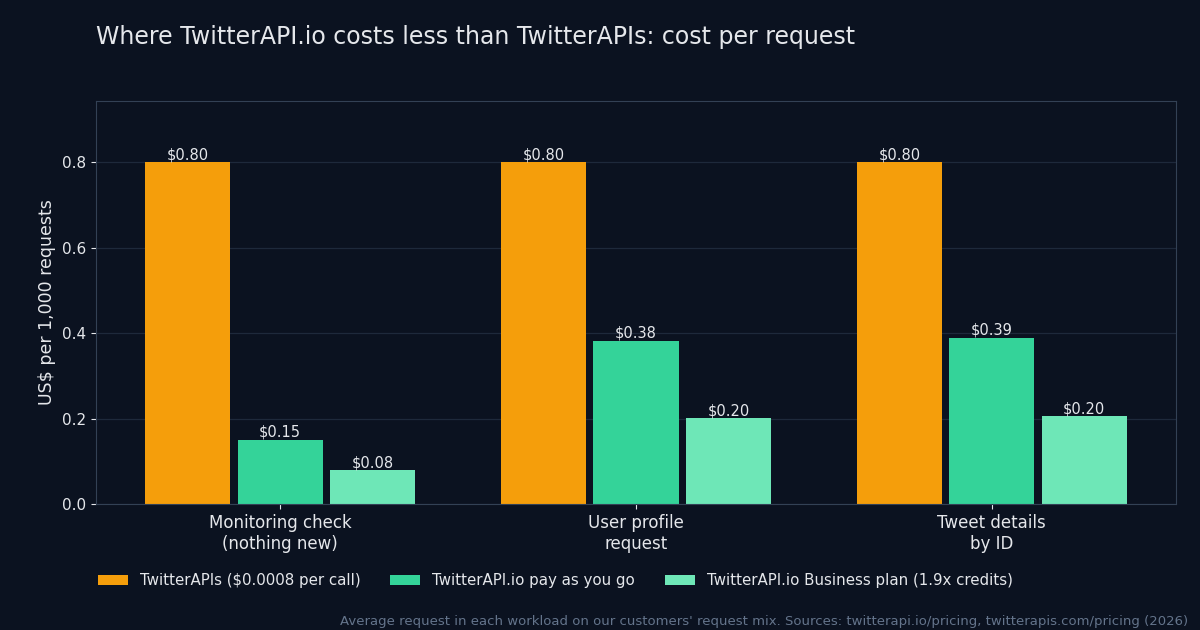
Priced on our customers' actual request mix over a 15-day window, TwitterAPI.io comes out 11% lower at pay-as-you-go prices, 27% lower on the Builder plan and 53% lower on Business. The table below shows where that comes from.
The short verdict
- Monitoring and polling: TwitterAPI.io costs less. A check that finds nothing is $0.00015 against $0.0008, and most monitoring checks find nothing.
- Profiles and tweet details: TwitterAPI.io costs less: $0.00018 per profile, $0.00015 per tweet by ID.
- Bulk profile enrichment: $0.01 per 1,000 profiles by ID in batches of 100+, against $0.80 per 1,000 one call at a time.
- Throughput: 20 requests a second once paid on TwitterAPI.io, 50 on Scale and up to 500 on Business, against 600 requests a minute (10 a second) on TwitterAPIs.
- Push delivery: TwitterAPI.io runs keyword filter rules on its side and delivers matches by webhook or WebSocket, billed like polling search.
Where TwitterAPI.io costs less, on real traffic
A rate card says little until it meets real traffic. We took the requests our customers actually make, grouped them into workloads, and priced the average request in each on both services. The table shows the workloads where TwitterAPI.io is lower, and the last row prices the whole request mix, every request included.
| Workload | Share of requests | TwitterAPI.io, pay as you go | TwitterAPI.io, builder plan | TwitterAPI.io, business plan | TwitterAPIs |
|---|---|---|---|---|---|
| Monitoring / polling (search calls that return no new tweets)/twitter/tweet/advanced_search (0 results) | 37.6% | $0.0001581% lower | $0.0001285% lower | $0.00007990% lower | $0.0008 |
| User profiles/twitter/user/info, /twitter/user/batch_info_by_ids, /twitter/user_about | 16.9% | $0.0003852% lower | $0.0003161% lower | $0.000275% lower | $0.0008 |
| Tweet details by ID/twitter/tweets | 9.5% | $0.0003951% lower | $0.0003260% lower | $0.000274% lower | $0.0008 |
| Whole request mix | 100% | 11% lower | 27% lower | 53% lower | baseline |
The biggest row decides the total. More than a third of all requests are monitoring checks that find nothing new, and those cost $0.00015 here against $0.0008. Profile lookups and tweet details by ID, together about a quarter of requests, also cost about half as much per request.
How each one bills
Every bill on either service is number of requests × price per request. The price per request is where they differ, and the number of items a request returns is what moves it.
TwitterAPIs uses a flat rate. Its pricing page (twitterapis.com/pricing) lists $0.0008 per call for the standard tier, which covers 65 of its 112 endpoints, and the other 47 endpoints, mostly write actions, at $0.0016 to $0.01 (full history $0.0024, full threads $0.004), with a few batch endpoints priced per item. A call that returns 20 tweets and a call that returns none cost the same.
TwitterAPI.io uses credits: 100,000 credits are $1. Tweets cost 15 credits each and profiles 18, with a 15-credit minimum per request. There is no per-request cap. The formula is:
request = max(15, 15 × tweets returned) credits · 100,000 credits = $1
So a request that returns 5 or fewer tweets costs less on TwitterAPI.io than one $0.0008 call, and a check that returns nothing costs $0.00015. Subscriptions lower our price further: our plans convert the fee to credits and add extra credits on top (14% in the first month on Builder, 50% on Business, plus a monthly return), so $1 buys 1.22× the credits on Builder and 1.9× on Business.
Price per data type
A single “per 1,000 tweets” number hides most of the difference, because per-call and per-result billing price each endpoint differently. This table prices the kinds of data where TwitterAPI.io is lower the way you would actually fetch them, at pay-as-you-go prices. Green marks the lower price on each row.
| Data | TwitterAPI.io | TwitterAPIs |
|---|---|---|
| Search that returns nothing (a monitoring check) | $0.00015 | $0.0008 |
| Search returning 1–5 tweets | $0.00015–$0.00075 | $0.0008 |
| Tweet details by ID, one tweet | $0.00015 | $0.0008 |
| Single profile lookup | $0.00018 | $0.0008 |
| Profiles in bulk by ID, per 1,000 | $0.01 (100+ per request) | $0.80 (one profile per call; no batch-by-ID endpoint listed) |
| Followers / followings, per 1,000 on full pages | $0.01 (200 per page) | $0.012–$0.016 (its own figure; ~70 on the first page, fewer after) |
| Verified followers, per page of 20 | $0.00015 | $0.0008 |
Items per page: TwitterAPI.io returns up to 200 followers per page and 20 verified followers per page; TwitterAPIs' followers page (twitterapis.com/twitter-followers-api) states about 70 per page. Per-1,000 figures for TwitterAPIs are $0.0008 divided by items per call. TwitterAPI.io prices are from our pricing page; TwitterAPIs prices from its pricing page (twitterapis.com/pricing), checked in 2026.
What a month costs: four jobs
Four common jobs, each costed on both services with the arithmetic shown, so you can swap in your own numbers. Prices are pay-as-you-go unless a row says otherwise.
- Keyword alert, polled every 60 seconds
- 43,200 checks a month; 90% find nothing, 10% find 3 tweets
- TwitterAPI.io38,880 × $0.00015 + 4,320 × $0.00045 = $7.78
- TwitterAPIs43,200 × $0.0008 = $34.56
- New posts from 200 accounts, hourly (from:handle since_id search)
- 144,000 searches, about 1 new tweet each
- TwitterAPI.io144,000 × $0.00015 = $21.60
- TwitterAPIs144,000 × $0.0008 = $115.20
- Enrich 100,000 profiles
- by user ID in batches of 100+
- TwitterAPI.io100,000 × $0.00001 = $1.00 (or $18.00 one by one)
- TwitterAPIs100,000 × $0.0008 = $80.00
- Export 1 million followers
- 200 per page here; ~70 on the first page there, fewer after
- TwitterAPI.io5,000 pages × $0.002 = $10.00
- TwitterAPIs$12–$16 (its stated $0.012–$0.016 per 1,000)
| Job | Assumption | TwitterAPI.io | TwitterAPIs |
|---|---|---|---|
| Keyword alert, polled every 60 seconds | 43,200 checks a month; 90% find nothing, 10% find 3 tweets | 38,880 × $0.00015 + 4,320 × $0.00045 = $7.78 | 43,200 × $0.0008 = $34.56 |
| New posts from 200 accounts, hourly (from:handle since_id search) | 144,000 searches, about 1 new tweet each | 144,000 × $0.00015 = $21.60 | 144,000 × $0.0008 = $115.20 |
| Enrich 100,000 profiles | by user ID in batches of 100+ | 100,000 × $0.00001 = $1.00 (or $18.00 one by one) | 100,000 × $0.0008 = $80.00 |
| Export 1 million followers | 200 per page here; ~70 on the first page there, fewer after | 5,000 pages × $0.002 = $10.00 | $12–$16 (its stated $0.012–$0.016 per 1,000) |
The pattern is consistent. Anything that repeats a query and usually finds little (alerts, monitoring, brand mentions, new posts from a list of accounts) costs several times less on TwitterAPI.io, because an empty check is $0.00015 instead of a full call. So does anything about users rather than tweets.
Poll accounts for new posts at the minimum price
Most account polling is really asking “has this account posted anything new?”, and on TwitterAPI.io that question costs least as a search that returns only the new tweets. A query like from:nasa since_id:<last id> returns only the new tweets: $0.00015 when nothing is new, $0.0003 for two, against $0.0008 per call on TwitterAPIs.
import os, time, requests

KEY = os.environ["TWITTERAPI_IO_KEY"]
HANDLES = ["nasa", "spacex", "esa"]  # accounts to watch
since = {h: None for h in HANDLES}

def check(handle):
    # the first run (no since_id yet) returns up to 20 recent tweets
    q = f"from:{handle}" + (f" since_id:{since[handle]}" if since[handle] else "")
    r = requests.get("https://api.twitterapi.io/twitter/tweet/advanced_search",
                     headers={"X-API-Key": KEY},
                     params={"query": q, "queryType": "Latest"}, timeout=30)
    if r.status_code == 429:
        time.sleep(int(r.headers.get("Retry-After", 1)))
        return []  # try this account again next round
    r.raise_for_status()
    tweets = r.json().get("tweets", [])
    if tweets:
        since[handle] = max(tweets, key=lambda t: int(t["id"]))["id"]
    return tweets  # billed per tweet returned; a check with nothing new is the 15-credit minimum

while True:
    for h in HANDLES:
        try:
            for t in check(h):
                print(h, t["id"], t["text"][:80])
        except requests.RequestException as e:
            print("skipped", h, e)  # network error or 5xx: retry next round
    time.sleep(3600)  # hourly; 3 accounts x 720 checks = 2,160 checks a month
Two caveats. Search results can arrive a little later than the timeline, so test the delay on your own accounts before relying on it for alerts measured in seconds. And if you need every reply and repost an account makes, compare the results with the timeline once before switching.
Features and limits
| TwitterAPI.io | TwitterAPIs | |
|---|---|---|
| Billing unit | Per item returned (15 credits per tweet, 18 per profile), 15-credit minimum per request | Flat per call: $0.0008 on 65 of 112 endpoints; the rest (mostly writes) $0.0016–$0.01, a few batch endpoints per item |
| Minimum top-up | No minimum spend on pay-as-you-go | $10 |
| Subscriptions | Optional, $29–$1,499 a month: 8–50% extra credits in the first month plus a monthly return | Pay as you go; monitoring plans |
| Rate limit | 20 requests/s once you have paid (0.2 before); 50 on Scale, 500 on Business, up to 1,000 on request | 600 requests/min (10/s) and 20 concurrent per key, same for everyone |
| Keyword rules pushed to you | Filter rules delivered by webhook or WebSocket, billed like polling search | Monitors and webhooks (15 tools in its MCP list) |
| Auth | X-API-Key header | Authorization: Bearer (or x-api-key) |
| Write actions | Login cookies from the login endpoint plus a proxy | auth_token + ct0 cookie pair, or credential login |
TwitterAPIs figures from its pricing (twitterapis.com/pricing), rate-limit (twitterapis.com/twitter-api-rate-limits) and MCP (twitterapis.com/mcp) pages; TwitterAPI.io from our pricing, rate limits and MCP server pages. Checked in 2026.
Rate limits in practice
TwitterAPIs gives every key the same ceiling, 600 requests a minute with 20 in flight, whatever you spend. TwitterAPI.io starts new, unpaid accounts at 0.2 requests per second, raises every account to 20 per second after the first payment, and goes to 50 on the Scale plan and 500 on Business. Your normal load rarely touches either ceiling. Backfills do, so size the limit for the backfill: at 20 per second you can fetch about 1.7 million search pages a day, at 10 per second about 860,000.
Real-time delivery
Both services can push data instead of making you poll. TwitterAPI.io runs keyword filter rules on its side and delivers matches by webhook or WebSocket, billed at the same rate as polling the search yourself; see the webhooks guide. For a fixed list of accounts, Twitter Stream costs $29 a month for 6 accounts (+$5 per extra account), $79 for 20, $149 for 50, $299 for 150 and $499 for 500, and adds accounts one at a time at $5 down to $1 each. TwitterAPIs' account monitors come in fixed tiers with no per-account add-on, so a count just above one of its tiers needs the next one: at 7–9, 21–23, 51–66, 151–199 and 501–799 accounts, Twitter Stream costs less.
AI agents and MCP
TwitterAPI.io's MCP server has 12 read-only tools (search, users, followers, replies, trends) as an npx package. For an agent that reads, a short tool list is easy for the model to choose from, and exploratory queries that return little stay cheap at $0.00015 each.
Write actions
Both support posting, liking, reposting and following on an account you control. TwitterAPI.io's write endpoints take login cookies from its login endpoint plus a proxy. TwitterAPIs uses an auth_token and ct0 cookie pair, or a credential login for which it recommends a residential proxy. Either way, automated actions on an X account can get it limited, so keep them human-paced.
The same request on both
The read endpoints share the /twitter/... path layout, so a search is the same request with a different host, header and one parameter name:
# TwitterAPI.io
curl -H "X-API-Key: $TWITTERAPI_IO_KEY" \
  "https://api.twitterapi.io/twitter/tweet/advanced_search?query=from%3Anasa&queryType=Latest"

# TwitterAPIs
curl -H "Authorization: Bearer $TWITTERAPIS_KEY" \
"https://api.twitterapis.com/twitter/tweet/advanced_search?query=from%3Anasa&product=Latest"| TwitterAPI.io | TwitterAPIs | |
|---|---|---|
| Base URL | https://api.twitterapi.io | https://api.twitterapis.com |
| Auth header | X-API-Key: <key> | Authorization: Bearer <key> |
| Search sort parameter | queryType=Latest | Top | product=Latest |
| Tweets in the response | tweets | tweets |
| Next-page cursor | next_cursor | next_cursor |
| More pages flag | has_next_page | has_more |
TwitterAPIs request and response fields from its quickstart (twitterapis.com/quickstart). Compare the fields inside each tweet object for the endpoints you use before moving production traffic.
One adapter for either provider
If you want to run both, or keep the option to move, put the four differences in one place. This TypeScript generator pages through a search on either service and backs off and retries on 429:
// One client, either provider. Only the base URL, auth header,
// search parameter and end-of-results flag differ.
type Provider = "twitterapi.io" | "twitterapis"

const CONFIG = {
  "twitterapi.io": {
    base: "https://api.twitterapi.io",
    headers: (key: string) => ({ "X-API-Key": key }),
    sortParam: "queryType",
    hasMore: (body: any) => Boolean(body.has_next_page),
  },
  twitterapis: {
    base: "https://api.twitterapis.com",
    headers: (key: string) => ({ Authorization: `Bearer ${key}` }),
    sortParam: "product",
    hasMore: (body: any) => Boolean(body.has_more),
  },
} as const

const sleep = (ms: number) => new Promise((r) => setTimeout(r, ms))

export async function* searchTweets(provider: Provider, key: string, query: string, maxPages = 10) {
  const c = CONFIG[provider]
  let cursor = ""
  for (let page = 0; page < maxPages; page++) {
    const params = new URLSearchParams({ query, [c.sortParam]: "Latest" })
    if (cursor) params.set("cursor", cursor)
    let res: Response
    for (let attempt = 0; ; attempt++) {
      res = await fetch(`${c.base}/twitter/tweet/advanced_search?${params}`, { headers: c.headers(key) })
      if (res.status !== 429 || attempt === 5) break
      const retryAfter = Number(res.headers.get("retry-after"))
      await sleep(retryAfter > 0 ? retryAfter * 1000 : 1000 * 2 ** attempt) // back off, then retry
    }
    if (!res.ok) throw new Error(`${provider} ${res.status}`)
    const body = await res.json()
    for (const t of body.tweets ?? []) yield t
    if (!c.hasMore(body) || !body.next_cursor) return
    cursor = body.next_cursor
  }
}
Switching checklist
- List the endpoints you call and how often. Price the list with the tables above; most bills are two or three endpoints.
- Measure your real items per call for a day. Monitoring checks, profile lookups and tweet-by-ID requests are where TwitterAPI.io is lower.
- For TwitterAPI.io, replace timeline polling with
from:handle since_id:searches where you only need new posts. - Swap the base URL and auth header, and map
queryType/productandhas_next_page/has_more. - Diff the tweet objects for each endpoint you use (field names, nested user object, media) and adjust your parser.
- Check the rate limit against your backfill, not your normal load; on TwitterAPI.io make a first payment before load testing (unpaid accounts are limited to 0.2 requests a second).
- Run both in parallel for a few days on the free credits and compare bills and row counts before cutting over.
Where TwitterAPI.io is the better pick
- Most of your calls are alerts, monitoring or polling, where checks usually find nothing and cost $0.00015.
- You enrich profiles in bulk ($0.01 per 1,000), look up tweets by ID or export follower lists.
- You need more than 10 requests a second: 20 once paid, 500 on Business.
- You want keyword rules pushed to you by webhook or WebSocket at the polling price.
- You run a steady volume: a subscription adds up to 90% extra credits.
Price your own workload
The calculator from our Twitter API price comparison, with TwitterAPIs highlighted. Enter how many searches you run, how many tweets they usually return and the request rate you need. For every endpoint price and how the plan credits are computed, see pricing.
If most of your requests return full pages of tweets (bulk exports, full timelines), compare the per-page price for your volume; on the Business plan a 20-tweet page costs $0.0016 after 12 monthly payments ($0.002 in the first month).
Each advanced-search call returns up to 20 posts.
Lower this if many of your searches come back empty or short (monitoring jobs usually do).
User info / follower pages, priced per profile on most APIs.
Vendors with a lower published limit are flagged.
| Provider | Pricing model | Per 1K posts | Monthly cost | Rate limit |
|---|---|---|---|---|
| GetXAPI | Growth plan | $0.025 | $49.00 | not published |
| TwitterAPIs.com | $0.0008 per call | $0.044 | $88.00 | 600 rpm (10 rps) |
| TwitterAPI.io (pay-as-you-go) | $0.15 / 1K posts, $0.18 / 1K profiles, min $0.00015 per call | $0.151 | $302 | 20 rps (0.2 before first payment) |
| SocialData | $0.0002 per item returned | $0.201 | $402 | 120 rpm (2 rps): below your 5 rps |
| TwitterAPI.io (subscription) | Scale plan, 50 rps | $0.249 | $499 | 20–500 rps by tier |
| Sorsa | Enterprise plan (500,000 requests) | $0.449 | $899 | 20 rps |
| Official X API | $0.005 per post read, $0.010 per user read | $5.05 | $10,100 | per-endpoint limits |
Prices from each provider's own pricing page (sources below). Per-call providers charge the same for a call that returns 20 posts or none; TwitterAPI.io charges per post with a 15-credit ($0.00015) minimum per call. SocialData doesn't charge empty responses up to 3 a minute; the calculator assumes your requests are spread evenly across the month. Rows are sorted by monthly cost for the workload above.
What TwitterAPIs' comparison page says about us, checked
TwitterAPIs publishes its own comparison with TwitterAPI.io (twitterapis.com/twitterapis-vs-twitterapi-io). Several of its statements about us were right when written and have since changed, or leave out part of the picture. Here they are against our current pricing and docs.
| Statement | Status | Current facts |
|---|---|---|
| A search that returns nothing still costs 15 credits | Correct | 15 credits is $0.00015. The same empty call costs $0.0008 on TwitterAPIs. |
| "60+ endpoints" | Out of date | Our public API reference lists 76 endpoints. |
| Throughput tied to balance, "3 to 20 QPS" | Out of date | The limit depends only on whether you have paid: 0.2 requests/s before the first payment, 20 after, 50 on Scale, 500 on Business, up to 1,000 on request. |
| twitterapi.io ships no MCP server | Out of date | We publish an MCP server with 12 read-only tools (npx package). |
| Profiles: "$0.04 per 1,000" vs "$0.18" | Incomplete | Our single lookup is $0.18 per 1,000 and bulk lookups by ID are $0.01 per 1,000. TwitterAPIs' price sheet lists profile lookups at $0.0008 per call, which is $0.80 per 1,000 profiles fetched one at a time. |
Against the official X API
Both services exist because of what the official API costs. X now bills per resource read with no subscriptions: according to its pricing documentation, $0.005 per post read, $0.010 per user read and $0.010 per follower or following read; creating a post costs $0.015, or $0.20 if it contains a URL. Pay-per-use is capped at 3 million post reads per monthly billing cycle, above which you need an Enterprise agreement. New accounts get $20 of credits when they save a first eligible card, plus a match of the first auto-recharge up to $50.
| 1 million tweets read, full pages | Cost |
|---|---|
| Official X API ($0.005 per post) | $5,000 |
| TwitterAPI.io, pay as you go ($0.00015 per tweet) | $150.00 |
| TwitterAPI.io, Business plan | $78.95 |
The official API still makes sense when you need a contract with X, posting through X's own consent screen, or data that only an authenticated first-party app can read. For reading public posts, TwitterAPI.io costs about 1/33 of the official price; for single profile lookups the official price is $0.010 against $0.00018 here. See TwitterAPI.io vs the official X API for the full comparison.
Quick decision guide
| If your main workload is | Lower cost on | Why |
|---|---|---|
| Keyword alerts, brand monitoring, social listening | TwitterAPI.io | Most checks find little; $0.00015 vs $0.0008 per check |
| New posts from a list of accounts | TwitterAPI.io | from: search with since_id returns only new tweets |
| Profile enrichment | TwitterAPI.io | $0.01 per 1,000 in bulk vs $0.80 |
| Tweet lookups by ID | TwitterAPI.io | $0.00015 per tweet vs $0.0008 per call |
| Follower graphs | TwitterAPI.io | $0.01 vs $0.012–$0.016 per 1,000 on full pages |
Questions
- Is TwitterAPI.io cheaper than TwitterAPIs?
- On our customers' actual request mix over a 15-day window, yes: 11% lower at pay-as-you-go prices, 27% lower on the Builder plan and 53% lower on Business. Monitoring checks that find nothing ($0.00015 vs $0.0008), profile lookups and tweet details by ID cost less on TwitterAPI.io, because it bills per result returned instead of a flat $0.0008 per call.
- How many tweets does one call return on each service?
- Both return up to about 20 tweets per search or timeline page. TwitterAPIs' own comparison measured pages averaging about 13 tweets and search pages closer to 8. Per-call pricing gets more expensive per tweet as pages get thinner; per-item pricing does not.
- Which one has higher rate limits?
- TwitterAPI.io allows 20 requests per second once you have paid (0.2 before), 50 on the Scale plan and 500 on Business, with up to 1,000 on request. TwitterAPIs allows 600 requests a minute (10 per second) and 20 concurrent requests per key for every account.
- Can I switch without rewriting my code?
- Mostly. Both use /twitter/... paths for the shared read endpoints and return a tweets array with a next_cursor. The differences are the base URL, the auth header (X-API-Key vs Bearer), a few parameter names (queryType vs product on search) and the end-of-results flag (has_next_page vs has_more). The adapter on this page handles all four.
- Is either one an official X API?
- No. Both are third-party services that read public X data without an X developer account. The official X API is billed per resource read: $0.005 per post and $0.010 per user, capped at 3 million post reads a month before an Enterprise contract.
Sources and method
- TwitterAPI.io: pricing, rate limits, Twitter Stream, MCP server, API docs.
- TwitterAPIs: pricing (twitterapis.com/pricing), quickstart (twitterapis.com/quickstart), rate limits (twitterapis.com/twitter-api-rate-limits), MCP (twitterapis.com/mcp), followers API (twitterapis.com/twitter-followers-api), its comparison page (twitterapis.com/twitterapis-vs-twitterapi-io).
- Official X API: pricing documentation.
- Workload table: anonymized, aggregated API usage on TwitterAPI.io over a 15-day window, shown as shares of requests only. Each rival is priced at its published rate, with empty results charged where it charges them.
- All figures checked in 2026. Prices change; check both pricing pages before you commit to a large job.