TwitterAPI.io vs Sorsa: pay per item or a flat monthly plan, priced per data type
TwitterAPI.io and Sorsa both sell public X (Twitter) data over a REST API without an X developer account, and both cost a small fraction of the official API. They bill in opposite ways. Sorsa sells monthly plans of requests ($49 for 10,000, $199 for 100,000, $899 for 500,000), and one request is one request whether it returns nothing or a page of tweets. TwitterAPI.io is pay-as-you-go and bills by what comes back: $0.00015 per tweet with a $0.00015 minimum. The result: monitoring checks, small result pages, single and 100+ batch profile lookups, verified followers, follow checks and anything run in small or uneven volumes cost less on TwitterAPI.io.
On real traffic the small requests dominate. Priced on our customers' actual request mix over a 15-day window, the average TwitterAPI.io request costs 64% lower than one request on Sorsa's $199 plan and 60% lower than one on its $899 plan at pay-as-you-go prices (79% lower on our Business plan), assuming every Sorsa request in the plan is used. If part of a plan goes unused, each Sorsa request costs more than that.
The short verdict
- Monitoring and polling checks that find nothing: TwitterAPI.io costs less on every Sorsa plan: $0.00015 against $0.00199 per request on a fully used Pro plan. Sorsa's own 30-second keyword alert costs $15.55 a month here and needs its $199 Pro plan.
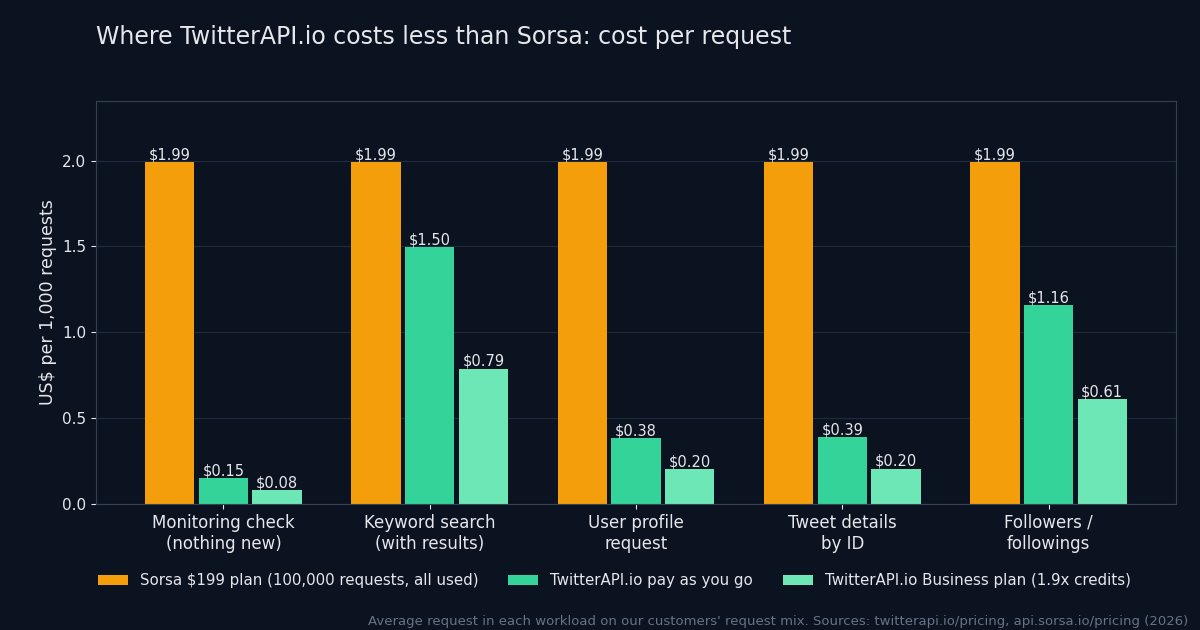
- Searches, mentions and replies that return a few tweets: lower here than every Sorsa plan up to 11 tweets per request, and lower than Pro up to 13. On our customers' mix the average keyword search that returns tweets costs $0.001496 here ($0.000787 on the Business plan) against $0.00199 for one request on a fully used Pro plan.
- Profiles and followers: single profile lookups ($0.00018), batches of 100 or more ($0.01 per 1,000) and verified followers ($0.0075 per 1,000) cost less here. The average followers or followings request on our customers' mix costs $0.001158, under one fully used Pro request.
- Small or uneven volume: TwitterAPI.io. A Sorsa plan costs the same whether you use 1% or 100% of it; each request balance has a valid_until date, no rollover is stated, and unused requests are not refunded.
- Coverage: TwitterAPI.io adds write actions, keyword rules pushed by webhook or WebSocket, and account streams; Sorsa is read-only and polling only.
- Throughput: 20 requests a second on both once paid; TwitterAPI.io goes to 50 on Scale and 500 on Business.
How each one bills
Both bills come down to requests × price per request, but the two services decide the price per request in opposite ways, and that difference matters more than any headline number.
Sorsa sells a monthly quota. Its pricing page (api.sorsa.io/pricing) lists three plans: Starter at $49 a month for 10,000 requests, Pro at $199 for 100,000 and Enterprise at $899 for 500,000, with 16% off for yearly billing and custom plans above that. “One API call is one request, on every endpoint and every plan.” A search that finds nothing is one request; so is a single profile lookup or a single follow check. Requests that return an error are not deducted. Its docs (docs.sorsa.io/pricing) put the price per request at $0.0049 on Starter, $0.00199 on Pro and $0.0018 on Enterprise, but that is the price only if you use the whole plan: the plan fee is fixed, so half a plan used means each request cost twice as much, and requests left at the end of the period are not refunded.
TwitterAPI.io uses credits with no plan required: 100,000 credits are $1. Tweets cost 15 credits each, on search, replies, mentions, timelines and lookups by ID alike, with a 15-credit minimum per request and no per-request cap. Profiles are 18 credits each, or 1 credit each when a batch request returns 100 or more; followers are 1 credit each at 200 per page; a page of 20 verified followers is 15 credits. Optional subscriptions convert the fee to credits and add extra on top: counting the first-month bonus plus 12 monthly returns, $1 buys 1.22× the credits on Builder ($99 a month) and 1.9× on Business ($1,499 a month).
request = max(15, 15 × tweets returned) credits · user search = 18 per user · 100,000 credits = $1
Put the two side by side and two things work in TwitterAPI.io's favour. First, most requests return little: a check that finds nothing costs $0.00015 here, under a tenth of a fully used Pro request, and a request that returns up to 11 tweets costs less here than on any fully used Sorsa plan. Second, TwitterAPI.io charges only for what you call, while a Sorsa plan is a fixed fee whatever you use. The chart prices the average request in five workloads on our customers' request mix, against one request on Sorsa's $199 plan with all 100,000 requests used.
Price per data type
Sorsa prices below are shown Starter / Pro / Enterprise, each assuming you use the whole plan. Green marks the lower price on the row. “Business rates” assume our subscriptions, counting the first-month bonus plus 12 monthly returns, $1 buys 1.22× the credits on Builder ($99 a month) and 1.9× on Business ($1,499 a month).
| Data | TwitterAPI.io | Sorsa (Starter / Pro / Enterprise) |
|---|---|---|
| Search that returns nothing (a monitoring check) | $0.00015 | One request: $0.0049 / $0.00199 / $0.0018 (only error responses are not counted) |
| Search returning 1–11 tweets | $0.00015–$0.00165 | One request: $0.0049 / $0.00199 / $0.0018 |
| Single profile lookup | $0.00018 | $0.0049 / $0.00199 / $0.0018 |
| Profiles in bulk, per 1,000 | $0.01 (100+ per request, by user ID) | $0.049 / $0.0199 / $0.018 (100 per request) |
| Verified followers, per 1,000 | $0.0075 ($0.00015 per page of 20) | $0.0245 / $0.00995 / $0.009 (up to 200 per page) |
| Does A follow B? | $0.001 per check | $0.0049 / $0.00199 / $0.0018 per check |
| Real-time feed of a fixed account list | Twitter Stream push: $29 for 6 accounts (+$5 each extra), $79 for 20, $149 for 50, $299 for 150, $499 for 500 | Polling only; each poll is one request from the plan |
Items per request: about 20 for Sorsa search, mentions and replies; up to 100 for its bulk profile lookups; up to 200 for verified followers (from its pricing docs (docs.sorsa.io/pricing)). TwitterAPI.io returns up to 20 tweets per search page and 20 verified followers per page. TwitterAPI.io prices from our pricing page; Sorsa prices from its pricing page (api.sorsa.io/pricing) and docs, checked in 2026.
Reading the table
A monitoring check that finds nothing costs $0.00015 here, under a tenth of a request on a fully used Pro plan, and most monitoring checks find nothing. A search that returns a few tweets stays lower too: up to 11 tweets, one request here costs less than one request on any fully used Sorsa plan. The same per-tweet rule applies to replies, quotes, mentions and list polls. Profiles are lower both ways: single lookups at $0.00018, and batches of 100 or more at $0.01 per 1,000. Verified followers cost $0.00015 for a page of 20 here, $0.0075 per 1,000, under Sorsa's $0.009 on Enterprise, and a follow check costs $0.001.
Tweet details by ID: pay for the tweets you fetch
If your pipeline already has tweet IDs (from a dataset, past results, or links people submit) and needs fresh metrics, TwitterAPI.io's /twitter/tweets endpoint takes a comma-separated list of IDs and bills per tweet returned. On our customers' mix the average request costs $0.000389 ($0.000205 on the Business plan), against $0.00199 for one request on a fully used Sorsa Pro plan. This is the batched call, with 429 handling:
import os, time, requests

KEY = os.environ["TWITTERAPI_IO_KEY"]

def get_tweets(ids):
    """Fetch tweets by ID in chunks (100 here; check the documented maximum)."""
    out = []
    for i in range(0, len(ids), 100):
        chunk = ",".join(ids[i:i + 100])
        for attempt in range(6):
            r = requests.get("https://api.twitterapi.io/twitter/tweets",
                             headers={"X-API-Key": KEY},
                             params={"tweet_ids": chunk}, timeout=30)
            if r.status_code != 429 or attempt == 5:
                break
            time.sleep(2 ** attempt)  # back off on 429
        r.raise_for_status()
        out.extend(r.json().get("tweets", []))
    return out  # billed per tweet: 1,000 tweets = $0.15
What a month costs: seven workloads
Plan pricing only means something against a real month of work. These seven jobs are costed on both, with the arithmetic shown. Three of them come straight from Sorsa's own documentation and blog, so you can check that we used its assumptions. Sorsa is priced at the smallest plan that covers the requests; TwitterAPI.io at pay-as-you-go rates.
- Keyword alert polled every 30 seconds (Sorsa's own example)
- 86,400 checks a month; 90% find nothing, 10% find 3 tweets
- TwitterAPI.io77,760 × $0.00015 + 8,640 × $0.00045 = $15.55
- Sorsa86,400 requests: Pro plan, $199
- Research backfill, 1 million tweets by keyword
- 50,000 full search pages
- TwitterAPI.io50,000 × $0.003 = $150.00
- Sorsa50,000 requests: Pro plan, $199 (Starter's 10,000 is too small; half of Pro goes unused)
- Competitor analysis, 5 accounts weekly (Sorsa's own example)
- per run: 5 profiles, 250 timeline pages, 50 mention pages, all pages full; 4 runs
- TwitterAPI.io4 × (5 × $0.00018 + 250 × $0.003 + 50 × $0.003) = $3.60
- Sorsa1,220 requests: Starter plan, $49
- 200 accounts in an X List, checked every 5 minutes
- 8,640 list polls a month
- TwitterAPI.io$1.30 if every poll is empty, $25.92 if every poll returns a full page
- Sorsa8,640 requests: Starter plan, $49
- Enrich 100,000 profiles
- by user ID, 100 per request on both
- TwitterAPI.io100,000 × $0.00001 = $1.00
- Sorsa1,000 requests: Starter plan, $49
- Export 1 million followers
- 200 per page on both
- TwitterAPI.io5,000 pages × $0.002 = $10.00
- Sorsa5,000 requests: Starter plan, $49
- Real-time feed of 6 fixed accounts
- push here; on Sorsa, one list poll a minute to approach push latency (a 5-minute poll, 8,640 requests, fits Starter at $49)
- TwitterAPI.ioTwitter Stream Starter: $29.00
- Sorsa43,200 requests: Pro plan, $199
| Workload | Assumption | TwitterAPI.io | Sorsa |
|---|---|---|---|
| Keyword alert polled every 30 seconds (Sorsa's own example) | 86,400 checks a month; 90% find nothing, 10% find 3 tweets | 77,760 × $0.00015 + 8,640 × $0.00045 = $15.55 | 86,400 requests: Pro plan, $199 |
| Research backfill, 1 million tweets by keyword | 50,000 full search pages | 50,000 × $0.003 = $150.00 | 50,000 requests: Pro plan, $199 (Starter's 10,000 is too small; half of Pro goes unused) |
| Competitor analysis, 5 accounts weekly (Sorsa's own example) | per run: 5 profiles, 250 timeline pages, 50 mention pages, all pages full; 4 runs | 4 × (5 × $0.00018 + 250 × $0.003 + 50 × $0.003) = $3.60 | 1,220 requests: Starter plan, $49 |
| 200 accounts in an X List, checked every 5 minutes | 8,640 list polls a month | $1.30 if every poll is empty, $25.92 if every poll returns a full page | 8,640 requests: Starter plan, $49 |
| Enrich 100,000 profiles | by user ID, 100 per request on both | 100,000 × $0.00001 = $1.00 | 1,000 requests: Starter plan, $49 |
| Export 1 million followers | 200 per page on both | 5,000 pages × $0.002 = $10.00 | 5,000 requests: Starter plan, $49 |
| Real-time feed of 6 fixed accounts | push here; on Sorsa, one list poll a minute to approach push latency (a 5-minute poll, 8,640 requests, fits Starter at $49) | Twitter Stream Starter: $29.00 | 43,200 requests: Pro plan, $199 |
These jobs share a shape: polling, profiles, followers, push delivery, or a volume that leaves most of a Sorsa plan unused. Sorsa's own 30-second keyword monitor is the sharpest case: 86,400 requests need its $199 Pro plan, while the same checks cost $15.55 here, because nine in ten find nothing. A 1-million-tweet backfill on full pages costs $150.00 here against $199, because it needs Pro and uses half of it. Sorsa's weekly competitor analysis comes to $3.60 here against Starter's $49.
The plan-fit question
A flat plan is a bet that your month will look like the plan. Sorsa's per-request prices assume you use every request before the period ends; whatever is left is gone. If you use 30,000 requests on Pro, you paid $199 for $59.70 of Pro-rate requests, about $0.0066 each. Up to about 66,334 requests a month (66% of Pro), even a full 20-tweet page here at $0.003 costs less than your effective Pro request; on Enterprise the same holds up to about 299,667 (60%), and on Starter, at $0.0049 a request, at any volume. For checks that return little or nothing the margin is far wider. Sorsa's own pricing calculator is candid about the low end too: it notes that below roughly 10,000 reads a month the official pay-per-use API is cheaper than its plans.
Features and limits
| TwitterAPI.io | Sorsa | |
|---|---|---|
| Billing unit | Per item returned: tweets $0.00015 each with a $0.00015 minimum per request and no per-request cap; profiles and followers on their own scales | Per request: every call to every endpoint is one request from a monthly quota |
| Commitment | Pay as you go with no minimum; optional subscriptions from $29 a month | Monthly plans: $49 for 10,000, $199 for 100,000, $899 for 500,000 requests; 16% off yearly |
| When the balance runs out | Requests stop until you add credits | The API stops returning data (403) until you buy a request package or upgrade |
| Unused allowance | Purchased credits never expire; bonus, monthly-return and sign-up credits expire after 31 days | Each request balance has a valid_until date and no rollover is stated, so plan on losing what a month leaves unused |
| Rate limit | 0.2 requests/s before the first payment; 20 after, 50 on Scale, 500 on Business, up to 1,000 on request | 20 requests/s per API key on every plan; each extra key gets its own 20; custom plans higher |
| Endpoints | 76 in the public API reference: reads, writes, filter rules, monitoring | 40 on the pricing page; 45 in the API reference, counting utility and key-usage calls |
| Write actions (post, like, follow, DM) | Yes, through login cookies from the login endpoint plus a proxy | None; read-only by design |
| Push delivery | Keyword filter rules by webhook or WebSocket, billed like polling search; Twitter Stream for account lists | None; polling only |
| Auth and request style | X-API-Key header; GET with query parameters | ApiKey header; search, timelines and replies are POST with a JSON body |
| Author profile inside each tweet | Included (author object) | Included (user object) |
| Payment | Card or crypto | Card (auto-renew) or crypto (one-time) |
Sorsa figures from its pricing (api.sorsa.io/pricing), rate-limit (docs.sorsa.io/rate-limits), authentication (docs.sorsa.io/authentication), error-code (docs.sorsa.io/error-codes) and real-time monitoring (docs.sorsa.io/real-time-monitoring) pages and its docs index (docs.sorsa.io/llms.txt); TwitterAPI.io from our pricing and rate limits pages. Checked in 2026.
Rate limits in practice
Sorsa limits every key to 20 requests per second on every plan, counted per second rather than in a sliding window, and returns 429 for the excess with no rate-limit headers. TwitterAPI.io starts new, unpaid accounts at 0.2 requests per second, raises every account to 20 after the first payment, and goes to 50 on the Scale subscription and 500 on Business, answering 429 when you go over (no Retry-After header, so back off about a second and retry).
Real-time delivery
Sorsa has no webhooks or streams. Its real-time guide (docs.sorsa.io/real-time-monitoring) describes polling every 1 to 30 seconds and suggests putting up to 5,000 accounts in an X List and polling the list, so one request covers them all. That is a smart pattern, and it works here too: our /twitter/list/tweets is billed per tweet returned, $0.00015 for a poll that finds nothing. The difference is cost per poll and who does the polling. On Sorsa every poll spends a request from the plan, whatever it returns; here an empty poll costs $0.00015, and you can skip polling altogether: keyword filter rules run on our side and push matches by webhook or WebSocket at the polling price (see the webhooks guide), and Twitter Stream pushes new posts from a fixed account list from $29 a month for 6 accounts.
Write actions and agents
Sorsa is read-only by design. TwitterAPI.io offers posting, likes, retweets, follows and DMs through an X account you log in with (login cookies plus a proxy), which is what you need for a bot or a scheduling tool and what you should avoid giving an unattended agent. For agents, our MCP server is read-only, open source (MIT) and runs locally with npx, with 12 tools for search, users, followers, replies and trends.
The same request on both
The two APIs look different on the wire. Sorsa uses a versioned base URL, an ApiKey header and, for search, timelines, replies and quotes, a POST with a JSON body. TwitterAPI.io uses /twitter/... paths, an X-API-Key header and GET with query parameters. Here is the same search:
# TwitterAPI.io
curl -H "X-API-Key: $TWITTERAPI_IO_KEY" \
  "https://api.twitterapi.io/twitter/tweet/advanced_search?query=from%3Anasa&queryType=Latest"

# Sorsa
curl -X POST "https://api.sorsa.io/v3/search-tweets" \
  -H "ApiKey: $SORSA_KEY" -H "Content-Type: application/json" \
  -d '{"query": "from:nasa", "order": "latest"}'
Request and response fields
| TwitterAPI.io | Sorsa | |
|---|---|---|
| Base URL | https://api.twitterapi.io | https://api.sorsa.io/v3 |
| Auth header | X-API-Key: <key> | ApiKey: <key> |
| Search method | GET, query string | POST, JSON body |
| Sort | queryType=Latest | Top | order: latest | popular |
| Cursor in | cursor | next_cursor (body or query) |
| End of results | has_next_page: false | next_cursor null or absent |
| Tweets array | tweets (replies: replies) | tweets |
| Text | text | full_text |
| Created | createdAt | created_at |
| Likes / reposts / replies / quotes | likeCount / retweetCount / replyCount / quoteCount | likes_count / retweet_count / reply_count / quote_count |
| Views / bookmarks | viewCount / bookmarkCount | view_count / bookmark_count |
| Author | author.userName, author.followers | user.username, user.followers_count |
| Quoted / reposted post | quoted_tweet / retweeted_tweet | quoted_status / retweeted_status |
| Reply and thread | isReply, inReplyToId, conversationId | is_reply, in_reply_to_tweet_id, conversation_id_str |
Endpoint map
| Sorsa | TwitterAPI.io | Note |
|---|---|---|
POST /search-tweets | GET /twitter/tweet/advanced_search | Same advanced-search operators; 15 credits per tweet |
POST /user-tweets | GET /twitter/user/last_tweets | 15 credits per tweet |
POST /mentions | GET /twitter/user/mentions | 15 credits per tweet |
POST /comments | GET /twitter/tweet/replies | Takes a tweet ID, not a link; 15 credits per tweet |
POST /quotes | GET /twitter/tweet/quotes | 15 credits per tweet |
POST /retweeters | GET /twitter/tweet/retweeters | 15 credits per user |
POST /tweet-info-bulk | GET /twitter/tweets | A comma-separated string of IDs here, a JSON array of URLs or IDs there |
GET /info | GET /twitter/user/info | 18 credits |
GET /info-batch | GET /twitter/user/batch_info_by_ids | 1 credit each at 100+ IDs |
GET /followers, /follows | GET /twitter/user/followers, /twitter/user/followings | 200 per page on both |
GET /verified-followers | GET /twitter/user/verifiedFollowers | 20 per page here, 15 credits per page |
GET /list-tweets | GET /twitter/list/tweets | 15 credits per tweet |
POST /search-users | GET /twitter/user/search | 18 credits per user |
GET /trends | GET /twitter/trends | By WOEID on both; 15 credits per trend here |
POST /check-follow | GET /twitter/user/check_follow_relationship | $0.001 per check |
GET /about | GET /twitter/user_about | Profile About data |
Sorsa paths and fields from its API reference (docs.sorsa.io/llms.txt) and pagination guide (docs.sorsa.io/pagination). Compare the objects of each endpoint you use before moving production traffic.
One adapter for either provider
While you migrate, or if you run both side by side for a while, keep the differences in one place. This TypeScript generator pages through a search on either service, returns one tweet shape, backs off and retries on 429, and throws a clear error when a Sorsa quota runs out (403):
// Search on either provider and get the same tweet shape back.
// Sorsa: POST JSON, cursor in the body, end of results = no next_cursor.
// TwitterAPI.io: GET query string, cursor param, end of results = has_next_page false.
type Provider = "twitterapi.io" | "sorsa"
type Tweet = { id: string; text: string; createdAt: string; likes: number; author: string }

const sleep = (ms: number) => new Promise((r) => setTimeout(r, ms))

async function call(provider: Provider, key: string, query: string, cursor: string) {
  for (let attempt = 0; ; attempt++) {
    const res = provider === "twitterapi.io"
      ? await fetch(
          "https://api.twitterapi.io/twitter/tweet/advanced_search?" +
            new URLSearchParams({ query, queryType: "Latest", ...(cursor ? { cursor } : {}) }),
          { headers: { "X-API-Key": key } },
        )
      : await fetch("https://api.sorsa.io/v3/search-tweets", {
          method: "POST",
          headers: { ApiKey: key, "Content-Type": "application/json" },
          body: JSON.stringify({ query, order: "latest", ...(cursor ? { next_cursor: cursor } : {}) }),
        })
    if (res.status === 429 && attempt < 5) {
      await sleep(1000 * 2 ** attempt) // back off, then retry
      continue
    }
    if (res.status === 403 && provider === "sorsa") throw new Error("sorsa: quota used up or key not allowed")
    if (!res.ok) throw new Error(`${provider} ${res.status}`)
    return res.json()
  }
}

function normalize(provider: Provider, t: any): Tweet {
  return provider === "twitterapi.io"
    ? { id: t.id, text: t.text, createdAt: t.createdAt, likes: t.likeCount, author: t.author?.userName }
    : { id: t.id, text: t.full_text, createdAt: t.created_at, likes: t.likes_count, author: t.user?.username }
}

export async function* searchTweets(provider: Provider, key: string, query: string, maxPages = 10) {
  let cursor = ""
  for (let page = 0; page < maxPages; page++) {
    const body = await call(provider, key, query, cursor)
    for (const t of body.tweets ?? []) yield normalize(provider, t)
    const next = body.next_cursor
    const more = provider === "twitterapi.io" ? Boolean(body.has_next_page) && Boolean(next) : Boolean(next)
    if (!more) return
    cursor = next
  }
}
Switching checklist
- Export a month of Sorsa usage (its key-usage endpoint and usage page show requests used) and split it by endpoint. Price each line with the table above, and note how much of your plan you actually use.
- Split search-type calls by what they return. Empty and small results are where the savings are largest.
- Replace POST bodies with query parameters,
ApiKeywithX-API-Key, and the end-of-results check withhas_next_page. - Rename fields in your parser (full_text → text, likes_count → likeCount, user → author) or use the adapter above.
- If you pass tweet URLs to Sorsa, extract the IDs; our endpoints take IDs only (replies, tweets by ID).
- If you poll, decide whether to keep polling (empty polls cost $0.00015) or move keyword rules to webhook or WebSocket delivery.
- Make a first payment before load testing; unpaid accounts are limited to 0.2 requests a second.
- Run both in parallel on the free tiers ($1 here if the account passes the invisible bot check (one per person and network), 100 requests there) and compare row counts and bills before cutting over.
Where TwitterAPI.io is the better pick
- Most of your calls are monitoring or polling checks: $0.00015 when a check finds nothing, and up to 13 tweets per request still cost less than a fully used Pro request.
- Your volume is small, seasonal or unpredictable, so a plan would sit half used and the rest would lapse.
- You enrich profiles one at a time ($0.00018) or in batches of 100 or more ($0.01 per 1,000), or pull verified followers.
- You want keyword rules or account lists pushed to you by webhook or WebSocket instead of polling.
- You need write actions, or more than 20 requests a second on one key (50 on Scale, 500 on Business).
Price your own workload
The calculator from our Twitter API price comparison, with Sorsa highlighted. Enter how many searches you run, how many tweets they usually return and the request rate you need; Sorsa is priced at the smallest plan that covers the calls. It models search and profiles. If most of your requests return full pages of tweets (bulk exports, full timelines), compare the per-page price for your volume; on the Business plan a 20-tweet page costs $0.0016 after 12 monthly payments ($0.002 in the first month). For the full rate cards see Twitter API pricing.
Each advanced-search call returns up to 20 posts.
Lower this if many of your searches come back empty or short (monitoring jobs usually do).
User info / follower pages, priced per profile on most APIs.
Vendors with a lower published limit are flagged.
| Provider | Pricing model | Per 1K posts | Monthly cost | Rate limit |
|---|---|---|---|---|
| GetXAPI | Growth plan | $0.025 | $49.00 | not published |
| TwitterAPIs.com | $0.0008 per call | $0.044 | $88.00 | 600 rpm (10 rps) |
| TwitterAPI.io (pay-as-you-go) | $0.15 / 1K posts, $0.18 / 1K profiles, min $0.00015 per call | $0.151 | $302 | 20 rps (0.2 before first payment) |
| SocialData | $0.0002 per item returned | $0.201 | $402 | 120 rpm (2 rps): below your 5 rps |
| TwitterAPI.io (subscription) | Scale plan, 50 rps | $0.249 | $499 | 20–500 rps by tier |
| Sorsa | Enterprise plan (500,000 requests) | $0.449 | $899 | 20 rps |
| Official X API | $0.005 per post read, $0.010 per user read | $5.05 | $10,100 | per-endpoint limits |
Prices from each provider's own pricing page (sources below). Per-call providers charge the same for a call that returns 20 posts or none; TwitterAPI.io charges per post with a 15-credit ($0.00015) minimum per call. SocialData doesn't charge empty responses up to 3 a minute; the calculator assumes your requests are spread evenly across the month. Rows are sorted by monthly cost for the workload above.
What Sorsa's pages say about us, checked
Sorsa has no dedicated page about TwitterAPI.io, but its pricing page (api.sorsa.io/pricing), its Twitter API alternatives (api.sorsa.io/blog/twitter-api-alternative) roundup, its scrapers roundup (api.sorsa.io/blog/twitter-scrapers) and its MCP post (api.sorsa.io/blog/twitter-mcp-server) all describe us. Most of it is fair; a couple of figures are out of date.
| Statement | Status | Current facts |
|---|---|---|
| "$0.15 per 1,000 tweets" (pricing page, alternatives and scrapers posts) | Correct | $0.00015 per tweet returned on search, timelines and tweets by ID alike, so $0.15 per 1,000. Subscriptions lower it: $0.079 per 1,000 at Business rates (counting the first-month bonus plus 12 monthly returns, $1 buys 1.22× the credits on Builder ($99 a month) and 1.9× on Business ($1,499 a month)). |
| "$0.18 per 1,000 profiles ($0.10 in batches of 100 or more)" | Matches an outdated line in our API reference | $0.18 per 1,000 is right for single lookups. Batches of 100 or more are billed at 1 credit per profile ($0.01 per 1,000), as our pricing page states; an older line in our API reference still said 10 credits per profile, which is where $0.10 comes from. |
| Follower lists "from about $0.01 per 1,000" | Correct | 1 credit per follower at 200 per page. |
| "New accounts get $0.10 in credits" | Out of date | New accounts get $1 with no card if the account passes the invisible bot check (one per person and network); free credits expire after 31 days. |
| Worked example: TwitterAPI.io "about $525" for the mixed analytics job | Out of date | The same job is $435.00 now. Its table used $100 for 1 million profiles, from the older 10-credit line in our API reference; batches of 100+ cost $10.00. |
| "With a minimum charge per call" | Correct | $0.00015 (15 credits) per call. |
| Write actions "run through an X account you connect" | Correct | Our write endpoints take login cookies from the login endpoint and a proxy. Sorsa has no write actions. |
| MCP table: TwitterAPI.io MCP access "varies by build" | Incomplete | We publish our own open-source (MIT) MCP server with 12 read-only tools (search, users, followers, replies, trends), run locally as an npx package. |
Both against the official X API
Both services exist because of what the official API costs. X now bills per resource read with no subscriptions: according to its pricing documentation, $0.005 per post read, $0.010 per user read and $0.010 per follower or following read; creating a post costs $0.015, or $0.20 if it contains a URL. Pay-per-use is capped at 3 million post reads per monthly billing cycle, above which you need an Enterprise agreement. New accounts get $20 of credits when they save a first eligible card, plus a match of the first auto-recharge up to $50.
| 1 million tweets by keyword search | Monthly cost |
|---|---|
| Official X API ($0.005 per post) | $5,000 |
| Sorsa | $199 (Pro plan; 50,000 of its 100,000 requests) |
| TwitterAPI.io | $150.00 (50,000 full pages) |
The official API still makes sense when you need a contract with X, posting through X's own consent screen, or data only an authenticated first-party app can read. For reading public posts in volume, either service costs a small fraction of the official price. See TwitterAPI.io vs the official X API for the full comparison.
Quick decision guide
| If your main workload is | Lower cost on | Why |
|---|---|---|
| Keyword alerts, brand monitoring, social listening | TwitterAPI.io | $0.00015 per empty check; no plan to fill |
| Keyword backfills that use under about 66% of a Pro plan | TwitterAPI.io | $0.003 per full page, paid only for pages fetched |
| Profile enrichment | TwitterAPI.io (batches of 100+ or single) | $0.01 vs about $0.02 per 1,000 in batches of 100+; $0.00018 per single lookup |
| Verified followers | TwitterAPI.io | $0.0075 vs $0.00995 per 1,000 on Pro |
| Real-time feed of a fixed account list | TwitterAPI.io | Push delivery from $29 for 6 accounts; Sorsa polls |
| Bots that post or reply | TwitterAPI.io | Sorsa has no write actions |
| Small or uneven monthly volume | TwitterAPI.io | Pay for requests made; no plan allowance to lapse |
Questions
- Is TwitterAPI.io cheaper than Sorsa?
- On our customers' actual request mix over a 15-day window, the average TwitterAPI.io request costs 64% lower than one request on Sorsa's $199 plan and 60% lower than one on its $899 plan at pay-as-you-go prices (79% lower on our Business plan), assuming every Sorsa request in the plan is used. TwitterAPI.io costs less for monitoring checks that find nothing ($0.00015 against $0.00199 per request on a fully used Pro plan), searches that return up to 11 tweets on any plan, single profile lookups, profile batches of 100 or more, verified followers, follow checks, push delivery for account lists, and any month that leaves part of a Sorsa plan unused.
- Do unused Sorsa requests carry over?
- Each Sorsa request balance has a valid_until date, no rollover is stated, and requests left at the end of the period are not refunded, so the per-request prices it publishes assume you use the whole plan. If you use 30,000 requests of the 100,000 on Pro, each one cost $0.0066. TwitterAPI.io is pay-as-you-go: you pay for the requests you make, and purchased credits never expire.
- What happens if I run out of Sorsa requests mid-month?
- Sorsa's pricing page says the API stops returning data until you top up, buy another request package or move to a larger plan; its error-code docs list a 403 when the quota is exhausted. On TwitterAPI.io there is no monthly quota: requests continue while you have credits.
- Which has the higher rate limit?
- Both start paid accounts at 20 requests per second. Sorsa allows 20 per key on every plan. TwitterAPI.io allows 0.2 per second before the first payment, 20 after, 50 on the Scale subscription and 500 on Business, with up to 1,000 on request.
- Does Sorsa support webhooks or streaming?
- No. Sorsa's real-time guide describes polling: you call an endpoint every 1 to 30 seconds and compare tweet IDs, and each poll is one request from your plan. TwitterAPI.io can push matches for keyword filter rules by webhook or WebSocket, and its Twitter Stream product pushes new posts from a fixed account list.
- Can either one post tweets?
- Sorsa is read-only. TwitterAPI.io has write endpoints (post, like, retweet, follow, DM) that act through an X account you log in with, using login cookies and a proxy. Automated actions can get an account limited, so keep them human-paced.
- How hard is it to move from Sorsa to TwitterAPI.io?
- Plan for a small rewrite rather than a URL swap. Sorsa sends search, timelines and replies as POST requests with a JSON body; TwitterAPI.io uses GET with query parameters. Field names differ (full_text vs text, likes_count vs likeCount, user vs author), and the end of results is a missing next_cursor on Sorsa and has_next_page: false here. The adapter on this page normalizes both.
- How far does TwitterAPI.io's free credit go?
- New accounts get $1 with no card if the account passes the invisible bot check (one per person and network), valid for 31 days: 6,666 monitoring checks that find nothing, about 333 full search pages (6,666 tweets), or 100,000 profiles in bulk.
- Which is better for an AI agent?
- Both MCP servers are read-only. Ours is open source (MIT), runs locally with npx and covers search, users, followers, replies and trends. On billing, most agent calls are lookups and checks that return little: an empty search costs $0.00015 here and a single profile $0.00018, against $0.00199 for any request on a fully used Sorsa Pro plan, and an agent that sits idle for a month costs nothing here.
- Is either one an official X API?
- No. Both are independent services that read public X data without an X developer account. The official X API bills per resource read: $0.005 per post and $0.010 per user.
Sources
- TwitterAPI.io: pricing, rate limits, Twitter Stream, MCP server, API docs.
- Sorsa: pricing (api.sorsa.io/pricing), pricing docs (docs.sorsa.io/pricing), rate limits (docs.sorsa.io/rate-limits), authentication (docs.sorsa.io/authentication), pagination (docs.sorsa.io/pagination), error codes (docs.sorsa.io/error-codes), real-time monitoring (docs.sorsa.io/real-time-monitoring), docs index (docs.sorsa.io/llms.txt), MCP server (api.sorsa.io/mcp-server), free tools (api.sorsa.io/tools), alternatives post (api.sorsa.io/blog/twitter-api-alternative), scrapers post (api.sorsa.io/blog/twitter-scrapers), MCP post (api.sorsa.io/blog/twitter-mcp-server).
- Official X API: pricing documentation.
- All figures checked in 2026. Prices change; check both pricing pages before you commit to a large job.