Pydantic AI vs LangGraph: Typed Agents or State Graphs, and When Each Wins
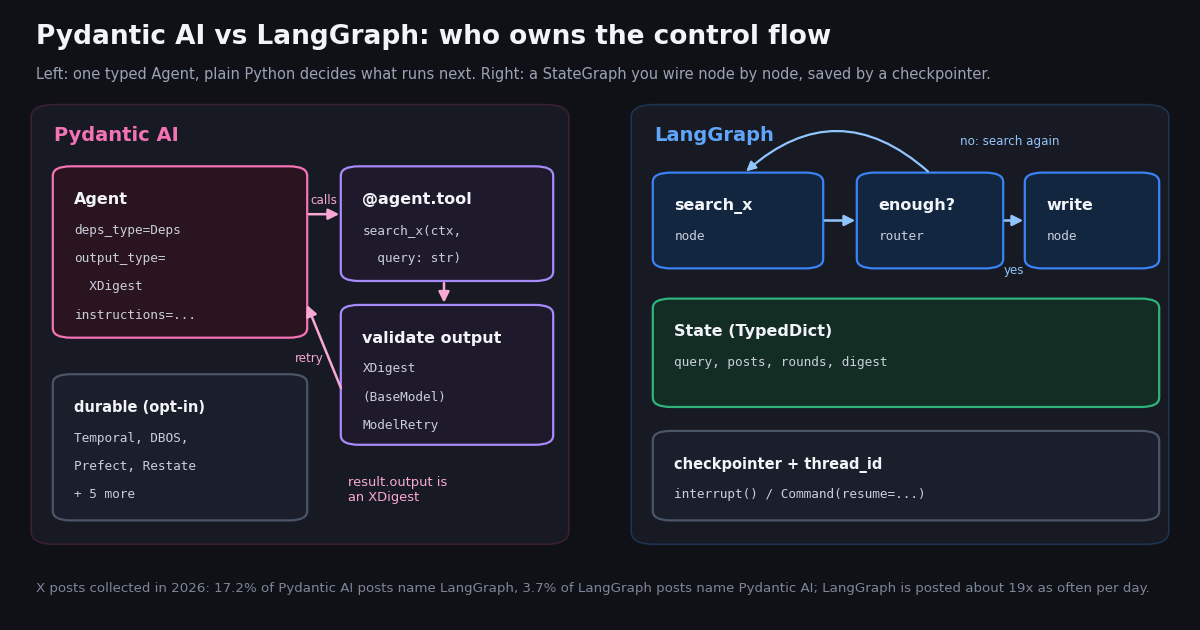
- Pydantic AI = one typed
Agent(deps_type,output_type,@agent.tool), plain Python control flow,@agent.output_validator+ModelRetryto reject bad output. - LangGraph = a
StateGraphyou wire node by node, compiled with a checkpointer andthread_id;interrupt()pauses for a human,Command(resume=...)continues. - Durability: LangGraph builds it in via checkpointers; Pydantic AI lists nine durable execution integrations (Temporal, DBOS, Prefect, Restate, AWS Lambda and more), one engine per agent.
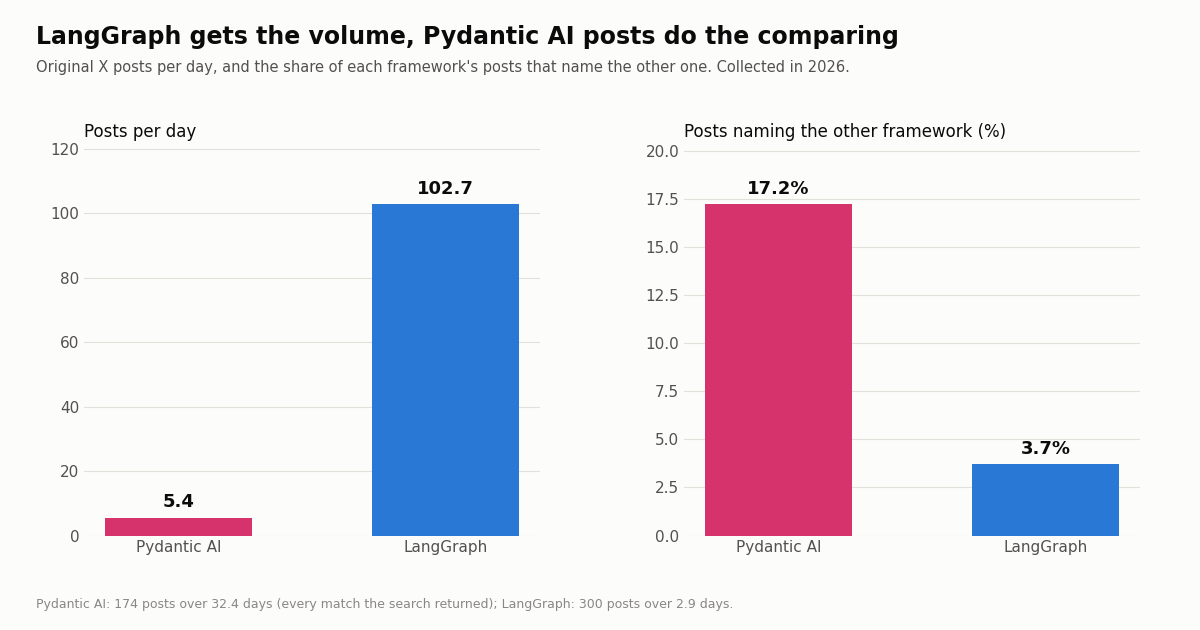
- On X, LangGraph gets about 19x the daily posts (102.7 vs 5.4), but 17.2% of Pydantic AI posts name LangGraph vs 3.7% the other way.
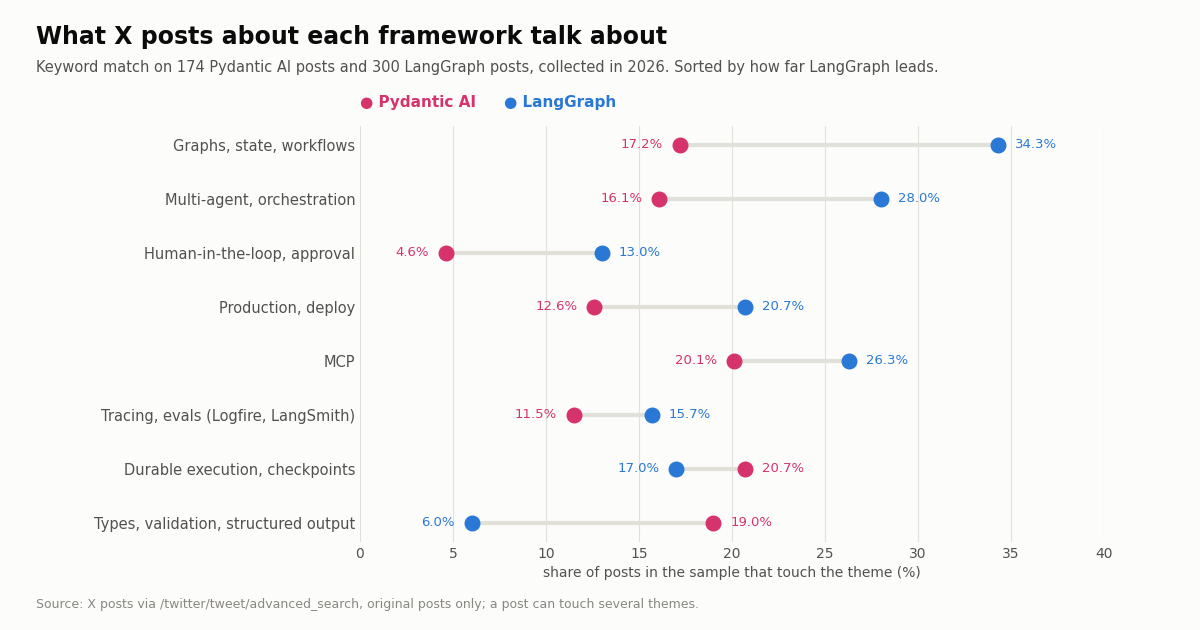
- Pydantic AI posts talk about types and validation 19.0% of the time vs 6.0%; LangGraph posts lead on graphs and state (34.3% vs 17.2%) and human approval (13.0% vs 4.6%).
- X data costs the same in either framework: $0.15 per 1,000 tweets returned on TwitterAPI.io vs $5.00 per 1,000 post reads on X's pay-per-usage rate card.
Pydantic AI and LangGraph keep showing up in the same shortlists because both promise production-grade Python agents, yet they start from opposite ends. Pydantic AI starts from data: what goes into the model, what must come out, and what happens when it does not validate. LangGraph starts from control flow: which step runs next, where state lives, and how a run survives a crash or waits days for a human.
This page is about that one choice. If you are weighing LangGraph against its own parent library, read our LangChain vs LangGraph comparison; for role-based multi-agent crews, see CrewAI vs LangGraph; for Google's framework, see Google ADK vs LangGraph. Here we compare the two on the dimensions that decide real projects, build the same X (Twitter) monitoring agent in both with validated tool output, price the X data it reads, and measure how builders on X actually talk about each framework.
Every version number, feature and price below was checked against the projects' own docs, PyPI and GitHub, and every X number comes from a study we ran and publish in full in the last section.
17.2%
Pydantic AI vs LangGraph at a glance
Both are open source under the MIT license and both are actively maintained: the pydantic/pydantic-ai GitHub repository has about 21,100 stars and the langchain-ai/langgraph repository about 44,800, and both received commits the day before we checked. The table summarizes what each project's documentation says today.
Two milestones explain most outdated comparisons. Pydantic AI reached 1.0.0 on PyPI on September 5, 2025, and its V2 became stable on June 23, 2026 with what the release notes call a harness-first design built around capabilities (bundles of tools, hooks, instructions and model settings). LangGraph reached 1.0.0 on October 17, 2025. Many articles still describe Pydantic AI as having no durable execution or no graph support; both statements are out of date.
The real difference, and when to pick each
Pydantic AI treats the model like a function with a typed signature. You declare deps_type (what your tools receive, such as an HTTP client or a database handle), tools as ordinary Python functions whose parameters become the tool schema, and an output_type that the run must satisfy. By default the output schema is sent to the model as a special output tool; you can switch to NativeOutput (the provider's structured outputs feature) or PromptedOutput (the schema in the instructions). The run ends with result.output already parsed into your type. When the model returns something that parses but is wrong, an @agent.output_validator can raise ModelRetry and the model gets another attempt; each retry uses one unit of the output retry budget, which defaults to 1 and is set with Agent(retries={'output': N}).
LangGraph treats the agent as a state machine you draw. You define a State (usually a TypedDict), add nodes that read state and return updates, connect them with edges, and use conditional edges for branches and loops. Nothing runs that you did not wire. The overview page lists the payoffs: hand-coded and model-driven steps in one graph, persistence to "checkpoint state and resume after failures or pauses", human-in-the-loop to "pause execution, inspect or edit state, then continue", short- and long-term memory, and streaming of tokens and state updates. LangGraph does not require LangChain, though most examples use LangChain chat models.
What that means in practice. In Pydantic AI, a retry loop for bad output is a decorator; in LangGraph, it is a validation node plus a conditional edge back to the writer. In LangGraph, "stop here and ask a human, then resume next Tuesday" is a call to interrupt() on a checkpointed thread; in Pydantic AI, it is a tool marked requires_approval=True, a run that ends with DeferredToolRequests, and a second run that passes the decisions back as deferred_tool_results with the earlier message_history. Both work. The question is which half of your problem you want the framework to own.
Pydantic's own docs argue against reaching for a graph early. The pydantic-graph page says that if you are not confident a graph-based approach is a good idea, it might be unnecessary, and to reach for it when control flow is the hard part. That is a fair one-line summary of this whole comparison.
Pick Pydantic AI when the output feeds code rather than a person (extraction, classification, routing, filling a database row), when you want type checkers and IDE completion to cover your agent, when one agent with a handful of tools does the job, when you already use Pydantic models across your service, or when you already operate Temporal, DBOS or Prefect and want agents inside them.
Pick LangGraph when the workflow has many steps with explicit branches and loops that reviewers must be able to read, when runs last minutes to days and must resume after failure, when humans approve or edit state mid-run, when several agents hand work to each other under rules you want to see, or when part of your team writes TypeScript.
Signals you picked wrong. In Pydantic AI, a growing pile of flags in deps that encode which step comes next is a graph trying to get out: move that part into pydantic-graph or LangGraph. In LangGraph, a graph whose nodes are mostly "call the model, parse JSON, retry if invalid" is a typed agent trying to get out: a Pydantic AI agent can live inside one LangGraph node, since a node is any Python function.
They also combine. Nothing stops a LangGraph node from calling agent.run(...) on a Pydantic AI agent and storing result.output in state, which gives you LangGraph's checkpoints around Pydantic AI's validated outputs. The trade-off is two dependency trees and two mental models for one team.
Durable execution, checkpoints and human approval
LangGraph: persistence is the runtime. Compile the graph with a checkpointer (the docs name InMemorySaver for development and PostgresSaver, AsyncPostgresSaver and SqliteSaver for real storage) and pass a thread_id in the config. Every step's state is saved, so a crashed run resumes from the last checkpoint, and interrupt() pauses the graph and returns a value to the caller. The interrupts docs list two requirements, a checkpointer ("use a durable checkpointer in production") and a thread ID, and resuming means invoking the graph again with Command(resume=value) on the same thread; that value becomes the return value of the interrupt() call.
Pydantic AI: durability is a plug-in engine. The durable execution docs state that Pydantic AI agents "run durably, surviving crashes and restarts" through integrations: Temporal (TemporalDurability), DBOS (DBOSDurability), Prefect (PrefectDurability), Restate (RestateAgent, shipped in Restate's own package), AWS Lambda, Absurd, pgtask and Azure Durable Task (in the pydantic-ai-harness package) and Apache Airflow (AgentOperator(..., durable=True)). The docs allow one durable execution engine per agent, and say Temporal, DBOS, Prefect, Restate and AWS Lambda are co-maintained by the Pydantic and vendor teams.
How to read that difference. If you already run Temporal or Prefect, Pydantic AI drops into the system you trust, and the durable history lives where the rest of your workflows live. If you have no workflow engine and want pause, resume and time travel without adding one, LangGraph's checkpointer gives it to you with a Postgres table. For human review, LangGraph's interrupt() can pause anywhere in a node; Pydantic AI's deferred tools pause at a tool call, which covers the common case ("approve before posting, paying or deleting") with less machinery.
pydantic-graph closes part of the gap. It is a separate async graph and state-machine library: nodes are dataclasses subclassing BaseNode, the return type of each node's run method defines its outgoing edges (so a union return type is a branch), End finishes the run, and GraphBuilder assembles the graph, which can render itself as a Mermaid diagram. Pydantic's comparison page also lists persistence for pausing and resuming. It is a reasonable choice when one part of a Pydantic AI project really is a state machine, without moving the whole project to LangGraph.
The shared piece: validated X (Twitter) data for either agent
To compare the frameworks on a real job, both versions below build the same agent: answer a question such as "what are developers saying about Pydantic AI this week?" from recent X posts, and return a short digest whose every finding cites a post the agent actually fetched. Citing posts that were never fetched is the failure mode that makes such digests useless, so both versions enforce it.
Validate at the edge, before the model sees anything. The shared file below wraps one REST endpoint, /twitter/tweet/advanced_search, which accepts X search operators (-is:retweet, lang:en, from:) and returns tweets[] plus has_next_page and next_cursor. Each row is parsed into an XPost Pydantic model using the field names the API returns (createdAt, likeCount, viewCount, author.userName); a malformed row is dropped instead of reaching the model. XDigest is the output contract both agents must meet: a topic, a summary of at most 800 characters, and one to five findings, each with a post_url.
No X account needed for reads. The key is a TwitterAPI.io API key sent as X-API-Key; there is no X developer app, OAuth flow or project approval. New accounts that pass the automatic bot check get up to $1 of free credits (at most 100,000 credits, no card, one per person or network, expiring after 31 days), which covers this example many times over.
"""x_tools.py - the X (Twitter) search function and the typed models both agents share."""
import os

import requests
from pydantic import BaseModel, Field, ValidationError

API_KEY = os.environ["TWITTERAPI_IO_API_KEY"]


class XPost(BaseModel):
    """One post, validated before any model sees it."""
    url: str
    text: str
    created_at: str = Field(alias="createdAt")
    likes: int | None = Field(None, alias="likeCount")
    views: int | None = Field(None, alias="viewCount")
    author: str


class Finding(BaseModel):
    claim: str = Field(max_length=280)
    post_url: str


class XDigest(BaseModel):
    """What the agent must return: a short summary backed by real post URLs."""
    topic: str
    summary: str = Field(max_length=800)
    findings: list[Finding] = Field(min_length=1, max_length=5)


def search_x(query: str, max_posts: int = 40) -> list[XPost]:
    """Recent posts matching an X search query, newest first."""
    posts, cursor = [], ""
    while len(posts) < max_posts:
        r = requests.get(
            "https://api.twitterapi.io/twitter/tweet/advanced_search",
            headers={"X-API-Key": API_KEY},
            params={"query": query, "queryType": "Latest", "cursor": cursor},
            timeout=30,
        )
        r.raise_for_status()
        body = r.json()
        for t in body.get("tweets", []):
            try:
                posts.append(XPost.model_validate({**t, "author": (t.get("author") or {}).get("userName", "")}))
            except ValidationError:
                continue  # drop a malformed row here instead of handing it to the model
        if not body.get("has_next_page"):
            break
        cursor = body["next_cursor"]
    return posts[:max_posts]


if __name__ == "__main__":
    for p in search_x('("pydantic ai" OR langgraph) -is:retweet lang:en', max_posts=10):
        print(p.created_at, p.author, p.likes, p.text[:80].replace("\n", " "))
The X digest agent in Pydantic AI
The Pydantic AI version is one agent, one tool and one validator. Deps carries the set of URLs the tool has returned; the tool adds to it on every call; the output validator compares the model's citations against it and raises ModelRetry with a precise message when a URL was never fetched. retries={'output': 2} gives the model two chances to fix it before the run fails. The model decides how many searches to make and with which operators.
What you get for free. result.output is an XDigest, so downstream code (a Slack post, a database row, a reply draft) gets typed fields, not a string to parse. The tool's signature becomes its JSON schema, so query: str is all the model is told, and the docstring is its description. Swapping output_type for a union such as [XDigest, DeferredToolRequests] is how you would add a human approval step before, say, posting the digest back to X.
"""pydantic_ai_agent.py - the X digest agent in Pydantic AI (imports x_tools.py)."""
import os
from dataclasses import dataclass, field

from pydantic_ai import Agent, ModelRetry, RunContext

from x_tools import XDigest, search_x


@dataclass
class Deps:
    seen_urls: set[str] = field(default_factory=set)


agent = Agent(
    os.environ["AGENT_MODEL"],  # a "provider:model" string, see the Pydantic AI models docs
    deps_type=Deps,
    output_type=XDigest,
    retries={"output": 2},
    instructions=(
        "Answer the question from recent X posts. Call search_posts with X search operators "
        "(for example -is:retweet lang:en). Cite only URLs that search_posts returned."
    ),
)


@agent.tool
def search_posts(ctx: RunContext[Deps], query: str) -> list[dict]:
    """Search recent X posts and return compact, validated rows."""
    posts = search_x(query, max_posts=40)
    ctx.deps.seen_urls.update(p.url for p in posts)
    return [p.model_dump() for p in posts]


@agent.output_validator
def cite_real_posts(ctx: RunContext[Deps], out: XDigest) -> XDigest:
    bad = [f.post_url for f in out.findings if f.post_url not in ctx.deps.seen_urls]
    if bad:
        raise ModelRetry(f"These URLs were not returned by search_posts: {bad}. Cite fetched posts only.")
    return out


if __name__ == "__main__":
    result = agent.run_sync("What are developers saying about Pydantic AI this week?", deps=Deps())
    print(result.output.model_dump_json(indent=2))
The same agent in LangGraph, and what the extra lines buy
The LangGraph version spells out what Pydantic AI leaves to the model and to the validator: a plan node writes the search query, search calls the shared function, enough routes back to plan (with a broader query) until there are at least 20 posts or two rounds have run, write asks for an XDigest through with_structured_output, and validate checks the citations and routes back to write with the error, at most three times. It uses LangChain's init_chat_model for the model, the usual pairing.
What the extra lines buy. Every branch is visible in the code and in a trace, the search budget is enforced by an edge rather than by trusting the model, and because the graph is compiled with a checkpointer and run on thread_id x-digest-1, the state after each node is saved. Swap InMemorySaver for PostgresSaver and a run interrupted mid-search resumes where it stopped; add interrupt() in a node and a human can approve the digest before anything is posted.
What they cost. On top of the shared file, the Pydantic AI agent is 45 lines and the graph is 73 for the same result. For a single-shot digest, that is overhead. For a digest that runs every hour, must never cite an unfetched post, must stop at a budget, and must wait for an editor, the graph earns its lines.
"""langgraph_agent.py - the same X digest agent as a LangGraph StateGraph (imports x_tools.py)."""
import json
import os
from typing import TypedDict

from langchain.chat_models import init_chat_model
from langgraph.checkpoint.memory import InMemorySaver
from langgraph.graph import END, START, StateGraph

from x_tools import XDigest, search_x

llm = init_chat_model(os.environ["LC_MODEL"])  # any model name init_chat_model accepts
writer = llm.with_structured_output(XDigest)


class State(TypedDict):
    question: str
    query: str
    posts: list[dict]
    rounds: int
    digest: XDigest | None
    error: str
    retries: int


def plan(state: State) -> dict:
    hint = "Make it broader than last time. " if state["rounds"] else ""
    q = llm.invoke(f"{hint}Write one X search query (operators allowed) for: {state['question']}. Reply with the query only.")
    return {"query": q.content.strip()}


def search(state: State) -> dict:
    new = [p.model_dump() for p in search_x(state["query"], max_posts=40)]
    return {"posts": state["posts"] + new, "rounds": state["rounds"] + 1}


def enough(state: State) -> str:
    return "write" if len(state["posts"]) >= 20 or state["rounds"] >= 2 else "plan"


def write(state: State) -> dict:
    prompt = (f"Question: {state['question']}\nFix this first: {state['error'] or 'nothing'}\n"
              f"Posts (JSON): {json.dumps(state['posts'][:40])}\nCite post URLs from the list only.")
    return {"digest": writer.invoke(prompt)}


def validate(state: State) -> dict:
    seen = {p["url"] for p in state["posts"]}
    bad = [f.post_url for f in state["digest"].findings if f.post_url not in seen]
    return {"error": f"Not fetched, do not cite: {bad}" if bad else "", "retries": state["retries"] + 1}


def after_validate(state: State) -> str:
    return "write" if state["error"] and state["retries"] < 3 else END


g = StateGraph(State)
g.add_node("plan", plan)
g.add_node("search", search)
g.add_node("write", write)
g.add_node("validate", validate)
g.add_edge(START, "plan")
g.add_edge("plan", "search")
g.add_conditional_edges("search", enough, ["plan", "write"])
g.add_edge("write", "validate")
g.add_conditional_edges("validate", after_validate, ["write", END])
app = g.compile(checkpointer=InMemorySaver())

if __name__ == "__main__":
    start = {"question": "What are developers saying about LangGraph this week?", "query": "", "posts": [],
             "rounds": 0, "digest": None, "error": "", "retries": 0}
    out = app.invoke(start, {"configurable": {"thread_id": "x-digest-1"}})
    print(out["digest"].model_dump_json(indent=2))
Wiring X data in through MCP, and what the data costs
MCP instead of a hand-written tool. If you prefer to give the agent a full set of X tools rather than one function, Pydantic AI connects to remote MCP servers with MCPToolset: pass the server URL and static headers, then add it with Agent(..., toolsets=[toolset]). Our hosted server is at https://mcp.twitterapi.io/mcp and takes your API key as a Bearer token, so the toolset is MCPToolset("https://mcp.twitterapi.io/mcp", headers={"Authorization": f"Bearer {key}"}). In LangGraph, a node is plain Python, so the REST function above is the shortest path; our Google ADK vs LangGraph page covers LangChain's MCP adapter.
The X data bill is the same in either framework. TwitterAPI.io charges 15 credits per tweet returned, which is $0.15 per 1,000 tweets returned, with a 15-credit ($0.00015) minimum, so a search that finds nothing costs $0.00015 and a full 20-tweet page costs $0.003. Profiles are 18 credits each, $0.18 per 1,000. X's official pay-per-usage rate card at docs.x.com/x-api/getting-started/pricing lists $0.005 per post read ($5.00 per 1,000) and $0.010 per user read, capped at 3 million post reads a month before Enterprise. Per 1,000 tweets that is $0.15 vs $5.00, about 33 times less.
The model tokens are billed separately by your model provider in both frameworks. Purchased credits never expire; see the pricing page for plans and the rate limits (0.2 requests per second before the first payment, 20 once paid, 50 on Scale, 500 on Business).
If the agent should also post. Writes are a separate, authenticated product: one /twitter/user_login_v2 login ($0.10, with a proxy you supply) returns login_cookies, and each post via /twitter/create_tweet_v2 is then 60 credits ($0.0006), billed per HTTP 200 call. The call acts as that X account, so X can rate-limit, lock or suspend it; keep a human pace, expect the session to need a re-login now and then, and put a human approval step (Pydantic AI deferred tools or LangGraph interrupt()) in front of it.
What builders on X say about Pydantic AI and LangGraph (real-data study)
We searched X for original posts (no reposts) about each framework and read the four accounts that speak for them. Volume is lopsided: the Pydantic AI search returned every match it had, 174 posts over 32.4 days, about 5.4 a day, while the LangGraph search reached our 300-post cap in 2.9 days, about 102.7 a day, roughly 19 times as many.
Comparison talk runs one way. 17.2% of Pydantic AI posts also name LangGraph; only 3.7% of LangGraph posts name Pydantic AI. Pydantic AI posts also name CrewAI (13.8%), the OpenAI Agents SDK (13.2%) and LangChain (10.3%), the pattern of a framework people evaluate against the field. LangGraph posts mostly name their own ecosystem, LangChain (26.7%), and CrewAI (18.7%).
The themes match the design split. The chart shows the share of posts touching each decision theme, by keyword match after removing the framework names themselves (so "LangGraph" does not count as a mention of graphs).
Pydantic AI posts are about three times as likely to talk about types and validation; LangGraph posts are twice as likely to talk about graphs and state, 1.7 times as likely to raise multi-agent orchestration and 2.8 times as likely to raise human approval. Durable execution is the one theme where Pydantic AI posts slightly lead (20.7% vs 17.0%), consistent with its durable execution integrations being newer and actively announced. Pydantic AI posts also link to GitHub more often (25.3% vs 12.3%).
What the official accounts push. In the latest posts of the company account @LangChain, 20.8% mention Deep Agents and only 5.8% mention LangGraph by name; for founder Harrison Chase (@hwchase17) the split is 15.8% vs 4.2%. @pydantic names Pydantic AI in 33.3% of its posts and Logfire in 10.8%; founder Samuel Colvin (@samuelcolvin) names Pydantic AI in 13.0%. None of the four accounts named the other framework in the posts we read. LangGraph has become the runtime under LangChain's newer agent products, so it is marketed less by name even as builders discuss it far more.
How we collected this
Question. When builders on X talk about Pydantic AI and LangGraph, how much do they post, how often do they compare the two, and which decision themes do they raise; and what do the official accounts promote?
Queries and accounts. Two searches on /twitter/tweet/advanced_search with queryType=Latest: ("pydantic ai" OR pydanticai OR "pydantic-ai" OR pydantic_ai) -is:retweet and langgraph -is:retweet, up to 15 pages each. Plus /twitter/user/info and up to six pages of /twitter/user/last_tweets for the company accounts @pydantic and @LangChain and their founders Samuel Colvin and Harrison Chase, who are public figures.
Window and sample. The most recent posts at collection time, collected in 2026: 174 Pydantic AI posts spanning 32.4 days (the search ran out of results), 300 LangGraph posts spanning 2.9 days (stopped at our cap), and 460 timeline posts. In total 53 requests and 934 tweets plus 4 profiles, which cost $0.14 at our prices.
Method. Themes and co-mentions are case-insensitive keyword matches on post text after removing the framework names, handles and links; the keyword lists are in the published analyze.py. Engagement figures are medians.
What the sample cannot show. Keyword matching misses posts that discuss a theme in other words and counts some passing mentions; 31% of Pydantic AI posts and 28% of LangGraph posts are not in English. The two searches cover different time spans, so we compare rates and shares, not totals. X conversation measures attention, not adoption or quality; a framework with fewer posts is not a worse framework.
Privacy. Aggregates only. Search results come mostly from private individuals, so their raw pages were never stored in our repository, and the published sample has no IDs, URLs, text or handles. Only organization accounts and public-figure founders are named.
"""x_digest.py - an X (Twitter) monitoring agent in Pydantic AI, one file, end to end.

    pip install pydantic-ai requests
    export TWITTERAPI_IO_API_KEY=...   (from https://twitterapi.io/dashboard)
    export AGENT_MODEL=...             (a "provider:model" string, plus that provider's key)
    python x_digest.py
"""
import os
from dataclasses import dataclass, field

import requests
from pydantic import BaseModel, Field, ValidationError
from pydantic_ai import Agent, ModelRetry, RunContext

API_KEY = os.environ["TWITTERAPI_IO_API_KEY"]


class XPost(BaseModel):
    """One post, validated before any model sees it."""
    url: str
    text: str
    created_at: str = Field(alias="createdAt")
    likes: int | None = Field(None, alias="likeCount")
    views: int | None = Field(None, alias="viewCount")
    author: str


class Finding(BaseModel):
    claim: str = Field(max_length=280)
    post_url: str


class XDigest(BaseModel):
    """What the agent must return: a short summary backed by real post URLs."""
    topic: str
    summary: str = Field(max_length=800)
    findings: list[Finding] = Field(min_length=1, max_length=5)


def search_x(query: str, max_posts: int = 40) -> list[XPost]:
    """Recent posts matching an X search query, newest first."""
    posts, cursor = [], ""
    while len(posts) < max_posts:
        r = requests.get(
            "https://api.twitterapi.io/twitter/tweet/advanced_search",
            headers={"X-API-Key": API_KEY},
            params={"query": query, "queryType": "Latest", "cursor": cursor},
            timeout=30,
        )
        r.raise_for_status()
        body = r.json()
        for t in body.get("tweets", []):
            try:
                posts.append(XPost.model_validate({**t, "author": (t.get("author") or {}).get("userName", "")}))
            except ValidationError:
                continue  # drop a malformed row here instead of handing it to the model
        if not body.get("has_next_page"):
            break
        cursor = body["next_cursor"]
    return posts[:max_posts]


@dataclass
class Deps:
    seen_urls: set[str] = field(default_factory=set)


agent = Agent(
    os.environ["AGENT_MODEL"],  # a "provider:model" string, see the Pydantic AI models docs
    deps_type=Deps,
    output_type=XDigest,
    retries={"output": 2},
    instructions=(
        "Answer the question from recent X posts. Call search_posts with X search operators "
        "(for example -is:retweet lang:en). Cite only URLs that search_posts returned."
    ),
)


@agent.tool
def search_posts(ctx: RunContext[Deps], query: str) -> list[dict]:
    """Search recent X posts and return compact, validated rows."""
    posts = search_x(query, max_posts=40)
    ctx.deps.seen_urls.update(p.url for p in posts)
    return [p.model_dump() for p in posts]


@agent.output_validator
def cite_real_posts(ctx: RunContext[Deps], out: XDigest) -> XDigest:
    bad = [f.post_url for f in out.findings if f.post_url not in ctx.deps.seen_urls]
    if bad:
        raise ModelRetry(f"These URLs were not returned by search_posts: {bad}. Cite fetched posts only.")
    return out


if __name__ == "__main__":
    result = agent.run_sync("What are developers saying about Pydantic AI this week?", deps=Deps())
    print(result.output.model_dump_json(indent=2))
Researching this?Free starter credits cover end-to-end testing — Google sign-in, no card. Get a key.
Questions readers ask
Is Pydantic AI better than LangGraph?
Neither is better in general. Pydantic AI is stronger when the hard part is typed, validated input and output for one agent with tools; LangGraph is stronger when the hard part is explicit control flow, long-running state, checkpoints and human approval mid-run. Many teams use Pydantic AI agents inside LangGraph nodes.
Does Pydantic AI support graphs like LangGraph?
Yes. pydantic-graph is Pydantic's async graph and state-machine library: nodes subclass BaseNode, each node's run return type defines its outgoing edges, and End finishes the run. It has no dependency on pydantic-ai, and Pydantic's own docs advise using it only when control flow is the hard part.
Does Pydantic AI have durable execution?
Yes, through integrations rather than a built-in checkpointer. The docs list nine: Temporal, DBOS, Prefect, Restate, AWS Lambda, Absurd, pgtask, Azure Durable Task and Apache Airflow, with one durable execution engine per agent. LangGraph builds persistence in through checkpointers keyed by thread_id.
How does human-in-the-loop compare?
LangGraph calls interrupt() inside a node, which saves state through the checkpointer, and you resume with Command(resume=value) on the same thread_id. Pydantic AI marks a tool requires_approval=True; the run ends with DeferredToolRequests, and you resume with deferred_tool_results plus the earlier message history.
Can I use Pydantic models with LangGraph?
Yes. LangGraph state can be a TypedDict or a Pydantic model, and LangChain chat models can return output shaped by a Pydantic model through with_structured_output. What you do not get is Pydantic AI's built-in output validator and ModelRetry loop; in LangGraph you write that as a validation node and a conditional edge, as in our example.
Do I need LangChain to use LangGraph?
No. LangGraph's overview says it works on its own and does not require LangChain. In practice most examples use LangChain chat models such as init_chat_model, and LangSmith for tracing.
What do Logfire and LangSmith cost?
Pydantic Logfire's Personal plan is free with 10M records a month; Team is $49/month and Growth $249/month, with extra records at $2 per million. LangSmith's Developer plan is $0 per seat with up to 5k base traces a month; Plus is $39 per seat a month with up to 10k base traces. Both frameworks also export OpenTelemetry.
How do I give either agent live X (Twitter) data?
Call /twitter/tweet/advanced_search from a tool (Pydantic AI) or a node (LangGraph) with an X-API-Key header, or connect Pydantic AI's MCPToolset to https://mcp.twitterapi.io/mcp with a Bearer token. Reads need no X account and cost $0.15 per 1,000 tweets returned, versus $5.00 per 1,000 post reads on X's pay-per-usage rate card.
Continue
- Pydantic AI docs: durable execution integrations (Temporal, DBOS, Prefect, Restate and more)
- Pydantic AI docs: pydantic-graph (BaseNode, End, GraphBuilder)
- LangGraph docs: Interrupts (interrupt(), checkpointer, Command(resume=...))
- pydantic/pydantic-ai on GitHub (MIT, releases including V2.0)
- langchain-ai/langgraph on GitHub (MIT)
- X API pricing (pay-per-usage rate card)
- X (Twitter) API guide for developers
- LangChain vs LangGraph: when to use each
- CrewAI vs LangGraph for multi-agent work
- Google ADK vs LangGraph, including MCP and A2A
- how to build an AI agent with live X data
- TwitterAPI.io hosted MCP server setup
- TwitterAPI.io pricing and rate limits
- 01Pipedream Pricing in 2026: Connect Plans, Credits and the Workflows Shutdown
- 02Cloudflare Pay per Crawl: How the HTTP 402 Handshake Works, and What It Means for Twitter (X) Data
- 03ScrapingBee Pricing in 2026: Plans, Credit Costs and Alternatives
- 04Firecrawl Pricing: Plans, Credit Costs and What an X (Twitter) URL Costs
- 05LunarCrush API: What It Returns, What It Costs, and When Raw Twitter (X) Data Is the Better Input
- 06CrewAI vs LangGraph: Which Multi-Agent Framework to Pick, and Where AutoGen Went
- 07Personal AI Agents Compared: Grok Bot, OpenAI Dots, Meta Muse and Claude Duet, and Which One Can Read Twitter (X)
- 08How to Build an AI Agent: A Python Tutorial That Monitors Twitter (X)
Writing about something you built with TwitterAPI.io? Our community rewards program pays API credits for honest tutorials, build logs and videos.
Stop reading. Start building.
Starter credits cover real testing on real data. Google sign-in, no card, no application queue.
Get an API keyAlready building with TwitterAPI.io? Publish an honest tutorial or build log about it and earn up to $200 a month in API credits.