LangChain vs LangGraph: Which to Use, With the Same X-Monitoring Agent Built in Both
This page compares the frameworks themselves: what LangChain, LangGraph, LangSmith and Langflow each are, and when to reach for which. If you already picked LangChain and only need to load tweets into it, the integration how-to is our LangChain + Twitter (X) API guide (document loader, @tool functions, MCP); this page links to it rather than repeating it.
The short version is that the question changed with LangChain 1.0. Before it, many teams used LangChain chains for simple apps and LangGraph's create_react_agent for agents. Today the LangChain docs describe LangChain as a minimal agent harness built on top of LangGraph, describe LangGraph as a low-level orchestration framework and runtime, and recommend create_agent over create_react_agent. So the real choice is how much of the control flow you want to write yourself.
To make that concrete we build one small agent twice: it watches X (Twitter) for posts about a library and summarizes what developers are asking. The LangChain version is one @tool and one create_agent call. The LangGraph version is a three-node graph that pages through search results in plain code and calls the model only once. Both use the same TwitterAPI.io endpoint, so the data cost is identical and the difference you see is purely the framework.
LangChain vs LangGraph vs LangSmith vs Langflow at a glance
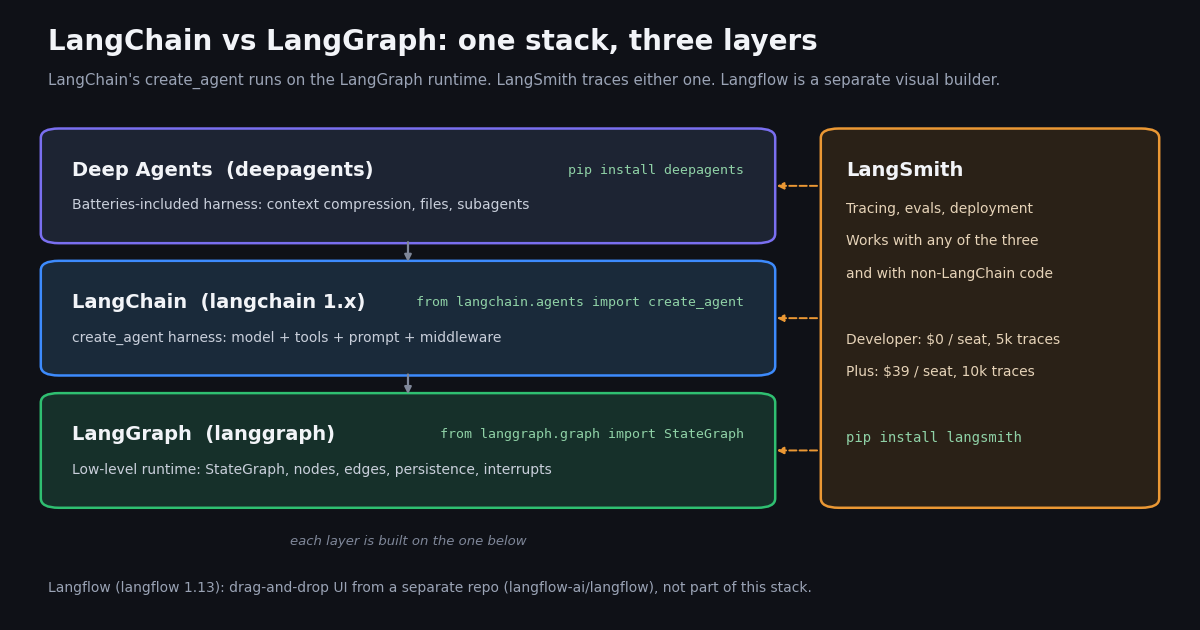
The four names come up together because three of them ship from LangChain Inc and the fourth sounds similar. Here is what each one is according to its own docs and package metadata, read this session.
The dependency direction matters. The LangChain overview states that "LangChain's agents are built on top of LangGraph", which is how create_agent gets durable execution, human-in-the-loop support and persistence. The LangGraph overview says LangGraph "can be used without LangChain". So LangChain depends on LangGraph, not the other way round.
LangSmith is a product, not a third framework. Its docs position it to "trace, debug, and evaluate agents built with any of these frameworks". It sits beside your code rather than replacing either library.
Langflow is the odd one out. It is a Python package "with a built-in web application" for assembling flows visually, published from the langflow-ai GitHub organization. If your team wants a canvas rather than code, compare it with Langflow-style tools, not with LangGraph.
What changed in LangChain 1.0: create_agent replaced create_react_agent
Most older comparison posts were written when the advice was "use LangChain for chains, LangGraph for agents". The LangChain v1 migration guide reverses part of that. It says: "Prior to v1.0, we recommended using langgraph.prebuilt.create_react_agent to build agents. Now, we recommend you use langchain.agents.create_agent."
The import path moved. The guide's table summarizes it as "Package moved from langgraph.prebuilt to langchain.agents" and the function was renamed from create_react_agent to create_agent.
The old function now warns. In the LangGraph repository, libs/prebuilt/langgraph/prebuilt/chat_agent_executor.py decorates create_react_agent with @deprecated("create_react_agent has been moved to langchain.agents. Please update your import to from langchain.agents import create_agent.", category=LangGraphDeprecatedSinceV10). The langgraph-prebuilt package (1.1.1 on PyPI) still ships it, so existing code runs, but new code should not start there.
Hooks became middleware. The same guide lists the other renames: prompt became system_prompt, pre- and post-model hooks became middleware with before_model and after_model, tool error handling moved to wrap_tool_call, and the streaming node name changed from "agent" to "model". Legacy code moved to the langchain-classic package.
The practical effect for the comparison: the prebuilt agent you used to import from LangGraph now lives in LangChain, and LangGraph is pitched at the cases the prebuilt agent does not cover.
# Before LangChain 1.0 (still runs, emits LangGraphDeprecatedSinceV10)
from langgraph.prebuilt import create_react_agent
agent = create_react_agent(model, tools, prompt="You are helpful.")

# LangChain 1.x
from langchain.agents import create_agent
agent = create_agent(model="anthropic:claude-sonnet-5", tools=tools, system_prompt="You are helpful.")When to use LangChain vs LangGraph
The LangChain overview itself gives the rule: use LangChain's create_agent "for a highly customizable harness", and use LangGraph, "our low-level orchestration framework, for advanced needs combining deterministic and agentic workflows." Translating that into decisions you actually face:
Choose LangChain when the model should drive. If the job is "here are some tools, figure it out", create_agent is less code and you lose nothing: it runs on the LangGraph runtime anyway, so persistence via a checkpointer such as InMemorySaver is still available.
Choose LangGraph when your code should drive. The LangGraph overview lists the reasons: mix deterministic and agentic steps, persistence through failures, human-in-the-loop inspection of state at any point, short- and long-term memory. If you find yourself fighting a prebuilt agent to stop it calling a tool a fifth time, that is the signal to write the graph.
You can move between them. Because create_agent runs on the LangGraph runtime, the two share concepts (state, checkpointers, thread_id), so starting with create_agent and rewriting only the parts that need fixed control flow as a StateGraph later is a modest step, not a rewrite of your tools.
The same X-monitoring agent in LangChain (create_agent)
The task: find recent posts on X about a library and summarize what developers are asking, with links. X data comes from TwitterAPI.io's GET /twitter/tweet/advanced_search, which takes an X search query plus queryType (Latest or Top) and returns a top-level tweets[] array with has_next_page and next_cursor for paging. Reads need only an API key in the X-API-Key header, no X account.
In LangChain the search becomes a @tool and the model decides when to call it and with which query. The docstring is the tool description the model sees, so it carries the query-syntax hint.
What you get. About 50 lines including the tool. The model may rewrite the query, call the tool again, or answer straight away; you steer it with the system prompt and, if needed, middleware. The max_pages argument caps how much it can spend on X data per call.
What you give up. You do not decide the control flow. If the model calls search_x three times with similar queries, you pay for three searches. That is usually fine for an interactive assistant and usually not what you want in a scheduled job.
# pip install -U langchain "langchain[anthropic]" requests
import os
import requests
from langchain.agents import create_agent
from langchain.tools import tool

BASE = "https://api.twitterapi.io"
HEADERS = {"X-API-Key": os.environ["TWITTERAPI_IO_KEY"]}


@tool
def search_x(query: str, max_pages: int = 1) -> list[dict]:
    """Search recent X (Twitter) posts. `query` uses X search syntax,
    for example 'langgraph -filter:retweets lang:en'. Returns compact rows."""
    rows, cursor = [], ""
    for _ in range(max_pages):
        r = requests.get(
            f"{BASE}/twitter/tweet/advanced_search",
            headers=HEADERS,
            params={"query": query, "queryType": "Latest", "cursor": cursor},
            timeout=30,
        )
        r.raise_for_status()
        body = r.json()
        for t in body.get("tweets", []):
            rows.append({
                "url": t["url"],
                "text": t["text"][:280],
                "author": t["author"]["userName"],
                "followers": t["author"]["followers"],
                "likes": t["likeCount"],
                "createdAt": t["createdAt"],
            })
        if not body.get("has_next_page"):
            break
        cursor = body.get("next_cursor", "")
    return rows


agent = create_agent(
    model="anthropic:claude-sonnet-5",
    tools=[search_x],
    system_prompt=(
        "You monitor X for developer questions about a library. "
        "Call search_x once, then summarize the three most useful posts with their URLs."
    ),
)

result = agent.invoke(
    {"messages": [{"role": "user", "content": "What are developers saying about LangGraph right now?"}]}
)
print(result["messages"][-1].content)
The same agent in LangGraph (StateGraph)
In LangGraph the search is not a tool at all. It is a deterministic fetch node that pages through results in code, a conditional edge decides whether to fetch again, summarize, or stop, and only the summarize node calls the model. The structure follows the LangGraph quickstart: a TypedDict state with Annotated[list[AnyMessage], operator.add] for messages, add_node, add_edge(START, ...), add_conditional_edges, then compile().
What you get. Predictable cost and behavior. The graph makes at most three search requests, stops without calling the model when nothing new was posted, and always sends the model the 15 most-liked posts. For a job that runs every few minutes, that early END is the difference between paying for a model call on every poll and paying only when there is something to read.
What you give up. More code, and you own the edge cases a prebuilt agent handles for you (tool-call parsing, retries, message formatting). For a one-off question, the LangChain version is quicker to write and read.
Persistence is one argument away. Pass a checkpointer to compile() and a thread_id in the config and the graph resumes where it stopped; store cursor in state and the next run continues paging from the last position instead of starting over.
# pip install -U langgraph langchain "langchain[anthropic]" requests
import os
import operator
from typing import Literal
from typing_extensions import TypedDict, Annotated

import requests
from langchain.chat_models import init_chat_model
from langchain.messages import AnyMessage, HumanMessage, SystemMessage
from langgraph.graph import StateGraph, START, END

BASE = "https://api.twitterapi.io"
HEADERS = {"X-API-Key": os.environ["TWITTERAPI_IO_KEY"]}
QUERY = "langgraph -filter:retweets lang:en"


class MonitorState(TypedDict):
    messages: Annotated[list[AnyMessage], operator.add]
    posts: list[dict]
    cursor: str
    pages: int


def fetch(state: MonitorState) -> dict:
    """Deterministic step: no LLM, just one page of advanced_search."""
    r = requests.get(
        f"{BASE}/twitter/tweet/advanced_search",
        headers=HEADERS,
        params={"query": QUERY, "queryType": "Latest", "cursor": state.get("cursor", "")},
        timeout=30,
    )
    r.raise_for_status()
    body = r.json()
    new = [
        {"url": t["url"], "text": t["text"][:280], "likes": t["likeCount"],
         "followers": t["author"]["followers"]}
        for t in body.get("tweets", [])
    ]
    return {
        "posts": state.get("posts", []) + new,
        "cursor": body.get("next_cursor", "") if body.get("has_next_page") else "",
        "pages": state.get("pages", 0) + 1,
    }


def enough(state: MonitorState) -> Literal["fetch", "summarize", END]:
    """Branch in code: stop early when nothing came back, page at most 3 times."""
    if not state["posts"]:
        return END
    if state["cursor"] and len(state["posts"]) < 40 and state["pages"] < 3:
        return "fetch"
    return "summarize"


model = init_chat_model("anthropic:claude-sonnet-5", temperature=0)


def summarize(state: MonitorState) -> dict:
    """Agentic step: the only node that calls the model."""
    top = sorted(state["posts"], key=lambda p: p["likes"], reverse=True)[:15]
    prompt = SystemMessage(content="Summarize what developers are asking about. Cite post URLs.")
    reply = model.invoke([prompt, HumanMessage(content=str(top))])
    return {"messages": [reply]}


builder = StateGraph(MonitorState)
builder.add_node("fetch", fetch)
builder.add_node("summarize", summarize)
builder.add_edge(START, "fetch")
builder.add_conditional_edges("fetch", enough, ["fetch", "summarize", END])
builder.add_edge("summarize", END)
graph = builder.compile()

out = graph.invoke({"messages": [], "posts": [], "cursor": "", "pages": 0})
print(f"{len(out['posts'])} posts fetched in {out['pages']} request(s)")
if out["messages"]:
    print(out["messages"][-1].content)
What the X data costs in either version
The framework does not change the data bill; the number of search calls does. TwitterAPI.io bills tweet endpoints at 15 credits per tweet returned, which is $0.15 per 1,000 tweets ($1 = 100,000 credits), with a minimum of 15 credits per request. A full 20-tweet page of advanced_search costs $0.003, and a search that finds nothing costs the $0.00015 minimum. You pay only for the data returned.
The official X API figures are from the pay-per-usage rate card on docs.x.com/x-api/getting-started/pricing: $0.005 per post read, $0.010 per user read, with pay-per-usage plans capped at 3 million post reads per monthly billing cycle (Enterprise above that). Per 1,000 tweets that is $5 against $0.15, about 33 times more.
Where the frameworks differ. The LangGraph version above never makes more than three search requests and skips the model when the first page is empty. The LangChain version can make as many as the model chooses, each up to max_pages. If you poll on a schedule, put the cap in code: a graph edge, or a max_pages limit plus a middleware that stops repeated tool calls.
Rate limits. TwitterAPI.io allows 0.2 requests per second before the first payment, 20 once paid, 50 on Scale, 500 on Business and up to 1,000 on request. Subscriptions run from Starter at $29 to Business at $1,499 a month; see the pricing page for what each includes. New accounts that pass the automatic bot check get up to $1 of free credits (at most 100,000 credits, no card, one per person or network, expiring after 31 days). Purchased credits never expire.
What LangChain's own X accounts talk about (real-data study)
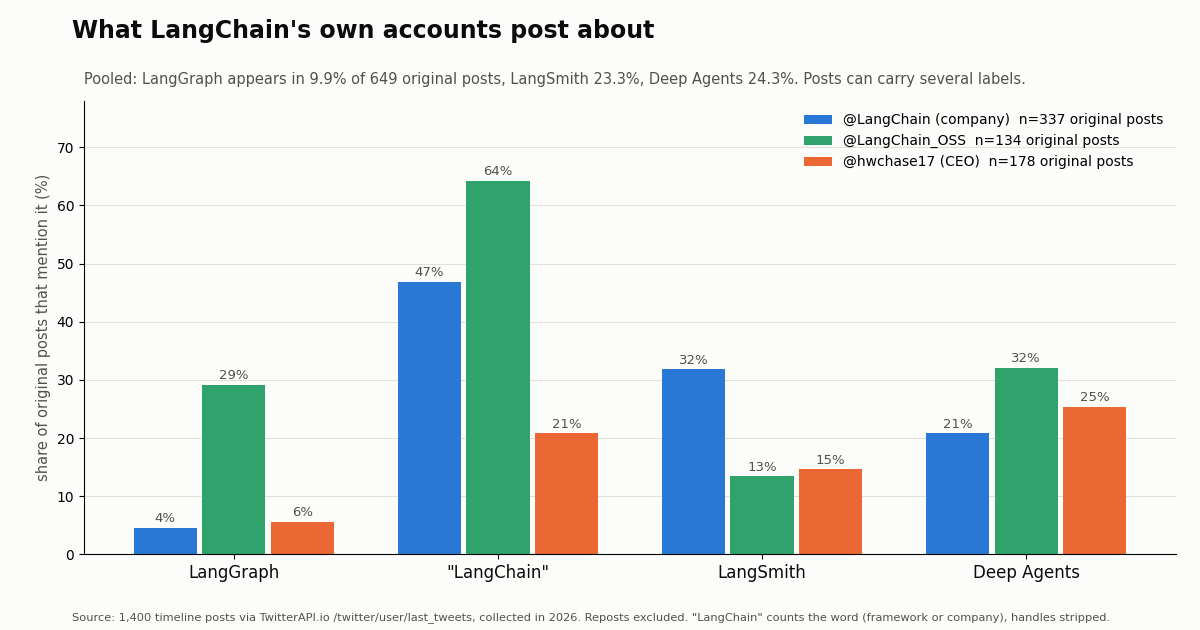
If LangGraph is the runtime and LangChain the harness, which one does the company actually promote? We pulled the recent timelines of the company account @LangChain (renamed from @LangChainAI, which now returns "user not found"), the open-source account @LangChain_OSS, and CEO Harrison Chase (@hwchase17): 1,400 posts, of which 649 are original posts or quotes and 751 are reposts. Each original post was tagged by keyword for the products it names.
LangGraph is the quiet layer. It appears in 9.9% of original posts, behind LangSmith (23.3%) and Deep Agents (24.3%). On the company account it is 4.5%; on @LangChain_OSS it is 29.1%, and 60.9% of all LangGraph mentions come from that open-source account. That matches the docs' framing: LangGraph is infrastructure, while the company's marketing sits on the harness (Deep Agents, create_agent) and the paid platform (LangSmith).
LangGraph is rarely mentioned alone. 71.9% of posts that name LangGraph also name LangChain, which fits the stack picture: the two ship together.
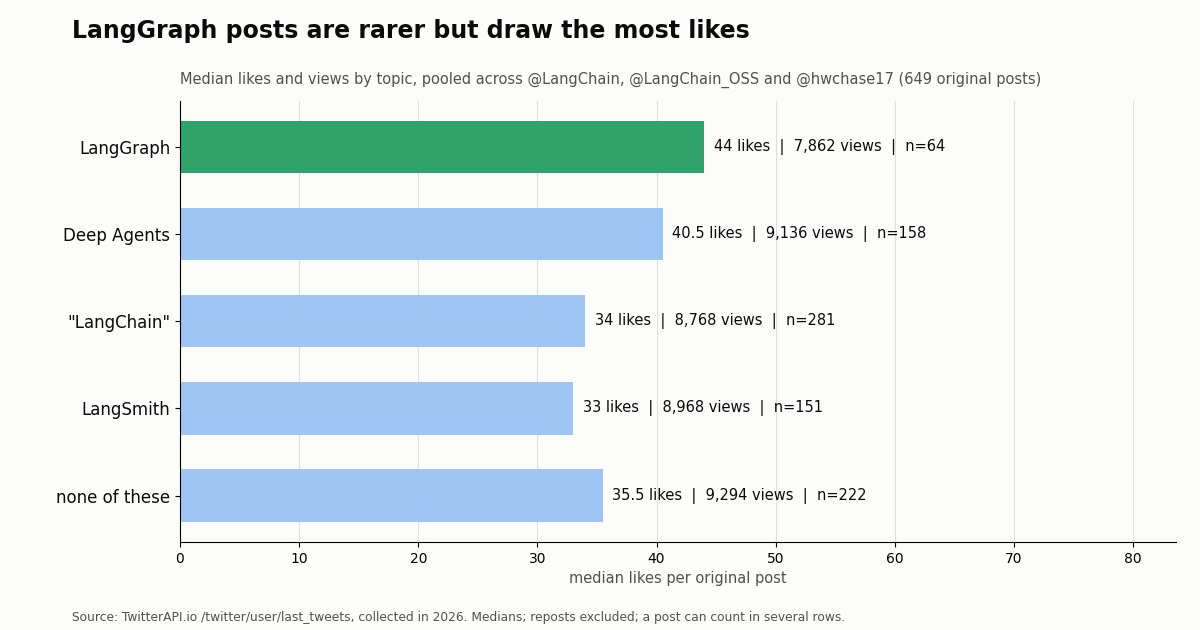
But LangGraph posts get engagement. They have the highest median likes of any topic (44) despite a lower median view count, and 43.8% of them link to docs, GitHub or the blog, the highest share of any topic. That suggests the runtime still draws interest from the developers who need it.
Account profiles differ. @LangChain posted about 6.84 times a day over the sample window and reposts 32.6% of the time; @hwchase17 reposts 70.3% of the time and quotes in 77.5% of his original posts, so his own text is a small slice of his timeline.
Engagement by topic and how we collected this
Question. Which layer of the Lang* stack do LangChain's own accounts talk about, and how do those posts perform?
Accounts and endpoint. @LangChain (company), @LangChain_OSS (open-source projects) and @hwchase17 (CEO, a public figure), via TwitterAPI.io /twitter/user/last_tweets, newest first, without replies: 25, 15 and 30 pages respectively, 1,400 posts in total. Collected in 2026; each account's window runs from its oldest to newest sampled post (73 days for @LangChain, 274 for @LangChain_OSS, 102 for @hwchase17).
Method. Reposts were excluded. For each original post we removed @handles and URLs from the text, added the expanded link URLs, and matched langgraph, langsmith, deep agent(s)/deepagents, langflow and the word langchain case-insensitively. A post can carry several labels. The word "LangChain" counts both the framework and the company, so that row is an upper bound for framework mentions.
Cost. 72 requests returning 1,400 tweets, about $0.21 of credits at 15 credits per tweet.
What the sample cannot show. Keyword tags are not intent: a post naming LangGraph may be a release note or a passing mention. Three accounts over a few months are not the developer community at large, and Langflow appears in zero posts; it is published from a different GitHub organization. Engagement depends on media, timing and who reposts, not only on topic.
Privacy. Aggregates only, from an organization account, an open-source project account and a public figure. Reposted and quoted authors were not analyzed; raw timelines stay outside the repository and the committed sample has no IDs, URLs, text or handles.
Shipping it: tracing with LangSmith and posting results back to X
Tracing. Whichever version you pick, LangSmith can trace it; the LangChain overview links a tracing quickstart under docs.langchain.com/langsmith for the setup. The LangSmith pricing page lists the Developer plan at $0 per seat (one seat, up to 5k base traces a month, then pay-as-you-go) and Plus at $39 per seat a month (up to 10k base traces, unlimited seats); Enterprise is custom. A monitoring graph that runs every 5 minutes produces 8,640 runs a month, so decide early whether every run needs a trace or only the ones that reach summarize.
Posting a digest back to X (optional). TwitterAPI.io also has write endpoints, which run through an authenticated session: one /twitter/user_login_v2 login ($0.10, with a proxy you supply) returns login_cookies, and each post via /twitter/create_tweet_v2 then costs 60 credits ($0.0006). The call acts as that account, so X can rate-limit, lock or suspend it; keep a human pace (a daily digest, not a post per run), expect that the session can need a re-login, and note that writes are billed per HTTP 200 call. In LangGraph this is one more node after summarize, gated by a human-in-the-loop interrupt if you want approval before anything is published.
Getting a key. Create an API key on the dashboard, put it in TWITTERAPI_IO_KEY, and run either script above. The endpoint reference and response fields are on docs.twitterapi.io; reads need no X account.
# pip install -U langgraph langchain "langchain[anthropic]" requests
import os
import operator
from typing import Literal
from typing_extensions import TypedDict, Annotated

import requests
from langchain.chat_models import init_chat_model
from langchain.messages import AnyMessage, HumanMessage, SystemMessage
from langgraph.graph import StateGraph, START, END

BASE = "https://api.twitterapi.io"
HEADERS = {"X-API-Key": os.environ["TWITTERAPI_IO_KEY"]}
QUERY = "langgraph -filter:retweets lang:en"


class MonitorState(TypedDict):
    messages: Annotated[list[AnyMessage], operator.add]
    posts: list[dict]
    cursor: str
    pages: int


def fetch(state: MonitorState) -> dict:
    """Deterministic step: no LLM, just one page of advanced_search."""
    r = requests.get(
        f"{BASE}/twitter/tweet/advanced_search",
        headers=HEADERS,
        params={"query": QUERY, "queryType": "Latest", "cursor": state.get("cursor", "")},
        timeout=30,
    )
    r.raise_for_status()
    body = r.json()
    new = [
        {"url": t["url"], "text": t["text"][:280], "likes": t["likeCount"],
         "followers": t["author"]["followers"]}
        for t in body.get("tweets", [])
    ]
    return {
        "posts": state.get("posts", []) + new,
        "cursor": body.get("next_cursor", "") if body.get("has_next_page") else "",
        "pages": state.get("pages", 0) + 1,
    }


def enough(state: MonitorState) -> Literal["fetch", "summarize", END]:
    """Branch in code: stop early when nothing came back, page at most 3 times."""
    if not state["posts"]:
        return END
    if state["cursor"] and len(state["posts"]) < 40 and state["pages"] < 3:
        return "fetch"
    return "summarize"


model = init_chat_model("anthropic:claude-sonnet-5", temperature=0)


def summarize(state: MonitorState) -> dict:
    """Agentic step: the only node that calls the model."""
    top = sorted(state["posts"], key=lambda p: p["likes"], reverse=True)[:15]
    prompt = SystemMessage(content="Summarize what developers are asking about. Cite post URLs.")
    reply = model.invoke([prompt, HumanMessage(content=str(top))])
    return {"messages": [reply]}


builder = StateGraph(MonitorState)
builder.add_node("fetch", fetch)
builder.add_node("summarize", summarize)
builder.add_edge(START, "fetch")
builder.add_conditional_edges("fetch", enough, ["fetch", "summarize", END])
builder.add_edge("summarize", END)
graph = builder.compile()

out = graph.invoke({"messages": [], "posts": [], "cursor": "", "pages": 0})
print(f"{len(out['posts'])} posts fetched in {out['pages']} request(s)")
if out["messages"]:
    print(out["messages"][-1].content)
Questions readers ask
Is LangGraph replacing LangChain?
No. The LangChain docs say LangChain's agents are built on top of LangGraph, and LangGraph's docs call it a low-level orchestration framework that can also be used without LangChain. They are layers of one stack: LangChain's create_agent is the higher-level harness, LangGraph the runtime underneath.
Should a beginner learn LangChain or LangGraph first?
The LangGraph overview itself recommends getting familiar with models and tools before using LangGraph, and the LangChain overview points new agents at create_agent. Start with LangChain, then drop to LangGraph when you need to control the steps yourself.
Is create_react_agent deprecated?
Yes. The LangChain v1 migration guide replaces langgraph.prebuilt.create_react_agent with langchain.agents.create_agent, and the LangGraph source marks create_react_agent with a LangGraphDeprecatedSinceV10 deprecation warning. It still runs from langgraph-prebuilt, but new code should use create_agent.
What is the difference between LangChain, LangGraph and LangSmith?
LangChain is the agent harness (model, tools, prompt, middleware). LangGraph is the orchestration runtime (graphs, state, persistence, interrupts). LangSmith is the platform for tracing, evaluating and deploying agents built with either; it has a free Developer plan and a Plus plan at $39 per seat a month.
How does Langflow compare with LangGraph?
Langflow is a visual builder, a Python package with a built-in web application published from the separate langflow-ai/langflow repository. LangGraph is a code-first runtime. Choose Langflow if you want to assemble flows on a canvas, LangGraph if you want typed state and control flow in Python.
Can I use LangGraph without LangChain?
Yes. The LangGraph overview states it is built by LangChain Inc but can be used without LangChain. In practice most examples import message types and init_chat_model from langchain, as the quickstart does, but the graph itself only needs langgraph.
How do I give a LangChain or LangGraph agent live X (Twitter) data?
Wrap a read endpoint such as /twitter/tweet/advanced_search in a @tool for create_agent, or call it from a node in a StateGraph. On TwitterAPI.io that costs $0.15 per 1,000 tweets returned, a 20-tweet page $0.003; the official X API's pay-per-usage rate card is $0.005 per post read.
Is OpenAI Agents SDK an alternative to LangGraph?
It is OpenAI's own agent framework, so it is closer in level to LangChain's create_agent (an agent loop with tools) than to LangGraph's graph runtime. Our OpenAI Agents SDK guide shows the same kind of X-data tool built with that SDK, so you can compare the code directly.
Continue
- LangChain docs: v1 migration guide (create_react_agent to create_agent, import path, middleware)
- LangChain docs: overview (agents built on top of LangGraph; LangChain vs LangGraph vs Deep Agents)
- LangGraph docs: overview (low-level orchestration runtime, usable without LangChain)
- LangGraph source: create_react_agent deprecation decorator
- PyPI: langgraph package (current release)
- X developer docs: pay-per-usage pricing
- X (Twitter) API overview: endpoints, pricing and access
- LangChain + Twitter (X) API: document loader, agent tools and MCP
- OpenAI Agents SDK with the Twitter (X) API
- CrewAI multi-agent setup with Twitter (X) data
- Twitter (X) MCP server for AI agents
- TwitterAPI.io pricing and plans
- Get a TwitterAPI.io API key
- TwitterAPI.io endpoint reference
- 01Twitter (X) API License: The Developer Agreement in Plain English
- 02n8n Pricing in 2026: Plans, Executions and the Twitter (X) Data Cost
- 03Claude Managed Agents: What It Is, What It Costs, and a Twitter (X) Monitoring Agent Built on It
- 04Cursor vs Claude Code: Plans, MCP Setup and Headless Runs Compared for Twitter (X) Data Work
- 05Codex Pricing in 2026: ChatGPT Plans, Usage Limits, Credits and API-Key Costs
- 06How to Use LangChain with the Twitter (X) API
- 07How do you earn TwitterAPI.io credits by writing about the API?
- 08X API 403 Forbidden: Every Cause on the Twitter (X) API and How to Fix Each One
Stop reading. Start building.
Starter credits cover real testing on real data. Google sign-in, no card, no application queue.
Get an API keyAlready building with TwitterAPI.io? Publish an honest tutorial or build log about it and earn up to $200 a month in API credits.