CrewAI vs LangGraph: Which Multi-Agent Framework to Pick, and Where AutoGen Went
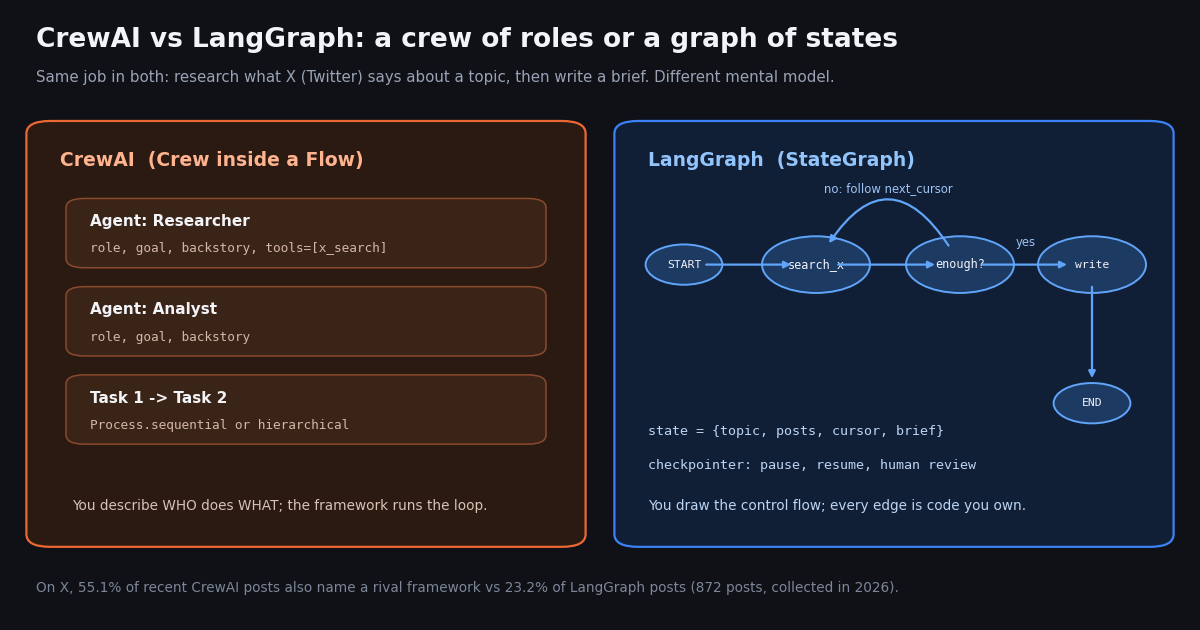
- CrewAI = roles, goals and tasks run by a Crew (sequential or hierarchical), plus Flows for event-driven control with
@start,@listen,@routerand@persist. - LangGraph = a
StateGraphyou draw yourself: typed state, nodes, conditional edges, a checkpointer for pause, resume andinterrupt()human review. - Our same X research agent took 33 lines in CrewAI vs 43 in LangGraph (plus a shared 28-line X search function): CrewAI is shorter, LangGraph shows every branch.
- AutoGen is archived: Microsoft points new users to Microsoft Agent Framework; the community fork is AG2 (formerly AutoGen).
- On X, 55.1% of CrewAI posts name a rival framework vs 23.2% of LangGraph posts, and LangGraph is discussed about 2.7x as often.
- X data costs the same in either framework: $0.15 per 1,000 tweets returned on TwitterAPI.io vs $5.00 per 1,000 post reads on X's pay-per-usage rate card.
Most CrewAI vs LangGraph comparisons repeat the same two sentences: CrewAI is role-based and easy, LangGraph is graph-based and controllable. That is true, but it does not tell you which one to open on Monday. This page answers with things you can check: the current versions, licenses and paid platforms of both, read this session from PyPI, GitHub and the vendors' own pricing pages; the same small agent built in each so you can see where the lines of code go; what happened to AutoGen; and a measured look at how builders on X (Twitter) talk about all three.
This is the framework-choice page. If you already picked CrewAI and need the X integration step by step (tools, MCP, prompt-injection guards), the CrewAI + Twitter API guide covers it; if your question is LangChain vs LangGraph, that comparison has its own page. Both are linked below, and nothing here repeats their setup walkthroughs.
The example agent throughout is an X trend researcher: search recent posts about a topic, group them into themes, write a five-bullet brief with links. It is small enough to read in one screen, and it touches everything that differs between the two frameworks: tool calls, a loop that may need more data, state between steps, and a final writing step.
55.1%
CrewAI vs LangGraph at a glance
Every row below was read this session from the primary source: PyPI for versions, the GitHub API for stars and licenses, pypistats.org for downloads, and each project's docs and pricing page. Stars and downloads move daily; treat them as an order of magnitude.
The download gap is the number that surprises people. Part of it is structural: LangChain's own agents are built on LangGraph, so every LangChain agent install pulls LangGraph in as a dependency, while CrewAI is installed only by people who chose CrewAI. Read it as reach, not as a vote. The star counts point the other way, which is the usual sign of a framework that many people tried and starred early.
Pricing in one sentence. Both frameworks are free; you pay for the model tokens your agents spend, for your own hosting, and optionally for the vendor platform: CrewAI's AMP suite (managed deployment, observability, governance) shows a free Basic tier with 50 workflow executions a month and a custom-priced Enterprise tier on crewai.com/pricing, and LangChain's LangSmith shows Developer at $0 per seat (up to 5k base traces a month), Plus at $39/seat/month (up to 10k base traces, one free small deployment, further deployments metered in LSUs at $1.00 each) and custom Enterprise on langchain.com/pricing.
The real difference: who owns the control flow
In CrewAI you describe a team and let the framework run it. A researcher Agent gets a role, a goal, a backstory and a list of tools; a Task says what to produce and which agent produces it; a Crew runs the tasks sequentially, or hierarchically with a manager agent delegating. The loop that decides when to call a tool, when to retry and when an answer is good enough lives inside the agent executor (an Agent's max_iter caps it). You get a working multi-agent pipeline with very little code, and you give up the ability to see or change every decision point.
In LangGraph you describe the control flow and the framework executes it. State is a typed dictionary; each node is a plain function that reads state and returns an update; edges, including conditional ones, say what runs next. If your agent needs to search, check whether it has enough material, widen the query and search again, that loop is three lines of graph you wrote and can test, not behavior you infer from logs.
CrewAI has narrowed the gap with Flows. The current docs describe Flows as the backbone of an application, managing state and execution, with Crews as the autonomous teams a Flow delegates to. Flows have @start, @listen and @router decorators, or_ and and_ to join branches, structured Pydantic state, @persist with SQLite as the default backend, and kickoff(inputs={"id": ...}) to resume a run. So the honest 2026 framing is not 'CrewAI has no control flow'; it is that CrewAI layers event-driven flows on top of a role-based agent abstraction, while LangGraph starts from the graph and lets you put agents (or no agents) inside nodes.
State. CrewAI passes task output forward as context and keeps Flow state on the Flow; LangGraph keeps one state object that every node reads and writes, with reducers deciding how updates merge. If several steps need to append to the same list of posts, LangGraph makes that explicit.
Persistence and replay. A LangGraph checkpointer saves state after every step, keyed by thread_id, so a run can pause for a human, survive a crash and resume, or be rewound to an earlier checkpoint. CrewAI's @persist saves Flow state per method and can restore or fork a run from a saved state id.
Debugging. In LangGraph the graph is the documentation of what can happen; LangSmith (optional, paid above the free tier) traces each node. In CrewAI the interesting decisions happen inside agent reasoning, so you debug by reading the agents' thoughts and tool calls; CrewAI's AMP suite adds observability on top.
Telemetry. CrewAI's README says it collects anonymous usage data and that you can turn it off with OTEL_SDK_DISABLED=true. Worth knowing before you run it in a regulated environment.
When to pick CrewAI, when to pick LangGraph
Pick CrewAI if the work divides into roles. Research then write; triage then draft; collect then score. A crew of two or three agents with sequential tasks is the shortest route from idea to a demo, and the role and backstory fields are a natural place to put domain instructions.
Pick CrewAI if non-engineers will read the definition. A Task with description and expected_output reads like a job ticket. Product people can review it without knowing what a reducer is.
Pick LangGraph if you need a loop you can reason about. Paging through search results until you have enough, retrying with a wider query, stopping after N attempts: in LangGraph these are edges you can unit-test.
Pick LangGraph if runs must pause and resume. Human approval before posting, long jobs that span hours, recovery after a crash: checkpointers and interrupt() are the core of the design, not an add-on.
Pick LangGraph if you also ship TypeScript. LangGraph has a JavaScript implementation in a separate repo (langchain-ai/langgraphjs); the CrewAI framework is a Python package.
Use both if it fits. Nothing stops a LangGraph node from calling crew.kickoff(). Teams sometimes keep a crew for a fuzzy research step and wrap it in a graph that owns retries, approval and storage.
Do not pick on popularity alone. The two frameworks win on different counters (stars favor CrewAI, downloads favor LangGraph), and on X the conversation splits the same way, as the study below shows.
CrewAI vs LangGraph vs AutoGen: what happened to AutoGen
AutoGen used to be the third pillar of every comparison. Its status changed: the microsoft/autogen README now says the project is archived and no longer maintained, that Microsoft is not providing bug fixes, security fixes, new features or support, and that new users should start with Microsoft Agent Framework, which it calls the enterprise-ready successor to AutoGen. The last autogen-agentchat release on PyPI is 0.7.5. The repository still carries about 61.8K stars, so it keeps showing up in searches and older tutorials.
Two lines continue. Microsoft Agent Framework (microsoft/agent-framework, MIT, agent-framework 1.25.0 on PyPI, about 14.6K stars) is Microsoft's supported path, with Python and .NET. AG2 (ag2ai/ag2, Apache-2.0, ag2 1.3.1 on PyPI, about 5.1K stars) describes itself as 'AG2 (formerly AutoGen)' and is the community-led fork of the original conversational design.
So 'CrewAI vs LangGraph vs AutoGen' in 2026 really means 'CrewAI vs LangGraph vs Microsoft Agent Framework (or AG2)'. If you have AutoGen code in production, the archive notice means no security fixes: plan a migration. If you are starting fresh, AutoGen itself is not a candidate. On X the switch is visible: in our AutoGen sample, 24.3% of posts already name Microsoft Agent Framework.
CrewAI vs AutoGen, briefly. Both started from 'several agents talking', but AutoGen's model was a conversation between agents (group chats, speaker selection), while CrewAI's is a division of labor (roles and tasks). With AutoGen archived, the CrewAI vs AutoGen question now resolves to CrewAI vs AG2 for the conversational style, or CrewAI vs Microsoft Agent Framework if you are in the Microsoft stack.
The same X research agent in CrewAI
Both versions call the same 28-line search_x() function (it is the code snippet at the end of this page): one GET to /twitter/tweet/advanced_search per page of up to 20 posts, following has_next_page and next_cursor, returning compact fields. Keeping the X call outside the framework is deliberate: the data layer, its cost and its rate limit are identical whichever framework you pick, and you can swap frameworks without touching it.
The CrewAI version is 33 lines. The @tool decorator from crewai.tools turns the function into a tool the researcher can call; the writer gets the researcher's output through context=[research]; max_iter=5 stops a confused agent from searching forever.
What you do not write: the reasoning loop. The researcher decides on its own how many searches to run and with which queries. That is the appeal and the risk: on a busy topic it may search once and stop; on a quiet one it may spend all five iterations rephrasing the query. Each search returns up to 100 posts, about $0.015 of X data at $0.15 per 1,000 tweets, so five searches cap the X bill of a run at about $0.075.
"""crew_version.py - X trend researcher as a CrewAI crew (pip install crewai requests)."""
import json

from crewai import Agent, Crew, Process, Task
from crewai.tools import tool

from x_search import search_x


@tool("Search X")
def x_search_tool(query: str) -> str:
    """Search recent X (Twitter) posts. Input: an X search query such as 'langgraph -is:retweet'."""
    return json.dumps(search_x(query, max_posts=100))


researcher = Agent(
    role="X research analyst",
    goal="Find what builders on X are saying about {topic} right now",
    backstory="You read raw posts, ignore spam and quote only what posts actually say.",
    tools=[x_search_tool],
    max_iter=5,
)
writer = Agent(
    role="Brief writer",
    goal="Turn research notes into a five-bullet brief with post links",
    backstory="You write short, sourced briefs for an engineering team.",
)
research = Task(
    description="Search X for {topic}. Group the posts into themes; keep 2 links per theme.",
    expected_output="Themes with post counts and links",
    agent=researcher,
)
brief = Task(
    description="Write the brief from the research notes.",
    expected_output="Five bullets, each with one link",
    agent=writer,
    context=[research],
)
crew = Crew(agents=[researcher, writer], tasks=[research, brief], process=Process.sequential)

if __name__ == "__main__":
    print(crew.kickoff(inputs={"topic": "langgraph"}).raw)
The same agent in LangGraph, and what the extra lines buy
The LangGraph version is 43 lines: 10 more than CrewAI. The extra lines are the decisions CrewAI made for you. enough() says exactly when to stop searching (30 posts, or two attempts); widen() says exactly how to retry (drop the -is:retweet filter); the conditional edge wires them together. The model is called once, in write, with the posts in the prompt, so the number of LLM calls per run is fixed and known.
Notice the cost row. The framework does not change the price of X data, but it changes how much X data a run reads. An autonomous agent that decides its own search count has a variable bill; a graph with a fixed stop condition has a known ceiling. For a scheduled job that runs every hour, that difference matters more than the framework's own price (zero).
We compiled both files but did not execute them against a model for this page; the APIs used (Agent, Task, Crew, Process, crewai.tools.tool, StateGraph, START, END, add_conditional_edges, InMemorySaver) were checked against the current CrewAI and LangGraph docs this session. Swap init_chat_model("anthropic:claude-sonnet-5") for any model your LangChain install supports; CrewAI agents use the default model from your environment unless you pass llm=.
"""graph_version.py - X trend researcher as a LangGraph StateGraph (pip install langgraph langchain requests)."""
from typing import TypedDict

from langchain.chat_models import init_chat_model
from langgraph.checkpoint.memory import InMemorySaver
from langgraph.graph import END, START, StateGraph

from x_search import search_x

llm = init_chat_model("anthropic:claude-sonnet-5", temperature=0)


class State(TypedDict):
    topic: str
    query: str
    posts: list
    attempts: int
    brief: str


def plan(state: State) -> dict:
    return {"query": f"{state['topic']} -is:retweet", "attempts": 0, "posts": []}


def search(state: State) -> dict:
    posts = search_x(state["query"], max_posts=100)
    return {"posts": posts, "attempts": state["attempts"] + 1}


def enough(state: State) -> str:
    if len(state["posts"]) >= 30 or state["attempts"] >= 2:
        return "write"
    return "widen"


def widen(state: State) -> dict:
    return {"query": state["topic"]}  # drop the filter and search again


def write(state: State) -> dict:
    lines = "\n".join(f"- {p['text'][:200]} ({p['url']})" for p in state["posts"])
    msg = llm.invoke(
        "Group these X posts into themes and write a five-bullet brief, one link per bullet.\n" + lines
    )
    return {"brief": msg.content}


g = StateGraph(State)
g.add_node("plan", plan)
g.add_node("search", search)
g.add_node("widen", widen)
g.add_node("write", write)
g.add_edge(START, "plan")
g.add_edge("plan", "search")
g.add_conditional_edges("search", enough, {"write": "write", "widen": "widen"})
g.add_edge("widen", "search")
g.add_edge("write", END)
app = g.compile(checkpointer=InMemorySaver())

if __name__ == "__main__":
    out = app.invoke({"topic": "crewai"}, config={"configurable": {"thread_id": "run-1"}})
    print(out["brief"])
Wiring X (Twitter) data into either framework, and what it costs
You have two ways to give an agent X data, and both work the same in CrewAI and LangGraph. A REST function, like search_x() above: you control the fields, the paging and the cost ceiling, and it is plain Python you can test. The hosted MCP server at https://mcp.twitterapi.io/mcp, authenticated with an Authorization: Bearer <key> header: CrewAI agents accept it directly through mcps=[MCPServerHTTP(...)], and LangGraph loads it through langchain-mcp-adapters (0.3.2 on PyPI) as ordinary LangChain tools. MCP saves you writing tool code; REST lets you trim each post to the fields the model needs, which cuts tokens.
Reads need no X account: you need a TwitterAPI.io key, and new accounts that pass the automatic bot check get up to $1 of free credits (at most 100,000 credits, no card, one per person or network, expiring after 31 days). Purchased credits never expire. One thing agents hit early: before your first payment the key allows 0.2 requests per second, which a paging loop reaches quickly; after the first payment it is 20 requests per second (50 on Scale, 500 on Business).
What the X data costs. TwitterAPI.io bills per tweet returned: 15 credits, which is $0.15 per 1,000 tweets, with a 15-credit minimum when a search comes back empty. X's own pay-per-usage rate card (docs.x.com/x-api/getting-started/pricing) lists $0.005 per post read, which is $5.00 per 1,000 posts, about 33x more, and caps pay-per-usage at 3 million post reads a month. The framework you pick does not change either price.
Model tokens usually cost more than the X data in a run like this, and they depend on your model choice, so they are not in the table. If you schedule an agent to watch for new posts, the cheap pattern is a plain poll that only wakes the agent when something is new: a check that finds nothing costs $0.00015, so polling every 5 minutes for a month is about $1.30 and every 60 seconds about $6.48. Plans and volume pricing are on the pricing page.
Posting results back to X. Write actions exist too, through an authenticated session: one /twitter/user_login_v2 login ($0.10, with a proxy you supply) returns login_cookies, and each post through /twitter/create_tweet_v2 is then 60 credits ($0.0006). The call acts as that account, so X can rate-limit, lock or suspend it; keep a human pace, expect the session to need a re-login now and then, and note that every HTTP 200 call is billed. In LangGraph, put an interrupt() before the posting node so a person approves the text; in CrewAI, put the posting step behind @human_feedback in a Flow.
"""Give the same X tools to both frameworks through the hosted TwitterAPI.io MCP server.
pip install crewai langchain-mcp-adapters langgraph langchain"""
import asyncio
import os

KEY = os.environ["TWITTERAPI_IO_API_KEY"]
MCP_URL = "https://mcp.twitterapi.io/mcp"

# CrewAI: an Agent takes MCP server configs directly
from crewai import Agent
from crewai.mcp import MCPServerHTTP

crew_researcher = Agent(
    role="X research analyst",
    goal="Find what builders on X say about {topic}",
    backstory="You quote posts accurately and link every claim.",
    mcps=[MCPServerHTTP(url=MCP_URL, headers={"Authorization": f"Bearer {KEY}"})],
)

# LangGraph: load the MCP tools as LangChain tools, then bind them in a graph or create_agent
from langchain_mcp_adapters.client import MultiServerMCPClient


async def load_x_tools():
    client = MultiServerMCPClient({
        "twitterapi": {
            "transport": "streamable_http",
            "url": MCP_URL,
            "headers": {"Authorization": f"Bearer {KEY}"},
        }
    })
    return await client.get_tools()


if __name__ == "__main__":
    tools = asyncio.run(load_x_tools())
    print([t.name for t in tools])
What builders on X say about CrewAI, LangGraph and AutoGen
We searched X for recent posts naming each framework (reposts excluded) and read the latest 283 CrewAI posts, 289 LangGraph posts and 300 AutoGen / AG2 / Microsoft Agent Framework posts, then matched each post's text against a list of framework names. Three findings change how you should read the comparison articles.
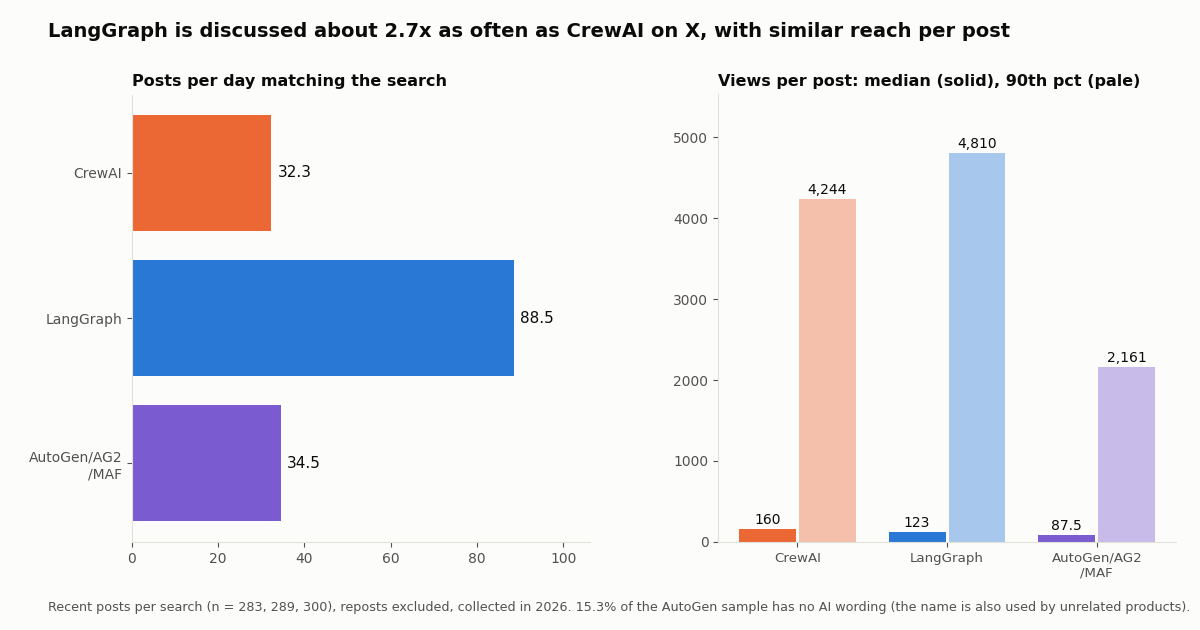
LangGraph is discussed much more. The LangGraph search returned 88.5 posts a day; CrewAI 32.3; the AutoGen family 34.5. That matches the download gap more than the star gap.
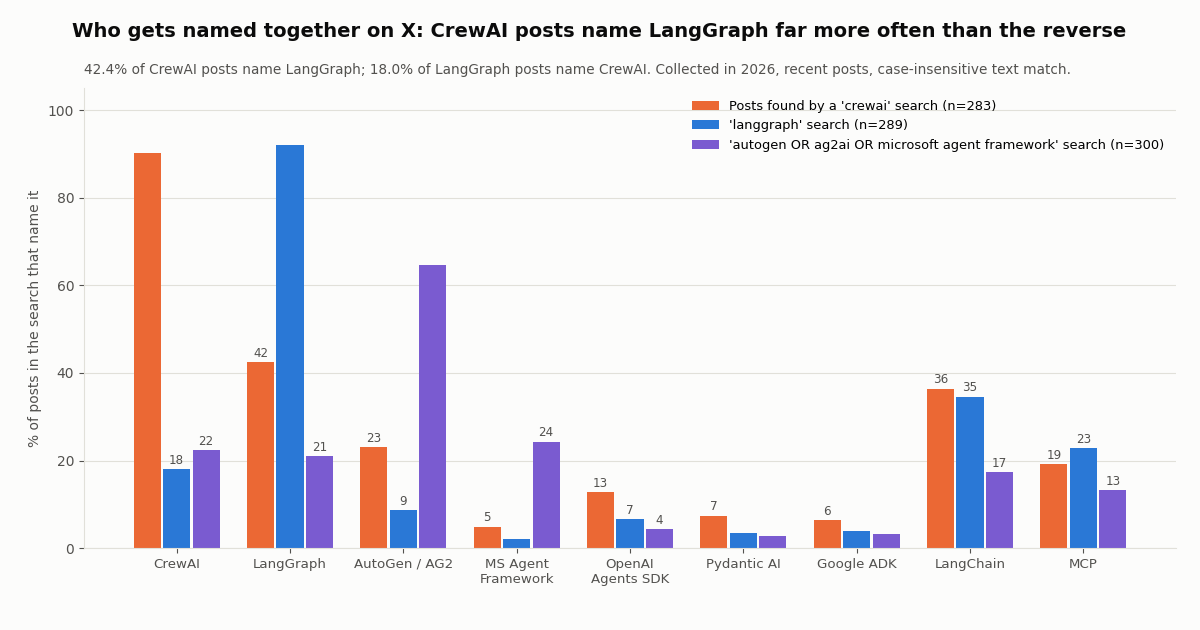
CrewAI is discussed in comparison. 55.1% of CrewAI posts named at least one other agent framework, against 23.2% of LangGraph posts. 42.4% of CrewAI posts named LangGraph; only 18.0% of LangGraph posts named CrewAI. CrewAI shows up in lists and 'which should I use' threads; LangGraph more often stands alone, in posts about building with it.
AutoGen talk is migration talk. 24.3% of the AutoGen-family sample named Microsoft Agent Framework, and 48.3% named some rival framework. That sample is also the noisiest: 15.3% of its posts carry no AI or agent wording at all, because 'Autogen' is also the name of unrelated products.
LangChain comes up in about a third of both CrewAI posts (36.4%) and LangGraph posts (34.6%), and MCP in 19.1% and 22.8%: tool access through MCP is now part of how people describe agent stacks in either framework.
Reach per post is low and lopsided for all three: median views of 160 (CrewAI), 123 (LangGraph) and 87.5 (AutoGen family), against 90th percentiles of 4,244, 4,810 and 2,161. Between 37.5% and 41.0% of posts had no likes. The conversation is many small accounts sharing projects plus a few posts that travel. About 72% of posts in each sample are in English, with Chinese the second language in all three (between 12.0% and 18.3%).
The vendors' own accounts tell a quieter story about positioning. We read the latest posts of the company accounts and of CrewAI's founder:
The LangChain account posts often but rarely says 'LangGraph': 5.8% of its recent posts name it, while 20.8% name Deep Agents and 8.3% LangSmith. LangGraph is marketed as the runtime underneath, not the product on the label. The CrewAI account posts rarely (0.2 a day over its recent posts) but 67.5% of those posts name CrewAI, and 16.2% mention AMP or enterprise: the company sells the platform around the open-source crew.
How we collected this
Question. How do builders on X talk about CrewAI, LangGraph and AutoGen right now, which rivals is each named with, and what do the frameworks' own accounts post?
Queries and accounts. Three searches on /twitter/tweet/advanced_search with queryType=Latest: crewai -is:retweet, langgraph -is:retweet and (autogen OR ag2ai OR "microsoft agent framework") -is:retweet. Timelines from /twitter/user/last_tweets and profiles from /twitter/user/info for @crewAIInc and @LangChain (company accounts) and @joaomdmoura (CrewAI's founder, a public figure).
Window and sample. The most recent matching posts at collection time, collected in 2026: 283 CrewAI posts covering about 9 days, 289 LangGraph posts covering about 3 days, 300 AutoGen-family posts covering about 9 days, plus 320 timeline posts: 1,192 posts in all, from 65 requests. At $0.15 per 1,000 tweets the data cost about $0.18.
Method. A post 'names' a framework when its text or expanded links match that framework's name (case-insensitive, with spacing variants such as 'crew ai'). Rival frameworks counted: CrewAI, LangGraph, AutoGen / AG2, Microsoft Agent Framework, OpenAI Agents SDK, Google ADK, Pydantic AI, smolagents and Mastra; LangChain and MCP are reported separately and not counted as rivals. The code line counts come from the two snippet files on this page, excluding blank lines, comments and docstrings.
What the sample cannot show. A week or so of posts is a snapshot, not a trend; the searches return a recent slice, so posts per day reflect that window only. Name matching cannot tell praise from complaint, and a post that names two frameworks is not always a comparison. The AutoGen query is noisy because the word has unrelated uses. Views are what X reports at collection time. Nothing here measures framework quality, speed or production reliability.
Privacy. Aggregates only. Search results came mostly from private individuals, so raw pages stayed out of the repository and the kept sample rows have no post ids, URLs, text, handles or author ids. Only the two company accounts and CrewAI's founder are named. The protocol, analysis script, results and de-identified sample live in data/studies/crewai-vs-langgraph/.
"""x_search.py - the one X (Twitter) data function both versions share."""
import os

import requests

API_KEY = os.environ["TWITTERAPI_IO_API_KEY"]


def search_x(query: str, max_posts: int = 100) -> list[dict]:
    """Recent posts matching an X search query, newest first, compact fields only."""
    posts, cursor = [], ""
    while len(posts) < max_posts:
        r = requests.get(
            "https://api.twitterapi.io/twitter/tweet/advanced_search",
            headers={"X-API-Key": API_KEY},
            params={"query": query, "queryType": "Latest", "cursor": cursor},
            timeout=30,
        )
        r.raise_for_status()
        body = r.json()
        for t in body.get("tweets", []):
            posts.append({
                "url": t["url"],
                "text": t["text"],
                "createdAt": t["createdAt"],
                "likes": t.get("likeCount", 0),
                "views": t.get("viewCount", 0),
                "author": t["author"]["userName"],
                "followers": t["author"].get("followers", 0),
            })
        if not body.get("has_next_page"):
            break
        cursor = body["next_cursor"]
    return posts[:max_posts]


if __name__ == "__main__":
    # Run this file on its own to check your key and see what an agent will receive.
    #   pip install requests
    #   export TWITTERAPI_IO_API_KEY=...   (from https://twitterapi.io/dashboard)
    #   python x_search.py
    posts = search_x("(crewai OR langgraph) -is:retweet", max_posts=40)
    print(f"{len(posts)} posts; X data cost about ${len(posts) * 0.00015:.4f} at $0.15 per 1,000 tweets")
    for p in posts[:10]:
        print(p["createdAt"], p["likes"], p["views"], p["url"])
Researching this?Free starter credits cover end-to-end testing — Google sign-in, no card. Get a key.
Questions readers ask
Is CrewAI better than LangGraph?
Neither is better in general. CrewAI gets a role-based multi-agent prototype running with less code (our example: 33 lines vs 43), while LangGraph gives you explicit control flow, typed state, checkpoints and human-in-the-loop pauses. Pick by the shape of the problem: roles handing work down a line favor CrewAI; loops, branches and resumable runs favor LangGraph.
Does CrewAI use LangChain or LangGraph under the hood?
No. CrewAI's README describes it as a standalone Python framework with its own primitives for agents, tasks, crews, flows, tools and orchestration. LangGraph, in turn, does not require LangChain, although LangChain's own agents are built on LangGraph.
Is AutoGen still maintained?
No. The microsoft/autogen README says the project is archived and no longer maintained, with no bug fixes, security fixes, features or support from Microsoft, and points new users to Microsoft Agent Framework. AG2, the community fork that calls itself 'formerly AutoGen', is still active under Apache-2.0.
CrewAI vs AutoGen: which should I use in 2026?
AutoGen itself is no longer a candidate for new work. Compare CrewAI with Microsoft Agent Framework if you are in the Microsoft or .NET stack, or with AG2 if you want AutoGen's conversational, group-chat style of agents. CrewAI remains the role-and-task option.
Are CrewAI and LangGraph free?
Both frameworks are open source under the MIT license and free to self-host. The vendors sell platforms around them: CrewAI AMP (Basic free with 50 workflow executions a month, Enterprise custom) and LangChain's LangSmith (Developer $0 per seat, Plus $39/seat/month, Enterprise custom). Your main running costs are model tokens, hosting and any data APIs your agents call.
Can I use CrewAI inside LangGraph?
Yes. A LangGraph node is a Python function, so it can call crew.kickoff() and write the crew's output into the graph state. That lets a graph own retries, approval and storage while a crew handles an open-ended research or writing step.
How do I give a CrewAI or LangGraph agent access to X (Twitter) data?
Either call a REST endpoint such as /twitter/tweet/advanced_search from a tool function, or connect the hosted MCP server at mcp.twitterapi.io/mcp with an Authorization: Bearer header (CrewAI through mcps=[MCPServerHTTP(...)], LangGraph through langchain-mcp-adapters). No X account is needed for reads; data is $0.15 per 1,000 tweets returned, versus $0.005 per post read on X's pay-per-usage rate card.
Which framework is more popular?
It depends on the counter. CrewAI has more GitHub stars (about 60.8K vs 44.8K), LangGraph far more PyPI downloads (about 44.8 million vs 2.4 million last month, partly because LangChain agents depend on it). On X, LangGraph drew 88.5 posts a day vs 32.3 for CrewAI in our 2026 sample.
Continue
- crewAI on GitHub: standalone framework, Crews and Flows, MIT license, telemetry opt-out
- CrewAI docs: Flows (@start, @listen, @router, @persist, @human_feedback)
- LangGraph docs: overview, capabilities, 'does not require LangChain'
- LangGraph docs: interrupts, checkpointers and resuming with Command
- microsoft/autogen README: archived, Microsoft Agent Framework is the successor
- X API pay-per-usage pricing ($0.005 per post read)
- X (Twitter) API guide: endpoints, pricing and access
- LangChain vs LangGraph: when to use each
- How to use CrewAI with the Twitter (X) API
- How to build an AI agent on X data
- The TwitterAPI.io MCP server for agents
- OpenAI Agents SDK with the Twitter (X) API
- LangChain tools for Twitter (X) data
- Pay-per-use pricing for X data
- 01Bright Data Alternatives for Twitter (X) Data: Prices, Fit and a Measured Cost Test
- 02Make.com Pricing in 2026: Plans, Credits and What a Twitter (X) Workflow Really Costs
- 03Browser Use MCP Server: Setup, CLI and Twitter (X) Reads in 2026
- 04Manus Alternatives in 2026: Hosted, Chat-Plan and Open-Source Agents, and What People on Twitter (X) Switch To
- 05Google ADK vs LangGraph: Which Agent Framework to Use in 2026
- 06How to Use CrewAI with the Twitter (X) API
- 07LangChain vs LangGraph: Which to Use, With the Same X-Monitoring Agent Built in Both
- 08Cursor vs Claude Code: Plans, MCP Setup and Headless Runs Compared for Twitter (X) Data Work
Writing about something you built with TwitterAPI.io? Our community rewards program pays API credits for honest tutorials, build logs and videos.
Stop reading. Start building.
Starter credits cover real testing on real data. Google sign-in, no card, no application queue.
Get an API keyAlready building with TwitterAPI.io? Publish an honest tutorial or build log about it and earn up to $200 a month in API credits.