Twitter (X) Search Operators — Complete API Reference
If you're building anything that programmatically searches Twitter (X) — brand monitoring, cashtag tracking, competitive intel, sentiment pipelines — search operators are the single biggest lever you have over both signal quality and cost. A one-word query returns tens of thousands of low-signal tweets; the same intent expressed with 3-4 operators returns hundreds of high-signal ones for a fraction of the price.
This reference lists every operator that works today via API, grouped by what it does, with runnable Python examples for the operator combos you'll actually use in production.
The 4 operator categories at a glance
Twitter's search grammar is docs.x.com/x-api/enterprise-gnip-2.0/fundamentals/search-api — the same modifiers work on both the free UI (twitter.com/search-advanced) and the API endpoints. What follows is grouped by the category most useful when constructing a query.
Any operator can combine with any other, space-separated inside your query parameter. AND is implicit (all operators must match). OR needs parentheses: (term1 OR term2). Exclusion uses leading -.
Operators decide what a query matches; they do not decide the order results come back in. For how X ranks what you see in the Top and Latest tabs, how profiles surface in the People tab, and how posts get indexed by Google, see Twitter search engine optimization: how X search and Google rank your posts.
What real API users actually put in their queries
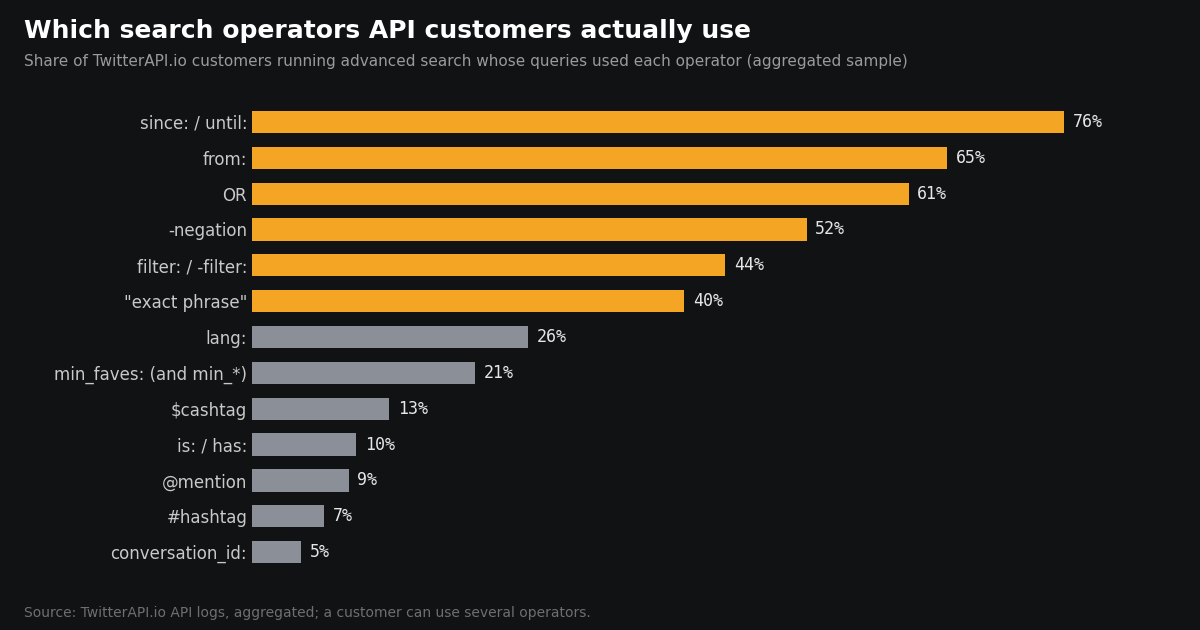
Operator references list everything the grammar allows. This is what developers actually send: we aggregated a sample of advanced-search traffic from thousands of TwitterAPI.io customers and counted how many of them used each operator at least once.
Time windows are close to universal. 76% of customers bound their queries with since: / until: (or the unix-time forms). The typical caller is a scheduled job asking only for what is new since its last run, not someone browsing search results.
Monitoring is mostly account lists, not keywords. 65% use from:. 39% of customers run single-account queries, and 30% OR a list of accounts together (from:a OR from:b OR …), usually somewhere between 5 and 21 handles per query.
Noise filters are common; engagement floors are not. 52% exclude terms with -word and 44% use filter: / -filter:, but only 21% set a min_faves:-style threshold — even though it is the simplest way to cut result volume (see Category 2).
Hashtags are rare. Only 7% of customers search a #hashtag; 13% search a $cashtag such as $BTC or $NVDA.
Read these as a picture of developers building monitoring and data pipelines on an API, not of the average person typing into x.com search — your own mix will depend on what you are tracking.
Category 1 — Author scope
from:@handle — tweets by a specific account. Case-insensitive. Handle-only (no @ prefix technically needed but common).
to:@handle — tweets sent as reply to an account.
@handle — tweets mentioning an account (in body or as reply).
list:<list_id> — tweets from members of a specific Twitter List. Use when your ICP already curates authors as a list.
Combining: from:elonmusk OR from:jack lang:en min_faves:100 — high-engagement English tweets from either of 2 authors.
Category 2 — Engagement threshold (biggest cost lever)
min_faves:N — tweets with at least N likes. The single most useful operator for research/analytics workloads. Even min_faves:5 cuts 90%+ of the null-engagement long tail.
min_retweets:N — analogous for retweet count.
min_replies:N — analogous for reply count.
Practical combo: <keyword> min_faves:20 min_retweets:5 — dual-threshold cuts noise even further; useful when you want engaged tweets that also sparked conversation.
Category 3 — Content class
lang:xx — ISO 639-1 code (en, ja, es, zh). Restricts to detected language. Combines cleanly with everything else.
filter:media — tweets with images, video, or GIF attachments.
filter:images / filter:videos / filter:native_video — narrower media types.
filter:links — tweets containing external URLs.
filter:verified — tweets from verified accounts (post-Twitter-Blue this includes paid checkmarks; for legacy-verified only, post-filter on verified_type field).
filter:replies — replies only. -filter:replies — exclude replies (top-level tweets only).
-filter:retweets — exclude retweets. Almost always want this for original-content analysis.
has:links / has:media — modern equivalents of some filter: operators.
-is:retweet — newer syntax for excluding retweets.
Category 4 — Date and phrase
since:YYYY-MM-DD — tweets on or after this date (UTC).
until:YYYY-MM-DD — tweets before this date (UTC, exclusive).
"exact multi-word phrase" — literal phrase match. Case-insensitive.
-excluded_term — exclude tweets containing this term.
(term1 OR term2) — parenthesized alternation.
Combined date + phrase: "climate change" since:2024-01-01 until:2024-12-31 lang:en min_faves:100.
Runnable — operator vocabulary in action
One call showing 6+ operators combined:
import os, requests

HEADERS = {"X-API-Key": os.environ["TWITTERAPI_IO_KEY"]}
BASE = "https://api.twitterapi.io"

def search(query: str, max_pages: int = 10) -> list:
    tweets, cursor = [], None
    for _ in range(max_pages):
        params = {"query": query}
        if cursor: params["cursor"] = cursor
        r = requests.get(f"{BASE}/twitter/tweet/advanced_search", headers=HEADERS, params=params, timeout=15)
        r.raise_for_status()
        resp = r.json()
        tweets.extend(resp.get("tweets", []))
        cursor = resp.get("next_cursor")
        if not cursor: break
    return tweets

# High-signal crypto sentiment: original English tweets, engagement threshold, date window, no retweets
q = 'bitcoin (bullish OR bearish) lang:en min_faves:20 -filter:retweets since:2024-01-01 until:2024-04-01'
tweets = search(q, max_pages=5)
print(f'{len(tweets):,} high-signal tweets matching operator combo')
# Cost per twitterapi.io/pricing: len(tweets) × $0.000155 real-world operator combos
Each combo returns dramatically fewer + higher-signal results than the base keyword alone. That's the whole point of operators: signal-per-dollar. Counting an account's posts for a fixed window, reposts included, is the same pattern in a different shape: from:federalreserve include:nativeretweets since_time:<start> until_time:<end>, which is how our Kalshi bot guide rebuilds the post counts behind Kalshi's X-post markets.
Watching a long list of accounts: the 512-character limit
Account lists are the most common monitoring pattern on our API (see the usage data above): (from:a OR from:b OR …). They hit a hard ceiling sooner than people expect. On TwitterAPI.io, advanced_search accepts queries up to 512 characters; a longer query is rejected with a message telling you to split it, and returns no results. Tweet filter rules (the webhook-based monitoring) are stricter: the rule value is capped at 255 characters.
Each from:handle costs 5 characters plus the handle (up to 15), and each OR another 4. With long handles, one 512-character query fits roughly 20 accounts; a 255-character filter rule fits roughly 10. Anything you add after the list, such as -filter:replies or a since_time: bound, comes out of the same budget.
The fix is to pack the list into several queries, each under the limit, and run them one after another (or as several filter rules). The function below does the packing greedily, keeps your suffix on every query, and works for any limit: pass limit=255 when you're building filter rules.
Two practical notes: keep the same suffix on every group so results stay comparable, and de-duplicate by tweet id when you merge the groups, because an account can appear in more than one list if you maintain several watchlists.
import os, requests

API = "https://api.twitterapi.io/twitter/tweet/advanced_search"
HEADERS = {"X-API-Key": os.environ["TWITTERAPI_IO_KEY"]}
MAX_QUERY = 512   # advanced_search; tweet filter rules allow 255

def pack_watchlist(handles, suffix="", limit=MAX_QUERY):
    """Split handles into OR-groups whose full query stays under `limit` chars."""
    groups, current = [], []
    for h in handles:
        trial = current + [h]
        query = "(" + " OR ".join(f"from:{x}" for x in trial) + ")" + suffix
        if len(query) > limit and current:
            groups.append(current)
            current = [h]
        else:
            current = trial
    if current:
        groups.append(current)
    return ["(" + " OR ".join(f"from:{x}" for x in g) + ")" + suffix for g in groups]

watchlist = ["OpenAI", "AnthropicAI", "GoogleDeepMind", "MistralAI", "xai"]  # ...hundreds work the same way
for query in pack_watchlist(watchlist, suffix=" -filter:replies"):
    r = requests.get(API, headers=HEADERS, params={"query": query, "queryType": "Latest"}, timeout=20)
    r.raise_for_status()
    for t in r.json().get("tweets", []):
print(t["author"]["userName"], t["id"], t["text"][:80])twitterapi.io vs X official — same grammar, different price
Practical: the 33× per-read cost gap ($0.005 vs $0.00015) compounds at any real volume + twitterapi.io lets you use the same operators for historical queries on the same endpoint.
Common operator mistakes
Wrong operator name: min_favorites: (invalid) vs min_faves: (correct). Grammar is strict — copy from a working example.
Language name instead of code: lang:english (invalid) vs lang:en (correct). Always ISO 639-1.
Missing quotes on multi-word phrase: climate change (matches either word) vs "climate change" (matches literal phrase).
Over-filtered → 0 results: too many operators + too tight — remove the most restrictive one first, usually min_faves: if high or the since: if in the future.
Forgetting to escape special chars in shell: $BTC needs single quotes in bash or $ gets shell-expanded.
# Full operator vocabulary demo — 4 combos, side by side.
import os, requests

HEADERS = {"X-API-Key": os.environ["TWITTERAPI_IO_KEY"]}
BASE = "https://api.twitterapi.io"

def count_matches(query: str) -> int:
    n, cursor = 0, None
    for _ in range(5):
        params = {"query": query}
        if cursor: params["cursor"] = cursor
        r = requests.get(f"{BASE}/twitter/tweet/advanced_search", headers=HEADERS, params=params, timeout=15)
        r.raise_for_status()
        resp = r.json()
        n += len(resp.get("tweets", []))
        cursor = resp.get("next_cursor")
        if not cursor: break
    return n

COMBOS = {
    "crypto sentiment signal-only": "$ETH lang:en min_faves:50 -filter:retweets",
    "brand mention noise-free":     "stripe -paypal -square lang:en min_faves:10",
    "author longitudinal":          "from:elonmusk since:2024-01-01 until:2024-04-01",
    "media-only viral":             "#Anthropic filter:media lang:en min_faves:100 -filter:retweets",
}

for label, q in COMBOS.items():
    n = count_matches(q)
    est_cost = n * 0.00015
    print(f"  {label:35s} → {n:>4} tweets  ~${est_cost:.4f}")
    print(f"    query: {q}")

# Cost per twitterapi.io/pricing:
#   Each combo returns a filtered signal set — total for all 4 combos typically well under $0.10
# Same 4 combos WITHOUT operators would return ~50-100x more tweets → cost proportionally higherQuestions readers ask
Do the operators work identically on X official and twitterapi.io?
Yes — both use X's native search grammar. Every operator in this reference works on both. Only difference is per-tweet cost (33× delta) and historical window (twitterapi.io covers 2006-present, X's recent search covers ~7 days).
How many operators can I combine in one query?
Practical max ~15-20 combined operators. Query strings can be several KB before X's parser starts complaining. Over-filtered queries return 0 results — remove most restrictive filter (usually min_faves or the since/until window) to debug.
Is there an 'OR' operator?
Yes — parenthesized: (term1 OR term2). Also (from:@a OR from:@b). AND is implicit (space-separated). NOT is -.
Can I use regex-style patterns?
No — operators are strict key:value pairs. For regex matching (character classes, patterns), pull with your best keyword approximation then regex-filter results in downstream code.
How do I find tweets with specific media types (only video, only images)?
filter:images / filter:videos / filter:native_video. filter:media matches all three. Combine with -filter:retweets to exclude retweeted media.
Does filter:verified still include paid Twitter Blue accounts?
Yes — post-2022 verified check includes any blue-checkmark account. For legacy-verified filtering, post-process on the verified_type field in the response (verified_type: 'blue' = paid vs no value = legacy).
What operators are deprecated or don't work anymore?
Old geo operators (near:, within:) are unreliable post-2022. source: (tweet client) rarely works. Some has: operators depend on X's current schema — best to check with a small test query before building a workflow around them.
Continue
- twitterapi.io — pricing
- X API — pricing (docs.x.com, 2026 verified)
- X — Premium Search API reference (operator grammar)
- Twitter (X) API — cluster hub
- Twitter (X) advanced search API guide (UI-facing sibling)
- Twitter (X) search filters — programmatic API
- Twitter (X) advanced search operators — overview
- Twitter (X) API pricing breakdown
- twitterapi.io pricing
- Twitter search engine optimization: how X search and Google rank posts
- Twitter search not working? The October 2026 list: search outage and fixes
- Kalshi bot guide: X-post markets and the Kalshi API
- 01Twitter (X) API License: The Developer Agreement in Plain English
- 02Claude Agent SDK: Build a Twitter (X) Research Agent in Python
- 03OpenRouter API: Base URL, API Key, Free Models and Pricing, Plus a Twitter (X) Agent That Swaps Models
- 04Codex vs Claude Code: Setup, MCP, Headless Runs and Pricing Compared for Twitter (X) Data Agents
- 05Open AI API Key: How to Get One, Pay for It, Keep It Safe and Feed It Live Twitter (X) Data
- 06Twitter (X) API — Search Hashtags Tutorial
- 07Twitter (X) Reverse Image Search — 3 Programmatic Paths
- 08Twitter (X) Search Filters — Programmatic API Guide
Stop reading. Start building.
Starter credits cover real testing on real data. Google sign-in, no card, no application queue.
Get an API keyAlready building with TwitterAPI.io? Publish an honest tutorial or build log about it and earn up to $200 a month in API credits.