Web Scraping vs API: Which to Use, Measured on Twitter (X) Data
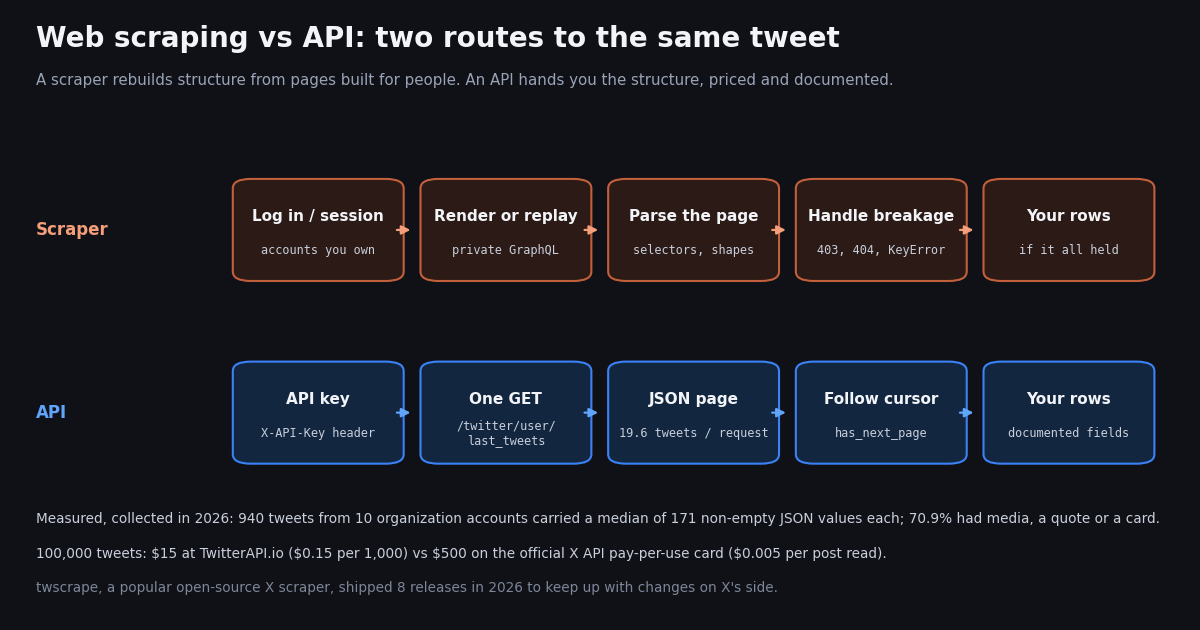
- Default to an API when one returns your fields under terms you can accept; scrape only for page-only data, sites without an API, or small one-off pulls you are allowed to make.
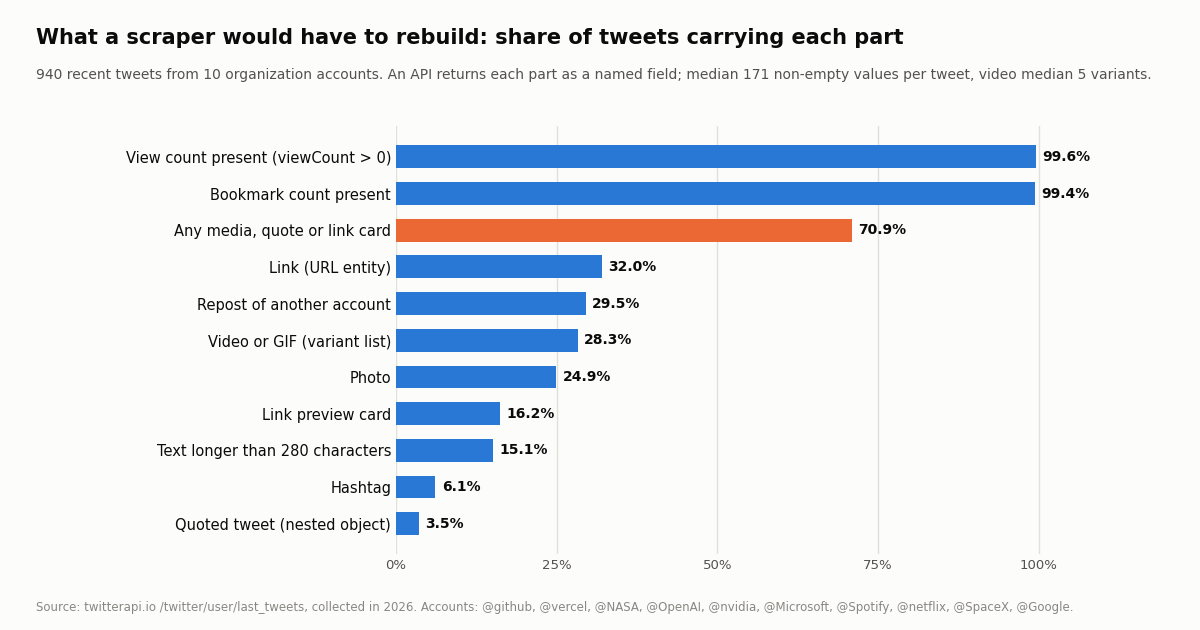
- What an API saves you, measured: 940 tweets from 10 organization accounts carried a median of 171 non-empty JSON values each (90th percentile 406); 70.9% had media, a quote or a link card.
- Hidden parts: 28.3% of tweets carried a video or GIF (median 5 variants to choose from), 15.1% had text over 280 characters, and view counts were present on 99.6%.
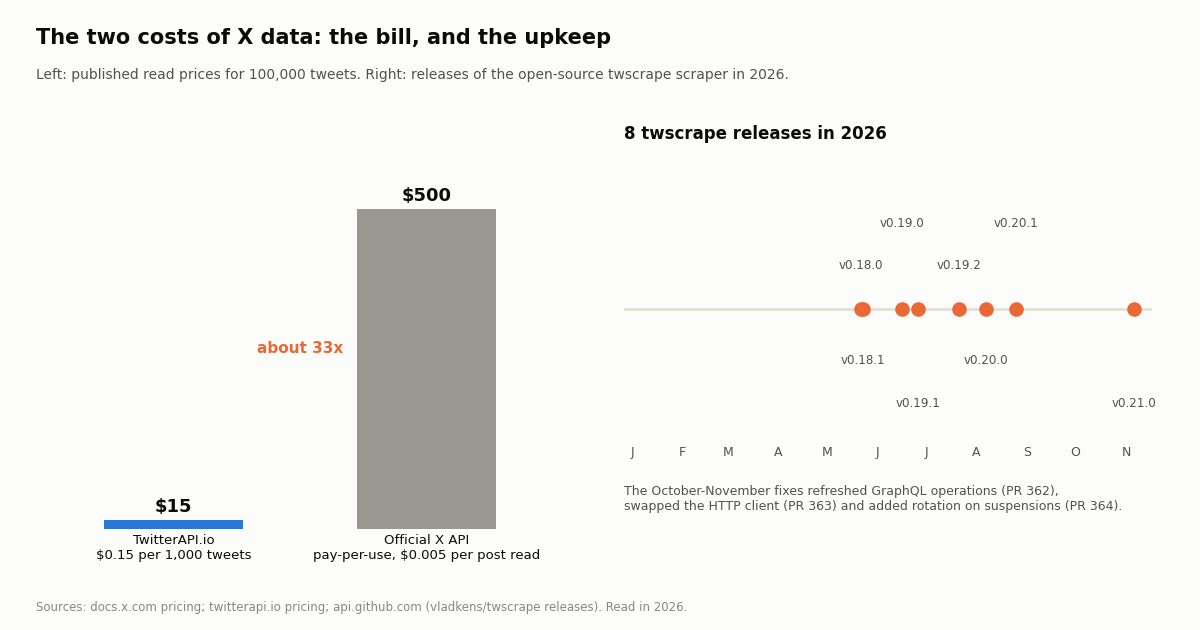
- The bill for 100,000 tweets: $15 at TwitterAPI.io ($0.15 per 1,000 tweets returned) vs $500 on the official X API pay-per-use card ($0.005 per post read), about 33x.
- The upkeep of scraping: twscrape shipped 8 releases in 2026; its October and November fixes refreshed GraphQL operations, swapped the HTTP client and added rotation on account suspensions.
- Terms: X's Terms of Service say crawling or scraping "in any form, for any purpose without our prior written consent is expressly prohibited", and
x.com/robots.txtanswersUser-agent: *withDisallow: /.
Every data project hits the same fork early: is there an API for this, and if there is, should you use it or scrape the site anyway? Most articles answer in the abstract. This one answers with a measured case. We take one popular, contested source, X (Twitter), and put numbers on both sides: what the API hands you per tweet, what a scraper would have to rebuild, what each route costs for 100,000 tweets, and how often the best-known open-source scrapers had to ship fixes this year.
The angle of this page is the general decision, with X as the worked example. If you have already decided to collect tweets and want the step-by-step how-to, our Twitter scraping guide and our walkthrough of scraping Twitter without the official API cover that; this page does not repeat their tutorials. It gives you the checklist, the cost table and the evidence to choose, then shows the API side in about 80 lines of Python.
171 at the median across 940 tweets from 10 organization accounts, collected in 2026; 70.9% of tweets carried media, a quoted tweet or a link card.
Web scraping vs API: the difference in one table
An API (application programming interface) is a door the data owner built on purpose. You send a request to a documented endpoint, usually with a key, and get back structured data, typically JSON, with named fields that do not move when the website is redesigned. The owner decides what is exposed, what it costs and how fast you may call it.
Web scraping is reading the pages people see and turning them back into data. A simple scraper fetches HTML with an HTTP client and pulls values out with CSS selectors or XPath. Modern sites render most content with JavaScript, so a scraper often has to run a headless browser, or skip the page and replay the private JSON calls the site's own front end makes. Either way, the structure is something you infer, not something you are promised.
A third category sits between the two: commercial scraping services that sell you an API on top of their own scrapers (ScrapingBee, ZenRows, Bright Data and Apify are well-known names). They take the proxy and browser work off your hands, but the data still comes from pages, so the terms question and the breakage risk move to the vendor rather than disappear. Read their terms with the same care you would read the target site's.
A five-question checklist for choosing
Run these in order. The first answer that rules a route out usually settles it.
1. Does an API return the fields you need? Check field by field, not by product name. An API that returns post text but not view counts, or profiles but not follower lists, may push you to combine routes. If no API returns a field you truly need, scraping that field is on the table.
2. Are you allowed to collect it that way? Read the site's terms of service and robots.txt. Terms bind you if you hold an account or accept them; robots.txt is the site's published crawl policy (standardized as RFC 9309). If the terms forbid scraping, the honest options are an API, a licensed data provider, or written permission.
3. What does the volume cost on each route? Price the API from its rate card. For scraping, add up proxies, browser compute, accounts and the hours to build and repair it. Small one-off pulls favor whatever is quickest; recurring pulls at volume favor the route with a predictable bill.
4. How fresh must it be, and for how long? A scraper that runs once can tolerate breakage. A pipeline that feeds a dashboard, a model or a customer every hour cannot; every site change becomes an incident.
5. Who maintains it? If nobody owns the scraper after launch, it will stop working quietly. APIs fail loudly with status codes and documented errors, which is easier to monitor.
Step 0 for any scraping plan is to read robots.txt for your user agent. The snippet below does that with Python's standard library. Run against x.com it returns False: the file's catch-all group is User-agent: * followed by Disallow: /, and the same file adds a separate block that disallows everything for the __usage_ai-training token.
"""Step 0 of any scraping plan: read the site's robots.txt for your user agent.
Python's standard library parser, no installs. Note: urllib.robotparser matches rule
paths by prefix and does not implement the RFC 9309 '*' and '$' wildcards, so treat
its answer as a first check, not the final word, on files that use wildcards."""
import urllib.robotparser

def may_fetch(site: str, path: str, user_agent: str = "my-research-bot") -> bool:
    rp = urllib.robotparser.RobotFileParser()
    rp.set_url(f"https://{site}/robots.txt")
    rp.read()
    return rp.can_fetch(user_agent, f"https://{site}{path}")

print(may_fetch("x.com", "/NASA"))   # False: x.com answers 'User-agent: *' with 'Disallow: /'
The worked case: three ways to get X (Twitter) data
X is a useful test because all three routes exist and each has a real price. Route A is scraping x.com yourself, usually with an open-source library that logs in with accounts you own and replays the GraphQL calls the web app makes. Route B is the official X API, sold pay-per-use. Route C is a third-party API such as TwitterAPI.io, which returns tweets and profiles as JSON with no X account needed for reads.
Two details from X's pricing page matter for the comparison. First, X deduplicates within a 24-hour UTC day, so reading the same post twice in one day counts once; repeated reads of a small set of posts cost less than the headline rate suggests. Second, pay-per-use is capped at 3 million post reads per monthly billing cycle, and X points higher volumes to an Enterprise plan. X also gives $20 of API credits when you save a first eligible card and matches the first auto-recharge up to $50.
On TwitterAPI.io you pay only for the data returned: 15 credits per tweet ($0.15 per 1,000), 18 credits per profile ($0.18 per 1,000), and a 15-credit minimum ($0.00015) when a call comes back empty. A full page of 20 tweets costs $0.003. New accounts that pass the automatic bot check get up to $1 of free credits (at most 100,000 credits, no card, one per person or network, expiring after 31 days). Purchased credits never expire.
What the API hands you that a scraper must rebuild (measured)
To make the parsing burden concrete, we pulled the most recent posts of 10 organization accounts through /twitter/user/last_tweets and measured what each tweet object contained. The API returned 940 tweets in 48 requests, 19.6 per request on average. Each tweet arrived as one JSON object of about 6.3 KB at the median (11.8 KB at the 90th percentile) holding a median of 171 non-empty values: text, timestamps, five engagement counters, entities, media, the author's profile and any nested quoted or reposted tweet.
A scraper gets the same information as rendered page elements, if it gets it at all. Each of the parts in the table below is a separate parsing job on a page, and several of them appear only after JavaScript runs.
Video is the clearest example. 28.3% of the tweets carried a video or GIF, and the API listed a median of 5 variants for each (different bitrates and formats). A page shows one player; getting the file means finding the stream behind it. In the JSON you pick the video/mp4 variant with the highest bitrate, as the code at the end of this page does.
Long posts are another. 15.1% of tweets had text longer than 280 characters, which a scraper has to expand or fetch separately before it has the full post. Engagement counters differ too: a page shows abbreviated labels, while the API returns each counter as an integer.
The upkeep of scraping, measured on GitHub
We did not run a scraper against x.com for this page: X's terms forbid it without written consent, and testing one would mean doing exactly that. The public record of the two best-known open-source tools tells the maintenance story without it. We read their releases, issues and pull requests from the GitHub API.
twscrape (github.com/vladkens/twscrape, MIT license, 2,951 stars when we checked) logs in with X accounts you supply and replays the web app's GraphQL calls. It shipped 8 releases in 2026, from v0.18.0 to v0.21.0. The latest round shows what the work looks like: PR 362 (merged October 21, 2026) refreshed the GraphQL operations, PR 363 (merged November 5, 2026) made a different HTTP client the default, and PR 364 (merged November 6, 2026) added rotation past rate-limited and suspended accounts. Issue 367, opened November 3, 2026 and still open, traced search failures to accounts without a verified phone number; PR 368 proposes keeping those accounts off search.
gallery-dl (github.com/mikf/gallery-dl, GPL-2.0) is a general media downloader with an X extractor. Issue 9822, opened October 19, 2026, reported KeyError: 'legacy' on a tweet URL after a response shape changed; it was closed the next day and the fix shipped in v1.32.18 on October 25, 2026. gallery-dl releases cover many sites, so its release count is not an X-only measure; the issue is.
None of this is a criticism of the maintainers, who fix things fast. It is the cost structure of scraping: the source can change its private interface at any time, and every fix is an upgrade you have to notice, test and deploy. With an API the provider absorbs that work and the contract stays the same.
Cost per 100,000 tweets, side by side
Prices below are the published read rates, before any plan or volume terms. Scraping has no rate card, so we list what you pay for instead of inventing a number.
At 20 tweets per page, 100,000 tweets is 5,000 pages. The X card is $0.005 per post read against $0.15 per 1,000 tweets here, about 33x per 1,000 tweets on the published X API pay-per-use rate card. The X API's 24-hour deduplication narrows that gap if you reread the same posts within a day; it does not change it for fresh posts.
Polling is where per-result pricing shows. A monitor that checks an account every 60 seconds and usually finds nothing pays the 15-credit minimum ($0.00015) per empty check: 43,200 checks a month is $6.48, or $1.30 at one check every 5 minutes. A scraper doing the same loop sends 43,200 page loads a month through accounts that X can rate-limit, lock or suspend.
Rate limits are part of the bill too. On TwitterAPI.io the limit is 0.2 requests per second before the first payment and 20 once paid, 50 on Scale, 500 on Business and up to 1,000 on request. Monthly plans run from Starter at $29 to Business at $1,499; the pricing page has the details.
"""Price a pull before you run it. Published read prices only (no plan discounts)."""
OUR_PER_TWEET = 0.00015      # TwitterAPI.io: 15 credits per tweet returned = $0.15 per 1,000
X_PER_POST_READ = 0.005      # official X API pay-per-use: $0.005 per post read (docs.x.com)

def bill(tweets: int) -> dict:
    return {
        "twitterapi_io": round(tweets * OUR_PER_TWEET, 2),
        "x_api_pay_per_use": round(tweets * X_PER_POST_READ, 2),
        "pages_of_20": -(-tweets // 20),
    }

print(bill(100_000))   # {'twitterapi_io': 15.0, 'x_api_pay_per_use': 500.0, 'pages_of_20': 5000}
Terms, robots.txt and the law
This is not legal advice, but on X the text is unambiguous. The Terms of Service (x.com/en/tos) forbid accessing the Services "other than through our currently available, published interfaces" and add: "crawling or scraping the Services in any form, for any purpose without our prior written consent is expressly prohibited".
Liquidated damages. The same terms set liquidated damages for anyone who violates them and requests, views or accesses more than 1,000,000 posts in any 24-hour period: $15,000 per 1,000,000 posts. Whatever a court would make of that clause, it shows how X prices unlicensed bulk access.
robots.txt. X's robots.txt gives named search engines a long list of allow and disallow rules and answers every other crawler with User-agent: * and Disallow: /. It also adds a separate __usage_ai-training token with Disallow: /. RFC 9309 makes robots.txt a crawl policy rather than an access control, but ignoring a site-wide disallow is hard to defend.
Accounts carry the risk. Logged-in scrapers run on accounts that accepted those terms, and X can rate-limit, lock or suspend them; twscrape's PR 364 treats suspension as a routine case to rotate past. Reading public data through a published API, X's own or a provider's, keeps the project off your personal accounts.
Data protection applies on every route. Tweets and profiles that identify a person are personal data under laws such as the GDPR. Collect what the question needs, aggregate where you can, honor deletions and do not build profiles of private individuals.
When scraping is still the right call
An API is the default, not a rule. Scraping, or a licensed scraping service, still wins in a few honest cases.
No API exists. Many public sites, such as a local government notice board, a small retailer or a conference schedule, publish data only as pages. If their terms allow automated access, a polite scraper that respects robots.txt, identifies itself and spaces its requests is the practical route.
The data is page-only. Some information exists only in the rendered experience: layout, the order items appear in, what a logged-out visitor sees in a given country. Measuring the page is the point, so you have to read the page.
A one-off, small pull. Fifty rows for a one-time analysis rarely justify an API integration. Check the terms, copy what you need and move on.
Hybrid pipelines. Many production systems mix both: an API for stable identifiers and the bulk of the fields, plus a narrow, permitted scrape for the one field the API lacks. Keep a column that records which route each value came from, so you can tell a parsing bug from a source change.
For X specifically, the API covers what scraping projects usually want, including timelines, search, replies, quotes, followers and profiles, so the hybrid case rarely applies. Writes such as posting or following are also available through an authenticated session: one /twitter/user_login_v2 login ($0.10, with a proxy you supply) returns login_cookies, then each action such as /twitter/create_tweet_v2 or /twitter/follow_user_v2 is 60 credits ($0.0006). Those calls act as that account, so X can rate-limit, lock or suspend it; keep a human pace, expect the session to need a fresh login at times, and note each HTTP 200 call is billed.
How we collected this
Question. For one real source, X (Twitter), what does an API return per tweet that a scraper would have to rebuild, what does each route cost, and how often do open-source X scrapers need fixes?
Accounts. @github, @vercel, @NASA, @OpenAI, @nvidia, @Microsoft, @Spotify, @netflix, @SpaceX, @Google. All are public organization accounts.
Method and window. /twitter/user/last_tweets with default settings (replies excluded), newest first, up to 5 pages per account, collected in 2026. 940 tweets in 48 requests. We counted non-empty JSON values per tweet and flagged media, video variants, quotes, reposts, cards, links, hashtags, text length and counters. The scraper side comes from the GitHub API record of twscrape and gallery-dl (releases, issues, pull requests), read the same year. Prices come from the published rate cards of X (docs.x.com) and TwitterAPI.io.
What the sample cannot show. Ten organization timelines are not all of X: personal accounts may carry a different mix of media and links, and replies were excluded. The @OpenAI timeline ended after 40 tweets with has_next_page false, so it contributes fewer rows. We did not run a scraper against x.com, so we report no scraper success rates or speeds; the upkeep evidence is the public GitHub record. The study cost $0.14 in credits.
Privacy. Aggregates only. Reposted and quoted authors were not analyzed, raw pages were not published, and the per-tweet sample file holds no ids, URLs, text or handles.
"""timeline_to_csv.py - the API side of 'web scraping vs API', end to end.
Pull the recent posts of public X (Twitter) accounts as structured JSON, follow the cursor,
flatten the fields a scraper would have to rebuild, and write a CSV.

    pip install requests
    export TWITTERAPI_IO_API_KEY=...      # from your twitterapi.io dashboard
    python timeline_to_csv.py NASA github --pages 3
"""
import argparse
import csv
import os
import time

import requests

BASE = "https://api.twitterapi.io"
HEADERS = {"X-API-Key": os.environ["TWITTERAPI_IO_API_KEY"]}
PRICE_PER_TWEET = 0.00015   # 15 credits per tweet returned ($0.15 per 1,000)


def last_tweets(user_name, pages):
    """Yield tweets from /twitter/user/last_tweets, newest first, 20 per page."""
    cursor = ""
    for _ in range(pages):
        r = requests.get(
            f"{BASE}/twitter/user/last_tweets",
            headers=HEADERS,
            params={"userName": user_name, "cursor": cursor},
            timeout=30,
        )
        if r.status_code == 429:          # slow down and retry the same page
            time.sleep(5)
            continue
        r.raise_for_status()
        body = r.json()
        if body.get("status") == "error":
            raise SystemExit(f"{user_name}: {body.get('msg')}")
        data = body.get("data") or {}
        yield from data.get("tweets") or []
        if not body.get("has_next_page"):
            break
        cursor = body.get("next_cursor") or ""


def row(t):
    media = (t.get("extendedEntities") or {}).get("media") or []
    videos = [m for m in media if m.get("type") in ("video", "animated_gif")]
    best_mp4 = ""
    for v in videos:
        mp4s = [x for x in (v.get("video_info") or {}).get("variants") or []
                if x.get("content_type") == "video/mp4"]
        if mp4s:
            best_mp4 = max(mp4s, key=lambda x: x.get("bitrate") or 0).get("url", "")
    author = t.get("author") or {}
    return {
        "id": t.get("id"),
        "created_at": t.get("createdAt"),
        "account": author.get("userName"),
        "text": t.get("text"),
        "lang": t.get("lang"),
        "likes": t.get("likeCount"),
        "reposts": t.get("retweetCount"),
        "replies": t.get("replyCount"),
        "quotes": t.get("quoteCount"),
        "views": t.get("viewCount"),
        "bookmarks": t.get("bookmarkCount"),
        "photos": sum(1 for m in media if m.get("type") == "photo"),
        "best_mp4": best_mp4,
        "links": " ".join(u.get("expanded_url", "") for u in (t.get("entities") or {}).get("urls") or []),
        "is_repost": bool(t.get("retweeted_tweet")),
        "quoted_id": (t.get("quoted_tweet") or {}).get("id"),
        "url": t.get("url"),
    }


def main():
    ap = argparse.ArgumentParser()
    ap.add_argument("accounts", nargs="+")
    ap.add_argument("--pages", type=int, default=3)
    ap.add_argument("--out", default="timelines.csv")
    args = ap.parse_args()
    rows = []
    for acct in args.accounts:
        rows += [row(t) for t in last_tweets(acct, args.pages)]
    if not rows:
        raise SystemExit("no tweets returned")
    with open(args.out, "w", newline="", encoding="utf-8") as f:
        w = csv.DictWriter(f, fieldnames=list(rows[0]))
        w.writeheader()
        w.writerows(rows)
    print(f"{len(rows)} tweets -> {args.out}, about ${len(rows) * PRICE_PER_TWEET:.4f} in credits")


if __name__ == "__main__":
    main()
Researching this?Free starter credits cover end-to-end testing — Google sign-in, no card. Get a key.
Questions readers ask
What is the main difference between web scraping and an API?
An API is an interface the data owner built for programs: you request documented endpoints and get structured data, usually JSON, under published prices and limits. Web scraping extracts data from pages built for people, so you rebuild the structure yourself and repair it whenever the site changes.
Is web scraping better than using an API?
Rarely, when an API returns the fields you need. Scraping wins when no API exists, the data appears only on pages, or the job is a small one-off you are allowed to do. In our X study each tweet carried a median of 171 non-empty JSON values; through an API you read them, through a scraper you reconstruct them.
Is web scraping cheaper than an API?
Only on the invoice. Scraping trades a bill for proxies, compute, accounts and repair hours. For X data, 100,000 tweets cost $15 at TwitterAPI.io ($0.15 per 1,000) and $500 on the official X API pay-per-use card ($0.005 per post read), while twscrape shipped 8 releases in 2026 to keep its scraping working.
Is it legal to scrape Twitter (X)?
Not legal advice, but X's Terms of Service say crawling or scraping the Services in any form, for any purpose without prior written consent is expressly prohibited, and they set liquidated damages of $15,000 per 1,000,000 posts for accessing more than 1,000,000 posts in 24 hours in violation of the terms. Using a published API is the route the terms allow.
Does robots.txt make scraping illegal?
No. RFC 9309 defines robots.txt as a crawl policy that crawlers are asked to honor, not an access control. It still matters: it is the site's stated wish, and it is evidence in disputes. x.com's file answers any unnamed crawler with Disallow: / for every path.
What is a web scraping API?
A commercial service that runs scrapers, proxies and headless browsers for you and returns the page or extracted fields through its own API. It removes infrastructure work but not the source site's terms, and its output still depends on the page layout.
Can I combine web scraping and an API?
Yes, and many pipelines do: take identifiers and most fields from the API, and scrape only a field the API lacks where the terms permit it. Record the source of each value so you can tell a parsing bug from a source change.
Do I need an X account to read tweets through an API?
Not with TwitterAPI.io: reads need only an API key in the X-API-Key header, no X account. The official X API needs a developer account and app. New TwitterAPI.io accounts that pass the automatic bot check get up to $1 of free credits (at most 100,000 credits, no card, one per person or network, expiring after 31 days).
Continue
- X developer docs: X API pricing (pay-per-use rates, 24-hour deduplication, 3M post read cap)
- X Terms of Service (scraping prohibition, liquidated damages clause)
- RFC 9309: Robots Exclusion Protocol
- twscrape on GitHub (releases, PRs 362-364 and 368, issue 367)
- gallery-dl issue 9822: Twitter KeyError 'legacy'
- TwitterAPI.io docs: Get user last tweets
- X (Twitter) API hub: endpoints, pricing and guides
- How to scrape Twitter (X) data in 2026, step by step
- Scrape Twitter without the official API: options compared
- Twitter scraper comparison for 2026
- twscrape guide: how the open-source X scraper works
- Firecrawl alternatives for web data in AI apps
- TwitterAPI.io pay-per-use pricing
- 01Pipedream Pricing in 2026: Connect Plans, Credits and the Workflows Shutdown
- 02Cloudflare Pay per Crawl: How the HTTP 402 Handshake Works, and What It Means for Twitter (X) Data
- 03ScrapingBee Pricing in 2026: Plans, Credit Costs and Alternatives
- 04Firecrawl Pricing: Plans, Credit Costs and What an X (Twitter) URL Costs
- 05LunarCrush API: What It Returns, What It Costs, and When Raw Twitter (X) Data Is the Better Input
- 06How to Scrape Twitter (X) Data in 2026: Methods That Work
- 07Twitter (X) Web Viewer: How to View Tweets Without an Account
- 08Twitter (X) Alerts for Keywords — A Developer's Guide
Writing about something you built with TwitterAPI.io? Our community rewards program pays API credits for honest tutorials, build logs and videos.
Stop reading. Start building.
Starter credits cover real testing on real data. Google sign-in, no card, no application queue.
Get an API keyAlready building with TwitterAPI.io? Publish an honest tutorial or build log about it and earn up to $200 a month in API credits.