Twitter (X) Web Viewer: How to View Tweets Without an Account
This page is for people who want to read X (Twitter) in a browser without signing up or signing in: open a profile someone mentioned, read a post from a link, watch a clip, or look something up anonymously. If you are a developer building your own viewer app, our Twitter (X) viewer API developer guide is the page for you; this one covers the reader's side and ends with a short bridge to the API for when a website is no longer enough.
Most "Twitter web viewer" articles are lists of third-party sites that promise everything. We started from the other end and measured what x.com itself gives a logged-out visitor today. In 2026 we sent 70 logged-out requests to x.com for 10 public accounts (NASA, SpaceX, Reuters, BBC Breaking News, The New York Times, WHO, NBA, GitHub, Elon Musk and the US National Weather Service), compared what came back with the same accounts' real timelines pulled through an API, and checked the best-known viewer sites, including the twitterwebviewer.com brand, the same way.
The short version: logged-out x.com is a decent viewer for a single link and a poor one for everything else, and the third-party viewers that fill the gap come and go. The sections below show exactly where the line is, what each kind of viewer does, how to stay safe using them, and what to do when you need search, full reply threads or many accounts.
What does x.com show when you are not logged in?
X has moved the line between public and logged-in several times. On June 30, 2023 it briefly required an account to view any post, which Elon Musk described as a temporary emergency measure against data scraping; logged-out viewing of individual posts returned within about a week, but browsing profiles and search stayed restricted. Rather than rely on old screenshots, we measured the current state.
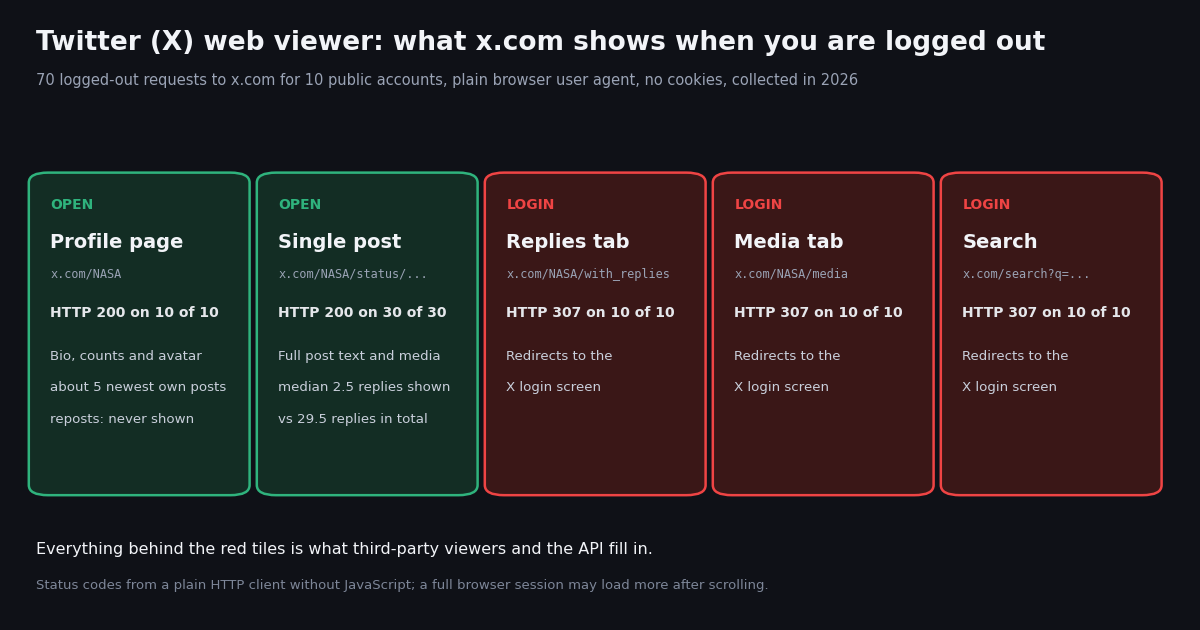
Method. A plain HTTP client with a desktop Chrome user agent, no cookies, no JavaScript and no login requested five kinds of x.com page for each of the 10 accounts, one second apart, and recorded the HTTP status, the redirect target and the posts embedded in the page's server HTML. We then pulled each account's 100 most recent posts through an API to see which of them a logged-out visitor actually got.
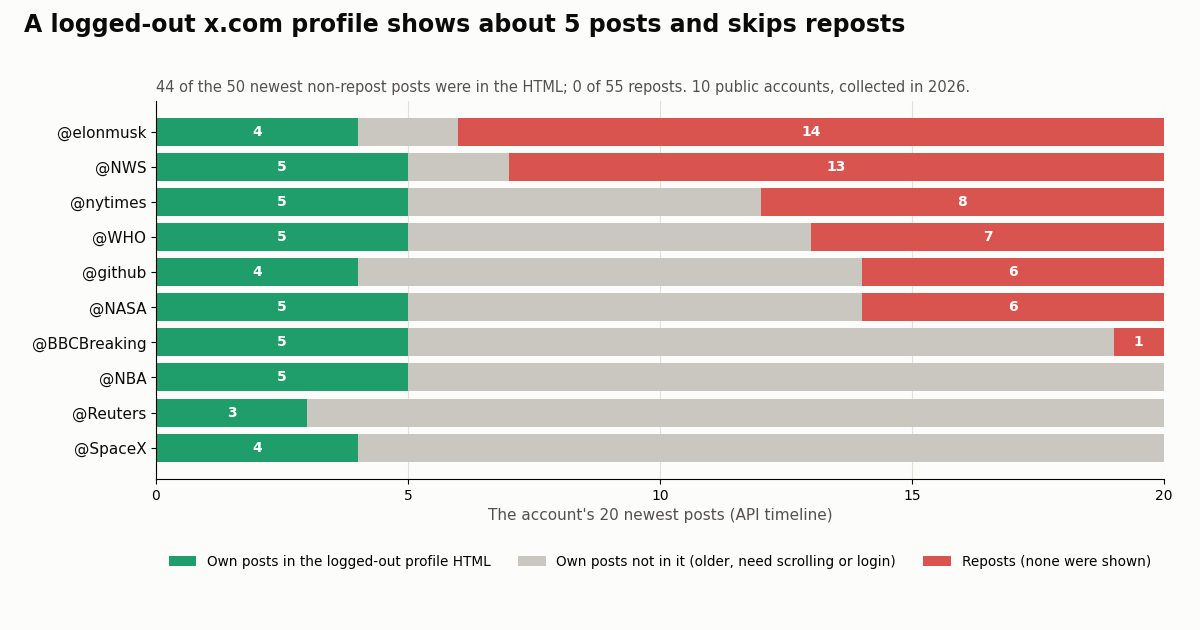
Profiles load, but show a short slice. Each logged-out profile page embedded a handful of posts in its HTML. Matching them against the real timelines, 44 of the 50 newest non-repost posts (5 per account) were there, and not one of the 55 reposts among the accounts' 20 newest posts. For an account like Elon Musk's, where 14 of the 20 newest posts were reposts, the logged-out profile skipped most of what had happened that day. The newest embedded post was the account's newest post for 6 of the 10 accounts and at most 2 hours behind for the rest.
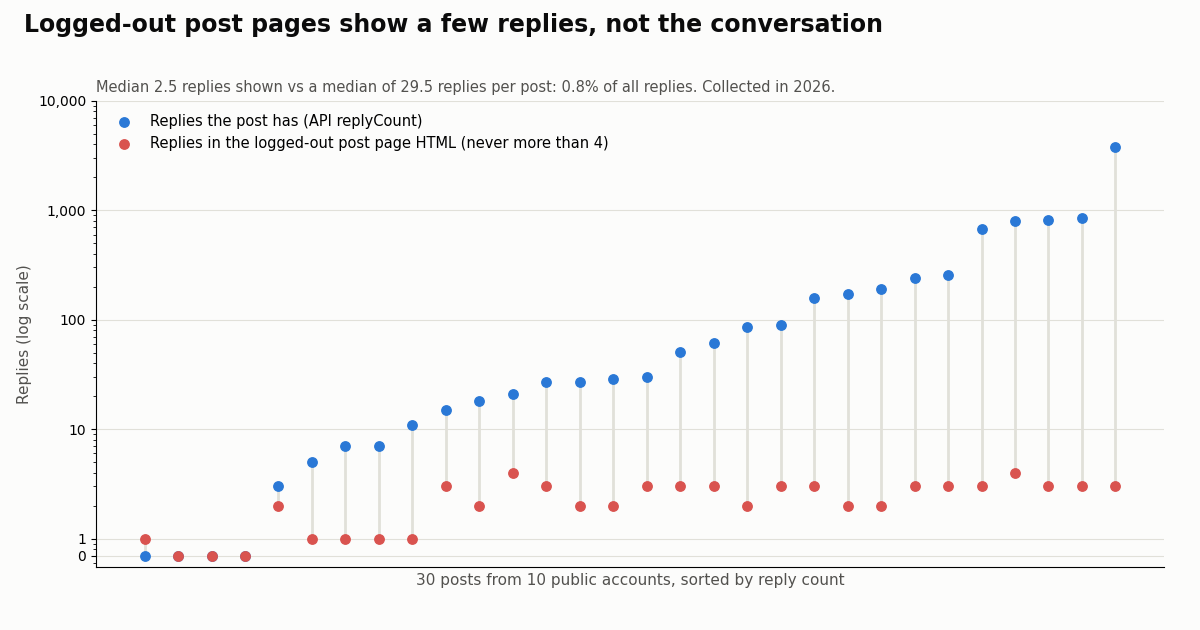
Posts load with text and media. All 30 post links we opened returned the full post text in the page and in its og:description preview tag, which is why links shared in chats and on other sites still preview properly. Replies are where it thins out: the page carried a median of 2.5 replies and never more than 4, while the same posts had a median of 29.5 replies and up to 3,761. Across all 30 posts that is 0.8% of the replies.
Search and tabs need an account. Every request to search, a Replies tab or a Media tab got a 307 redirect to /i/jf/onboarding/web?...&mode=login. This is the wall most people mean when they search for a way to see Twitter without an account. Old twitter.com links still work: twitter.com/NASA returned a 301 redirect to x.com/NASA.
What this test cannot show. We read the server HTML, not a fully rendered browser session. A real browser runs X's JavaScript after the page arrives and may load more posts as you scroll, or show a sign-up prompt over them after a while; we did not measure either. Treat our numbers as what is guaranteed to arrive with the page, and expect a browser to behave similarly or somewhat better on profiles.
How to view tweets without an account on x.com itself
Before reaching for any third-party site, use what x.com already gives you. It is the only viewer that cannot be suspended, does not need your trust, and shows the post exactly as its author published it.
Open the link directly. A post URL (x.com/<user>/status/<id>) works logged out. If someone sends you a twitter.com link, it redirects to the same page. Use a private or incognito window if you are signed in elsewhere and want nothing tied to your account.
Read a profile's latest posts. x.com/<user> shows the bio, follower counts and the most recent original posts. Expect roughly five, and no reposts, from the server; scrolling in a browser may add a few more.
Watch videos without an account. Videos play on the post page itself; they are part of the post, not the Media tab. In our sample, 22.6% of the 755 original posts carried a video or GIF (84% for the NBA), and 47.5% carried some kind of media. If you need the file itself, our Twitter video downloader tool saves a public video you have the right to use.
Find posts through a search engine. x.com search requires an account, but public posts and profiles are indexed by search engines. A query such as site:x.com NASA artemis in Google or Bing often surfaces the post you remember, and the result opens logged out like any other link. Coverage is partial and lags behind real time.
Look for the post where it was embedded. Even during the 2023 login requirement, Bloomberg reported that posts embedded on other sites stayed visible to logged-out readers. News articles and blogs that quote a post through X's embed (generated at publish.x.com) remain a no-login way to read it.
What you cannot do logged out on x.com: search, browse the Replies or Media tabs, read a full reply thread, see who follows whom beyond the counts, or read anything from a protected account. That gap is what the rest of this page is about.
Anonymous and no-login Twitter viewers: what they are and how they work
A third-party Twitter viewer is a website that fetches X content on its own servers and shows it to you, so you never touch x.com and never sign in. They market themselves as an anonymous Twitter viewer, an X profile viewer, a tweet viewer, a Twitter comment viewer or an online Twitter viewer, but they all do the same thing: take a handle, a post URL or a search term, fetch the data, and render a page.
Where the data comes from. None of them has its own copy of X. They either call a data API (paid by the site, often supported by ads or an upsell), or, in the case of Nitter-style front ends, run a pool of real X account sessions behind the scenes. The creator of twitterwebviewer.com described this openly in his Hacker News launch post: searches and profile views go to Twitter's API through a third-party provider, there is no local index of tweets, and responses are cached briefly.
Why they come and go. Each viewer pays for every page it fetches, and X restricts the traffic that feeds them. The best-known free front end, Nitter, received cease-and-desist letters from X Corp. on 24 August 2026 and a second on 8 September 2026, according to the notice now shown on nitter.net, and its GitHub repository was archived by its owner on 9 October 2026. The xcancel.com instance answered both of our requests with HTTP 451 and the message "XCancel service is suspended". Our xcancel alternative and Nitter alternative pages track those mirrors in detail.
Anonymous toward the account, not toward the viewer. Using any of these sites, the account you look at cannot see you: X has no profile-visitor list for anyone. But the viewer site itself sees every handle and link you paste, your IP address and whatever its ad partners collect. "Anonymous" in their marketing means "no X account required", not "nobody knows what you looked at".
Is twitterwebviewer.com real, and which Twitter viewer sites still load?
Yes, it is a real, independently run site, though we could not see its pages. Here is what we could verify first-hand this year, and what we could not.
What it is. twitterwebviewer.com was launched on Hacker News as "Show HN: Twitter Viewer - View Profiles, Search Tweets, Download Videos (No Login)". The author lists viewing public profiles and tweets without an account, keyword search and MP4 video downloads, and says the site does not track users. He describes the stack as Next.js on Vercel with an API proxy, and in a later comment explains that the host flagged unusual bandwidth from video hosting, after which he switched videos to proxy links. Directory listings credit the same creator.
What we saw. Both of our requests to twitterwebviewer.com returned HTTP 403 with a "Just a moment..." challenge page, and the www. address redirects there with a 301. A second, independent fetcher got the same 403. That challenge is a check that a real browser usually passes and a script does not, so the site may well work in your browser; we simply cannot vouch for what it shows, whether it carries ads, or how current its data is.
How to judge it yourself. Open a post you can also open on x.com and compare the text, the counts and the timestamp. If they match and the page does not ask for your X password, an email address or a browser extension, it is behaving like a normal viewer. If it does ask for any of those, close it.
We requested the homepage of each widely searched viewer twice from the same plain HTTP client and recorded what came back. We list them in plain text, not links, because we do not endorse any of them and their behavior changes week to week.
Reading the table. A 200 on the homepage only tells you the site is up; it does not prove that profile lookups return current data. A 403 challenge means the site sits behind a bot check: browsers usually pass, scripts, RSS readers and link previews do not. Several of the sites that loaded are supported by advertising or offer a paid tier, which is how they pay for the data they fetch.
The "twitter viewer grok" searches people type mostly mean the TweetGrok site's viewer, not xAI's Grok assistant; tweetgrok.ai is primarily a set of AI tweet-writing tools with a viewer attached.
Twillot and Snaplytics are covered on their own pages, the Twillot Twitter viewer review and the Snaplytics Twitter viewer review, so we do not repeat them here.
Can you get around the X login wall? What is and is not possible
Many people search for a way past the login wall. The honest answer depends on what is behind it.
Public posts: yes, through someone else's account or API access. Search, full reply threads and the Media tab are public data that X shows only to signed-in users. A third-party viewer or an API fetches them on its side and shows you the result, so you never sign in. That is why these sites exist, and why they depend on paid data access or on a pool of accounts.
Protected (private) accounts: no. Posts from a protected account are visible only to followers the owner has approved; X's help page on public and protected posts (help.x.com/en/safety-and-security/public-and-protected-posts) spells this out. No viewer site or trick can show them to you, because X shows them only to that list (and to apps those followers have themselves authorized). A site advertising a "private Twitter account viewer" is either showing you nothing useful or trying to collect your details, a payment or an app install. An API lookup of such a profile simply reports protected: true.
Likes: not for anyone else's account. Since June 12, 2024 likes on X are private: you can see the posts you liked, and authors see who liked their own posts, but nobody else can see another user's likes. A viewer that claims to show someone's likes is not showing real data.
Who viewed a profile: no. X does not record or show profile visitors, so neither the account owner nor any viewer site can tell you who looked; our page on whether X shows who viewed your profile goes through the details. Looking at a public profile, logged in or not, is invisible to its owner.
A word on how you use viewers. Reading public posts is ordinary. Using viewers to follow and pressure a private person is a different thing, and X's rules on abusive behavior and private information (help.x.com/rules-and-policies/abusive-behavior) apply whatever tool you use. Our Twitter stalker page covers the line between legitimate monitoring and harassment.
Twitter search without an account, text-only feeds and comment viewers
Three requests come up again and again with viewer searches, each with a different best answer.
Search Twitter without an account. Logged-out search on x.com redirected to login on 10 of 10 attempts. Your options are a search engine (site:x.com plus your terms; good for finding one remembered post, weak on recency), a third-party viewer with a search box (works while the site does), or an API that accepts X's own advanced search operators such as from:, since: and min_faves:. Our Twitter advanced search guide explains the operators, and the code below runs one such search with no X account.
A text-only Twitter feed. The logged-out x.com profile page weighed about 168 KB of HTML before any of its JavaScript ran, and the post page about 144 KB. Nitter used to be the lightweight, text-only way to read an account, with RSS feeds for every profile; with nitter.net now a legal notice, the most dependable text-only feed is one you build yourself from an API, as in the script at the end of this page, which prints posts as plain text in a terminal.
A Twitter comment viewer. This is where logged-out x.com falls shortest. The 30 posts we opened had between 0 and 3,761 replies, and the logged-out page carried at most 4 of them. Across the sample, the median original post collected 39 replies and the busiest tenth collected 514 or more, far beyond what any logged-out page shows. Viewer sites that advertise a reply viewer fetch the reply thread through an API on their side; you can do the same with the replies endpoint shown in the script below.
Which way to view X should you use?
Match the tool to the job. Here is how the realistic options compare on the things people actually need.
You were sent one link. Open it on x.com in a private window. Nothing else is needed.
You check a few public accounts now and then. Logged-out profiles show their latest original posts. If you also care about reposts and replies, a reputable viewer site is the convenient choice; compare one post against x.com first.
You want to search or follow a conversation. That is exactly what logged-out x.com withholds. Use a viewer site with search, or sign in with a separate, minimal account if you are comfortable doing so.
You need it every day, for many accounts, or in a spreadsheet. Websites are the wrong tool: they change, wall off scripts and show what they choose. An API returns the same public data as structured fields you can store, filter and repeat. The next section shows what that costs.
For developers: build your own Twitter web viewer with an API
Every viewer site above is a thin page on top of the same three reads: a profile, a timeline and a reply thread. You can run those reads yourself, with no X account to log in and nothing to get suspended. With twitterapi.io, GET /twitter/user/info returns the profile card (name, bio, followers, following, statusesCount, protected), GET /twitter/user/last_tweets returns the latest posts 20 at a time including reposts, with has_next_page and next_cursor for older pages, and GET /twitter/tweet/replies/v2 returns the replies to a post. The full script is at the end of this page; the search example below covers the part x.com keeps behind its login screen.
What it costs, against the official X API. Both prices come from each provider's published rate card: twitterapi.io charges $0.15 per 1,000 posts returned and $0.18 per 1,000 profiles; the official X API's pay-per-usage pricing on docs.x.com lists $0.005 per post read and $0.010 per user read, so 1,000 posts cost $5.00 there versus $0.15, about 33x.
On twitterapi.io the minimum charge is 15 credits ($0.00015) per request, which only matters when a request returns almost nothing, and you pay only for the data returned. New accounts that pass the automatic bot check get up to $1 of free credits (at most 100,000 credits, no card, one per person or network, expiring after 31 days); before the first payment the rate limit is 0.2 requests per second, and 20 per second once paid. The study behind this page, 1,000 posts and 10 profiles, cost about $0.15 in 60 requests.
Respect what the viewer shows. Build for public accounts and public posts, show protected accounts as protected, and keep the pace of your requests reasonable. Our developer guide to Twitter viewer APIs covers caching, UI patterns and the official X API path in detail.
import os
import requests

BASE = "https://api.twitterapi.io"
HEADERS = {"X-API-Key": os.environ["TWITTERAPI_IO_KEY"]}

# The search x.com sends logged-out visitors to the login screen for.
params = {"query": "from:NASA artemis -filter:replies", "queryType": "Latest"}
seen = 0
while seen < 60:
    body = requests.get(f"{BASE}/twitter/tweet/advanced_search",
                        headers=HEADERS, params=params, timeout=30).json()
    for t in body.get("tweets", []):
        seen += 1
        print(t["createdAt"], t["url"])
        print("  ", t["text"][:160].replace("\n", " "))
    if not body.get("has_next_page"):
        break
    params["cursor"] = body["next_cursor"]
How we collected this
Question. What does a logged-out visitor get from x.com today, compared with what the account actually posted, and which viewer sites answer at all?
Accounts. 10 public organization and public-figure accounts: NASA, SpaceX, Reuters, BBCBreaking, nytimes, WHO, NBA, github, elonmusk and NWS. No private individuals were profiled.
Timeline data. For each account, /twitter/user/info (1 request) and /twitter/user/last_tweets with default settings (5 pages, 100 posts, newest first): 1,000 posts in total, 755 of them original posts, the rest reposts. 60 API requests, about $0.15. Collected in 2026; each account's window runs from its oldest to its newest sampled post, from a few hours for Reuters and the NBA to about 41 days for GitHub.
Logged-out web check. 70 requests to x.com (per account: the profile, the Replies tab, the Media tab, a search for the handle and 3 post URLs from the timeline data) and 24 requests to viewer-site homepages, made with a plain HTTP client: desktop Chrome user agent, no cookies, no JavaScript, redirects recorded rather than followed. Posts embedded in the server HTML were matched to the timeline by their creation timestamp.
What the sample cannot show. A real browser runs X's JavaScript and may load more posts while scrolling or show sign-up prompts; we did not measure that. The check ran from one network, at one point in time, and X changes logged-out behavior without notice. The Reuters profile was fetched a few minutes after its timeline, during which it posted again, which is why it matched only 3 of its 5 newest posts. Replies counted on a post page are posts newer than the post itself embedded in its HTML. Viewer sites were checked on their homepage only.
Privacy. Aggregates only. Raw timelines are kept compressed for the organization and public-figure accounts; no reply author was analyzed, and logged-out HTML pages were not kept.
"""A text-only Twitter (X) web viewer for your terminal.

Shows a profile card, the latest posts (reposts included, newest first) and the
replies under any post, with no X account and no browser. Set TWITTERAPI_IO_KEY
to a key from https://twitterapi.io/dashboard first.

    python x_viewer.py NASA                # profile + 20 latest posts
    python x_viewer.py NASA 2112604875452223824   # + replies to that post
"""
import os
import sys

import requests

BASE = "https://api.twitterapi.io"
HEADERS = {"X-API-Key": os.environ["TWITTERAPI_IO_KEY"]}


def get(url, params):
    r = requests.get(url, headers=HEADERS, params=params, timeout=30)
    r.raise_for_status()
    body = r.json()
    if body.get("status") == "error":
        sys.exit(f"API error: {body.get('msg')}")
    return body


def show_profile(handle):
    # 18 credits per profile = $0.00018
    u = get(f"{BASE}/twitter/user/info", {"userName": handle})["data"]
    print(f"{u['name']} (@{u['userName']})  {u['followers']:,} followers, "
          f"{u['following']:,} following, {u['statusesCount']:,} posts")
    print(u.get("description") or "")
    if u.get("protected"):
        print("[protected account: posts are visible only to approved followers]")
    print("-" * 72)


def show_posts(handle, pages=1):
    # 15 credits per post returned; a full 20-post page = $0.003
    cursor = ""
    for _ in range(pages):
        body = get(f"{BASE}/twitter/user/last_tweets",
                   {"userName": handle, "cursor": cursor})
        for t in (body.get("data") or {}).get("tweets", []):
            label = "REPOST" if t.get("retweeted_tweet") else "POST"
            media = [m["type"] for m in (t.get("extendedEntities") or {}).get("media", [])]
            print(f"[{label}] {t['createdAt']}  {t['likeCount']:,} likes, "
                  f"{t['replyCount']:,} replies  {' '.join(media)}")
            print("   " + t["text"].replace("\n", "\n   "))
            print("   " + t["url"])
        if not body.get("has_next_page"):
            break
        cursor = body.get("next_cursor") or ""


def show_replies(tweet_id, max_pages=3):
    # replies are posts too: 15 credits each
    cursor = ""
    for _ in range(max_pages):
        params = {"tweetId": tweet_id}
        if cursor:
            params["cursor"] = cursor
        body = get(f"{BASE}/twitter/tweet/replies/v2", params)
        for t in body.get("tweets", []):
            print(f"  > {t['author']['userName']}: {t['text'][:200]}")
        if not body.get("has_next_page"):
            break
        cursor = body.get("next_cursor") or ""


if __name__ == "__main__":
    handle = sys.argv[1] if len(sys.argv) > 1 else "NASA"
    show_profile(handle)
    show_posts(handle)
    if len(sys.argv) > 2:
        print("=" * 72)
        show_replies(sys.argv[2])
Questions readers ask
What is a Twitter web viewer?
A Twitter (X) web viewer is any way to read X in a browser without signing in: x.com itself for single posts and profiles, or a third-party website that fetches X content on its servers and shows it to you. Third-party viewers add what logged-out x.com withholds, such as search, reply threads and media tabs.
Can I view Twitter without an account in 2026?
Partly. In our 2026 test, logged-out x.com loaded every profile (10 of 10) and every post link (30 of 30), but search, the Replies tab and the Media tab redirected to the login screen every time. A profile showed about five of its newest own posts and no reposts.
Is twitterwebviewer.com safe?
It is a real site launched publicly by its creator, who says it does not track users and fetches data through a third-party API provider. We could not test its pages because it returned a 403 challenge to our requests. Use any viewer cautiously: never enter your X password, email or payment details, and do not install extensions it pushes.
Can someone see that I viewed their Twitter profile?
No. X does not record or show profile visitors to anyone, whether you are logged in, logged out or using a viewer site. The viewer site you use, however, does see what you look up.
Can a viewer show a private (protected) Twitter account?
No. Protected posts are visible only to followers the owner has approved, and X does not hand them to outside viewer sites. Sites that claim to be a private Twitter account viewer cannot deliver real protected posts; treat them as a scam risk.
How can I search Twitter without an account?
x.com search needs a login. Use a search engine with site:x.com plus your terms, a third-party viewer that offers search, or an API that accepts X's advanced search operators. Search-engine results are partial and lag behind real time.
How do I watch Twitter videos without an account?
Open the post link on x.com: videos play on the post page without signing in. In our sample 22.6% of original posts carried a video or GIF. The Media tab of a profile needs a login, so you need the post link itself.
Why do Twitter viewer sites keep shutting down?
They pay for every page they fetch and depend on access X can restrict. Nitter, the best-known free front end, received cease-and-desist letters from X Corp. in August and September 2026 and its repository was archived; xcancel.com now returns HTTP 451 with a suspension notice.
Continue
- Hacker News: the twitterwebviewer.com creator's launch post and comments on how it fetches data
- Nitter on GitHub: cease-and-desist notice and repository archive status
- X API pay-per-usage pricing (docs.x.com)
- twitterapi.io docs: user last tweets endpoint (20 per page, includeReplies)
- twitterapi.io pricing
- Engadget: X makes likes private for everyone (June 2024)
- Twitter (X) API overview: the hub for reading X data
- Twitter (X) viewer API: a developer's guide to building a viewer
- xcancel alternatives that still work
- Nitter alternatives for reading X without an account
- Nitter instances: which ones still answer
- Twillot Twitter viewer review
- Snaplytics Twitter viewer review
- Twitter stalker tools: what is public and where the line is
- Does X show who viewed your profile?
- Twitter advanced search operators guide
- Free Twitter video downloader tool
- Read X data with no X account through an API
- twitterapi.io pricing: pay only for the data returned
- 01X Radar Explained: Twitter (X) Keyword Monitoring, Tiers, Limits and an API Alternative
- 02Twitter (X) Stalker Tools: What They Can See, What They Can't, and Where the Line Is
- 03Snaplytics Twitter (X) Viewer: What It Is, Whether It Works, and Safer Options
- 04Tweeload: What the Twitter (X) Video Downloader Does, and Whether It Is Safe
- 05Twillot Twitter (X) Viewer: What It Is, Whether It Works, and Is It Safe?
- 06Twitter (X) Viewer API — A Developer's Read-Only Guide
- 07How to Download Tweets via API — A Python Guide
- 08Saifedean Ammous on Twitter — A Tracking Guide for Bitcoin & Macro Researchers
Stop reading. Start building.
Starter credits cover real testing on real data. Google sign-in, no card, no application queue.
Get an API key