Firecrawl Alternatives in 2026, and What Each Can Read From Twitter (X)
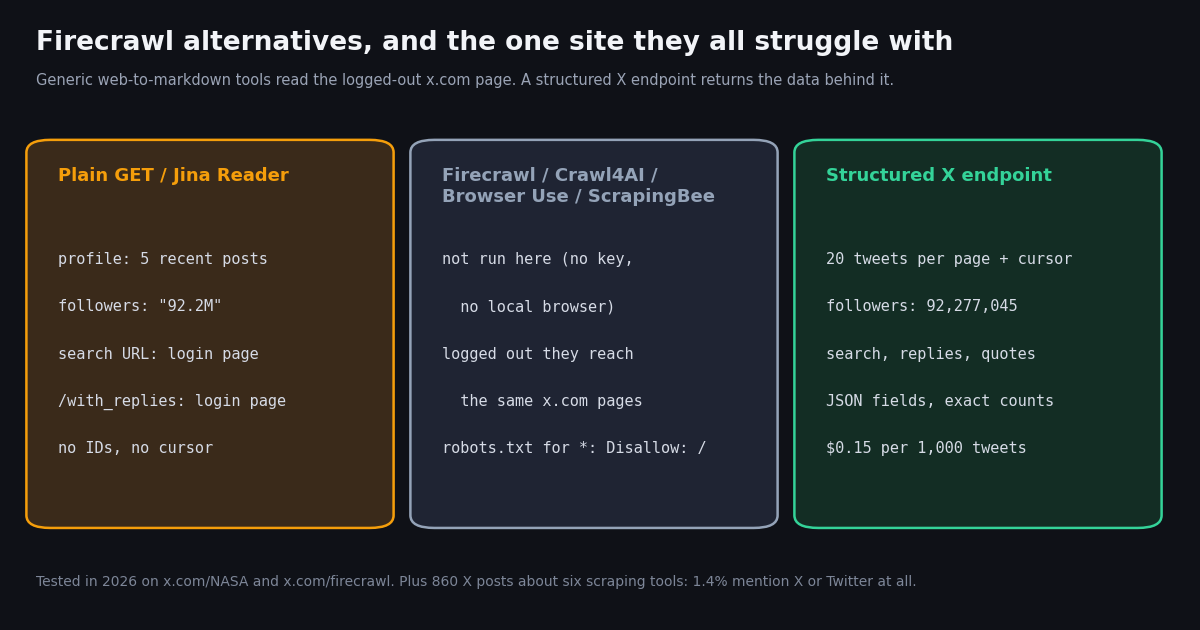
- Crawl4AI is the open-source Firecrawl alternative: Apache-2.0, about 87,000 GitHub stars, free to run in Python or Docker, and now also a hosted Crawl4AI Cloud (1,000 free credits a month, plans from $10).
- Apify is a marketplace, not a single scraper: you rent an Actor someone built for the site. Free plan has $5 of usage a month; Starter is $19/month.
- Jina Reader (
r.jina.ai/<url>) is the lightest swap for Firecrawl's/scrape: 20 requests a minute with no key, 10M free tokens with a key. - Browser Use and ScrapingBee solve different problems: an LLM that clicks through pages, and rented proxies plus JavaScript rendering.
- X is the gap for all of them. A logged-out profile page gave 5 of 20 latest posts with rounded counts;
x.com/searchand/with_repliesgave a login page;x.com/robots.txtsaysDisallow: /to every unnamed crawler. - On X itself, these tools are rarely discussed as X data sources: only 12 of 860 posts about them (1.4%) mention X or Twitter. For X data,
/twitter/user/last_tweetsand/twitter/tweet/advanced_searchcost $0.15 per 1,000 tweets vs $0.005 per post read on X's pay-per-usage rate card.
Firecrawl turns a URL into clean markdown or JSON for an LLM, and it does that well enough that "Firecrawl alternative" is now its own search. The usual reasons people look elsewhere are concrete: the AGPL-3.0 license on the self-hosted version, a credit bill that grows with every page, a site Firecrawl's hosted API will not scrape, or a job that needs a browser to click through rather than read a page once.
This page compares the five alternatives that come up most often for AI pipelines (Crawl4AI, Apify, Jina Reader, Browser Use and ScrapingBee) on license, price unit and the job each one fits, with Crawl4AI and Apify given their own head-to-head sections. Prices were read from each vendor's own pricing page this session and are written exactly as the vendor shows them.
Then it does one thing the usual roundups skip: it points each route at x.com, the site many agent builders want data from, and records what comes back. If you are choosing a Twitter-specific scraper rather than a general web crawler, our Apify Twitter scraper comparison covers that narrower decision; this page is about general web-to-LLM tools and where they stop.
5 of 20 latest posts, follower count rounded to "92.2M", no cursor; search and reply URLs returned a login page (tested in 2026). The structured endpoint returned 20 posts per page, 92,277,045 followers and a next_cursor.
What Firecrawl does, and the four reasons people replace it
Firecrawl is an API and an open-source project (github.com/firecrawl/firecrawl, AGPL-3.0, about 199,500 GitHub stars when we checked) that fetches pages and returns LLM-ready output. Its docs list the endpoints: Scrape (one URL to markdown, HTML or other formats), Crawl (a whole site), Map (discover URLs), Search (search the web and get full page content in one call), Agent (autonomous data gathering) and Interact (click and fill forms on a scraped page).
The hosted price unit is the credit. Per Firecrawl's pricing page, a scrape or crawl costs 1 credit per page (4 more for JSON format), search costs 2 credits per 10 results, and Interact costs 2 credits per browser minute. Plans: Free at $0 with 1,000 credits a month, Hobby $19/month (5,000 credits), Standard $99/month (100,000 credits), Growth $399/month (500,000 credits) and Scale $749/month (1,000,000 credits), with lower prices billed annually and an Enterprise tier.
Reason 1: license. Self-hosting is allowed, but AGPL-3.0 obliges you to publish your modifications if you offer the modified service over a network. Crawl4AI (Apache-2.0) and Browser Use (MIT) do not.
Reason 2: per-page billing at volume. At one credit per page, a crawl of 100,000 pages uses the whole Standard allowance. A self-hosted crawler moves that cost to your own servers and proxies.
Reason 3: unsupported sites. Firecrawl's hosted API keeps a domain blocklist in its database (the open-source blocklist.ts loads it at runtime rather than listing domains), and a blocked URL returns the message "we do not support this site" with a pointer to sales. The list itself is not public, so test your target domains before you commit.
Reason 4: the job is not a page read. If the data sits behind a login, a search box or infinite scroll, a one-shot scrape is the wrong tool and a browser agent or a site-specific API is the right one.
Firecrawl alternatives compared: license, price unit and best fit
Every price below was read from the vendor's own page this session. Apify and ScrapingBee pricing pages are apify.com/pricing and scrapingbee.com/pricing.
How to read the price unit column. Firecrawl and ScrapingBee charge per request or page, so a page that holds little data costs the same as a rich one. Apify bills compute plus whatever the Actor's author charges. The Crawl4AI and Browser Use libraries cost nothing to run, and you pay for servers, proxies and LLM tokens instead; both projects also sell a hosted version.
What is not on this list. Search APIs such as Tavily and Exa overlap with Firecrawl's /search endpoint, not with its crawler; we cover those on our Tavily API page. Apify alternatives as a topic in its own right (Apify for Twitter specifically) is on our Apify Twitter scraper comparison.
Firecrawl vs Crawl4AI: managed API or open-source library
Crawl4AI (github.com/unclecode/crawl4ai) is the open-source project most often named as the self-hosted Firecrawl replacement. It is Apache-2.0, had about 87,000 GitHub stars and a v0.9.5 release when we checked, and it turns pages into clean markdown for RAG or structured JSON, run from Python or Docker on your own machine. Its README now leads with Crawl4AI Cloud, a hosted API (api.crawl4ai.com) that runs the browsers and proxies for you, with /search, /serp and /answer endpoints, 1,000 free credits a month and plans from $10; the library itself stays free.
Pick Firecrawl when you want one HTTP call, someone else's browsers and proxies, and /search in the same bill. Pick Crawl4AI when your volume makes per-page credits the largest line item and you will run the library yourself, when you need a permissive license, or when you want the crawler inside your own network next to your data. If you want Crawl4AI hosted, compare its Cloud prices with Firecrawl's on the same page counts.
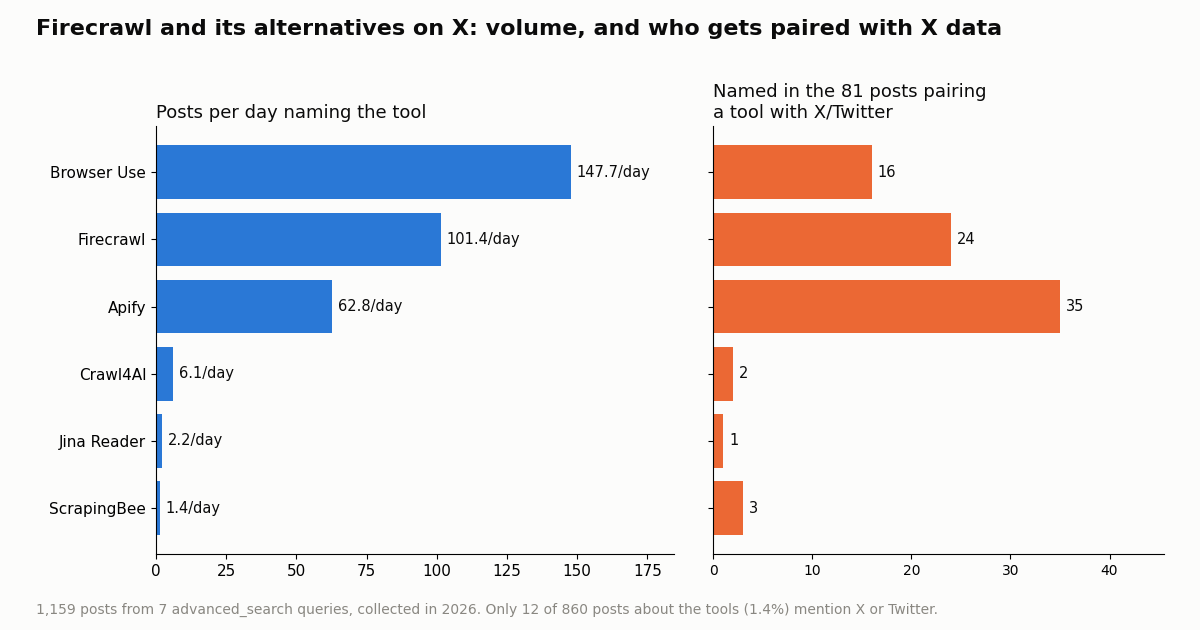
On our X conversation sample (below), Crawl4AI had far less chatter than Firecrawl: about 6.1 posts a day against about 101.4. Fewer posts, but its posts drew more attention each: a median of 465 views against 61.5 for Firecrawl, whose sample was dominated by replies (58.8%) to its own launch posts.
Firecrawl vs Apify: one API or a marketplace of scrapers
Apify (apify.com) is a different shape of product. Instead of one general scraper, it runs a store of Actors, each a scraper or automation that someone wrote for a site or a task, on Apify's cloud. You pay Apify for compute and, for many Actors, the author's own per-result or rental fee.
Per Apify's pricing page: Free is $0 with $5 of included usage a month (access is blocked once you use it up, until the next cycle), Starter is $19 a month, Scale $199 and Business $999, each including the same dollar amount of usage. Compute units cost $0.2 on Free and Starter, $0.16 on Scale and $0.13 on Business; annual billing takes 10% off.
Pick Firecrawl when the job is "read these pages and give my LLM clean text". Pick Apify when the job is "get structured records from site X" and someone has already written and maintains an Actor for site X. That is also why Apify dominates when people pair a scraping tool with X: in our sample, Apify was named in 35 of the 81 posts that paired one of these tools with X or Twitter, ahead of Firecrawl (24) and Browser Use (16), largely through tweet-scraper Actors.
The catch with marketplace scrapers for X is that each Actor is a third party's maintenance promise. When X changes its pages, the Actor breaks until its author fixes it, and the price is whatever that author sets. We compare those Actors for X specifically on our Apify Twitter scraper comparison.
Jina Reader, Browser Use and ScrapingBee: when each one fits
Jina Reader. Prefix a URL with r.jina.ai/ and the service fetches it server-side and returns LLM-friendly text. Per jina.ai/reader, it allows 20 requests a minute per IP with no key, more with a key, and every new key comes with 10M free tokens; pricing is token-based. It is the lightest swap for Firecrawl's single-page scrape and the one we could test with no account, so it appears in our x.com test below. The open-source code is github.com/jina-ai/reader (Apache-2.0).
Browser Use. github.com/browser-use/browser-use (MIT, about 120,000 GitHub stars when we checked) lets an LLM operate a real browser: it reads the page, decides what to click or type, and repeats. Its cloud bills $0.02 per browser hour (per minute, one-minute minimum), $5/GB for home-IP proxy traffic and per task or per token for its agents, per browser-use.com/pricing. Use it when the data appears only after a multi-step interaction. Expect it to be slower and more expensive per record than a page read, because every step is an LLM call.
ScrapingBee. A proxy and rendering API rather than an LLM tool: it fetches a URL through its proxies, optionally renders JavaScript, and hands back the HTML (with extraction options). Per scrapingbee.com/pricing, plans start at $19/mo (Hobby, 75,000 API credits) and a JavaScript-rendered request costs 5 credits; credits do not roll over. Use it when your blocker is IP reputation and rendering, and you are happy to do the parsing yourself.
A note on counting chatter. Browser Use shows the highest post rate in our sample (about 147.7 a day), but the phrase "browser use" is also plain English and other products use it, so read that bar as an upper bound.
The x.com test: what a scraper actually gets back from Twitter
Agent builders often reach for Firecrawl or an alternative to read X, because posts are where launches, outages and opinions show up first. So we pointed the routes we could run without an account at public x.com pages and compared the body with the JSON a structured X endpoint returns for the same account.
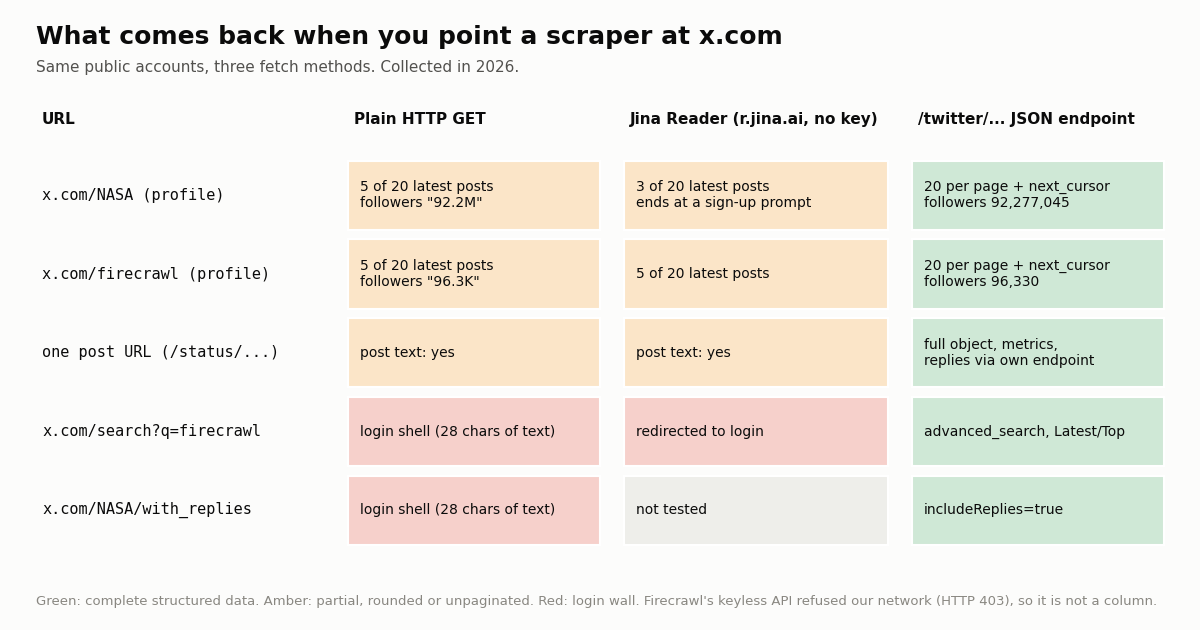
Profiles render partly. A plain HTTP GET of x.com/NASA returned HTTP 200 and about 202 KB of HTML with the bio, a rounded follower count ("92.2M") and 5 of the 20 posts the API returned as the latest, followed by a "Log in or sign up for X" prompt. Jina Reader returned 3 of 20 for NASA and 5 of 20 for x.com/firecrawl. Neither gave post IDs as data, exact counts or a way to load the next page.
Single posts render. One /status/ URL returned the post text through both the plain fetch and Jina Reader.
Search and replies do not. x.com/search?q=firecrawl gave the plain fetch a login shell with 28 characters of visible text, and Jina Reader was redirected to the login page. x.com/NASA/with_replies gave the same 28-character shell.
Robots. x.com/robots.txt lists rules for named search crawlers and ends with User-agent: * and Disallow: /. Crawlers that honor robots.txt are told to stay out of all of x.com.
What we could not test. Firecrawl's keyless API answered our network with HTTP 403 ("your IP address looks like a VPN or proxy"), and we had no Firecrawl key, no local browser for Crawl4AI or Browser Use, and no ScrapingBee account, so those four are not columns. Logged out, a browser-based tool reaches the same x.com pages a logged-out browser does; to see more it would have to sign in to an X account, which ties the job to that account.
What 1,159 posts on X say about these tools
To see how builders talk about Firecrawl and its alternatives, and how often X itself comes up, we pulled the latest posts naming each tool with /twitter/tweet/advanced_search (860 posts across six queries) plus one query pairing the tools with Twitter, X or tweets (299 posts).
Takeaway 1: X data is a side topic for these tools. Only 12 of 860 posts naming one of the six tools (1.4%) mention X or Twitter in their own text. People discuss them as general web readers for agents, which matches what they are built for.
Takeaway 2: when X does come up, Apify is named most often. Of the 299 posts the pairing query returned, 81 name X or Twitter in their own text (the rest match through links, and 23.1% are link-only). Within those, Apify is named 35 times, Firecrawl 24, Browser Use 16, ScrapingBee 3, Crawl4AI 2 and Jina Reader 1.
Takeaway 3: volume is not reach. Firecrawl's 101.4 posts a day include many replies to its own launches (58.8% replies), so the median Firecrawl post had 61.5 views. Quieter ScrapingBee and Jina Reader posts had medians of 1537 and 1224.5 views.
Getting X data into an LLM pipeline instead of scraping x.com
If X is one of the sources your agent needs, the structured route returns what the page hides: every post on a timeline page by page, search results, replies and quotes, and exact counts as numbers. On TwitterAPI.io, /twitter/user/last_tweets returns 20 posts per page with has_next_page and next_cursor, /twitter/tweet/advanced_search takes the same query syntax as X search (from:, -is:retweet, since_time:), and /twitter/user/info returns exact follower, following and post counts. Reads need no X account.
What it costs. $0.15 per 1,000 tweets returned (15 credits per tweet) and $0.18 per 1,000 profiles; a full 20-tweet page is $0.003, and a request that returns nothing is charged the 15-credit minimum ($0.00015). Pay only for the data returned. X's own pay-per-usage rate card at docs.x.com/x-api/getting-started/pricing lists $0.005 per post read, which is $5 per 1,000 posts, about 33 times $0.15.
Compared with a scraper credit. Firecrawl bills 1 credit per page whatever the page holds; a logged-out x.com profile page held 5 posts in our test, with no next page to request. The structured endpoint bills per tweet returned, and the next page is one cursor away.
New accounts that pass the automatic bot check get up to $1 of free credits (at most 100,000 credits, no card, one per person or network, expiring after 31 days). Before the first payment the limit is 0.2 requests per second, then 20 once paid. Purchased credits never expire.
For agents. The same data is available through our hosted MCP server at https://mcp.twitterapi.io/mcp with your key sent as a Bearer token, so Claude, Cursor or any MCP client can call search and timelines as tools next to Firecrawl or Crawl4AI for the rest of the web.
The script below reads a timeline and a search, keeps the fields an LLM needs, and writes both JSON and markdown, which is the shape a Firecrawl user expects.
import os, requests

BASE = "https://api.twitterapi.io"
H = {"X-API-Key": os.environ["TWITTERAPI_IO_API_KEY"]}

# One page of a timeline: 20 posts, newest first, exact counts
body = requests.get(f"{BASE}/twitter/user/last_tweets", headers=H,
                    params={"userName": "firecrawl"}, timeout=30).json()
for t in body["data"]["tweets"][:3]:
    print(t["createdAt"], t["likeCount"], t["viewCount"], t["text"][:80])
print("more pages:", body["has_next_page"], body["next_cursor"][:16])

# Search: what x.com/search shows only after login
res = requests.get(f"{BASE}/twitter/tweet/advanced_search", headers=H,
                   params={"query": "crawl4ai -is:retweet", "queryType": "Latest"}, timeout=30).json()
print(len(res["tweets"]), "posts; next:", res["has_next_page"])How we collected this
Question. How large is the X conversation about Firecrawl and five common alternatives, how much of it concerns X/Twitter data, and what does each fetch route return for public x.com pages?
Queries. Seven /twitter/tweet/advanced_search queries with queryType=Latest: one per tool (firecrawl, crawl4ai, apify, "jina reader" OR "r.jina.ai", "browser use" OR browser_use OR "browser-use", scrapingbee, each with -is:retweet) and one pairing all six names with twitter OR "x.com" OR tweets OR tweet. Fetch test: x.com/NASA, x.com/firecrawl, one /status/ URL, x.com/search?q=firecrawl and x.com/NASA/with_replies, each with a plain GET (desktop browser User-Agent) and through r.jina.ai, compared with /twitter/user/info and /twitter/user/last_tweets for the same two organization accounts.
Window and sample. The latest matching posts at collection time, collected in 2026: 1,159 posts in total. Each query's window runs from its oldest to its newest post, so busy queries cover hours (Browser Use: 19.5 hours) and quiet ones cover weeks (ScrapingBee: 1422.1 hours). The study used 62 API requests, about $0.18.
Method. Posts per day is posts in the sample divided by the hours covered. "Mentions X or Twitter" means the post's own text, with links removed, contains twitter, tweet(s), x.com, "on X" or "X" followed by data, posts, API, scraper, profile(s), account(s) or thread(s). The fetch test counts a post as present when the first 40 characters of its text appear in the returned body.
What the sample cannot show. Keyword search misses posts that name a tool only in an image or a link, and catches unrelated uses of a common phrase ("browser use"). Seven snapshots are not a trend. The fetch test covers two accounts at one moment; X changes what logged-out visitors see, and other tools (Firecrawl, Crawl4AI, Browser Use, ScrapingBee) were not run.
Privacy. Aggregates only. Search results come from private individuals, so raw pages were kept out of the repository; the published sample has no IDs, URLs, text or handles. Only organization accounts (NASA, Firecrawl) are named.
"""x_to_llm.py - pull X (Twitter) posts as clean JSON and markdown for an LLM pipeline.

Firecrawl and its alternatives turn a web page into markdown. For x.com, the logged-out
page holds a handful of posts and no cursor, so this script reads the same data from
structured endpoints instead: one account timeline plus one keyword search.

    pip install requests
    export TWITTERAPI_IO_API_KEY=...   # from the twitterapi.io dashboard
    python x_to_llm.py firecrawl "crawl4ai OR firecrawl -is:retweet" 3

Cost: $0.15 per 1,000 tweets returned (15 credits per tweet). A full 20-tweet page
is $0.003; a page that comes back empty is charged the 15-credit minimum ($0.00015).
"""
import json
import os
import sys
import time

import requests

BASE = "https://api.twitterapi.io"
HEADERS = {"X-API-Key": os.environ["TWITTERAPI_IO_API_KEY"]}


def get(url, params):
    for attempt in range(4):
        r = requests.get(url, headers=HEADERS, params=params, timeout=30)
        if r.status_code == 429:          # over your QPS: back off and retry
            time.sleep(2 ** attempt)
            continue
        r.raise_for_status()
        body = r.json()
        if body.get("status") == "error":
            raise RuntimeError(body.get("msg"))
        return body
    raise RuntimeError("rate limited four times in a row")


def timeline(user, pages):
    """Newest-first posts of one account; 20 per page."""
    out, cursor = [], ""
    for _ in range(pages):
        body = get(f"{BASE}/twitter/user/last_tweets", {"userName": user, "cursor": cursor})
        out += body["data"]["tweets"]
        if not body.get("has_next_page"):
            break
        cursor = body["next_cursor"]
    return out


def search(query, pages):
    """Latest posts matching an X search query; tweets[] is top-level here."""
    out, cursor = [], ""
    for _ in range(pages):
        body = get(f"{BASE}/twitter/tweet/advanced_search",
                   {"query": query, "queryType": "Latest", "cursor": cursor})
        out += body["tweets"]
        if not body.get("has_next_page"):
            break
        cursor = body["next_cursor"]
    return out


def slim(t):
    """Keep what an LLM needs; exact counts instead of a rounded '96.3K'."""
    a = t.get("author") or {}
    return {
        "id": t["id"], "url": t["url"], "created_at": t["createdAt"], "lang": t.get("lang"),
        "author": a.get("userName"), "author_followers": a.get("followers"),
        "text": t["text"], "likes": t.get("likeCount"), "reposts": t.get("retweetCount"),
        "replies": t.get("replyCount"), "views": t.get("viewCount"),
        "is_reply": t.get("isReply"), "quoted": (t.get("quoted_tweet") or {}).get("text"),
    }


def to_markdown(rows, title):
    lines = [f"# {title}", ""]
    for r in rows:
        lines.append(f"## @{r['author']} ({r['created_at']})")
        lines.append(r["text"])
        lines.append(f"likes {r['likes']} | reposts {r['reposts']} | replies {r['replies']} | views {r['views']} | {r['url']}")
        lines.append("")
    return "\n".join(lines)


if __name__ == "__main__":
    user, query, pages = sys.argv[1], sys.argv[2], int(sys.argv[3])
    tl = [slim(t) for t in timeline(user, pages)]
    found = [slim(t) for t in search(query, pages)]
    json.dump({"timeline": tl, "search": found}, open("x_data.json", "w"), indent=1, ensure_ascii=False)
    open("x_data.md", "w").write(to_markdown(tl, f"@{user} timeline") + "\n" + to_markdown(found, query))
    n = len(tl) + len(found)
    print(f"{len(tl)} timeline posts, {len(found)} search posts; about ${n * 0.00015:.4f} at $0.15 per 1,000 tweets")
Researching this?Free starter credits cover end-to-end testing — Google sign-in, no card. Get a key.
Questions readers ask
What is the best open-source alternative to Firecrawl?
Crawl4AI is the one most often named: Apache-2.0, about 87,000 GitHub stars, a Python library (or Docker server) that returns clean markdown or JSON, with an optional hosted Cloud. Browser Use (MIT) is the open-source pick when the job needs clicks and forms rather than page reads. Firecrawl itself is open source too, under AGPL-3.0.
Is Firecrawl free?
The hosted Free plan gives 1,000 credits a month at $0 with no card, and a scrape costs 1 credit per page. Paid plans start at $19/month (Hobby, 5,000 credits). The open-source version is free to self-host under AGPL-3.0.
Firecrawl vs Crawl4AI: which should I use?
Use Firecrawl when you want a managed API with crawl, map and search in one bill and do not want to run browsers. Use the Crawl4AI library when per-page credits would be your largest cost, when you need a permissive license, or when the crawler should run inside your own network; Crawl4AI Cloud is the hosted option if you do not want to run browsers.
Firecrawl vs Apify: what is the difference?
Firecrawl is one general scraper that turns any URL into markdown or JSON, billed per page. Apify is a platform of site-specific scrapers (Actors) written by Apify or third parties, billed by compute units plus any Actor fee. Choose Apify when a maintained Actor already exists for your target site.
Can Firecrawl or Crawl4AI scrape Twitter (X)?
Logged out, a fetch of a public profile in our test returned 5 of the 20 latest posts with rounded counts and no next page, and search and reply URLs returned a login page. x.com/robots.txt disallows all unnamed crawlers. Firecrawl's hosted API also keeps a private domain blocklist. For complete X data, use a structured X API.
Does Jina Reader work on x.com?
Partly. In our test r.jina.ai returned 5 of 20 latest posts for x.com/firecrawl and 3 of 20 for x.com/NASA, the text of a single post, and a login page for x.com/search.
How much does X (Twitter) data for an LLM cost?
Compare per-result prices. X's pay-per-usage rate card lists $0.005 per post read ($5 per 1,000). TwitterAPI.io charges $0.15 per 1,000 tweets returned, with a 15-credit minimum when a request returns nothing, and reads need no X account. A web scraper charges per page, and a logged-out x.com page carries only a few posts.
Are there Firecrawl alternatives for AI agents specifically?
Yes: Jina Reader for one-call page reads inside an agent loop, Browser Use for agents that must operate a site, and search APIs such as Tavily or Exa if you mainly use Firecrawl's search endpoint. For X data inside an agent, an MCP server exposes search and timelines as tools.
Continue
- Firecrawl pricing: plans, credits per scrape/crawl/search, rate limits
- firecrawl/firecrawl on GitHub (AGPL-3.0; blocklist.ts and the unsupported-site message)
- unclecode/crawl4ai on GitHub (Apache-2.0, releases)
- browser-use/browser-use on GitHub (MIT)
- X API pay-per-usage pricing ($0.005 per post read)
- twitterapi.io API reference: last_tweets, advanced_search, user info
- X (Twitter) API hub: endpoints, pricing and guides
- Apify Twitter scraper alternatives compared
- Twitter (X) scraper comparison for 2026
- How to scrape Twitter (X) without the official API
- Tavily API: search for agents, and where X fits
- Twitter (X) MCP server for Claude, Cursor and other agents
- TwitterAPI.io pay-per-use pricing
- 01Warp Pricing in 2026: Plans, Dollar Usage, Add-ons and the Real Monthly Bill
- 02Roo Code vs Cline in 2026: After the Shutdown, Which One to Run
- 03What Is x402? How the HTTP 402 Payment Protocol Works, With a Real 402 Offer Decoded
- 04Windsurf (now Devin Desktop) vs Cursor in 2026: plans, agents, MCP and what X users say
- 05Gemini CLI vs Claude Code in 2026: Access, Quotas, MCP and Pricing for Twitter (X) Data Agents
- 06Base44 alternatives in 2026: Lovable, Bolt.new, Replit, v0, Emergent, open-source Dyad and coding agents compared
- 07Sprout Social Alternatives: What to Use Instead, by Job, With a Twitter (X) Data Study
- 08n8n Alternatives in 2026: Pick by Why You Are Leaving, and Keep Your Twitter (X) Workflows
Writing about something you built with TwitterAPI.io? Our community rewards program pays API credits for honest tutorials, build logs and videos.
Stop reading. Start building.
Starter credits cover real testing on real data. Google sign-in, no card, no application queue.
Get an API keyAlready building with TwitterAPI.io? Publish an honest tutorial or build log about it and earn up to $200 a month in API credits.