Account Activity API: Real-Time Event Subscription Guide
Account Activity API: Real-Time Event Subscription Guide
The Account Activity API delivers real-time updates about user events like direct messages, new followers, or tweet engagements via webhooks. Instead of polling for updates, this API pushes data directly to your server, making it a resource-efficient solution for applications needing instant notifications. However, managing webhooks and scaling subscriptions can bring challenges, particularly for smaller teams.
Key points:
- Webhook-based delivery: Sends JSON payloads for user-specific events.
- Subscription limits: Up to 50 accounts per webhook initially, with tiered pricing plans for scaling.
- Webhooks vs. WebSockets: Webhooks are efficient for event-driven setups, while WebSockets excel in high-frequency, low-latency scenarios.
- Pricing: Enterprise plans can be costly and rigid, while alternatives like TwitterAPI.io offer pay-as-you-go pricing at $0.15 per 1,000 tweets and $0.18 per 1,000 profiles.
For developers, the choice depends on your need for user-specific tracking versus broader event monitoring. TwitterAPI.io simplifies integration with flexible pricing and high scalability, while the Account Activity API is better for detailed user event tracking but may require more infrastructure management.
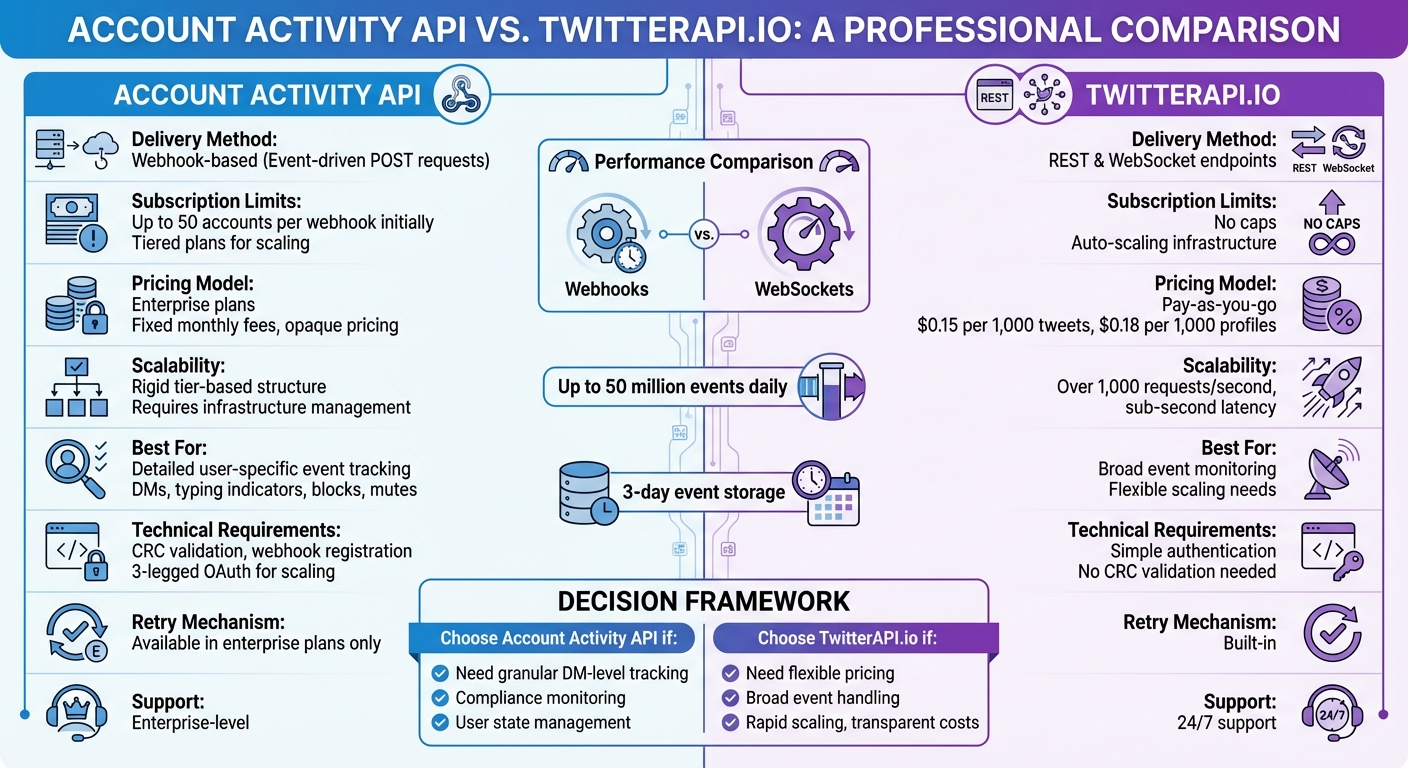
Account Activity API vs TwitterAPI.io: Feature and Pricing Comparison
Getting Started with Twitter API: A Step-by-Step Guide for Beginners
sbb-itb-9cf686c
Real-Time Event Delivery and Performance
The Account Activity API sends user event data through webhook POST requests with a JSON payload, ensuring your server processes data only when specific events occur. To use this, you’ll need a publicly accessible web server and must handle Challenge Response Check (CRC) validations to keep your webhook active. For local testing, tools like ngrok can expose your development environment to the internet. Alternatively, you can use persistent connections like WebSocket streams, which offer a different performance approach.
WebSocket streams create a continuous, two-way connection between your application and the data source. This eliminates the need for repeated HTTP headers that accompany each webhook POST request, delivering data with millisecond-level latency. This makes WebSockets ideal for applications requiring ultra-fast updates, such as live dashboards or trading algorithms. TwitterAPI.io’s WebSocket implementation further reduces network overhead after the initial connection handshake.
When it comes to large-scale event monitoring, systems can handle up to 50 million events daily, with streamed events typically stored for up to three days. This highlights why webhook-based models are often preferred for user-focused event tracking - they balance efficiency and reliability.
The choice between webhooks and WebSockets depends on your specific needs and architecture. Webhooks are better suited for serverless functions or microservices, where maintaining a constant connection isn’t feasible. On the other hand, WebSockets shine in high-frequency scenarios like financial trading or real-time content moderation, providing near-instant updates. For event-driven applications that don’t require constant connectivity, webhooks offer a more resource-efficient option.
For high-volume accounts, it’s essential to ensure your server can handle concurrent POST requests efficiently. Enterprise versions of the Account Activity API also include replay functionality, allowing you to recover missed events within specific timeframes. This added reliability makes the API a strong choice for mission-critical applications requiring real-time data delivery.
Subscription Management and Scaling
Managing subscriptions effectively is key to ensuring smooth performance in real-time event monitoring. The Account Activity API uses a tiered subscription model, which limits the number of user accounts you can monitor based on your plan. Lower-tier plans are suited for smaller-scale needs, like monitoring a handful of brand accounts, while higher-tier plans expand that capacity. However, each tier comes with a fixed monthly fee, regardless of how much you use it. This structure can make scaling tricky, especially for businesses with fluctuating needs.
Handling these subscriptions requires careful coordination. Developers must register webhooks, perform regular CRC validations, and use specific API endpoints to manage accounts. When you hit the limits of your current plan, moving to a higher tier is the only option, often leading to steep increases in monthly costs. For businesses experiencing seasonal spikes or unpredictable surges, this rigid structure can become a significant operational hurdle. These challenges highlight the need for more adaptable solutions.
Enter TwitterAPI.io, which offers a flexible pay-as-you-go pricing model. Instead of fixed tiers, it charges $0.15 per 1,000 tweets and $0.18 per 1,000 profiles. This approach removes subscription caps and allows for over 1,000 requests per second with sub-second latency, thanks to an auto-scaling global infrastructure. The pay-as-you-go model eliminates the need to predict your capacity months in advance, giving you the freedom to pay only for what you use.
For developers building scalable applications, this flexibility is a game-changer. Imagine a social media monitoring tool that operates steadily most of the time but needs to handle a massive spike during a product launch or a crisis. With a tiered model, you'd have to upgrade - potentially at a high cost - just to meet temporary demand. TwitterAPI.io’s dynamic pricing, on the other hand, adjusts costs in real-time based on usage. It also simplifies integration with REST and WebSocket endpoints, offers easy authentication, and provides 24/7 support. This kind of scalability ensures your application can handle sudden surges without missing a beat, keeping notifications timely and operations smooth.
Pros and Cons
After exploring real-time performance and scalable subscription management, let’s dive into the key strengths and challenges of the Account Activity API.
The Account Activity API shines when it comes to tracking user-specific events in detail. It uses webhook-based delivery to send rich data payloads for activities like DM typing indicators, blocks, mutes, and follows - complete with user profile information. This makes it a strong choice for applications that need to monitor individual user states. For example, compliance tools can track tweet deletions, and chat apps can display live typing indicators.
However, there are some notable hurdles. Pricing details for the API are unclear, often requiring enterprise access with high costs, which can be a roadblock for smaller developers. Additionally, scalability can be tricky. Managing webhooks on a per-user basis adds complexity, and without a built-in retry mechanism, missed events are a risk if endpoints don’t respond quickly. The webhook CRC validation process can also make development more challenging, especially in unstable network environments.
On the other hand, TwitterAPI.io offers a simpler and more transparent alternative. With a pay-as-you-go model - $0.15 per 1,000 tweets and $0.18 per 1,000 profiles - it eliminates the need for opaque enterprise pricing tiers and subscription limits. Its developer-friendly endpoints skip the hassle of intricate webhook registration, and the platform supports over 1,000 requests per second. With access to both real-time and historical data streams, along with 24/7 support, it’s a better fit for applications requiring scalable, broad event handling rather than highly specific DM-level tracking.
Choosing between these options depends on your real-time data needs. Balancing granular event tracking with operational complexity and predictable costs is key to building responsive and efficient applications.
Conclusion
Selecting the right API comes down to your development needs and the scale of your project. The Account Activity API is ideal for developers who require detailed, user-specific event tracking. This makes it particularly useful for applications like Direct Message bots or instant notification systems. Its webhook-based approach is efficient with resources, but scalability will depend heavily on your infrastructure's ability to handle simultaneous event processing.
That said, managing webhooks and performing CRC validation can be challenging for smaller teams. While personal tokens might work for initial testing, scaling up will require implementing 3-legged OAuth and thorough capacity planning. Additionally, the lack of built-in retry mechanisms in lower-tier plans can pose challenges for mission-critical applications.
On the other hand, TwitterAPI.io offers a more straightforward solution for handling a wide range of events. Its pay-as-you-go pricing - $0.15 per 1,000 tweets and $0.18 per 1,000 profiles - provides transparency, while supporting over 1,000 requests per second. With access to both real-time and historical data via simple REST and WebSocket endpoints, it eliminates the need for CRC validation or webhook registration.
For enterprise-level users, the Account Activity API's retry process and Replay API can be valuable tools. Startups, however, may find TwitterAPI.io's easy setup, round-the-clock support, and predictable costs more appealing. Ultimately, your choice should align with your operational requirements, whether you prioritize granular tracking with user-specific webhooks or prefer simpler integration with broader data access and clear pricing.
FAQs
What events can the Account Activity API send to my webhook?
The Account Activity API allows you to receive real-time updates on various user interactions directly to your webhook. These events include:
- Posts and post deletions
- Mentions, replies, retweets, and quote tweets
- Likes, follows, and unfollows
- Blocks and mutes
- Direct messages (sent and received), typing indicators, and read receipts
- Subscription revokes
By leveraging these updates, you can monitor user activity effectively and stay informed about interactions as they happen.
How do I pass CRC validation for an Account Activity API webhook?
To ensure your webhook passes CRC validation, you'll need to handle the CRC request sent by Twitter during the registration process. Here's how:
- Extract the
crc_tokenfrom Twitter's request. - Use your consumer secret to hash the
crc_tokenand generate aresponse_token. - Respond to Twitter with a JSON object that includes the
response_token.
This process confirms your webhook's validity. For detailed steps and code examples, check out Twitter's official documentation on CRC validation and setting up webhooks.
How should I handle retries and missed events if my webhook is down?
If your webhook goes offline, Twitter will attempt to resend events up to three times within a five-minute window, provided no '200 OK' response is received. If events are missed beyond this retry period, you can recover them using the Account Activity Replay API. This tool allows you to retrieve important events from the last five days, helping you capture any critical data lost during the downtime.
Tags
Related articles
Ready to get started?
Try TwitterAPI.io for free and access powerful Twitter data APIs.
Get Started Free