Handling Twitter API Rate Limits: Best Practices
Handling Twitter API Rate Limits: Best Practices
Twitter API rate limits can disrupt your app if not managed properly. Here's what you need to know:
- Rate Limits: Twitter restricts how many API requests you can make in a 15-minute window. Exceeding limits triggers a 429 error (Too Many Requests).
- Types of Limits: User-level limits (e.g., 180 requests for search) vs. app-level limits (e.g., 450 requests for search).
- Headers to Monitor: Use
x-rate-limit-remainingandx-rate-limit-resetto track usage and reset times.
Key Strategies to Avoid Issues:
- Batch Requests: Combine multiple queries into one to save quota (e.g., fetch 100 tweets in one call).
- Caching: Store frequently accessed data to reduce redundant API calls. Tools like Redis can cut requests by up to 65%.
- Retry Logic: Handle 429 errors by waiting until limits reset, guided by
x-rate-limit-reset. Use exponential backoff for retries. - Fallbacks: Serve cached data or delay non-critical tasks when limits are hit.
If you need higher capacity, consider app-level authentication for read-heavy tasks or third-party services like TwitterAPI.io for scalable access. By combining these methods, you can keep your application running smoothly while staying within Twitter's limits.
How To Fix Rate Limit Exceeded On X (Twitter) - Full Guide (2025)
sbb-itb-9cf686c
Techniques for Reducing API Calls
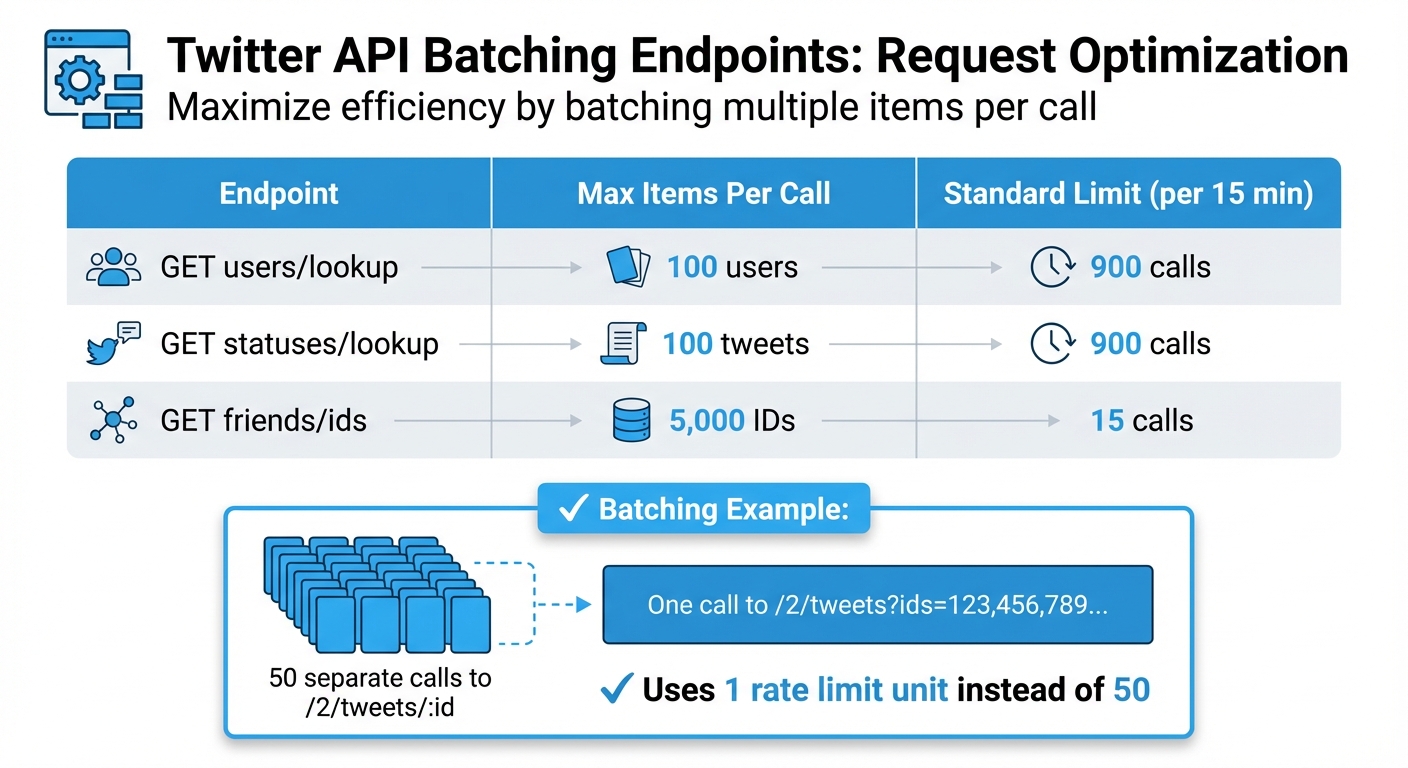
Twitter API Rate Limit Comparison: Batching Endpoints and Request Limits
Batching Multiple Requests
One way to cut down on API calls is by grouping multiple requests into a single one. This approach helps you conserve your rate quota and avoid the "N+1" problem, where you repeatedly call an endpoint for individual items. Instead, use plural endpoints to retrieve multiple items in one go - up to 100 items per request.
For instance, instead of making 50 separate calls to /2/tweets/:id for 50 tweets, you can combine them into a single call like /2/tweets?ids=123,456,789.... This method uses only one rate limit unit instead of 50. For developers facing persistent constraints, exploring Twitter API alternatives can provide more flexible data access. Similarly, you can fetch up to 100 user profiles in a single GET users/lookup request. This not only saves on rate limits but also reduces network latency by minimizing the number of HTTP connections.
| Endpoint | Max Items Per Call | Standard Limit (per 15 min) |
|---|---|---|
| GET users/lookup | 100 users | 900 calls |
| GET statuses/lookup | 100 tweets | 900 calls |
| GET friends/ids | 5,000 IDs | 15 calls |
Batching is a simple yet effective way to optimize API usage. But to take it a step further, caching is another key technique.
Setting Up Caching Systems
Caching is all about storing frequently accessed data to avoid making repeated API calls for unchanged information. Tools like Redis or Memcached can help you reduce API calls by as much as 65% in high-traffic environments. Ideally, aim for a cache hit rate of 70% or higher.
The Time-to-Live (TTL) settings for cached data should match how often the data changes. For dynamic data, use TTLs of 60 to 120 seconds, while more stable data can have TTLs of up to 15 minutes. If you're working with multiple servers, a distributed cache can ensure consistency across your application. For example, setting a 90-second cache interval can limit an application to just 10 API requests every 15 minutes.
Managing Rate Limit Errors
Even with batching and caching in place, hitting rate limits is inevitable. The key is to handle these errors gracefully so your application remains functional.
Reading 429 Errors and Rate Limit Headers
When you exceed your rate limit, Twitter responds with a 429 Too Many Requests status code. This means you've surpassed the request limit for a specific endpoint within the current 15-minute window. However, the status code alone doesn't give you enough detail - you need to examine the response headers.
Twitter API responses include three essential headers:
- x-rate-limit-limit: Indicates the total number of requests allowed.
- x-rate-limit-remaining: Shows how many requests you can still make.
- x-rate-limit-reset: Provides the Unix timestamp when your limit will reset.
Interestingly, over 40% of applications encounter rate-limiting issues because they fail to monitor these headers. To avoid this, set up automated alerts that trigger when x-rate-limit-remaining falls below 10–20% of your allowance. Proactively tracking these values can boost your request success rate by more than 50%. Don’t wait for a 429 error - monitor these metrics consistently and plan ahead with retry strategies.
Building Retry Logic
When a 429 error occurs, use the x-rate-limit-reset header to calculate the wait time. Add a 1-second buffer to account for clock discrepancies.
"The most robust, production-ready way to handle 429 errors is not to estimate a sleep duration, but to precisely respect the x-rate-limit-reset header." - Error Medic Editorial
For HTTP 503 errors, implement exponential backoff with ±25% jitter. This approach - starting with short delays (e.g., 1 second, then doubling to 2, 4, 8 seconds) - prevents multiple clients from retrying simultaneously and overwhelming the server. Studies show that applications using exponential backoff experience fewer disruptions and improved performance in over 90% of cases. Adaptive retry mechanisms can reduce lockouts by up to 57% compared to static retry intervals.
Limit retries to 3–5 attempts, with an upper wait-time cap of 64 or 128 seconds, to avoid infinite loops. Only retry on 429 and 503 errors. Be cautious of other issues like the automated request error which requires different handling. Avoid retrying on 401 (Unauthorized) or 403 (Forbidden), as these errors require changes to credentials or permissions.
Designing Fallback Options
If retries don’t resolve the issue, exploring X API alternatives or fallback options can help maintain functionality. For instance, serve cached data with "last updated" timestamps during cooldown periods to keep users engaged.
In distributed systems, use centralized tools like Redis to track rate limit statuses across worker nodes. Additionally, implement a circuit breaker pattern to halt outgoing requests temporarily (e.g., for 60 seconds) when repeated 429 errors occur. This prevents cascading failures and can improve application stability by about 40% during high-traffic periods.
To prioritize critical operations, use message queues like Celery or RabbitMQ. Delay non-essential tasks, such as analytics, until the rate limit resets. This strategy can cut blockage durations by nearly 50%. By focusing on critical requests, you ensure your application continues to deliver value even under constraints.
Options for Higher Rate Limits
Once you've tackled ways to reduce API calls and manage errors, you might find your application still needs more capacity. If that's the case, there are strategies to push beyond standard rate limits by optimizing your authentication methods.
Using App-Level Authentication
Switching to app-level authentication (via Bearer Tokens) can provide a major boost to your read-only rate limits. For example, the GET /2/users/:id/tweets endpoint allows 10,000 requests per 15 minutes with app-level authentication, compared to just 900 requests using user-level authentication. Similarly, media uploads benefit significantly, supporting up to 180,000 "append" operations per 24 hours.
However, there’s a catch: app-level authentication is strictly for public data lookups. You won’t be able to post tweets, like posts, or perform any other write actions. For those, you’ll need user-level authentication, which limits individual users to 100 tweets per 15 minutes but lets your app post up to 10,000 tweets per 24 hours across multiple authorized users.
"Your app can post on behalf of multiple Twitter accounts and has a bigger daily limit... Both limits apply. Your app could e.g. serve 16 different Twitter users each posting 100 tweets per 24 hours which adds up to a safe 1600 tweets per 24 hours." - Markus Kauppinen, Developer
The most effective strategy is to split your workloads: use Bearer Tokens for high-volume, read-only tasks like fetching user profiles or search results, and reserve user-level authentication for account-specific actions. By keeping an eye on the x-rate-limit-remaining header, you can switch between methods before hitting any limits, ensuring smoother operations for data-heavy tasks.
Using TwitterAPI.io for Higher Limits

For those who need even more capacity - or just want a simpler solution - TwitterAPI.io is a great alternative. This platform supports over 1,000 requests per second, offers an average response time of about 800ms, and guarantees 99.99% uptime. Unlike Twitter’s official API, which operates within strict 15-minute windows, TwitterAPI.io scales with your usage through a pay-as-you-go pricing model. Rates start at $0.15 per 1,000 tweets and $0.18 per 1,000 profiles, with no monthly commitments or developer account approvals required. Plus, you’ll get $1 in free credits to test the service.
Using TwitterAPI.io means you skip the complexity of OAuth and gain instant access with a simple API key, making it an ideal choice for high-performance, uninterrupted data access.
Conclusion
Dealing with Twitter API rate limits doesn’t have to feel like an uphill battle. The trick lies in combining monitoring rate limit headers with smart request strategies. Keeping an eye on these headers acts as a safety net, letting you tweak request frequencies before hitting limits. This approach can cut service disruptions by as much as 30%.
Here’s the bottom line: techniques like caching, batching, and smart retries don’t just lower API call volumes - they also reduce failures, making your integration far more reliable.
These methods are the foundation of building robust API integrations.
"Successfully integrating with the Twitter API requires accepting that rate limits and intermittent server errors are normal operational states, not catastrophic failures." - Error Medic Editorial
Planning for scalability is critical to avoid hard lockouts or prolonged restrictions, which affect 34% of developers who lack automated backoff mechanisms. And since roughly 74% of account suspensions occur during peak traffic times, preemptive throttling is crucial for keeping your app running smoothly.
To ensure seamless social data analytics, managing rate limits effectively is non-negotiable. Whether you stick with Twitter’s official API or explore alternatives like TwitterAPI.io for greater capacity and easier authentication, the principles remain the same: monitor usage, cache aggressively, batch requests, and implement smart retries. Nail these basics, and you’ll have an application that scales effortlessly without constant disruptions.
FAQs
How do I calculate the exact wait time from x-rate-limit-reset?
To figure out the wait time using x-rate-limit-reset, check the header in the API response. This header provides a UNIX timestamp that tells you when the rate limit will reset. To calculate how long you need to wait, subtract the current UNIX timestamp from the x-rate-limit-reset value:
wait_time_seconds = x-rate-limit-reset - current_unix_timestamp
Use this calculated wait time to pause your requests and prevent hitting rate limit errors again.
What cache TTL should I use for profiles vs. tweets?
To handle rate limits efficiently, consider caching responses based on the type of data you're dealing with.
- Profiles: Since profile data doesn't change often, you can use a longer cache TTL (time-to-live), ranging from several minutes to a few hours. This reduces unnecessary API calls while still keeping data reasonably current.
- Tweets: Tweets are much more time-sensitive, so a shorter TTL - about 90 seconds to a few minutes - is better. This ensures you're not missing out on fresh updates while still cutting down on API requests.
This strategy strikes a balance between keeping your data up-to-date and minimizing the number of API calls you make.
When should I use app-level auth vs. user-level auth?
When accessing public data or performing tasks solely on behalf of your application, app-level authentication is the way to go. This method is ideal when the actions or data are tied to the application itself, not a specific user.
On the other hand, if you're working with user-specific data or need to perform actions on behalf of an individual user, you'll need to use user-level authentication. This approach ensures you're operating within the scope of a particular user's permissions.
Each method is tailored to its purpose, depending on whether the focus is on the app as a whole or an individual user.
Tags
Related articles
Ready to get started?
Try TwitterAPI.io for free and access powerful Twitter data APIs.
Get Started Free