Twitter Sentiment Analysis for Public Opinion Trends
Twitter Sentiment Analysis for Public Opinion Trends
Twitter sentiment analysis helps understand public opinions in real time by analyzing tweets for positive, negative, or neutral sentiments using Natural Language Processing (NLP). With over 500 million tweets posted daily, organizations, researchers, and businesses use this method to track trends, gauge reactions, and make data-driven decisions. Here's a quick overview:
- Why It Matters: Twitter provides immediate insights compared to slower methods like surveys. It’s widely used in areas like product feedback, political campaigns, and even financial market predictions.
- How It Works: Tweets are collected via APIs, cleaned, and analyzed using tools like VADER, TextBlob, or advanced models like RoBERTa. Sentiment scores range from -1 (negative) to +1 (positive).
- Applications: Businesses monitor brand reputation, researchers track long-term trends, and public health agencies identify early warnings for outbreaks.
- Challenges: Sarcasm, slang, and large data volumes can complicate analysis. Combining automation with human validation ensures better accuracy.
TwitterAPI.io simplifies data collection with cost-effective access to real-time and historical tweets, making it easier for users to set up sentiment analysis systems. Whether for short-term insights or long-term trend tracking, Twitter sentiment analysis is a powerful tool for understanding public opinion.
Why Use Twitter Sentiment Analysis for Public Opinion Trends
Real-Time Insights
Twitter's 280-character limit encourages concise communication, making it an ideal platform for Natural Language Processing (NLP) tools to quickly analyze sentiment. This capability is essential for "social listening", where organizations monitor public reactions in real time - whether it’s during a product launch, breaking news, or other fast-moving events. Unlike traditional surveys that take days or weeks, Twitter sentiment analysis provides immediate feedback.
"Twitter has become the default way to share a bad customer experience and express frustrations whenever something goes wrong." – Federico Pascual
For example, a sudden increase in negative mentions can indicate a crisis. Tools like VADER or TextBlob can process thousands of tweets per second, offering near-human accuracy while operating continuously.
Even financial markets leverage Twitter sentiment. Investors monitor ticker symbols like $TSLA to gauge public reactions to earnings reports or executive statements, using this data to predict stock movements. Beyond immediate responses, Twitter data supports ongoing sentiment tracking, giving organizations a dynamic view of public opinion.
Long-Term Trend Analysis
Analyzing historical sentiment data helps uncover shifts in public opinion over extended periods. Unlike one-off surveys, Twitter sentiment analysis provides a continuous stream of insights into how attitudes evolve regarding brands, policies, or social movements.
Take, for instance, a study analyzing sentiment toward Notion. Researchers found that 50% of tweets were positive, while only 8.2% were negative. This type of baseline data allows businesses to measure the impact of product updates, pricing changes, or marketing campaigns on public perception over time. By observing these trends, organizations can make data-driven adjustments to their strategies.
However, managing the sheer volume of data is a challenge. With around 2.5 quintillion bytes of data generated daily, much of it remains unstructured and underutilized. To address this, researchers often store Tweet IDs for future "re-hydration", enabling longitudinal studies while staying within data retention guidelines.
Applications for Businesses and Researchers
Both businesses and researchers tap into Twitter sentiment analysis to refine strategies and policies, leveraging real-time and historical insights.
For businesses, sentiment analysis helps pinpoint customer preferences and frustrations. Instead of speculating why satisfaction scores drop, companies can categorize tweets by themes like pricing, usability, or customer support, identifying specific areas that need improvement.
"Start small. Pilot with a subset of data before scaling." – Vignesh Prajapati
Public health agencies utilize Twitter data to detect early signs of disease outbreaks, while political campaigns monitor voter sentiment and track misinformation. Twitter provides unfiltered, real-time feedback that traditional surveys often miss.
Predictive analytics powered by sentiment data can also drive cost savings. For example, Netflix uses similar behavioral analysis techniques in its user retention models, saving the company an estimated $1 billion annually.
sbb-itb-9cf686c
Twitter Sentiment Analysis by Python | best NLP model 2022
How Twitter Sentiment Analysis Works
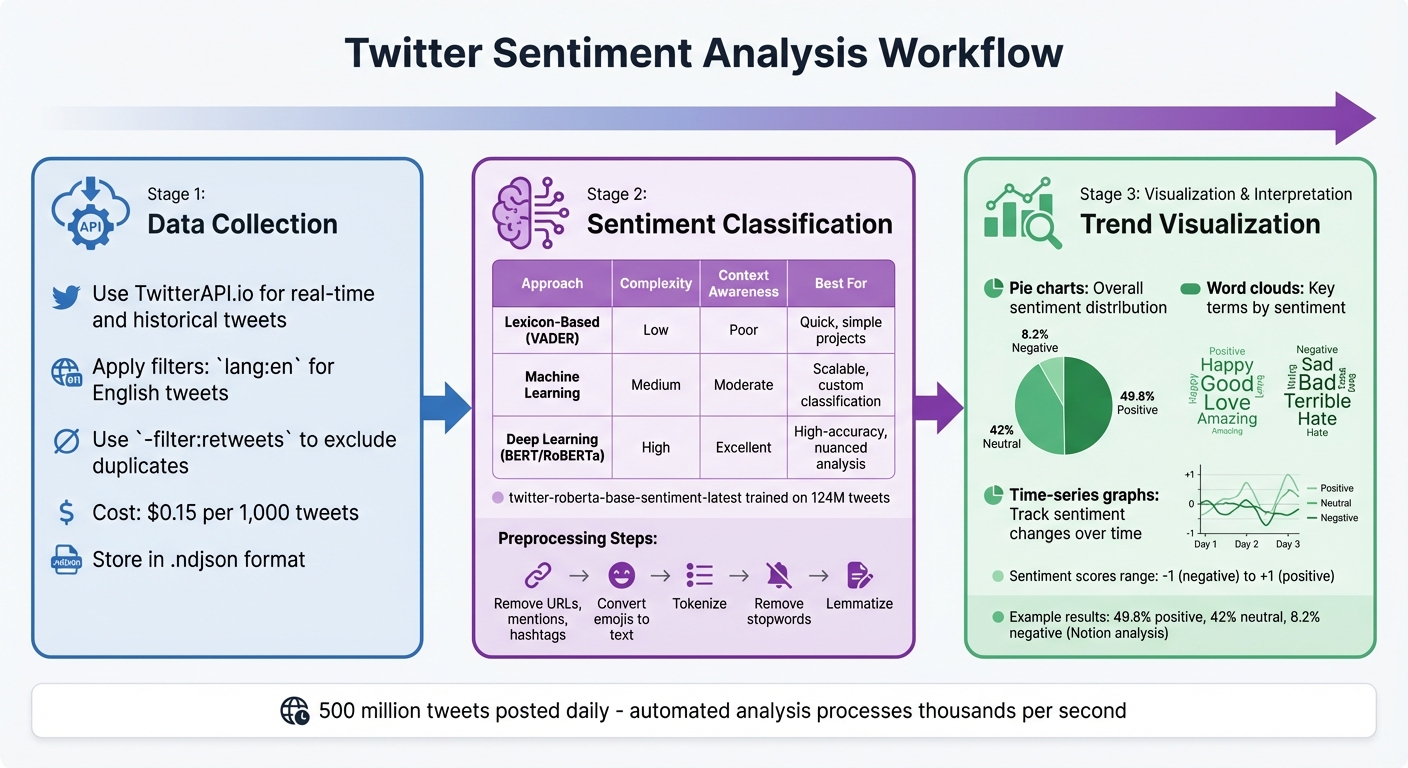
Twitter Sentiment Analysis Workflow: From Data Collection to Insights
Understanding the mechanics behind Twitter sentiment analysis is essential for accurate and actionable insights. The process involves three main stages: gathering tweet data, analyzing sentiment, and presenting the results visually.
Data Collection
The first step in sentiment analysis is collecting tweets. Platforms like TwitterAPI.io offer tools for accessing both real-time and historical tweet data. This flexibility allows you to track ongoing events or study past trends. To keep your dataset relevant and clean, use filters such as lang:en for English-language tweets and -filter:retweets to exclude duplicate content. This ensures that your analysis focuses on unique opinions rather than repetitive noise.
Real-time data is invaluable for capturing immediate reactions during live events. Meanwhile, historical data helps uncover how sentiments shift over time, offering a broader perspective.
Sentiment Classification Techniques
Once you've gathered your dataset, the next step is to analyze the sentiment of each tweet - whether it’s positive, negative, or neutral. Sentiment classification typically relies on three main approaches:
- Lexicon-Based Methods: Tools like VADER and TextBlob use predefined word dictionaries where each word is assigned a sentiment score. VADER is particularly effective on platforms like Twitter because it recognizes elements like emojis and slang.
- Machine Learning Models: These models identify sentiment patterns by training on pre-labeled datasets, such as the Sentiment140 dataset, which contains 1.6 million classified tweets. Algorithms like Naive Bayes and Support Vector Machines convert text into numerical data (e.g., using a Bag-of-Words model) to detect sentiment patterns. While more flexible than lexicon-based methods, this approach requires labeled training data.
- Deep Learning Techniques: Advanced tools like BERT and RoBERTa go beyond simple patterns, capturing the nuances and context of language. The twitter-roberta-base-sentiment-latest model, trained on around 124 million tweets, is particularly adept at understanding social media-specific language.
Before diving into classification, make sure to preprocess your tweets by removing irrelevant data, as previously outlined.
| Approach | Complexity | Context Awareness | Best For |
|---|---|---|---|
| Lexicon-Based (VADER) | Low | Poor | Quick, simple projects |
| Machine Learning | Medium | Moderate | Scalable, custom classification |
| Deep Learning (BERT/RoBERTa) | High | Excellent | High-accuracy, nuanced analysis |
Trend Visualization and Interpretation
Interpreting raw sentiment scores can be challenging without proper visual aids. Pie charts, for instance, provide a quick snapshot of the overall distribution of positive, negative, and neutral tweets, offering a sense of brand health. Word clouds are another useful tool, highlighting key terms that drive sentiment in each category.
For tracking changes over time, time-series graphs are particularly effective. They help you identify spikes in sentiment, which could signal emerging issues or the impact of successful campaigns. A good example comes from Federico Pascual, who analyzed 1,000 tweets about Notion in July 2022 using the twitter-roberta-base-sentiment-latest model. His findings showed 49.8% positive, 42% neutral, and 8.2% negative tweets. Word clouds revealed positive terms like "notes" and "cron", while negative feedback focused on "enterprise" and "account" issues.
For seamless workflows, tools like Zapier can automatically send analyzed sentiment data to platforms like Google Sheets, ensuring time-series graphs update in real-time as new tweets are processed.
"Sentiment analysis allows making sense of all that data in real-time to uncover insights that can drive business decisions." – Federico Pascual, Author, Hugging Face
With these steps - data collection, sentiment classification, and visualization - you’re ready to implement sentiment analysis using the right tools and workflows for your needs.
Step-by-Step Guide to Implementing Twitter Sentiment Analysis
Now that you’ve got a grasp on how sentiment analysis works, let’s dive into the practical steps for building your own system. This guide will take you through everything from accessing tweet data to classifying sentiment using NLP tools.
Setting Up TwitterAPI.io
Getting started with TwitterAPI.io is refreshingly simple. You can register instantly without dealing with lengthy approval processes. Head over to twitterapi.io, sign up, and you'll receive $1 in free credits to test the service. Once you’re in, grab your API key from the dashboard and include it in your HTTP headers as X-API-Key: YOUR_API_KEY. No need for a Twitter developer account or OAuth tokens.
For digging into historical sentiment, use the tweet_advanced_search endpoint with queryType: "Latest" to fetch recent tweets about your topic of interest. If you’re monitoring live events, the stream_filter endpoint or WebSocket connection is your go-to option. These methods allow for real-time data collection with persistent connections, which is ideal for handling high tweet volumes efficiently. Pricing is straightforward - $0.15 per 1,000 tweets - making it a cost-effective choice for small and large-scale projects alike. Store the raw JSON responses in .ndjson files to easily integrate them with analysis tools like Pandas or R.
Preprocessing Tweet Data
Once you’ve set up TwitterAPI.io, the next step is cleaning up the tweet data to ensure accurate sentiment analysis. Start by removing elements like URLs, mentions, hashtags, punctuation, numbers, and extra whitespace. Convert text to lowercase, expand contractions (e.g., "can't" becomes "cannot"), and address common chat slang (e.g., "imo" for "in my opinion"). Instead of discarding emojis, use the emoji library's demojize() function to translate them into descriptive text (e.g., ":red_heart:"). Emojis often carry important emotional cues, so keeping them in some form is beneficial.
After cleaning, tokenize the text into individual words using tools like NLTK’s word_tokenize. Strip out stopwords (e.g., "the", "is", "and") and apply lemmatization with WordNetLemmatizer to reduce words to their base form. This process helps standardize the data, improving the overall performance of your sentiment analysis.
Applying Sentiment Analysis Tools
With clean data in hand, it’s time to apply sentiment analysis techniques. For a quick and efficient solution, VADER (Valence Aware Dictionary and sEntiment Reasoner) is a great starting point. It’s designed for social media text and can handle emojis and slang effectively.
If you’re aiming for more nuanced results, consider using the Hugging Face Inference API with the cardiffnlp/twitter-roberta-base-sentiment-latest model. This model has been trained on a massive dataset of about 124 million tweets, allowing it to capture subtleties that simpler tools might overlook.
"By using machine learning, companies can analyze tweets in real-time 24/7, do it at scale and analyze thousands of tweets in seconds." – Federico Pascual, Hugging Face
That said, even the most advanced models have limitations. Sarcasm and irony, where the surface meaning doesn’t match the intended sentiment, remain challenging for automated systems. For critical use cases, supplementing machine analysis with occasional human review can help maintain accuracy.
Challenges and Best Practices in Twitter Sentiment Analysis
Even with advanced tools and carefully prepared data, sentiment analysis on Twitter comes with its own set of challenges. Understanding these obstacles and employing effective strategies can lead to systems that provide meaningful and reliable insights. Below, we explore some key challenges and practical ways to address them.
Handling Sarcasm and Ambiguity
Sarcasm is one of the trickiest issues in sentiment analysis. Why? Because the literal meaning of words often contradicts the intended tone. For instance, a tweet like "Great, another Monday morning" might appear positive to an algorithm, but most people instantly recognize the sarcasm. Add to this the complexity of slang, context-specific language, and cultural nuances, and the difficulty grows.
To tackle this, Transformer models like RoBERTa can be invaluable. For example, the twitter-roberta-base-sentiment-latest model has been trained on a massive dataset of about 124 million tweets, making it better equipped to understand the nuances of Twitter language. Additionally, using ensemble methods (like Random Forest) can enhance predictive accuracy by combining the strengths of multiple models. For cases where sarcasm or ambiguity is flagged, consider incorporating human reviews to further refine the analysis.
Managing Data Volume and Scalability
Twitter’s sheer data volume is staggering - about 6,000 tweets are posted every second. This makes manual analysis impossible, requiring a robust infrastructure to collect, store, and process data efficiently.
One cost-effective solution is TwitterAPI.io, which offers pay-as-you-go pricing at $0.15 per 1,000 tweets. For storage, your choice depends on your specific requirements:
- MongoDB: Ideal for storing flexible JSON-like data structures.
- PostgreSQL: Suitable for running complex queries.
- Elasticsearch: Perfect for real-time text searches.
- Redis: Best for fast caching and quick lookups.
Planning your infrastructure early can prevent bottlenecks and ensure smooth scalability as your data needs grow.
Ensuring Accuracy with Human Validation
Automated sentiment analysis can struggle with subtleties, so integrating human expertise is crucial for ensuring accuracy. Key metrics like Precision (usefulness of results), Recall (coverage of relevant data), and the F1 Score (balance between Precision and Recall) can help identify misclassifications. Tools like a confusion matrix can pinpoint specific weaknesses, such as a model’s tendency to misclassify negative sentiments as neutral.
For highly sensitive tasks - like monitoring brand reputation or political sentiment - set up a hybrid workflow. This could involve domain experts periodically reviewing a sample of the results to catch biases or misinterpretations, especially when dealing with slang or nuanced language. Combining automation with human oversight ensures both speed and depth in your sentiment analysis.
Conclusion
Analyzing sentiment on Twitter has become a powerful way to track public opinion in real time. Unlike traditional surveys, which can be slow and expensive, Twitter sentiment analysis provides immediate feedback on everything from product launches to social issues. With its 280-character limit and hashtag system, Twitter makes it easy to focus on specific topics. Meanwhile, machine learning models can process massive volumes of tweets in seconds, making this approach both fast and scalable.
The applications are broad. Businesses can keep an eye on brand perception and identify potential PR issues by noticing spikes in negative sentiment. Researchers can study long-term trends across different demographics, and policymakers can understand how the public feels about new initiatives. These insights allow for a measurable understanding of public sentiment over time.
Of course, challenges like interpreting sarcasm and managing large datasets still exist. However, combining automation with human oversight helps to address these hurdles effectively.
To make the most of this type of analysis, having a reliable data pipeline is essential. TwitterAPI.io is a strong option for this, offering affordable and accessible tweet analysis. At just $0.15 per 1,000 tweets, it provides high rate limits (over 1,000 requests per second), access to extensive historical data, and 99.9% uptime. Plus, it eliminates the hassle of complex approval processes. Whether you're a researcher working within a budget or a large company analyzing millions of tweets, TwitterAPI.io delivers the scalability and dependability needed to turn Twitter's endless data stream into actionable insights.
FAQs
How many tweets are needed for reliable sentiment trends?
The number of tweets needed to identify reliable sentiment trends depends heavily on the context and your desired level of accuracy. In general, larger sample sizes tend to provide more dependable insights. That said, there isn't a universal number that ensures precision - it all comes down to your specific analysis goals and the characteristics of your dataset.
How do I handle sarcasm and slang in tweet sentiment analysis?
Handling sarcasm and slang in tweet sentiment analysis is no walk in the park. Traditional keyword-based approaches often fall flat because they can't pick up on the subtlety and context behind these expressions. That's where advanced machine learning models step in. By training on massive datasets, these models learn to recognize contextual clues and patterns, making them much better at detecting sarcasm and interpreting slang. This results in more accurate sentiment analysis, even for the trickiest tweets.
How can I track sentiment over time without storing full tweet text?
To monitor sentiment trends over time without storing complete tweet texts, focus on using sentiment scores or aggregated metrics derived from Twitter data streams or APIs. Conduct real-time sentiment analysis on incoming tweets and save only summary information, such as sentiment scores, averages, or the count of positive and negative tweets. This approach allows you to track public opinion and trends effectively while avoiding the need to retain full tweet content.
Tags
Related articles
Ready to get started?
Try TwitterAPI.io for free and access powerful Twitter data APIs.
Get Started Free