Ultimate Guide to Twitter Hashtag Optimization
Ultimate Guide to Twitter Hashtag Optimization
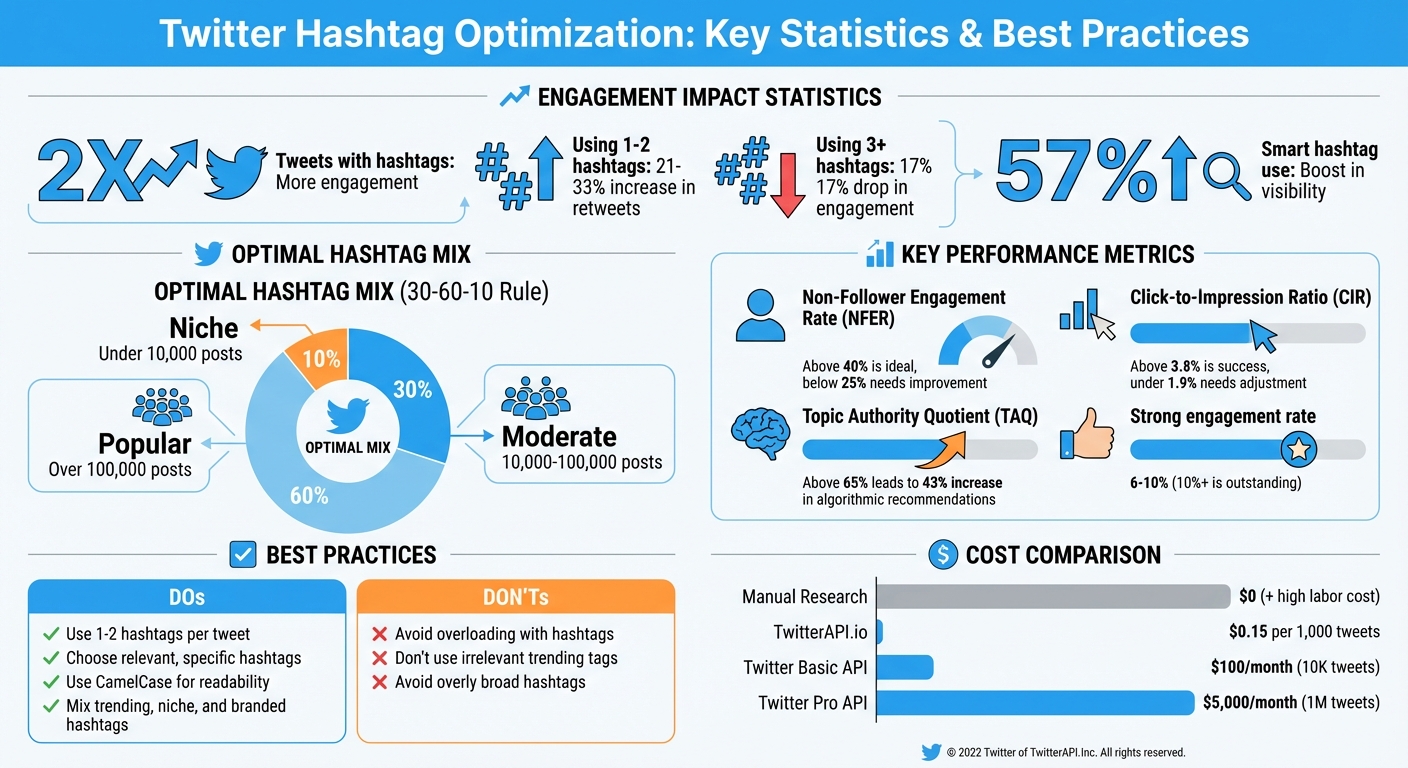
Want to boost your Twitter (now X) engagement? Hashtags are the key. Tweets with hashtags get 2x more engagement, and using just 1–2 hashtags can increase retweets by 21–33%. But overusing them? That can drop engagement by 17%.
Here’s the deal: Hashtags help your content get discovered by the right people. They act as signals for Twitter’s algorithm, improving visibility in search results, Explore tabs, and even external search engines. But the trick is to use them strategically. Here’s what you need to know:
- Keep it simple: Use no more than 1–2 hashtags per tweet.
- Be relevant: Choose hashtags that match your content.
- Go specific: Niche hashtags like #BuildInPublic work better than broad ones like #love.
- Avoid spammy practices: Don’t overload your tweets with hashtags or use irrelevant trending ones.
Want to take it further? Research hashtags using Twitter’s search tools, track trending topics, and analyze competitor strategies. Tools like TwitterAPI.io can help you monitor hashtag performance in real time, giving you data on engagement rates, reach, and more - all for just $0.15 per 1,000 tweets.
Bottom line: Smart hashtag use can boost visibility by 57% and help your content stand out. Learn how to mix trending, niche, and branded hashtags effectively to maximize engagement while staying algorithm-friendly.
Twitter Hashtag Optimization Statistics and Best Practices
How to Use Hashtags on X to Increase, Reach, and Boost Engagement
sbb-itb-9cf686c
Hashtag Basics
A hashtag is simply a word or phrase preceded by a "#" symbol that transforms text into a clickable link, creating a curated feed around that topic. For example, tagging your tweet with #SaaS or #WritingCommunity tells people what your post is about while grouping it with similar conversations. This helps users discover content beyond their immediate circle and provides extra signals to the platform's algorithm, making your tweet more likely to appear in "For You" feeds or search results.
Hashtags also play a big role in building connections. Tags like #BuildInPublic or #MedTwitter connect you to niche groups where engagement thrives. They’re often used during live events or campaigns as well. For instance, Tesla’s #CybertruckDelivery hashtag organically reached 24.5 million users and helped secure over 500,000 pre-orders in just one week.
As hashtag strategies evolve, it’s now about quality over quantity. Twitter’s algorithm favors hashtags that drive authentic engagement rather than those used just for visibility.
Ross Simmonds, Founder of Distribution.ai, explains: "Twitter hashtags are still relevant. They can boost visibility and help your content reach the right audience, but only if you use them strategically."
With that foundation in mind, let’s look at what makes hashtags effective.
Characteristics of Effective Hashtags
Not all hashtags work the same. The most effective ones share these traits:
- Relevance: Your hashtags must match your tweet's content. Using popular but unrelated tags can hurt your reach.
- Specificity: Niche hashtags like #AcademicTwitter or #BuildInPublic often perform better than broad ones like #love or #motivation, as they attract more engaged audiences.
- Readability: Use CamelCase (e.g., #DigitalMarketing or #MentalHealthAwareness) to make hashtags easier to read and more accessible for screen readers.
- Quantity Control: Limit hashtags to 1–2 per tweet. Using three or more can make your post look spammy, which reduces engagement.
- Placement: Add hashtags naturally within your sentences (e.g., "The best part of the #BuildInPublic community...") or place them at the end. Avoid starting tweets with hashtags, as this might trigger spam filters. For threads, include hashtags only in the first tweet to keep the rest clean.
Hashtag Mistakes to Avoid
Overusing hashtags can hurt your engagement. Tweets with more than two hashtags often see up to a 17% drop in engagement, as algorithms may flag them as spammy.
Avoid using irrelevant or trending hashtags just to chase visibility. Twitter’s advanced algorithms can tell if a hashtag doesn’t match your content, which could bury your tweet instead of promoting it. Always check the current context of a hashtag before using it.
Steer clear of overly broad tags like #marketing or #business, as they’re so crowded that your content is likely to get lost. Instead, focus on niche options like #NYCtech or #SaaSGrowth to connect with people looking for specific topics.
Repetition is another common error. Using the same hashtags repeatedly can make your behavior appear automated, which might trigger spam filters. Switch up your hashtags based on the content of each tweet while staying relevant.
Lastly, be cautious when using hashtags in ads. Twitter ads without hashtags or mentions tend to get more clicks, as hashtags can distract from your main call-to-action.
Next, we’ll dive into advanced strategies to take your hashtag game to the next level.
How to Research Hashtags
Finding the right hashtags starts with understanding the conversations your audience is already having. The goal isn’t just to chase high-visibility tags but to find ones that connect you to meaningful discussions. With the right research, you can strike a balance between visibility and relevance, ensuring your tweets reach people who genuinely care about what you’re sharing.
Manual Research Using Twitter Search
Start by using Twitter’s search bar. Type in a relevant keyword, and pay attention to the autocomplete suggestions like #MarketingTips or #DigitalMarketing. These suggestions reflect what people are actively searching for. To refine your search, toggle between the "Top" tab, which highlights hashtags with high engagement, and the "Latest" tab, which surfaces emerging trends. Before committing to a hashtag, click on it to double-check that its current context aligns with your content. This step helps avoid any unintended associations.
For a more targeted approach, use Twitter’s advanced search filters. These allow you to narrow results by date, location, or language. For instance, if your target audience includes tech professionals in New York, filtering by location might uncover hyperlocal hashtags like #NYCtech, which can help you connect with a specific, engaged audience.
Once you’ve explored manual searches, consider how trending hashtags can boost your real-time engagement.
Finding and Using Trending Hashtags
Trending hashtags offer a dynamic way to amplify your reach. Check the Explore tab (the search icon) to see real-time trends, and use the "Trends for You" section for personalized suggestions based on your activity and the accounts you follow. These often highlight industry-specific hashtags that might not appear in broader global trends.
Timing is everything with trending hashtags. They’re most effective in the first few hours of gaining traction. If you wait too long - say, a full day - the trend may become oversaturated, reducing the chances of your content standing out. Always ensure the trending tag is relevant to your post. Using unrelated hashtags (a practice known as "hashtag-jacking") can lead to algorithmic penalties and may make your account seem spammy.
A good rule of thumb is the 30-60-10 approach:
- 30% popular hashtags (over 100,000 posts)
- 60% moderate hashtags (10,000–100,000 posts)
- 10% niche hashtags (under 10,000 posts)
This mix ensures broad visibility while keeping you connected to more focused communities.
Learning from Competitor Hashtag Strategies
Take a close look at the top 20–30 accounts in your industry. Study their most successful posts to identify recurring hashtags. These often reflect established community tags that resonate with your shared audience. To stay organized, track competitor hashtag usage and performance in a spreadsheet for easy analysis.
Instead of focusing solely on hashtag popularity, pay attention to engagement-to-impression ratios. Hashtags that drive replies and retweets are generally more valuable than those that simply reach a large audience. For example, posts with hashtags that have high engagement-to-impression ratios tend to receive 57% better distribution from Twitter’s algorithm. Additionally, aligning your content with the right hashtags can boost your reach by 43%.
Rather than copying competitors outright, look for opportunities they might be missing. If everyone uses #Marketing, but few are using #B2BMarketing, the latter could give you better visibility with less competition. Reviewing the profiles of your active followers can also provide insights into the hashtags they frequently engage with, helping you fine-tune your strategy to match their interests.
Thorough research is the first step in building a hashtag strategy. It sets the stage for more advanced techniques, which will be covered in the next sections.
Advanced Hashtag Strategies
Once you've nailed down the right hashtags through research, the next step is using them effectively to boost both your reach and engagement. These advanced approaches take your hashtag game to the next level, helping you combine different types of hashtags while steering clear of practices that might hurt your visibility. Let’s dive into how you can strategically mix hashtags to get the most out of your tweets.
Mixing Niche, Trending, and Branded Hashtags
Blending trending, niche, and branded hashtags in a single post is a smart way to extend your reach while keeping your content relevant. This layered approach helps Twitter’s algorithm understand your content better, ensuring it reaches both broad audiences and highly targeted groups.
For example, imagine you’re announcing a new product update at a tech conference. You could use a trending event hashtag like #SXSW, pair it with a niche tag like #SaaSGrowth, and include your branded hashtag. This combination ensures your message gets in front of conference attendees, SaaS professionals, and your core audience.
Keep in mind that Twitter now prioritizes 1–2 well-chosen hashtags over stuffing your post with too many. Focus on the most strategic ones to avoid cluttering your message.
Building and Promoting Branded Hashtags
A branded hashtag can be a powerful tool for organizing campaigns and fostering community. To make it effective, keep it short (under 15 characters), easy to spell, and unique. Using CamelCase formatting - like #BrandNameCampaign - not only improves readability but also makes it accessible for screen readers.
Before launching your branded hashtag, test it in lowercase to ensure it doesn’t unintentionally form awkward or confusing phrases. Once finalized, promote it consistently across all your platforms to build recognition.
There are some fantastic examples of branded hashtag success. Cancer Research UK’s #NoMakeupSelfie campaign encouraged people to post makeup-free selfies and donate, raising about $10.4 million for research. Similarly, the ALS Association’s #IceBucketChallenge sparked a global movement, driving a 187% increase in annual funding for ALS research. Both campaigns worked because they made participation simple and fun.
To encourage adoption, retweet content from users who engage with your branded hashtag, and consider running contests or hosting Twitter Chats. Branded hashtags can boost message association by 18%, brand awareness by 8%, and even purchase intent by 3%.
"A branded hashtag helps you boost visibility, strengthen brand recognition, and build community." - Ross Simmonds, Founder, Distribution.ai
Once you've established your branded hashtag, it’s crucial to follow best practices to avoid penalties and maintain visibility.
Preventing Reduced Visibility
Twitter’s algorithm has evolved to treat hashtags as more than just discovery tools; they’re now semantic signals. This means the platform checks if your tweet’s content aligns with the hashtags you’re using. Misusing trending tags to artificially boost reach - known as "hashtag-jacking" - can lead to penalties that hurt your post's visibility.
Avoid using the same set of hashtags repeatedly, as this can trigger "algorithm fatigue." Instead, rotate between 4–6 different hashtag combinations to keep your content fresh and engaging. Tweets with strong content-hashtag alignment see 43% higher distribution compared to those using unrelated tags.
Placement also plays a role. Hashtags work best at the end of a tweet or when they flow naturally within the text. Starting a tweet with a hashtag or awkwardly forcing it into the middle of a sentence can hurt readability and lower engagement. Interestingly, Twitter ads without hashtags or @mentions generate 23% more clicks than those that include them.
Rather than chasing high-volume hashtags, focus on ones with strong engagement-to-impression ratios. These can deliver up to 57% better distribution from the algorithm.
Automation and Analytics for Hashtag Performance
Trying to manually track impressions, engagement, and follower growth across tweets can feel like an endless chore. Thankfully, automation tools take care of the number-crunching, giving you the insights you need to make smarter decisions.
Key Metrics to Monitor
To make the most of automation, it’s important to track the metrics that matter most. Start with the basics - impressions, retweets, likes, and follower growth - to get a clear picture of visibility and engagement. Then, dig deeper with more advanced indicators.
- Non-Follower Engagement Rate (NFER): This metric shows how well your hashtags attract new audiences. Ideally, your NFER should be above 40%. If it drops below 25%, it might be time to rethink your hashtag strategy.
- Click-to-Impression Ratio (CIR): This reveals whether your hashtags are reaching the right people. A CIR above 3.8% signals success, while anything under 1.9% suggests your hashtags might be missing the mark.
- Volume Velocity: Tracks how quickly a hashtag gains traction. For instance, a hashtag hitting 1,000 mentions in 3 days shows much stronger momentum than one taking 30 days.
- Engagement Density: This is calculated by dividing total engagement by total posts. It helps determine if your hashtag is driving meaningful conversations or just adding to the noise.
- Topic Authority Quotient (TAQ): Measures how effectively your hashtags build algorithmic authority. A TAQ score above 65% can lead to a 43% increase in algorithmic recommendations.
"Hashtag tracking isn't just about counting mentions. It's about understanding momentum, identifying who's driving conversations, and knowing when your hashtag is gaining traction versus quietly fading into obscurity." - Xpoz.ai
For Twitter, a strong engagement rate generally falls between 6–10%, with anything over 10% considered outstanding. During trending moments, hashtags can account for 15–25% of total impressions.
Using TwitterAPI.io for Real-Time Hashtag Data
TwitterAPI.io makes hashtag optimization easier by offering real-time and historical tweet data with high rate limits and flexible, pay-as-you-go pricing. Unlike Twitter's official API, which has restrictive rate limits and a complicated authentication process, TwitterAPI.io provides a straightforward REST API capable of handling over 1,000 requests per second.
Here’s how the pricing breaks down:
- 30-minute updates require about 1,440 API calls per month, costing roughly $0.46.
- 5-minute updates need around 8,640 calls per month, totaling about $1.35.
This model is accessible for both small businesses and large-scale campaigns. Beyond basic metrics, TwitterAPI.io lets you track advanced indicators like the Reach Multiplier (total follower count of all accounts using your hashtag) and Authenticity Scoring to differentiate between genuine engagement and bot activity.
Testing Different Hashtag Combinations
A/B testing is essential for identifying the most effective hashtag sets. Experiment with combinations of niche, trending, and branded hashtags, and monitor Engagement Density to see which ones resonate best.
Follow the 80/20 rule: focus on the top 20% of hashtags that drive 80% of your results. Use these in 70% of your posts, and dedicate the remaining 30% to testing new or trending tags. Group your hashtags into categories:
- "Proven Winners": High performers with strong reach and engagement.
- "Testing Ground": New, seasonal, or experimental hashtags.
- "Retired": Underperforming tags that no longer deliver results.
As you test, keep an eye on metrics like Click-to-Impression Ratio and Non-Follower Engagement Rate. A low NFER suggests room for improvement in your hashtag selection, while high engagement-to-impression ratios can boost algorithmic distribution by up to 57%. Some brands have even seen engagement rates improve by as much as 34 times their industry average with optimized hashtags.
"Without measurement, you're guessing. With proper tracking, you're strategizing." - Hashtagtools.io
Manual Research vs. TwitterAPI.io Comparison
Developing an effective hashtag strategy requires more than just basic research - it demands a balance of affordability and scalability. Let’s break down the differences between manual methods, TwitterAPI.io, and the official Twitter API.
Manual hashtag research might seem cost-free at first glance, but the hidden costs quickly add up. Without access to advanced tools and limited to viewing posts from the past seven days, this process becomes incredibly time-consuming. For brands managing hashtags on a larger scale, spending countless hours scrolling through Twitter’s search results is simply not practical.
Then there’s the official Twitter API, which comes with a steep price tag. The Basic tier costs $100 per month and allows access to just 10,000 tweets, while the Pro tier - designed for larger-scale data needs - jumps to $5,000 monthly for access to 1 million tweets. This pricing structure leaves many businesses stuck between minimal data access and prohibitively expensive enterprise-level plans.
Enter TwitterAPI.io, which offers a more flexible and affordable solution. With pay-as-you-go pricing starting at just $0.15 per 1,000 tweets, retrieving 1 million tweets costs about $20. That’s 250 times cheaper than the official Twitter Pro tier. This pricing model makes it possible for startups and small businesses to perform in-depth hashtag analysis without breaking the bank. The table below highlights the key differences between these options.
Comparison Table: Manual Methods vs. TwitterAPI.io
| Feature | Manual Research | TwitterAPI.io | Official Twitter API |
|---|---|---|---|
| Speed | Very slow (manual entry) | Instant (automated) | Fast (automated) |
| Cost per Month | $0 plus high labor cost | $0.15 per 1,000 tweets | $100–$5,000+ |
| Data Volume | Extremely limited | Scalable to millions | 10K–1M tweets |
| Search History | Recent posts only | Full archive | 7-day (Basic) / Full (Pro) |
| Rate Limits | Manual browsing limits | 1,000+ requests/second | Varies by tier |
| Sentiment Analysis | Not available | Included | Requires additional tools |
| Best For | Hobbyists / small brands | Startups / researchers / SMBs | Enterprises / ad agencies |
For most businesses, a hybrid approach works best. TwitterAPI.io can handle large-scale data collection and detailed hashtag analysis, while manual research remains useful for quick, real-time checks. This combination allows businesses to achieve comprehensive insights without the hefty costs associated with enterprise tools.
Conclusion
Smart hashtag selection plays a major role in driving engagement on Twitter. By focusing on one or two carefully chosen, data-backed hashtags, you can align your content with the platform's evolved algorithm. As of 2026, sticking to highly relevant tags that resonate with your audience is key to maximizing tweet distribution and engagement.
"Hashtags are a tool, not a strategy. Use them thoughtfully and sparingly, and they can give your best content an extra push." – Success on X
Research shows that optimized hashtags can boost distribution by 57%. This is where tools like TwitterAPI.io come into play. At just $0.15 per 1,000 tweets, the platform provides real-time data on behavioral relevance, semantic matching, and velocity - insights that are nearly impossible to achieve through manual research alone.
To stay ahead, treat your hashtag approach as a dynamic process. Regularly audit your performance, experiment with different combinations, and eliminate underperforming tags. Jumping on trending topics early can also enhance visibility, while branded hashtags help build lasting community recognition.
In today’s Twitter ecosystem, quality beats quantity. Whether you're a startup monitoring industry chatter or a large organization managing multiple campaigns, pairing smart research with real-time insights from TwitterAPI.io gives you the edge to cut through the noise. By continuously refining your hashtag strategy with actionable data, you’ll ensure your content reaches the right audience and achieves the engagement it deserves.
FAQs
How do I pick the best 1–2 hashtags for a tweet?
Stick to 1–2 hashtags that align closely with your content and audience. Why? Because Twitter's algorithm values engagement over sheer popularity. Using the right hashtags can spark meaningful interactions, which boosts your visibility.
Here’s a simple guideline to follow: the 30-60-10 rule. Break your hashtags down like this:
- 30% popular hashtags: These reach a broader audience but might face stiff competition.
- 60% moderately used hashtags: These strike a balance between reach and relevance.
- 10% niche hashtags: These connect with a highly specific audience, perfect for deeper engagement.
Avoid cramming your tweets with hashtags. Overloading can dilute your message and actually hurt your reach. Instead, focus on clear, targeted hashtags to maximize your tweet's performance. Sometimes, less is more!
How can I tell if a hashtag is helping me reach non-followers?
To determine if a hashtag is helping you reach beyond your followers, focus on metrics like reach (the number of unique users) and impressions (the total number of views). Pay attention to interactions from non-followers, such as likes, retweets, and replies, as these are strong signs of extended reach. Hashtags that show a high engagement-to-impression ratio often indicate success in connecting with new audiences. Leverage analytics tools to monitor these metrics and evaluate how well your hashtag is performing in attracting non-followers.
What’s a simple way to A/B test hashtag sets without hurting reach?
To test different hashtag sets without affecting your reach, take advantage of Twitter's analytics and segmentation tools. Start by creating randomized, non-overlapping user groups, then assign a distinct hashtag set to each group. By testing just one variation at a time, you can pinpoint the effect of each set. This approach ensures you get precise performance data while keeping your content's visibility intact.
Tags
Related articles
Ready to get started?
Try TwitterAPI.io for free and access powerful Twitter data APIs.
Get Started Free