How to Build a Spam Filter with TwitterAPI.io
How to Build a Spam Filter with TwitterAPI.io
Spam on Twitter can overwhelm your data with bots, promotional posts, and harmful links. Building a spam filter ensures cleaner, high-quality data for better insights. This guide shows you how to create one using TwitterAPI.io, a cost-effective platform for accessing live and historical tweets. Here's what you'll learn:
- Why spam filters matter: Spam distorts analytics and trends, but analyzing account metrics (e.g., follower ratios) and content patterns (e.g., repeated URLs) can help detect it.
- How TwitterAPI.io helps: It offers affordable access to Twitter data at $0.15 per 1,000 tweets, compared to $100+ for X API plans.
- Step-by-step process:
- Collect tweets using TwitterAPI.io's REST or WebSocket endpoints.
- Preprocess data: Clean text, remove URLs, and tokenize words.
- Extract features like TF-IDF and user metadata for spam detection.
- Train models: Start with Naive Bayes or Logistic Regression, and scale to transformers like BERT for complex patterns.
- Deploy your spam filter: Integrate with TwitterAPI.io for real-time performance.
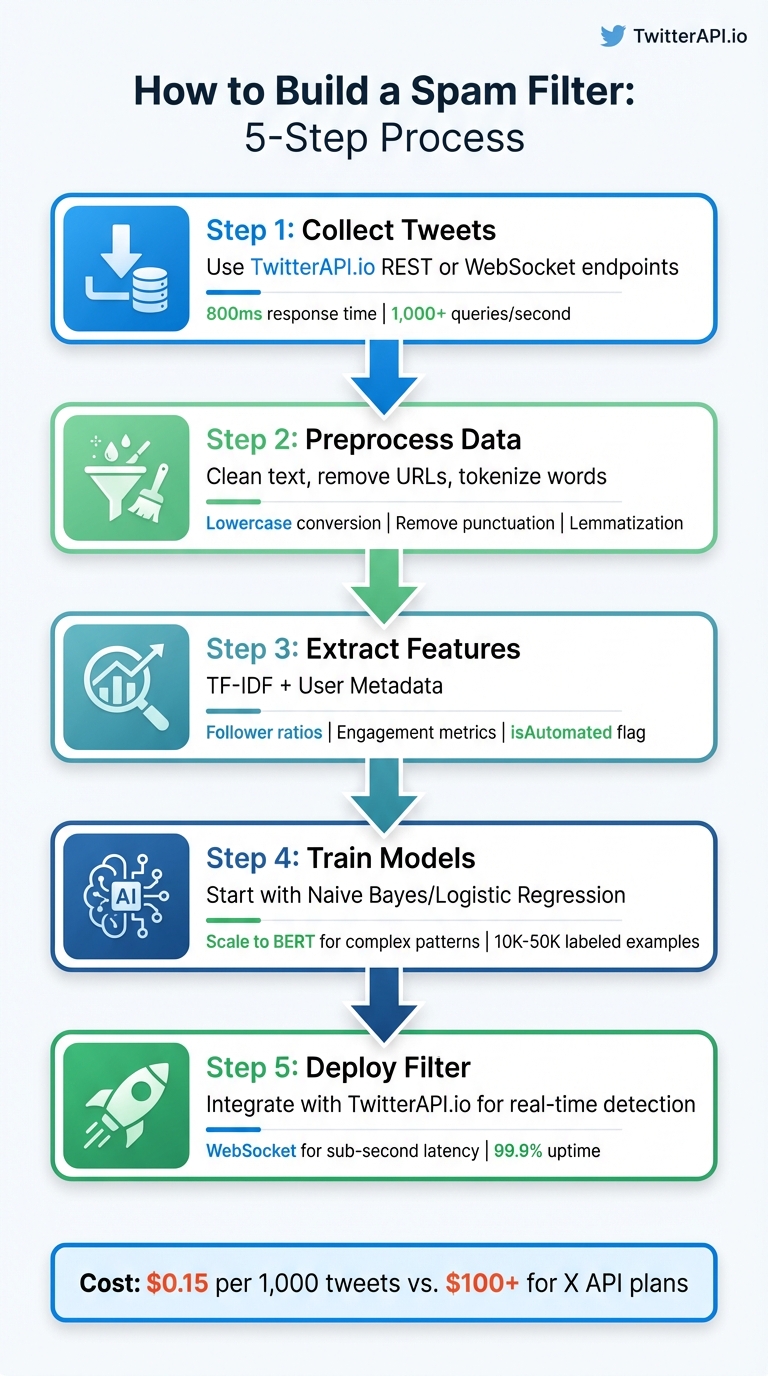
5-Step Process to Build a Twitter Spam Filter with TwitterAPI.io
Prerequisites and Setup
To get started on building your spam filter, you'll need a few essential tools and credentials. Begin by signing up for a free account at TwitterAPI.io, which provides $1 in trial credits for new users to explore the platform. Additionally, ensure you have Python 3.x installed on your system, along with some key libraries for data processing and machine learning.
Required Tools and Libraries
This project depends on five core Python libraries. Here's what you'll need:
- pandas and numpy: For handling data and performing numerical computations.
- scikit-learn: To construct and train your machine learning model.
- requests: For making REST API calls to TwitterAPI.io.
- websocket-client: If you plan to stream real-time data.
Install these libraries by running the following command in your terminal:
pip install pandas numpy scikit-learn requests websocket-client
Once you've installed the libraries, the next step is to set up your TwitterAPI.io credentials.
Setting Up TwitterAPI.io
After signing up at TwitterAPI.io, log into your dashboard and head to the API credentials section. Generate your unique API key, which you'll need to include in all API requests. Use the following format in your HTTP headers:
x-api-key: YOUR_API_KEY.
Store this key securely in a separate configuration file, such as credentials.py, instead of embedding it directly into your scripts. As TwitterAPI.io explains:
"Every API request requires authentication using an API key in the HTTP headers".
This straightforward authentication method simplifies the process, eliminating the need for OAuth flows or additional developer application approvals.
With your API key ready, it's time to configure your Python environment.
Preparing Your Python Environment
Start by creating a dedicated project directory:
mkdir spam-filter
Next, initialize a virtual environment to keep your project dependencies isolated:
python3 -m venv filter-env
Activate the environment using the appropriate command for your operating system:
- Linux/macOS:
source filter-env/bin/activate - Windows:
filter-env\Scripts\activate
Once the virtual environment is active, install your required libraries. To ensure everything is set up correctly, open a Python shell and try importing the libraries. If no errors occur, your environment is ready for data collection and model building.
sbb-itb-9cf686c
Collecting and Preprocessing Twitter Data
To analyze spam effectively, the first step is gathering a solid dataset of tweets. TwitterAPI.io offers both REST and WebSocket endpoints, boasting a response time of approximately 800ms and handling over 1,000 queries per second. This ensures you can collect data efficiently without running into performance issues.
Streaming Live Tweets with TwitterAPI.io
For real-time data collection, TwitterAPI.io's search endpoint is a great tool. You can filter tweets by keywords, hashtags, or even specific date ranges. Here's an example of how to gather tweets containing spam-related terms like "crypto giveaway":
import requests

API_KEY = "YOUR_API_KEY"
headers = {"x-api-key": API_KEY}
params = {"query": "crypto giveaway", "count": 100}

response = requests.get("https://api.twitterapi.io/search/tweets", headers=headers, params=params)
tweets = response.json()
You can refine your search using the advanced_search endpoint with parameters like since:2021-12-31 or from:username. Once collected, store the tweets in a pandas DataFrame to make preprocessing more manageable. Cleaning the data should follow immediately to maintain quality.
Cleaning and Normalizing Data
Raw tweet data is messy, so preprocessing is essential. Start by converting all text to lowercase, ensuring consistency (e.g., "FREE" and "free" are treated the same). Then, remove URLs with regular expressions (re.sub(r'http\S+', '', text)), strip punctuation and numbers, and clear out extra spaces.
Handle contractions like "can't" by expanding them to "cannot." Emojis can add sentiment context, so use the emoji library to translate them into text. Mahesh Tiwari emphasizes this step's importance:
Text preprocessing involves transforming raw text into a format that is easier to work with, reducing noise and irrelevant information, and enhancing the quality of sentiment analysis results.
Once the text is cleaned, tokenize it into individual words, remove common stopwords like "the" or "is" using NLTK's stopword list, and apply lemmatization. Unlike stemming, lemmatization considers word context, ensuring more accurate results for spam detection.
Extracting Features for Spam Detection
After cleaning, focus on extracting features that will help identify spam. Start by converting the text into feature vectors using TF-IDF (Term Frequency-Inverse Document Frequency). This method highlights words that frequently appear in spam tweets but are rare in legitimate ones. Here's how to implement it with scikit-learn:
from sklearn.feature_extraction.text import TfidfVectorizer

vectorizer = TfidfVectorizer(max_features=5000)
X = vectorizer.fit_transform(cleaned_tweets)
In addition to text-based features, leverage user metadata from TwitterAPI.io's response. Fields like the isAutomated flag, follower-to-following ratio, and statusesCount provide valuable insights. For example, accounts posting more than 2,400 tweets per day often get flagged as spam by platform filters.
Behavioral signals are equally important. Low engagement metrics such as likeCount and retweetCount, combined with high posting frequency, often indicate spam accounts. The source field can also reveal whether tweets originate from bot platforms rather than genuine apps or web clients. By combining textual and behavioral features, you can create a robust model for spam detection.
Training and Evaluating Machine Learning Models
Creating the Training Dataset
Before diving into model training, you need a well-structured, labeled dataset that combines tweet text with user metadata. Tools like TwitterAPI.io's Advanced Search or Get User Last Tweets endpoints are great for collecting raw data. Use query operators such as -is:retweet to exclude retweets and lang:en to ensure the dataset remains monolingual.
The dataset should include both content features (like cleaned tweet text) and behavioral signals (e.g., follower counts and engagement metrics). Save this data in JSONL format (JSON Lines), which is compatible with most machine learning frameworks and supports streaming. Thomas Shultz, Head of Data at ScrapeBadger, highlights this point:
"Most guides on building a Twitter dataset stop at 'call the API and save some JSON.' That's not a dataset. That's a pile of raw text."
To improve data quality, apply filters to reduce noise. For instance:
- Set engagement thresholds, like
like_count >= 2orretweet_count >= 1, to weed out bot-generated content. - Exclude accounts with fewer than 10 followers (
follower_count >= 10) to avoid spam accounts. - Enforce a minimum tweet length of 20 characters to eliminate low-value content.
Use tweet_id as your primary key to avoid duplicates during training.
When it comes to labeling, you have three main options:
- Keyword proxy labels: Low-cost but less accurate.
- LLM labeling: Models like GPT-4o provide medium-to-high quality at a manageable cost.
- Manual annotation: The most reliable option, ideal for creating high-quality "gold standard" test sets.
For fine-tuning smaller transformers like BERT-base or DistilBERT, aim for 10,000 to 50,000 labeled examples to ensure consistent performance. With a clean and balanced dataset in hand, you're ready to train your models.
Training Spam Detection Models
Begin with simpler models like Naive Bayes as a baseline. From there, experiment with Logistic Regression, Random Forest, or XGBoost using TF-IDF or word frequency features. If your goal is to identify more complex patterns, deep learning models like BiLSTM or transformer-based models like BERT and GPT-2 are excellent choices. These models leverage contextual embeddings to understand text more deeply.
Interestingly, retaining certain stopwords such as "free", "now", and "call" can be beneficial since they often signal urgency in spam tweets. For datasets with class imbalances - like 87% legitimate tweets versus 13% spam - avoid relying on raw accuracy. A model could achieve 87% accuracy simply by labeling all tweets as "not spam", which isn't helpful.
In a March 2026 benchmark, BERT made only 11 errors out of 1,115 messages. Meanwhile, BiLSTM achieved a Precision-Recall AUC of 0.97, offering better computational efficiency. Random Forest, however, struggled with an 88% miss rate for spam tweets, despite maintaining high precision. Once trained, these models can connect directly with TwitterAPI.io for real-time spam filtering.
Measuring Model Performance
After training, evaluate your models using metrics that account for imbalanced datasets. Precision, recall, and F1-score are far more informative than raw accuracy. Here's why:
- Precision: Measures how many tweets flagged as spam are actually spam.
- Recall: Reflects how much of the total spam is correctly identified.
- F1-score: Balances precision and recall into a single metric.
A confusion matrix can also provide valuable insights into your model's weaknesses. Hafsa Rouchdi, an AI Practitioner, describes its importance:
"The confusion matrix is where you understand your model's actual behavior: Summary metrics tell you how a model scores; confusion matrices tell you how it fails."
To address class imbalances effectively, use precision, recall, F1-score, and Precision-Recall curves. Don't stick to the default 0.5 probability threshold - adjust it to maximize spam recall while keeping false positives in check. In production, false positives (legitimate tweets flagged as spam) are generally more problematic than false negatives, as they can disrupt legitimate communication.
Implementing and Testing the Spam Filter
Connecting the Model with TwitterAPI.io
Once your model is trained, save it using tools like joblib or pickle, and integrate it with TwitterAPI.io's stream. Use your API key in the X-API-Key header, as outlined in the earlier preprocessing steps.
To set up custom rules for filtering tweets - whether by specific keywords or monitored accounts - use TwitterAPI.io's POST endpoint: https://api.twitterapi.io/oapi/tweet_filter/add_rule.
This integration pulls tweets via REST or WebSocket endpoints. Each tweet is preprocessed using the same cleaning steps as in your training pipeline, then passed through your model for classification. WebSocket connections are ideal for real-time spam detection, offering sub-second latency and handling over 1,000 queries per second. Every tweet is assigned a spam probability score, and you can adjust the threshold for classification based on your operational needs.
After setting this up, focus on managing rate limits and preparing your system for real-time scaling.
Managing API Rate Limits and Scaling
TwitterAPI.io's pricing model - $0.15 per 1,000 tweets - and its scalable infrastructure make it easy to handle high traffic without worrying about rate limits.
To balance costs and performance, tweak the interval_seconds parameter in your filtering rules. The API allows a minimum interval of 100 seconds. For scenarios requiring live detection, WebSockets are the better choice, as they reduce network overhead and eliminate the need for constant reconnections. If instant detection isn’t critical, REST endpoints are a good option for batch processing.
TwitterAPI.io's infrastructure spans 12+ regions globally, with auto-scaling capabilities that ensure your spam filter can handle sudden spikes in traffic without manual intervention.
Testing and Deploying Your Spam Filter
With the model integrated and rate limits accounted for, it's time to validate its performance. Test your spam filter in a staging environment for 24–48 hours to ensure it meets your precision and recall expectations. Pay close attention to false positives, as incorrectly flagged legitimate tweets can harm user experience more than missing occasional spam.
Track key metrics like tweets processed per minute, inference latency, API response times, and overall classification accuracy. Log all detections for auditing purposes. If you run into issues with rate limits or data quality, TwitterAPI.io provides 24/7 live chat support. Make sure your system includes error handling for network timeouts, API failures, and model errors to maintain reliability even when individual requests fail.
For continuous operation, deploy your filter as a background service or a serverless function. Webhooks are particularly useful for event-driven setups where persistent connections aren’t needed. Regularly review misclassified tweets to identify gaps in your model's understanding and retrain it periodically with updated labeled data. This ensures your filter stays effective as spam tactics evolve.
Conclusion and Key Takeaways
Why Choose TwitterAPI.io for Spam Filtering
Once your spam filter is up and running, it’s worth taking a step back to appreciate its benefits and map out potential improvements. Creating a reliable spam filter doesn’t have to be overly complex or costly. TwitterAPI.io provides real-time WebSocket and Webhook streams with lightning-fast response times - processing over 1,000 queries per second effortlessly. With a 99.9% uptime, you can trust that your filter will remain functional during critical moderation periods.
Another advantage is the platform’s pricing structure, which caters to projects of all sizes. By leveraging Twitter Search syntax, such as excluding retweets (-is:retweet) or filtering by language, you can cut through unnecessary data and optimize your processing costs.
Steps to Take Your Spam Filter to the Next Level
Once you’ve integrated and tested your spam filter, there are several ways to refine it further:
- Add engagement filtering: Set thresholds for likes, retweets, or replies to focus on high-impact content while sidelining low-quality automated posts.
- Regularly update your dataset: Spam tactics evolve quickly, so refresh your training dataset with recent examples to keep it effective.
- Explore advanced tools: Incorporate LLMs like OpenAI or Claude for detecting intent beyond simple keyword matching .
- Automate workflows: Use tools like n8n to connect TwitterAPI.io with other services. For instance, you could automate daily spam reports to Gmail or track suspicious accounts in Google Sheets.
TwitterAPI.io also allows up to 50 active rules per API key, making it possible to monitor multiple keywords, competitors, or spam trends simultaneously.
As Thomas Shultz, Head of Data at ScrapeBadger, puts it:
For anything requiring fast reaction times, Filter Rules are the right primitive.
FAQs
How do I label tweets as spam without a big manual effort?
To tackle the challenge of labeling tweets as spam with minimal manual intervention, consider using machine learning or automated filtering techniques. By training models with labeled datasets and leveraging natural language processing (NLP) tools, you can create a system that analyzes tweet content and flags spam automatically. This significantly cuts down on the need for manual review.
The process typically involves three key steps:
- Data Collection: Gather a dataset of tweets, ensuring it includes examples labeled as spam and non-spam.
- Model Training: Use this dataset to train a classifier capable of identifying spam patterns.
- Real-Time Application: Deploy the trained model to analyze incoming tweets and flag potential spam in real time.
This method streamlines the process, saving time and effort while maintaining accuracy.
What features work best for catching bots and link spam together?
Catching bots and link spam requires a keen eye on user behavior and content patterns. To improve your detection efforts, consider these best practices:
- Define the data you need: Be clear about the type of information you're looking for. This ensures your analysis stays focused and relevant.
- Use filters strategically: Incorporate tools like keywords, hashtags, or mentions to narrow down your results and make them more precise.
- Leverage real-time data streams: Accessing and analyzing data in real time allows you to respond quickly to suspicious activity.
While the article outlines a step-by-step approach, it doesn't dive into specific combinations of features that target both bots and link spam simultaneously. However, the strategies mentioned above provide a solid foundation for tackling these challenges effectively.
How do I pick the right spam-score threshold for production?
To determine the best spam-score threshold, you need to test your filter using actual data. Focus on metrics like precision, recall, and the F1-score to find the right balance between catching spam and maintaining accuracy. Think about what level of false positives (legitimate tweets mistakenly flagged as spam) and false negatives (spam that slips through) you can accept. Adjust the threshold over time to match your error tolerance and adapt to changing spam trends.
Tags
Related articles
Ready to get started?
Try TwitterAPI.io for free and access powerful Twitter data APIs.
Get Started Free