Browser Use MCP Server: Setup, CLI and Twitter (X) Reads in 2026
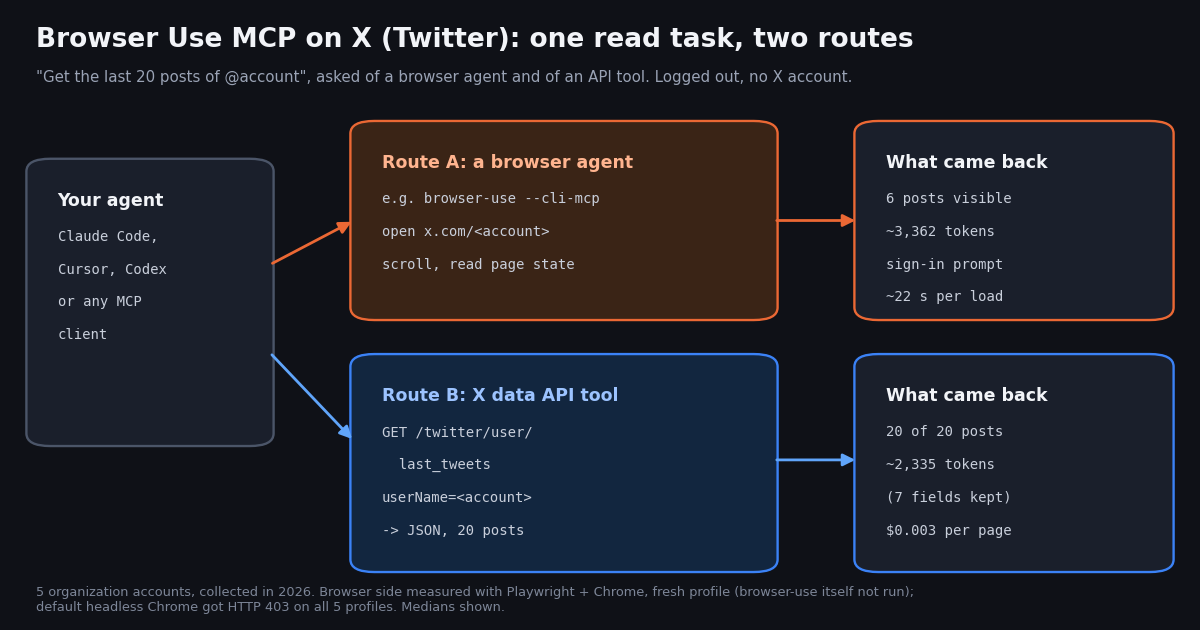
- Open-source MCP:
browser-use --cli-mcp(run withuvx --from browser-use==1.0.0), three tools:browser_exec,browser_screenshot,browser_login. The client's model writes the browser code; there is no tool that runs the full Browser Use agent. - Hosted MCP:
https://api.browser-use.com/v3/mcpwithAuthorization: Bearer <key>; tools such asrun_sessionandget_sessionrun complete tasks in Browser Use Cloud and report cost per session. - CLI:
uv tool install 'browser-use==1.0.0', thenbrowser-use skill installregisters a skill for Claude Code, Codex, Cursor, Gemini, OpenClaw and others. The 0.x commands (open,state,click,run) are gone. - On X, logged out: 29 posts visible across 5 profile loads (5 to 7 each), a sign-in prompt on all 5, and HTTP 403 for Chrome's default headless mode on all 5.
- Token bill per post read: about 622 tokens of page snapshot per visible post versus about 117 tokens of trimmed API JSON, roughly 5.3x.
- Price of the API route: 15 credits per tweet returned, so 20 posts cost $0.003 and 1,000 cost $0.15, against $5.00 on the official X API pay-per-use card ($0.005 per post read). No X account needed for reads.
Browser Use is the open-source Python library (and paid cloud) that lets an AI model drive a real browser. Its MCP server is how you hand that browser to Claude, Cursor, Codex or any other MCP client. Version 1.0 changed almost everything about it: the package was rebuilt around one persistent Python REPL on raw Chrome DevTools Protocol, the MCP server moved to a new flag, the CLI lost its old subcommands, and the Jev Ultrafast experiment became a built-in mode. Most setup guides that rank for this query still describe the 0.x server.
This page does two jobs. First, it is the current setup guide for the Browser Use MCP server, the hosted Cloud MCP and the CLI, checked against the Browser Use docs, PyPI and GitHub this year. Second, it answers the question behind 'browser use twitter': should a browser agent read X (Twitter) for you? We measured what a browser actually gets on x.com without an account, and what the same read costs through an API. It does not repeat our pages on OpenClaw Browser Relay or Claude in Chrome, which cover driving your own signed-in Chrome; it is about Browser Use specifically, plus a measured browser-versus-API read test.
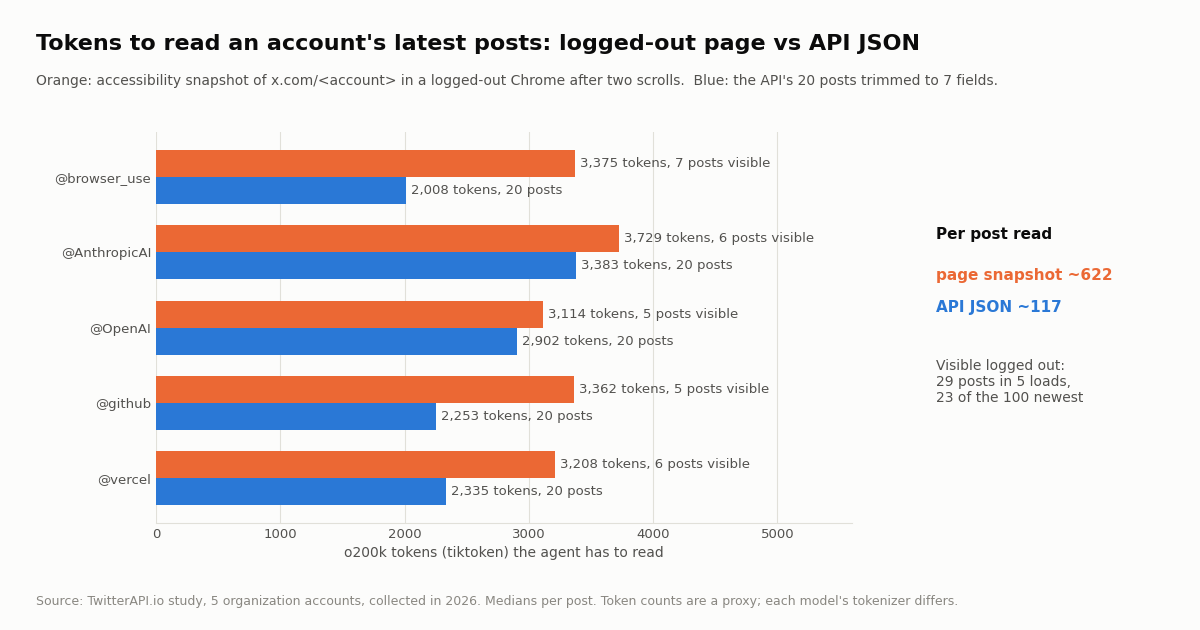
23 of 100 (23%) across 5 organization accounts, at about 622 tokens per visible post; the API returned 20 of 20 per account at about 117 tokens per post for $0.003 a page (collected in 2026).
What the Browser Use MCP server is in version 1.0
Browser Use (github.com/browser-use/browser-use, MIT license, about 120.7K stars when we checked) describes itself on PyPI as a "browser agent on Pydantic AI: one persistent Python REPL on raw CDP, cloud or local Chrome". Version 1.0.0 reached PyPI on November 10, 2026, followed by 1.0.1 the same day and 1.0.2 on November 11, 2026. It needs Python 3.11 or newer.
There are three ways to use it, and the MCP server is only one of them:
The library. Agent(task).run_sync() in your own Python. By default it runs the bu-fast model on the Browser Use gateway and a Browser Use Cloud browser, both paid with one BROWSER_USE_API_KEY; you can swap in your own model (OpenAI, Anthropic, Google or any OpenAI-compatible server) and a local Chromium.
The CLI. browser-use reads Python from standard input and runs it against a browser with the Browser Harness helpers (new_tab, goto_url, page_info, click_at_xy, type_text, js, cdp). It is built for coding agents such as Claude Code and Codex, which write the Python themselves.
The MCP server. browser-use --cli-mcp exposes the same helpers as MCP tools, so any MCP client can drive a browser. The docs are explicit that "the client's model writes the code; there is no MCP tool that runs the full browser-use Agent".
Browser Use Cloud adds a fourth option: a hosted MCP endpoint that does run full agent tasks, in cloud browsers, billed per use. The next two sections set up both MCP servers.
How to set up the Browser Use MCP server (open source, --cli-mcp)
The documented config for Claude Desktop, Cursor and other clients that read an mcpServers block is below. It needs uv installed (for uvx) and Python 3.11+. The Browser Use docs pin ==1.0.0 and warn that "browser-use moves fast, and a new release can break your setup"; PyPI already lists 1.0.2, so pin whichever exact version you have tested, never >=.
Claude Code. Claude Code's own syntax for a local stdio server is claude mcp add --transport stdio <name> -- <command> [args...], so the equivalent is claude mcp add --transport stdio browser-use -- uvx --from browser-use==1.0.0 browser-use --cli-mcp. Add --env BROWSER_USE_API_KEY=bu_... before the name if you want cloud browsers.
Local or cloud browser. Locally, browser_exec "drives the Chrome you have open, with your logins". The first time, Chrome asks whether to allow remote debugging; on macOS browser-use mac-approve approves it, and browser-use --doctor diagnoses a failed attach. For a cloud browser, call start_remote_daemon() inside browser_exec (after browser_login if you are not signed in). It lives 30 minutes unless you pass timeout=<minutes>, up to 240.
The three tools.
Migrating from 0.x. The old browser-use --mcp server ran the removed engine. In 1.0, --mcp prints a deprecation notice, and old tool names such as browser_navigate, browser_click and retry_with_browser_use_agent return an error that points to browser_exec. If a tutorial shows those tool names, it predates 1.0.
Security note from the docs. The live-view and CDP URLs grant control of the browser, so the server neither opens nor returns them unless you set BH_OPEN_LIVE_URL=1. Remember that the local mode acts with every login in your Chrome profile.
{
  "mcpServers": {
    "browser-use": {
      "command": "uvx",
      "args": ["--from", "browser-use==1.0.0", "browser-use", "--cli-mcp"],
      "env": { "BROWSER_USE_API_KEY": "bu_..." }
    }
  }
}

// The env block is optional: it is only needed for Browser Use Cloud browsers.
// MCP clients do not read your shell's exports, so put the key here, not in ~/.zshrc.The hosted Browser Use Cloud MCP server and the CLI
Cloud MCP. Browser Use Cloud runs a remote MCP server at https://api.browser-use.com/v3/mcp. Authenticate with Authorization: Bearer YOUR_API_KEY (the legacy x-browser-use-api-key header still works). In Claude Code: claude mcp add -t http -H "Authorization: Bearer YOUR_API_KEY" browser-use https://api.browser-use.com/v3/mcp. Cursor takes a url plus headers entry in .cursor/mcp.json, Windsurf a serverUrl entry, and Claude Desktop goes through npx -y mcp-remote as a stdio bridge.
Unlike the open-source server, the Cloud MCP runs complete agent tasks. Its tools are run_session (create a session and run a task, with options such as model, output_schema, profile_id and proxy_country), get_session (status, step count, cost breakdown, live URL), send_task, stop_session, get_session_messages, list_sessions and list_browser_profiles. The docs note it runs API V3 sessions, not the newer V4 runs.
CLI. Install with uv tool install 'browser-use==1.0.0', then run browser-use skill install, which writes a skill to ~/.agents and to each supported agent you have installed: claude, codex, copilot, cursor, gemini, openclaw, opencode. After that, your coding agent drives the browser by piping Python: browser-use <<'PY' then new_tab("https://example.com") and print(page_info()). The CLI runs Python, not tasks: there is no browser-use run "<task>" in 1.0.
MCP or CLI? Both give your agent the same helpers. The CLI suits coding agents that already have a shell and benefit from a skill file; the MCP server suits clients without a shell (Claude Desktop) or teams that standardize on MCP. Our comparison of the two patterns, with token costs, is in the MCP vs CLI guide linked below.
Pricing, ultrafast mode and what happened to Jev
The open-source package is free. Browser Use Cloud is pay as you go, and its pricing page (browser-use.com/pricing) lists these rates when we fetched it:
New accounts get a one-time $1 signup credit; top-ups start at $5 and never expire. Concurrency rises with total spend: 10 browsers at $0, 50 at $100, 250 at $1,000, 500 at $5,000 and 1,000 at $25,000.
Ultrafast mode and Jev. github.com/browser-use/jev-ultrafast (MIT, about 24.4K stars, created in September 2026) now carries a banner: "Jev Ultrafast is now ultrafast mode in Browser Use". In the library, mode='ultrafast' gives the agent a bu object: bu.state() prints the page as numbered accessibility-tree lines ([id] role "name"), and bu.click(id) / bu.type(id, text) act on those ids, with no screenshots in the default loop. It is the default for the bu-fast and bu-ultrafast models. The repo's own benchmark reports a median task time going from 9.450 s to 7.092 s and browser protocol calls from 1,092 to 101, and it says plainly that this is "three repeats of one task on one browser profile, not a general reliability benchmark".
That accessibility-tree format matters for the X test below: it is the kind of page state we measured.
Browser Use on X (Twitter): what a browser agent gets on x.com, measured
The most common X job people hand a browser agent is a read: "get the latest posts from @account" or "find what people say about a product". We tested the read half without logging in to X and without running browser-use itself. Using Playwright and the locally installed Chrome with a fresh, empty profile, we opened the public profile page of five organization accounts (@browser_use, @AnthropicAI, @OpenAI, @github, @vercel), waited 10 seconds, scrolled twice, and captured the accessibility snapshot, the structured page state that browser agents read and the same shape as bu.state() output. We then asked an X data API for the same five accounts' 20 latest posts.
Headless did not load at all. Chrome's default headless mode (we did not change its user agent) received HTTP 403 on all 5 profile pages. A normal Chrome window with the same fresh profile loaded them with HTTP 200. Browser Use's local mode attaches to the Chrome you already have open, so this mostly matters when you run an agent headless on a server.
Logged out, X shows a handful of posts. Each page showed 5 to 7 posts (29 in total) and a sign-in prompt on all 5. Only 23 of the 100 newest posts (20 per account) were on screen, 23%. A median page took 21.8 seconds to settle and weighed about 174 KB of HTML.
Per post, the page costs about 5.3x more tokens. The snapshot came to a median of 3,362 tokens (tiktoken o200k_base, a proxy for model tokens), about 622 per visible post, because it carries navigation, buttons, counters and the sign-in prompt along with the posts. The API's 20 posts, trimmed to seven fields (id, createdAt, text, likeCount, retweetCount, replyCount, viewCount), came to a median of 2,335 tokens, about 117 per post. Trimming matters: the untrimmed API response, which includes full author objects and entities, was a median of 46,906 tokens, 20.1x more, so have your tool return only the fields the model needs.
The dollar cost of one look is small either way. At BU Ultrafast's listed $0.24 per 1M input tokens, one 3,362-token snapshot is about $0.0008, and 21.8 seconds of cloud browser time at $0.02 an hour is about $0.0001. The real difference is coverage: logged out you cannot get the 20 newest posts at all, and logging in changes the risk picture (next section). The API route returned 20 of 20 for $0.003 per account.
What this test cannot show. Five accounts, one load each, logged out, in one session; X serves different layouts to different sessions and regions, so your counts will vary. We did not run the browser-use agent, so we make no claim about its step count, success rate or speed on X. We did not log in, so we did not measure a signed-in timeline.
Logging the browser agent in to X: what changes and what X's rules say
The obvious fix for the sign-in wall is to let the agent use your logged-in Chrome, which is exactly what browser-use --cli-mcp does in local mode. That works for occasional, supervised tasks. It also means every page the agent opens, every scroll and every click is done by your X account.
X's automation rules (help.x.com/en/rules-and-policies/x-automation) say that non-API-based automation, such as scripting the X website, may result in permanent suspension of the account. X's Terms of Service (x.com/en/tos) restrict accessing the service by automated means other than through X's published interfaces. Read both before pointing any agent at an account you rely on.
Reading. For reads, an API needs no X account: no login, no session to expire, no account standing on the line. That is the route we recommend for search, timelines, replies and profiles, and it is what the next section wires into Browser Use.
Writing. Posting, replying, liking or following always acts as a real X account, whether a browser clicks the button or an endpoint does it. TwitterAPI.io's write actions run through an authenticated session: one /twitter/user_login_v2 login ($0.10, with a proxy you supply) returns login_cookies, and each post, delete, like, retweet, follow, unfollow or media upload is then 60 credits, $0.0006 (for example /twitter/create_tweet_v2). The call acts as that account and X can rate-limit, lock or suspend it, so keep a human pace, expect the session to need a fresh login from time to time, and note that billing is per HTTP 200 call. Have the agent draft and a person approve.
For the signed-in-Chrome pattern in other agents, see our pages on OpenClaw Browser Relay and Claude in Chrome; the account question is the same.
Give your Browser Use agent X data through an API tool instead
You do not have to choose one route. Keep Browser Use for sites that only work in a browser, and give the same agent an X data tool for reads. There are two ways to do it.
Next to the Browser Use MCP server, add an X MCP server. TwitterAPI.io's hosted MCP server is at https://mcp.twitterapi.io/mcp and takes your API key as a Bearer token. Its 12 tools read X data: search_tweets, get_user_last_tweets, get_user_info, get_tweet_replies, get_user_followers and more. In Claude Code: claude mcp add --transport http --scope user twitterapi-io https://mcp.twitterapi.io/mcp --header "Authorization: Bearer your_key_here". With both servers registered, the model calls get_user_last_tweets for X and browser_exec for everything else.
Inside a browser-use library agent, add a custom tool. browser-use 1.0 lets you give the agent your own functions with @tools.action. Wrap one HTTP call (below) so the agent asks for X posts as JSON instead of opening x.com.
On X's pay-per-use rate card (docs.x.com/x-api/getting-started/pricing) a post read is $0.005, so 1,000 posts cost $5.00 against $0.15 on TwitterAPI.io, roughly 33x. X caps pay-per-use at 3 million post reads a month before Enterprise and gives $20 in credits on a first card plus a match of up to $50. TwitterAPI.io charges per result: 15 credits per tweet returned ($1 = 100,000 credits), a full 20-tweet page is $0.003, and a search that returns nothing costs the 15-credit minimum, $0.00015. New accounts that pass the automatic bot check get up to $1 of free credits (at most 100,000 credits, no card, one per person or network, expiring after 31 days); purchased credits never expire. Rate limits start at 0.2 requests per second before the first payment and rise to 20 once paid.
# A browser-use 1.0 custom tool that returns X posts as JSON instead of opening x.com.
# Check the @tools.action signature against docs.browser-use.com/open-source/tools for your pinned version.
import os
import requests

BASE = "https://api.twitterapi.io"
HEADERS = {"X-API-Key": os.environ["TWITTERAPI_IO_API_KEY"]}
KEEP = ("id", "createdAt", "text", "likeCount", "retweetCount", "replyCount", "viewCount")


def latest_posts(user_name: str, limit: int = 20) -> list[dict]:
    """Return the newest posts of an X account, trimmed to the fields a model needs."""
    posts, cursor = [], ""
    while len(posts) < limit:
        r = requests.get(f"{BASE}/twitter/user/last_tweets",
                         params={"userName": user_name, "cursor": cursor},
                         headers=HEADERS, timeout=30)
        r.raise_for_status()
        body = r.json()
        if body.get("status") != "success":
            raise RuntimeError(body.get("msg"))
        data = body.get("data") or {}
        posts += [{k: t.get(k) for k in KEEP} for t in data.get("tweets", [])]
        if not body.get("has_next_page"):
            break
        cursor = body.get("next_cursor", "")
return posts[:limit]What people on X say about Browser Use, MCP and Jev
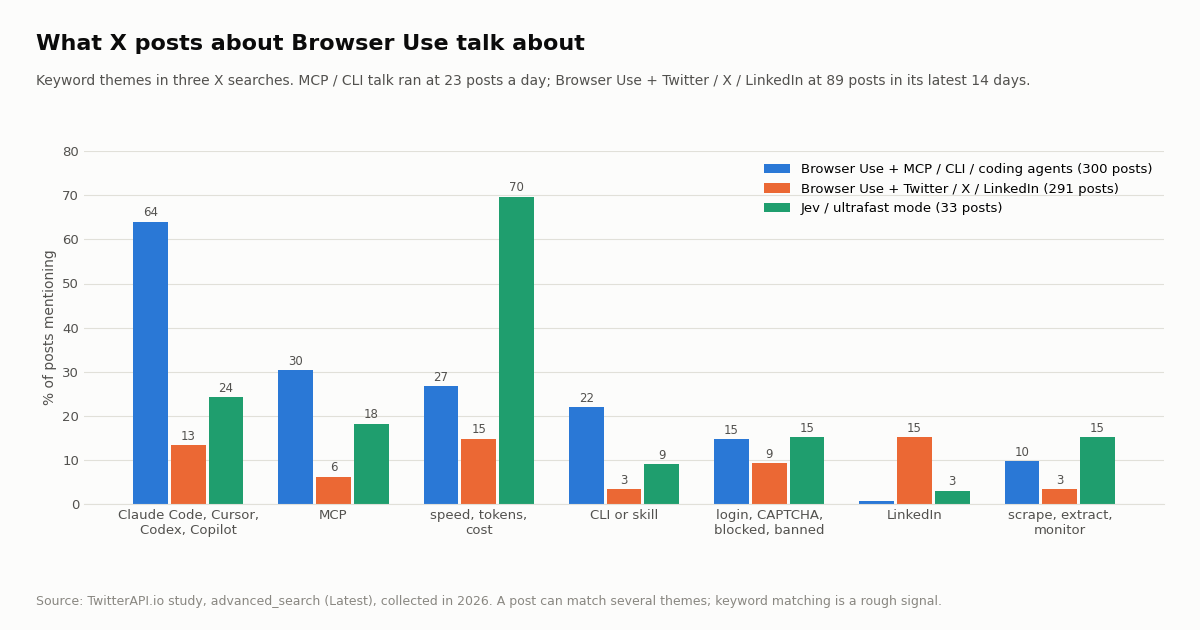
We ran three X searches (latest posts) to see how builders talk about Browser Use. Posts that mention Browser Use together with MCP, the CLI or a coding agent are the busy conversation: 300 posts from 255 accounts in 13.0 days, about 23 a day. Posts that pair Browser Use with Twitter, X or LinkedIn are much rarer: 89 in their latest 14 days (about 6.4 a day), and the full 291 stretched back 954 days.
Coding agents dominate. 64% of the MCP / CLI posts name Claude Code, Cursor, Codex or Copilot ("claude" alone counts), 30% say MCP, 22% mention the CLI or a skill, and 27% talk about speed, tokens or cost. 15% mention logins, CAPTCHAs, blocks or bans. The conversation is international: 209 posts in English, 42 in Chinese and 15 in Japanese.
On X and LinkedIn, the Twitter / X / LinkedIn search is mostly about posting and growth: 15% mention LinkedIn and 9% mention logins, blocks or bans, the account-risk side of using a browser agent on a social site.
Jev talk is about speed. The Jev search returned 100 posts, but only 33 were about the Browser Use project (the word matches unrelated posts too). Of those, 70% are about speed, tokens or cost.
The official account. @browser_use's latest 200 posts span 97 days (74 of them reposts), with a median of 47 likes and 7,171 views. Posts on ultrafast or Jev (8 posts) drew a median of 38,210 views, and the 1.0 release post 171,959. Cloud is the most frequent topic (22 posts); MCP appears in 1 and X or Twitter use cases in 0.
Keyword themes are a rough signal, not a census: a post can match several themes, and short words such as "cost" or "login" also appear in unrelated contexts.
How we collected this
Question. For the read task "get the last 20 posts of an organization account", what does a browser agent have to read compared with an API call, and how do people on X talk about Browser Use, its MCP server, CLI and ultrafast mode?
Accounts and queries. Five organization accounts: @browser_use, @AnthropicAI, @OpenAI, @github, @vercel. Three /twitter/tweet/advanced_search queries (Latest): Browser Use with MCP / CLI / Claude Code / Cursor / Codex; Browser Use with Twitter / x.com / tweet / LinkedIn; Jev Ultrafast and ultrafast mode. Plus the latest 200 posts of @browser_use via /twitter/user/last_tweets.
Browser side. Playwright 1.59 driving the installed Google Chrome with a fresh temporary profile (no X account, no cookies), locale en-US, 10-second settle and two scrolls, in Chrome's default headless mode (user agent unchanged) and in a normal window. We repeated a pass when a connection dropped and kept one completed load per account per mode. We did not install or run browser-use.
Sample and bill. 50 API requests returned 991 posts for about $0.15 at 15 credits per tweet; the same reads at $0.005 per post on X's pay-per-use card would be about $4.96. Plus 22 logged-out page loads in total, 5 kept per browser mode. Collected in 2026.
What the sample cannot show. It is a small, single-session test of logged-out pages; it says nothing about signed-in timelines, about the browser-use agent's own success rate on X, or about other regions. Token counts use tiktoken o200k_base as a stand-in for model tokenizers. Keyword themes are approximate.
Privacy. Aggregates only. Organization accounts are named; search authors are private individuals and are not profiled, quoted or linked. De-identified rows (no ids, text or handles) and the analysis code are kept with the study.
"""x_reads_for_agents.py - X (Twitter) reads an AI agent can call instead of driving x.com.

    pip install requests
    export TWITTERAPI_IO_API_KEY=...   # from the twitterapi.io dashboard

Prices: 15 credits per tweet returned ($0.15 per 1,000 tweets); a 20-tweet page is $0.003.
"""
import json
import os

import requests

BASE = "https://api.twitterapi.io"
HEADERS = {"X-API-Key": os.environ["TWITTERAPI_IO_API_KEY"]}
KEEP = ("id", "createdAt", "text", "likeCount", "retweetCount", "replyCount", "viewCount")


def trim(tweet: dict) -> dict:
    row = {k: tweet.get(k) for k in KEEP}
    row["author"] = (tweet.get("author") or {}).get("userName")
    return row


def latest_posts(user_name: str, limit: int = 20) -> list[dict]:
    """Newest posts of one account (20 per page, newest first)."""
    out, cursor = [], ""
    while len(out) < limit:
        r = requests.get(f"{BASE}/twitter/user/last_tweets",
                         params={"userName": user_name, "cursor": cursor},
                         headers=HEADERS, timeout=30)
        r.raise_for_status()
        body = r.json()
        if body.get("status") != "success":
            raise RuntimeError(body.get("msg"))
        out += [trim(t) for t in (body.get("data") or {}).get("tweets", [])]
        if not body.get("has_next_page"):
            break
        cursor = body.get("next_cursor", "")
    return out[:limit]


def search(query: str, max_pages: int = 3) -> list[dict]:
    """X search with the usual operators, e.g. '\"browser use\" mcp -filter:replies'."""
    out, cursor = [], ""
    for _ in range(max_pages):
        r = requests.get(f"{BASE}/twitter/tweet/advanced_search",
                         params={"query": query, "queryType": "Latest", "cursor": cursor},
                         headers=HEADERS, timeout=30)
        r.raise_for_status()
        body = r.json()
        out += [trim(t) for t in body.get("tweets", [])]
        if not body.get("has_next_page"):
            break
        cursor = body.get("next_cursor", "")
    return out


if __name__ == "__main__":
    posts = latest_posts("browser_use", 20)
    print(f"{len(posts)} posts, {len(json.dumps(posts))} bytes of JSON for the model")
    for p in posts[:3]:
        print(p["createdAt"], p["likeCount"], p["text"][:80].replace("\n", " "))
    hits = search('("browser use" OR "browser-use") mcp', max_pages=1)
    print(f"{len(hits)} recent posts mention Browser Use and MCP")
Researching this?Free starter credits cover end-to-end testing — Google sign-in, no card. Get a key.
Questions readers ask
How do I install the Browser Use MCP server?
Add an entry to your MCP client's config with command uvx and args --from browser-use==1.0.0 browser-use --cli-mcp. In Claude Code, run claude mcp add --transport stdio browser-use -- uvx --from browser-use==1.0.0 browser-use --cli-mcp. You need uv and Python 3.11 or newer. Pin an exact version; the docs warn that new releases can break a setup.
Is browser-use --mcp still the right command?
No. In browser-use 1.0, --mcp prints a deprecation notice and the old tools (browser_navigate, browser_click, retry_with_browser_use_agent) return an error pointing to browser_exec. Use --cli-mcp, which exposes browser_exec, browser_screenshot and browser_login.
What is the difference between the Browser Use MCP server and the Cloud MCP?
The open-source --cli-mcp server gives your client's model browser helpers and lets that model write the steps, in your own Chrome or a cloud browser. The Cloud MCP at https://api.browser-use.com/v3/mcp runs whole tasks with Browser Use's hosted agent (run_session, get_session), authenticated with a Bearer key and billed pay as you go.
Does Browser Use need an API key?
Not for the MCP server driving your local Chrome with your client's model. The library's default setup (the bu-fast model and a cloud browser) and any cloud browser need BROWSER_USE_API_KEY; the library can also run your own OpenAI, Anthropic or Google model with a local Chromium.
What is Jev Ultrafast?
Jev Ultrafast started as a separate experiment repo, browser-use/jev-ultrafast, and is now ultrafast mode in Browser Use. The agent reads the page as numbered accessibility-tree lines with bu.state() and acts with bu.click(id) and bu.type(id, text), without screenshots in the default loop. It is the default mode for the bu-fast and bu-ultrafast models.
Can Browser Use read Twitter (X) without logging in?
Only partly. In our test, logged-out x.com profile pages showed 5 to 7 posts each behind a sign-in prompt, 23 of the 100 newest posts across five accounts, and Chrome's default headless mode got HTTP 403. A logged-in agent sees more but acts as your account, which X's automation rules say can lead to suspension when the website is scripted.
Is it cheaper to read X with a browser agent or an API?
Per look, the browser's token and browser-time cost is small (about $0.0008 of BU Ultrafast input tokens for one page snapshot in our test), but it could not return the 20 newest posts logged out. TwitterAPI.io returns them for $0.003 (15 credits per tweet returned, $0.15 per 1,000), against $5.00 per 1,000 on the official X API's pay-per-use card.
Can I use Browser Use and an X API together in one agent?
Yes. Register both MCP servers in your client (Browser Use for websites, TwitterAPI.io's hosted MCP at https://mcp.twitterapi.io/mcp for X reads), or add a custom @tools.action function to a browser-use library agent that calls /twitter/user/last_tweets or /twitter/tweet/advanced_search and returns trimmed JSON.
Continue
- Browser Use docs: MCP server (--cli-mcp config, tools, local vs cloud, 0.x migration)
- Browser Use docs: Cloud MCP server (endpoint, auth, client configs, tools)
- Browser Use docs: Browser Use CLI (install, skill install, commands)
- browser-use/browser-use on GitHub (MIT, README, install pins)
- browser-use on PyPI (release history, Python requirement)
- X API pricing (pay-per-usage rate card)
- X API overview: endpoints, pricing and access options
- OpenClaw Browser Relay: driving your signed-in Chrome from an agent
- Claude in Chrome: setup, plans and reading X through an API
- MCP vs CLI for AI agents: token cost, auth and reliability, measured
- What an MCP server is and how it works
- TwitterAPI.io's X MCP server: tools and install options
- Use Claude with the Twitter (X) API
- TwitterAPI.io pricing and plans
- 01Bright Data Alternatives for Twitter (X) Data: Prices, Fit and a Measured Cost Test
- 02Make.com Pricing in 2026: Plans, Credits and What a Twitter (X) Workflow Really Costs
- 03CrewAI vs LangGraph: Which Multi-Agent Framework to Pick, and Where AutoGen Went
- 04Manus Alternatives in 2026: Hosted, Chat-Plan and Open-Source Agents, and What People on Twitter (X) Switch To
- 05Google ADK vs LangGraph: Which Agent Framework to Use in 2026
- 06How to Use Claude with the Twitter (X) API
- 07How Will You Use the Twitter (X) API or Twitter Data? Answering the Developer Sign-Up Question
- 08How to Use CrewAI with the Twitter (X) API
Writing about something you built with TwitterAPI.io? Our community rewards program pays API credits for honest tutorials, build logs and videos.
Stop reading. Start building.
Starter credits cover real testing on real data. Google sign-in, no card, no application queue.
Get an API keyAlready building with TwitterAPI.io? Publish an honest tutorial or build log about it and earn up to $200 a month in API credits.