OpenClaw Browser Relay: How the Chrome Extension Drives Your Signed-In Browser (and When to Use an API for Twitter (X) Data Instead)
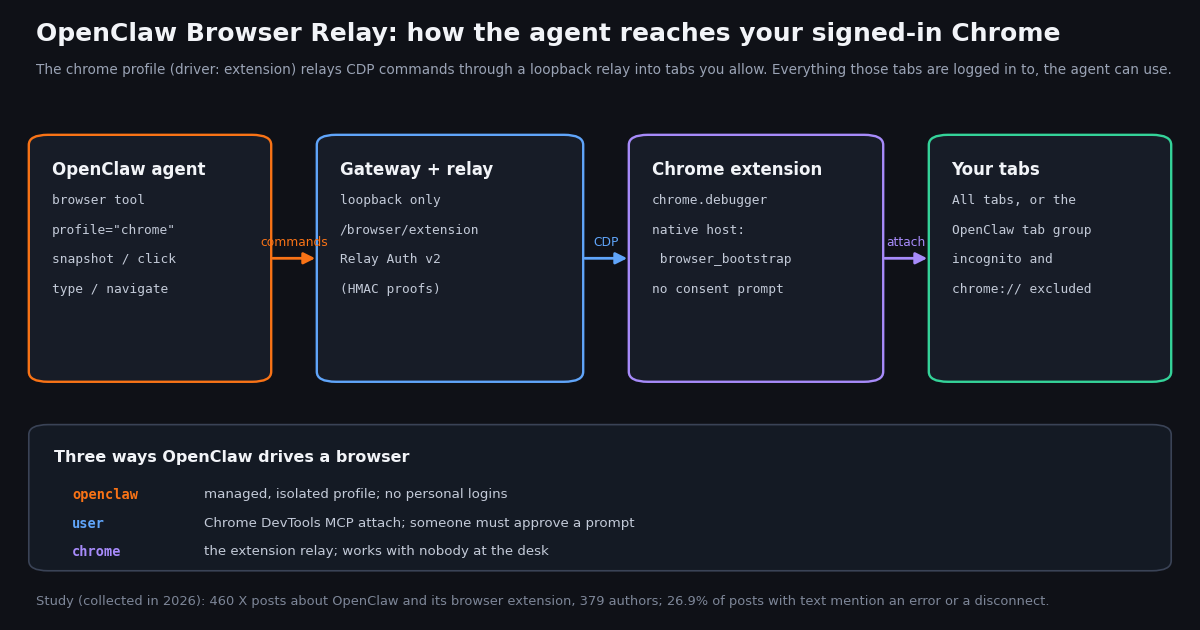
This page is about one OpenClaw component: Browser Relay, the Chrome extension that hands the agent your signed-in browser. If you want to connect OpenClaw to X data through an MCP server or a SKILL.md, that is our separate OpenClaw Twitter (X) skill and MCP setup guide; here we stay on the browser side, what the relay does, how it is wired, how people use it on X, and where it stops being the right tool.
Everything about the extension below comes from OpenClaw's own documentation (docs.openclaw.ai/tools/chrome-extension, the browser profiles and security pages) and the openclaw/openclaw GitHub repository, read for this guide. The docs change quickly: older tutorials still describe clicking the toolbar icon to attach a tab and a relay at 127.0.0.1:18792, while the current configuration reference lists that address only as a legacy single-profile override and the setup is now an automatic native pairing. When a guide disagrees with the docs, trust the docs.
Then the part other explainers skip: we collected 460 recent X posts that mention OpenClaw together with its browser extension, plus two searches comparing how OpenClaw users talk about reaching X through a browser versus through an API, MCP server or skill. The numbers show what people actually do with the relay, what breaks, and why reading X through a logged-in browser is the route fewer builders choose.
What OpenClaw Browser Relay is (and what it is not)
OpenClaw's browser tool can drive three kinds of browser. By default it launches a separate, agent-only Chrome or Chromium profile named openclaw, isolated from your personal browsing. Browser Relay is the other path: the OpenClaw Chrome extension connects your everyday, signed-in Chrome to the agent so it can open tabs, read pages, take snapshots and screenshots, click, type and navigate where you are already logged in.
The docs are specific about what the extension is. It uses Chrome's chrome.debugger API, so it "does not require Chrome's blocking remote-debugging consent prompt". It is "browser automation infrastructure": no chat window, no page sharing, no prompt box, no tab copilot (an earlier copilot feature is retired). Its popup shows the connection state, the current access mode, a Pause/Allow button for the current tab, and a Settings link.
"Relay" is the piece in the middle. OpenClaw's browser control service and other local clients send Chrome DevTools Protocol (CDP) commands to a loopback relay; the extension holds the other end of that connection and forwards the commands into the tabs it is allowed to touch. For a fresh local setup the extension connects through the Gateway's /browser/extension route, and that first authenticated connection starts the profile's loopback relay.
What it is not. It is not a cloud browser, not a scraper, and not a way to give the agent more permissions than your own browser session has. It also is not the same as OpenClaw's X channel plugin, which connects a bot account through an X OAuth2 app and answers mentions with public replies; that plugin uses the official X API and its own cost limits, while the relay just operates whatever site your tab shows.
The three browser profiles: openclaw, user and chrome
OpenClaw's browser profiles page lists three built-in profiles, and choosing between them is most of the decision.
The guidance in the docs is direct: use the isolated openclaw browser by default; prefer profile="chrome" when existing logged-in sessions matter and you are away from the computer (for example messaging the agent from Telegram or WhatsApp); prefer profile="user" when logged-in sessions matter and you are at the computer to approve the attach prompt. The configuration reference adds that driver: "extension" "is the only signed-in-browser mode that works with nobody at the computer".
Why that matters on X. The relay is popular precisely because it can act in your logged-in X session while you are elsewhere. That same property is the risk: nobody is watching each click, and every action is taken as you.
# Make the extension (Browser Relay) profile the default for agent browser calls
openclaw config set browser.defaultProfile chrome

# The built-in profile it selects, as it appears in ~/.openclaw/openclaw.json (JSON5)
# browser: { profiles: { chrome: { driver: "extension" } } }

# Or keep the isolated browser as default and pick the relay per call:
# browser tool call with profile="chrome"How to set up OpenClaw Browser Relay
Current setup is a native pairing rather than a pasted token. Run the install command on the machine that hosts Chrome and leave it running while Chrome finishes its side. On macOS it registers OpenClaw's native messaging host (ai.openclaw.browser_bootstrap) and then asks Google Chrome to install the official Chrome Web Store extension; Chrome only picks that request up at startup, so you may need to fully quit and reopen Chrome and then enable OpenClaw. OpenClaw never restarts Chrome or approves the permission prompt for you.
On Linux and other Chromium browsers, add the OpenClaw extension from the Chrome Web Store yourself after the native host registers (Linux does not support the per-user Store request). On Windows the setup uses the OpenClaw.BrowserBootstrap.exe native executable and has no script fallback. Requirements: Google Chrome, Chrome for Testing or Chromium, with OpenClaw (or an OpenClaw browser node) on the same machine.
Steps in order. First, run openclaw browser extension install. Second, enable the extension in Chrome when it appears. Third, set the chrome profile as default or pass it per call. Fourth, keep openclaw gateway run or the managed Gateway service running. Fifth, check the result with openclaw browser extension status and list tabs with openclaw browser --browser-profile chrome tabs.
Development copies. openclaw browser extension install --no-store copies the bundled extension to a stable folder and registers the native host without a Store request; load that folder through chrome://extensions with Developer mode and Load unpacked. The docs warn to load only unpacked copies you trust, because a key-matched build gets the same identity and native-host access.
Remote Gateway. If Chrome runs on a laptop that does not run OpenClaw, openclaw browser extension pair --gateway-url wss://... prints a pairing string to paste into the extension's Settings, Advanced manual pairing. Non-loopback URLs must use wss://, and the docs say to treat the complete pairing string as a password.
# 1. Register the native host and request the Store extension (keep it running)
openclaw browser extension install
#    development: openclaw browser extension install --no-store, then Load unpacked

# 2. Use the extension profile
openclaw config set browser.defaultProfile chrome

# 3. Keep the Gateway up (it serves the /browser/extension route)
openclaw gateway run

# 4. Verify, without printing any key
openclaw browser extension status --json
openclaw browser --browser-profile chrome tabs

# 5. If something is off
openclaw browser doctor --browser-profile chrome
openclaw doctorTab access, permissions and the security model
Two access modes decide what the agent can see. All tabs exposes every eligible ordinary tab in that Chrome profile, except tabs you pause for the session from the popup. Selected tabs uses a Chrome tab group named "OpenClaw" as the boundary: drag a tab into the group to grant access, drag it out to revoke it. Fresh automatic pairings start on All tabs; tabs the agent opens itself go into the OpenClaw group in either mode. Incognito tabs, chrome:// and chrome-extension:// pages, and tabs without a usable URL are always excluded.
The extension requests only debugger, tabs, tabGroups, storage, alarms and nativeMessaging. It does not request activeTab, contextMenus, scripting or sidePanel. The relay authenticates clients with connection-bound HMAC proofs (Browser Relay Authentication v2): the persistent per-host key is not sent in a URL, header or frame, and a replayed proof fails. A legacy setting, browser.extensionRelay.allowLegacyAuth, accepts older bearer-style clients during a migration window; the security page says to update every client and then set it to false.
None of that limits what the model may do once a tab is attached. OpenClaw's own "Browser control risks" page says it plainly: if a profile already has logged-in sessions, the model can access those accounts and data, so treat browser profiles as sensitive state. Its recommendations: prefer a dedicated agent profile over your daily driver, disable sync and password managers in the agent profile, treat downloads as untrusted, and never expose browser control or relay ports to a LAN or the public internet. It also notes that the Chrome MCP user mode is "not safer": it acts as you too.
Prompt injection is the X-specific twist. A timeline is a page full of text written by strangers. An agent reading it in your logged-in browser can be steered by a post that addresses it. Use Selected tabs, keep the agent's instructions narrow, and require a human to approve any post, reply or DM.
What 460 X posts say about the browser relay
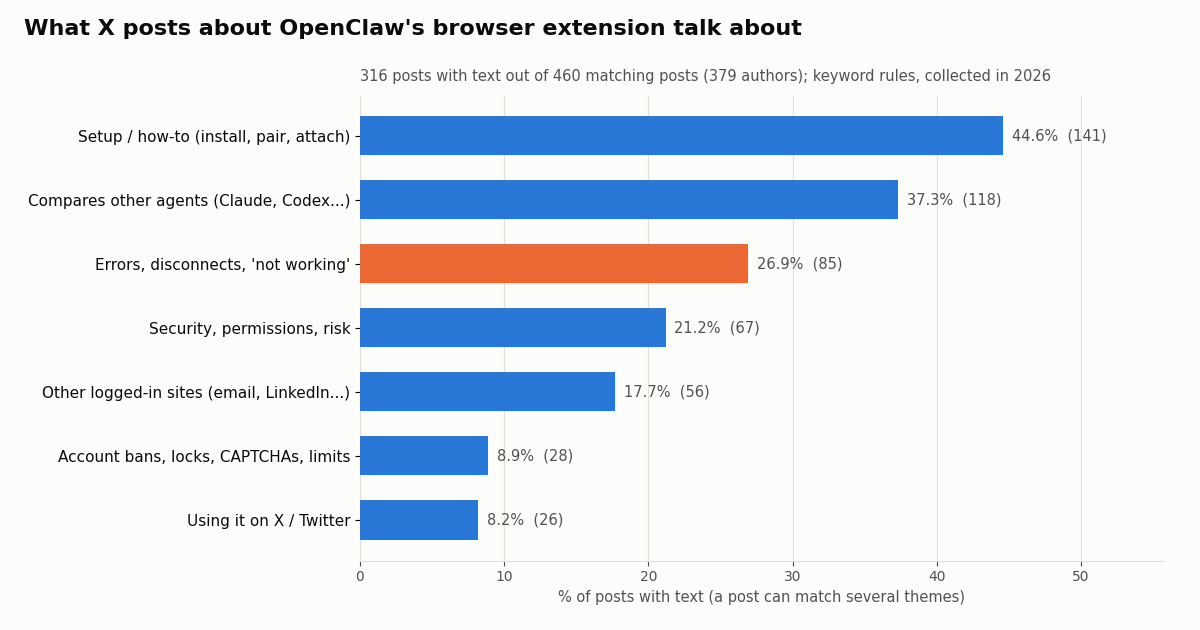
We searched X for recent posts that mention OpenClaw together with "browser relay", "chrome extension", "browser extension" or "browser tool" and kept the 460 posts the search returned (379 distinct authors, about 1.68 a day over the sample). 144 of them were link-only posts with no text, so the themes below are shares of the 316 posts with text. A post can match several themes.
Setup dominates. Close to half the posts with text are people installing, pairing or asking how to attach, which matches the number of moving parts above (native host, Store request, Chrome restart, Gateway route). Breakage is common. 26.9% mention an error, a disconnect or "not working", and the openclaw/openclaw repository's issue search returns more than 1,000 issues and pull requests mentioning "browser relay", including open reports about the relay not starting at Gateway boot and dropping in Selected-tabs mode on Windows.
X is a small but telling slice. 26 posts (8.2%) talk about using the relay on X itself, mostly to draft or publish posts from a logged-in session; 34.6% of those also mention an error or a fix. The posts reach a real audience: median 1,238 views and 8 likes, with the top 10% above 30,374 views. 30.4% of them come from accounts with 10,000 to 99,999 followers and 12.6% from accounts above 100,000.
The official @openclaw account rarely talks about the extension directly: 4 of its 200 most recent posts (2.0%) mention the browser, mostly inside release notes (shared browser pages, watching browser automation live, answerable browser dialogs).
Driving X through the relay: reading, posting and what X's rules say
The pattern people describe is simple: sign in to X in Chrome, install the extension, and ask the agent to read the timeline, draft a post, or publish it. For an occasional, supervised action ("open my notifications and summarize them", "post this draft I approved") it does what it says, because it is your own browser doing what you could do by hand.
The trouble starts when that becomes a job that runs by itself. X's published automation rules (help.x.com/en/rules-and-policies/x-automation) define automation as accounts or apps that take repeated actions without a person actively performing them, and state that using non-API-based forms of automation, such as scripting the X website, may result in the permanent suspension of your account. A relay-driven agent clicking through x.com is exactly that kind of website scripting. OpenClaw's own browser-login page also recommends signing in manually rather than letting the agent automate logins, because automated logins can lock the account.
There is a practical cost too. A browser agent reads X by taking page snapshots, which means the model receives page structure, buttons and every visible post, not just the fields you need. Infinite scroll, lazy-loaded media and a changing page layout make each run less predictable than an API page with a cursor.
A sensible split. Keep the relay for things only a logged-in browser can do and that you supervise: checking your own notifications, reviewing a draft in place, settings pages. Move anything repeated, scheduled or high-volume, especially reading X, to an API that returns structured data without touching your account.
Posting is a separate question. Reading is where the API route is clearly better. Writing is different: any tool that posts, likes, follows or sends a DM acts as a real X account, whether it clicks a button in your browser or calls an endpoint.
TwitterAPI.io's write actions run through an authenticated session: one /twitter/user_login_v2 login ($0.10, with a proxy you supply) returns login_cookies, and each post, delete, like, retweet, follow, unfollow or media upload is then 60 credits, $0.0006 (for example /twitter/create_tweet_v2). The call acts as that account, and X can rate-limit, lock or suspend it. Keep a human pace, expect the session to need a fresh login from time to time, and note that billing is per HTTP 200 call.
For an OpenClaw agent, the safe pattern is the same either way. The agent drafts; a person approves; then one post goes out. OpenClaw's X channel plugin builds that rule in for work sessions (it drafts a reply of at most 280 characters and asks before posting), and you can do the same with the relay by keeping the publish step manual. What you should not build is an unattended loop that posts, follows or likes from your account.
Reading X data without a logged-in browser: the API route, and which route builders pick
For read data the steadier route is an HTTP API. TwitterAPI.io's endpoints need an API key and no X account: /twitter/tweet/advanced_search takes the same query operators as X search (from:, since_time:, lang:, -filter:replies) and returns structured posts with text, createdAt, likeCount, viewCount and an author object, 20 per page, with has_next_page and next_cursor for paging. /twitter/user/last_tweets returns an account's recent posts and /twitter/user/info a profile.
Inside OpenClaw you can expose the same data to the agent as tools. The hosted MCP server at https://mcp.twitterapi.io/mcp (or the npm package @twitterapi_io/mcp-server) registers under mcp.servers in OpenClaw's config, and the agent calls search_tweets or get_user_last_tweets instead of opening x.com. Our OpenClaw Twitter (X) guide walks through that config, the stdio variant and a SKILL.md alternative step by step.
Prices on that table come from each rate card: TwitterAPI.io charges 15 credits per post returned ($1 = 100,000 credits), so a full 20-post page is $0.003 and an empty search costs the 15-credit minimum, $0.00015. The official X API pay-per-use page (docs.x.com/x-api/getting-started/pricing) lists $0.005 per post read, $0.010 per user read, and a cap of 3 million post reads per monthly billing cycle before Enterprise. Per 1,000 posts that is $5 against $0.15, roughly 33x. New TwitterAPI.io accounts that pass the automatic bot check get up to $1 of free credits (at most 100,000 credits, no card, one per person or network, expiring after 31 days); purchased credits never expire. Rate limits start at 0.2 requests per second before the first payment and rise to 20 once paid.
To see which route builders actually talk about, we ran two more X searches. The first matched OpenClaw posts that mention X or Twitter together with browser, relay, extension or Chrome; the second matched OpenClaw posts that mention X or Twitter together with API, MCP or skill. Each returned about 300 posts (298 and 299; 71 posts matched both).
The same number of posts took 122.8 days to accumulate for the browser search and 20.2 days for the API search, so API, MCP and skill talk runs about 6.1x as often. Words like "skill" and "API" are broad, so read this as a rough signal of where the conversation is, not a usage census. It agrees with the theme table: the browser route generates setup threads and error reports, the API route generates build logs.
# Register the hosted twitterapi.io MCP server in OpenClaw (reads only need an API key)
echo 'TWITTERAPI_IO_API_KEY=your_key' >> ~/.openclaw/.env
openclaw gateway stop
openclaw mcp set twitterapi '{"url":"https://mcp.twitterapi.io/mcp","transport":"streamable-http","headers":{"X-API-Key":"${TWITTERAPI_IO_API_KEY}"}}'
openclaw gateway start

# Or call the REST endpoint directly
curl -s 'https://api.twitterapi.io/twitter/tweet/advanced_search?query=openclaw%20lang%3Aen%20-filter%3Areplies&queryType=Latest' \
  -H "X-API-Key: $TWITTERAPI_IO_API_KEY"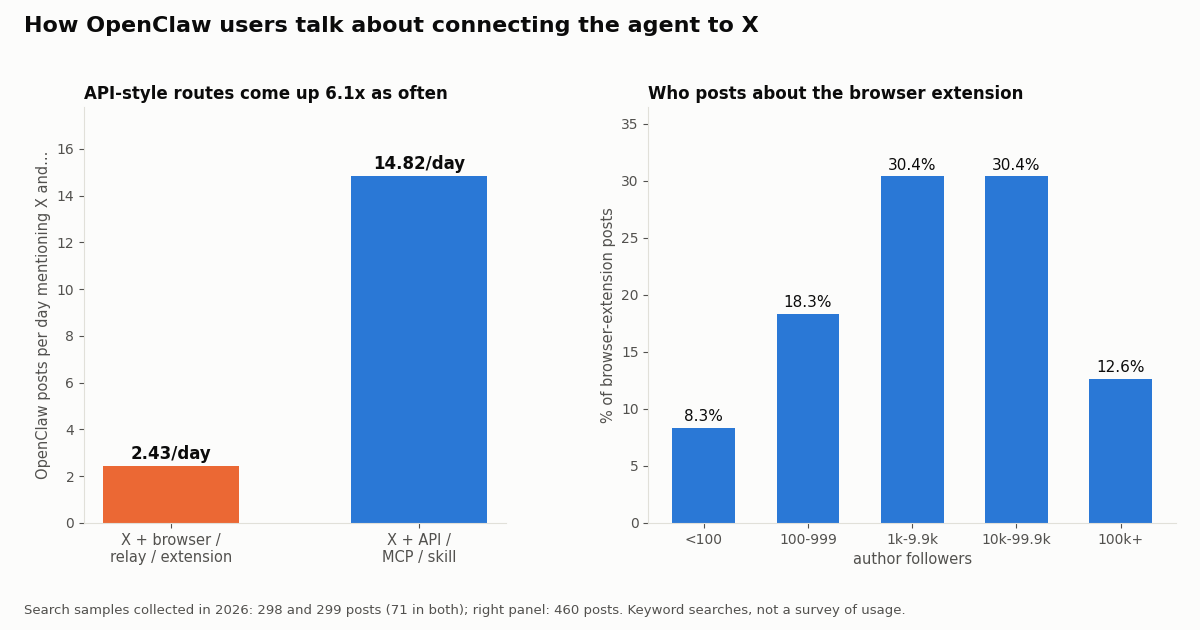
Troubleshooting OpenClaw Browser Relay
"No native host was pre-registered". Resolve the path, ownership or permission problem the command reports. If Chrome has never been launched, launch it once, then rerun openclaw browser extension install before adding the extension.
Extension loaded before the native host. Chrome caches the first missing-host result for the running browser process, so retrying from the popup cannot fix it. Fully restart Chrome once, then rerun the install flow.
"Relay unavailable". For /browser/extension pairings, confirm the Gateway is running. For direct ws://127.0.0.1:<port>/extension pairings, check native-host registration, that automatic setup is on, and that the paired port still belongs to an extension profile; relay wake-up is throttled to once a minute and needs the exact 127.0.0.1 host, not localhost.
Connected but no tabs. "Ready" means the relay has an authenticated extension, not that any tab is eligible. In Selected tabs mode only tabs in the OpenClaw group count; incognito and internal pages never do.
Version mismatch or stale element refs. Reload the extension (or update the Store build), run openclaw browser doctor --browser-profile chrome, and take a fresh snapshot after any reconnect: the docs note that a dropped connection retires debugger attachments before reattaching.
The X page keeps failing. If X shows a login wall, a verification step or a "something went wrong" banner in the attached tab, stop the agent and handle it yourself. Do not script around it; for read data, switch the job to the API route.
How we collected this
Question. What do people say on X about OpenClaw's browser extension, and when OpenClaw users discuss connecting the agent to X, how often is it through a browser versus an API, MCP server or skill?
Data. Three /twitter/tweet/advanced_search samples (Latest, retweets excluded): OpenClaw with browser relay / extension / browser tool terms (460 posts, 379 authors, about 274 days); OpenClaw with X plus browser terms (298 posts); OpenClaw with X plus API / MCP / skill terms (299 posts). Plus the 200 most recent posts of the organization account @openclaw from /twitter/user/last_tweets. Collected in 2026; 65 requests, 1,257 posts returned, about $0.19 at $0.15 per 1,000.
Method. Themes come from transparent keyword rules (published with the study's analysis script), applied to post text; a post can match several themes and link-only posts are excluded from theme shares. Posts per day are sample size divided by the span between the oldest and newest post.
What the sample cannot show. Keyword search finds posts that use these words, not all users of the extension; some matches are about other Chrome extensions that mention OpenClaw in passing. It cannot measure how often relay users run into account limits on X, and the route comparison depends on how broad words like "skill" and "API" are.
Privacy. Aggregates only. Search results include private individuals, so raw search pages were not kept; the published sample has no post IDs, URLs, text, handles or author IDs. Only the organization account @openclaw is named.
"""Give an OpenClaw agent fresh X posts without a logged-in browser.

Pulls recent posts for a query from TwitterAPI.io, keeps only the fields the
agent needs, and writes JSON lines a skill or a cron job can hand to the model.
Reads need an API key only (no X account). Cost: 15 credits per post returned.
"""
import json
import os
import time

import requests

BASE = "https://api.twitterapi.io"
HEADERS = {"X-API-Key": os.environ["TWITTERAPI_IO_API_KEY"]}


def search(query, max_posts=100, query_type="Latest"):
    posts, cursor = [], ""
    while len(posts) < max_posts:
        params = {"query": query, "queryType": query_type}
        if cursor:
            params["cursor"] = cursor
        r = requests.get(f"{BASE}/twitter/tweet/advanced_search", headers=HEADERS, params=params, timeout=30)
        if r.status_code == 429:
            time.sleep(5)  # paid accounts get 20 requests/s; free tier 0.2/s
            continue
        r.raise_for_status()
        body = r.json()
        for t in body.get("tweets", []):
            author = t.get("author") or {}
            posts.append({
                "url": t.get("url"),
                "created_at": t.get("createdAt"),
                "author": author.get("userName"),
                "followers": author.get("followers"),
                "text": t.get("text"),
                "likes": t.get("likeCount"),
                "views": t.get("viewCount"),
            })
        if not body.get("has_next_page"):
            break
        cursor = body.get("next_cursor", "")
    return posts[:max_posts]


def profile(user_name):
    r = requests.get(f"{BASE}/twitter/user/info", headers=HEADERS, params={"userName": user_name}, timeout=30)
    r.raise_for_status()
    body = r.json()
    if body.get("status") == "error":  # unknown user: HTTP 200 with msg "user not found"
        return None
    d = body["data"]
    return {"userName": d["userName"], "followers": d["followers"], "statuses": d["statusesCount"]}


if __name__ == "__main__":
    rows = search('"openclaw" (browser OR relay) lang:en -filter:replies', max_posts=60)
    with open("x_posts.jsonl", "w") as f:
        for row in rows:
            f.write(json.dumps(row, ensure_ascii=False) + "\n")
    print(len(rows), "posts written; about $%.4f at $0.15 per 1,000" % (len(rows) * 0.00015))
    print(profile("openclaw"))
Questions readers ask
What is OpenClaw Browser Relay?
It is the OpenClaw Chrome extension and the local relay it connects to. The agent's browser tool sends Chrome DevTools Protocol commands through a loopback relay, and the extension, using Chrome's chrome.debugger API, applies them to tabs in your signed-in Chrome. In OpenClaw it is the built-in chrome profile with driver extension.
How do I install the OpenClaw Browser Relay Chrome extension?
Run openclaw browser extension install on the machine that hosts Chrome and keep it running. On macOS it registers the native host and asks Chrome to install the official Store extension; restart Chrome and enable OpenClaw. On Linux, add the extension from the Chrome Web Store after the native host registers. Then run openclaw config set browser.defaultProfile chrome and keep the Gateway running.
What is the difference between the chrome and user profiles in OpenClaw?
Both use your real signed-in Chrome. The user profile attaches through Chrome DevTools MCP, and Chrome shows an Allow remote debugging prompt on first attach, so someone must be at the computer. The chrome profile goes through the extension relay, has no such prompt, and works with nobody at the desk. The default openclaw profile is a separate isolated browser.
Is OpenClaw Browser Relay safe?
The relay itself uses authenticated, loopback-only connections, but OpenClaw's security docs warn that once a tab is attached the model can use any account that browser profile is logged in to. Use Selected tabs mode, a dedicated Chrome profile without sync or saved passwords, never expose relay ports beyond the machine, and keep a human approval step before anything is posted or sent.
Can I use OpenClaw Browser Relay to automate X (Twitter)?
It can operate x.com in your logged-in tab, and people do use it to draft and publish posts. X's automation rules state that non-API automation such as scripting the X website may lead to permanent suspension, so keep it to supervised, occasional actions on your own account. For reading X data at any volume, use an API that returns structured posts with no X account involved.
Why does my OpenClaw extension say relay unavailable?
For Gateway pairings, the Gateway is not running or not reachable on the /browser/extension route. For direct loopback pairings, check that the native host is registered, automatic setup is on, and the paired port still belongs to an extension profile; wake-up is limited to once a minute and needs 127.0.0.1, not localhost. Run openclaw browser doctor --browser-profile chrome.
What port does OpenClaw Browser Relay use?
Older guides cite 127.0.0.1:18792. The current docs give each extension profile its own loopback relay port, and the configuration reference lists the 127.0.0.1:18792 address only as a legacy single-profile override. Run openclaw browser extension cdp to print the current endpoint without any secret.
How much does reading X through an API cost compared with the official X API?
TwitterAPI.io charges 15 credits per post returned, $0.15 per 1,000 posts, with a 15-credit minimum per request ($0.00015 for an empty search). The official X API pay-per-use rate card lists $0.005 per post read, $5 per 1,000, about 33x more, with a cap of 3 million post reads per monthly billing cycle.
Continue
- OpenClaw docs: Chrome extension (install, tab access, permissions, relay authentication, troubleshooting)
- OpenClaw docs: Browser profiles (openclaw, user, chrome)
- OpenClaw docs: Browser control risks
- openclaw/openclaw on GitHub (source, releases, issues)
- X API pricing (pay-per-usage rate card)
- TwitterAPI.io documentation
- X (Twitter) API guides and endpoints hub
- OpenClaw Twitter (X) skill and MCP setup
- OpenClaw vs Claude Code compared
- Hermes Agent vs OpenClaw for X workflows
- Twitter (X) automation rules and safe patterns
- Twitter (X) MCP server for AI agents
- TwitterAPI.io pricing and credit packs
- 01Twitter (X) Clients in 2026: Which Ones Still Work, by Platform
- 02How to Mass Block on Twitter (X): Tools, Block Lists and Safer Options
- 03Does Twitter (X) Delete Inactive Accounts? The Policy, the Purge, and What Actually Survives
- 04How to View a Suspended Twitter (X) Account, and What Still Survives
- 05Twitter (X) Temporary Label: What "May Impact Its Reach" Means and What to Do
- 06OpenClaw vs Claude Code: which agent should run your Twitter (X) jobs?
- 07Hermes Agent vs OpenClaw: Which Agent Fits Twitter (X) Work?
- 08OpenClaw Twitter (X) Skill: Connect Your Agent to X Data
Stop reading. Start building.
Starter credits cover real testing on real data. Google sign-in, no card, no application queue.
Get an API keyAlready building with TwitterAPI.io? Publish an honest tutorial or build log about it and earn up to $200 a month in API credits.