Claude in Chrome: What It Is, How to Set It Up, and When an API Beats It for Twitter (X) Data
This page is about Claude in Chrome, Anthropic's own browser extension. If you want the open-source agent that drives your signed-in Chrome through a relay extension, that is our separate OpenClaw Browser Relay guide; if you want Claude to read X data through an API or MCP server, that is the how-to-use-Claude-with-the-Twitter-API guide. Here we cover what Claude in Chrome is, which plans include it, how to set it up from the side panel and from Claude Code, and where it fits when the job is reading Twitter (X).
Every product fact below comes from Anthropic's own pages read this session: the help-center article on getting started, the Claude Code Chrome docs at code.claude.com/docs/en/chrome, the product page at claude.com/claude-in-chrome, and the original launch post. We did not install or run the extension for this page, so there are no first-hand speed numbers for the browser side. What we did measure is the conversation about it on X, and how long and how much the API route takes for the same kind of read.
What Claude in Chrome is (and the three places you use it)
Anthropic's help center describes Claude in Chrome as a browser extension that allows Claude to read, click, and navigate websites alongside you. The product page at claude.com/claude-in-chrome sums it up as reading the page you are signed in to, then clicking, typing and filling forms while you decide what happens next.
The side panel. Click the Claude icon in the Chrome toolbar and a panel opens beside the page. On Max, Ultra and Team plans (on Pro as the rollout reaches you, and on Enterprise where an admin enables it) the panel runs as a Claude Cowork session with your saved skills, plugins and connectors; otherwise it uses the classic side panel.
Claude Cowork and the desktop app. In the desktop app you enable the Claude in Chrome connector, and a chat or Cowork task that touches a website can open Chrome and do the work. The help center notes the connector is off by default and has to be enabled per conversation. Cowork also has its own built-in browser; the product page says Claude uses it by default unless you already use Claude in Chrome, and you switch under Settings, Cowork, Preferred browser.
Claude Code. The Claude Code docs describe the integration as browser automation from the CLI or the VS Code extension: Claude opens new tabs, shares your browser's login state, and runs actions in a visible Chrome window. When it meets a login page or CAPTCHA it pauses and asks you to handle it.
The core features listed in the help center are: recorded workflows (classic side panel only), console-log reading, scheduled tasks (daily, weekly, monthly or annually), multi-tab work through a tab group, built-in knowledge of sites such as Slack, Gmail, Google Docs and GitHub, background workflows that continue while Chrome is open, screenshot and image upload, saved shortcuts, and sign-in through 1Password, which the page labels a beta on macOS.
Which plans include Claude in Chrome
The help center lists Claude in Chrome on paid plans: Pro, Max, Ultra, Team and Enterprise, usable in the Chrome side panel, Claude Cowork and Claude Code. The product page says it is available on all paid plans and points free users to the upgrade page. The Claude Code docs repeat the requirement as a direct Anthropic plan (Pro, Max, Ultra, Team, or Enterprise). Plan prices change, so check claude.com/pricing rather than a number copied here.
Enterprise with HIPAA. The Claude Code docs say Claude in Chrome is off by default in Enterprise organizations that have HIPAA enabled, an Owner can turn it on, and the Business Associate Agreement does not cover data sent to third-party sites through the extension.
Third-party clouds. The same page says Chrome integration is not available through Amazon Bedrock, Google Cloud's Agent Platform or Microsoft Foundry. If you only reach Claude through one of those, you need a separate claude.ai account.
How access widened. The launch post, published on August 25, 2025, started with a pilot of 1,000 Max plan users. An update dated November 24, 2025 opened a beta to all Max subscribers, and one dated December 18, 2025 expanded it to Pro, Team and Enterprise along with the Claude Code integration. An editor's note on that post says mentions of Max from before October 30, 2026 include what are now the Max and Ultra plans.
How to set up Claude in Chrome (side panel and Claude Code)
Step 1: install the extension. Install Claude from the Chrome Web Store (the Claude Code docs link the listing at chromewebstore.google.com/detail/claude/fcoeoabgfenejglbffodgkkbkcdhcgfn), sign in with your Claude account, pin it, and grant the permissions it asks for.
Step 2: understand the permissions. The help center lists each Chrome permission and why it is needed. The ones that matter most: debugger lets Claude click, type and take screenshots; scripting lets it read page text; tabs and tabGroups let it open and group the tabs it works in; alarms runs scheduled tasks; downloads saves files; nativeMessaging connects it to Claude Desktop and Claude Code.
Step 3: pick an approval mode. The help center says the side panel starts in Automatically approve mode, where Claude works continuously, reviews each action for safety and pauses when something needs your approval; whatever mode you switch to is kept for future sessions. The product page describes the alternative, Permissions Mode, as granting access one site at a time, and says purchases and other one-way actions wait for you.
Step 4 (developers): connect Claude Code. Start a session with claude --chrome. The first launch shows a one-time dialog about site permissions. Run /chrome at any time to check status, manage permissions, reconnect, or choose which connected browser to use; the docs say the integration is working when the panel shows Status: Enabled and Extension: Installed. To skip the flag, open /chrome and pick Enabled by default, which the docs warn increases context usage because the browser tools are always loaded.
Requirements that trip people up. Extension version 1.0.36 or later. A claude.ai sign-in through /login: the docs say that if you authenticate with an API key or a long-lived token from claude setup-token, Claude Code keeps Chrome integration off even with --chrome. The extension and Claude Code must be signed in to the same organization, otherwise browser tools return Browser extension is not connected. Chrome integration is not supported in WSL.
Which browsers. The two Anthropic pages differ here. The help center says Google Chrome only, with other Chromium browsers and mobile not supported. The Claude Code docs say the integration works with Google Chrome and Microsoft Edge and that Claude Code also detects the extension in Brave, Arc, Vivaldi and Opera. If you are using the side panel, plan on Chrome; for the Claude Code bridge, the wider list applies.
# Claude Code + Claude in Chrome, from the Claude Code docs (code.claude.com/docs/en/chrome)
claude --chrome          # start a session with browser tools
# inside the session:
/chrome                  # status, permissions, reconnect, select browser, Enabled by default
/mcp                     # select claude-in-chrome, then View tools to list the browser tools

# if the extension is not detected (macOS, Chrome), the native messaging host file should exist:
ls ~/Library/Application\ Support/Google/Chrome/NativeMessagingHosts/com.anthropic.claude_code_browser_extension.jsonWhat people on X say about Claude in Chrome (our 2026 study)
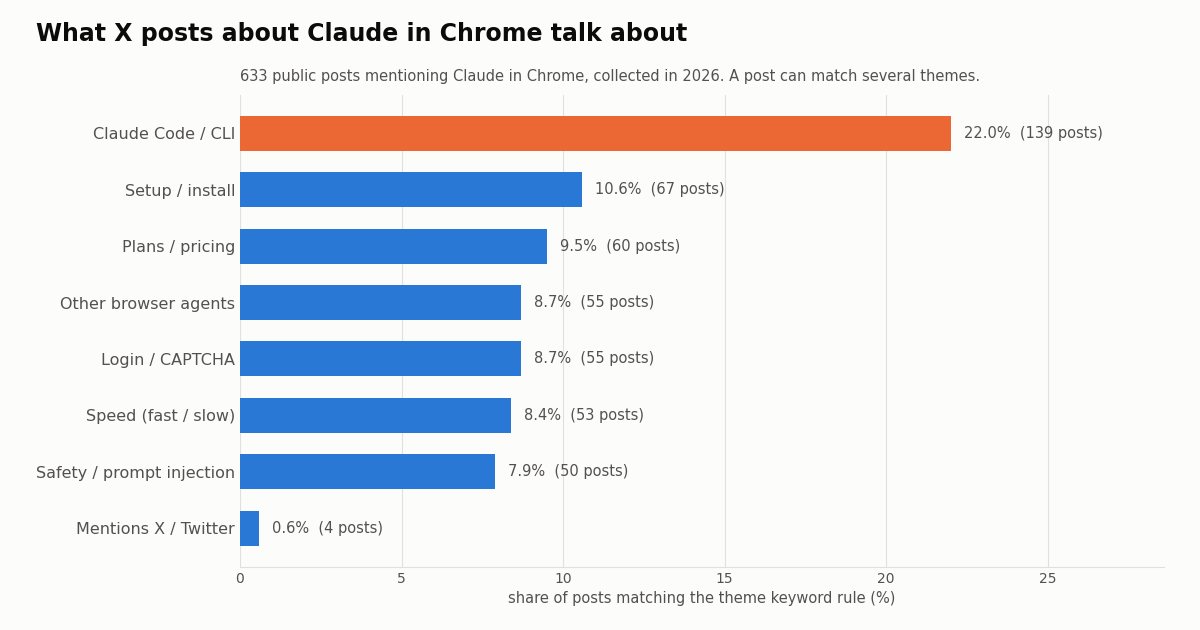
We pulled 633 public posts that mention Claude in Chrome (the exact phrases claude in chrome, claude for chrome or claude chrome extension) from 535 accounts through the API: 600 from the Latest tab, which covered the most recent 43.5 days at about 13.8 posts a day, plus 73 from the Top tab. Each post was tagged with simple keyword rules, so a post can carry several themes.
Claude Code is the main conversation. 22.0% of the posts (139) mention Claude Code, the CLI, --chrome or /chrome, more than double any other theme. Setup and install come next at 10.6%, then plans and pricing at 9.5%.
Friction shows up, but it is not dominant. Login, sign-in and CAPTCHA words appear in 8.7% of posts, speed words (fast, slow, quick mode, minutes) in 8.4%, and safety or prompt-injection words in 7.9%. Comparisons with other browser agents (Comet, Atlas, Operator, Browser Use, OpenClaw, Playwright, Puppeteer) appear in 8.7%.
Almost nobody is talking about using it on X itself. Only 4 posts (0.6%) mention x.com, Twitter or tweets. People reach for it for dashboards, docs, forms and development work, not for reading the platform they are posting on.
Who is talking: languages, reach and how Anthropic itself posts about it
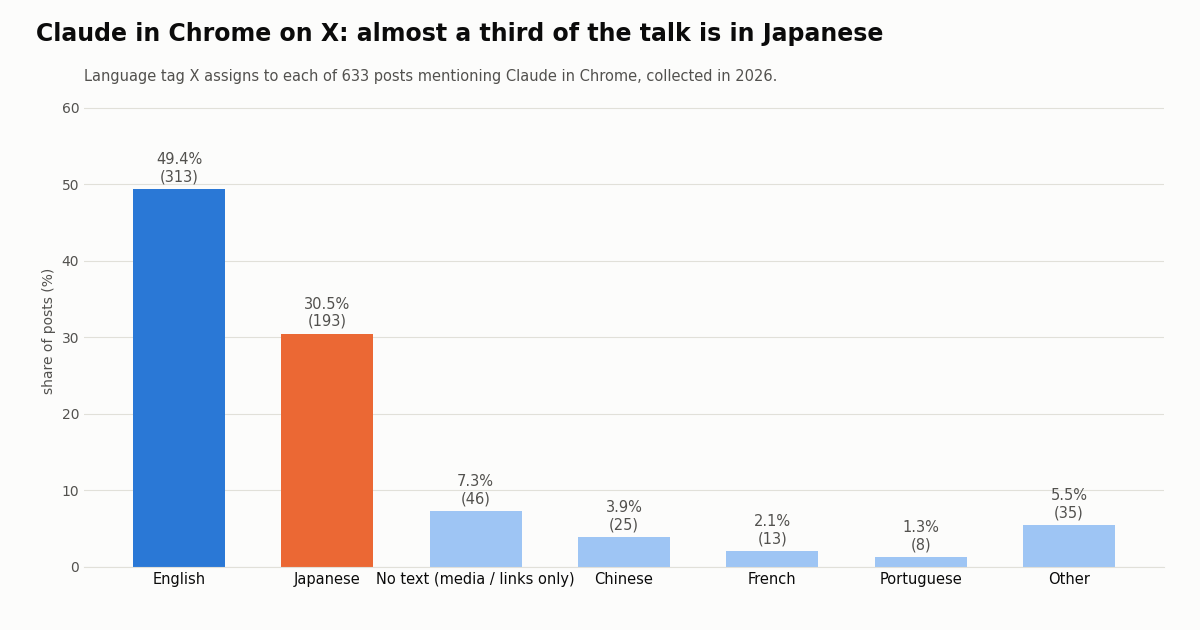
A large Japanese conversation. English accounts for 49.4% of the posts and Japanese for 30.5%, ahead of posts with no language tag (7.3%, media or links only), Chinese (3.9%), French (2.1%) and Portuguese (1.3%). If you build or market around browser agents, the Japanese developer audience is not a rounding error.
Most posts are small. The median post got 4 likes and 400 views; the 90th percentile reached 45 likes and 7,972 views, and 16.7% got no likes at all. 21.3% came from accounts with 10,000 or more followers, 28.8% were replies, and 24.5% carried a photo or video.
Anthropic posts about it rarely, but those posts travel. In the latest 200 posts on the @claudeai timeline (185 of them its own, spanning 390 days), 2 name Claude in Chrome: the all-paid-plans launch with the Claude Code integration (6,682 likes, 1,229,561 views) and the post saying Claude in Chrome sessions now carry over to desktop, web and mobile (11,819 likes, 1,332,951 views). Widening the rule to any post mentioning Chrome or a browser gives 6 posts (3.2%). None of the latest 178 own posts on @AnthropicAI mention it.
Reading X (Twitter) with Claude in Chrome vs through an API
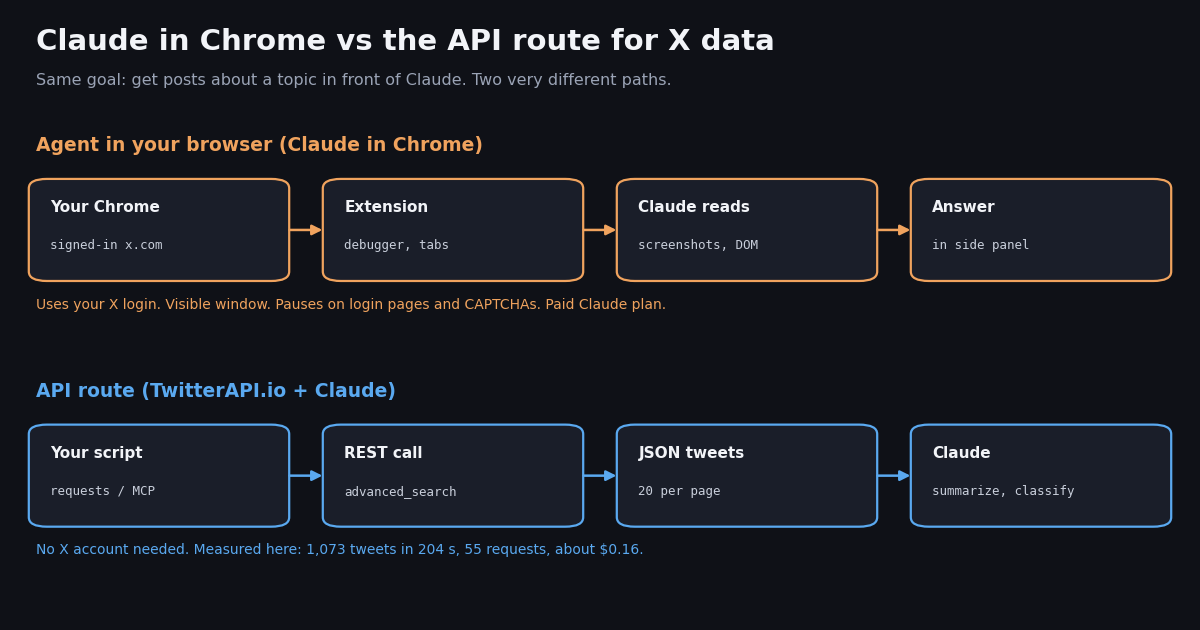
Claude in Chrome can open x.com in your signed-in browser and read what is on screen, so it is tempting to point it at X for research. The two routes are built for different jobs. Everything in the browser column is from Anthropic's pages; everything in the API column is from our pricing and the study above.
What we measured on the API side. Collecting this page's data took 55 requests, returned 1,073 tweets in 204 seconds of wall-clock time (3.71 s per 20-tweet page), through a client capped at 5 requests a second and shared with other jobs that were running at the same time. At 15 credits per tweet returned, that is about $0.16. The same 1,073 post reads on the official X API's pay-per-usage card, which lists $0.005 per post read, would be about $5.37; per 1,000 tweets that is $5 against $0.15, roughly 33 times more.
What we did not measure. We did not run Claude in Chrome against x.com, so we make no claim about how many posts a minute it reads, how often it stops, or how X responds to it. The Claude Code docs do say it runs in a visible window, shares your login state and pauses at login pages and CAPTCHAs, and the help center says background tasks keep going only while Chrome is open.
The account question. A browser agent acts as you: anything it does on x.com is done by your logged-in account. X's Terms of Service (x.com/en/tos) set rules for accessing the service by automated means, and Anthropic asks users to follow its own usage policy for agents. Read both before you aim any agent at a site you rely on. Reading through an API needs no X account at all.
When to use which
Use Claude in Chrome when there is no API. Anthropic's own examples are internal tools, legacy portals, admin consoles, analytics dashboards, Google Drive clean-ups, calendar prep and CRM logging: sites you are already signed in to where an API either does not exist or is not worth wiring up. It is also the developer tool in the Claude Code docs: build a UI, open it, read console errors and DOM state, and fix the code.
Use an API when the job is X data. Keyword monitoring, timelines of a list of accounts, mention tracking, engagement counts and anything you want to repeat on a schedule all work better as structured requests: you get every field, pagination is a cursor, and cost scales with the posts returned. Claude then reads clean JSON instead of screenshots.
Combine them. A practical split is to let a script (or our hosted MCP server) pull the X data and hand Claude a file, and keep Claude in Chrome for the steps that only exist in a browser, such as pasting a summary into an internal dashboard. Scheduled tasks in the extension and a cron job for the API script can run side by side.
Writing to X is a separate decision. Posting, liking or following through either route acts as a real account. Through TwitterAPI.io, write actions run through an authenticated session: one /twitter/user_login_v2 login ($0.10, with a proxy you supply) returns login_cookies, and each post, like, retweet or follow after that (for example /twitter/create_tweet_v2 or /twitter/follow_user_v2) costs 60 credits ($0.0006), billed per HTTP 200 call. The call acts as that account, so X can rate-limit, lock or suspend it; keep a human pace, and expect the session to need a fresh login from time to time.
Example: hand Claude a digest of X posts without opening x.com
The script below is the API lane from the diagram. It searches X through /twitter/tweet/advanced_search, follows next_cursor for a few pages, and writes x_digest.md and x_digest.json. Then you ask Claude, in Claude Code, Cowork or a chat with the file attached, to read and group the posts. No browser, no X login.
Cost. Each tweet returned costs 15 credits ($0.15 per 1,000), so five full pages of 20 posts is about $0.015. A search that finds nothing still bills the 15-credit minimum ($0.00015). New accounts that pass the automatic bot check get up to $1 of free credits (at most 100,000 credits, no card, one per person or network, expiring after 31 days); purchased credits never expire.
Rate limits. Before your first payment the limit is 0.2 requests a second, which is why the script sleeps five seconds between pages. After any payment it rises to 20 requests a second, 50 on Scale and 500 on Business. Plans and limits are on the pricing page.
Search operators. The query field takes X's advanced search syntax, so "claude in chrome" lang:ja would pull only the Japanese part of the conversation we measured above, and from:claudeai limits it to one account.
How we collected this
Question. How does Anthropic talk about Claude in Chrome on X, what do people on X say about it, and how long and how much does the API route take to pull that conversation?
Accounts and query. The latest posts on the @claudeai and @AnthropicAI timelines (10 pages of 20 each, replies excluded) through /twitter/user/last_tweets, and the search "claude in chrome" OR "claude for chrome" OR "claude chrome extension" through /twitter/tweet/advanced_search (30 pages Latest, 5 pages Top). Collected in 2026.
Sample. 200 @claudeai posts, 200 @AnthropicAI posts and 633 distinct search posts from 535 accounts; 55 requests and 1,073 tweets in total, about $0.16. Timing is the wall-clock time of each collection command, through a client capped at 5 requests a second and shared with other jobs, so a dedicated paid client would be faster.
What the sample cannot show. Themes are keyword rules, not a reading of every post, so sarcasm and posts in other languages that do not use the keywords are missed or mislabeled. The Latest tab covers only the most recent weeks, and the search sees only posts that use the exact phrases. We did not run the extension, so there are no browser-side speed or reliability numbers.
Privacy. Aggregates only. Organization accounts are named; individual posters are not, and the search pages were kept out of the published study files, which keep de-identified rows (language, counts, follower bucket, themes) with no ids, handles, links or text.
"""x_digest.py - pull recent X (Twitter) posts about a topic through TwitterAPI.io
and write a compact digest file that Claude (in Claude Code, Cowork or the chat app) can read.
This is the API route: no browser, no X login, no screenshots.

    pip install requests
    export TWITTERAPI_IO_API_KEY=...      # from twitterapi.io/dashboard
    python3 x_digest.py '"claude in chrome" lang:en' 5
"""
import json
import os
import sys
import time

import requests

BASE = "https://api.twitterapi.io"
HEADERS = {"X-API-Key": os.environ["TWITTERAPI_IO_API_KEY"]}


def search(query, max_pages=5, query_type="Latest"):
    """Yield tweets from /twitter/tweet/advanced_search, following next_cursor."""
    cursor = ""
    for _ in range(max_pages):
        params = {"query": query, "queryType": query_type}
        if cursor:
            params["cursor"] = cursor
        r = requests.get(f"{BASE}/twitter/tweet/advanced_search",
                         headers=HEADERS, params=params, timeout=30)
        r.raise_for_status()
        body = r.json()
        for tweet in body.get("tweets", []):
            yield tweet
        if not body.get("has_next_page") or not body.get("next_cursor"):
            break
        cursor = body["next_cursor"]
        time.sleep(5)  # stay under 0.2 requests/s on a free account; drop once paid


def main():
    query = sys.argv[1] if len(sys.argv) > 1 else '"claude in chrome"'
    pages = int(sys.argv[2]) if len(sys.argv) > 2 else 5
    seen, rows = set(), []
    for t in search(query, pages):
        if t["id"] in seen:
            continue
        seen.add(t["id"])
        rows.append({
            "created": t["createdAt"],
            "lang": t.get("lang"),
            "likes": t.get("likeCount", 0),
            "reposts": t.get("retweetCount", 0),
            "views": t.get("viewCount") or 0,
            "is_reply": t.get("isReply", False),
            "text": " ".join((t.get("text") or "").split()),
            "url": t.get("url"),
        })
    rows.sort(key=lambda r: r["likes"], reverse=True)
    with open("x_digest.md", "w", encoding="utf-8") as fh:
        fh.write(f"# X posts for {query} ({len(rows)} posts, most liked first)\n\n")
        for r in rows:
            fh.write(f"- [{r['likes']} likes, {r['views']} views, {r['lang']}] {r['text']} ({r['url']})\n")
    with open("x_digest.json", "w", encoding="utf-8") as fh:
        json.dump(rows, fh, ensure_ascii=False, indent=1)
    cost = len(rows) * 15 / 100_000  # 15 credits per tweet returned, $1 = 100,000 credits
    print(f"{len(rows)} posts written to x_digest.md, about ${cost:.4f} of credits")
    print('Next: in Claude Code, ask "Read x_digest.md and group these posts by theme."')


if __name__ == "__main__":
    main()
Questions readers ask
Is Claude in Chrome free?
No. Anthropic's help center lists it on paid plans only: Pro, Max, Ultra, Team and Enterprise. The product page sends free users to the upgrade page. The extension itself installs from the Chrome Web Store, but you need a paid Claude account to use it.
How do I use Claude in Chrome with Claude Code?
Install the extension (version 1.0.36 or later), sign in to Claude Code with /login using your claude.ai account, then start Claude Code with claude --chrome or run /chrome inside a session. The Claude Code docs say API-key or claude setup-token sign-in keeps Chrome integration off, and the extension must be signed in to the same organization as Claude Code.
Does Claude in Chrome work in Edge, Brave or Arc?
It depends on which surface. The help center says the extension supports Google Chrome only, not other Chromium browsers or mobile. The Claude Code docs say the Claude Code integration works with Chrome and Microsoft Edge and also detects the extension in Brave, Arc, Vivaldi and Opera. It is not supported in WSL.
Is Claude in Chrome safe?
Anthropic calls browser agents risky and says its protections against prompt injection are not foolproof. Its launch post reported a 23.6% attack success rate in red-team tests without its new mitigations and 11.2% with them, across 123 test cases. The product page recommends skipping banking, health records and credentials, and says purchases and other irreversible actions wait for your approval.
Can Claude in Chrome read Twitter (X)?
It can open x.com in your signed-in browser and read what is on screen, acting as your account, and it pauses at login pages and CAPTCHAs. We did not test its speed on x.com. For repeatable or larger reads, an API returns structured posts without an X account: our study pulled 1,073 posts in 204 seconds for about $0.16.
Can Claude in Chrome run tasks on a schedule?
Yes. The help center says you can schedule saved shortcuts to run daily, weekly, monthly or annually from the clock icon in the extension panel, and that background tasks keep running only while Chrome is open. The Claude Code docs warn that logging out of the extension deletes saved shortcuts and scheduled tasks.
What is the difference between Claude in Chrome and Cowork's built-in browser?
Claude in Chrome works in your own Chrome, where you are already signed in. Cowork's built-in browser is separate from your browsing and needs nothing installed. The product page says Claude uses the built-in browser by default unless you already use Claude in Chrome, and you can switch in Settings, Cowork, Preferred browser.
How much does it cost to read X data through an API instead?
On TwitterAPI.io, tweet endpoints cost 15 credits per tweet returned, $0.15 per 1,000 tweets, with a 15-credit minimum per request. The official X API's pay-per-usage card lists $0.005 per post read, $5 per 1,000. New accounts that pass the automatic bot check get up to $1 of free credits (at most 100,000 credits, no card, one per person or network, expiring after 31 days).
Continue
- Claude Help Center: Get started with Claude in Chrome (plans, permissions, features)
- Claude Code docs: Use Claude Code with Chrome (prerequisites, --chrome, /chrome, troubleshooting)
- Anthropic: Claude in Chrome product page (availability, safety controls)
- Anthropic: Piloting Claude in Chrome (launch post, rollout updates, prompt-injection results)
- X API docs: pay-per-usage pricing (per-resource read prices, 3M post-read cap)
- TwitterAPI.io API documentation (advanced_search, last_tweets)
- X (Twitter) API hub: endpoints, pricing and guides
- how to use Claude with the Twitter (X) API
- OpenClaw Browser Relay, the open-source Chrome-driving agent
- what an MCP server is, with a hosted X example
- Claude Code channels for X alerts
- Claude Code pricing and usage limits
- X API cost breakdown for 2026
- TwitterAPI.io pricing and rate limits
- 01Twitter (X) API License: The Developer Agreement in Plain English
- 02Claude Agent SDK: Build a Twitter (X) Research Agent in Python
- 03OpenRouter API: Base URL, API Key, Free Models and Pricing, Plus a Twitter (X) Agent That Swaps Models
- 04Codex vs Claude Code: Setup, MCP, Headless Runs and Pricing Compared for Twitter (X) Data Agents
- 05Open AI API Key: How to Get One, Pay for It, Keep It Safe and Feed It Live Twitter (X) Data
- 06How to Get a Claude API Key: Console Steps, Billing, First Call and Live X (Twitter) Data
- 07Claude Code Pricing in 2026: Plans, Usage Limits and the Real Cost of an Always-On Agent
- 08Claude API Pricing in 2026: Per-Token Rates and What 1,000 Tweets Really Cost
Stop reading. Start building.
Starter credits cover real testing on real data. Google sign-in, no card, no application queue.
Get an API keyAlready building with TwitterAPI.io? Publish an honest tutorial or build log about it and earn up to $200 a month in API credits.