Claude Managed Agents: What It Is, What It Costs, and a Twitter (X) Monitoring Agent Built on It
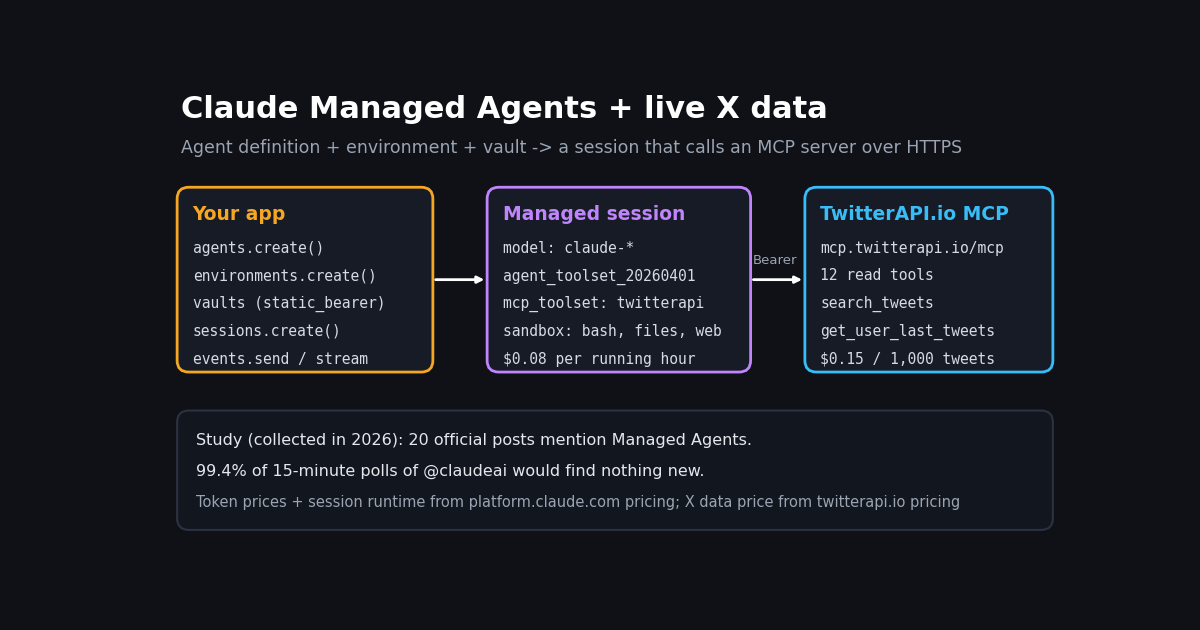
This page is about Claude Managed Agents, the hosted service where Anthropic runs the agent loop, the sandbox and the session state for you. It is not the Claude Agent SDK: the SDK is a library you run on your own machine or server, and we cover it, with a self-hosted X research agent, in our Claude Agent SDK guide. If you are choosing between the two, the comparison table below is the short answer; the rest of this page covers what Managed Agents actually bills, how the MCP connector and vaults work, and a full X (Twitter) monitoring agent that uses them.
Everything about Managed Agents here was read from Anthropic's own docs on platform.claude.com in this review, including the pricing page, the MCP connector page, the vaults page and the rate-limit reference. The product is in beta and Anthropic says behaviors may be refined between releases, so every vendor fact on this page is listed with its source at the bottom. We did not run a Managed Agents session for this article; the code is assembled from the documented calls, and the cost table is an estimate built from documented prices and tweet sizes we measured.
To ground the X side, we pulled 480 timeline posts from @AnthropicAI and @claudeai and every post from those two accounts that mentions "managed agents" (20 posts). That tells you how Anthropic has been shipping the product, and how often a monitoring agent watching those accounts would actually have something to do.
What Claude Managed Agents is, how it differs from the Agent SDK, and who can use it
Anthropic's overview puts it in one line: Managed Agents is a "pre-built, configurable agent harness that runs in managed infrastructure", best for "long-running tasks and asynchronous work". The Messages API, by contrast, is direct model access for teams that want their own agent loop and fine-grained control.
Agent. The model, system prompt, tools, MCP servers and skills. You create it once and reference it by ID (agents are versioned, so updates apply to sessions created afterward).
Environment. Where sessions run: an Anthropic-managed cloud sandbox, or a self-hosted sandbox on your own infrastructure. Networking is limited (an allowed_hosts list, plus switches for package managers and MCP servers) or unrestricted.
Session. A running agent instance inside an environment, doing one task. Sessions are stateful: they resume after pauses and keep conversation history, sandbox state and outputs server-side until you delete them.
Events. The messages between your app and the agent: user.message in, and agent.message, agent.tool_use, agent.mcp_tool_use, agent.custom_tool_use and session.status_idle out, over a streaming connection.
Inside the sandbox the agent gets built-in tools through agent_toolset_20260401: bash, file operations (read, write, edit, glob, grep), web search and fetch, plus any MCP servers you attach. The harness adds prompt caching and compaction on its own.
The practical rule: if you want to own the loop, use the Messages API; if you want the Claude Code harness inside your own process, use the Agent SDK; if you want to hand Anthropic the runtime and pay per running hour, use Managed Agents.
Availability and beta header. Managed Agents is in beta on every model listed in the docs, on three surfaces: the Claude API, Claude Platform on AWS, and Claude Models on Google Cloud (Anthropic managed). The docs list the current lineup, from claude-opus-5-5 and claude-sonnet-5-5 to claude-haiku-4-5-20251001, as supported.
To start you need a Claude API key from the Console and the managed-agents-2026-04-01 beta header on every request; access is "enabled by default for all API accounts". The Python and TypeScript SDKs set the header automatically through client.beta.agents, client.beta.environments, client.beta.sessions and client.beta.vaults. A CLI (ant) can apply agent definitions from a markdown file.
Two parts of the product sit in a narrower research preview that needs an access request: MCP tunnels (for private MCP servers) and dreaming (the agent reviews past sessions and curates memories). Memory itself was announced in public beta on @claudeai.
Data handling. Because sessions store transcripts and sandbox state server-side, Managed Agents is not eligible for Zero Data Retention or HIPAA BAA coverage, including self-hosted sandboxes. You can delete sessions and uploaded files through the API at any time.
Your organization's usage-tier rate limits and spend limits still apply on top. For a monitoring agent that creates one session per batch of new posts, 300 creates per minute is far beyond what you will touch.
Claude Managed Agents pricing: tokens plus $0.08 per session-hour
Anthropic bills Managed Agents on two dimensions. Tokens are charged at the normal model rates, with prompt-caching multipliers applied the same way as on the Messages API. Session runtime is $0.08 per session-hour, measured to the millisecond, and it accrues only while the session status is running. Time spent idle (waiting for your next message or a tool confirmation), rescheduling or terminated is not billed, and runtime replaces the container-hour billing of the code execution tool, so there is no second sandbox charge.
A few modifiers change the bill: web search inside a session costs $10 per 1,000 searches; pinning model.inference_geo to us bills tokens at 1.1x; fast mode premium pricing applies when model.speed is fast. The Batch API discount does not apply, because sessions are interactive.
Anthropic's own worked example: a one-hour Opus 5.5 session with 50,000 input and 15,000 output tokens costs $0.20 + $0.30 + $0.08 = $0.58, or $0.428 when 40,000 of the input tokens are cache reads. The pattern is worth noticing: runtime is the small line. For most agent work the token line decides the bill, which is exactly what our X agent estimate below shows too.
For the full model price list and how caching math works on the Messages API, see our Claude API pricing breakdown.
The MCP connector: declare servers on the agent, keep secrets in a vault
MCP configuration is split in two on purpose. At agent creation you list servers in mcp_servers (each needs type: "url", a unique name of 1 to 255 characters, and a url up to 2,048 characters) and add one mcp_toolset per server whose mcp_server_name matches. No tokens go here. At session creation you pass vault_ids, and the session pulls credentials from those vaults. The API rejects an agent with an unreferenced server or a dangling toolset, and an agent can declare up to 20 MCP servers.
Servers must be remote and reachable over HTTP; the docs ask for MCP's streamable HTTP transport, with an automatic fallback for servers that only speak the older SSE transport. Private servers need MCP tunnels (research preview).
Vault credentials. A vault is a set of credentials, typically one per end user. mcp_oauth handles OAuth 2.0 servers (Anthropic refreshes the access token if you give it a refresh block). static_bearer is for servers that take a fixed API key as a Bearer token. Both are keyed by mcp_server_url, injected automatically when the agent connects to that URL, and stored write-only: the API never returns the token. A third type, environment_variable, swaps a placeholder for the real secret at egress for CLIs and direct API calls from the sandbox.
Tool filtering and permissions. By default every tool the server exposes is enabled and MCP toolsets run under always_ask, which pauses the session for your approval before each call. For a trusted read-only data source you can set default_config.enabled to false, enable only the tools you want, and give them always_allow. A third policy, auto, lets the server evaluate each call.
Networking. With a limited environment, session creation fails with a 400 if an MCP server's host is not in allowed_hosts, unless you set allow_mcp_servers to true. Large results are handled for you: an MCP tool output over 100,000 characters (about 25,000 tokens) is written to a file in the sandbox and the model gets a truncated preview with the path.
If you do not want MCP at all, a custom tool with an input_schema works too: the session emits agent.custom_tool_use, your code runs the call (for example a TwitterAPI.io request) and sends back user.custom_tool_result. That keeps the API key entirely on your side.
Worked example: an X (Twitter) monitoring agent on Managed Agents
The job: watch @AnthropicAI and @claudeai, and when they post, have Claude write a short digest and check how developers replied to anything that announces a product change. The agent gets live X data from TwitterAPI.io's hosted MCP server at mcp.twitterapi.io/mcp. We called its initialize and tools/list methods in this review: it answers as twitterapi-mcp, asks for your TwitterAPI.io API key as the Bearer token, and lists 12 tools, including search_tweets, get_user_last_tweets, get_user_info, get_user_mentions, get_tweet_replies, get_tweet_quotes, get_tweet_retweeters and get_trends.
Bearer auth maps directly onto a vault static_bearer credential, so the setup is three calls: create the agent with the MCP server and a filtered toolset, create a limited environment with allow_mcp_servers on, and create a vault with the key. Reads need no X account. The toolset below enables only three tools and auto-approves them, so the session never stalls waiting for a confirmation.
The second half, in the code block at the end of this page, is the part that keeps the bill small: a cron job runs one advanced_search call every 15 minutes with since_time, and only starts a Managed Agents session when that call returns posts. It also hands the agent trimmed post JSON (id, url, author, time, text, counts), so most of the work needs no tool call at all; the agent only reaches for MCP to pull replies.
Not run here: we did not create this agent or start a session for the article, so treat the code as a documented starting point and check the event loop against your SDK version.
# One-time setup: agent + environment + vault (Python, anthropic SDK; beta header set by the SDK)
from anthropic import Anthropic

client = Anthropic()  # reads ANTHROPIC_API_KEY

agent = client.beta.agents.create(
    name="X Monitor",
    model="claude-sonnet-5-5",
    system=(
        "You watch X (Twitter) for a product team. Use the twitterapi tools to read posts, "
        "then write a short digest: what was announced, links, and which posts drew replies."
    ),
    mcp_servers=[
        {"type": "url", "name": "twitterapi", "url": "https://mcp.twitterapi.io/mcp"},
    ],
    tools=[
        {"type": "agent_toolset_20260401"},
        {
            "type": "mcp_toolset",
            "mcp_server_name": "twitterapi",
            "default_config": {"enabled": False},          # only the tools listed below
            "configs": [
                {"name": "search_tweets", "enabled": True,
                 "permission_policy": {"type": "always_allow"}},
                {"name": "get_user_last_tweets", "enabled": True,
                 "permission_policy": {"type": "always_allow"}},
                {"name": "get_tweet_replies", "enabled": True,
                 "permission_policy": {"type": "always_allow"}},
            ],
        },
    ],
)

environment = client.beta.environments.create(
    name="x-monitor-env",
    config={
        "type": "cloud",
        "networking": {"type": "limited", "allowed_hosts": [], "allow_mcp_servers": True},
    },
)

vault = client.beta.vaults.create(display_name="x-monitor")
client.beta.vaults.credentials.create(
    vault_id=vault.id,
    display_name="TwitterAPI.io key",
    auth={
        "type": "static_bearer",
        "mcp_server_url": "https://mcp.twitterapi.io/mcp",
        "token": "YOUR_TWITTERAPI_IO_KEY",   # write-only: never returned by the API
    },
)
print(agent.id, environment.id, vault.id)What one run costs: tokens, runtime and X data, line by line
We measured the tweet objects in our sample: the median tweet as returned by the REST API is 5,358 characters of JSON (p90 13,299), while the median post text is only 241 characters. With the common rule of thumb of about 4 characters per token, that is roughly 1,339 tokens per full tweet object against about 60 for the text alone. MCP tool output may be shaped differently from the REST JSON, so treat the token figures as an estimate.
Assume a run reads 40 full tweet objects (two 20-tweet pages) plus about 6,000 tokens of system prompt, tool definitions and instructions, writes 2,000 tokens, and keeps the session running for 3 minutes on Claude Sonnet 5.5:
Tokens are about 93% of the run. Session runtime ($0.0040) and X data ($0.0060) are rounding errors next to it. Two levers follow. First, trim: passing only text and counts instead of full objects cuts input tokens by more than an order of magnitude on our measurements. Second, gate: never start a session to discover that nothing happened.
Against the official X API. Pulling the same 40 posts on X's pay-per-usage rate card (docs.x.com pricing: $0.005 per post read) costs $0.20, versus $0.0060 on TwitterAPI.io at $0.15 per 1,000 tweets. Per 1,000 posts that is $5 against $0.15, about 33x. X's rate card also lists $0.010 per user read and caps pay-per-usage at 3 million post reads a month before Enterprise.
How Anthropic has shipped Managed Agents on X: 20 official posts
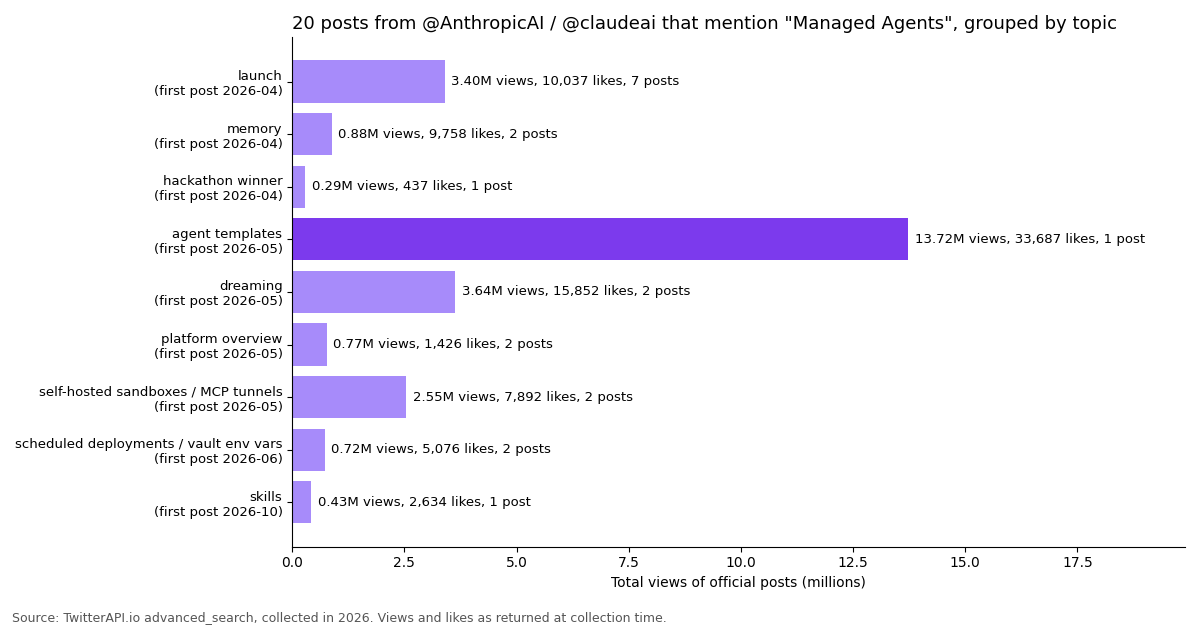
An advanced_search for "managed agents" from @AnthropicAI or @claudeai returned 20 posts, from the April 8, 2026 launch thread to an October 2026 customer story. Their median post drew 1,095 likes and 428,853 views. Grouped by what they announced:
The launch was a seven-post thread with named customers (Rakuten, Asana, Vibecode and Sentry; Anthropic's launch post adds Notion) and an Engineering Blog post from @AnthropicAI. The follow-ups map the roadmap: memory in public beta in April 2026, dreaming as a research preview and financial-services agent templates in May 2026, self-hosted sandboxes and MCP tunnels at Code with Claude London in May 2026, and scheduled deployments plus environment variables in vaults at Code with Claude Tokyo in June 2026.
The single most viewed post was the financial-services agent templates announcement, which mentions Managed Agents as the place to deploy them. In other words, the product's reach on X came less from the infrastructure story than from ready-made agents built on it, which is a useful hint if you are packaging your own agent.
What a monitoring agent would actually see: posting rhythm and empty polls
The timelines show why the pre-check matters. @AnthropicAI posted 300 times across 480.3 days in our sample and @claudeai 180 times across 325.9 days, a little over one post every two days each. The median gap between posts is about a day, and one in ten gaps is four days or longer.
Polling every 15 minutes, 99.3% and 99.4% of checks find nothing. On TwitterAPI.io an empty advanced_search costs the $0.00015 per-request minimum, so watching one of these accounts every 15 minutes costs about $0.0144 a day including the posts it does return. Starting a Managed Agents session on every tick instead would pay model tokens for the system prompt and tool definitions 96 times a day to learn, almost every time, that nothing happened.
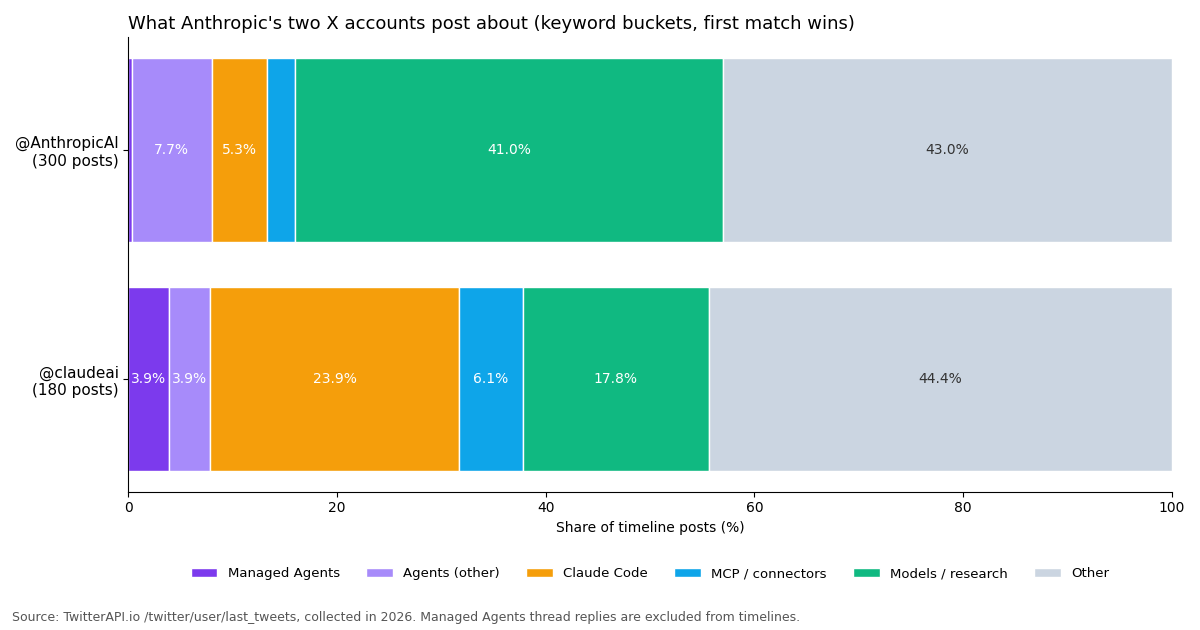
What the accounts talk about matters for the prompt. On @claudeai, Claude Code is the largest named topic (23.9% of posts), MCP and connectors 6.1%, and Managed Agents 3.9% in the timeline sample. @AnthropicAI is mostly models and research (41.0%).
Among original posts, Claude Code posts had the highest median likes (9,599), followed by Managed Agents (8,246) and MCP (6,800), all above the 3,845 of posts outside these topics. Developer-platform news travels on these accounts, so an agent that flags it within 15 minutes is worth the setup.
When to pick Managed Agents, and the setup checklist
Pick Managed Agents when tasks run for minutes or hours, when you want many sessions in parallel without running workers, when the agent needs a real sandbox (bash, files, packages), or when you want per-user credentials handled by vaults. Pick the Agent SDK or the Messages API when you need Zero Data Retention or HIPAA coverage, when your tasks are short request/response calls, or when you want the agent loop in your own process.
Gate sessions. Use a cheap trigger (a 15-minute advanced_search, or a filter rule that pushes matches to your webhook) and start a session only on new data.
Trim inputs. Pass text and counts, not whole tweet objects, and let the agent fetch replies or quotes through MCP only when it needs them.
Filter MCP tools. Disable everything by default and enable the two or three tools the job needs; keep always_ask for anything you would not want to run unattended.
Scope the network. Use limited networking with allow_mcp_servers rather than unrestricted, and keep the API key in a vault, not in the system prompt.
Clean up. Sessions persist until deleted; delete the ones you no longer need, especially if posts or replies you pass in contain personal data.
On the X data side: TwitterAPI.io reads cost $0.15 per 1,000 tweets and $0.18 per 1,000 profiles, you pay only for the data returned, and new accounts that pass the automatic bot check get up to $1 of free credits (at most 100,000 credits, no card, one per person or network, expiring after 31 days). The rate limit is 0.2 requests per second before the first payment and 20 once paid. Create a key in the dashboard, and the full endpoint reference is at docs.twitterapi.io.
How we collected this
Question. How does Anthropic post about Managed Agents and agents in general on X, how does that content perform, and how often would an agent watching the two accounts find something new?
Accounts and query. Timelines of @AnthropicAI and @claudeai via /twitter/user/last_tweets (replies excluded, up to 15 pages each), plus /twitter/tweet/advanced_search for "managed agents" (from:AnthropicAI OR from:claudeai), Latest. Both are organization accounts.
Window and size. The most recent posts at collection time, collected in 2026: 300 posts covering 480.3 days for @AnthropicAI, 180 covering 325.9 days for @claudeai, and 20 search results. 27 API requests returned 500 tweets, which cost $0.075 at $0.15 per 1,000.
Method. Topic buckets come from case-insensitive keyword rules on post text, first match wins, in this order: managed agents, Claude Code, MCP or connector, other agent terms, models and research. Engagement medians use original posts and quotes, not reposts. Empty-poll shares split each account's covered span into 15-minute windows. Token figures divide JSON characters by four, a rule of thumb, not a tokenizer count.
What the sample cannot show. Timelines exclude replies, so thread continuations about Managed Agents appear in the search results but not in the timeline buckets; the @claudeai timeline endpoint returned 180 posts, so its window is shorter. Likes and views are as returned at collection time and keep growing. Keyword buckets miss posts that describe a feature without naming it. The run-cost table is an estimate, not a measured bill: we did not run a Managed Agents session.
Privacy. Aggregates only, from two organization accounts; reposted and quoted authors were not analyzed. The study files are in data/studies/claude-managed-agents/.
Ready to wire live X data into your own agent? Grab an API key from the TwitterAPI.io dashboard and point the MCP connector at mcp.twitterapi.io/mcp.
"""x_monitor_managed_agent.py - wake a Claude Managed Agents session only when
@AnthropicAI or @claudeai posted something new on X (Twitter).

    pip install requests anthropic
    export TWITTERAPI_IO_API_KEY=...   # twitterapi.io dashboard (reads need no X account)
    export ANTHROPIC_API_KEY=...       # Claude Console
    export AGENT_ID=... ENVIRONMENT_ID=... VAULT_ID=...   # from the one-time setup
    python x_monitor_managed_agent.py  # run from cron every 15 minutes

Cost model: the pre-check is one advanced_search call. When it finds nothing it
costs the $0.00015 minimum and no Claude session starts, so no tokens and no
session runtime are billed. When it finds posts you pay $0.15 per 1,000 tweets
returned, plus tokens and $0.08 per running session-hour on the Claude side.
"""
import json
import os
import sys
import time

import requests
from anthropic import Anthropic

BASE = "https://api.twitterapi.io"
HEADERS = {"X-API-Key": os.environ["TWITTERAPI_IO_API_KEY"]}
STATE = "x_monitor_state.json"
QUERY = "from:AnthropicAI OR from:claudeai"


def load_since():
    try:
        return json.load(open(STATE))["since"]
    except (FileNotFoundError, KeyError, ValueError):
        return int(time.time()) - 900          # first run: last 15 minutes


def new_posts(since):
    """Cheap pre-check with TwitterAPI.io advanced_search, newest first."""
    posts, cursor = [], ""
    while True:
        params = {"query": f"{QUERY} since_time:{since}", "queryType": "Latest"}
        if cursor:
            params["cursor"] = cursor
        r = requests.get(f"{BASE}/twitter/tweet/advanced_search",
                         headers=HEADERS, params=params, timeout=30)
        r.raise_for_status()
        body = r.json()
        for t in body.get("tweets", []):
            posts.append({
                "id": t["id"],
                "url": t["url"],
                "author": t["author"]["userName"],
                "createdAt": t["createdAt"],
                "text": t["text"],
                "likeCount": t.get("likeCount", 0),
                "replyCount": t.get("replyCount", 0),
            })
        if not body.get("has_next_page") or len(posts) >= 100:
            break
        cursor = body.get("next_cursor", "")
    return posts


def run_agent(posts):
    client = Anthropic()
    session = client.beta.sessions.create(
        agent=os.environ["AGENT_ID"],
        environment_id=os.environ["ENVIRONMENT_ID"],
        vault_ids=[os.environ["VAULT_ID"]],
        title=f"X digest: {len(posts)} new posts",
    )
    prompt = (
        "New posts from @AnthropicAI / @claudeai (trimmed JSON below). "
        "Summarize them in at most 8 lines. If a post announces a product change, "
        "call get_tweet_replies on it and add one line on how developers reacted.\n\n"
        + json.dumps(posts, ensure_ascii=False)
    )
    with client.beta.sessions.events.stream(session.id) as stream:
        client.beta.sessions.events.send(
            session.id,
            events=[{"type": "user.message",
                     "content": [{"type": "text", "text": prompt}]}],
        )
        for event in stream:
            if event.type == "agent.message":
                for block in event.content:
                    if block.type == "text":
                        print(block.text, end="")
            elif event.type == "agent.mcp_tool_use":
                print(f"\n[MCP tool: {getattr(event, 'name', '?')}]", file=sys.stderr)
            elif event.type == "session.status_idle":
                break
    return session.id


if __name__ == "__main__":
    since = load_since()
    now = int(time.time())
    posts = new_posts(since)
    if posts:
        print(f"{len(posts)} new posts; starting a Managed Agents session")
        print("session:", run_agent(posts))
    else:
        print("nothing new; no session started")
json.dump({"since": now}, open(STATE, "w"))Questions readers ask
What is Claude Managed Agents?
A hosted agent harness from Anthropic. You define an agent (model, system prompt, tools, MCP servers, skills) and an environment, then start sessions that run in Anthropic's infrastructure, with a sandbox where Claude can run bash, edit files, search and fetch the web and call MCP tools. Your app talks to a session through events over a stream.
How much does Claude Managed Agents cost?
Standard token rates for the model you choose (for example $2 input and $10 output per million tokens on Claude Sonnet 5.5) plus $0.08 per session-hour. Runtime is metered to the millisecond and only while the session is running; idle time waiting for your next message or a tool confirmation is not billed. Web search inside a session costs $10 per 1,000 searches, and the Batch discount does not apply.
Is Claude Managed Agents generally available?
No, it is in beta on the Claude API, Claude Platform on AWS and Claude Models on Google Cloud (Anthropic managed). Every request needs the managed-agents-2026-04-01 beta header, which the SDKs add for you, and access is enabled by default for API accounts. MCP tunnels and dreaming are in a narrower research preview that needs an access request.
What is the difference between Claude Managed Agents and the Claude Agent SDK?
The Agent SDK is a library: the Claude Code harness running inside your own process, on your hardware, billed only for tokens. Managed Agents runs the harness, sandbox and session state for you, billed for tokens plus session runtime. Pick the SDK when you need control or Zero Data Retention; pick Managed Agents for long-running, parallel or asynchronous work you do not want to host.
How do I connect an MCP server to a managed agent?
Declare it in the agent's mcp_servers array (type url, a unique name, the server URL) and add an mcp_toolset entry whose mcp_server_name matches. Put the credential in a vault as mcp_oauth or static_bearer, keyed by the server URL, and pass vault_ids when you create the session. MCP tools default to always_ask, so set always_allow on tools you trust to run unattended.
Can a Claude managed agent read live tweets?
Yes, through an MCP server or a custom tool. TwitterAPI.io's MCP server at mcp.twitterapi.io/mcp takes your API key as a Bearer token, which fits a static_bearer vault credential, and exposes 12 tools such as search_tweets and get_user_last_tweets. Reads cost $0.15 per 1,000 tweets and need no X account.
Is Claude Managed Agents eligible for Zero Data Retention or HIPAA?
No. Sessions are stateful and store transcripts, sandbox state and outputs until you delete them, so the docs list Managed Agents, including self-hosted sandboxes, as not eligible for Zero Data Retention or HIPAA BAA coverage. You can delete sessions and uploaded files through the API.
What are the Managed Agents rate limits?
Per organization, 300 requests per minute for create endpoints (agents, sessions, environments) and 1,200 per minute for read endpoints (retrieve, list, stream), on top of your usage-tier rate limits and spend limits.
Continue
- Anthropic docs: Claude Managed Agents overview (concepts, beta header, availability, data handling)
- Anthropic docs: Managed Agents MCP connector (mcp_servers, mcp_toolset, vault_ids, limits)
- Anthropic docs: Authenticate with vaults (mcp_oauth, static_bearer, environment_variable)
- Anthropic docs: Pricing (model rates, Managed Agents session runtime $0.08 per session-hour)
- X developer docs: pay-per-usage pricing ($0.005 per post read)
- TwitterAPI.io API reference (advanced_search, user timelines, MCP)
- X (Twitter) API overview: endpoints, pricing and limits
- Claude Agent SDK: build a self-hosted X research agent in Python
- How to use Claude with the Twitter (X) API
- TwitterAPI.io MCP server: tools and setup
- Claude API pricing per model, with caching math
- Claude routines for scheduled X monitoring
- Get a TwitterAPI.io API key in the dashboard
- TwitterAPI.io API reference
- 01Twitter (X) API License: The Developer Agreement in Plain English
- 02n8n Pricing in 2026: Plans, Executions and the Twitter (X) Data Cost
- 03Cursor vs Claude Code: Plans, MCP Setup and Headless Runs Compared for Twitter (X) Data Work
- 04Codex Pricing in 2026: ChatGPT Plans, Usage Limits, Credits and API-Key Costs
- 05Claude Code --dangerously-skip-permissions: what it skips, what it still blocks, and a safer unattended setup
- 06How to Use Claude with the Twitter (X) API
- 07OpenClaw vs Claude Code: which agent should run your Twitter (X) jobs?
- 08Claude Code Channels: Telegram, Discord and Twitter (X) Alerts in Your Session
Stop reading. Start building.
Starter credits cover real testing on real data. Google sign-in, no card, no application queue.
Get an API keyAlready building with TwitterAPI.io? Publish an honest tutorial or build log about it and earn up to $200 a month in API credits.