Cursor vs Claude Code: Plans, MCP Setup and Headless Runs Compared for Twitter (X) Data Work
This page compares Cursor and Claude Code head to head. If you are choosing between OpenAI's Codex and Claude Code (two terminal agents), our Codex vs Claude Code comparison covers that pair in depth; here Codex appears only as a third row in the tables. And if you already chose Cursor and just need the X data wiring, the Cursor Twitter API setup guide is the shorter read.
Every plan, price and config key below was read from the vendors' own pages (cursor.com/pricing, cursor.com/docs, claude.com/pricing, code.claude.com/docs, learn.chatgpt.com/docs/pricing) while writing this page, and the prices are listed in the sources and volatile facts so they can be rechecked. We did not run either agent for this comparison; the config snippets follow the documented formats, and the one thing we did test live is the shared MCP server both of them would connect to.
To keep the comparison concrete, we use one task throughout: give the agent access to X (Twitter) data, have it search recent posts about a topic, and rank them by engagement. That task touches everything that actually differs between the two tools: how MCP servers are configured, where project rules live, how a run is scripted, and who pays for what.
Cursor vs Claude Code at a glance
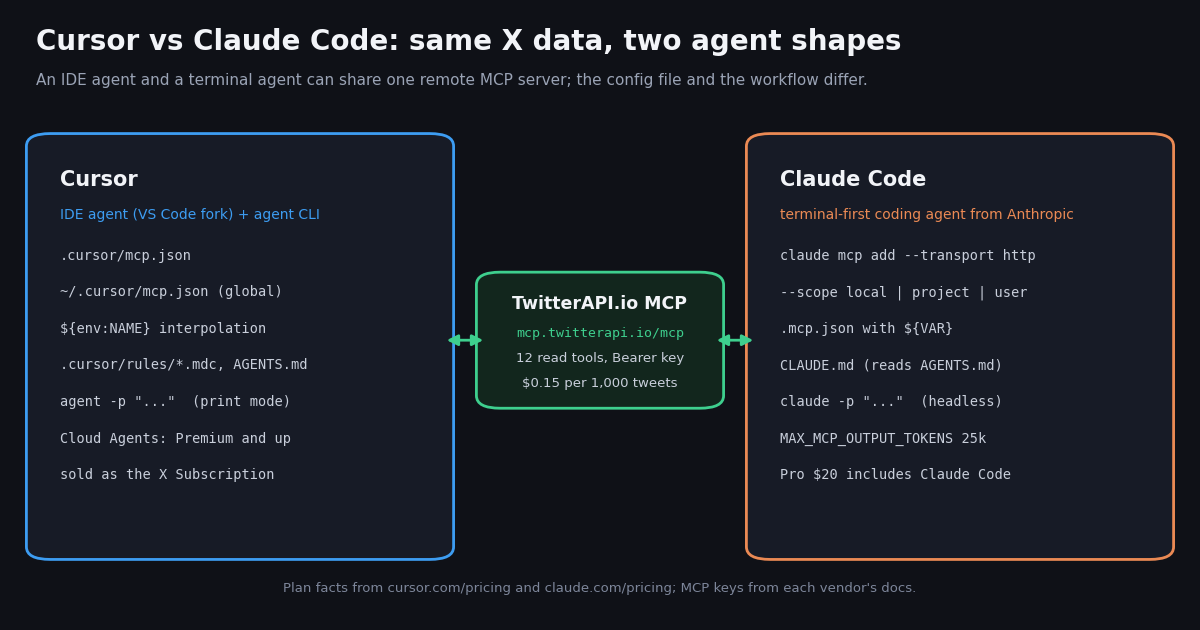
The short version: Cursor puts the agent inside an editor, Claude Code puts it in your terminal. Both now reach beyond their home surface (Cursor has a CLI and Cloud Agents; Claude Code has headless mode and IDE integrations), but the default workflow still follows that split.
How to read the Codex column. The Codex prices come from learn.chatgpt.com/docs/pricing (Free $0, Go $8, Plus $20, Pro from $100 with tiers at $100, $200 and $500, Business $20 per user a month billed annually or $25 monthly). The Codex config and headless details are covered in full in our Codex vs Claude Code page.
The biggest change in this comparison is commercial, not technical. Cursor's pricing page now lists Cursor inside the X Subscription, sold through X Subscription Corp, with Grok chat, Grok API access and X Premium features in the same tiers. That changes what the monthly fee buys if your main model is Claude: Cursor's FAQ says Premium and above include generous Grok usage but no allowance for third-party models, which stay available at API list price.
Pricing in 2026: what each plan actually buys
Cursor's plan table (from cursor.com/pricing) reads as follows. Prices exclude taxes.
Teams starts at $30 per user a month and Enterprise is custom. Cursor's FAQ says every tier includes a pool of AI usage shared across Cursor and Grok, the allowance refreshes weekly, and you can keep going with top-offs when you reach it. Paid plans include Grok API access, billed separately at standard model rates.
Claude's plan table (from claude.com/pricing) is simpler for a Claude Code buyer, because Claude Code is included in every paid plan and draws from the same usage limits as your chats.
Team seats are $20 a seat a month billed annually ($25 monthly) for standard seats and $100 ($125 monthly) for premium seats with 5x usage; Enterprise is $20 a seat a month billed annually with a 20-seat minimum, plus usage. The pricing page also notes you can switch heavy Claude Code sessions to pay-as-you-go API credits through a Console account.
What this means for a Claude-first developer. If the model you want is Claude, Claude Pro at $20 includes it directly. In Cursor, Plus is Grok-only, and on Premium and above Claude runs at API list price on top of the subscription. If you want Grok plus an editor, Cursor Premium bundles both. Neither page publishes a dollar value for its usage multipliers, so compare plans by the models you will actually use, not by the headline price. Our Claude Code pricing guide breaks down the Claude limits in more detail.
MCP: connecting the same X data server in Cursor and in Claude Code
Both tools are MCP clients, so a single remote MCP server can serve both. We used the TwitterAPI.io server at mcp.twitterapi.io/mcp: we sent it an MCP initialize request while writing this page and it answered as twitterapi-mcp version 0.1.0, describing 12 tools (tweet search, user lookup, followers, replies, trends and more) and asking for your API key as the Bearer token.
Cursor. Put a project config in .cursor/mcp.json or a global one in ~/.cursor/mcp.json. Cursor supports stdio, SSE and Streamable HTTP transports, and resolves ${env:NAME}, ${userHome} and ${workspaceFolder} inside command, args, env, url and headers. By default it asks for approval before using an MCP tool; MCP follows the same Run Modes as terminal commands. Enterprise admins get an MCP allowlist by command or URL pattern, and Team MCP servers configured in the dashboard are available to Cloud Agents, which keep their own MCP sign-ins on Cursor's servers.
Claude Code. One command adds a remote server: claude mcp add --transport http <name> <url> with --header for the key. The --scope flag decides where it lives: local (the default, only you in this project), project (shared with everyone through a .mcp.json file in the repo) or user (you, across all projects). In .mcp.json, ${VAR} and ${VAR:-default} expand from the environment, and a project server shows as pending approval until you approve it in an interactive session. Claude Code warns when an MCP tool returns more than 10,000 tokens and caps output at 25,000 tokens by default (MAX_MCP_OUTPUT_TOKENS raises it); MCP_TIMEOUT sets the startup timeout.
Practical difference. Cursor's config is a file you edit or a marketplace click; Claude Code's is a command that writes the file for you, with an explicit scope. Both keep the secret out of the committed file by interpolating an environment variable, but note the different syntax: ${env:NAME} in Cursor, ${NAME} in Claude Code.
// ---------- Cursor: .cursor/mcp.json (project) or ~/.cursor/mcp.json (global) ----------
{
  "mcpServers": {
    "twitterapi": {
      "url": "https://mcp.twitterapi.io/mcp",
      "headers": { "Authorization": "Bearer ${env:TWITTERAPI_IO_API_KEY}" }
    }
  }
}

// ---------- Claude Code: one command (local scope by default) ----------
// claude mcp add --transport http twitterapi https://mcp.twitterapi.io/mcp \
//   --header "Authorization: Bearer $TWITTERAPI_IO_API_KEY"
//
// or commit .mcp.json at the repo root (shared, project scope); ${VAR} expands from the environment
{
  "mcpServers": {
    "twitterapi": {
      "type": "http",
      "url": "https://mcp.twitterapi.io/mcp",
      "headers": { "Authorization": "Bearer ${TWITTERAPI_IO_API_KEY}" }
    }
  }
}Rules files: .cursor/rules and AGENTS.md vs CLAUDE.md
Both agents read standing instructions from the repo, which is where you tell them how to call an API correctly instead of letting them guess field names.
Cursor keeps project rules in .cursor/rules as .mdc files with frontmatter (description, globs, alwaysApply). A rule with alwaysApply: true is applied to every chat; otherwise the description is shown to the agent so it can decide. A plain .md file in that folder is ignored. Cursor also supports AGENTS.md in the project root and subdirectories as a simpler, metadata-free alternative.
Claude Code reads CLAUDE.md. Per its memory docs, it reads AGENTS.md only when there is no CLAUDE.md, .claude/CLAUDE.md or CLAUDE.local.md in the working directory or above it; your user-level ~/.claude/CLAUDE.md and .claude/rules/ files keep loading alongside it.
The portable setup. Write one AGENTS.md that both tools read, and add Cursor-specific glob-scoped rules only where you need them. The example below pins the exact response shape for X searches, which prevents a common generated-code bug in X integrations: reading a public_metrics object that this API does not return.
# AGENTS.md  (Cursor reads it in the root and subdirectories;
#             Claude Code reads it when the repo has no CLAUDE.md)

## X (Twitter) data
- For one-off lookups, use the twitterapi MCP server tools.
- For code, call https://api.twitterapi.io with the X-API-Key header,
  key from the TWITTERAPI_IO_API_KEY environment variable. Never print it.
- Search: GET /twitter/tweet/advanced_search?query=...&queryType=Latest
  -> top-level tweets[], has_next_page, next_cursor (follow the cursor).
- Tweet fields: id, url, text, createdAt, likeCount, retweetCount,
  viewCount, author.userName. There is no public_metrics object.
- Budget: 15 credits per tweet returned; stop after 5 pages unless asked.

# .cursor/rules/x-data.mdc  (optional Cursor-only rule, scoped by globs)
---
description: Rules for code that reads X (Twitter) data
globs: ["scripts/x/**/*.py"]
alwaysApply: false
---
Follow AGENTS.md "X (Twitter) data". Use requests, timeout=30, and
stop paginating when has_next_page is false.Headless and background runs: agent -p vs claude -p
Monitoring X is a recurring job, so it matters how each tool runs without you watching.
Cursor ships a CLI installed with curl https://cursor.com/install -fsS | bash. Its print mode, agent -p "...", runs non-interactively for scripts and CI, with --model and --output-format text; it also has Plan and Ask (read-only) modes. Beyond the CLI, Cloud Agents and automations run on Cursor's infrastructure and are included from the Premium plan up.
Claude Code runs headless with claude -p "...". Pre-approve only the tools a job needs with --allowedTools (for example mcp__twitterapi__* for the X server), and use --output-format json when another program reads the result.
Which suits a scheduled X job? For a cron on your own machine or CI runner, both CLIs work the same way: one prompt in, text or JSON out. If you would rather not host the runner, Cursor's Cloud Agents (Premium and up) are the built-in option on that side. For anything that runs every few minutes, the cheaper design is usually a plain script (see the code below) that the agent wrote once, with the agent invoked only to summarize, because a polling script costs data credits but no model tokens.
# Cursor CLI (install: curl https://cursor.com/install -fsS | bash)
agent -p "Run scripts/x/search.py for 'cursor vs claude code' and summarize the 5 most-liked posts" \
  --output-format text > cursor-run.txt

# Claude Code headless: -p prints the result and exits; pre-approve only the X tools
claude -p "Use the twitterapi MCP server to find posts about 'claude code' from the last hour and list the 5 most-liked" \
  --allowedTools "mcp__twitterapi__*" \
--output-format json > claude-run.jsonReal data: what the Cursor and Claude teams post about on X
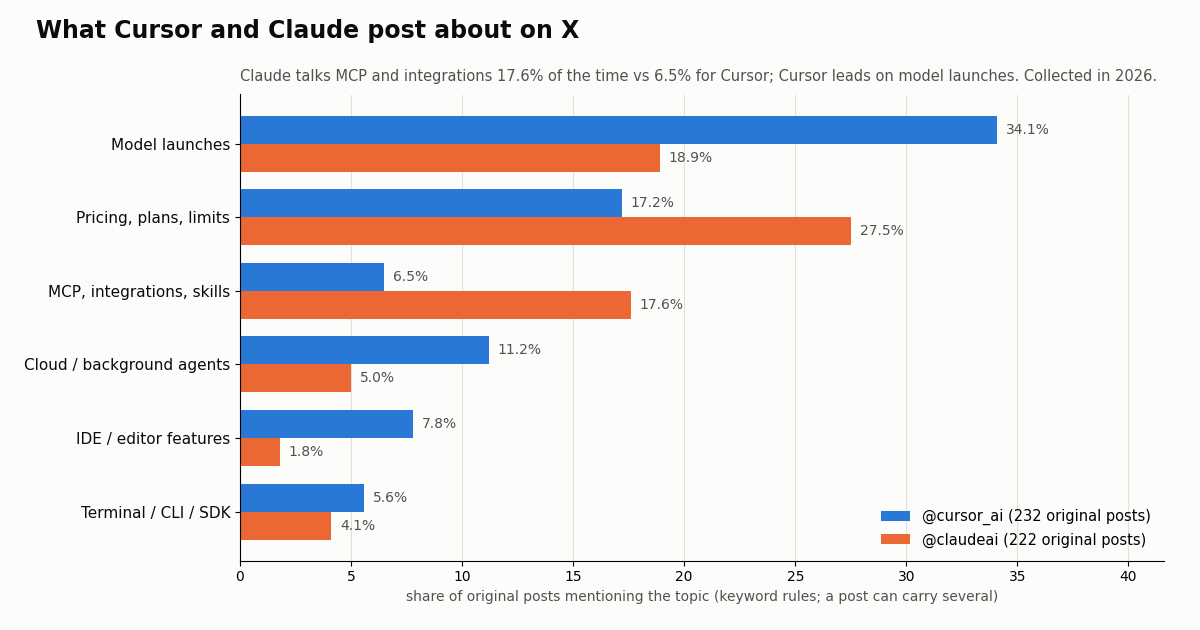
To see how each team positions its product, we pulled the recent timelines of @cursor_ai and @claudeai (and, for the Codex row, @OpenAIDevs) through /twitter/user/last_tweets and tagged each original post by topic with keyword rules. The sample is 547 posts in total, collected in 2026.
Claude talks integrations; Cursor talks models. 17.6% of @claudeai's original posts mention MCP, integrations, connectors, plugins or skills, against 6.5% for @cursor_ai. Cursor's largest topic is model launches at 34.1% (versus 18.9% for Claude), and it mentions cloud or background agents more often (11.2% vs 5.0%) and IDE features more often (7.8% vs 1.8%). That matches the product split: an editor that routes between model vendors, and an agent built around one vendor's models plus tool connections.
Pricing posts get attention on both accounts. Posts mentioning plans, prices or usage limits had a median of 4,322 likes on @cursor_ai versus 2,331 for its other posts, and 11,340 versus 9,178 on @claudeai. Integration posts, by contrast, earned slightly less than the account median on both (2,115 and 8,449 median likes). Audiences react most to what things cost and which model is new.
The Codex account looks different. @OpenAIDevs returned only 40 posts covering about 10 days, and 80% of them were reposts, so its 8 original posts are too few to compare by topic. We report it only so the third option is not silently missing.
The X data workflow and what it costs in either tool
Whichever agent you choose, the X data part of the job is the same HTTP API. The model tokens come out of your Cursor or Claude plan; the data comes out of your data API account. That split is worth keeping in mind, because it means the data cost does not change when you switch editors.
TwitterAPI.io. Tweet endpoints such as /twitter/tweet/advanced_search cost 15 credits per tweet returned, which is $0.15 per 1,000 tweets; a full 20-tweet page costs $0.003, and a search that finds nothing is billed the 15-credit minimum ($0.00015). Reads need no X account. New accounts that pass the automatic bot check get up to $1 of free credits (at most 100,000 credits, no card, one per person or network, expiring after 31 days); purchased credits never expire.
Official X API. The pay-per-usage rate card at docs.x.com/x-api/getting-started/pricing lists $0.005 per post read and $0.010 per user read, with pay-per-usage capped at 3 million post reads a month (Enterprise above that). That is $5 per 1,000 posts versus $0.15 on TwitterAPI.io, roughly 33x.
Polling floor. A job that checks every 60 seconds and finds nothing costs $0.00015 per check: 43,200 checks a month is $6.48, or $1.30 at every 5 minutes. Rate limits are 0.2 requests per second before the first payment and 20 once paid. Full numbers are on the pricing page.
# What the X data in a run costs (same for Cursor and Claude Code)
# TwitterAPI.io: 15 credits per tweet returned = $0.15 per 1,000 tweets
#   one search page (20 tweets)        = $0.003
#   5 pages (100 tweets) per agent run = $0.015
# Official X API pay-per-usage (docs.x.com rate card): $0.005 per post read
#   100 posts                          = $0.50
# The model tokens are billed by your Cursor or Claude plan, not by the data API.How we collected this
Question. What do the official Cursor, Claude and OpenAI Developers accounts post about on X, and which topics earn engagement?
Accounts and method. @cursor_ai, @claudeai and @OpenAIDevs, read with /twitter/user/last_tweets (newest first, replies excluded) through a rate-limited client, up to 15 pages per account. 32 requests returned 547 posts, about $0.08 of data at 15 credits per tweet. Collected in 2026.
Window. The most recent posts available per account at collection time; the @cursor_ai sample spans about 1012 days and the @claudeai sample about 457 days, so per-week rates use only the last 180 days of each.
Topic tags. Case-insensitive keyword rules over post text (published in the study's analyze.py); a post can carry several tags, and broad words such as plan names (Pro, Max) count toward pricing. Reposts are excluded from engagement statistics.
What it cannot show. Which tool is better, how many people use either, or developer sentiment. Engagement depends on follower count and on what each team chose to post, so compare topic mix within an account rather than raw likes across accounts. The @OpenAIDevs sample is too small for topic comparison.
Privacy. Organization accounts only, aggregates only; no reposted or quoted authors were analyzed, and raw pages were not published.
Which should you pick, and how to start with X data
Pick Cursor if you live in an editor, want to see each change as a diff before it lands, switch models from several vendors, or want Grok and X Premium in the same subscription. Cloud Agents (Premium and up) are useful if you do not want to host a runner.
Pick Claude Code if Claude is your main model (Pro at $20 includes it with no per-token surcharge), you prefer delegating whole tasks from the terminal, or you want scripted runs with explicit tool allowlists and project-scoped MCP config checked into the repo.
Pick Codex if you are on a ChatGPT plan already and want a terminal agent on OpenAI models; the Codex vs Claude Code page covers that decision.
Use both if your team is split. Nothing in the X data setup is tool-specific: one AGENTS.md, one MCP server and one API key work in Cursor, Claude Code and Codex. Many teams run Cursor for interactive editing and a terminal agent for long or scheduled jobs.
Create a key in the dashboard, export it as TWITTERAPI_IO_API_KEY, then either add the MCP server with the snippet above or let your agent write a small script like the one below against the documented endpoints. The full endpoint reference (search operators, user lookup, followers, replies, webhooks) is at docs.twitterapi.io.
Writes, if you need them. Posting, liking or following runs through an authenticated session: one /twitter/user_login_v2 login ($0.10, with a proxy you supply) returns login_cookies, then each action such as /twitter/create_tweet_v2 or /twitter/follow_user_v2 is 60 credits ($0.0006), billed per HTTP 200 call. The call acts as that account, so X can rate-limit, lock or suspend it; keep a human pace, and expect the session to need a re-login now and then.
Next step. Open the dashboard to get a key, or read the docs to see every endpoint the agent can call.
import os
import time
import requests

BASE = "https://api.twitterapi.io"
HEADERS = {"X-API-Key": os.environ["TWITTERAPI_IO_API_KEY"]}


def search_posts(query, max_pages=5):
    """Latest posts for a query. 15 credits per tweet returned (about $0.003 per full 20-tweet page)."""
    posts, cursor = [], ""
    for _ in range(max_pages):
        params = {"query": query, "queryType": "Latest"}
        if cursor:
            params["cursor"] = cursor
        r = requests.get(f"{BASE}/twitter/tweet/advanced_search", headers=HEADERS, params=params, timeout=30)
        r.raise_for_status()
        body = r.json()
        posts.extend(body.get("tweets", []))
        if not body.get("has_next_page"):
            break
        cursor = body.get("next_cursor", "")
        time.sleep(0.2)
    return posts


def summarize(posts, top=5):
    ranked = sorted(posts, key=lambda t: t.get("likeCount") or 0, reverse=True)
    for t in ranked[:top]:
        author = (t.get("author") or {}).get("userName", "?")
        print(f"{t.get('likeCount', 0):>6} likes  {t.get('viewCount', 0):>8} views  @{author}: {t['text'][:90]!r}")
        print(f"        {t['url']}")


if __name__ == "__main__":
    q = '"claude code" cursor -is:retweet lang:en'
    posts = search_posts(q)
    print(f"{len(posts)} posts returned, data cost about ${len(posts) * 0.00015:.4f}")
    summarize(posts)
Questions readers ask
Is Cursor or Claude Code better?
Neither is better across the board. Cursor is an editor with an inline agent and several model vendors; Claude Code is a terminal-first agent on Anthropic models. Choose Cursor for hands-on, diff-by-diff editing and Claude Code for delegating multi-step tasks or scripted runs.
How much does Cursor cost compared with Claude Code?
Cursor's pricing page lists Free $0, Plus $8 (Grok models only), Premium $30, Super $100 and Ultra $200 (monthly prices), sold as the X Subscription, with third-party models billed at API list price. Claude Code is included in Claude Pro ($20 a month, or $17 billed annually), Max ($100) and Ultra ($200); the Free plan does not include it.
Can I use Claude models inside Cursor?
Yes, but per Cursor's FAQ, Plus includes Grok models only, and Premium and above include Grok usage but no allowance for third-party models. Claude and other third-party models remain available in Cursor at API list price, billed by usage.
Do Cursor and Claude Code both support MCP?
Yes. Cursor reads .cursor/mcp.json (project) or ~/.cursor/mcp.json (global) and supports stdio, SSE and Streamable HTTP. Claude Code adds servers with claude mcp add in local, project or user scope, with project servers stored in .mcp.json. One remote MCP server can serve both.
Do both tools read AGENTS.md?
Yes. Cursor supports AGENTS.md in the project root and subdirectories alongside .cursor/rules. Claude Code reads AGENTS.md only when no CLAUDE.md, .claude/CLAUDE.md or CLAUDE.local.md exists in the working directory or above it.
What about Cursor vs Claude Code vs Codex?
Codex is OpenAI's agent (terminal, IDE and desktop app), priced through ChatGPT plans: Free $0, Go $8, Plus $20, Pro from $100, or API-key billing. It reads AGENTS.md, configures MCP in config.toml and runs headless with codex exec. Our Codex vs Claude Code page compares it in detail.
Can Cursor or Claude Code read Twitter (X) data?
Not on their own. Connect a data source: an MCP server such as TwitterAPI.io's at mcp.twitterapi.io/mcp, or have the agent write a script against the REST API. Through TwitterAPI.io, tweets cost $0.15 per 1,000 returned and need no X account; the official X API lists $0.005 per post read.
Which is better for a scheduled X monitoring job?
Both CLIs can run a prompt from cron (agent -p and claude -p), and Cursor also offers Cloud Agents from Premium up. For checks every few minutes, a plain script is cheaper than invoking an agent each time: an empty check costs $0.00015 in data and no model tokens, so the agent only needs to run when there is something to summarize.
Continue
- Cursor pricing (Free, Plus, Premium, Super, Ultra, Teams, Enterprise; X Subscription)
- Cursor docs: Model Context Protocol (mcp.json locations, transports, interpolation)
- Claude plans and pricing (Free, Pro, Max, Ultra, Team, Enterprise)
- Claude Code docs: connect to tools via MCP (claude mcp add, scopes, .mcp.json)
- OpenAI Codex docs: pricing (Free, Go, Plus, Pro, Business, API key)
- X API pricing: pay-per-usage rate card
- X (Twitter) API guide: endpoints, pricing and access options
- Codex vs Claude Code: setup, MCP and headless runs compared
- Cursor Twitter (X) API MCP setup guide
- Claude Code pricing and usage limits explained
- How to use Claude with the Twitter (X) API
- Build your own MCP server for X data
- Get a TwitterAPI.io API key in the dashboard
- TwitterAPI.io API reference docs
- 01Twitter (X) API License: The Developer Agreement in Plain English
- 02n8n Pricing in 2026: Plans, Executions and the Twitter (X) Data Cost
- 03Claude Managed Agents: What It Is, What It Costs, and a Twitter (X) Monitoring Agent Built on It
- 04Codex Pricing in 2026: ChatGPT Plans, Usage Limits, Credits and API-Key Costs
- 05Claude Code --dangerously-skip-permissions: what it skips, what it still blocks, and a safer unattended setup
- 06Codex vs Claude Code: Setup, MCP, Headless Runs and Pricing Compared for Twitter (X) Data Agents
- 07Claude Code Channels: Telegram, Discord and Twitter (X) Alerts in Your Session
- 08OpenClaw vs Claude Code: which agent should run your Twitter (X) jobs?
Stop reading. Start building.
Starter credits cover real testing on real data. Google sign-in, no card, no application queue.
Get an API keyAlready building with TwitterAPI.io? Publish an honest tutorial or build log about it and earn up to $200 a month in API credits.